


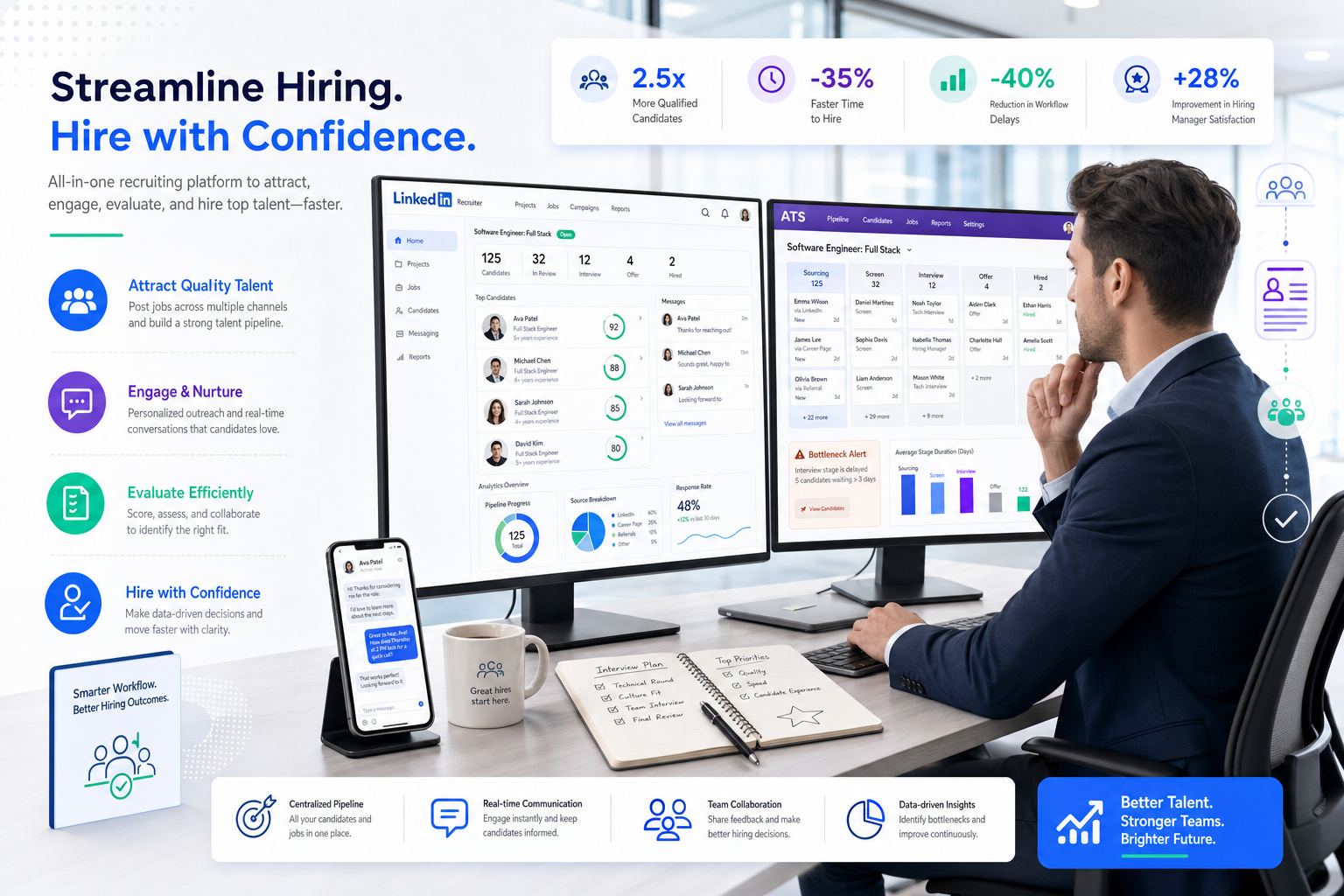
This article shows headhunters how to judge an ats recruitment tool by workflow fit, avoid admin drag, and fix hidden hiring delays.
That matters because most recruiting software disappoints for predictable reasons: candidate records live in one place, manager feedback lives somewhere else, outreach happens in inboxes or LinkedIn threads, and nobody is fully sure which delay is slowing the search. For a solo recruiter, that means evenings spent chasing updates and rebuilding context. For a small agency owner, it means slower submittals, weaker candidate experience, and more revenue tied up in avoidable admin. For an in-house hiring lead, it means lost credibility when the process feels slow, fragmented, or bureaucratic.
In my own workflow, I have found that StrategyBrain AI Recruiter helps most when the real problem is not final selection but repetitive front-end communication. Its LinkedIn outreach automation, after-hours candidate replies, and multilingual follow-up can keep conversations moving while the recruiter still owns résumé review, qualification, and the decision to advance or decline. Used that way, AI Recruiter is not a replacement for recruiter judgment; it is a way to stop admin drag from distorting the pipeline.
A useful way to frame the software question comes from a very different talent market: life sciences teams weighing moves into larger pharmaceutical employers as new clinical systems and methods changed the shape of the work. The attraction was not just brand prestige or budget. Candidates were looking at where they could gain earlier exposure to evolving processes, better tools, and more modern operating methods. At the same time, they worried about becoming a small cog in a large machine, where ideas could be slowed by formal process and buried under bureaucracy.
That tension maps closely to recruiting software selection. Teams do not buy the best recruiting software just to add process; they buy it to preserve speed, visibility, and good judgment as the organization grows. The best applicant tracking setup is the one that balances resources, processes, and values: enough structure to scale, enough flexibility to keep recruiters and hiring managers engaged, and enough clarity to prevent good candidates from being trapped in workflow friction. That is also where recruitment ats systems need to be judged more seriously than a simple feature checklist.
Table of Contents
- Why ATS Fit Matters More Than Feature Volume
- What an ATS Recruitment Tool Actually Does
- Use Resources, Processes, and Values to Evaluate Software
- How to Evaluate the Best Recruiting Software
- Best Recruiting Software by Hiring Use Case
- Quick Comparison Table
- How Recruiters Should Shortlist and Implement
- Common Buying Mistakes
- FAQ
Why ATS Fit Matters More Than Feature Volume
When recruiters search for the best recruiting software, they often start with comparison lists and demo requests. In practice, the smarter question is not which platform appears most advanced, but which system supports the way your team makes hiring decisions. That distinction matters because software rarely fails on headline functionality alone. It fails when process design, user behavior, and team expectations do not line up.
In recruiting, formalization is double-edged. A defined process helps teams scale, keep records clean, and avoid reinventing the wheel on every requisition. But too much rigidity can strip ownership away from recruiters and hiring managers, slow response times, and make candidates feel like they are moving through an admin maze instead of a hiring process. The strongest ats recruitment tool is one that creates consistency without flattening recruiter judgment.
This is also why experienced teams should think beyond resources alone. A larger employer may have a bigger budget, more integrations, and broader reporting ambitions. That does not automatically create a better hiring operation. If the workflows are clumsy, the values around collaboration are weak, or managers do not use the platform as intended, even expensive software underperforms. In daily recruiting work, fit beats feature inflation.
What an ATS Recruitment Tool Actually Does
An Applicant Tracking System is recruiting software built to centralize and manage the hiring workflow. At a practical level, an ats recruitment tool helps teams open requisitions, publish jobs, track applicants, schedule interviews, collect evaluation notes, move candidates through stages, issue offers, and report on hiring activity.
But the real value is not just organization. The biggest advantages of applicant tracking system adoption appear when recruiters, coordinators, hiring managers, and HR teams can all work from the same source of truth. That improves handoffs, cuts down on duplicate admin, and makes it easier to spot where the process is breaking down.
For that reason, discussions about the best applicant tracking software should center on operational reality. A high-volume hourly team, a specialist executive search desk, and a growing in-house TA function all need different kinds of structure. The system should fit the hiring model, not force the hiring model to fit the software.
Why recruiters outgrow manual tracking
Most teams start with some combination of spreadsheets, inbox folders, calendar invites, notes, and job board logins. That can work when hiring is light and stakeholders are few. It becomes fragile when searches multiply, interview loops grow, and candidate touchpoints spread across channels.
This is where recruitment ats systems shift from convenience to operating necessity. They turn hiring into a visible process instead of a series of disconnected actions. Recruiters no longer need to reconstruct candidate history from memory, and managers no longer need to ask who is waiting on whom.
Use Resources, Processes, and Values to Evaluate Software
One of the most helpful ways to assess recruiting technology is through a simple lens: resources, processes, and values. In the reference scenario behind this article, candidates considering larger organizations were drawn by resources and exposure to newer systems, but they also worried that formalized processes could reduce their influence. The lesson transfers neatly into ATS selection.
Resources: what the system gives you
Resources are the visible inputs: recruiter seats, integrations, automation, analytics, job distribution, career site tools, communication templates, and support. This is the layer most software demos emphasize. It matters, but it is only the starting point.
For example, I have used StrategyBrain AI Recruiter as a supporting resource when outbound LinkedIn activity became the bottleneck rather than ATS administration itself. The practical gain was simple: candidate messages still moved overnight or across time zones, while I kept control of résumé screening and shortlist decisions. That kind of support is valuable only when it connects back into a disciplined recruiting process.
Processes: how the hiring machine actually moves
Processes are where the best recruiting software usually wins or loses. Can recruiters move candidates quickly? Can hiring managers leave feedback without training sessions or repeated reminders? Can the team see where delays sit? Can candidate conversations started in one channel be captured without manual copying? Process quality determines whether software reduces chaos or just documents it more neatly.
This is the category where many teams discover that the best applicant tracking option is not the one with the longest product roadmap. It is the one that makes ordinary recruiting work easier every single day.
Values: what the software reinforces
Values are the least discussed and often the most important. Does the platform reinforce responsiveness, accountability, structured decision-making, and candidate respect? Or does it encourage passivity, slow feedback, and ownership gaps? Software cannot create good recruiting culture on its own, but it can either support it or quietly undermine it.
That is why the strongest recruitment ats systems help teams preserve engagement rather than bury it. The software should not make recruiters feel powerless or managers feel detached. It should make participation clearer and better timed.
How to Evaluate the Best Recruiting Software
Once you move past marketing language, experienced recruiting teams usually return to a small set of operational criteria. These are the categories that determine whether an ats recruitment tool earns adoption or becomes shelfware.
1. Candidate tracking and pipeline visibility
The foundation of any ATS is candidate tracking. Recruiters need to see where every candidate sits, what action is pending, and which stage is causing the slowdown. If the pipeline is visible, coaching becomes easier and delays become diagnosable.
Ask a simple question during evaluation: can a recruiter, coordinator, and hiring manager all tell what should happen next without separate status meetings?
2. Job posting and source management
Good software should reduce repetitive posting work and preserve source clarity. When role distribution is fragmented, source analysis becomes unreliable and recruiters waste time re-entering the same data across channels.
One of the most immediate applicant tracking system benefits is cleaner posting discipline and better source attribution, especially for lean teams balancing active hiring with sourcing and stakeholder management.
3. Interview scheduling and communication flow
Scheduling is one of the first areas where weak systems show their limits. The best recruiting software either handles scheduling well natively or connects cleanly to tools that do. What matters is that coordination gets lighter, not more layered.
This is also where supporting tools can help. In periods when I was managing heavy LinkedIn outreach and candidate replies, AI Recruiter was useful for keeping initial engagement active while the ATS remained the system of record for advancing candidates. That division of labor worked because final qualification and interview movement still stayed with me.
4. Structured hiring and collaboration
A mature ats recruitment tool should support scorecards, interview kits, approvals, and documented feedback. This is one of the clearest advantages of applicant tracking system adoption because it improves consistency and reduces the risk that decisions depend on the loudest voice in the debrief.
More importantly, collaboration should feel easy for non-recruiters. If a hiring manager needs too many clicks, logins, or reminders just to submit feedback, the process will break no matter how strong the platform looks in a demo.
5. Automation without loss of control
Automation matters, but it should be judged carefully. Recruiters benefit most when automation removes repetitive actions such as reminders, email templates, stage notifications, scheduling triggers, or initial outreach support. It becomes far less useful when it creates black-box decisions or weakens recruiter oversight.
That is why practical buyers should separate administrative automation from evaluative judgment. Automation can move work forward; recruiters should still own the hiring call.
6. Reporting that answers operating questions
Analytics should explain bottlenecks, source quality, recruiter load, manager responsiveness, and conversion rates between stages. A dashboard is only valuable if it changes behavior.
When comparing recruitment ats systems, ask for examples tied to real hiring questions: where do candidates stall, which departments respond slowly, and what sourcing channels actually produce interviews or offers?
7. Tech stack fit from sourcing to onboarding
An ATS rarely works alone. It sits beside sourcing tools, CRM systems, scheduling tools, assessments, onboarding workflows, and HR systems. The best applicant tracking choice for your team may be the one that fits this stack cleanly rather than the one with the flashiest standalone demo.
That matters because disconnected systems recreate the very problem software is meant to solve: fractured hiring activity and extra handoffs.
Best Recruiting Software by Hiring Use Case
There is no universal winner. The best recruiting software depends on hiring volume, role complexity, stakeholder count, and how formalized the organization already is.
Best for small and growing teams
Smaller teams need simplicity, fast setup, and clear manager participation. The main risk is overbuying. If the system is too complex, the team will route work around it and return to email and spreadsheets.
In this segment, a practical ats recruitment tool should make one recruiter or a lean HR team look organized without creating unnecessary admin.
Best for mid-market organizations
Mid-market teams often need stronger approvals, better reporting, and more structured hiring than startups, but they still need agility. They usually benefit from recruitment ats systems that balance governance with recruiter speed.
This is where software fit becomes especially important. Too lightweight and the team outgrows it quickly. Too heavy and adoption collapses.
Best for enterprise hiring teams
Enterprise environments usually require layered permissions, more complex reporting, integration discipline, and business-unit visibility. The strongest systems here support scale without turning every search into process theater.
For enterprise evaluations, test real scenarios rather than polished walkthroughs: multiple approvers, panel interviews, regional differences, and varied recruiter workflows.
Best for high-volume and hourly hiring
High-volume hiring needs speed and low friction. The right software should support fast screening, rapid stage movement, and manager responsiveness without sacrificing record quality.
If every workflow step feels slow, candidate drop-off rises. That is why the best recruiting software for this segment is usually the one that keeps throughput high while still preserving visibility.
Best for agency and staffing workflows
Agency recruiters often need a mix of ATS and CRM behavior. They are not only managing applicants for active jobs; they are also managing longer-term candidate relationships and client context.
This makes the best applicant tracking setup for agencies different from standard internal hiring software. If relationship-building and outbound sourcing matter, the stack may need both ATS structure and specialist outreach support.
Quick Comparison Table
| Evaluation Area | Why It Matters | Best For | Practical Buyer Tip |
|---|---|---|---|
| Candidate tracking | Keeps the pipeline visible and accountable | All teams | Check whether bottlenecks are obvious without manual status updates |
| Job posting | Reduces repetitive admin and posting errors | Lean teams | Confirm source data stays clean across channels |
| Scheduling | Prevents coordination delays | Panel and high-volume teams | Run a real interview-booking scenario in the demo |
| Scorecards | Supports structured decisions | Mid-market and enterprise | Have hiring managers test feedback submission directly |
| Automation | Removes repetitive manual tasks | Busy recruiting operations teams | Prefer transparent workflow automation over vague AI claims |
| Analytics | Turns process data into action | Leaders managing multiple requisitions | Ask for reports tied to actual operating questions |
| Integrations | Reduces duplicate entry and broken handoffs | HR-led organizations | Map sourcing-to-onboarding data flow before purchase |
| CRM or sourcing support | Helps maintain long-term candidate relationships | Agencies and proactive sourcing teams | Separate applicant workflow from outbound relationship workflow |
How Recruiters Should Shortlist and Implement an ATS Recruitment Tool
Choosing the best recruiting software is only the first half of the work. Implementation determines whether the platform changes recruiter behavior or just adds another place to store partial data.
Start with workflow mapping
Document how the hiring process works today: intake, approvals, sourcing, outreach, screening, scheduling, feedback, offers, and onboarding handoff. This shows where an ats recruitment tool needs to solve real friction rather than abstract dissatisfaction.
It also exposes where supporting systems belong. If outbound sourcing and candidate response management are the weak point, that may be where a tool like StrategyBrain AI Recruiter fits alongside the ATS rather than inside it.
Build a practical scorecard
Create a scoring model around must-have capabilities: candidate tracking, usability, collaboration, automation, analytics, integration quality, and process flexibility. This is far more useful than relying on generic rankings of recruitment ats systems.
Include the people who will actually use the system. Recruiters, coordinators, hiring managers, and HR operations often see different points of failure.
Use realistic demo scenarios
Ask vendors to walk through real hiring activity, not a polished ideal state. Open a requisition, post a role, review applicants, move a candidate, schedule interviews, collect scorecards, generate a report, and complete a handoff.
The strongest advantages of applicant tracking system design show up in ordinary tasks, not in sales-stage theater.
Plan change management early
Set clear rules around stage definitions, scorecard use, manager deadlines, and ownership of next steps. Software supports discipline, but it does not create discipline by itself.
This is where many of the promised applicant tracking system benefits become real: cleaner records, faster collaboration, and better data.
Common Buying Mistakes to Avoid
- Buying for prestige instead of fit: A bigger platform is not automatically better if the team cannot use it well.
- Confusing resources with results: More features and integrations do not guarantee better recruiting outcomes.
- Ignoring recruiter and manager behavior: Low adoption quietly destroys software value.
- Over-formalizing the process: Structure should support judgment, not suffocate it.
- Separating sourcing from tracking entirely: If front-end outreach and ATS movement are disconnected, visibility suffers.
- Skipping implementation planning: Weak rollout creates workarounds that become permanent habits.
The best recruiting software does not just store applicants; it preserves recruiter momentum while giving the wider hiring team enough structure to act on time.
FAQ
What is an ATS in recruiting?
An ATS, or Applicant Tracking System, is software used to manage the hiring process from requisition to offer. A modern ats recruitment tool supports job posting, applicant review, interview coordination, feedback capture, and reporting.
How do recruitment ATS systems work?
Recruitment ats systems centralize candidate and hiring activity in one workflow. Recruiters move candidates through stages, managers review profiles, teams submit feedback, and leaders track progress through reports and dashboards.
What should I look for in the best applicant tracking software?
Focus on candidate tracking, usability, collaboration, scheduling, reporting, structured hiring tools, and integration fit. The best applicant tracking option is the one that aligns with your hiring volume, role complexity, and stakeholder workflow.
What are the main advantages of applicant tracking system adoption?
The main advantages of applicant tracking system adoption are visibility, process consistency, cleaner collaboration, better reporting, and reduced reliance on ad hoc spreadsheets and inbox tracking.
Can ATS software work with LinkedIn outreach tools?
Yes. Many recruiting teams use an ATS as the system of record while using separate outreach tools for sourcing and candidate messaging. In practice, that can work well when recruiters keep final screening and advancement decisions inside the hiring workflow.
Where does StrategyBrain AI Recruiter fit?
It fits best as front-end sourcing and communication support, especially for LinkedIn-heavy recruiting. It can automate outreach, candidate replies, and résumé collection while the recruiter still handles qualification, shortlist decisions, and interview progression.
How do I know if my team needs ATS plus sourcing support?
If your team is losing time before candidates ever enter the pipeline, you may need both. An ATS organizes the process after engagement begins; sourcing support helps create and maintain that engagement in the first place.
Conclusion
The search for the best recruiting software is really a search for better operating discipline without unnecessary bureaucracy. The right ats recruitment tool gives recruiters visibility, gives managers clear participation points, and gives leadership better evidence about what is slowing hiring down.
If you are comparing recruitment ats systems, judge them the way experienced recruiters judge opportunities: by resources, by processes, and by the values they reinforce in daily work. That is the most reliable path to the best applicant tracking fit for your team.














