


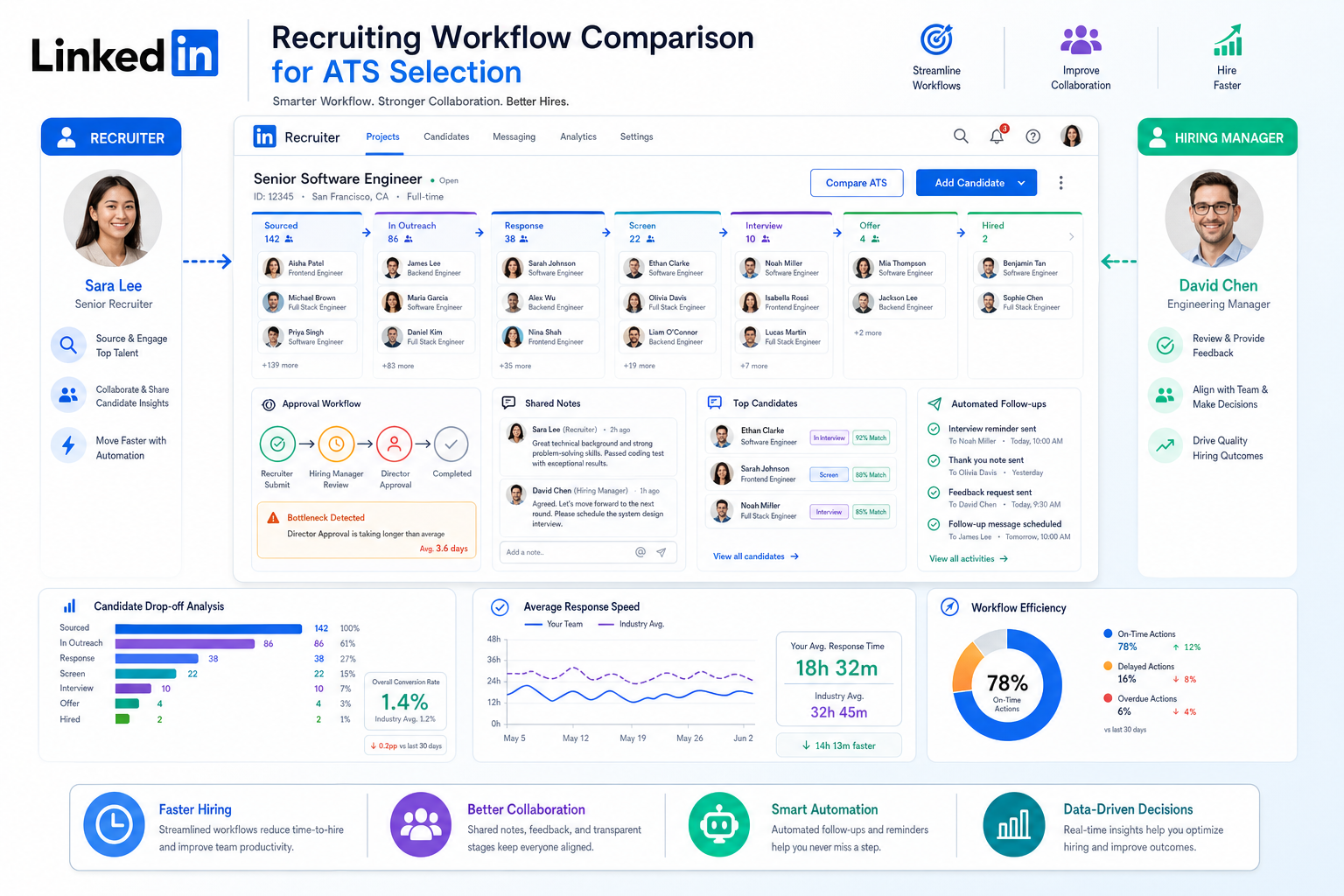
When recruiter bandwidth is tight and approvals stall, this article helps you judge which ATS for recruiters keeps candidates moving.
That matters most when the role is difficult to position, the budget is tight, or the team making the hire is not especially fast. In those situations, recruiters lose time in the same places: chasing feedback, retelling the story of the role, juggling scattered candidate notes, and watching strong people move on while approvals stall. For agency recruiters, internal talent teams, and small search firms alike, the cost is not just efficiency. It is missed placements, weaker candidate trust, and more pressure on already limited recruiter capacity.
In my own workflow, I have found that StrategyBrain AI Recruiter is most useful when the bottleneck is early outreach and follow-up rather than final selection. Its always-on candidate messaging, multilingual communication, and automated collection of resumes and contact details help keep conversations moving when recruiters would otherwise be buried in manual LinkedIn work. The recruiter still reviews the resume, decides who is qualified, and owns the next step, but the system can remove a lot of repetitive front-end friction.
A good example is non-profit recruiting, where the mission can be compelling but the hiring process is often underpowered. The recruiter is not only trying to fill a role; they are competing with private-sector employers, working around slower board-led decisions, and sometimes doing it without a mature HR function behind them. At that point, the work becomes very practical: widen the talent pool beyond the sector, identify which skills are truly transferable, write a role pitch that does not oversell compensation, and build an assessment process that actually matches the job.
Once candidates start replying, the operational gaps show up fast. You are comparing someone with volunteer-aligned values against someone with stronger technical experience, adding a writing task for a grant-heavy role, arranging a panel conversation for a public-facing position, and trying to keep every note, resume, and decision in one place before momentum dies. That is exactly where the best recruiting software stops being a generic tool category and becomes a real buying question: which ATS for recruiters, which of the best ATS systems, and which of the best applicant tracking systems for small companies can support a constrained team without adding complexity?
If you are searching for the best recruiting software, that is usually the real issue underneath the search. You are not looking for a universal winner. You are trying to find a system that fits your hiring motion, your decision speed, and the amount of coordination your team can realistically sustain.
Table of Contents
- Why Hiring Context Matters When Choosing an ATS
- What Is an ATS for Recruiters?
- Recruiting Software vs ATS vs CRM
- Quick Comparison of the Best ATS Systems by Use Case
- How Small Companies Should Evaluate ATS Software
- Features That Matter Most
- Advantages of Applicant Tracking System Adoption
- How to Choose the Right ATS for Recruiters
- Implementation and Adoption Tips
- Common Mistakes When Buying Recruiting Software
- FAQ
Why Hiring Context Matters When Choosing an ATS
One lesson from non-profit recruiting applies far beyond the sector: software decisions make more sense when you start with hiring constraints, not feature lists. A lean team, a mission-driven role, or a search that depends on transferable skills will expose different workflow needs than a high-volume recruiting operation.
For example, if compensation is not your strongest selling point, recruiters need better visibility into candidate motivation, cleaner outreach history, and a tighter handoff from sourcing to interview. If the hiring process involves a board, executive director, or part-time stakeholders, then reminder workflows, shared notes, and structured feedback matter more than flashy extras. If the role calls for public speaking, writing, fundraising, or technical crossover from another industry, your system should help you run tailored assessments without turning the process into chaos.
Key insight: the best ATS systems are not the ones with the most features. They are the ones that support the real constraints behind a search and keep candidate momentum alive.
What Is an ATS for Recruiters?
An ATS for recruiters is software that helps teams manage active hiring from application intake to final decision. At a minimum, it stores candidate records, tracks stage movement, centralizes communication, and gives recruiters a consistent workflow across open roles.
In practice, a solid applicant tracking system for recruiters usually includes job posting, resume parsing, interview scheduling support, hiring manager collaboration, scorecards, and reporting. The better systems also make it easier to standardize process without forcing recruiters into endless admin work.
That distinction matters. Recruiters do not need another database. They need a system that keeps searches moving when the process becomes multi-person, high-friction, or slow to decide.
Recruiting Software vs ATS vs CRM
When teams look for the best recruiting software, they often compare three categories at once: ATS-only tools, ATS plus CRM platforms, and broader recruiting suites. That is why buying decisions can get muddy.
An ATS is designed to manage active applicants and open roles. A recruiting CRM is more focused on relationship-building before application, including outreach and longer-term talent nurturing. Some teams need both, but many small teams overbuy before they have nailed the basics.
| Category | Main Purpose | Best For | Watch-Out |
|---|---|---|---|
| ATS-only | Manage applicants and hiring stages | Teams that need structure quickly | May be lighter on sourcing relationships |
| ATS + CRM | Track applicants and nurture prospects | Recruiters doing active sourcing over time | Can add process overhead |
| Broader recruiting software | Support sourcing, interviews, reporting, and workflows | Scaling organizations with more complexity | Often requires stronger change management |
If your real problem is that candidates fall through the cracks once they show interest, an ATS may solve more than a CRM. If your recruiters spend most of their week on proactive LinkedIn outreach, a front-end sourcing layer such as AI Recruiter can work alongside an ATS by keeping outreach and early engagement moving while the ATS remains the system of record.
Quick Comparison of the Best ATS Systems by Use Case
Instead of asking for a single winner, it is more useful to group the best ATS systems by hiring scenario.
| Use Case | What the Team Usually Needs | What to Prioritize | Good Fit Profile |
|---|---|---|---|
| Small business hiring occasionally | Simple setup and low admin work | Ease of use, posting, basic reporting | Owner-led or HR-led hiring |
| Small company hiring steadily | Repeatable workflows and collaboration | Scorecards, scheduling, pipeline clarity | One recruiter or talent lead |
| Mission-driven or budget-constrained hiring | Better role storytelling and cleaner follow-up | Candidate notes, structured evaluation, reminders | Non-profits, associations, lean internal teams |
| Agency or recruiter-heavy workflow | Speed across multiple searches | Searchability, parsing, communication history | Recruiters managing volume |
| Scaling organization | Standardization across departments | Permissions, analytics, approvals, automation | Growing talent acquisition team |
That third row is worth calling out. Searches where the role must be sold carefully, where stakeholders are slower, or where transferable skills matter more than direct-industry experience are often where recruiter discipline matters most. The right ATS helps preserve that discipline.
How Small Companies Should Evaluate ATS Software
The search intent behind best applicant tracking systems for small companies is usually practical. Small teams want to know whether a system is fast to launch, easy for hiring managers to use, and realistic to maintain without dedicated operations support.
That is why I usually advise small companies to evaluate recruiter usability before advanced depth. If the platform looks powerful but takes too much maintenance, it will not hold up once live searches get busy.
What matters most for small-company recruiting teams
- Fast setup: Can you launch jobs and define stages without a drawn-out implementation?
- Ease of use: Will non-recruiters actually review candidates and leave feedback in the system?
- Pipeline visibility: Can the team see where candidates are stuck and who owes input?
- Assessment flexibility: Can you add writing tasks, panel interviews, or custom scorecards when the role requires it?
- Low admin overhead: Can one recruiter or HR generalist keep it clean without becoming a system administrator?
For lean teams, one of the biggest applicant tracking system benefits is that the hiring process starts to look more mature than the team size would suggest. That is especially valuable in sectors or organizations where the recruiter is trying to create confidence around a role that already faces budget or speed limitations.
Features That Matter Most
Long feature lists are easy to publish and hard to use. These are the capabilities that usually separate helpful systems from software that recruiters quietly work around.
1. Structured hiring workflows
A strong ATS lets you define stages, owners, and movement criteria clearly. That structure is what keeps a search organized when multiple stakeholders are involved or when the role needs a tailored process.
2. Interview scorecards and feedback capture
If feedback lives in inboxes and chat threads, decision speed drops. Scorecards create comparability, especially when recruiters are balancing values alignment, technical skill, and communication ability in the same search.
3. Resume parsing and searchable records
This matters any time you are widening the talent pool beyond one obvious background. If the best candidate may come from outside your usual sector, the system should make it easy to search transferable experience and revisit prior applicants.
4. Career site and job distribution
The best recruiting software should make job promotion cleaner, not more fragmented. Straightforward posting helps small teams save time and maintain consistency in how the opportunity is presented.
5. Scheduling support
Scheduling is still one of the biggest hidden drains on recruiter time. It becomes even more painful when the process includes panel interviews, executive approvers, or part-time stakeholders.
6. Practical analytics
You do not need a wall of dashboards. You do need to know where candidates are dropping, whether feedback is late, and which part of the funnel is really causing delays.
7. Explainable AI support
AI is most useful when it reduces repetitive work without taking judgment away from the recruiter. In my own testing of AI-supported sourcing workflows, the most practical gains came from consistent outreach, after-hours follow-up, and easier resume collection from interested candidates. The recruiter still had to review whether the resume actually matched the brief, but the hand-raising and message handling became much less manual.
Advantages of Applicant Tracking System Adoption
When teams compare the best recruiting software, they often overfocus on surface features and underfocus on operating value. The biggest advantages of applicant tracking system adoption usually show up in consistency, coordination, and speed.
- Better process control: Recruiters can stop reinventing workflows for each req.
- Cleaner collaboration: Hiring managers know where to review and respond.
- Faster follow-up: Centralized communication reduces candidate drift.
- More consistent assessment: Scorecards and tailored steps improve comparability.
- Clearer reporting: Teams can spot stage delays and feedback bottlenecks.
- Better candidate experience: Organized processes usually produce more timely communication.
In roles that are harder to sell, these benefits are not abstract. They directly affect whether the recruiter can hold candidate attention long enough to get through a slower or more layered decision process.
How to Choose the Right ATS for Recruiters
If you are comparing options, use a workflow-first evaluation instead of a generic top-10 mindset.
- Map the real hiring process.
Document how candidates move from outreach or application to screen, assessment, interview, offer, and close. If your process is fuzzy now, software will not fix that by itself.
- Identify the real bottleneck.
Is the issue applicant organization, slow stakeholder feedback, difficulty selling the role, or too much manual outreach work? Different problems call for different systems.
- Decide where ATS ends and sourcing support begins.
If your recruiters rely heavily on LinkedIn outreach, an ATS may need help from an engagement layer. I have seen the best results when the ATS handles tracking and collaboration while StrategyBrain AI Recruiter handles repetitive first-touch messaging, multilingual follow-up, and resume collection from interested prospects.
- Test recruiter and hiring manager workflows.
Do not evaluate from the admin seat alone. See how quickly a recruiter can move candidates and how easily a hiring manager can submit usable feedback.
- Review assessment flexibility.
If some roles require writing samples, team panels, or public-facing simulations, make sure the system supports those steps cleanly.
- Check pricing logic.
What matters is not the headline number alone but whether the pricing model fits your team size, growth plan, and actual usage.
- Assess automation carefully.
Look for help with repetitive work, not black-box decision-making. Recruiters need to understand and override automated actions when needed.
This approach produces better outcomes than broad “best software” lists because it matches how real recruiters work under pressure.
Implementation and Adoption Tips
Even the best ATS systems fail when the rollout is treated as a purchase instead of a workflow change.
Practical rollout advice
- Keep stages simple at first. Start with a clean process before adding exceptions.
- Standardize scorecards early. This is especially helpful when transferable skills and culture alignment both matter.
- Train hiring managers on their exact tasks. Show them how to review, comment, and move on.
- Define ownership clearly. Decide who posts, who advances, who follows up, and who keeps records clean.
- Review the first live search closely. Watch where the team slips back into spreadsheets, email threads, or side conversations.
One practical lesson from using AI support alongside ATS workflows: do not let automation create a second shadow process. If a sourcing assistant is handling LinkedIn messaging, make sure interested-candidate details and recruiter decisions still flow back into the main hiring workflow. The handoff matters as much as the automation itself.
Common Mistakes When Buying Recruiting Software
Teams shopping for the best recruiting software often make the same avoidable errors.
Buying for edge cases instead of common searches
If most of your hiring follows a few repeating patterns, optimize for those first.
Ignoring role-selling reality
Some jobs are simply harder to position because compensation is limited, the mission is specialized, or the process is slower. Your system should help recruiters manage that reality, not assume every role sells itself.
Confusing ATS needs with sourcing automation needs
If your real pain is candidate organization, choose for workflow control. If your real pain is manual outreach volume, add the right front-end support. These are related problems, but not identical ones.
Overlooking hiring manager adoption
If hiring managers will not use the system, the process breaks down no matter how good the demo looked.
Choosing automation without transparency
Automation should reduce repetitive tasks, not hide judgment. The recruiter still needs to own qualification and next-step decisions.
Underestimating implementation effort
Even the best applicant tracking systems for small companies require decisions around stages, permissions, scorecards, and process ownership.
FAQ
What is an ATS for recruiters?
An ATS for recruiters is software that organizes active hiring workflows, including candidate intake, stage tracking, interview coordination, communication, and feedback collection.
How is an ATS different from recruiting CRM software?
An ATS manages active applicants and open roles. A recruiting CRM is more focused on prospect nurturing before application. Some teams need both, but many should start with the workflow problem they actually have.
How does ATS software help small businesses?
It creates structure without requiring a large talent team. Small businesses benefit from cleaner candidate tracking, better visibility, more consistent feedback, and less manual follow-up.
What features matter most in the best applicant tracking systems for small companies?
Usually easy setup, intuitive pipelines, scorecards, candidate searchability, scheduling support, job posting, and practical reporting. Usability matters more than feature sprawl.
Are AI features necessary in the best ATS systems?
Not always, but useful AI can help with outreach, note capture, reminders, and repetitive admin tasks. The key is that recruiters still retain control over qualification and selection.
Can recruiters use AI sourcing tools alongside an ATS?
Yes. Many recruiters use an ATS for process management and a separate sourcing assistant for LinkedIn outreach and candidate engagement. The important part is keeping the workflow connected and maintaining recruiter oversight.
How should recruiters choose the best recruiting software?
Start with your actual hiring workflow, stakeholder structure, role complexity, and outreach volume. Then choose the system that your team will consistently use well.
Conclusion
The best recruiting software is easier to choose when you stop asking for a universal winner and start looking at the pressure points inside your own hiring process.
Non-profit recruiting is a useful reminder of that. When budgets are tight, decision-making is slower, and the recruiter has to sell mission, assess transferable skills, and coordinate multiple voices, the value of an ATS becomes very concrete. You need visibility, structure, and enough automation to protect momentum.
That is why the right ATS for recruiters is usually the one that fits the team’s real operating conditions. For some, that means one of the best applicant tracking systems for small companies. For others, it means combining one of the best ATS systems with targeted sourcing support like StrategyBrain AI Recruiter to reduce manual outreach load while keeping final hiring judgment firmly in recruiter hands.














