


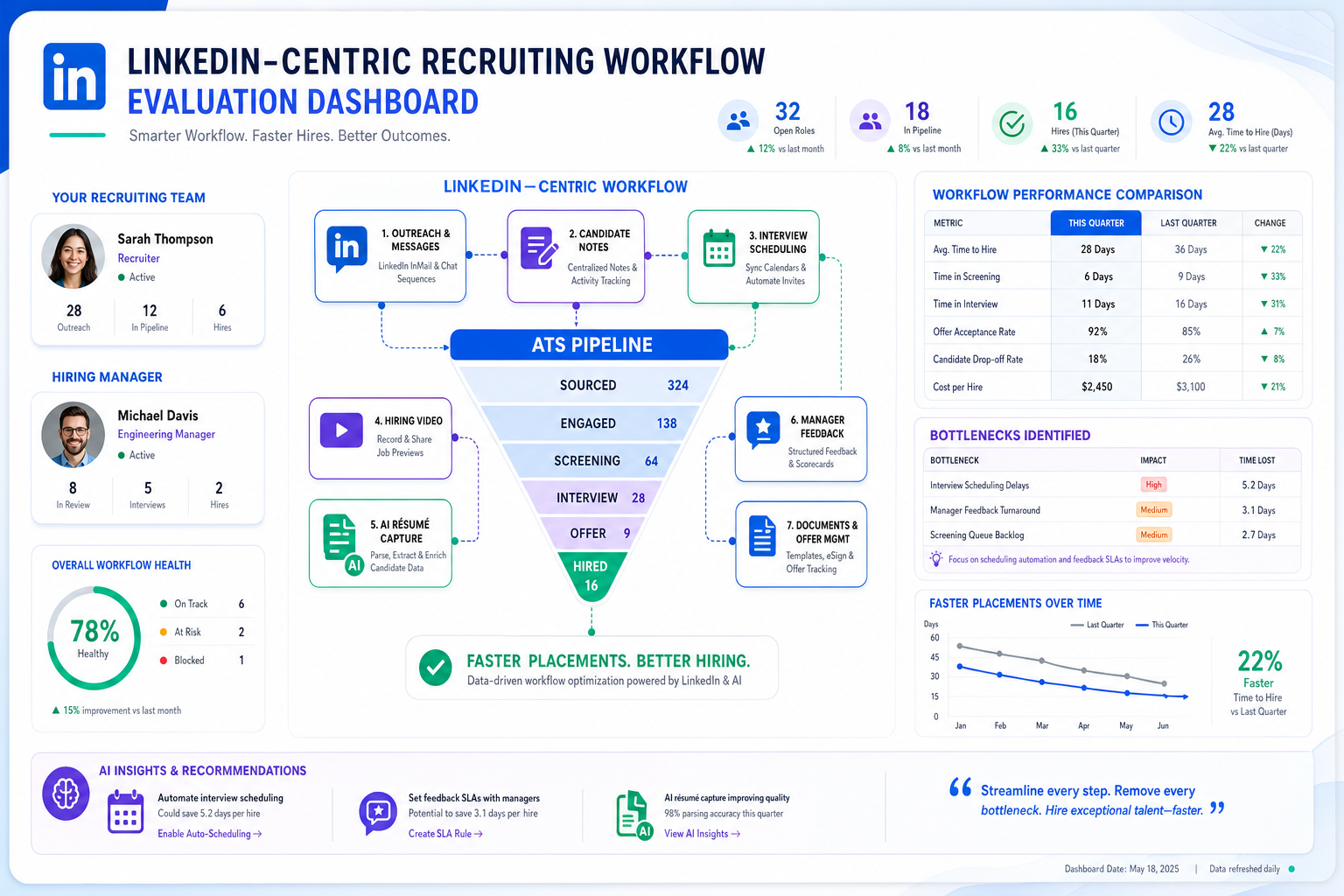
This evaluation helps recruiting leaders choose a hire platform that fixes follow-up gaps, workflow fragmentation, and slow placements.
That matters because most recruiting delays do not start with sourcing volume alone. They start when outreach lives in one place, candidate notes in another, interview scheduling in email, and manager feedback somewhere else again. For a solo recruiter, that means missed follow-ups and wasted evenings. For a small agency owner, it means slower placements, weaker client confidence, and consultants spending time on admin instead of conversations that move searches forward. For in-house teams, the cost shows up in stalled approvals, candidate drop-off, and hiring managers who think the pipeline is further along than it really is.
In my own workflow, tools only started helping once they reduced the repetitive front end without pretending to replace recruiter judgment. That is why I pay attention to how a platform handles sourcing conversations, after-hours replies, and résumé capture before I get excited about dashboards. StrategyBrain AI Recruiter is relevant here because it can automate LinkedIn outreach, respond to candidates across time zones, and collect résumés and contact details from interested people while the recruiter still decides who is actually qualified and what happens next. If your bottleneck is the constant handoff between first contact and real screening, that kind of support can remove genuine friction.
You can see the same logic in a different career scenario. When someone wants a mentor, the first move is usually not a grand ask. They start by clarifying what they want to become, identifying a person whose experience reflects that goal, and checking whether that person is even realistically accessible through a manager, a cross-functional contact, or a second-degree introduction. Then they research the person, learn their career path, ask for a short meeting, and focus the conversation on the other person rather than on themselves.
That sequence is useful because it reveals how many recruiting teams still evaluate software poorly. They jump to feature comparisons before defining hiring goals, they ignore whether users can actually access the workflow easily, and they skip the research step that should cover integrations, recruiter adoption, and manager participation. In other words, the same discipline used to build a mentor relationship is often the discipline missing when businesses hire through a new hire platform, especially once hiring video, sourcing automation, and collaboration tools are added to the stack.
- Start With Hiring Goals, Not Feature Lists
- What Makes Recruiting Software “Best”?
- What an ATS Really Does in a Hire Platform
- Accessibility: Can Recruiters and Managers Actually Use It?
- Research Before You Buy
- Core Features Every Hire Platform Should Cover
- Where Hiring Video Fits
- AI Support for LinkedIn and Early Funnel Work
- Best Recruiting Software by Team Size
- A Practical Evaluation Framework
- Common Buying Mistakes
- Quick Comparison Table
- FAQ
- Conclusion
Start With Hiring Goals, Not Feature Lists
One of the most useful lessons from mentoring is simple: define the destination before choosing the relationship. The same is true when selecting the best recruiting software. Before you compare vendors, clarify the hiring outcomes you need to improve. Are you trying to reduce time spent on first-touch outreach? Standardize candidate movement? Improve hiring manager responsiveness? Make high-volume screening more structured? Support geographically distributed recruiting with better messaging coverage?
If those goals are vague, every demo will sound persuasive. If those goals are clear, you can judge whether a hire platform actually supports the work your team does every day.
- For agency recruiters: focus on speed, outreach consistency, candidate tracking, and consultant productivity
- For in-house recruiters: focus on approval flow, hiring manager collaboration, and handoff visibility
- For lean teams: focus on adoption, simplicity, and reducing repetitive admin
- For growth-stage teams: focus on scalable workflows, reporting, and integration quality
That goal-first approach is often what separates a useful hire platform from software that gets purchased and quietly underused six months later.
What Makes Recruiting Software “Best”?
The best recruiting software is the platform that fits your hiring workflow, not the one with the loudest marketing. For one team, that may be a lightweight hire platform that helps small businesses hire consistently. For another, it may be a more structured applicant tracking system for recruiters who manage multiple hiring managers, approval paths, and interview stages across departments.
In experienced recruiting teams, “best” usually comes down to five outcomes:
- Centralization: one place for candidates, jobs, notes, feedback, and reporting
- Speed: faster movement from application to interview to offer
- Consistency: shared workflows that reduce ad hoc hiring decisions
- Visibility: clean pipelines and reporting that show bottlenecks
- Candidate experience: clear communication, easier scheduling, and fewer handoff errors
Those outcomes are easier to achieve when the system matches how recruiters actually build relationships and move people through a process. Just as asking someone to mentor you works better when you know your goals and do your homework, software selection works better when you know what hiring discipline you are trying to create.
What an ATS Really Does in a Hire Platform
An applicant tracking system (ATS) is the operating core of most modern recruiting software. It stores applicant records, organizes candidates into stages, tracks communication, supports interview workflows, and often connects to job distribution, analytics, and offer processes.
When buyers search for recruitment software, talent acquisition software, or a hire platform, they are usually comparing ATS-led systems whether they use that term or not. That matters because the ATS is where process discipline lives. If the platform cannot reliably track movement, ownership, and feedback, the rest of the workflow starts to fray.
For recruiting teams, the advantages of ATS adoption are practical:
- Recruiters stop managing version control through inboxes and spreadsheets
- Hiring managers get a clearer view of who is in process
- Interview feedback is easier to collect and compare
- Compliance and recordkeeping become more structured
- Reporting improves because activity lives in one system
If your current hiring process feels scattered, that usually points to a workflow problem before it points to a sourcing problem.
Accessibility: Can Recruiters and Managers Actually Use It?
The mentoring framework also highlights another buying issue: accessibility. In the original mentoring logic, the right person is not enough if you have no realistic way to reach them. Recruiting software works the same way. A platform may look powerful, but if recruiters need extensive workarounds or hiring managers avoid logging in, the process slows down anyway.
When evaluating accessibility in a hire platform, ask:
- Can hiring managers review candidates and leave feedback without training fatigue?
- Can recruiters move candidates, schedule interviews, and update records quickly?
- Can agency consultants manage multiple live searches without losing context?
- Can leadership see pipeline health without asking recruiting to rebuild reports manually?
Small teams especially should not underestimate usability. Many tools fail not because they lack features, but because the people involved do not engage with them consistently enough to keep the system accurate.
Research Before You Buy
In mentoring, research means understanding a person’s background before asking for their time. In recruiting software selection, research means going beyond the demo script. Look at implementation requirements, sourcing workflow depth, interview coordination, integration quality, security expectations, candidate communication design, and what the product expects a recruiter to do manually.
I also recommend pressure-testing the earliest part of the funnel, because that is where many recruiting teams leak time. In one of my LinkedIn-heavy workflows, I found that the biggest drag was not identifying possible candidates. It was the repeated sequence of connecting, introducing the role, answering routine questions, checking interest, and gathering a résumé before I could even decide whether someone deserved a proper screening call. In that kind of process, AI Recruiter is useful as a support layer because it keeps those early interactions moving, including after hours, while I remain responsible for résumé review and shortlist decisions. That division of labor is the important part.
Good research should tell you not only what a platform can do, but also what work it still leaves with the recruiter.
Core Features Every Hire Platform Should Cover
Not every team needs the same depth, but the best recruiting software should support the full hiring workflow well enough that your team does not need to patch together too many side systems.
1. Candidate pipeline management
This is the foundation. Recruiters need configurable stages, bulk actions, searchable candidate records, and clear ownership. Hiring managers need visibility without requiring recruiter hand-holding at every step.
2. Job posting and distribution
For teams that need to post quickly, job distribution matters. Small teams especially benefit when recruiting software helps businesses hire without re-entering the same job information across channels.
3. Scheduling and interview coordination
Interview scheduling is where many processes start to break. The best recruiting software should reduce back-and-forth, support panel coordination, and keep interview plans attached to the candidate record.
4. Hiring team collaboration
A hire platform should make it easy for recruiters, HR, department leaders, and interviewers to leave feedback in one place. Strong collaboration tools help prevent delayed decisions and inconsistent evaluation standards.
5. Reporting and analytics
Basic analytics should answer operational questions fast: where candidates drop off, which roles stall longest, and which teams are delaying feedback.
6. Integrations
Many teams already use HRIS, calendars, email, communication tools, assessments, or background screening workflows. The platform does not need to replace everything, but it should reduce duplicate work.
7. Offer and onboarding-adjacent handoff
Recruiting software does not need to run all onboarding, but it should make the transition orderly once a candidate accepts.
Where Hiring Video Fits
Hiring video is now a standard part of many recruiting workflows, especially when early screening needs to move faster or stakeholders are distributed across locations.
There are two main forms of hiring video buyers should evaluate:
- Live video interviews: scheduled conversations between candidates and interviewers
- One-way video interviews: candidates record responses to set questions on their own time
The key question is not simply whether video exists. It is whether your hire platform connects video steps to the ATS workflow so feedback, status changes, and review history remain visible in the same record.
Disconnected hiring video tools often create predictable problems:
- Recruiters manually update candidate status
- Hiring managers review interviews outside the main record
- Feedback gets split across systems
- Conversion reporting becomes harder to trust
Used well, hiring video supports speed and consistency. Used badly, it becomes one more detached checkpoint.
AI Support for LinkedIn and Early Funnel Work
AI has become part of nearly every conversation about the best recruiting software, but the most useful applications are usually narrower and more operational than the marketing suggests. In practice, AI tends to help most in sourcing support, workflow automation, candidate communication, and early-stage routing.
That is especially true for LinkedIn-driven recruiting. If your team spends large amounts of time on first outreach, reply handling, interest checks, and collecting résumés from candidates who respond outside business hours, software support can be valuable. Based on my experience testing workflows like this, StrategyBrain AI Recruiter is strongest when used as a front-end communication layer for repetitive LinkedIn recruiting tasks. It can connect with candidates, introduce roles, reply in multiple languages, continue the conversation around the clock, and capture contact details or résumés from interested people. What it does not replace is the recruiter’s final qualification work. I still need to review the résumé, decide whether the background fits, and choose whether to move the person into screening or interview.
That distinction matters. AI support is most useful when it removes waiting time and message handling, not when it asks the team to surrender hiring judgment.
- Best fit: agency sourcing, in-house talent teams using LinkedIn heavily, after-hours candidate engagement, multilingual outreach
- Less useful alone: teams whose bottleneck is manager indecision, unclear role definition, or poor interview discipline
- What to verify: recruiter oversight, data handling, workflow visibility, and how candidate information is handed back to the human team
Best Recruiting Software by Team Size
The best recruiting software depends heavily on team structure, hiring frequency, and process maturity.
For small businesses
Small organizations usually need simplicity, speed, and enough structure to avoid hiring chaos. If your main concern is helping businesses hire with a lean team, prioritize a hire platform that is easy to adopt, does not bury users in configuration, and handles posting, candidate review, and interview scheduling cleanly.
- Choose workflow clarity over advanced customization
- Make sure hiring managers can use it without heavy training
- Check whether reporting is understandable for non-specialists
- Confirm that candidate communication is easy to manage from one place
For mid-market teams
Mid-sized companies usually outgrow basic workflows first. They often need stronger approvals, better collaboration across departments, more robust analytics, and cleaner integrations.
For enterprise recruiting
Enterprise teams typically need governance, configurability, role-based access, process control, and support for multiple business units. At that scale, fragmentation becomes expensive quickly.
For high-volume or role-specific hiring
Teams hiring for frontline, seasonal, field, or repetitive roles need throughput. In those environments, the best recruiting software should reduce candidate drop-off, support high application volumes, and shorten the path to screening and interview steps.
A Practical Evaluation Framework
When teams evaluate the best recruiting software, I recommend a three-part method that echoes the mentor-asking process: define goals, test accessibility, and do deeper research before formal commitment.
1. Define the outcome you want
Identify the bottleneck first. Common issues include slow feedback, poor visibility, duplicated data entry, inconsistent screening, weak reporting, and fragmented LinkedIn outreach.
2. Test whether the workflow is realistically usable
Review the full funnel from job intake to accepted offer:
- Requisition or job setup
- Job posting and distribution
- Application or sourced candidate collection
- Screening and shortlist creation
- Interview scheduling
- Feedback collection
- Decision and offer workflow
- Handoff to onboarding or HR operations
If a platform handles one or two stages well but creates friction elsewhere, it may not be the best recruiting software for your team.
3. Research the relationship before you commit
Ask practical questions during evaluation:
- How does feedback get submitted and compared?
- What happens when interviewers are late with scorecards?
- How easily can recruiters move candidates in bulk?
- How well does hiring video connect to the candidate record?
- What part of sourcing or messaging can be automated safely?
- Where does recruiter review still need to happen?
This is also where your title and first-line search appeal should be judged internally. A good SEO evaluation process for an article like this should score two things before publication: first, whether the title combines the high-intent topic with a practical decision angle; second, whether the opening sentence gives an experienced recruiter a concrete outcome or judgment standard worth clicking for. My usual check is simple: compare three title options for clarity, specificity, and likely search match, then test whether the first sentence names the workflow problem and implies a usable answer within the first line.
Common Buying Mistakes
Even experienced teams can choose the wrong recruiting software when they focus on surface-level comparisons.
Buying for edge cases before fixing core workflow problems
If your team still struggles with pipeline visibility, feedback discipline, and scheduling, start there.
Ignoring hiring manager adoption
A platform is not truly the best recruiting software if recruiters love it but managers avoid it.
Underestimating integration friction
A hire platform should reduce fragmentation. If it creates more manual handoffs, your team will feel that burden quickly.
Assuming automation will fix a weak process
Automation helps mature workflows perform better. It does not repair unclear hiring criteria or delayed decision-making on its own.
Asking for commitment too early
This is the most direct lesson from the mentoring comparison. In recruiting software terms, teams often try to commit after a polished demo without enough workflow testing. That is the software equivalent of asking for a major commitment in the first meeting.
Quick Comparison Table
| Evaluation Area | What Good Looks Like | Why It Matters |
|---|---|---|
| ATS workflow | Clear stages, easy movement, full candidate history | Pipeline control is the base layer of recruiting discipline |
| Job distribution | Simple posting to multiple channels | Helps businesses hire with less repetitive admin |
| Scheduling | Low-friction interview coordination | Reduces a major recruiter time drain |
| Collaboration | Centralized notes, scorecards, and approvals | Improves responsiveness and consistency |
| Hiring video | Live and one-way video tied to candidate records | Avoids disconnected workflows and scattered feedback |
| LinkedIn automation support | Outreach, reply handling, and résumé capture with recruiter oversight | Improves early-funnel efficiency without removing human judgment |
| Reporting | Useful funnel and bottleneck visibility | Turns software into an operating tool, not just a database |
| Integrations | Clean connection to surrounding HR and communication tools | Reduces fragmentation across the hiring process |
Key insight: The best recruiting software usually wins by improving relationship-building workflow, not by piling on disconnected features.
FAQ
What is an ATS?
An ATS, or applicant tracking system, is software that organizes job openings, applicants, hiring stages, interview activity, and recruiting communication in one place. In many cases, a modern hire platform is ATS-led, meaning the applicant record and pipeline workflow sit at the center of the process.
Which recruiting software is best for small business?
The best recruiting software for a small business is usually the one that is easiest to adopt and manage consistently. Small teams should prioritize pipeline clarity, job posting, interview scheduling, and straightforward collaboration over heavy customization.
How does hiring video work inside recruiting software?
In strong systems, hiring video is connected directly to the candidate record so interview status, reviewer feedback, and progression decisions stay in the same workflow. That is true for both live interviews and one-way video steps.
Can AI recruiting software make hiring decisions?
It can support sourcing, screening preparation, candidate messaging, and administrative automation, but final hiring decisions should remain with recruiters and hiring managers.
When is LinkedIn automation actually useful?
It is most useful when recruiters spend too much time on first-touch communication, follow-up, and collecting résumés from interested candidates. In those situations, a tool such as StrategyBrain AI Recruiter can reduce repetitive effort while leaving final qualification with the recruiter.
Conclusion
The best recruiting software is the one that helps your team hire with less fragmentation and more control. A strong hire platform should connect applicant tracking, collaboration, scheduling, reporting, and hiring video into one workable system.
If you are evaluating options, borrow a lesson from the mentoring process: start with goals, choose tools your people can actually access and use, research deeply before committing, and build the relationship with the system around real workflow needs. That is the clearest path to helping businesses hire more effectively without adding complexity for its own sake.














