


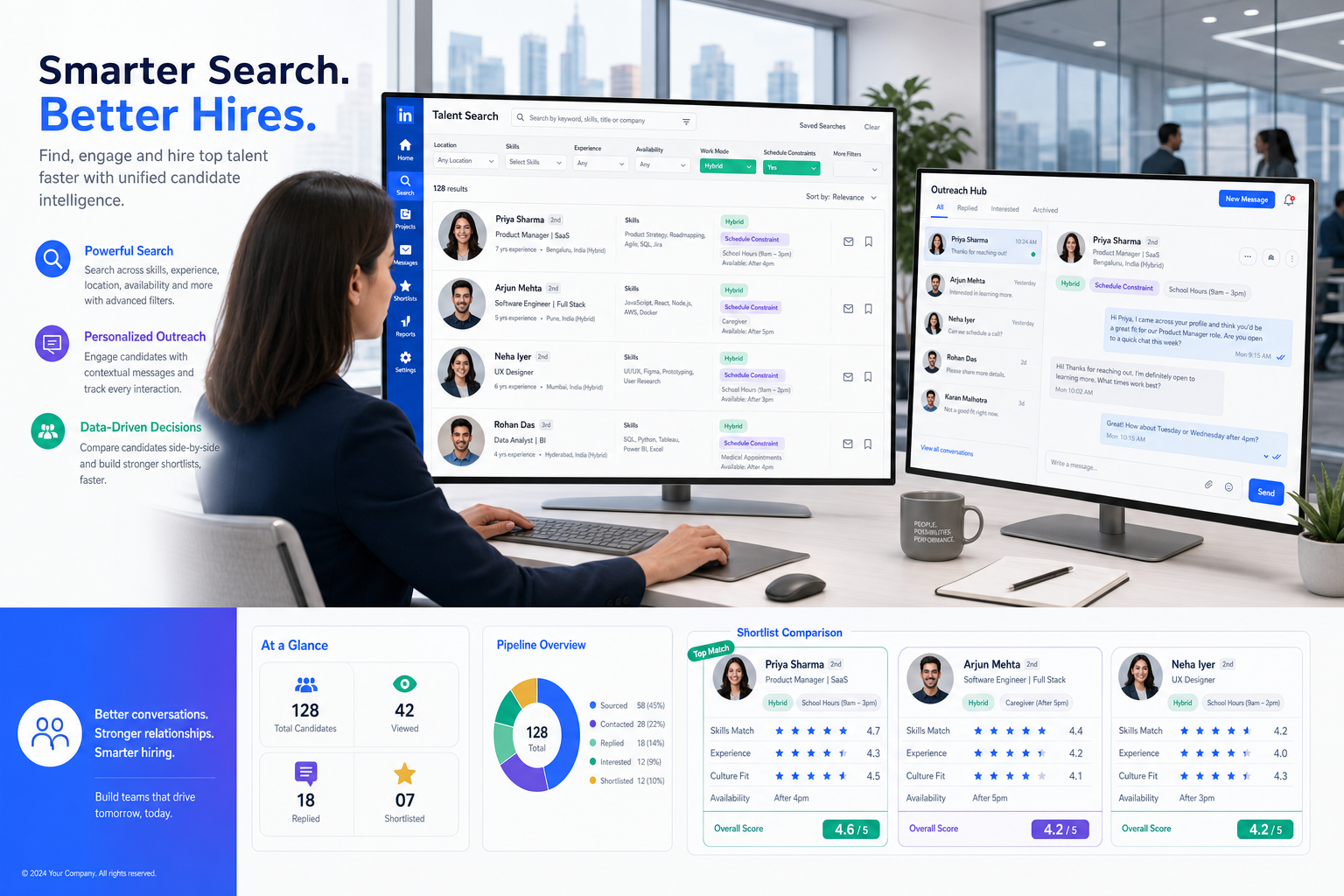
When shortlist quality suffers from lost context and repeat outreach, this article helps recruiting leaders judge a recruitment database that prevents those misses.
That sounds straightforward until a live search starts pulling in hiring-manager preferences, hybrid work constraints, caregiver realities, and repeated requests to “find balance” on a team without losing sight of who is actually qualified. In smaller agencies and lean in-house teams, that pressure quickly turns into missed follow-ups, duplicated outreach, weak shortlists, and candidate records that tell only half the story.
One workflow that helped me in those situations was pairing a structured database with AI Recruiter for the repetitive front end of outreach and response handling. Used properly, it can keep LinkedIn conversations moving, collect resumes and contact details from interested candidates, and cover after-hours replies, while the recruiter still owns final screening, resume judgment, and the decision on who moves forward.
A useful reminder comes from a recent recruiter discussion published around International Women’s Day on 8 March 2025. The recruiters were not debating theory. They were describing real assignments: a client in construction and architecture asking for strong female candidates to bring a different perspective into a male-dominated environment, another client wanting to balance an office that had only one woman, and still another employer worrying whether a candidate returning from maternity leave would be fully committed.
What makes those examples relevant to recruiting software is not the headline about diversity. It is the operational reality underneath it. A recruiter has to pull prior candidates from the database, reopen old conversations, log client preferences carefully, track who declined because of rigid office hours or daycare responsibilities, and avoid letting bias become hidden process drift. That is exactly where the best recruiting software, a reliable recruitment database, and search terms like usa recruitment database or us recruitment and information database stop being abstract categories and become day-to-day hiring infrastructure.
Table of Contents
- Why recruiting software fails when context is missing
- What a recruitment database really needs to store
- What makes the best recruiting software in practice
- ATS vs CRM vs long-term talent relationship management
- Best recruiting software by hiring use case
- Features that matter most in a candidate database
- Agency and in-house teams need different database logic
- How to choose the right system
- Common selection mistakes
- FAQ
Why recruiting software fails when context is missing
The International Women’s Day recruiter reflections are useful because they expose a problem many software demos hide: hiring is not just stage management. Recruiters are constantly interpreting context. One client may want more gender balance in a software engineering team but still end up interviewing mostly men because the experienced pipeline is easier to find there. Another may quietly hesitate over a mother returning from leave. Another may insist on a rigid 7 a.m. office start that immediately narrows the pool for candidates with caregiving duties.
If your system only records names, resumes, and status changes, you lose the reason behind the search. You cannot easily see which candidates were previously strong but unavailable because of schedule constraints, which hiring teams have recurring preference patterns, or where the same role keeps stalling for reasons unrelated to talent quality.
That is why experienced recruiters do not judge the best recruiting software by interface alone. They judge whether the system preserves enough hiring context to support better decisions later.
Practical takeaway: A recruitment database is valuable when it captures not only who was in process, but why decisions were made and what changed.
What a recruitment database really needs to store
A recruitment database is the searchable operating memory of a recruiting function. At minimum, it should tie together candidate profiles, resumes, outreach history, interview activity, recruiter notes, jobs, clients or hiring managers, and decision context over time.
In real recruiting work, that means a consultant should be able to open one profile and quickly understand:
- What role the person was previously considered for
- Why they advanced, withdrew, or were passed over
- Whether schedule, travel, childcare, compensation, or location constraints mattered
- Which recruiter or stakeholder last spoke with them
- Whether they are worth revisiting for a similar opening
That last point matters more than many buyers realize. In the reference examples, a recruiter asked to build a more balanced shortlist in a male-dominated field does not want to start from zero every time. They want to rediscover credible women candidates, reopen old conversations respectfully, and compare prior notes against the current role without guessing.
For US-focused buyers, usa recruitment database is usually shorthand for a system that supports domestic recruiting workflows, distributed recruiter collaboration, and high-volume candidate records. The phrase us recruitment and information database is less standard, but the intent is similar: people are looking for software that stores recruiting information in a way that is operationally useful, not just administratively complete.
What makes the best recruiting software in practice
The best recruiting software usually gets three things right at the same time: structured records, workable recruiter flow, and durable communication history. When one of those pieces is weak, the system may still look modern but becomes unreliable during an actual search.
In practical terms, the best recruiting software should help recruiters:
- Find past talent quickly by skill, location, experience, and prior interaction
- Track active applicants consistently across every open role
- Record decision context so a later recruiter understands what happened
- Log communications automatically or easily to preserve continuity
- Reconnect jobs, candidates, and stakeholders without switching tools
- Handle repeat admin work through automation without erasing recruiter judgment
- Report on pipeline quality using the same data recruiters actually work in
Those are the applicant tracking system benefits that matter in the field. They reduce waste, protect candidate relationships, and make it easier to return to a search months later with confidence.
In my own workflow, I found that outreach was often the first place the system broke down. Messages came back after hours, LinkedIn replies sat too long, and by the time I got back into the thread I had already lost momentum. Using AI Recruiter for that layer helped keep conversations active and organized while I focused on the part software should not replace: assessing the resume, checking fit, and deciding whether the candidate belonged on a real shortlist. For recruiters who lean heavily on LinkedIn sourcing, that kind of support is practical rather than theoretical.
ATS vs CRM vs long-term talent relationship management
Many teams searching for the best recruiting software are really trying to solve two different problems at once. They need a clean hiring process for open roles, and they need a database that makes old talent useful again.
Applicant Tracking System
An ATS is mainly built for active hiring. It manages applications, interview stages, feedback, and requisition progress. This is where an applicant tracking system for recruiters creates process discipline.
Recruiting CRM
A recruiting CRM is stronger on relationship continuity. It helps recruiters segment talent pools, revisit prior candidates, and maintain outreach history over time. That becomes essential when searches involve nuanced positioning, market mapping, or repeated hiring into similar functions.
Talent Relationship Management
Talent relationship management goes a step further. It supports long-cycle engagement instead of one vacancy at a time. For example, if a candidate was not available because of family commitments, location limits, or timing rather than capability, TRM-style functionality helps you reapproach them later with context intact.
Why the distinction matters
In the hiring scenarios reflected earlier, the issue is rarely just “Can we track applicants?” The issue is whether the system lets recruiters preserve the full reason a candidate was or was not right at that moment. That is why the best recruiting software often combines ATS structure with CRM depth.
| System Type | Primary Focus | Best For | Main Limitation |
|---|---|---|---|
| ATS | Active applicants and stage control | Structured hiring processes | Can lose long-term relationship value |
| Recruiting CRM | Candidate engagement and rediscovery | Sourcing and talent pooling | May be weaker on requisition workflow |
| ATS + CRM | Process plus searchable history | Most agency and TA teams | Needs disciplined setup |
| Generic CRM | Contact management | Basic records | Usually too shallow for recruiting complexity |
Best recruiting software by hiring use case
Because software labels can be misleading, it is often more useful to evaluate by operating model than by category page.
1. Staffing and search firms
Agencies need a data model that connects candidates, jobs, and clients. They also need enough history to understand why a candidate was previously marketed, shortlisted, declined, or held for later. In searches where clients are trying to broaden representation or rethink team makeup, that history is especially important.
The best recruiting software for agencies usually combines ATS and CRM behavior in one environment. A generic contact system is rarely enough.
2. In-house talent acquisition teams
Internal teams usually care most about requisition flow, stakeholder visibility, interview scheduling, and reporting consistency. But the same context problem still applies. If a team learns that rigid onsite expectations or narrow manager preferences are limiting outcomes, the database should make that visible instead of burying it in emails and memory.
3. High-volume recruiting teams
At scale, manual updates become the bottleneck. Automation matters here, but only if the underlying records stay interpretable. A high-volume team still needs to know why candidates dropped, who responded positively, and what constraints repeatedly block hiring.
That is one reason some recruiters add targeted automation tools alongside core systems. If your sourcing engine depends on LinkedIn, an automation layer like AI Recruiter can keep outreach and resume collection moving continuously, while the main database remains the source of truth for evaluation and next-step decisions.
4. Relationship-driven and niche recruiting
Executive search, specialist recruiting, and market-mapping work depend heavily on rich notes and careful timing. In those environments, a candidate database with shallow history becomes a real handicap. Recruiters need to know not just who fits, but when and why a prior approach did not convert.
Features that matter most in a candidate database
When buyers ask what the best recruiting software should include, I usually bring the conversation back to recruiter actions rather than feature lists.
Centralized candidate records
Every profile should show resume, notes, prior submissions, interview history, communication log, and linked jobs or clients. This is how recruiters avoid restarting the same conversation from scratch.
Search that reflects real recruiting logic
A strong recruitment database should support search by skills, title, geography, compensation band, work arrangement, prior stage, and historical interaction. For teams evaluating a usa recruitment database, US market filters and location logic often matter more than flashy design.
Resume parsing and structured profile creation
Good parsing improves adoption because recruiters do not want to manually rebuild every profile. The better the structure, the more useful the database becomes later.
Communication tracking
Email history, notes, LinkedIn conversations, reminders, and activity logs are essential. Without them, a recruiter cannot easily revisit a candidate who was previously strong but unavailable due to timing, flexibility, or family obligations.
Linked sourcing support
If LinkedIn is a major sourcing channel, your workflow should support quick handoff from outreach to database record. One thing I appreciated when testing AI Recruiter on LinkedIn recruiting workflows was that it handled repetitive first-contact exchanges and gathered contact details without me having to babysit every thread. That was useful on nights and weekends, but the important point is that it complemented rather than replaced database discipline.
Workflow automation
Automation should reduce repetitive admin work such as reminders, stage changes, and scheduling triggers. It should not make the record less readable later.
Reporting and pattern detection
Reports should help leaders identify where hiring is narrowing unnecessarily, where candidates consistently drop, and where recruiter activity is producing reusable pipeline value.
| Feature | Why It Matters | Who Benefits Most |
|---|---|---|
| Search and filters | Improves rediscovery of prior talent | Agencies, search firms, TA teams |
| Applicant tracking | Keeps active hiring organized | Recruiters, HR, hiring managers |
| Communication logs | Preserves context over time | Shared desks and collaborative teams |
| Automation | Reduces admin drag | High-volume recruiters |
| Job-client-candidate links | Reflects actual agency workflow | Staffing and retained search firms |
| Analytics | Shows process friction and recurring blockers | Recruiting leaders and ops |
Agency and in-house teams need different database logic
One of the most common buying mistakes is assuming all recruiting teams need the same system. They do not.
Agency teams usually need:
- Candidate, job, and client entities connected
- Submission tracking
- Ownership visibility across consultants
- Historical placement and business-development context
- A fast way to reopen old talent pools for new client mandates
In-house teams usually need:
- Requisition approval and control
- Hiring manager collaboration
- Interview scheduling and feedback collection
- Stage consistency and compliance of process
- Talent pooling for repeat roles
The opening examples around gender balance, caregiver constraints, and rigid work structures can appear in either setting, but they show up differently. Agencies need to match nuanced client requests without losing commercial context. In-house teams need to see whether the process itself is reducing the available pool.
How to choose the right system
If you are comparing the best recruiting software, I would not start with vendor lists. I would start with workflow evidence.
- Map the real search process. Document how a candidate enters the pipeline, how outreach is done, where notes live, and how stakeholder feedback gets recorded.
- Identify missing context. Ask what your current system fails to capture: schedule constraints, previous objections, client preferences, role-specific nuances, or follow-up timing.
- Test rediscovery. Run a practical search for a role you hired before and see whether the system helps you find good past candidates quickly.
- Check communication continuity. Make sure messages, notes, and handoffs are easy to track when more than one recruiter touches the desk.
- Review automation boundaries. Decide what should be automated and what should remain with the recruiter. Outreach, reminders, and resume collection can be automated; fit judgment and shortlist decisions should not be.
- Pressure-test for your market. If you are evaluating a usa recruitment database, make sure the system fits your US hiring volume, location logic, and recruiter collaboration model.
If you come across the phrase us recruitment and information database, do not get hung up on terminology. The useful question is whether the platform acts as a complete and searchable recruiting record, not whether the category label sounds precise.
Common selection mistakes
Buying for UI instead of retrieval quality
A polished interface does not matter much if recruiters cannot find the right historical candidates fast enough.
Tracking stages but not reasons
This is a major weakness. If a candidate declined because of office-hour rigidity, family logistics, travel load, or timing, that should be recoverable later.
Confusing automation with judgment
Automation helps with repetitive tasks. It does not replace recruiter assessment. That is why tools that support outreach or response handling should feed into, not replace, a strong recruitment database.
Using a generic CRM for recruiting complexity
Recruiting involves relationships among people, jobs, managers, clients, and timelines. Generic contact records rarely handle that well.
Ignoring bias-sensitive process design
Hiring teams often assume fairness is a training issue only. In reality, it is also a systems issue. If your software does not preserve enough context to review patterns, preferences, and repeated blockers, you miss opportunities to improve process quality.
FAQ
What is the difference between a recruitment database and an ATS?
A recruitment database is the deeper record layer that stores candidate history, notes, and relationships, while an ATS manages the active workflow of applications and hiring stages. The strongest systems combine both.
What makes the best recruiting software for headhunters?
For headhunters, the best recruiting software supports fast search, rich historical notes, communication continuity, and clear links between candidates, jobs, and clients. It should help reopen old searches without losing context.
Why does candidate context matter so much in a database?
Because hiring decisions are rarely based on resume fit alone. Timing, flexibility, caregiver responsibilities, market conditions, and stakeholder preferences often shape outcomes. If those details are not stored well, recruiters repeat work and lose strong candidates.
How should I evaluate a usa recruitment database?
Evaluate it based on workflow fit, search quality, collaboration support, reporting usefulness, and how well it handles your US hiring patterns. A useful usa recruitment database should function as a live operating system for recruiters, not just a profile archive.
Is us recruitment and information database a standard category?
Not really. It is better treated as a search variation for recruiting systems that store candidate and hiring information. In practice, compare ATS, recruiting CRM, and combined platforms instead of relying on that label.
Can LinkedIn outreach automation help without replacing recruiters?
Yes, if used properly. Tools such as AI Recruiter can help manage repetitive first-contact messaging, after-hours replies, and resume collection, while the recruiter remains responsible for screening, fit assessment, and final progression decisions.
Conclusion
The best recruiting software is not the one with the longest feature page. It is the one that gives your team a trustworthy recruitment database and preserves enough context to make better hiring decisions under pressure.
The recruiter reflections that surfaced around International Women’s Day make that point clearly. Searches are shaped by team balance goals, caregiving realities, work-model constraints, and hiring-manager assumptions. If your system cannot capture those realities cleanly, it will not support strong recruiting no matter how modern the dashboard looks.
Start with your process, your retrieval needs, and your communication gaps. Then evaluate whether the software helps recruiters search better, remember more, and act faster without losing judgment. That is how you find the best recruiting software that will actually hold up in practice.














