


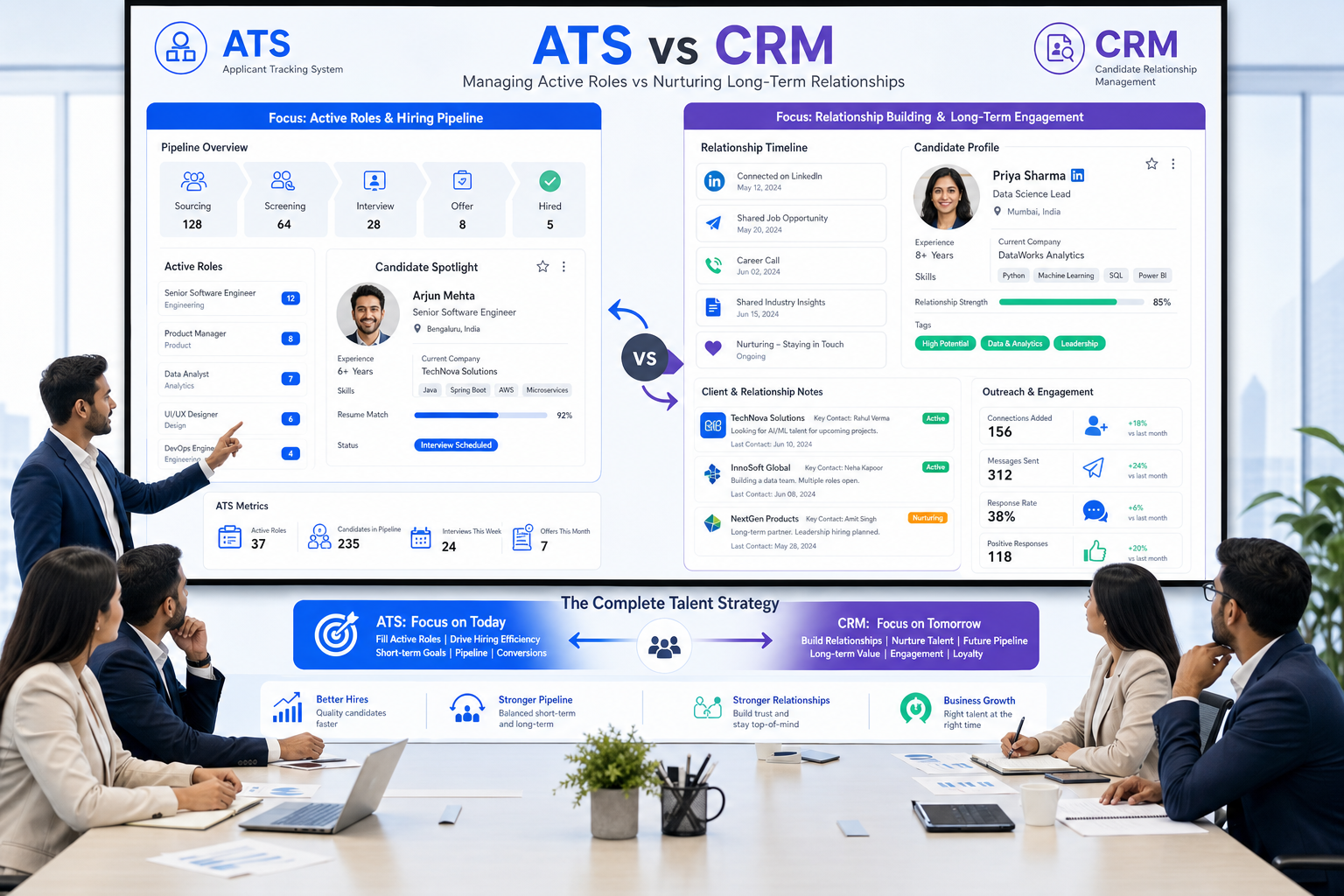
When business recruitment gets blurred by weak notes and mixed expectations, this article helps agency leaders judge ATS vs CRM fit and avoid costly workflow mistakes.
That matters because most recruiting problems do not start with a lack of candidates or job orders. They start when expectations are unclear, recruiter notes live in too many places, and the team cannot easily tell the difference between a role that should be filled now and a relationship that needs patient nurturing. In a small recruitment agency business, that leads to missed follow-up, weaker candidate marketing, slower submissions, and clients who assume the market is easier than it really is. For an in-house team, the damage shows up differently: fragmented visibility, slower decisions, and more avoidable friction with hiring managers and applicants.
In my own workflow, one useful way to reduce that drag has been pairing core recruiting software with targeted outreach support such as StrategyBrain AI Recruiter. I do not use it as a substitute for recruiter judgment, and it does not replace final résumé review or shortlist decisions. What it can do well is handle repetitive LinkedIn outreach, maintain after-hours candidate communication, and collect contact details or résumés from interested people so the recruiter can step in at the right point with actual market judgment. In busy agency desks, especially where passive talent is central, that handoff can remove a lot of avoidable admin without removing accountability.
A good example comes from a familiar agency reality: a recruiter speaks with a strong accounting or finance candidate who assumes the recruiter is there to find them a job immediately, while the recruiter is actually trying to match that person to current client mandates and future demand. The recruiter opens the CRM, checks which clients are active, reviews notes from prior conversations with hiring contacts, and tries to decide how to position the candidate. Then the recruiter reaches out to a client contact who has no formal opening yet, because some employers will still make room for high-caliber talent when the profile is compelling enough.
That moment exposes why software selection matters. The recruiter is not merely processing an application; they are balancing candidate expectations, client reality, market timing, and long-term relationship value. For business recruitment, especially inside a recruitment agency business or headhunting agency, the best recruiting software is the system that supports that full judgment process: applicant tracking when there is an active job, CRM depth when there is not, and enough workflow structure to keep both sides informed without reducing the work to a simple pipeline.
- What “Best” Means in Recruiting Software
- Recruiting Myths That Affect Software Buying
- Best Recruiting Software by Use Case
- ATS vs Recruiting CRM
- 3 Recruiting Software Options to Compare
- Key Features That Matter Most
- Applicant Tracking System Benefits in Real Work
- Pricing Considerations
- How to Choose for a Recruitment Agency Business
- Common Buying Mistakes
- FAQ
What “Best” Means in Recruiting Software
When people search for the best recruiting software, they often mean one of three different things. They may want the best system for processing applicants efficiently. They may want the best platform for managing recruiter relationships over time. Or they may want the best operating system for an entire recruiting business, where candidate marketing, client communication, submissions, and placements all need to sit together.
That distinction matters because software disappointment usually starts with a mismatch between buying language and operating reality. A recruiter may say, “We need an ATS,” when the real problem is weak candidate re-engagement. A client partner may ask for better reporting, when the underlying issue is that recruiter activity and account history are split across tools. A headhunting agency may want stronger search execution, but buy software designed mainly for inbound applications.
In practical terms, the best platform is the one that helps recruiters do three things reliably: understand what the client actually needs, market candidates credibly, and maintain enough context that future searches do not begin from zero.
Recruiting Myths That Affect Software Buying
The reference point many recruiters will recognize is this: misunderstanding how recruiting really works leads to bad expectations on both sides. Candidates often think recruiters are job finders first. Clients sometimes think recruiters can always deliver a perfect candidate quickly. Both assumptions distort software buying too.
Myth 1: Recruiting software is mainly about filling jobs faster
Speed matters, but experienced recruiters know that quality recruiting starts before a role is formally live and continues after one search closes. A recruiter may speak to a strong candidate months before the right opportunity appears. If your system cannot preserve context, notes, motivations, compensation parameters, and relationship history, you lose one of the biggest assets in business recruitment: reusable knowledge.
Myth 2: Recruiters only need tools for open requisitions
That may be enough for some in-house teams. It is rarely enough for a mature recruitment agency business. Agencies sell judgment, access, and market timing. That means they need software that can handle roles that are open now, clients who may open later, and candidates who are not applying but are still worth tracking.
Myth 3: The perfect candidate can always be found if the database is large enough
No software solves unrealistic expectations. Strong recruiting software helps by making search criteria, must-have skills, compensation constraints, and stakeholder feedback visible. It supports better trade-off decisions. It does not eliminate them.
Practical takeaway: the best recruiting software does not replace recruiter judgment. It makes that judgment easier to document, repeat, and defend.
Best Recruiting Software by Use Case
The right platform depends heavily on your hiring model.
1. In-house hiring teams
Internal talent teams usually benefit most from ATS-first software. Their core needs are requisition control, interview scheduling, hiring manager collaboration, and compliance records. If your version of business recruitment is internal hiring across one employer brand, clean process control matters more than agency-style sales workflows.
2. Recruitment agency business
A recruitment agency business usually needs a hybrid approach: ATS discipline plus CRM depth. The recruiter is not only managing applicants; they are building talent pools, contacting passive candidates, pitching profiles to clients, tracking submissions, and revisiting relationships across future mandates.
3. Headhunting agency and executive search
A headhunting agency needs stronger relationship memory than a standard applicant process usually provides. Long search cycles, confidential briefs, passive talent, and shortlist refinement all require richer notes, deeper searchability, and better timeline context.
4. High-volume recruiting
If speed and volume define your operation, workflow automation, scheduling, communication templates, and reporting are central. Here, the biggest gains come from consistency and lower manual admin.
5. Specialist desks
Specialist recruiters in finance, accounting, legal, healthcare, or technical markets often sit between agency and search models. They need enough ATS structure to move live roles, but enough CRM flexibility to keep niche talent warm between mandates.
| Use Case | Best Software Focus | Why It Fits |
|---|---|---|
| In-house hiring | ATS-first platform | Supports requisitions, interviews, approvals, and visibility |
| Recruitment agency business | Agency ATS + CRM | Handles candidates, clients, submissions, and placements |
| Headhunting agency | CRM-led search workflow | Supports passive sourcing and long-cycle search work |
| High-volume recruiting | Automation-heavy ATS | Reduces admin and speeds candidate movement |
| Specialist recruiting | Searchable talent pools + custom pipelines | Helps nurture niche markets over time |
ATS vs Recruiting CRM
This is still the most important distinction in recruiting software.
What an ATS does well
- Tracks applicants by role and stage
- Supports interview coordination
- Creates structured audit trails
- Improves hiring team visibility
- Produces process reports
These are core applicant tracking system benefits. If your workflow begins with an application and ends with a hire, ATS strength may be enough.
What a recruiting CRM does well
- Maintains long-term candidate relationships
- Supports passive talent sourcing
- Tracks client communication history
- Helps recruiters market candidates proactively
- Enables re-engagement across future searches
For a recruitment agency business, CRM is often the difference between one-off execution and durable desk performance. For a headhunting agency, it is usually essential.
In practice, I have found that AI-supported outreach works best when it sits on top of this distinction, not instead of it. For example, when I used AI Recruiter in a LinkedIn sourcing workflow, the biggest gain was not “automation” in the abstract. It was the ability to keep early candidate conversations moving while I stayed responsible for fit judgment, résumé review, and which profiles should actually be introduced to a client. That is especially useful when a recruiter is acting as a market educator, not just an inbox processor.
3 Recruiting Software Options to Compare
Because this article is about software selection rather than a single workflow, it helps to compare broad categories through recognizable products. The point is not to crown a universal winner, but to show how fit changes by operating model.
1. Greenhouse
Greenhouse is widely used by in-house talent acquisition teams and is generally strongest when structured hiring, interview consistency, and internal collaboration are the priority.
- Use experience: usually clear for hiring teams and coordinators, with mature workflow structure.
- Effectiveness: well suited to internal process control and stakeholder visibility.
- Cost fit: often better justified for organizations with consistent in-house hiring volume.
- Best for: mid-size to larger employers with formal hiring processes.
- How it works with StrategyBrain AI Recruiter: useful when internal teams rely on LinkedIn outreach to generate interested candidates, then move qualified people into an ATS for final review and interview workflow.
2. Bullhorn
Bullhorn is commonly associated with agency recruiting and staffing environments, where client management and recruiter desk activity are central.
- Use experience: better aligned to agency operations than many ATS-first systems, though complexity can rise with customization.
- Effectiveness: typically stronger for submissions, placements, and multi-client workflow than in-house-first tools.
- Cost fit: can make sense for established agencies that need agency-grade process depth.
- Best for: staffing firms and a scalable recruitment agency business.
- How it works with StrategyBrain AI Recruiter: agencies can use LinkedIn automation to maintain candidate flow and then push recruiter-reviewed leads into the broader agency workflow.
3. Lever
Lever is often positioned between ATS and CRM thinking, which makes it relevant for teams that want more relationship management than a strict ATS usually offers.
- Use experience: often appreciated for balancing recruiting workflow with candidate relationship visibility.
- Effectiveness: useful for teams that want sourcing and pipeline collaboration in one environment.
- Cost fit: can suit growing teams that need more than basic applicant tracking.
- Best for: internal talent teams and some hybrid recruiting operations.
- How it works with StrategyBrain AI Recruiter: teams using outbound LinkedIn sourcing can let AI handle repetitive first-touch messaging, while recruiters make final engagement decisions inside the main system.
| Software | Strength | Best For | Limitation to Watch | Where AI Recruiter Helps |
|---|---|---|---|---|
| Greenhouse | Structured hiring process | In-house teams | May feel less agency-native | Adds outbound LinkedIn support before ATS workflow starts |
| Bullhorn | Agency and staffing workflow | Recruitment agency business | Can require more process discipline | Supports sourcing scale and after-hours candidate engagement |
| Lever | ATS + relationship balance | Hybrid recruiting teams | Fit depends on complexity of agency needs | Handles repetitive outreach while recruiters keep fit control |
Key Features That Matter Most
If the opening case taught anything, it is that recruiting software should support how recruiters market, advise, and negotiate expectations, not just how they move stages.
Applicant tracking and pipeline management
An applicant tracking system for recruiters should make role stages easy to manage, clarify ownership, and reduce follow-up gaps.
Candidate relationship management
This is critical for any desk that works with passive talent or repeat searches. It is also where software starts to reflect the reality that recruiters place careers, not just open jobs.
Client records and account visibility
When a recruiter calls a client about a strong candidate before a formal job order exists, the system needs to hold that context. That is not a nice-to-have for agencies. It is daily operating infrastructure.
Sourcing workflow support
For modern search work, software should help capture prospects, preserve outreach history, and turn sourcing into a measurable process.
Outreach automation
Used carefully, this helps recruiters stay present without sounding absent. In my experience, AI Recruiter is most useful here when response timing and multilingual communication matter, especially after hours or across markets. The recruiter still decides whether the candidate is actually right for the role.
Interview coordination and collaboration
Even agency recruiters benefit from cleaner scheduling and feedback tracking once a candidate reaches shortlist stage.
Reporting and compliance
Whether you run internal hiring or a headhunting agency, leaders need to see where the process slows, where talent quality improves, and where communication breaks down.
Applicant Tracking System Benefits in Real Work
The advantages of applicant tracking system workflows become much clearer when tied to real recruiter behavior.
Better workload control
Recruiters can see where each role stands and which candidates need action. That reduces dropped follow-ups and duplicate contact.
Faster movement on live searches
Standardized stages and ownership rules shorten delays, especially once a role enters active interview territory.
Stronger reporting
Leaders get more than anecdotal updates. They can review conversion through sourcing, screening, submissions, interviews, and placements.
Improved candidate experience
Even candidates who never receive an offer notice whether the process feels organized and respectful.
More reusable data
This matters most in a recruitment agency business. If a recruiter has already learned what motivates a strong finance candidate, what compensation range matters, and which employers might flex for that profile, that information should not disappear after one search.
Pricing Considerations
Pricing should be judged against operating model, not just subscription line items.
- Per-user fees
- Feature-based tiers
- Costs for integrations or analytics
- Implementation and migration effort
- Limits on records, automation, or customization
An ATS-only system may look cheaper, but the cost picture changes if your recruiters still need separate tools for sourcing, outreach, client communication, and long-term relationship management. For agencies, fragmented cost often becomes fragmented execution.
The same is true for LinkedIn-heavy sourcing. A lightweight outreach layer can be economical if it removes repetitive admin, but it should support the recruiter’s process rather than create another disconnected database.
How to Choose for a Recruitment Agency Business
If you run a recruitment agency business, evaluate software in the order recruiters actually work.
- Start with how recruiters win trust. Can the system preserve notes on candidate strengths, motivations, and client preferences?
- Map what happens before the job order exists. Strong candidates often appear before the formal vacancy does.
- Separate ATS needs from CRM needs. You will usually need both.
- Test how the platform handles candidate marketing. Can a recruiter position a candidate to a client clearly and track the response?
- Review sourcing and outreach support. This matters especially for a headhunting agency.
- Check whether reporting reflects real desk performance. Submissions, interviews, placements, and response rates should be easy to review.
- Confirm where automation stops and recruiter judgment begins. That boundary should be clear.
If you rely heavily on LinkedIn, I would also test how easily the main system cooperates with an outreach tool. In my own use, the best results came when StrategyBrain AI Recruiter handled repetitive first-touch communication and résumé collection, while I kept control of qualification, market positioning, and final shortlist decisions. That division of labor fits how experienced recruiters actually work.
Common Buying Mistakes
- Buying for features instead of recruiter behavior. Adoption fails when daily workflow is awkward.
- Assuming all recruiting software is basically the same. In-house, agency, and search work are not identical.
- Choosing ATS-only software for agency relationship work. This is a common error in a growing recruitment agency business.
- Expecting software to solve unrealistic hiring expectations. It can support better decisions, not create perfect candidates.
- Adding automation without deciding who owns final judgment. Recruiters still need to review résumés, assess fit, and guide the next step.
FAQ
What is the best recruiting software for business recruitment?
It depends on your operating model. In-house teams often do best with ATS-first systems. Agency teams usually need ATS plus CRM. A headhunting agency often needs deeper relationship tracking and sourcing support than a standard applicant workflow provides.
Does a recruitment agency business need both ATS and CRM?
Usually yes. ATS handles live hiring workflow, while CRM supports candidate and client relationships over time. Agencies rarely thrive on applicant tracking alone.
What makes software right for a headhunting agency?
A headhunting agency usually needs strong passive candidate management, detailed notes, search history, outreach tracking, and long-cycle visibility. Relationship depth matters as much as stage tracking.
Are applicant tracking system benefits different for agencies and in-house teams?
Yes. In-house teams tend to value process consistency, interview coordination, and compliance. Agencies also need reusable talent data, client submissions, and account visibility.
Can LinkedIn automation replace recruiters?
No. It can support repetitive outreach, candidate communication, and résumé collection, but recruiters still need to make final qualification decisions, assess fit, and manage client conversations.
How should I evaluate recruiting software vendors?
Start with workflow fit, then test reporting, usability, relationship tracking, automation boundaries, and how well the platform supports your actual hiring model.
Conclusion
The best recruiting software is not the one with the longest feature list. It is the one that fits how recruiting actually happens. The opening case from accounting and finance recruiting makes that clear: recruiters are not simply there to process applications or produce perfect candidates on demand. They act as market interpreters, candidate advocates, and business partners who need to manage both live jobs and future possibilities.
For internal business recruitment, an ATS-first platform may be enough. For a recruitment agency business, ATS plus CRM is usually the stronger choice. For a headhunting agency, relationship memory and sourcing workflow should weigh even more heavily. And if your team spends significant time on LinkedIn outreach, pairing your main recruiting system with tools like StrategyBrain AI Recruiter can help reduce repetitive work while keeping recruiter judgment where it belongs: on fit, trust, and final decisions.














