


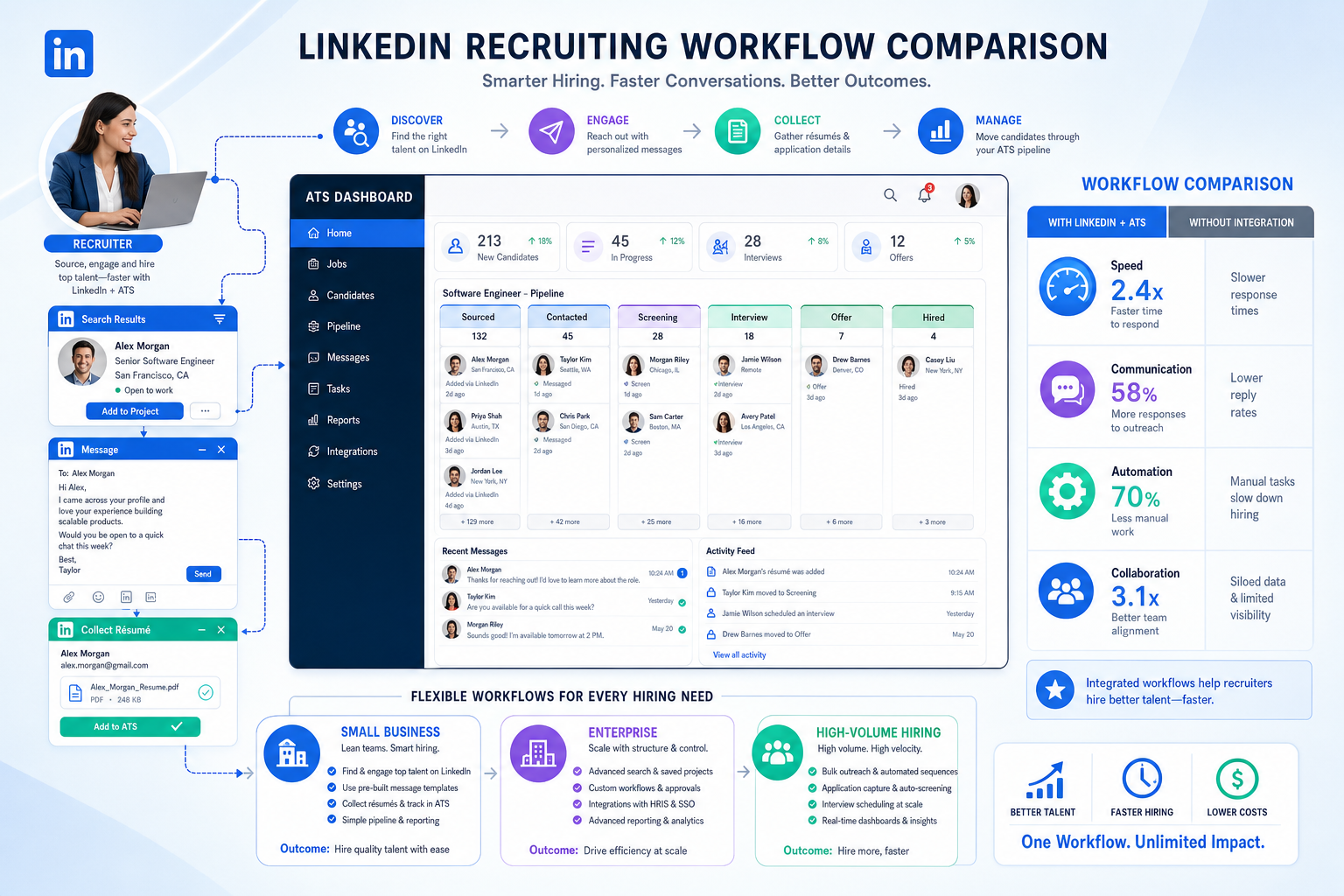
See how recruiting and applicant tracking software should be judged to prevent slow, fragmented hiring from costing recruiters strong candidates.
That matters because hiring breaks down long before an offer stage when recruiters cannot show candidates how work actually feels inside the company. Small search firms lose placements when communication drifts or outreach stalls. Solo recruiters waste evenings chasing replies and updating notes. In-house talent teams feel it when strong candidates choose smaller, more engaging employers because the hiring process itself signals speed, ownership, and team trust better than a polished careers page ever can.
One workflow fix I have found useful is combining an ATS with targeted automation rather than asking recruiters to do every first-touch task manually. In my own sourcing work, StrategyBrain AI Recruiter helped most when candidate replies came in after hours, across time zones, or in multiple languages. Its strongest use in this context is not replacing recruiter judgment; it is handling repetitive outreach, answering early role questions, and collecting résumés or contact details so the recruiter can still make the final screening call and decide who moves forward.
The reason this matters becomes clearer if you look at why many candidates are attracted to smaller employers in the first place. In the SMB market, candidates are often not choosing between salary bands alone. They are weighing whether they will be lost inside bureaucracy or able to see the effect of their work. In sectors shaped by startup conditions and cross-functional projects, they often look for teams that move quickly, solve messy problems, and let individuals contribute directly rather than disappear into layers of approval.
That judgment happens fast. A recruiter reaches out, the candidate asks what the team is really like, whether decisions happen close to the work, and whether the company can adapt when priorities change. If the recruiter has to dig through scattered notes, wait for a manager to clarify how the team operates, or lose the thread of the conversation across email and LinkedIn, the opportunity weakens. This is exactly where the best recruiting software becomes more than an admin tool: it has to support recruitment applicant tracking while preserving the story, speed, and collaboration signals that top talent is actually evaluating.
Updated for 2026. If you are comparing the best recruiting software today, start with one practical truth: for most hiring teams, the center of the system is still recruiting and applicant tracking software. But the best systems also help recruiters present a hiring environment candidates want to join, especially when the role sits in a smaller company, startup-style team, or business trying to hire with more agility and less bureaucracy.
- What “best” recruiting software means now
- Why candidate expectations change the software decision
- Quick comparison by hiring use case
- Must-have features in recruiting and applicant tracking software
- Best recruiting software for small businesses
- Best recruiting software for enterprise hiring
- Best recruiting software for high-volume recruiting
- How to evaluate recruiting software in real workflows
- What applicant tracking system certification really means
- Common buying mistakes
- FAQ
What “best” recruiting software means now
When teams search for the best recruiting software, they often mix together ATS platforms, recruiting CRM tools, sourcing systems, interview workflow tools, and broader talent suites. That overlap is real, but the practical center of the decision is still recruiting and applicant tracking software. The ATS is where requisitions, candidate records, pipeline stages, interviewer feedback, offers, and reporting have to stay coherent.
The difference in 2026 is that software is no longer judged only by internal process control. Candidates are evaluating employers for responsiveness, clarity, team dynamics, and whether the company feels structured without feeling bureaucratic. That is especially true in small and mid-sized businesses, where candidates often expect to work closer to business goals, cross-functional teams, and visible outcomes.
Key insight: The best recruiting software is the system that keeps recruiter operations organized while helping candidates experience speed, accountability, and a believable team story.
That is why experienced recruiters evaluate recruitment applicant tracking as both a workflow question and a candidate-convincing question. If the system cannot support fast responses, clean collaboration, and clear handoffs, the team may lose the kind of candidates who are specifically looking for a more agile work environment.
Why candidate expectations change the software decision
One useful lesson from SMB and startup hiring is that candidates do not always optimize for brand size. Many are drawn to smaller employers because they expect more direct impact, less hierarchy, and work that feels connected to the company’s mission. In Canada, small and medium-sized businesses have long represented the overwhelming majority of employer businesses, and that scale matters because it shapes how candidates think about visibility, ownership, and growth.
In startup-heavy and technical environments, another pattern shows up: candidates are often attracted to teams that can adapt quickly, solve unusual problems, and work in close collaboration. For years, Agile-style work has been one shorthand for that environment. Candidates may not care about methodology labels for their own sake, but they do care about what those labels imply: quick decisions, trust in capable people, frequent collaboration, and enough structure to avoid chaos.
From a recruiting perspective, this changes what your software must support. Recruiters need to capture more than résumés and interview dates. They need a system that stores team context, role nuance, stakeholder alignment, and communication history well enough to answer candidate questions quickly and consistently.
That is one reason I do not separate candidate experience from ATS selection anymore. If your software makes the recruiter slow, the company looks slow. If your handoffs are messy, the company looks political. If a candidate asks how the team works and the answer depends on three inboxes and a spreadsheet, the process undercuts the very qualities smaller employers rely on to attract talent.
Quick comparison by hiring use case
Different teams need different kinds of recruitment applicant tracking support. A 30-person firm hiring a product designer and two engineers does not need the same controls as a multinational employer filling dozens of roles across regions. The best recruiting software depends on the operating model behind the hiring.
| Hiring use case | What matters most | ATS-related priority | Practical advice |
|---|---|---|---|
| Small business | Usability, fast setup, recruiter-manager visibility | Simple pipelines, posting, communication history | Choose software that lets candidates feel the company’s speed and clarity |
| Enterprise | Governance, permissions, reporting, integrations | Structured workflows, audit trails, multi-team consistency | Stress-test approvals, reporting ownership, and cross-region hiring rules |
| High-volume hiring | Speed, screening, scheduling, bulk actions | Fast movement, texting, automations, mobile flow | Prioritize recruiter efficiency and candidate response handling |
| Agile project-based teams | Context sharing, role nuance, stakeholder alignment | Clear notes, collaboration, quick feedback loops | Look for software that helps recruiters explain team dynamics credibly |
If you are comparing the best recruiting software, start by identifying which of these realities actually describes your team. That single step usually tells you more than a generic top-10 list.
Must-have features in recruiting and applicant tracking software
Most buyers know they need an ATS. Fewer define what strong workflow support looks like in day-to-day recruiting. The best systems help recruiters stay organized while making it easier to present a role accurately and keep a fast-moving team aligned.
1. Job posting and career site control
Your software should publish roles efficiently and keep them current across channels. This is one of the most practical benefits of strong recruiting and applicant tracking software because it reduces duplicate work and lowers the risk of stale or inconsistent job information.
2. Candidate sourcing and pipeline continuity
Good systems support more than inbound applicants. They should help recruiters organize sourced prospects, referrals, previous finalists, and passive talent pools without losing context on why a person mattered in the first place.
3. Collaboration that reflects how teams really work
If candidates are attracted to smaller or more agile employers because they expect close collaboration, your software should support that story operationally. Recruiters need clean note-sharing, role context, interview coordination, and structured feedback so hiring managers are not answering the same basic questions repeatedly.
4. Automation that removes friction
Automation is useful when it shortens repetitive work, not when it obscures judgment. For many recruiters, that means message follow-up, scheduling triggers, reminder sequences, and first-response support. In outreach-heavy workflows, I have used AI Recruiter to keep candidate conversations moving overnight and across time zones, then reviewed the resulting résumés and contact details myself before deciding who deserved a real screening conversation.
5. Reporting that shows where hiring slows down
Recruiting leaders need to know where candidates drop, which teams delay decisions, and how quickly stages move. In agile or startup-like hiring environments, delays are especially visible because the company often sells speed and adaptability as part of its value proposition.
6. Integrations with the rest of the stack
Integration quality is not optional anymore. Recruiters need reliable data flow across job boards, professional networks, HRIS platforms, calendars, and communication tools. Without it, supposedly modern software pushes teams back into spreadsheets and disconnected inboxes.
7. Candidate communication support
Strong recruiting software should make it easier to answer early candidate questions clearly and quickly. That includes compensation basics, process steps, role context, and logistics. It does not remove the recruiter from the process, but it helps preserve momentum before interest cools.
Best recruiting software for small businesses
Small businesses often win talent by offering what larger employers struggle to show: clearer impact, tighter teams, and more direct ownership. But they can lose the same talent if the hiring process feels improvised. For that reason, the best recruiting software for SMBs is usually software that supports responsiveness without creating enterprise-level admin overhead.
For a small business, the right system should make it easy to:
- Create and approve jobs quickly
- Post to multiple channels without repeating work
- Track every applicant in one place
- Keep communication history visible
- Share hiring manager feedback without email sprawl
- Preserve the story of how the team works
The software decision here is not only about efficiency. It is also about credibility. Candidates who are drawn to smaller organizations are often looking for signs that decisions happen close to the work and that teams can move with intent. If your recruiting workflow is disorganized, they may assume the company itself operates that way.
That is where practical automation can help. In smaller teams without a full recruiting coordination layer, a tool like StrategyBrain AI Recruiter can keep outreach and first-response conversations moving while the recruiter focuses on qualification, manager calibration, and offer decisions. Used carefully, it supports speed without pretending that early automation should replace final human evaluation.
Best recruiting software for enterprise hiring
Enterprise hiring is less about simple posting and more about governance, consistency, security, and interoperability. The best recruiting software for large organizations must support layered approvals, regional differences, role permissions, and reporting depth without making recruiters slower than they need to be.
There is a tension here that many enterprise teams underestimate. Candidates may still want the energy and ownership associated with smaller, more agile employers, even when they are considering a large company. That means enterprise teams need software that supports both control and responsiveness.
This is where many implementation efforts fail. Larger companies sometimes try to borrow the language of agile work or dynamic teams without building the workflow support behind it. When project goals are unclear, metrics are vague, or too many changes are introduced at once, recruiters cannot communicate a believable hiring story. The system may be technically powerful, but the candidate experience still feels slow and fragmented.
Practical advice: involve recruiting operations, security, HRIS owners, and hiring leaders early. Then test whether the software helps recruiters explain team structure, decision paths, and role ownership as clearly as it handles approvals and data controls.
Best recruiting software for high-volume recruiting
High-volume hiring has different rules. When you are filling frontline, seasonal, support, or distributed operational roles, speed matters as much as structure. The best recruiting and applicant tracking software in this segment reduces processing friction while keeping communication clear.
The strongest setups usually emphasize:
- Mobile-friendly applications
- Fast prescreening workflows
- Bulk messaging and reminders
- Automated scheduling support
- Simple dispositioning
- Location-level reporting
This is also where after-hours communication becomes valuable. Candidates often reply when recruiters are offline, and interest fades if no one responds. I have found that automation tools tied to sourcing channels can keep those early exchanges alive, especially when the system can collect résumés and contact details for next-day review. The recruiter still has to decide who is qualified, but the queue is healthier when momentum is preserved.
How to evaluate recruiting software in real workflows
If you want to compare the best recruiting software seriously, move beyond feature checklists. Start with the hiring model you are trying to support. The lesson from smaller, high-impact teams is simple: people join when they understand the work, trust the pace, and believe the organization can make decisions.
- Map the hiring story, not just the stages. Document approvals, sourcing, interviews, offers, and handoffs, but also note what recruiters must explain about the team, project goals, and working style.
- Identify where momentum gets lost. Is it delayed outreach, vague manager feedback, scattered notes, unclear role context, or weak follow-up?
- Test live recruiter tasks. Ask how a recruiter posts a role, tracks a sourced prospect, records a conversation, reschedules an interview, and pulls a pipeline report.
- Test candidate question handling. Can the system help the recruiter answer practical questions quickly and consistently, especially across channels?
- Review automation carefully. Confirm what can be automated, what remains human-reviewed, and how communication history is captured.
- Check integration reality. Validate data flow with your HRIS, calendars, job boards, and sourcing channels before buying.
- Assess manager adoption. If hiring managers will not use the workflow, the software will not solve the real problem.
One more practical test: ask whether the system helps you recruit for teams that sell collaboration, speed, or adaptability. If the answer is no, then the software may organize candidates without helping you win them.
What applicant tracking system certification really means
The phrase applicant tracking system certification often creates confusion because buyers assume there is a universal credential that proves ATS quality. In reality, certification is usually specific to one platform or training program. It often means product training for recruiters, admins, or operations users who need to run that system well.
So applicant tracking system certification can be useful for adoption, but it is not a reliable proxy for software fit. A well-trained team can still struggle if the product does not match the organization’s hiring model, reporting needs, or collaboration style.
For employers, the practical takeaway is straightforward: treat certification as enablement, not proof. For recruiters, training can absolutely help you build cleaner workflows and stronger reporting habits, but it does not remove the need to evaluate whether the software actually supports your recruiting reality.
Common buying mistakes
Choosing based on feature count
A long feature list can hide weak core workflow design. If posting, tracking, collaboration, and communication are clumsy, advanced features will not rescue adoption.
Ignoring the candidate’s reason for saying yes
Teams often evaluate software from an admin view only. But if candidates are choosing smaller or more agile employers for speed, ownership, and meaningful work, your process must reinforce those signals.
Underestimating communication flow
Recruiters lose good candidates when outreach, follow-up, and early question handling are inconsistent. This is especially common when teams rely on manual sourcing and disconnected note systems.
Expecting automation to replace recruiter judgment
Automation can reduce repetitive work and preserve momentum. It should not be used as a substitute for résumé review, nuanced qualification, or final decision-making.
Confusing broader HR software with strong recruiting software
Some HR systems include recruiting modules, but buyers still need to confirm that sourcing, pipeline management, reporting, and collaboration are strong enough for real recruiting work.
FAQ
What is the best recruiting software for small businesses?
For most small businesses, the best recruiting software is software that combines straightforward ATS workflow, easy posting, clear collaboration, and fast candidate communication. Strong usability often matters more than heavy customization.
What is recruiting and applicant tracking software?
It is software that helps hiring teams manage job openings, applications, sourcing activity, interview steps, feedback, and hiring decisions in one system. In practice, the ATS is the workflow core of modern recruiting software.
Why does candidate experience matter when choosing an ATS?
Because the software shapes how quickly recruiters respond, how clearly they communicate, and how well hiring teams stay aligned. Candidates often infer what a company is like from the hiring process itself.
How does recruitment applicant tracking help agile or startup-style hiring?
Recruitment applicant tracking helps recruiters preserve context, move quickly, coordinate with managers, and keep candidate communication organized. That matters when the employer is trying to hire for fast-moving, collaborative teams.
Is applicant tracking system certification necessary?
No universal certification is required to buy or use an ATS. Platform-specific training can help adoption, but it should not be confused with proof that one product is the best fit for your team.
Can AI help without replacing recruiters?
Yes. AI can assist with outreach, follow-up, first-response communication, and administrative tasks. Recruiters should still handle résumé evaluation, deeper screening, manager calibration, and final decisions.
Final thoughts
The best recruiting software is not just the system that stores applicants neatly. It is the one that helps recruiters represent the real opportunity well, especially when candidates are drawn to smaller teams, visible impact, and faster-moving work environments.
In most cases, that means starting with strong recruiting and applicant tracking software, then validating communication support, integrations, automation, reporting, and recruiter usability around that core. If your team hires into environments that compete on agility and engagement, your software should help prove those qualities every day, not just claim them in a demo.














