


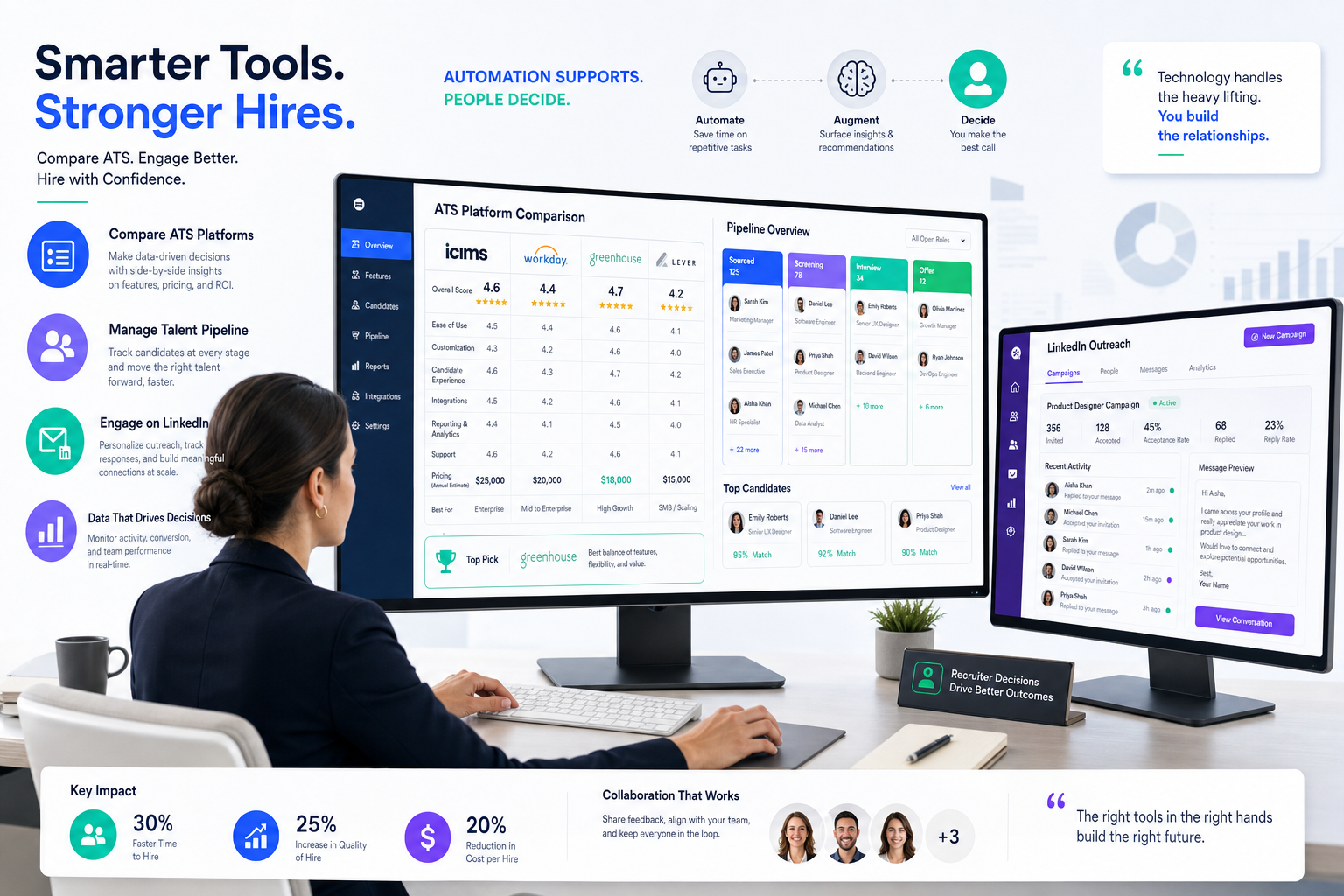
When hiring pressure exposes weak workflows, this article helps recruiters judge which ATS for recruiters will prevent slower hiring and missed follow-up.
That matters most when hiring pressure rises faster than team capacity. In smaller search firms, lean internal talent teams, and growth-stage employers, the damage from a weak system shows up quickly: candidate replies sit in inboxes, hiring managers review resumes in scattered threads, role priorities shift without clear visibility, and recruiters lose time re-entering the same updates in too many places. The result is not just lower efficiency. It is slower hiring, weaker candidate experience, and more avoidable friction with clients or stakeholders who expect a clear answer on pipeline progress.
In that kind of environment, I have found that specialized automation can help if it supports the recruiter instead of pretending to replace recruiter judgment. For outbound prospecting and message handling, StrategyBrain AI Recruiter can take over repetitive LinkedIn outreach, keep candidate conversations moving after hours, and collect resumes or contact details from interested prospects. What it does well is reduce the manual back-and-forth that clogs a recruiter's day. The recruiter still decides who truly fits the brief, reviews the resume, and makes the next-call judgment.
You can see why this matters in a market like Vancouver's tech sector, where sustained growth created real recruiting strain. The local technology market expanded rapidly, with tens of thousands of professionals concentrated in information and communication technology and a steady growth rate that kept demand elevated. Employers from startups to larger organizations were not struggling because they lacked openings. They were struggling because too many attractive companies were chasing the same qualified people at once, while tighter foreign worker rules made it harder to widen the talent pool.
In practice, that kind of market pressure turns into a daily workflow problem. A recruiter posts a specialized role, checks LinkedIn replies, updates candidate stages, tries to confirm interest, and then has to explain to a hiring manager why a short list is still thin even though the market looks active from the outside. That is where the conversation shifts from general recruiting effort to the best recruiting software: if your system cannot centralize outreach, track movement cleanly, and keep pricing predictable, it will not hold up under pressure. The same issue drives searches for the best applicant tracking systems for small businesses and questions about ats software price, because smaller teams usually feel the process strain first.
Table of Contents
- Why hiring pressure exposes weak recruiting systems
- What an ATS for recruiters actually needs to do
- Which teams need which type of recruiting software
- How to compare the best recruiting software
- Where LinkedIn automation fits into the workflow
- How to evaluate ATS software price
- What makes the best applicant tracking systems for small businesses
- Common recruiting software buying mistakes
- How to validate vendor claims before buying
- A practical ATS selection process
- FAQ
Why hiring pressure exposes weak recruiting systems
When a market becomes talent-short, every flaw in the recruiting workflow becomes more visible. The Vancouver tech example is useful because it was not just a story about growth. It was a story about what happens when demand expands, employer competition intensifies, and access to outside talent gets harder at the same time. Recruiters in that environment do not simply need more effort. They need better process control.
That is why experienced teams evaluate software based on execution under pressure. Can the system help recruiters keep candidate history clean, move people through stages fast, and show stakeholders where the search is getting stuck? If not, the technology becomes another layer of admin instead of a tool for managing reality.
| Pressure Point | What Breaks Without Good Software | What Strong Recruiting Software Should Do |
|---|---|---|
| High competition for talent | Slow follow-up and lost candidate interest | Keep outreach, status, and communication in one workflow |
| Specialized role scarcity | Thin pipelines and poor visibility on sourcing progress | Track sourcing activity and pipeline movement clearly |
| Lean recruiting teams | Too much manual admin for too few recruiters | Reduce repetitive work and support automation where useful |
| Stakeholder pressure | Weak reporting and unclear hiring bottlenecks | Surface stage, source, and conversion data quickly |
| Changing labor access | Narrower talent pools and slower hiring cycles | Support proactive recruiting and disciplined follow-through |
Practical takeaway: the best recruiting software is usually revealed in a difficult market, not an easy one. If a platform only looks good during a demo, it is probably not enough.
What an ATS for recruiters actually needs to do
An ATS for recruiters is the operating system for hiring execution. At minimum, it should store candidate records, manage requisitions, track hiring stages, support communication, and create a shared system of record for recruiters and hiring managers. In stronger setups, it also supports job distribution, reporting, approvals, integrations, and sourcing-adjacent workflow.
From a recruiter's perspective, the main value is not that the system contains data. The value is that it keeps momentum visible. In a fast market, candidates move, managers delay feedback, and priorities change. A functional ATS helps the team respond without losing process discipline.
The core applicant tracking system benefits usually include:
- Pipeline control: all open roles and candidate stages stay visible.
- Shared accountability: recruiters and hiring managers work from the same status view.
- Faster follow-through: less manual chasing around scheduling and communication.
- Better reporting: teams can see where searches stall or convert.
- Cleaner candidate experience: communication is less fragmented.
That last point matters more than many buyers expect. In talent-short markets, candidates often choose the employer that responds clearly and quickly, not just the one with the strongest brand.
Which teams need which type of recruiting software
Small businesses and lean hiring teams
Smaller companies usually need simplicity more than configuration depth. If one recruiter, an HR lead, and a few hiring managers are doing most of the work, the system needs to be easy to launch and easy to use. That is why the best applicant tracking systems for small businesses typically emphasize fast setup, straightforward permissions, and predictable administration.
In-house talent acquisition teams
Internal recruiting teams usually care more about approvals, hiring manager compliance, reporting consistency, and integration with the broader HR stack. For them, the ATS has to support structured recruiting without making every request feel bureaucratic.
Agency and search firms
Agency recruiters often need stronger sourcing support, faster movement across many simultaneous requisitions, and better candidate rediscovery. A system built only to manage inbound applicants may feel too static for that environment.
The right fit depends less on the most features and more on whether the software matches the way your recruiting team actually produces hires.
How to compare the best recruiting software
When I help recruiting teams compare systems, I usually bring the discussion back to workflow pressure. In a market like Vancouver's tech boom, the real test is whether the tool helps recruiters respond faster without losing quality or visibility.
1. Ease of use under real hiring conditions
The platform should feel clear not only to recruiters but also to hiring managers who log in less often. If managers avoid the system, recruiters end up rebuilding the process in email and chat.
2. Setup speed and launch effort
Long implementation cycles are often a warning sign for small and mid-sized teams. If your team needs a quarter just to go live on core workflows, the tool may be too heavy for your current operating model.
3. Candidate pipeline visibility
Look for dashboards and stage logic that answer normal recruiting questions quickly. You should be able to tell where candidates are dropping, which searches need attention, and what the recruiter has already done.
4. Job posting and sourcing workflow
Some teams depend heavily on inbound application flow. Others need more proactive outreach. The best recruiting software should fit your sourcing reality rather than force you into one channel.
5. Integration quality
Email, calendar, HRIS, assessments, and background checks matter because each missing integration creates another manual handoff. Over time, those handoffs are where process quality erodes.
6. Reporting for stakeholders
Recruiting leaders need more than candidate storage. They need enough visibility to explain progress, delays, and source performance without creating a second reporting workflow in spreadsheets.
7. Pricing logic
Do not treat price as a single line item. The way the system charges often matters more than the entry point.
| Evaluation Area | What to Check | Why It Matters |
|---|---|---|
| Usability | Recruiter flow, hiring manager adoption, mobile access | Low adoption ruins process consistency |
| Implementation | Time to launch, migration, workflow setup | Heavy setup delays value |
| Collaboration | Feedback forms, approvals, permissions | Shared visibility keeps searches moving |
| Sourcing support | Job distribution, talent pipeline workflow | Important where qualified talent is scarce |
| Reporting | Pipeline, source, stage conversion, bottlenecks | Helps leaders manage hiring pressure |
| Pricing model | Seat-based, employee-based, requisition-based, flat rate | Determines long-term cost control |
Where LinkedIn automation fits into the workflow
An ATS is not always enough by itself, especially when recruiters are actively sourcing rather than just processing applications. In competitive talent markets, I have seen the best results when the ATS remains the system of record and outbound automation handles the repetitive top-of-funnel work.
That is where AI Recruiter has been useful in my own workflow testing. I used it mainly for initial LinkedIn outreach on roles that required persistent follow-up. The practical gain was not magical matching. It was the fact that candidate messages kept moving even outside normal working hours, responses were captured consistently, and interested prospects could share resumes or contact details without me manually chasing every thread. I still reviewed the resume myself, decided whether the person actually fit the search, and chose whether to move them into interview workflow.
For recruiters handling multiple active searches, that division of labor makes sense:
- The ATS manages requisitions, stages, collaboration, and reporting.
- LinkedIn automation supports repetitive outreach and candidate response handling.
- The recruiter owns judgment, qualification, and hiring decisions.
If your team depends on outbound sourcing, evaluate whether your recruiting software can cooperate with that reality instead of assuming every candidate enters through a job ad.
How to evaluate ATS software price
ATS software price is one of the most misunderstood parts of buying. Many teams focus on the starting number, but the more important question is how the pricing model behaves when hiring volume changes.
Common pricing models
- Per user or per recruiter: easy to understand, but can rise quickly if many collaborators need access.
- Per employee: common in broader HR software environments, usually more natural for in-house teams than agencies.
- Per open role: may suit companies with low ongoing volume, but can become awkward during hiring spikes.
- Flat monthly pricing: often attractive to smaller businesses that want budget predictability.
In a market where recruiting demand can accelerate suddenly, pricing flexibility matters. Vancouver's tech growth is a good reminder that hiring conditions can change faster than planned. A pricing structure that feels fine at five active searches may become frustrating at fifteen.
Questions to ask about ATS software price
- What causes a move to a higher tier?
- Are hiring managers counted as paid users?
- Are integrations or reporting locked behind premium plans?
- Is implementation billed separately?
- Does cost rise with job count, seats, or employee growth?
Practical advice: ask vendors to map cost against your likely next year of hiring activity, not just your current team size.
What makes the best applicant tracking systems for small businesses?
The best applicant tracking systems for small businesses are usually the ones that reduce operational drag right away. Smaller teams do not have much margin for software that requires a dedicated admin or a long configuration project.
Based on how smaller recruiting teams actually work, these are the priorities that matter most:
- Fast deployment: core workflows should be live quickly.
- Simple manager participation: hiring managers should be able to review candidates and submit feedback without training fatigue.
- Clear reporting: enough visibility to spot delays without exporting everything manually.
- Low maintenance: the system should not create a second job for HR or recruiting ops.
- Predictable cost: smaller companies usually need easy budget logic.
That is why small businesses often get more value from straightforward software than from highly configurable enterprise systems. Ease of adoption is one of the most underrated applicant tracking system benefits.
Common recruiting software buying mistakes
Buying for the demo instead of the workflow
A polished demo can hide clunky daily use. Always test the sequence that matters: create a role, post it, review candidates, update stages, request feedback, and generate a report.
Ignoring the sourcing reality
Some teams rely on inbound applications. Others live on outbound search. If your workflow depends on active prospecting, software that only handles applicants will feel incomplete.
Underestimating manager adoption
Recruiters can work around a lot, but they should not have to rebuild stakeholder participation outside the system.
Judging only the entry price
ATS software price problems often appear later, when more users, more openings, or basic integrations trigger extra cost.
Overbuying complexity
This is especially common when evaluating the best applicant tracking systems for small businesses. More features do not automatically mean better fit.
How to validate vendor claims before buying
Use demos, trial workflows, third-party reviews, and reference calls together. No single source tells the whole story.
When reading reviews, look for patterns instead of headline ratings:
- Do recruiters describe the system as saving time in daily execution?
- Do hiring managers appear in the feedback, or only admins?
- Are implementation complaints recurring?
- Do users mention pricing surprises?
- Is support quality consistent after launch?
If your workflow includes outbound search, also validate whether the ATS can coexist smoothly with tools used for LinkedIn recruiting rather than forcing everything into a rigid applicant-only model.
A practical ATS selection process
If you want a cleaner evaluation, keep the process operational.
- Define your team model: small business, internal TA team, or agency/search firm.
- List non-negotiable workflows: posting, screening, sourcing, collaboration, reporting, and approvals.
- Map your hiring pattern: steady volume, bursts, or ongoing high-output recruiting.
- Choose a pricing model you can live with: not just the cheapest first option.
- Run a realistic use case: do not score platforms from slides alone.
- Include hiring managers: their behavior determines adoption.
- Pressure-test sourcing support: especially if specialized talent is hard to reach.
- Review future fit: can the system handle growth without becoming too expensive or too heavy?
That process usually leads to a clearer conclusion than broad feature comparison. The best recruiting software is the one that supports your actual hiring environment, whether you are operating in a high-growth talent market, a lean small-business setup, or an agency model that depends on speed.
FAQ
What does an ATS do for recruiters?
An ATS for recruiters centralizes candidate records, job openings, hiring stages, communication, and reporting. Its value is practical: it keeps recruiting work visible and structured so fewer candidates and next steps fall through the cracks.
How much does ATS software cost?
ATS software price depends on the pricing model more than a single universal amount. Common models include per user, per recruiter, per employee, per open role, and flat monthly pricing.
Which ATS is best for small businesses?
The best applicant tracking systems for small businesses are usually easy to launch, simple for hiring managers to use, and predictable in cost. Smaller teams generally benefit more from clarity and adoption than from advanced complexity.
Should recruiters use LinkedIn automation with an ATS?
For teams that rely on outbound sourcing, it can be useful. The ATS should remain the system of record, while automation supports repetitive outreach and candidate response handling. Recruiters should still own qualification and hiring decisions.
What matters more: features or fit?
Fit matters more. A platform with fewer features but stronger adoption, cleaner workflow, and better pricing discipline often produces better recruiting results than a larger system no one uses consistently.
Conclusion
If you are comparing the best recruiting software, start with the pressure points in your real workflow. Markets with strong hiring demand and scarce specialized talent show exactly why this matters: recruiters need systems that keep outreach, tracking, collaboration, and reporting under control when the process gets busy.
A strong ATS for recruiters should make hiring easier to run, easier to measure, and easier for stakeholders to follow. If you also depend on outbound sourcing, supporting that workflow with tools like StrategyBrain AI Recruiter can remove repetitive top-of-funnel work while leaving judgment where it belongs: with the recruiter. For teams evaluating the best applicant tracking systems for small businesses, that balance of simplicity, fit, and manageable ats software price is usually what leads to the best decision.














