


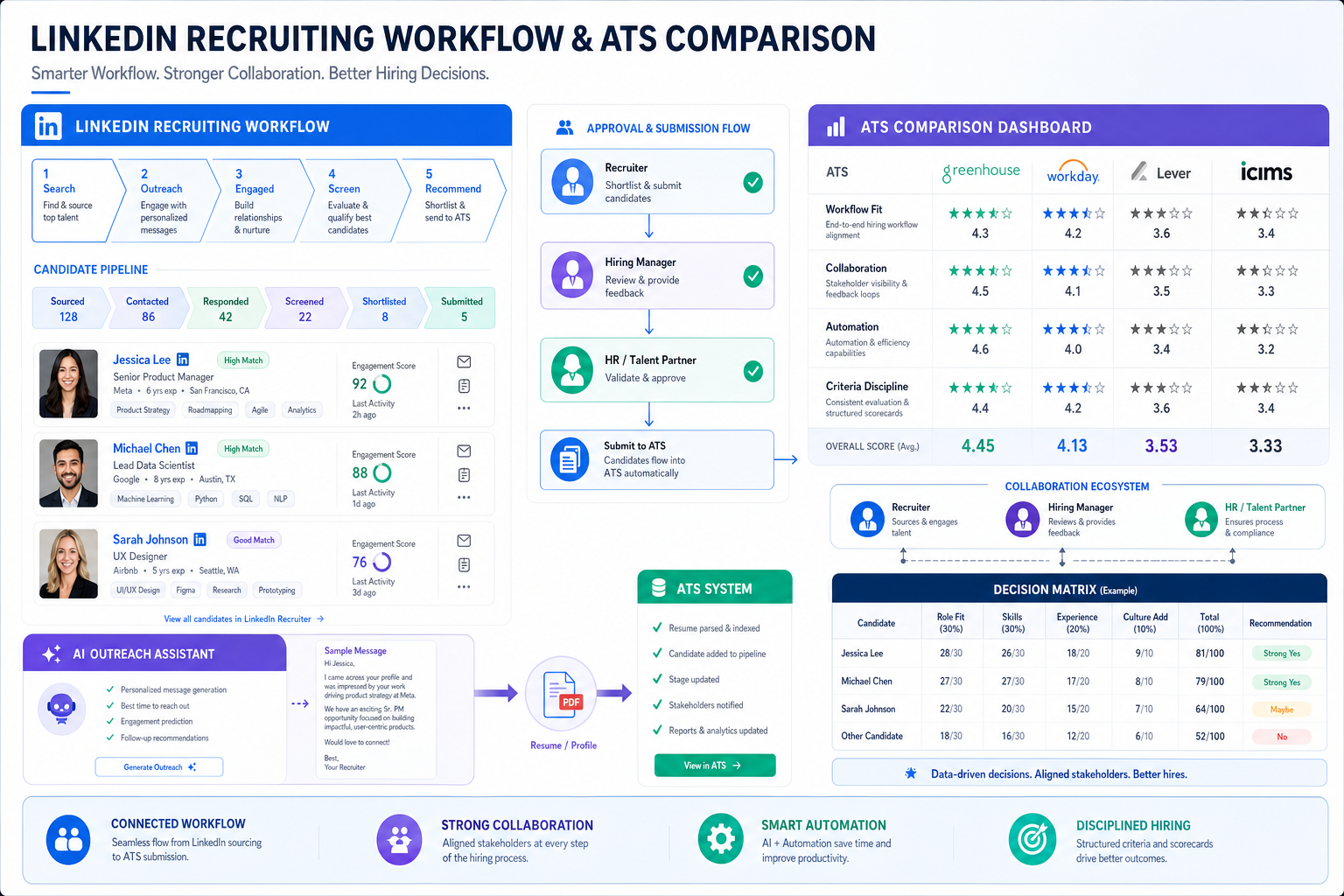
This guide helps hiring leaders compare ats recruitment software to prevent shifting criteria, weak finalist choices, and rehires.
The expensive part of hiring is not always sourcing volume or interview scheduling. It is the moment a team believes it is being objective, then quietly shifts standards as resumes are reviewed, feedback comes in, and confidence rises around the wrong finalist. For a solo recruiter, that means wasted follow-up and damaged credibility. For a small agency owner, it can mean a backfill search months later. For an internal talent lead, it often means slower decisions, inconsistent manager feedback, and a candidate experience that becomes harder to defend.
In my own workflow, tools that reduce repetitive outreach and keep candidate communication moving have helped most when they support judgment rather than replace it. That is where StrategyBrain AI Recruiter can be useful alongside your core ATS: it can automate initial LinkedIn outreach, handle after-hours follow-up in multiple languages, and collect resumes or contact details from interested candidates, while the recruiter still owns resume review, shortlist decisions, and the final recommendation to the hiring team.
The deeper issue shows up earlier than most teams expect. A hiring group opens a search for a high-impact finance role after a previous hire did not work out, and everyone walks in believing the next round will be more disciplined. Resumes are reviewed, early cuts are made, and a candidate with strong industry background gets screened out because one missing requirement stands out at the wrong moment. Later, when the team shifts into selection mode and starts discussing upside, another profile with similar gaps suddenly feels more appealing.
That swing between choosing and rejecting is not just a people problem. It is a workflow problem. When criteria live in email, notes, memory, or scattered recruiter judgment, teams overvalue positives in one stage and negatives in another. That is exactly why the search for the best recruiting software should start with decision structure, not feature volume. The right ats for small business or ats for collaborative hiring helps teams define what matters before opinions harden, then keeps those standards visible through every handoff.
Table of Contents
- Why Decision Quality Matters More Than Feature Lists
- What ATS Recruitment Software Actually Does
- Choosing vs Rejecting: The Hiring Bias Most Teams Miss
- How to Compare the Best Recruiting Software
- What to Look For in an ATS for Small Business
- What Makes a Strong ATS for Collaborative Hiring
- How to Choose by Hiring Scenario
- How AI-Supported Workflows Fit Into Recruiting
- Where the ATS Ends and Other Tools Begin
- A Fair Evaluation Methodology
- Common Buying Mistakes
- FAQ
Why Decision Quality Matters More Than Feature Lists
Most software comparisons in recruiting focus on features first: posting, parsing, scorecards, scheduling, reporting, and automation. Those matter, but they are not the full buying question. In practice, teams usually adopt new software because their current process fails in one of three ways:
- They cannot keep candidate information organized across stakeholders.
- They struggle to apply the same evaluation standard from first review to final decision.
- They lose time on admin work that distracts recruiters from actual judgment.
That is why experienced buyers treat the best recruiting software as a decision system, not just a database. The software should help you protect process quality when pressure rises, confidence shifts, or hiring managers start anchoring on different candidate traits.
Key insight: Strong ATS recruitment software does more than move applicants through stages. It keeps the team honest about what it said mattered at the start of the search.
What ATS Recruitment Software Actually Does
ATS recruitment software is the core system used to collect applications, organize candidate records, track progress through hiring stages, and document decisions. In many organizations, it becomes the operating layer between sourcing activity and the final hire.
That sounds basic, but the impact is practical. Recruiters use it to avoid inbox chaos and spreadsheet drift. Hiring managers use it to review the right information without chasing updates. HR and operations teams use it to maintain consistency, approvals, and documentation.
I usually separate the categories this way:
- ATS recruitment software: the system of record for jobs, candidates, stages, feedback, and hiring decisions.
- Recruiting software: a broader group that may also include sourcing, CRM, assessments, scheduling, and analytics.
- Hiring platform: a bundled label often used for systems that combine ATS functions with collaboration and automation.
If your team is comparing the best recruiting software, the real question is not which category label sounds strongest. It is whether the system fits the hiring behavior your team actually has.
Choosing vs Rejecting: The Hiring Bias Most Teams Miss
One of the most useful hiring lessons I have seen in practice is that teams do not evaluate candidates the same way in every stage. Early in a search, people often operate in rejection mode. They are looking for reasons to eliminate risk, reduce volume, or move faster. Later, when finalists emerge, the same group often moves into choosing mode and starts emphasizing upside, growth potential, or standout strengths.
That shift sounds harmless, but it changes which traits get overweighted. In rejection mode, a missing skill, a nonstandard background, or an imperfect credential can dominate the discussion. In choosing mode, positive signals can suddenly feel more important than the risks the team cared about earlier.
Without process discipline, candidate rankings move for reasons the team may not even notice. People assume they became more precise. In reality, they may just be responding differently to the same information because the decision frame changed.
What good software should do about this
- Lock evaluation criteria before candidate review starts.
- Support structured scorecards tied to role requirements.
- Make feedback visible in one place instead of across email and chat.
- Track who approved what and at which stage.
- Reduce ad hoc changes to the process once candidate momentum builds.
This is one of the least discussed but most valuable applicant tracking system benefits. A solid ATS does not remove human judgment. It gives that judgment a stable frame.
How to Compare the Best Recruiting Software
Before booking demos, compare systems against the workflow you need to protect. The table below is a practical starting framework.
| Evaluation Area | What to Look For | Why It Matters |
|---|---|---|
| Core ATS workflow | Job creation, posting, pipelines, search, notes, stage movement | These are the baseline capabilities every hiring team needs |
| Criteria control | Scorecards, interview kits, required fields, stage rules | Helps teams avoid drifting between choosing and rejecting logic |
| Ease of use | Simple UI, minimal training, clean permissions | Adoption is critical, especially for occasional hiring managers |
| Automation | Email templates, reminders, triggers, scheduling support | Reduces repetitive admin and follow-up burden |
| Collaboration | Shared visibility, feedback collection, approvals | Essential for an ATS for collaborative hiring |
| Pricing transparency | Clear starting cost, user model, setup expectations | Prevents surprises as hiring volume grows |
| Integrations | HRIS, onboarding, calendars, background checks, video | Reduces friction after the decision is made |
| Reporting | Pipeline conversion, bottlenecks, source tracking | Turns process data into management insight |
| AI support | Sourcing help, communication automation, matching controls | Useful when paired with recruiter oversight |
In demos, ask vendors to show one identical sequence: open a role, post it, review applicants, collect feedback, move a finalist forward, and hand off to the next system. That will tell you far more than a polished product tour.
What to Look For in an ATS for Small Business
When teams search for an ats for small business, they usually need relief from process improvisation, not enterprise complexity. Smaller hiring teams often share recruiting work across founders, department heads, office managers, or HR generalists. That changes what “best” means.
What smaller teams usually need first
- Fast setup so they can launch quickly
- Affordable entry point with understandable pricing
- Easy hiring manager adoption without heavy training
- Job distribution that reduces manual posting
- Basic automation for follow-up and scheduling
- Simple reporting to spot bottlenecks before they become habits
The main applicant tracking system benefits for a small business are usually operational at first. One place for resumes. One version of candidate status. One process for documenting feedback. That may sound modest, but it often marks the difference between disciplined hiring and reactive hiring.
My practical advice for small teams
- Map your current process from approval to offer.
- Identify where decisions currently slip: slow feedback, inconsistent standards, lost follow-up, or unclear ownership.
- Choose software that removes those exact pain points first.
- Check how the tool scales by users, jobs, or workflow needs.
- Confirm whether you will need another system immediately for onboarding or handoff.
For most small companies, the best recruiting software is the one the full hiring team will actually use without constant recruiter policing.
What Makes a Strong ATS for Collaborative Hiring
Many hiring problems are really coordination problems. Recruiters, hiring managers, executives, and interview panelists all need different levels of access, different reminders, and different views of the same search. That is why demand for an ats for collaborative hiring continues to rise.
Capabilities that matter most
- Shared candidate visibility without exposing unnecessary admin detail
- Structured scorecards tied to predetermined criteria
- Role-based access for managers, interviewers, and approvers
- Centralized feedback instead of scattered comments in email or chat
- Scheduling support to reduce coordination lag
- Approval paths that keep decisions moving
The difference between weak and strong collaboration is structure. If your process depends on interviewers “remembering to send notes,” you do not have collaborative hiring. You have collaboration theater.
A good test is simple: can the recruiter move a role forward without chasing every stakeholder manually, and can the hiring manager see exactly what action is needed next? If not, the software is not solving the real problem.
How to Choose by Hiring Scenario
There is no universal winner in the best recruiting software category because buying conditions vary.
Startup or founder-led hiring
Look for simple ATS recruitment software with easy setup, lightweight automations, and basic collaboration. Avoid systems built around assumptions of a large TA team.
Steady annual hiring in a smaller company
An ats for small business should balance cost, usability, and enough workflow structure to stop standards from shifting between roles and managers.
Growing team with more open requisitions
Prioritize automation, stronger permissioning, reporting, and manager accountability. At this stage, software needs to absorb process complexity without creating extra clicks.
Distributed or multi-department hiring
Look for standardization: scorecards, approval controls, and reporting by location, department, or role type.
High-stakeholder interview environments
If many people influence the final decision, choose an ats for collaborative hiring that keeps feedback structured and visible. That matters as much as candidate tracking itself.
How AI-Supported Workflows Fit Into Recruiting
AI should be judged by where it reduces low-value repetition without obscuring accountability. In recruiting, that often means communication support, sourcing assistance, resume capture, and workflow follow-up rather than autonomous hiring decisions.
In my own experience, the most useful place for AI support has been the front end of outreach and candidate responsiveness. When recruiters are juggling inbound applicants, LinkedIn replies, and hiring manager follow-up, momentum often dies in the handoff between first interest and actual review.
That is where AI Recruiter has been practical to test in parallel with ATS recruitment software. It can keep LinkedIn outreach moving automatically, respond to candidates after hours, and collect resumes and contact details from people who want to continue the conversation. For teams hiring across regions, its multilingual communication support is also useful when time zones slow human response cycles. What it does not remove is the recruiter's responsibility to review the resume, judge fit, and decide who should advance.
If your team relies heavily on LinkedIn outreach before candidates ever enter the ATS, that kind of support can reduce the dead space between sourcing activity and actual pipeline entry. The ATS remains the system of record; AI helps feed and maintain that system more consistently.
Questions to ask about AI-supported recruiting workflows
- What step is being automated: outreach, response handling, qualification, or scheduling?
- Can recruiters review and override outputs easily?
- Where does candidate data get stored and how is it transferred into the hiring workflow?
- Does the tool support multilingual or after-hours communication if those are real bottlenecks?
- Is the team clear about where final human judgment still sits?
Used well, AI can strengthen applicant tracking system benefits by keeping the top of funnel active and organized. Used poorly, it just creates more noise for the ATS to clean up.
Where the ATS Ends and Other Tools Begin
One of the fastest ways to make a bad software decision is to expect the ATS to do everything. Most recruiting teams rely on a stack, not a single tool.
What the ATS usually owns
- Job and requisition management
- Application intake
- Candidate records and pipeline stages
- Interview coordination workflows
- Feedback, approvals, and hiring decisions
- Operational recruiting reports
What adjacent tools may own
- Sourcing outreach before a candidate enters the ATS
- Background checks after finalist selection
- Recruitment marketing and employer brand activity
- Video interviewing and scheduling utilities
- CRM workflows for long-term talent relationships
- HRIS or onboarding tools after offer acceptance
For teams using LinkedIn heavily, this boundary matters. Outreach automation or candidate-response tools can help fill the funnel, but they should not become a substitute for structured evaluation inside the ATS.
A Fair Evaluation Methodology
If you want a shortlist you can defend to leadership, use a scoring model based on your actual hiring reality.
| Criterion | What to Assess | Suggested Weight |
|---|---|---|
| Workflow fit | How well the software matches your real process | 25% |
| Criteria discipline | Scorecards, consistency controls, approval structure | 15% |
| Usability | Ease for recruiters and hiring managers | 15% |
| Collaboration | Feedback collection, visibility, and handoffs | 15% |
| Automation | Admin reduction across common tasks | 10% |
| Pricing transparency | Clarity on cost and setup effort | 10% |
| Integrations | Connection to adjacent HR and recruiting tools | 5% |
| Reporting and AI controls | Visibility plus responsible oversight | 5% |
A sound review process should include:
- A live demo against one real hiring workflow
- A scenario test involving a recruiter, a hiring manager, and an approver
- A review of how evaluation criteria are set and preserved
- A pricing discussion that includes scaling assumptions
- An integration check for sourcing, onboarding, and communication tools
Common Buying Mistakes
1. Buying for a different hiring model
A system built for enterprise process depth may slow a lean team down. A lightweight tool may collapse under cross-functional complexity.
2. Ignoring how decisions actually drift
If you only compare posting and pipeline features, you may miss the bigger problem: inconsistent standards between first review and final selection.
3. Underestimating adoption risk
If hiring managers avoid the system, recruiters end up rebuilding the process manually outside the tool.
4. Treating collaboration as optional
For teams making shared hiring decisions, collaboration is a core requirement, not a nice-to-have.
5. Assuming AI will rescue weak process design
AI can reduce repetitive work and maintain communication momentum. It cannot define hiring criteria or own the final decision for you.
FAQ
What is an ATS in recruiting?
An ATS, or applicant tracking system, is software that helps teams collect applications, track candidates through hiring stages, organize records, and document decisions.
What are the main applicant tracking system benefits?
The biggest benefits are process visibility, better collaboration, less manual admin, structured feedback, and more consistent decision-making.
Which ATS is best for small business?
The best ats for small business is usually the one with fast setup, simple workflows, hiring manager usability, and enough structure to keep standards consistent without adding enterprise overhead.
What makes an ATS good for collaborative hiring?
An ats for collaborative hiring should provide shared candidate visibility, structured scorecards, role-based access, centralized feedback, and clear approval paths.
How should recruiters evaluate AI features?
Focus on where AI reduces repetitive work, such as outreach, follow-up, or resume capture, while preserving human control over fit assessment and advancement decisions.
Can LinkedIn outreach tools replace ATS recruitment software?
No. Outreach tools can help start conversations and capture interested candidates, but ATS recruitment software remains the system that structures evaluation, collaboration, and final hiring decisions.
Conclusion
The best recruiting software is not the platform with the biggest feature catalog. It is the one that helps your team make better decisions under real hiring pressure. If you anchor your evaluation in ats recruitment software, then test how well it preserves criteria, supports manager adoption, and improves collaboration, you will make a stronger choice.
For a lean team, that may mean an ats for small business built for speed and clarity. For a cross-functional hiring environment, it may mean an ats for collaborative hiring that keeps feedback structured and visible. And if your bottleneck starts before candidates even enter the ATS, AI-supported outreach tools such as StrategyBrain and its AI Recruiter workflow can help maintain top-of-funnel momentum while leaving final hiring judgment where it belongs: with the recruiter and the hiring team.














