


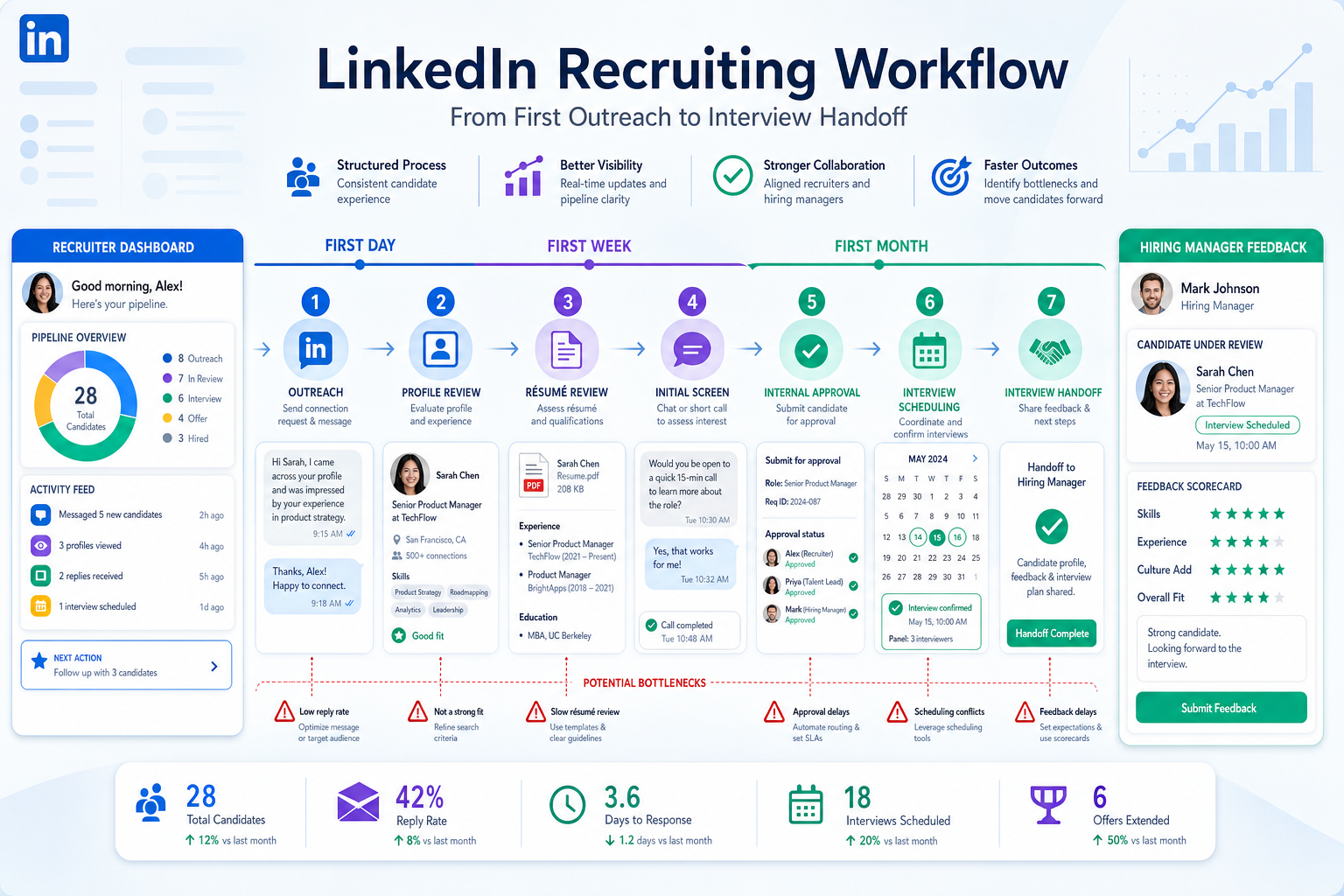
When hiring systems break down in the handoffs, this article helps recruiters judge software by timeline control to avoid delays and lost candidates.
That matters more than most software demos admit. When a recruiter is juggling inbound applications, sourced outreach, hiring manager follow-up, and the need to advertise for employees quickly, weak process design shows up everywhere: candidates wait too long, notes sit in inboxes, stakeholders miss context, and good applicants lose momentum before anyone makes a decision. For a solo recruiter, that means wasted hours and damaged credibility. For a small agency owner, it means lower consultant output and harder client conversations. For an internal talent lead, it means slower fills and a hiring process that feels less reliable than it should.
I have seen that pressure ease when repetitive top-of-funnel work is separated from final recruiter judgment. In practice, tools like StrategyBrain AI Recruiter can help by handling first-contact messaging, after-hours follow-up, and résumé collection across LinkedIn conversations, while the recruiter still decides who is worth advancing, how to assess fit, and what the next step should be. That division of labor is useful when your hiring systems break down not because recruiters lack expertise, but because too much admin work arrives before the real evaluation starts.
A good example comes from a familiar onboarding problem. When a finance consultant is about to join a team, success often depends on what is ready before day one: system access, the right logistics, clear expectations, and materials delivered at least 24 hours in advance. Then the work continues on a timeline through the first day, first week, and first month. In recruiting, the same pattern appears earlier in the funnel. Before a specialist candidate can contribute, someone has to line up communication, documents, stakeholder visibility, and stage ownership in the right order.
If that setup is missing, recruiters end up doing the equivalent of onboarding in reverse. They chase missing résumés, re-explain role details, rebuild candidate history from message threads, and remind hiring managers what was supposed to happen next. That is exactly why the best recruiting software matters: strong hiring systems create a usable timeline from first outreach to first interview and beyond, so applicant hiring does not depend on memory, heroics, or scattered tools.
- Why setup matters more than feature volume
- Best recruiting software categories to compare first
- Use a timeline mindset to evaluate hiring systems
- Must-have features for applicant hiring
- How recruiting software helps you advertise for employees
- Where AI-supported workflows fit
- Which hiring systems fit different team types
- Common buying mistakes
- FAQ
Why Setup Matters More Than Feature Volume
When teams search for the best recruiting software, they often start with feature checklists. In my experience, that is backwards. A better starting point is to ask whether the platform supports the preparation work that keeps hiring on track.
The onboarding reference above is helpful because it frames success as preparation plus timeline management. In recruiting terms, that means asking:
- What must be ready before a role goes live?
- What should a recruiter provide before the first serious candidate conversation?
- What must happen on day one of a new requisition, during the first week of sourcing, and during the first month of active interviewing?
- Who owns each handoff?
The best hiring systems answer those questions in the workflow itself. They do not just store candidates. They make the process visible enough that recruiters, hiring managers, and coordinators know what happens next.
Key insight: The strongest recruiting software behaves less like a résumé warehouse and more like an operating checklist for applicant hiring.
Best Recruiting Software Categories to Compare First
Before you compare individual vendors, compare the category you actually need. Most hiring systems are optimized around a primary operating model.
| Software category | Best for | Main advantage | Main watch-out |
|---|---|---|---|
| ATS-first systems | Structured internal hiring | Clear stage control, approvals, compliance support | Can feel rigid for highly fluid search work |
| Recruiting CRM-led platforms | Relationship-driven sourcing teams | Nurturing, talent pools, proactive outreach | May need stronger formal applicant hiring controls |
| All-in-one recruiting platforms | Growing HR teams | Balanced posting, tracking, scheduling, reporting | Module depth can vary |
| High-volume hiring systems | Frontline and operations hiring | Speed, automation, bulk workflows | Less nuanced for specialist roles |
| Enterprise suites | Large, multi-stakeholder organizations | Governance, integrations, analytics | Longer rollout and adoption cycle |
If your biggest pain is simply getting jobs live, keeping applicants organized, and moving feedback forward, ATS-first or all-in-one hiring systems are usually the right starting point. If your team does heavy outbound sourcing, you may also need workflow support beyond the ATS core.
Use a Timeline Mindset to Evaluate Hiring Systems
The most useful lesson from the onboarding checklist reference is not the finance role itself. It is the timeline logic: prepare before start, define the first critical handoffs, then review progress across the first day, week, and month. That same logic makes software evaluation sharper.
Before the role opens
Your recruiting software should support the work that has to happen before candidate flow begins:
- Requisition approval
- Job description review
- Posting destinations
- Hiring team alignment
- Interview plan setup
- Access and permissions
If those basics are not built into the workflow, recruiters become project managers for avoidable admin.
Within the first 24 hours
The reference article stresses what needs to be provided at least 24 hours before a consultant starts. In recruiting, there is an equivalent moment right after a job goes live or outreach begins. Candidates should receive the right information early: role scope, process expectations, contact path, and a smooth way to submit materials. This is especially important when you need to advertise for employees across multiple channels and cannot afford inconsistent messaging.
Across the first day, week, and month
Good hiring systems should make it easy to see what happens immediately, what happens after initial candidate flow begins, and what happens once multiple stakeholders are involved.
- First day: posting, pipeline setup, outreach launch, recruiter ownership
- First week: screening, scheduling, hiring manager reviews, source checks
- First month: funnel conversion trends, bottlenecks, interview discipline, offer movement
That timeline view is how experienced teams spot whether software supports real work or just presents a clean demo.
Must-Have Features for Applicant Hiring
Feature depth still matters, but only after workflow fit is clear. Here are the capabilities I would treat as non-negotiable in the best recruiting software.
1. Job posting and controlled distribution
If your team needs to advertise for employees regularly, the platform should publish approved roles across multiple destinations without forcing recruiters to update each posting manually.
2. Strong applicant tracking
This is the center of applicant hiring. Recruiters need stage movement, searchable records, communication history, duplicate control, and reliable status visibility.
3. Candidate intake that does not create friction
Whether candidates apply directly or respond through outreach, the system should make résumé and contact capture simple. Intake quality matters because weak capture creates rework later.
4. Scheduling and interview coordination
Slow scheduling often looks like a people problem when it is really a systems problem. Strong hiring systems reduce unnecessary back-and-forth and keep stage ownership visible.
5. Structured feedback and approvals
Hiring managers should be able to review, comment, and approve without disappearing into email. This is where many buyer evaluations fail: they optimize for recruiters and ignore occasional users.
6. Reporting tied to real decisions
Reporting should answer practical questions:
- Which sources produce qualified applicants?
- Where do candidates stall?
- How long does each stage take?
- Which roles are overloaded with admin work?
- Which managers delay progress?
7. Integrations and automation
Automation is useful when it removes repetitive admin and preserves recruiter judgment. It is less useful when it hides the workflow and makes errors harder to catch.
How Recruiting Software Helps You Advertise for Employees
Many teams searching for hiring systems are not only trying to track applicants. They are trying to advertise for employees effectively without adding manual work at every step.
Multi-channel posting
A strong system lets recruiters publish one approved version of a job to multiple sources. That improves speed and consistency.
Careers page support
The careers page should be easy to navigate, mobile-friendly, and closely aligned with how candidates actually apply.
Referral and sourced candidate intake
Not every applicant comes from a public ad. Good recruiting software should keep referrals, inbound applicants, and sourced prospects inside one trackable workflow.
Source visibility
If you cannot tell where quality applicants are coming from, you cannot improve spend, channel strategy, or recruiter effort allocation.
In practical terms, software helps you advertise for employees best when it connects promotion with conversion. Posting is only half the job; organized intake is the other half.
Where AI-Supported Workflows Fit
AI in recruiting software is useful when it supports throughput without pretending to replace recruiter judgment. That distinction matters.
In my own testing of LinkedIn-heavy workflows, I found that AI Recruiter was most helpful in the exact places where specialist searches can bog down early: initiating conversations, responding when candidates reply after hours, and collecting résumés and contact details from interested people without forcing the recruiter to manually babysit every thread. For agency recruiters and headhunters doing repeated outreach, that can keep momentum alive while still leaving final qualification in human hands. The recruiter still reviews the résumé, decides whether the profile really fits, and determines who reaches interview stage.
That matters because LinkedIn recruiting often creates a false workload signal. It looks like the problem is screening quality, when the real issue is that too much time is consumed by repetitive first-touch communication. If an AI-supported workflow can take over the repetitive outreach and follow-up layer, the core hiring systems become more effective because recruiters can spend more time on evaluation, stakeholder alignment, and candidate preparation.
When evaluating AI-supported recruiting tools, ask:
- What exact task is automated?
- Does the recruiter still control final decisions?
- How are candidate data and credentials handled?
- Can the workflow feed cleanly into your ATS or applicant hiring process?
- Is the benefit strongest for sourcing-heavy teams, internal hiring teams, or both?
Those are better questions than asking whether a platform simply “has AI.”
Which Hiring Systems Fit Different Team Types
Small and midsize businesses
SMB teams usually need easy setup, straightforward posting, fast applicant review, and reporting that does not require an analyst to interpret. Simplicity often beats feature sprawl.
Agency recruiters and headhunters
These teams need search flexibility, communication history, sourcing support, and strong handoff control. If much of the work happens on LinkedIn, a dedicated outreach layer can complement the main ATS rather than replace it.
Internal talent acquisition teams
In-house teams usually need stronger approvals, hiring manager collaboration, and process consistency across departments. That is where structured hiring systems create the most value.
High-volume hiring teams
Speed, mobile apply, stage automation, and bulk communication matter most. But even at volume, the process still needs clarity. Fast chaos is still chaos.
Common Buying Mistakes
Buying for the demo, not the handoff
Most recruiting software looks polished during a walkthrough. The real test is whether it handles the messy handoffs between recruiter, candidate, and hiring manager.
Ignoring pre-start setup
The onboarding reference is a reminder that success depends on what is ready before the work starts. The same is true in applicant hiring. If roles launch without structure, software will not rescue the process later.
Overvaluing automation without defining ownership
Automation should support a known workflow. If nobody owns the next action, the software just accelerates confusion.
Underestimating occasional users
Hiring manager adoption can make or break even the best hiring systems. If managers avoid the platform, recruiters are pulled back into manual chasing.
Not separating sourcing problems from tracking problems
Some teams need a better ATS. Others need stronger outreach support. Many need both, but in different proportions. Knowing which problem is primary leads to a better purchase decision.
FAQ
What is the best recruiting software for most teams?
The best recruiting software is the one that matches your actual hiring model. Most teams do best with hiring systems that combine strong applicant tracking, easy job posting, clean collaboration, and useful reporting.
How do hiring systems improve applicant hiring?
They standardize candidate movement, centralize communication, reduce missed handoffs, and make it easier to see where the process is slowing down.
Can recruiting software help us advertise for employees more effectively?
Yes. Good recruiting software improves multi-channel job distribution, careers page publishing, source tracking, and inbound application management.
Do I need both an ATS and sourcing automation?
Not always, but many agency and search-oriented teams benefit from pairing a core ATS with outreach support. The ATS manages structured applicant hiring, while sourcing automation helps keep candidate conversations moving.
Where does LinkedIn automation fit into hiring systems?
It fits best at the top of the funnel for teams that spend significant time reaching out, answering candidate questions, and collecting materials before formal screening begins.
What should I ask in a software demo?
Ask the vendor to show a real workflow: job launch, posting, outreach or application intake, recruiter review, manager feedback, scheduling, and reporting. That reveals much more than a feature tour.
Conclusion
The best recruiting software is not the platform with the most crowded product page. It is the one that gives your team a reliable sequence of preparation, outreach, applicant hiring, feedback, and decision-making. That is the real lesson behind strong hiring systems.
The onboarding checklist reference makes that clear in a different context: when critical materials, systems, and expectations are ready before someone starts, work goes better. Recruiting is no different. If your software supports what must happen before candidate momentum builds, your team is far less likely to lose control later.
So when you evaluate options, do not just ask what features exist. Ask whether the system helps you advertise for employees, capture early candidate interest, maintain stage discipline, and support recruiter judgment all the way through the process. That is how you choose recruiting software that actually improves hiring rather than just documenting it.














