


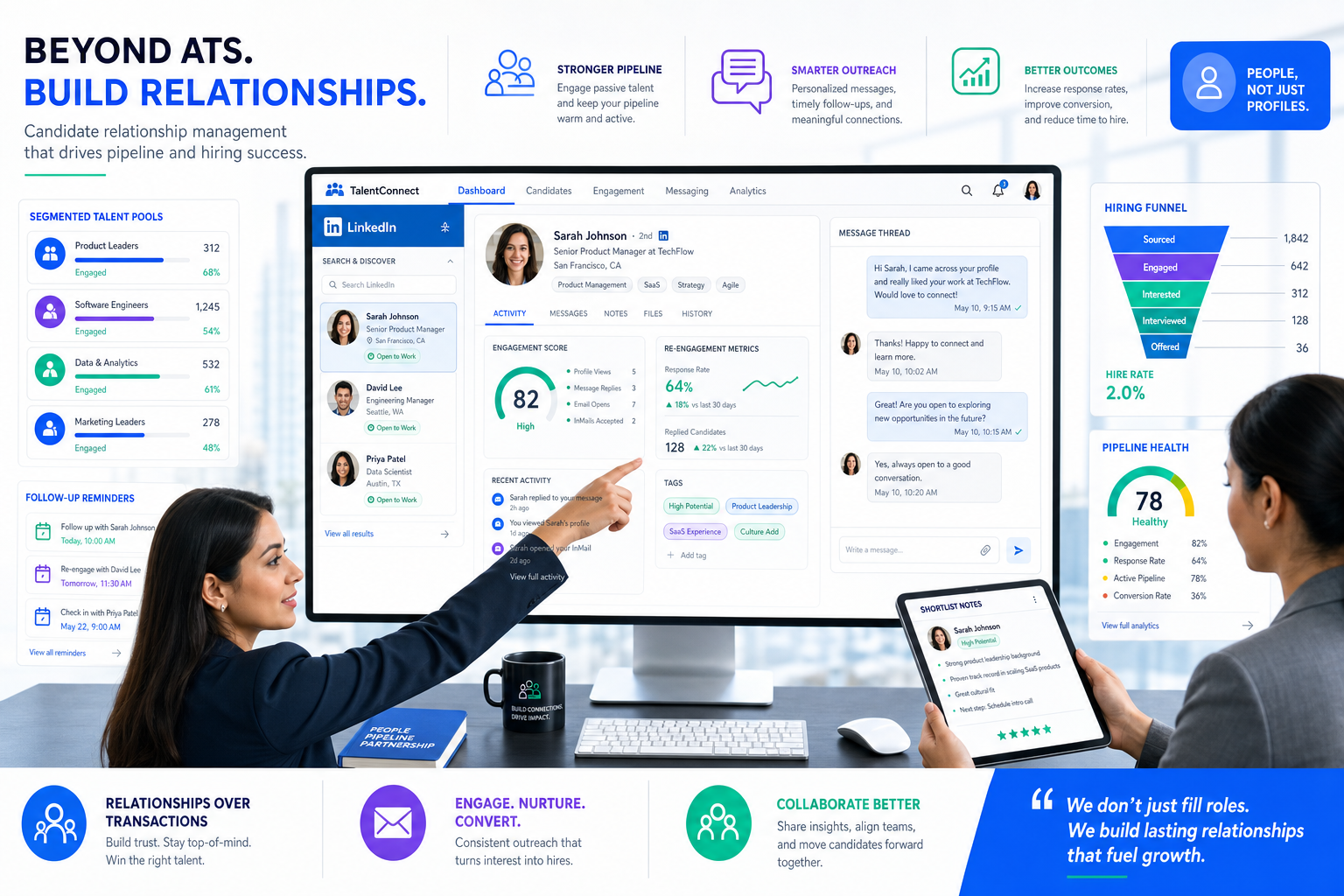
When late-stage drop-off and counteroffers keep hurting search teams, this candidate CRM guide helps agency leaders judge what to buy, re-engage talent faster, and avoid ATS-only mistakes.
That is the practical issue many recruiting teams are dealing with now. In a tight labor market, more qualified people are already employed, open roles can stay live longer than expected, salary expectations rise, and candidates often leave late in the process or accept counteroffers. For a solo recruiter, a small agency owner, or an in-house talent lead, the damage is familiar: slower shortlists, weaker follow-up, more duplicated outreach, and fewer warm candidates when a hiring manager suddenly needs interviews this week.
One workflow that has helped in that situation is using StrategyBrain AI Recruiter to handle the repetitive top-of-funnel work that usually gets dropped when recruiters are overloaded. In my experience, the most useful parts are always-on candidate messaging, multilingual outreach when talent sits across regions, and automated initial conversations that collect resumes and contact details before interest goes cold. The recruiter still owns final judgment, resume review, and whether someone should move into a formal hiring process, but the response gap becomes much easier to control.
You can see why this matters in the kind of market update many firms faced in 2023 and still recognize today: unemployment hovering around 5%, job postings staying well above pre-pandemic levels, and a visible rise in demand for interim finance and accounting talent. A recruiting team opens its requisition list, sees permanent roles still unfilled, then adds contract coverage because the business cannot wait. The recruiter searches past finance candidates, checks who previously wanted hybrid work, reopens old conversations, and tries to work out who is available now versus who only wanted a title jump six months ago.
Then the friction shows up. One strong candidate reaches final-stage discussions and pulls out without much warning. Another appears ready to resign, only to receive an aggressive counteroffer from their current employer. Meanwhile, the hiring team wants clarity on role scope, growth path, flexibility, and how the person will fit a lean team over the next 3, 6, or 12 months. That sequence exposes the real software problem: the best recruiting software is not just an ATS that records applicants. It needs a candidate CRM layer that supports candidate relationship management before, during, and between openings so recruiters can evaluate the best candidate relationship management software against actual market pressure.
Table of Contents
- Why Market Pressure Changed Recruiting Software Needs
- What Is a Candidate CRM?
- ATS vs Candidate CRM: Where Each One Matters
- Why Candidate Relationship Management Matters More in a Tight Market
- What to Look for in the Best Candidate Relationship Management Software
- Which Teams Need Candidate CRM Most?
- How to Evaluate Best Recruiting Software in Real Workflows
- Common Buying Mistakes to Avoid
- FAQ
Why Market Pressure Changed Recruiting Software Needs
The most useful lesson from recent hiring trend reports is not a single statistic. It is the chain reaction those conditions create inside recruiting teams. When unemployment stays unusually low and job openings remain elevated versus pre-pandemic levels, the available talent pool shrinks. When more candidates are already employed, outreach has to be more relevant. When demand rises for interim or project-based talent, recruiters need fast rediscovery of people who were not ready for a permanent move but may accept a contract assignment. And when flexibility becomes non-negotiable for many workers, prior candidate preferences suddenly become operational data, not nice-to-have notes.
That is why many teams discover their current stack is good at tracking applicants but weak at building future hiring supply. A job can be approved today, but the real advantage often comes from conversations that started three months ago, event leads saved six months ago, or silver-medalist candidates who were handled well during a previous search.
Key insight: In a tight labor market, the best recruiting software is the system that helps recruiters reuse trust, context, and timing—not just process new applications.
That is also where candidate relationship management becomes practical rather than theoretical. If late-stage drop-off, counteroffers, and role ambiguity are already common, recruiters need software that preserves conversation history, candidate intent, compensation context, work-location preferences, and follow-up responsibility across the whole team.
What Is a Candidate CRM?
A candidate CRM is recruiting software built to help teams attract, organize, engage, and re-engage talent over time. It is designed for proactive recruiting rather than only formal applicant processing. In practice, that means talent pools, outreach campaigns, segmentation, follow-up reminders, candidate notes, and rediscovery tools that let recruiters work from a living pipeline instead of restarting every search from zero.
Recruiters often use candidate CRM, recruitment CRM, and candidate relationship management software almost interchangeably. The common idea is relationship continuity. You are keeping a record of who someone is, what they wanted, when they were receptive, and what should happen next when a new role appears.
That matters most when the market makes reactive hiring expensive. If candidates are employed, selective, and likely to compare multiple options, then the relationship before application often matters as much as the process after application.
ATS vs Candidate CRM: Where Each One Matters
One of the easiest ways to buy the wrong recruiting software is to assume the ATS already covers CRM work. It usually does not. An ATS is built to manage a structured hiring process after someone applies. A candidate CRM is built to support sourcing, nurture, and re-engagement before application and between requisitions.
| Function | Applicant Tracking System | Candidate CRM |
|---|---|---|
| Primary job | Manage active applicants and hiring stages | Build and maintain candidate relationships over time |
| Best timing | After formal application begins | Before application and between hiring cycles |
| Typical strengths | Workflow control, compliance, interview coordination | Segmentation, outreach, rediscovery, nurture |
| Main users | Recruiters, coordinators, HR, hiring managers | Recruiters, sourcing teams, talent acquisition leaders |
| Core records | Applicants, stages, feedback, offers | Prospects, tags, campaigns, conversations, intent signals |
Most mature teams need both. The ATS keeps the hiring process structured. The CRM keeps the pipeline alive. In the market conditions described earlier, that distinction becomes even more important. A candidate might first appear as a passive prospect, then respond after-hours, then share a resume days later, then move into a formal interview process only after a recruiter clarifies flexibility, career path, or compensation expectations.
If your current software only handles the last step well, you probably do not yet have the best recruiting software for modern hiring pressure.
Why Candidate Relationship Management Matters More in a Tight Market
The reference hiring trends point to several recruiting realities that make CRM capability more valuable.
1. Scarcity changes the recruiter’s job
When most qualified candidates are already employed, recruiters spend more time on outreach quality, timing, and persistence. A strong candidate CRM helps track who engaged, who declined for now, who asked for hybrid flexibility, and who may reopen the conversation later.
2. Unfilled jobs increase the cost of bad follow-up
If job postings remain elevated and hard to fill, every avoidable delay matters. Recruiters need to know which warm candidates are already in the database, who should be contacted first, and what message will make sense based on prior conversations.
3. Interim hiring requires fast rediscovery
When businesses turn to contract or interim support because permanent hiring is stalled, a CRM becomes a practical search asset. It helps recruiters surface people who were open to project-based work, available sooner, or better suited to a transitional role.
4. Candidate expectations are harder to manage without history
High salary expectations, strong demand, and frequent counteroffers all make relationship context more important. Candidate relationship management helps preserve details that affect close rates: compensation range, title motivations, timing, commute limits, and what the candidate saw as a meaningful next step.
5. Flexibility is now selection data
When a large share of workers resist fully in-office setups, recruiters need a clean way to sort candidates by remote, hybrid, or office preferences. Without that, teams waste time pitching roles that do not match what candidates will seriously consider.
In other words, candidate relationship management is no longer just an efficiency feature. It is how recruiters maintain relevance in a market where candidates have more leverage and less patience.
What to Look for in the Best Candidate Relationship Management Software
The best candidate relationship management software should help recruiters act faster without making communication feel careless. These are the feature groups that matter most in real recruiting work.
1. Talent pools that reflect how recruiters actually search
You need pools by function, geography, seniority, skill, project type, and work model. In many teams, the most useful pools are not generic; they are built around repeat hiring patterns such as interim controllers, senior accountants open to hybrid work, or software engineers with prior startup experience.
2. Flexible tagging and searchable candidate history
Notes should capture more than resume facts. Good candidate relationship management records include timing, motivators, work authorization, compensation direction, interview impressions, and prior objections. This is what lets a recruiter reopen the right conversation quickly.
3. Outreach automation that still feels recruiter-led
Automation is useful only when it protects relevance. The best systems support follow-up sequences, reminders, and personalization by role family, location, or previous interaction. Generic blasting usually hurts response rates and employer reputation.
4. Fast sourcing and rediscovery workflows
When late-stage candidates fall out or a new requisition lands suddenly, speed matters. Recruiters should be able to find previous finalists, former referrals, event leads, and silver medalists without jumping between spreadsheets and inboxes.
5. Clear prospect-to-applicant handoff
A candidate CRM should connect cleanly with the ATS so recruiters know when a prospect becomes an applicant, who owns the record, and what data moves automatically. Bad handoffs create duplicate work and incomplete histories.
6. Reporting that helps managers make decisions
Useful analytics answer practical questions: Which talent pools respond best? Where are campaigns stalling? How long does re-engagement take? Which recruiters are leaving too many warm candidates untouched? Dashboards should support action, not just executive screenshots.
7. Candidate experience tools that reduce dropout risk
Late-stage drop-off is rarely caused by one thing alone. It often reflects poor communication, unclear process, slow follow-up, or mismatch on expectations. Career pages, sign-up flows, scheduling support, and consistent messaging all play a role.
8. Practical AI support
AI is useful when it reduces repetitive work without replacing recruiter judgment. In my own testing, that means message drafting, initial outreach, after-hours response handling, multilingual communication, scheduling assistance, and clean collection of candidate information. It does not remove the need for recruiter review.
That is why I found AI Recruiter most helpful as a workflow extension rather than a decision-maker. It can continue conversations after the recruiter logs off, ask candidates about openness to a role, answer basic role questions, and gather resumes or contact details. I still decide whether a profile is worth presenting and whether the match is strong enough to move into interviews, but it reduces the lag that often causes passive candidates to disappear. For recruiters working heavily on LinkedIn, the related usage notes here line up with the same practical benefit: maintaining momentum when manual outreach becomes inconsistent.
Which Teams Need Candidate CRM Most?
Staffing agencies and search firms
Agencies benefit heavily from searchability, segmented talent pools, recruiter productivity, and repeat re-engagement. In markets where candidates are juggling counteroffers and selective moves, agencies need to preserve every useful conversation.
Best fit: firms with repeat functional searches, project-based hiring, or high outbound volume.
In-house talent acquisition teams
Internal teams often already have an ATS, but still need stronger nurture capability for silver medalists, event leads, referrals, and future hiring campaigns. Candidate relationship management becomes especially useful when headcount planning changes quickly.
Best fit: companies with ongoing departmental hiring, employer branding needs, and location-specific pipelines.
Enterprise recruiting organizations
Larger teams usually need governance, permissions, integrations, analytics, and consistent segmentation across business units. The bigger the hiring network, the more costly poor candidate history becomes.
Best fit: multi-region organizations with shared recruiting operations and high coordination needs.
Small and growing businesses
Smaller companies may not need every advanced feature, but they do need software that keeps promising candidates from slipping away. A lightweight CRM can make a major difference when one recruiter or founder is managing sourcing between other responsibilities.
Best fit: lean teams that need simple follow-up, talent pools, and basic automation without heavy administration.
How to Evaluate Best Recruiting Software in Real Workflows
The strongest buying process starts with actual recruiting conditions, not vendor slides. Use the market-pressure scenario from the opening as your test: hard-to-fill roles, selective candidates, changing role scope, flexibility questions, and late-stage risk.
- Define the role need clearly. One of the biggest hiring lessons from market updates is that many teams have not done enough work on role definition. Before evaluating software, decide what information recruiters need to communicate accurately: responsibilities, growth path, work model, and near-term business goals.
- Map the next 3, 6, 9, and 12 months. If hiring needs shift between permanent and interim support, the CRM should help recruiters organize candidates by timing and work type, not just by current open job.
- Test the re-engagement workflow. Can a recruiter quickly find past candidates, review notes, send personalized outreach, and track replies? This is one of the clearest markers of a useful candidate CRM.
- Review flexibility and expectation tracking. The system should make it easy to record remote, hybrid, compensation, title, and availability preferences. Those fields are central in today’s market.
- Check late-stage communication support. Candidate drop-off often starts with small communication failures. Look for reminders, stage visibility, and easy collaboration between recruiter and hiring manager.
- Verify recruiter control over judgment. Automation should help with speed and consistency, but final qualification, shortlist decisions, and interview movement should remain with the recruiter.
- Evaluate adoption under pressure. The best recruiting software is the one a busy recruiter will actually use during a live search, not the one that looks most impressive in a static demo.
| Evaluation Area | What to Ask | Why It Matters |
|---|---|---|
| Role clarity support | Can recruiters store and share role scope, growth path, and work model clearly? | Reduces mismatch and late-stage withdrawal |
| Re-engagement speed | How fast can we find and contact warm candidates? | Critical in tight labor markets |
| Candidate history | Does the system preserve useful context beyond resume data? | Improves personalization and close rate |
| ATS handoff | What happens when a prospect becomes an applicant? | Prevents duplicate work and lost information |
| Automation quality | Does it save time without sounding robotic? | Protects recruiter credibility |
| Flexibility tracking | Can we segment by remote, hybrid, and location preference? | Supports realistic candidate targeting |
| Reporting | Will the data improve team decisions? | Supports ongoing optimization |
Common Buying Mistakes to Avoid
Buying for features instead of hiring conditions
If your team is dealing with scarce talent, long-open roles, and counteroffers, the real question is not whether software has many modules. It is whether the workflow helps recruiters preserve momentum and trust.
Assuming the ATS already handles relationship management
Many teams only discover this gap when they try to reopen a search and realize they have no structured way to revisit past interest, candidate preferences, or incomplete conversations.
Ignoring role-definition problems
Software cannot fix a poorly scoped role by itself. If hiring managers are unclear about responsibilities, support needs, or future team structure, even the best CRM will struggle to help recruiters tell a coherent story.
Overlooking flexibility and growth-path data
Candidates increasingly make decisions based on work model and future progression. If your records do not capture those details, re-engagement becomes guesswork.
Trusting vague AI claims
Ask where automation actually saves recruiter time. Does it help with outreach, follow-up, after-hours replies, multilingual communication, or collection of resumes and contact details? Or is it mostly presentation? Practical use matters more than buzzwords.
Forgetting candidate-side transparency
The opening case showed how candidates can disappear late when expectations are not aligned. Good recruiting software should make the process clearer, not more confusing.
FAQ
What is a candidate CRM in recruiting?
A candidate CRM is software that helps recruiters build, organize, and re-engage relationships with potential hires over time. It is especially useful for sourcing, talent pooling, follow-up, and future hiring readiness.
How is candidate relationship management different from an ATS?
An ATS manages formal applicants and hiring stages. Candidate relationship management focuses on prospects before application and between openings. Most recruiting teams benefit from both working together.
Why does candidate CRM matter more in a tight labor market?
Because recruiters need better timing, better context, and better follow-up when candidates are already employed, selective, and likely to receive competing offers or counteroffers.
What features matter most in the best candidate relationship management software?
Look for strong talent pools, tagging, candidate history, outreach automation, re-engagement workflows, ATS integration, reporting, and candidate experience support. Practical AI can also help if it reduces repetitive work while leaving final decisions to recruiters.
Can AI help with candidate CRM workflows?
Yes, especially for initial outreach, after-hours responses, multilingual communication, and collecting resumes or contact details. The recruiter should still handle final qualification and next-step decisions.
Who benefits most from candidate relationship management?
Search firms, staffing agencies, in-house talent acquisition teams, and growing businesses with recurring hiring needs usually benefit the most, especially when outbound recruiting or repeat re-engagement is a large part of the workflow.
Conclusion
The best recruiting software is not the one that looks most comprehensive on paper. It is the one that helps recruiters operate effectively when the market is tight, candidates are selective, and every delayed response can cost you a hire.
A strong candidate CRM gives recruiting teams a way to preserve context, act faster, and reconnect with the right talent before urgency turns into chaos. That is the practical value of candidate relationship management, and it is why the best candidate relationship management software should be evaluated through real hiring pressure, not feature lists alone.
If your team already has an ATS but still struggles with re-engagement, late-stage dropout, or weak pipeline continuity, that is usually the sign to look harder at the CRM layer. Start with your workflow, your market realities, and your candidate expectations. The right software choice usually becomes clearer from there.














