


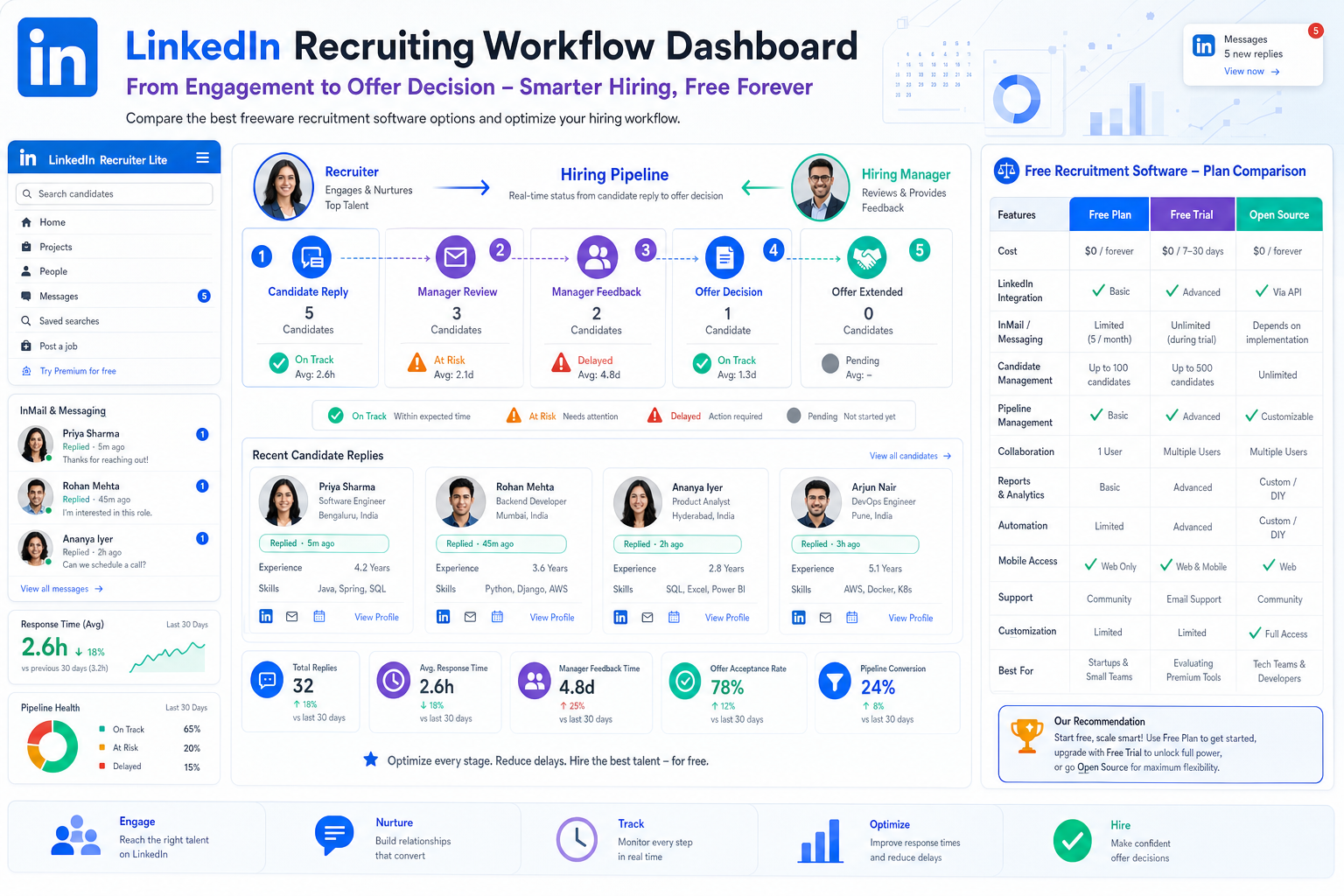
When freeware recruitment software is under review, recruiters can use this framework to spot delay risks before candidates disappear.
That matters most in a market where hiring demand stays strong while the available candidate pool feels smaller every month. When recruiters cannot see who replied last, which hiring manager still owes feedback, or which role needs an offer decision now, delays turn into lost placements, weaker client trust, and avoidable candidate drop-off. For in-house teams, the damage looks different but lands the same way: slower hiring, more manual chasing, and a worse candidate experience precisely when speed matters most.
In that kind of environment, I have found that AI Recruiter is most useful when treated as support for the earliest and most repetitive parts of the workflow, not as a substitute for recruiter judgment. It helps keep candidate conversations moving after hours, can communicate across languages when talent markets are wider than one region, and can collect resumes and contact details from interested prospects so the recruiter can focus on review, qualification, and the final next step. Used that way, it removes lag from outreach-heavy hiring while leaving the actual decision with the recruiter.
A useful way to understand the pressure is to look at what happens when job growth rises faster than recruiter capacity. In one Canadian market update, employment growth came in well above forecast, with 31,800 jobs added versus an expected 22,300, while recruiters were already reporting difficulty finding available job seekers. That is not just a macro story. It translates directly into live recruiting work: a recruiter opens the requisition list, checks which shortlisted candidate has gone quiet, replies to a late-message prospect who is already fielding other options, and then nudges a hiring manager for a decision that should have been made earlier.
The lesson is not simply that the market is competitive. It is that a candidate-favoured market exposes whether your process can confirm quality candidates quickly without becoming careless. That is exactly where the search for the best recruiting software becomes practical. If you are comparing freeware recruitment software, a free online applicant tracking system, or a free ATS, the real question is whether the tool helps your team move fast, stay organized, and make decisions in sequence before good candidates disappear.
Table of Contents
- Why speed now decides hiring outcomes
- What freeware recruitment software really means
- Quick comparison by hiring scenario
- How recruiters should evaluate free recruiting software
- Features that remove the most friction
- What the best recruiting software looks like by scenario
- Common mistakes when choosing a free ATS
- Implementation advice for recruiters and hiring managers
- FAQ
Why Speed Now Decides Hiring Outcomes
Experienced recruiters do not need a lecture on market pressure. They see it in the pipeline. When employment demand expands and employers are optimistic enough to keep opening roles, quality candidates often have more choice, more conversations, and less patience for internal delay. That was the central message behind the employment commentary referenced above: strong job growth does not just create opportunity for employers, it also puts more strain on an already limited candidate pool.
In practice, that means the old recruiting weaknesses become expensive very quickly. Slow feedback from hiring managers, fragmented notes, inbox-only communication, and unclear ownership all reduce the odds of converting strong applicants. The market may change, but the operational failure pattern stays familiar.
That is why recruiters looking for the best recruiting software should start with process readiness rather than feature envy. Good software helps teams set evaluation steps in advance, keep candidate status visible, and move toward an offer without unnecessary waiting. It should support fast decisions without encouraging poor decisions.
Practical takeaway: In a candidate-led market, software earns its value by reducing delay between interest, review, feedback, and offer readiness.
I have seen this most clearly in outreach-heavy searches. When candidate replies arrive outside working hours or across time zones, waiting until the next day can cost momentum. That is one reason I see value in using StrategyBrain AI Recruiter alongside a core ATS workflow. It can keep initial communication active, answer common role questions, and gather contact details while I still retain responsibility for screening the resume, judging fit, and deciding who moves forward. It is especially useful when the bottleneck is response speed rather than final assessment.
What Freeware Recruitment Software Really Means
Freeware recruitment software is any recruiting tool that allows employers or agencies to run at least part of the hiring workflow without an upfront subscription fee. But recruiters should be careful: “free” can mean several different models, and those models affect day-to-day usability more than many first-time buyers expect.
- Completely free: Ongoing use without subscription charges, often with limited functionality.
- Free plan: No-cost access with restrictions on users, jobs, records, automation, or reporting.
- Free trial: Temporary access intended for evaluation, not long-term use.
- Open source: No license fee in the usual sense, but setup, hosting, maintenance, and support become your responsibility.
This distinction matters because many teams search for a free online applicant tracking system expecting a complete no-cost operating system for hiring, only to discover they are really looking at a limited entry tier or a short trial. In a fast-moving market, limits on users, job volume, or candidate history can become a workflow problem very quickly.
So the first rule is simple: do not compare all free recruiting software as if it offers the same kind of freedom. A plan that works for an occasional hiring manager may fail completely for a multi-recruiter search team.
Quick Comparison by Hiring Scenario
The fastest way to compare options is by use case rather than by vendor promise. The table below shows how I would frame a shortlist before testing any platform.
| Hiring scenario | Free model that usually fits best | Main limits to check | Workflow risk if limits are weak | Features to prioritize |
|---|---|---|---|---|
| Small business with steady hiring | Ongoing free plan | Users, active jobs, collaboration access | Managers fall back to email and spreadsheets | Pipeline tracking, posting, notes, scheduling |
| Internal HR team with occasional openings | Completely free or light free tier | Candidate records, job limits, history retention | Loss of visibility between openings | Candidate profiles, status tracking, templates |
| Agency or search firm | Usually trial for testing, free plans often too narrow | User seats, search filters, volume caps | Recruiters outgrow the system immediately | Resume management, searchability, collaboration |
| Candidate-experience focused team | Free tier with communication support | Automation, email handling, scheduling | Slow replies and poor stage clarity | Automated updates, calendars, shared status |
| Outreach-heavy sourcing workflow | ATS plus workflow support tools | Integrations, message handling, candidate capture | Interest is lost before review begins | Central tracking, messaging support, handoff discipline |
That last scenario is often overlooked. A free ATS can organize candidates well after they apply, but many recruiters also need help before formal application begins. In those cases, an ATS and an outreach support tool can work together, provided the recruiter controls qualification and documentation carefully.
How Recruiters Should Evaluate Free Recruiting Software
When I evaluate software, I do not start by asking which platform has the longest feature list. I start by asking where the process currently loses candidates.
1. Start with the actual hiring model
An agency handling multiple client searches has very different requirements from a single-site HR team. Internal recruiters often need stronger requisition control and manager feedback discipline. Search firms usually need better candidate searchability, reuse of prior profiles, and multi-role coordination.
If your biggest problem is candidate response lag at the top of funnel, you may also need workflow support beyond the ATS itself. That is where I have used StrategyBrain AI Recruiter carefully: to keep first-contact conversations active, answer routine role questions, and collect resumes from interested talent while I focus on fit assessment. It helps, but it does not replace final recruiter review.
2. Check the limits before the feature list
In free recruiting software, the practical breaking points are usually limits, not missing headline features. Review these first:
- How many recruiters and hiring managers need access?
- How many open jobs can run at once?
- How many candidate records can remain visible?
- Are communication and scheduling included or restricted?
- Can you keep historical context for future searches?
A tool that looks generous in a demo can fail in daily use as soon as one extra vacancy opens or one more stakeholder needs visibility.
3. Map the software to your hiring stages
The best recruiting software should reflect how your team actually works: sourcing, screening, manager review, interview coordination, feedback, and offer discussion. If the workflow cannot be represented clearly, people create side systems. Once that happens, your ATS becomes a record-keeping chore instead of the hiring control center.
4. Test communication speed, not just record storage
In a candidate-tight market, communication speed matters as much as database quality. The value of a free online applicant tracking system goes up sharply when it keeps all follow-up visible and reduces handoff lag. If communication still lives across personal inboxes and memory, the system is not doing enough.
5. Evaluate decision readiness
The reference market update made an important point that still holds: employers need their valuation and decision process set in advance if they want to move quickly on quality candidates. Translate that into software evaluation. Does the system help your team decide, or only record what happened after the fact?
Features That Remove the Most Friction
When teams search for a free ATS, they often overvalue advanced extras and undervalue workflow control. In my experience, the following features matter most.
Pipeline tracking
If a recruiter cannot instantly see who is new, screened, shortlisted, scheduled, interviewed, or stalled, the software is not carrying its weight. Pipeline visibility is the core operating benefit.
Candidate profiles and resume management
A usable system gives one clear view of resume history, notes, stage movement, and prior interactions. For agencies and headhunters, this also affects future candidate reuse, not just current requisitions.
Interview scheduling and stakeholder follow-up
One of the biggest causes of lost momentum is waiting for calendars, feedback, or approvals. Good recruiting software reduces back-and-forth and keeps ownership visible.
Team collaboration
Hiring managers should be able to review, comment, and decide without forcing recruiters to relay everything manually. Shared visibility is one of the most underrated applicant tracking system benefits.
Automated communication
Basic automation for acknowledgments, interview confirmation, and status updates can materially improve candidate experience. In a fast market, consistency matters.
Sourcing and outreach support
Some teams also need help handling the repetitive top-of-funnel work that happens before a candidate formally enters the ATS. In my own workflow, I have found value in using AI Recruiter conversation handling for outreach continuity, especially when candidates reply late or ask routine questions about role basics. The important discipline is to treat that support layer as an accelerator for engagement, while the recruiter still reviews the resume, checks alignment, and decides whether the person belongs in the live pipeline.
What the Best Recruiting Software Looks Like by Scenario
No software is universally best. The better question is what “best” means in your recruiting environment.
Best for small businesses
For small teams, the best recruiting software is usually the one that can be adopted quickly and keeps hiring managers inside one simple workflow.
- Prioritize an ongoing free tier
- Make sure managers can access records
- Keep stage definitions simple
- Choose communication tools over flashy extras
Best for internal hiring teams
Internal teams usually need governance and consistency more than sourcing complexity.
- Approval-friendly workflows
- Clear ownership by stage
- Simple manager feedback collection
- Reliable candidate status visibility
Best for agency recruiting
Agencies need speed, searchability, and flexibility. Many free tools are too restrictive here, especially around user seats or candidate volume.
- High search usability
- Strong resume organization
- Shared recruiter notes
- Support for multiple concurrent searches
Best for candidate experience
If candidate drop-off is your real problem, focus on the parts of the workflow that keep people informed and moving.
- Fast acknowledgments
- Clear interview scheduling
- Timely updates
- Less internal delay between stages
Best for outreach-heavy recruiting
Some recruiting teams need an ATS plus a support layer for first contact and message continuity. That does not change the need for a central system of record, but it does change what “best” looks like. In these environments, the best setup often combines structured tracking with tools that can sustain candidate engagement outside office hours and across regions, while the recruiter retains control over qualification and advancement.
Common Mistakes When Choosing a Free ATS
Choosing based on free access alone
A no-cost label is not a workflow strategy. Free trials, free plans, and open-source systems solve different problems and create different tradeoffs.
Ignoring the speed problem
The reference market example is useful here: when candidates are fielding multiple offers, slow decisions become a competitive disadvantage. If the software does not reduce response lag, it may not solve your real problem.
Overvaluing advanced features before core execution
AI features, search enhancements, or automation can be helpful, but not if the basics are weak. Start with posting, tracking, notes, communication, and decision flow.
Letting communication sit outside the system
If updates live in inboxes, chat messages, or personal memory, your process is fragile. The same applies when outreach support is used without a clean handoff into the ATS.
Failing to plan for growth
A free online applicant tracking system may fit current hiring volume and fail six months later. Check what happens when you add roles, stakeholders, or regions.
Implementation Advice for Recruiters and Hiring Managers
Even strong software disappoints when implementation is loose. I recommend a few basics before rollout:
- Define stages in advance. Do not let every recruiter invent a different pipeline.
- Set minimum record rules. Source, owner, current stage, and next step should always be visible.
- Clarify manager responsibilities. Managers need simple actions: review, comment, decide.
- Use message templates carefully. Consistency helps, but communication still needs context.
- Review bottlenecks monthly. Look for stalled stages, delayed feedback, and capacity limits.
- Create a clean outreach-to-ATS handoff. If you use tools like StrategyBrain AI Recruiter for initial engagement, decide exactly when a contact becomes an active candidate record, who reviews the resume, and who owns the next action.
That last point matters more than many teams think. In my own use, the value of AI-supported outreach is not that it makes the recruiter less necessary. It is that it removes repetitive front-end delays so I can spend more time evaluating resumes, comparing fit, and moving the right people forward. The software helps me work faster; it does not make the hiring judgment for me.
FAQ
Is freeware recruitment software enough for a serious hiring team?
It can be, if the workflow is straightforward and the limits match your volume. For many teams, the real issue is not whether the tool is free, but whether it supports the process under real hiring pressure.
What is the difference between a free ATS and a free online applicant tracking system?
In practice, they are often used interchangeably. Both usually refer to recruiting software that helps track applicants through hiring stages. The more important distinction is whether the system is truly free, part of a limited plan, or only a trial.
Can a free ATS work for agencies?
Sometimes, but agencies often outgrow free tiers quickly because of user limits, candidate volume, and search complexity. They need to test carefully before committing.
Why does speed matter so much in recruiting software selection?
Because strong candidates often have options. In a candidate-favoured market, the delay between interest and decision can determine whether you hire the person at all.
Where does AI-assisted outreach fit in?
It fits best at the top of funnel, where repetitive messaging, after-hours replies, and initial information gathering can slow recruiters down. It should support, not replace, recruiter review and final decisions.
Is open-source recruiting software a good option?
It can be for teams with technical resources and a clear maintenance plan. But open source is not automatically simpler or cheaper once hosting, support, and upkeep are included.
Conclusion
The search for the best recruiting software gets easier when you stop treating it as a brand contest and start treating it as a process decision. In a market where hiring demand can rise faster than candidate availability, freeware recruitment software only helps if it keeps your workflow visible, shortens response time, and supports timely decisions.
If you are comparing a free online applicant tracking system or a free ATS, look past the free label and focus on what happens in live recruiting: who owns each stage, how quickly candidates get a response, whether hiring managers can act without friction, and how cleanly outreach converts into structured review. That is the standard experienced recruiters use, and it is the one most likely to help you hire well under pressure.














