


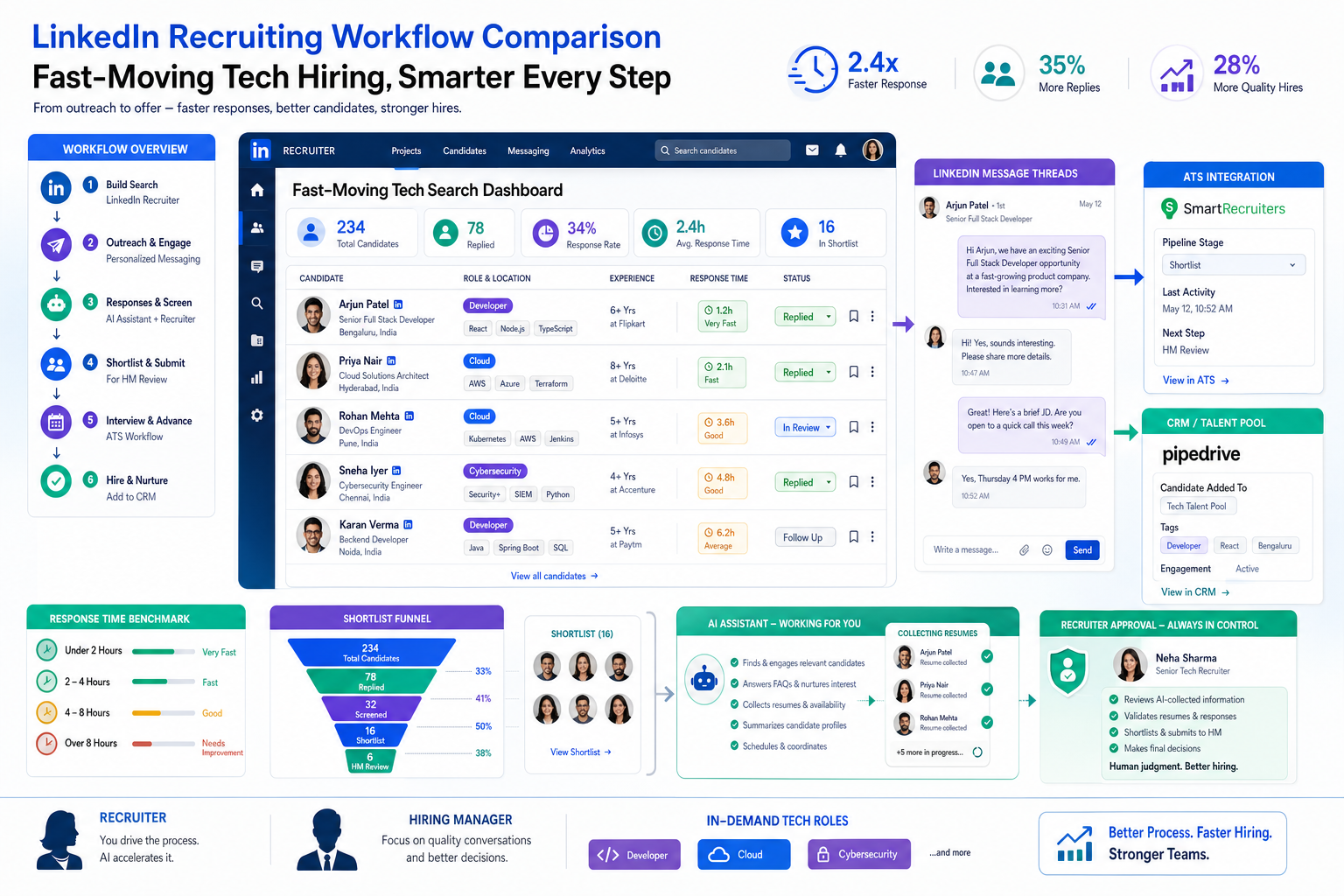
When business recruitment stalls between exact-match demands and missed candidate replies, this article helps agency leaders judge software by workflow fit to avoid slower shortlists and lost placements.
That matters because the cost of weak tooling is rarely just administrative. A small agency owner feels it when consultants lose candidates between inboxes, spreadsheets, and LinkedIn threads. A solo recruiter feels it when follow-up slips while juggling several client searches. An in-house talent lead feels it when hiring managers wait too long, shortlist quality drops, and a role stays open because the team could not move quickly enough around a narrow skills brief.
In my own workflow, I have found that StrategyBrain AI Recruiter is most useful when the problem is not judgment but repetitive outreach and response handling. Used carefully, it can keep candidate conversations moving on LinkedIn, reply across time zones, and collect resumes and contact details from interested prospects while the recruiter still makes the final call on fit, resume quality, and whether a candidate should move forward.
You see the need for that most clearly in fast-moving tech hiring. A client opens a search for a developer, cloud specialist, or cybersecurity hire, and the brief is unusually exacting: specific languages, platform exposure, systems experience, and enough practical depth to contribute quickly. The recruiter starts by reviewing the requisition, checking prior candidates with similar stacks, and sending outreach to people who are often no longer available within days if the first response window is missed.
Then the bottleneck appears. One hiring manager wants every requirement matched, another is willing to consider someone at roughly seventy percent if they can learn fast, and candidates want to know about flexibility, growth, and compensation before they commit to a conversation. That scene exposes the real software question behind best recruiting software: in business recruitment, and especially in a recruitment business serving technical roles or ny recruiting teams under speed pressure, your system has to support exact-match searching, fast communication, reusable talent pipelines, and recruiter control at the same time.
- Why recruiting software matters in hard-to-fill hiring
- What recruiting software actually means today
- ATS vs recruiting CRM vs RMS staffing software
- Features that matter most in business recruitment
- What tech hiring teaches software buyers
- Best recruiting software by use case
- How to choose the right system
- What ny recruiting teams should consider
- Common buying mistakes
- FAQ
Why recruiting software matters in hard-to-fill hiring
Some of the clearest lessons about recruiting software come from information technology hiring. In technical searches, the market changes quickly, candidate supply is uneven, and hiring teams often write requirements in very specific terms. Recruiters are expected to move fast, but they also need accuracy. That combination creates pressure that basic applicant storage alone cannot solve.
When a role requires exact proficiencies in programming languages, cloud environments, security standards, systems integration, or delivery experience, the workflow breaks down if candidate information is scattered. You need to know who replied, who declined, who might be suitable with some flexibility, and who should be revisited if the brief changes. In real business recruitment work, software earns its value by helping recruiters manage that moving target without losing the human judgment that determines fit.
That is also why specialized recruiting teams often outperform generalist workflows in difficult markets. The software should support a recruiter’s ability to maintain active pipelines, pre-screen for both technical and cultural fit, advise clients on realistic requirements, and keep momentum while stakeholders are still deciding how rigid they want to be.
What recruiting software actually means today
When buyers search for the best recruiting software, they are often comparing several categories at once. In practice, recruiting software is the set of tools a team uses to attract applicants, organize candidate data, communicate with prospects, move people through interviews, and support hiring decisions. That is why modern category language often sounds broader than a single ATS.
For business recruitment, this matters because internal hiring teams and agency recruiters do not operate the same way. A corporate HR team may prioritize requisition control, approvals, and hiring manager visibility. A recruitment business usually needs stronger candidate relationship management, client coordination, pipeline reuse, and recruiter speed.
A simple definition helps. An applicant tracking system for recruiters is software that stores applications and tracks candidates through hiring stages. A candidate relationship management system helps recruiters build and nurture talent pools over time, even before a live role exists. A talent pipeline is the active and future-ready group of candidates a team can return to quickly. Candidate scoring is a structured way to rank fit based on selected criteria, while a skills taxonomy is the shared framework used to organize capabilities, job requirements, and search filters.
One of the biggest applicant tracking system benefits is operational consistency. Teams stop relying on inbox memory, spreadsheets, or side notes. The broader advantages of applicant tracking system usage show up in cleaner process control, better visibility, and stronger collaboration between recruiters and hiring managers.
ATS vs recruiting CRM vs RMS staffing software
This is where many software evaluations go wrong. Vendors and buyers often use ATS, recruiting CRM, and RMS or staffing software almost interchangeably, but they are not the same thing. If your team does not separate these functions early, you can end up buying software that fits the demo better than the workflow.
| Software Type | Primary Job | Best Fit | Operational Focus |
|---|---|---|---|
| ATS | Track applicants through hiring stages | Internal HR and structured recruiting teams | Requisitions, workflows, compliance, interview stages |
| Recruiting CRM | Manage relationships with candidates over time | Agency recruiters and proactive talent teams | Sourcing, outreach, nurture, pipeline reuse |
| RMS or staffing software | Support agency and staffing operations | Staffing firms and multi-client recruitment business models | Candidates, clients, jobs, recruiter activity, placements |
If you are hiring for one company, an ATS may be the operational center. If you run a recruitment business, the CRM or RMS layer may matter just as much because recruiter productivity depends on speed to shortlist, repeatable outreach, and visibility across multiple client accounts. That is why the best recruiting software for agencies often looks different from the best recruiting software for a single employer brand.
From a practitioner point of view, the real question is not which label sounds best. It is whether the system supports your recruiters’ daily work. For example, if recruiters spend most of the day re-engaging past candidates and balancing several open client searches, a pure ATS may feel restrictive. If your HR team needs approval paths, interview panels, and structured hiring records, a CRM alone may not be enough.
Features that matter most in business recruitment
The strongest buying criteria are usually not flashy. In business recruitment, the most valuable software features tend to be scalability, customization, workflow automation, integrations, and fit with your current hiring model. These are the capabilities that determine whether a system helps your team six months after launch, not just in the first demo.
1. Workflow fit
Start with the process you already run. Do recruiters source first and open jobs second, or does everything begin with approved requisitions? Do hiring managers review every applicant, or only shortlisted profiles? The best recruiting software should match the actual motion of your team, not force everyone into an awkward sequence.
This becomes even more important in technical recruiting. When requirements change after the search starts, the system should let recruiters revisit prior talent pools, update search logic, and preserve communication history without creating duplicate work. A good ATS creates consistent stages, handoffs, and ownership. For recruiters, that means fewer dropped candidates. For HR, it means cleaner visibility. For hiring managers, it means less confusion about who is doing what next.
2. Automation that removes admin, not judgment
Automation should reduce repetitive work such as interview scheduling, status updates, reminders, and routine pipeline movement. It should not replace recruiter judgment on fit, motivation, compensation alignment, or stakeholder management. In experienced teams, the best automation handles clerical load so recruiters can spend more time qualifying, closing, and advising managers.
That distinction is especially useful in candidate outreach. I have used AI Recruiter in scenarios where after-hours replies and high message volume would normally slow a search down. It helped maintain conversation flow, answer routine role questions, and capture resumes from interested people, but the meaningful screening step still stayed with me. That balance is the right one for serious recruiters.
3. Integrations
Recruiting rarely happens in one tool. Your system should connect cleanly with email, calendars, job boards, assessment tools, interview scheduling, HR systems, and onboarding workflows. If recruiters have to retype candidate notes in multiple places, adoption will suffer. If hiring managers cannot access interview feedback easily, delays will multiply.
4. Search, filtering, and reusable pipelines
Fast-changing fields like IT expose this requirement quickly. Recruiters need to search by skill combinations, prior client submissions, availability, communication history, and adjacent experience. If a manager first asks for an exact match and later relaxes the brief, your software should help you find the near-match candidates you already touched rather than restarting the search from zero.
5. Customization
No two recruiting teams define process exactly the same way. A healthcare staffing desk, an executive search consultant, a ny recruiting agency team, and a startup talent lead all need different fields, stages, permissions, and reporting views. Good customization allows the system to reflect the process without becoming a maintenance project.
6. Security and data handling
Candidate data is sensitive. Any serious review of the best recruiting software should include permission controls, retention settings, audit visibility, and sensible data handling policies. Recruiters, HR leaders, and agency owners should know who can view candidate records, where notes live, and how the system supports responsible handling of personal information.
What tech hiring teaches software buyers
The reference point from IT recruiting is useful because it makes the hidden selection criteria obvious. In this market, employers often want exact technical fit, but the talent market moves too quickly for slow, rigid process. Candidates also evaluate opportunities differently now. Salary still matters, but so do flexibility, growth, impact, and whether the company can communicate clearly enough to look credible.
That creates a recurring tension. Hiring managers want precision. Recruiters need speed. Candidates expect relevant outreach and timely answers. The best recruiting software helps all three sides at once by preserving context: what the role requires, how strict the brief really is, who has already been contacted, what the candidate asked, and whether the team is hiring for a short-term stack or long-term adaptability.
One practical lesson is that rigid checklists can narrow the talent pool more than necessary. In difficult hiring markets, a candidate who meets most of the requirements and can learn the rest may still be a strong hire. Your system should make it easy to tag and revisit those candidates if the brief softens. Otherwise, recruiters repeat work, clients get frustrated, and promising talent falls out of view.
Key insight: The best recruiting software does not just organize applicants. It preserves the decision context around fast-changing roles so recruiters can react when clients tighten or loosen requirements.
Best recruiting software by use case
There is no universal winner for every team. The better approach is to evaluate the best recruiting software by use case, because business recruitment needs vary sharply by environment.
Staffing agencies and recruitment business teams
A recruitment business usually needs strong CRM behavior, searchability, recruiter collaboration, and client-facing workflow support. The priority is not just tracking applicants. It is building reusable talent pools, managing several vacancies across different clients, and keeping recruiters productive under time pressure.
Practical advice: prioritize candidate search, outreach tracking, talent pipeline visibility, and recruiter notes that stay useful months later. For this segment, an applicant tracking system for recruiters is valuable, but it should not come at the expense of relationship management.
Executive search
Executive search teams often care more about confidentiality, long-cycle relationship management, detailed stakeholder notes, and carefully controlled shortlists. The software should support precision over speed. Candidate scoring may exist, but it usually needs human context and nuanced judgment rather than rigid automation.
Practical advice: look for flexible records, controlled access, clear client communication workflow, and excellent note structure. The main applicant tracking system benefits here are visibility and discipline, but the CRM side often drives the real value.
Healthcare staffing
Healthcare staffing teams often work in fast-moving, credential-sensitive environments. Their workflow can involve repeat placements, compliance checks, scheduling pressure, and large active databases. Scalability matters because recruiter workloads can rise quickly.
Practical advice: assess whether the system handles volume, recurring talent pools, and status-based filtering clearly. In this environment, the advantages of applicant tracking system usage show up when recruiters can quickly identify availability, qualifications, and next steps without extra manual sorting.
High-volume hiring
For high-volume hiring, process speed and consistency matter most. Teams need strong stage management, candidate communication templates, and hiring manager visibility. This is where an ATS often becomes the operational backbone.
Practical advice: test workflow automation, bulk actions, interview coordination, and dashboard clarity. Ask whether hiring managers can participate without needing heavy training. The best recruiting software in high-volume settings keeps throughput high without letting candidate experience collapse.
SMB internal recruiting teams
Small and mid-sized businesses often need balance more than depth in one category. They may not need a highly specialized agency workflow, but they do need structure, simple collaboration, and integrations that reduce administrative burden. Ease of adoption matters because one recruiter may also handle HR operations.
Practical advice: choose software that is intuitive, scalable, and cleanly organized. For SMBs, the applicant tracking system benefits often begin with one simple improvement: everyone can see the same candidate status, feedback, and hiring stage in one place.
How to choose the right system for your team
If you are comparing options, use a workflow-first process rather than a feature-count exercise. The best recruiting software is the one your team will actually use well under real hiring conditions.
- Map your hiring model. Document whether you are an internal team, staffing agency, search firm, or hybrid operation. This immediately narrows what “best” should mean.
- List the exact points where speed is lost. In tech hiring and other hard-to-fill searches, that may be slow outreach, fragmented response handling, poor talent rediscovery, or hiring manager indecision.
- Separate must-haves from nice-to-haves. For example, approval flows may be essential for corporate HR, while recruiter CRM workflow may be essential for a recruitment business.
- Test real scenarios. Ask how the system handles a new requisition, a sourced passive candidate, a reactivated past applicant, a hiring manager feedback delay, and a handoff to onboarding.
- Review integrations early. A strong demo can still fail if the system does not fit your email, calendar, HRIS, or interview workflow.
- Check reporting logic. Make sure metrics reflect your process. Bad reporting definitions create false confidence.
- Assess user adoption risk. If recruiters need workarounds to move quickly, they will create them. Good software reduces side spreadsheets and private note systems.
A useful buying question is this: where does our team lose time today? If the answer is interview coordination, status chasing, duplicate data entry, weak talent pipeline visibility, or after-hours candidate replies that stall until the next day, your software should solve those operational bottlenecks first.
For teams that rely heavily on LinkedIn sourcing, one workable pattern is to pair a core ATS or CRM with StrategyBrain AI Recruiter for the front end of outreach and candidate response handling. In my experience, that setup works best when you want continuity and speed without handing over final qualification. The system can keep conversations active and gather contact details, but shortlist quality still depends on recruiter review and client calibration.
What ny recruiting teams should consider
For ny recruiting teams, especially those working across NYC agency and employer environments, speed and coordination often matter more than abstract feature depth. Local recruiting workflows tend to involve tighter response expectations, multiple stakeholders, and a higher premium on keeping candidate pipelines active. That means software should support fast search, quick outreach history, clean handoffs, and clear prioritization.
If your firm handles ny recruiting across several clients or business units, ask whether the system makes it easy to segment pipelines, assign ownership, and track communication without confusion. A recruitment business in New York may also need stronger recruiter CRM behavior because candidates can move quickly and duplicate outreach creates avoidable friction.
For internal NYC hiring teams, practical software value often comes from reducing lag between recruiter screening and hiring manager review. In a competitive market, the best recruiting software supports fast feedback loops, organized interview scheduling, and visible next steps. The technology should help teams act quickly without losing discipline.
Common buying mistakes to avoid
Even experienced teams make predictable mistakes when selecting recruiting software.
- Buying for the demo instead of the workflow. A polished interface means little if your recruiters need side tools to do core work.
- Confusing ATS and CRM needs. This is especially common in business recruitment environments where both applicant flow and relationship management matter.
- Ignoring recruiter rediscovery needs. If the system cannot help you return to prior candidates when a brief changes, hard-to-fill searches become more expensive than they need to be.
- Ignoring hiring manager adoption. If managers avoid the system, recruiters end up doing extra administrative follow-up.
- Over-automating candidate handling. Automation is useful, but candidate experience still depends on human judgment and timely communication.
- Skipping data governance questions. Candidate records need clear ownership, access controls, and sensible retention practices.
The most reliable selection mindset is operational realism. Think about recruiter workload, manager behavior, candidate volume, and handoffs across the hiring lifecycle. The best recruiting software should make the process more consistent, not more complicated.
FAQ
What is recruiting software?
Recruiting software is the set of tools used to source, track, communicate with, evaluate, and move candidates through hiring workflows. It can include an ATS, recruiting CRM, automation tools, interview coordination, and onboarding support depending on the needs of the team.
How is recruiting software different from an ATS?
An ATS focuses on managing applicants through structured hiring stages. Recruiting software is a broader term that can include ATS functionality plus CRM, sourcing workflow, reporting, automation, and staffing operations support. Many buyers compare them together, but they solve slightly different problems.
Does recruiting software include CRM functionality?
Sometimes, but not always. Some systems are ATS-first and offer light relationship management, while others are built around candidate relationship management and talent pipeline development. A recruitment business usually needs stronger CRM capability than a small internal HR team.
Why do technical roles make software gaps more obvious?
Because technical hiring often combines strict skill requirements with fast candidate movement. Recruiters need to track exact proficiencies, preserve communication history, and revisit near-match talent quickly if the brief changes. Weak systems make that process slower and more fragmented.
What features matter most when choosing the best recruiting software?
The most important features usually include workflow fit, automation, integrations, customization, reporting, searchability, reusable talent pools, and data handling controls. The right priorities depend on hiring volume, team structure, and whether you are recruiting for one employer or operating a multi-client recruitment business.
What are the advantages of applicant tracking system software for recruiters?
The main advantages of applicant tracking system usage are better visibility, cleaner process management, less manual tracking, and easier collaboration with hiring managers. For recruiters, an ATS can reduce administrative confusion and create a more consistent candidate journey when it matches the real workflow.
Where does StrategyBrain AI Recruiter fit?
It fits best as support for repetitive LinkedIn recruiting tasks such as initial outreach, candidate replies, and resume collection from interested prospects. It does not replace the recruiter’s final evaluation. Recruiters still review resumes, judge fit, and decide who advances.
How should teams evaluate security and data protection?
Teams should review access controls, user permissions, audit visibility, retention settings, and how candidate information is stored and shared. Recruiters and HR leaders should know who can see records, how notes are controlled, and whether the system supports responsible handling of personal data.
Final thoughts
The best recruiting software is the one that fits how your team actually hires under pressure. In business recruitment, that usually means thinking beyond a single category and evaluating the full recruiting stack: ATS, CRM, automation, integrations, and workflow control. For a recruitment business, relationship management and client-facing execution may matter as much as applicant tracking. For internal HR teams, structure and hiring manager visibility may lead the decision.
The lesson from fast-moving IT recruitment is simple: when roles are specific and candidates move quickly, process quality becomes a competitive advantage. If your system helps recruiters search precisely, respond quickly, preserve context, and revisit talent intelligently, it is doing real work. Those are the recruiting software benefits that hold up long after implementation.















