


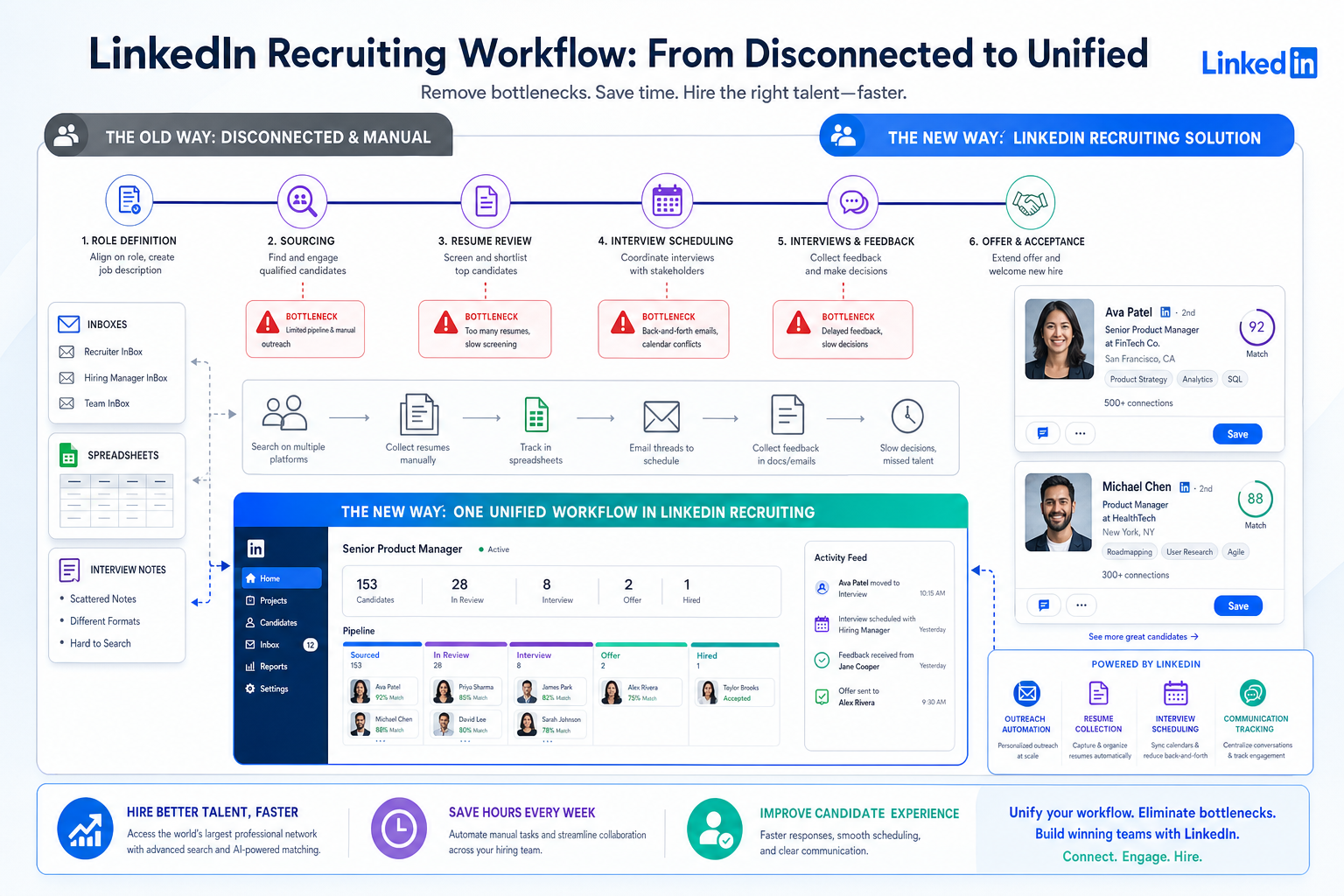
Business recruitment leaders can use this guide to spot hiring bottlenecks, compare software models, and avoid costly delays.
The practical problem is rarely a total lack of applicants. In most searches, time is lost when role scope shifts, interview feedback arrives late, sourcing starts without a real plan, or candidate communication sits in too many places at once. For a small search firm, that means wasted recruiter hours and weaker client confidence. For an internal talent lead, it means missed hiring targets, slower team growth, and good candidates disappearing into faster-moving processes.
That is where workflow support matters more than feature hype. In my own sourcing work, tools like StrategyBrain AI Recruiter have been most useful when they handle repetitive outreach, keep candidate conversations moving after hours, and collect resumes or contact details from interested prospects without forcing the recruiter to chase every reply manually. The recruiter still owns final judgment, resume review, shortlist quality, and the decision on who moves forward.
A realistic hiring timeline for many professional roles is about six to twelve weeks from role definition to accepted offer, and the slippage usually starts long before the final interview. First the role is opened without full alignment on priorities. Then sourcing begins across job boards, referrals, database searches, and direct outreach. After that, recruiters review resumes, run initial screens, and try to line up interview availability while hiring managers are still refining what “good” looks like.
Once those steps spread across inboxes, spreadsheets, LinkedIn messages, and scattered interview notes, delay becomes structural. Entry-level roles may still move in three to six weeks, but mid-level professional hiring often stretches into six to ten, and senior or specialized searches can run eight to sixteen weeks or more. That is the point where the best recruiting software becomes a process decision, not just a tech purchase, especially for business recruitment teams weighing inbound hiring, outbound sourcing, a headhunting agency model, and how to recruit employees for small business without losing momentum.
Table of Contents
- Why hiring speed matters when choosing recruiting software
- The main software types to compare
- Where hiring time is really spent
- Best recruiting software by recruiting model
- Features that matter before you buy
- How to recruit employees for small business with software
- In-house team, headhunting agency, or both?
- Common software selection mistakes
- FAQ
Why hiring speed matters when choosing recruiting software
If you are comparing the best recruiting software, start with the hiring timeline, not the demo checklist. In real business recruitment, software earns its value by reducing friction between the moments that matter most: defining the role, sourcing candidates, reviewing resumes, scheduling interviews, gathering feedback, making the decision, and getting the offer accepted before the candidate loses interest.
That is why many teams buy the wrong system. They ask for broad HR software when the real need is an applicant tracking system, a recruitment CRM, or a sourcing workflow that keeps outreach organized. The best recruiting software is the one that matches how your team actually hires and where your searches typically slow down.
One lesson I have seen repeatedly is that candidate responsiveness can drop quickly when nobody owns communication between stages. For outbound-heavy work, I have found that using AI-supported LinkedIn outreach workflows can help keep conversations active across time zones and after hours, especially when candidates reply outside a recruiter's working day. That said, the technology is only useful when it feeds a disciplined recruiting process rather than replacing it.
The main software types to compare
Before choosing the best recruiting software, define which category of tool you are really buying. Most hiring teams are evaluating one of three models, even if vendors use broader language.
1. Applicant tracking system (ATS)
An applicant tracking system is designed to manage candidates who have already entered a hiring pipeline. For many employers, it is the foundation of structured business recruitment because it keeps jobs, applicants, stages, interview notes, and hiring decisions in one place.
Typical ATS strengths:
- Job requisition and job description management
- Job posting distribution
- Application intake and resume parsing
- Interview scheduling and stage tracking
- Feedback collection and hiring-team collaboration
- Offer-stage coordination and reporting
For teams asking how to recruit employees for small business, an ATS is often the first system worth adopting because it replaces ad hoc hiring with a visible workflow.
2. Recruitment CRM
A recruitment CRM is built more for sourcing and relationship management than for processing inbound applicants. It helps recruiters build talent pools, search previous candidates, run outreach, and revisit people for future roles.
Typical CRM strengths:
- Searchable candidate database
- Talent pools and segmentation
- Direct outreach workflow
- Follow-up reminders and communication history
- Longer-term relationship management
- Source tracking and campaign visibility
If your bottleneck is not applicant volume but finding qualified people in a tight market, CRM capability can matter more than a polished careers page.
3. Agency or search workflow platform
Agency-focused systems usually blend ATS and CRM functions, then add client-side workflow. A team operating like a headhunting agency often needs to track clients, role intake, shortlist submissions, outreach history, and placements at the same time.
Agency-oriented priorities often include:
- Candidate and client records
- Submission tracking
- Resume formatting and parsing
- Pipeline visibility across multiple searches
- Database search and sourcing workflow
- Targeted outreach to passive candidates
For search recruiters, the best recruiting software is rarely just an ATS. It usually needs to support outbound work, relationship continuity, and fast movement when a client is ready to act.
Where hiring time is really spent
One of the most useful ways to evaluate recruiting software is to map it against the actual stages where hiring time is spent. For many professional roles, the overall process lands somewhere between six and twelve weeks, but that total hides several very different points of delay.
Sourcing and outreach
This stage can take two to four weeks or more, especially for specialized roles. It may involve job postings, database searches, referrals, direct outreach, and passive candidate engagement. When recruiters start from scratch each time, the search slows. When they already have organized pipelines and communication history, it moves faster.
Resume review and initial screening
This usually takes one to two weeks, but it becomes a bottleneck when screening criteria are unclear or different reviewers apply different standards. This is one of the clearest applicant tracking system benefits: a good ATS or ATS-plus-CRM setup keeps candidate records consistent and makes shortlisting easier to defend.
Interviews and assessments
Interview scheduling often causes the most visible delay. A role with one or two straightforward interviews can move quickly. A role with panel interviews, assessments, or multiple stakeholders can drag on for weeks if nobody sets the sequence upfront. The best recruiting software should reduce handoff confusion here, not add another admin layer.
Decision-making, references, and offer
Even after interviews end, hiring can slow down because feedback is late, decision-makers disagree, references take time, or internal approvals stall the offer. Software cannot fix poor accountability, but it can make ownership, status, and bottlenecks much easier to see.
Key insight: Long hiring cycles are usually a process problem before they are a candidate supply problem. Software should be judged by how well it prevents restarts, delays, and lost communication between stages.
Best recruiting software by recruiting model
The phrase best recruiting software only becomes useful when tied to a real recruiting model.
| Recruiting Model | Best-Fit Tool Type | Main Need | Practical Advice |
|---|---|---|---|
| Small business with occasional hiring | ATS-first system | Simple workflow and visibility | Choose easy setup, clean stages, and basic reporting |
| Growing SMB with repeat hiring | ATS + light CRM | Faster sourcing and reusable pipelines | Prioritize talent pools and source tracking |
| Internal recruiting team for hard-to-fill roles | ATS + stronger CRM | Proactive sourcing and follow-up discipline | Look for outreach tracking and candidate history |
| Agency recruiter | Agency workflow platform | Candidate, client, and submission management | Need database search, outreach workflow, and placement visibility |
| Executive or specialized search | CRM-heavy workflow or external partner | Confidential outreach to passive talent | Compare software against using a headhunting agency |
If your hires mostly come from posted jobs, ATS capability should lead the evaluation. If your hires mostly come from direct sourcing, CRM and outreach workflow deserve more attention. If your process depends heavily on LinkedIn outreach, multilingual communication, or response management across time zones, specialized support can complement your core ATS rather than replace it.
In that narrower sourcing scenario, I have seen recruiters use StrategyBrain AI Recruiter as a support layer for repetitive LinkedIn tasks such as first-contact messaging, candidate interest checks, and resume collection. The biggest practical benefit is not magical matching. It is keeping outreach alive while the recruiter focuses on qualification, shortlist decisions, and client or hiring-manager conversations.
Features that matter before you buy
Many software reviews focus on abstract features when they should focus on where hiring slows down. The right evaluation questions are operational.
Role intake and job definition
Unclear requirements are one of the biggest reasons hiring timelines expand. Good systems support structured intake, job description consistency, and approval flow before sourcing begins. That matters because weak role definition creates bad sourcing, bad screening, and extra interviews later.
Candidate record quality
Clean candidate records matter more than flashy dashboards. Resume parsing, communication history, source tagging, and searchable profiles save time and help recruiters return to useful candidates later.
Stage visibility and feedback discipline
One of the strongest advantages of applicant tracking system design is making every stage visible. Recruiters need to know who is waiting, which feedback is missing, and where the decision is actually stuck.
Sourcing and outreach support
For specialized business recruitment, candidate sourcing is often the decisive capability. If your team depends on proactive outreach, look for saved searches, outreach history, follow-up reminders, and tools that reduce repetitive communication tasks.
Communication speed
Speed matters at every stage, but especially during sourcing, scheduling, and offer management. Candidates often disengage when messages sit too long. This is also where AI-assisted support can be useful if it improves responsiveness without obscuring who is accountable for the next step.
Reporting that informs action
Software should help you understand source quality, stage conversion, and where delays repeat. Reporting is valuable when it changes behavior, not when it just fills a monthly dashboard.
How to recruit employees for small business with software
If your real question is how to recruit employees for small business, the answer is usually to simplify the process and make each step visible. Small teams do not need enterprise complexity. They need structure.
- Define the role before sourcing starts. Clarify outcomes, priorities, budget range, and must-have requirements.
- Choose the right sourcing mix. Decide whether the role should rely on job ads, referrals, direct outreach, or search support.
- Standardize screening. Use clear criteria so every applicant is judged against the same profile.
- Set interview stages early. Avoid adding interviews halfway through because the team never agreed on the process.
- Capture feedback in one place. Keep notes and decisions inside the recruiting workflow instead of scattered in email.
- Move quickly at offer stage. Delay here can undo weeks of good work.
For small employers, the practical applicant tracking system benefits are not about complexity. They are about reducing avoidable delay, improving consistency, and making hiring repeatable even when HR capacity is limited.
Practical advice for SMB hiring:
- Keep stages limited and easy to follow
- Use the same scorecard for the same role
- Do not buy software that requires heavy admin support
- Track which channels actually produce qualified candidates
- Make sure candidate communication does not stall between steps
In-house team, headhunting agency, or both?
Not every hiring challenge should be solved by software alone. Some roles are better handled with a mix of internal process control and external search support.
A headhunting agency is usually most valuable when the role is senior, confidential, highly specialized, or difficult to fill through normal posting channels. In those cases, proactive outreach and market access can matter more than job board efficiency.
Use in-house recruiting software when:
- You hire repeatedly for similar roles
- You need process consistency and reporting
- You receive enough applicants to justify structured tracking
- Your team can manage screening and coordination internally
Consider a headhunting agency when:
- The role is senior or business-critical
- The market is narrow
- Confidential sourcing matters
- Your internal team lacks capacity for targeted outreach
Use both when:
- You want the ATS to manage the internal process while an external partner sources passive talent
- You expect both inbound applicants and direct-sourced candidates
- You need consistent documentation across recruiters, managers, and outside partners
In practice, strong business recruitment often comes from matching the channel to the role difficulty instead of expecting one system to solve every search type equally well.
Common software selection mistakes
When recruiting software disappoints, the issue is often poor fit rather than poor technology.
Buying for the demo, not the workflow
A long feature list means little if the tool does not solve your actual delays. Start with the hiring process, then map the software to the weak points.
Ignoring where hiring time really goes
If your delays happen during sourcing and follow-up, an applicant-only workflow may not help enough. If your problem is messy interview coordination, outreach automation alone will not solve it.
Assuming AI will replace recruiter judgment
AI can support speed, communication, and repetitive admin. It does not replace role calibration, candidate assessment, or hiring accountability.
Using the same setup for every role
Entry-level hiring, specialist hiring, and executive search do not move at the same pace and should not be managed the same way.
Forgetting manager adoption
If hiring managers still send feedback by text or email, your reporting and process visibility will break no matter how strong the system looks.
FAQ
What is the best recruiting software for business recruitment?
The best recruiting software for business recruitment is the one that fits your hiring model. For many teams, that means an ATS for structured workflow, a CRM for proactive sourcing, or a combination of both for repeat hiring and specialist searches.
How long does a normal hiring process take?
For many professional roles, a realistic timeline is roughly six to twelve weeks from role definition to accepted offer. Entry-level roles may move faster, while senior or specialized roles often take longer.
What are the biggest applicant tracking system benefits?
The biggest applicant tracking system benefits are better visibility, more consistent screening, cleaner candidate records, easier collaboration, and fewer missed steps in the hiring process.
What are the main advantages of applicant tracking system tools for small business?
The main advantages of applicant tracking system tools for small business are simpler job posting, organized applicant review, consistent feedback capture, and a more reliable process when HR resources are limited.
How to recruit employees for small business without overcomplicating hiring?
Start with a clear role definition, use limited hiring stages, standardize screening criteria, choose the right sourcing channels, and keep candidate communication and feedback in one system.
When should a company use a headhunting agency?
A company should consider a headhunting agency for senior, niche, confidential, or hard-to-fill roles where passive candidate outreach matters more than inbound application flow.
Can AI help with sourcing even if it does not make the hiring decision?
Yes. AI-supported tools can help with outreach, response handling, and resume collection, but recruiters should still make the final qualification and shortlist decisions.
Does LinkedIn outreach support replace an ATS?
No. Outreach support and an ATS usually solve different problems. Outreach tools help find and engage candidates, while an ATS helps manage the hiring workflow once candidates are in process.
Conclusion
The best recruiting software is not the platform with the biggest promise. It is the one that fits how your team actually hires and where your hiring process tends to slow down. For most business recruitment teams, that means understanding whether the core problem is applicant tracking, sourcing discipline, communication speed, or stakeholder alignment.
If you are deciding how to recruit employees for small business, start with a simple workflow, clear role definition, and software your team will consistently use. If you are handling specialized or senior searches, compare internal tools against the realities of proactive sourcing and whether a headhunting agency model is more effective. Good software improves execution, but better hiring still comes from clearer decisions, faster follow-up, and stronger recruiter judgment.














