


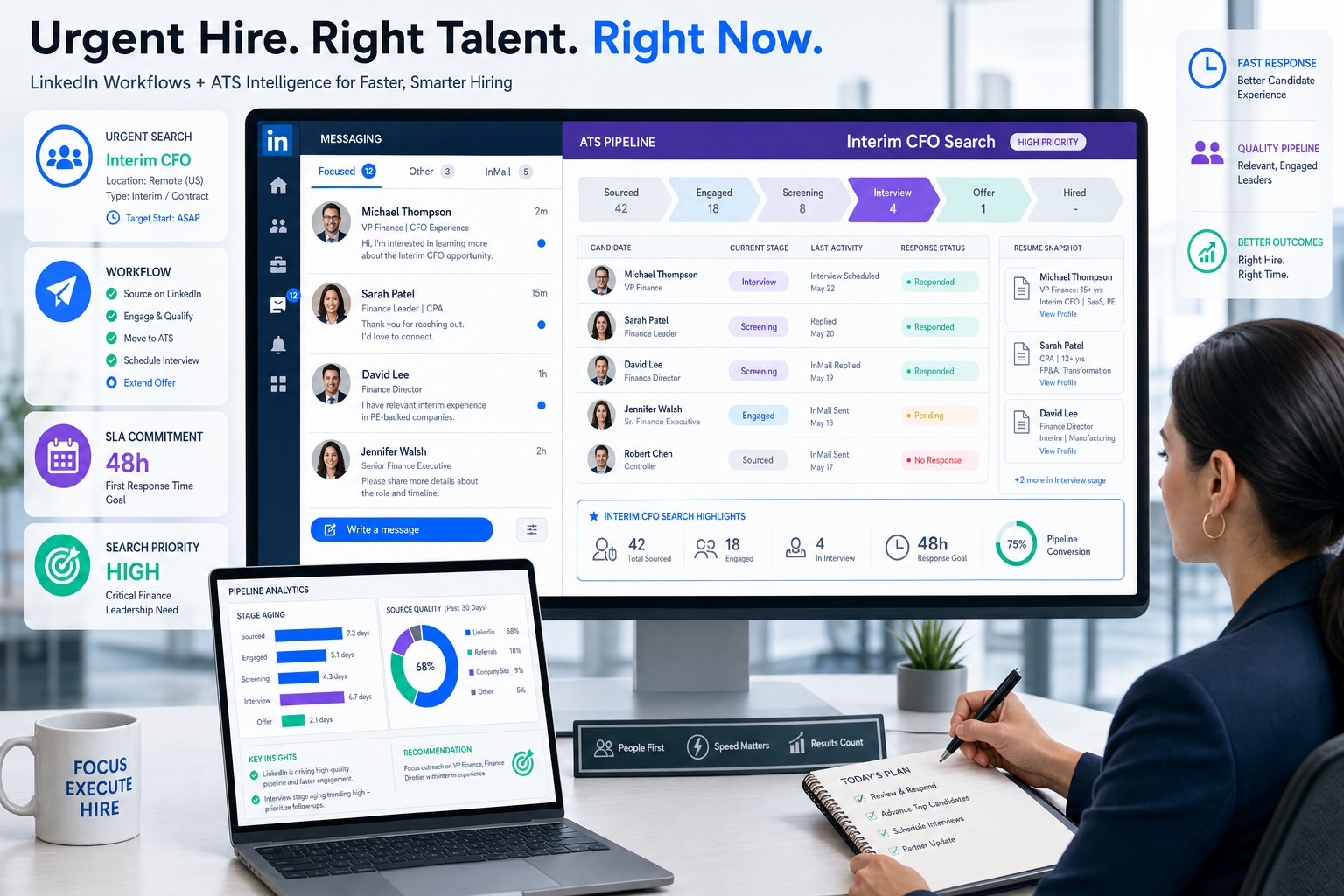
When urgent searches stall, this article helps recruiters evaluate recruiting tools, spot workflow gaps, and avoid slower placements.
That matters most when a search is not just important but time-sensitive. A recruiter filling a transition-critical leadership role can lose candidate trust, client confidence, and internal momentum if outreach sits unanswered, interview notes live in separate places, or nobody can see which conversations actually moved forward. For smaller agencies, that means wasted billable time and slower placements. For in-house teams, it means prolonged gaps in roles that stabilize finance, operations, or growth.
In that kind of workflow, I have found that StrategyBrain AI Recruiter is most useful when it handles the repetitive top-of-funnel work recruiters usually do by hand on LinkedIn: first outreach, candidate replies outside business hours, and early interest confirmation. Its multilingual messaging and always-on follow-up help keep conversations warm, while the recruiter still reviews the resume, judges fit, and decides who moves into a real interview process.
That becomes very real when the assignment is something like an interim CFO search. The pressure is different from standard backfilling. The company does not just want a senior finance leader eventually; it needs someone who can step in fast, understand the business, steady the finance function, and make sound first-week decisions. In that moment, the recruiter is not only collecting profiles. They are checking whether the candidate knows the market, has handled a sudden leadership gap before, and can prioritize operational risk immediately.
Now picture how that search actually unfolds without strong systems. The recruiter opens a LinkedIn thread to answer a candidate asking about the company situation, flips to notes from a client intake about finance-team instability, searches for a prior message about industry background, then tries to remember who already sent a resume and who only expressed tentative interest. A search like that exposes the real buying question behind the best recruiting software debate: which recruiting tools help recruiters move fast on nuanced roles, which efficient recruitment tools for recruiters reduce admin without weakening judgment, and where social recruiting tools genuinely support sourcing rather than scatter it.
Table of Contents
- Why urgent searches change software needs
- What recruiting software actually covers
- ATS vs CRM vs broader recruiting platforms
- Six questions to ask before you buy
- What features matter most in recruiting tools
- How efficient recruitment tools for recruiters save time
- What social recruiting tools actually do
- How to compare recruiting software vendors
- What fits startups, agencies, and enterprise teams
- Common buying mistakes
- FAQ
Why urgent searches change software needs
The reference point for this article is simple: some hiring work is about volume, while some is about stabilization. When a client needs an interim leader, a replacement after a sudden departure, or a specialist who must onboard quickly, the recruiting process changes. Speed matters, but so does decision quality.
That is why the best recruiting software is not just a database with a long feature list. It has to support a recruiter who is judging readiness, context, and operational risk under time pressure. In those searches, the software should help answer questions such as:
- Does the recruiter have the full business context in one place?
- Can outreach happen quickly without becoming generic?
- Can the team track who understands the industry and who only looks good on paper?
- Can hiring stakeholders see what happened in the first few candidate conversations?
Those needs are not limited to interim finance roles. The same pattern appears in confidential replacement searches, hard-to-fill leadership hires, and niche specialist recruiting. The software has to help recruiters move quickly while preserving the reasoning behind each decision.
Key insight: The best recruiting software is often easiest to spot in high-pressure searches, because workflow gaps show up immediately.
What recruiting software actually covers
Recruiting software is the set of systems used to run hiring work from requisition to handoff. In practice, that can include job posting, resume intake, candidate records, interview scheduling, recruiter collaboration, communication tracking, analytics, offers, and sometimes onboarding.
When most teams search for recruiting tools, they are really asking how much of that workflow one system should cover. Some need a strong applicant tracking system first. Others need sourcing and CRM support because their bottleneck is not processing applicants but building pipeline before anyone applies.
For recruiters, the practical value of an applicant tracking system is straightforward: one place to document movement, capture feedback, and prevent important candidates from disappearing into inboxes or spreadsheets. That becomes especially important when the role requires more than routine screening and calls for structured judgment.
ATS vs CRM vs broader recruiting platforms
Many buying teams still mix these categories together, but they serve different parts of the recruiting process.
| Category | Main Purpose | Best Use | Limit to Watch |
|---|---|---|---|
| ATS | Manage applicants through formal hiring stages | Process control and requisition-based hiring | Can be weaker for long-term pipeline nurturing |
| Recruiting CRM | Build relationships before application | Passive talent engagement and rediscovery | Usually needs an ATS for active hiring workflow |
| Sourcing automation | Support outbound talent discovery and outreach | Top-of-funnel recruiting work | Does not replace stage management |
| End-to-end platform | Combine ATS, CRM, communication, analytics, and scheduling | Teams that want fewer disconnected systems | Can take longer to implement well |
If you are recruiting for nuanced roles such as interim executives, turnaround hires, or hard-to-brief specialists, the distinction matters even more. You may need a CRM or social sourcing workflow to start the conversation, but you still need an ATS-style system of record once candidates enter a serious process.
Six questions to ask before you buy
The most useful lesson from the interim-CFO interview framework is not the job title itself. It is the decision logic. In urgent transition hires, the right evaluation starts with context, relevant experience, stabilization capability, risk prioritization, trust building, and judgment under pressure. Those same dimensions work well when evaluating recruiting software.
1. Does the software help recruiters understand the full business context?
In urgent searches, recruiters need more than candidate names and stage labels. They need intake notes, business challenges, role urgency, stakeholder priorities, and communication history in one place. If the system cannot hold that context clearly, nuanced searches become guesswork.
2. Does it support role-specific and industry-specific recruiting?
A good platform should let recruiters segment talent pools, track industry background, store market notes, and search past conversations intelligently. Generic sourcing support may be enough for broad hiring, but specialized searches demand richer context and retrieval.
3. Can it help stabilize the process quickly when a critical role opens suddenly?
This is where workflow design matters. When a company loses a leader unexpectedly, recruiters need to launch outreach fast, assign ownership clearly, and keep every conversation visible. The best recruiting software reduces setup friction so the team can act within hours, not after a long configuration cycle.
4. Does it surface the risks that need attention first?
Strong recruiting tools make bottlenecks visible. That may mean stage aging, unanswered candidate messages, source quality, or hiring-manager delays. If the system does not show risk early, recruiters spend too much time discovering problems manually.
5. Can recruiters build trust quickly through the workflow?
Trust in recruiting often comes from responsiveness and clarity. Candidates notice when messages are timely, personalized, and consistent. Clients and hiring managers notice when updates are organized and specific. Software should help create that experience, not slow it down.
6. Does it leave room for judgment and learning?
No serious recruiting team should want software that hides every decision behind automation. The better standard is assistive support: automate outreach, reminders, scheduling, and record capture where useful, but keep resume review, candidate assessment, and final progression decisions with the recruiter and hiring team.
What features matter most in recruiting tools
Once you use those six questions as a frame, the usual feature checklist becomes easier to evaluate.
Candidate sourcing
Strong recruiting tools should help recruiters find talent before applications arrive. That means talent pools, source tagging, rediscovery, outreach support, and clean records of who has already been contacted. For search firms and proactive internal teams, sourcing is often the difference between administrative software and truly useful software.
In my own LinkedIn-heavy workflow, I have used AI Recruiter to keep first-touch outreach moving when candidate replies came in after hours or across time zones. What I liked was not the promise of automatic hiring. It was the practical relief of not having to manually start and continue every repetitive conversation myself. The system handled initial engagement, answered common role questions, and collected resumes or contact details from interested candidates, while I stayed responsible for fit assessment and shortlist decisions.
Job distribution and source tracking
Posting jobs manually across channels creates inconsistency and weak reporting. Good recruiting software centralizes publishing and shows where applicants or prospects came from. Even if your hiring depends heavily on outbound sourcing, source visibility still matters for refining your channel mix.
Resume screening and routing
Screening is one of the biggest time drains in recruiting. The best recruiting software helps route applications, group similar profiles, and highlight likely priorities without pretending to make the final call. For leadership or transition roles, that distinction matters. A system can help organize evidence, but a recruiter still has to judge whether a candidate has actually steadied a team before.
Interview scheduling
Scheduling becomes far more important when the role is urgent. Delays between shortlist and interview can cost you serious candidates. Efficient recruitment tools for recruiters reduce this friction through calendar coordination, reminders, confirmations, and rescheduling support.
Candidate communication
Communication is not a soft feature. It is one of the main ways recruiters maintain momentum and trust. The software should make it easy to send updates, store message history, and keep everyone working from the same record.
Analytics and reporting
Recruiting leaders need more than open-job counts. Useful reporting should show stage aging, source quality, conversion, recruiter workload, and process bottlenecks. In urgent searches, analytics are especially valuable when they reveal silent delays before they damage the search.
Integrations
No recruiting team works in isolation. ATS, calendar, email, HR systems, assessment tools, and onboarding workflows all need to exchange data cleanly. Poor integration quality creates exactly the kind of fragmented process that hurts critical searches.
How efficient recruitment tools for recruiters save time
Efficient recruitment tools for recruiters are most helpful when they remove repetitive work without stripping away judgment. In practice, that time saving usually comes from four areas:
- Top-of-funnel outreach: initiating and maintaining candidate contact at scale
- Response handling: replying quickly to basic questions and capturing candidate interest
- Workflow movement: routing, assigning, and triggering the next step
- Scheduling and reminders: reducing email back-and-forth around interviews
On LinkedIn searches, especially for passive candidates, the biggest administrative burden is often not evaluation but continuity. Recruiters send the first note, candidates reply late, someone asks for compensation details, another person wants to know whether the role is interim or permanent, and by then the recruiter is switching between browser tabs, inboxes, and spreadsheets. That is one of the clearer use cases for StrategyBrain AI Recruiter: it can continue those early conversations, collect contact details and resumes from interested prospects, and keep outreach active across time zones while the recruiter focuses on screening and client advising.
The important qualifier is control. Good systems support triage and responsiveness; they do not replace recruiter accountability for evaluating resumes, deciding who belongs on a shortlist, or advising the hiring manager on trade-offs.
What social recruiting tools actually do
Social recruiting tools are not a separate magic category. They are a set of capabilities that help teams use social channels to attract, engage, and convert candidates into a formal process.
In practice, social recruiting tools usually support:
- Job promotion: sharing openings across social channels
- Employee referral visibility: helping teams extend reach through their networks
- Direct candidate outreach: starting conversations with passive talent
- Fast messaging: keeping momentum through text or platform-based communication
These tools work best when connected to the rest of the recruiting stack. If social outreach lives in isolation, recruiters lose context, duplicate messages, and weaken compliance records. That is why many teams now evaluate social recruiting tools not as standalone add-ons, but as part of a broader workflow that includes sourcing, record keeping, and handoff into formal hiring stages.
For LinkedIn-centered recruiting, social capability is often where the gap between theory and practice shows up. Plenty of systems claim to support outreach, but fewer help with sustained conversation management. That is where a specialized tool such as AI Recruiter can complement a core ATS by handling repetitive social-channel communication while preserving recruiter control over qualification.
How to compare recruiting software vendors
Recruiting teams usually make better software decisions when they compare vendors against actual workflows rather than generic demos. For urgent or specialized hiring, I recommend testing the platform against a real scenario, such as replacing a critical leader quickly.
Use this comparison checklist
| Evaluation Area | What to Ask | Why It Matters |
|---|---|---|
| Workflow fit | Can we configure stages, ownership, and approvals around our real process? | Critical for urgent and high-stakes hiring |
| Context capture | Can recruiters store intake notes, business risks, and stakeholder priorities clearly? | Important for nuanced searches |
| Sourcing support | Does it help with proactive outreach and talent pool management? | Essential when candidates do not apply on their own |
| Automation | Which repetitive tasks are actually reduced, and what still needs human review? | Shows whether it is truly efficient |
| Social capabilities | How do social recruiting tools fit with ATS or CRM records? | Prevents fragmented outreach history |
| Reporting | Can we see source quality, stage aging, and candidate-response delays? | Helps detect risk early |
| Integration quality | Will it connect cleanly with calendars, email, HR systems, and onboarding? | Reduces duplicate admin |
When possible, ask the vendor to walk through a realistic flow: launch a search, contact passive candidates, record early responses, collect resumes, move a prospect into interview scheduling, and generate stakeholder updates. That is much more revealing than a polished product tour.
What fits startups, agencies, and enterprise teams
Startups and lean teams
Smaller teams usually need recruiting tools that are easy to launch, easy to learn, and strong in ATS basics. They benefit most when software replaces spreadsheets and scattered inboxes before adding complex layers.
Agencies and search firms
Search recruiters often need stronger sourcing workflows, clearer communication history, and ways to keep top-of-funnel activity moving without spending the entire day in manual outreach. That is one reason agency recruiters often pair a core system of record with specialized LinkedIn support.
Enterprise organizations
Larger teams typically need deeper permissions, analytics, compliance controls, and support for multiple hiring groups or geographies. Enterprise teams also have more to gain from standardized communication and visible workflow governance, especially when hiring pressure spikes across business units.
Common buying mistakes
1. Buying for features instead of process pressure
The right test is not whether the platform has many modules. It is whether it helps in the searches where your team feels the most pressure.
2. Treating social outreach like a side task
When LinkedIn and other social conversations stay outside the core record, recruiters lose visibility and repeat work. Social recruiting tools should strengthen the workflow, not sit beside it.
3. Over-automating meaningful decisions
Automation should support outreach, reminders, and routing. It should not obscure why a candidate was advanced or rejected.
4. Underestimating implementation work
Even the best recruiting software needs workflow setup, permissions, templates, integrations, and reporting design. Weak implementation erases strong product potential.
5. Ignoring urgent-search use cases in the demo
If the vendor cannot show how the system handles a fast, high-context search, you may be buying for an ideal process rather than your real one.
FAQ
What is the best recruiting software?
The best recruiting software is the one that fits your actual hiring workflow, gives you a dependable system of record, improves sourcing and communication, and reduces admin without replacing recruiter judgment.
What are recruiting tools used for?
Recruiting tools are used for job posting, applicant tracking, sourcing, candidate communication, screening support, interview scheduling, reporting, and handoff into later HR processes.
What makes efficient recruitment tools for recruiters different?
They reduce repetitive tasks such as outreach, reminders, routing, and scheduling, while still leaving evaluation and final progression decisions to the recruiter and hiring team.
What do social recruiting tools do?
Social recruiting tools help recruiters promote jobs, reach passive candidates, support referrals, and manage communication on social channels. They work best when connected to ATS or CRM workflows.
Should recruiters use LinkedIn automation tools?
They can be useful when used responsibly for repetitive communication and top-of-funnel support. The best setup keeps recruiters in charge of resume review, fit assessment, and interview decisions.
How does StrategyBrain AI Recruiter fit into a recruiting stack?
It can complement a core ATS or CRM by automating early LinkedIn outreach, handling candidate replies across time zones, and collecting resumes or contact details from interested prospects before recruiter review.
Conclusion
The best recruiting software is easier to judge when you stop thinking only about features and start thinking about pressure. If your team had to fill a transition-critical role quickly, could your current recruiting tools capture context, keep outreach moving, preserve candidate trust, and help recruiters make sound decisions?
That is the real standard. In most teams, the answer starts with a solid ATS foundation, then expands into sourcing, analytics, communication, and carefully chosen social recruiting tools. And if LinkedIn outreach is a major part of your process, specialized support such as StrategyBrain AI Recruiter can reduce repetitive messaging work while leaving the final judgment where it belongs: with the recruiter.














