


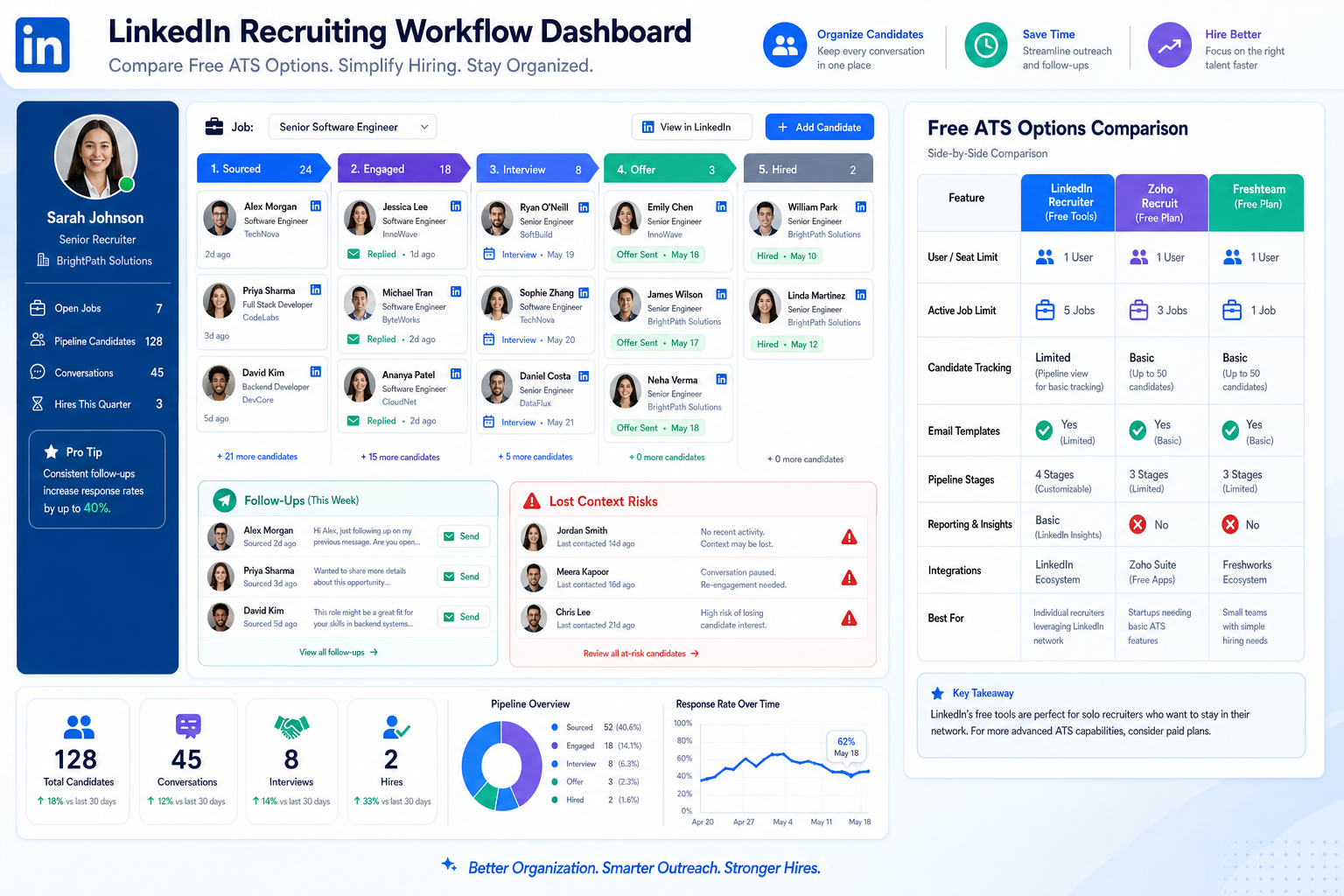
When follow-up slips and candidate context gets lost, this article helps recruiters judge freeware recruitment software to avoid credibility and pipeline mistakes.
That matters because hiring rarely breaks down in one dramatic moment. More often, it slips through small misses: a reply left too long, a promising applicant parked in the wrong stage, a hiring manager looped in too late, or a recruiter pushing roles that do not really fit. For agency owners, that means slower placements and weaker client trust. For solo recruiters, it means wasted outreach and damaged rapport. For in-house teams, it becomes a pipeline problem that looks like a talent shortage when the real issue is process control.
In my own workflow, I have found that StrategyBrain AI Recruiter helps most when those bottlenecks start with repetitive outreach and after-hours candidate messaging. It can keep LinkedIn conversations moving, answer common role questions, and collect resumes or contact details from interested people while I stay responsible for fit judgment, resume review, and the final next step. That division of labor is important: automation can protect speed and continuity, but the recruiter still owns the hiring call.
You can see the same logic in recruiter-candidate relationships. A professional thinking about leaving a finance or accounting role usually does not make that move lightly. They may see trouble ahead in their company, feel stuck in their growth, or simply realize that staying put no longer makes sense. Then they start scanning job boards and LinkedIn, connect with a recruiter, and expect that relationship to open the right doors. What often goes wrong is not the idea of using a recruiter. It is the lack of structure around specialization, timing, expectations, and follow-up.
When candidates assume every recruiter is interchangeable, or when recruiters rush to push any open role instead of the right one, trust erodes quickly. A more experienced specialist may have the stronger network, but even that advantage gets wasted if conversations are not tracked well, if the recruiter cannot revisit context weeks later, or if nobody can see whether interest was real, recent, and relevant. That is exactly where the search for the best recruiting software begins to overlap with the real need for free applicant tracking system software and a reliable free online applicant tracking system.
If you are searching for the best recruiting software on a tight budget, the practical category to compare is usually freeware recruitment software built around applicant tracking. The strongest free tools do more than store resumes. They help recruiters keep promises, maintain context, and avoid the credibility mistakes that happen when outreach, follow-up, and candidate fit are handled in scattered spreadsheets or inboxes.
- Why free recruiting tools fail or help
- Five selection mistakes to avoid
- What good free ATS software should include
- A practical comparison framework
- Best recruiting software by use case
- ATS vs CRM vs open-source options
- Career pages and applicant flow
- How I use AI Recruiter with ATS workflow
- When free stops being enough
- FAQ
Why free recruiting tools fail or help
One lesson recruiters learn early is that tools do not rescue weak judgment, but weak systems absolutely make good judgment harder to apply. That is why freeware recruitment software should not be treated as a generic category. In practice, it usually means one of three things: a free-forever ATS plan, a trial with a hard stop, or an open-source platform that is free to access but not free to run.
The distinction matters because recruiting relationships develop over time. A candidate may not be ready today, but could become relevant weeks or months later. If your system cannot preserve that history cleanly, impatience creeps in. Recruiters start re-asking the same questions, over-selling a mismatched role, or losing track of why someone declined the last conversation.
For most teams, the useful definition of freeware recruitment software is straightforward: free applicant tracking system software that can support real hiring activity, not just a short test. It should handle candidate records, stage movement, interview coordination, collaboration, and basic job publishing well enough that your process becomes more dependable, not just more digital.
Practical rule: If a free tool hides meaningful limits around users, open jobs, workflow access, or candidate volume, treat it as a temporary trial rather than a dependable recruiting system.
Five selection mistakes to avoid
The reference case about working with a specialist recruiter maps surprisingly well to software selection. In both situations, the failure points are predictable. When teams choose the wrong tool, they usually repeat one of these mistakes.
1. Treating all recruiting software as the same
Just as not all recruiters bring the same network or judgment, not all ATS tools create the same operating value. Some free systems are polished but shallow. Others look plain but handle collaboration and pipeline control better. If you only compare by homepage claims, you miss the differences that actually affect hiring.
2. Not being specific about your real hiring model
Specialization matters in recruiting, and it matters in software too. A startup hiring five roles a quarter has different needs from an agency desk working many active openings. The best recruiting software is rarely universal. It is usually the system whose limits, workflow, and user model fit your actual process.
3. Expecting immediate results from any new tool
A free ATS will not clean up your hiring operation in one day. Teams need time to define stages, train hiring managers, and normalize feedback habits. If you expect instant transformation, you will blame the tool for process gaps that existed before implementation.
4. Being unrealistic about workflow complexity
Some teams buy simplicity and then expect enterprise reporting. Others buy flexibility and then discover nobody uses it. The strongest free online applicant tracking system for your team is the one that matches your current level of hiring maturity while leaving room for the next step.
5. Treating the system like a one-way database
An ATS should not be a passive storage cabinet. It should support a two-way working relationship between recruiter, hiring manager, and candidate pipeline. If feedback is not logged, outreach history is lost, or hiring managers avoid the system, the ATS becomes another place where information goes to die.
What good free ATS software should include
When recruiters ask me about free applicant tracking system software, I tell them to ignore feature inflation and start with operational basics. A credible free ATS should include:
- Job posting tools that let you publish and manage openings cleanly
- Candidate tracking with visible stages and status history
- Resume capture or parsing to reduce manual entry
- Interview coordination or at least clear scheduling support
- Team collaboration for notes, reviews, and hiring manager visibility
- Branded career page options to support candidate trust
- Searchable records so recruiters can revisit earlier conversations without guesswork
That last point is often underestimated. In specialist recruiting, context compounds. If a candidate spoke with you six weeks ago and declined for good reasons, your system should make those reasons easy to recover. Otherwise you look careless, and that damages your standing faster than most reporting gaps ever will.
A practical comparison framework
The easiest way to compare freeware recruitment software is to evaluate its limits before its design. A clean interface can still break your workflow if the plan restricts access or candidate flow too early.
| Comparison Area | Why It Matters | What To Check |
|---|---|---|
| Free forever vs trial | Determines whether you can rely on it | Does the free version expire? |
| Seat limits | Affects recruiter and manager participation | How many users can actively collaborate? |
| Open job limits | Sets your real hiring capacity | How many live roles can you run at once? |
| Candidate caps | Restricts sourcing and pipeline depth | Are records, applicants, or storage limited? |
| Workflow depth | Shapes process discipline | Can you customize stages and feedback steps? |
| Search and notes | Protects relationship memory | Can you easily recover prior context? |
| Career page quality | Affects applicant conversion | Does it support hosted and mobile-friendly apply flows? |
| Upgrade triggers | Signals future cost pressure | What forces you into a paid plan first? |
This framework is also why I do not like one-size-fits-all rankings. The best recruiting software is usually best for a condition: first-time hiring, agency volume, internal collaboration, or low-admin startup recruiting.
Best recruiting software by use case
Best for startups
Startups need structure without heavy administration. In that environment, freeware recruitment software should be fast to launch, easy for founders or hiring managers to use, and good enough to replace inbox-based hiring. The goal is not sophistication. It is consistency.
Best for small internal teams
Small HR or talent teams usually need one shared system that everybody understands quickly. Here, a free online applicant tracking system works best when stage movement, comments, and approvals are simple enough that managers actually participate.
Best for specialist recruiters
If your recruiting depends on industry credibility and repeat conversations, choose a tool that preserves relationship context. This is where searchable notes, clean history, and reliable follow-up matter more than flashy dashboards.
Best for agencies or high-activity desks
High-volume recruiters should be especially careful with job and candidate caps. Free plans can work as a starting point, but they often become restrictive once multiple live searches run at the same time.
Best for first-time recruiters
New recruiters usually benefit from a tool that makes the workflow obvious: intake, review, move, coordinate, close. The best recruiting software for them reduces avoidable errors and teaches process discipline early.
ATS vs CRM vs open-source options
ATS
An ATS is still the clearest match for searches like free applicant tracking system software. It is built to move applicants through active roles and centralize team collaboration around those openings.
Recruiting CRM
A CRM matters more when your recruiting model depends on nurturing passive talent over a longer period. If your main pain point is applicant organization after people apply or reply, ATS capability should come first.
Open-source ATS
Open-source can be attractive if your organization wants control and has technical ownership. But free to access is not the same as free to maintain. Hosting, updates, security, and support can quickly become the real cost.
That is why many recruiters prefer hosted freeware recruitment software before considering open-source complexity. Unless you truly need custom control, the operational simplicity is usually worth more.
Career pages and applicant flow
Recruiters often spend too much time comparing internal dashboards and too little time reviewing candidate-facing flow. That is a mistake, especially when your reputation depends on trust and fit.
When you evaluate a free online applicant tracking system, look closely at:
- Hosted career pages that look credible without heavy setup
- Embedded job widgets for cleaner website integration
- Mobile apply flow that does not create unnecessary friction
- Employer branding controls for logos, copy, and tone
- Application length so candidates are not overburdened too early
A weak application flow creates the same trust problem as a careless recruiter conversation. Candidates notice friction, inconsistency, and generic handling very quickly. Good software does not replace human judgment, but it should make the process feel more organized and respectful on both sides.
How I use AI Recruiter with ATS workflow
My own experience is that ATS software and outreach automation solve different parts of the recruiting problem. An ATS protects process memory and team coordination. AI Recruiter helps me on the front end when LinkedIn follow-up would otherwise slow down because candidates reply across time zones or after hours.
I have used it most effectively for three situations. First, when outbound sourcing creates more replies than I can answer in real time. Second, when candidates ask standard role questions before deciding whether to continue. Third, when I need resumes and contact details collected consistently before I review fit myself. In those cases, the tool keeps the conversation moving instead of letting intent go stale.
What I like is that it does not force me to give up recruiter judgment. The system can introduce the opportunity, respond in the candidate's language, and gather documents or contact information, while I still decide whether the resume actually matches the brief and whether the next interview should happen. If you want to see how that works in practice, the product overview and conversation examples at this resource and this tutorial are useful starting points.
For recruiters using freeware recruitment software, that pairing can be practical: use the ATS to track applicants and manage stages, then use AI-supported outreach where LinkedIn responsiveness and multilingual communication are the actual bottlenecks. The result is not a fully automated desk. It is a cleaner division between repetitive communication and human evaluation.
When free stops being enough
Free tools are valuable until their limits begin to affect recruiter behavior. In most teams, it is time to upgrade when these problems start recurring:
- Seat limits block collaboration with hiring managers or coordinators.
- Open job caps interfere with active hiring.
- Candidate limits make sourcing history hard to retain.
- Reporting is too shallow for leadership or process improvement.
- Workflow customization is missing and spreadsheets return.
- Career page controls are too weak for a credible applicant experience.
The right upgrade point is not when the free plan becomes mildly annoying. It is when it starts weakening candidate handling, slowing recruiter follow-up, or hiding the context your team needs to make better decisions.
FAQ
Is freeware recruitment software really free?
Sometimes. Some vendors offer free-forever plans, while others only provide limited trials. Always verify whether your free applicant tracking system software can support live hiring over time.
What is the biggest risk in choosing a free ATS?
The biggest risk is picking a system that looks affordable but breaks your workflow through limits on users, jobs, candidates, or collaboration. That usually shows up later as recruiter inconsistency.
Is a free online applicant tracking system enough for agencies?
It can be enough for a niche desk or early-stage agency setup, but high-volume teams often outgrow free plans faster because of record and job limits.
How do I know whether I need an ATS or sourcing automation first?
If your problem is applicant organization, feedback tracking, and stage control, start with an ATS. If your bottleneck is manual LinkedIn outreach and delayed candidate replies, add sourcing automation to support that front-end workflow.
What should recruiters look for first in the best recruiting software?
Start with workflow fit. The best recruiting software should support candidate tracking, collaboration, communication continuity, and a credible application experience before you worry about advanced extras.
Conclusion
The search for the best recruiting software becomes much clearer when you stop chasing generic feature lists and start looking at real recruiting failure points. In practice, the right freeware recruitment software is the one that protects context, credibility, and follow-up discipline. That is why free applicant tracking system software and a dependable free online applicant tracking system matter so much to both agencies and internal teams.
Good recruiting depends on relationships, timing, and fit. Software should support those things, not get in their way. If you evaluate free tools with that standard, you will make a stronger short-term choice and a smarter long-term one.














