


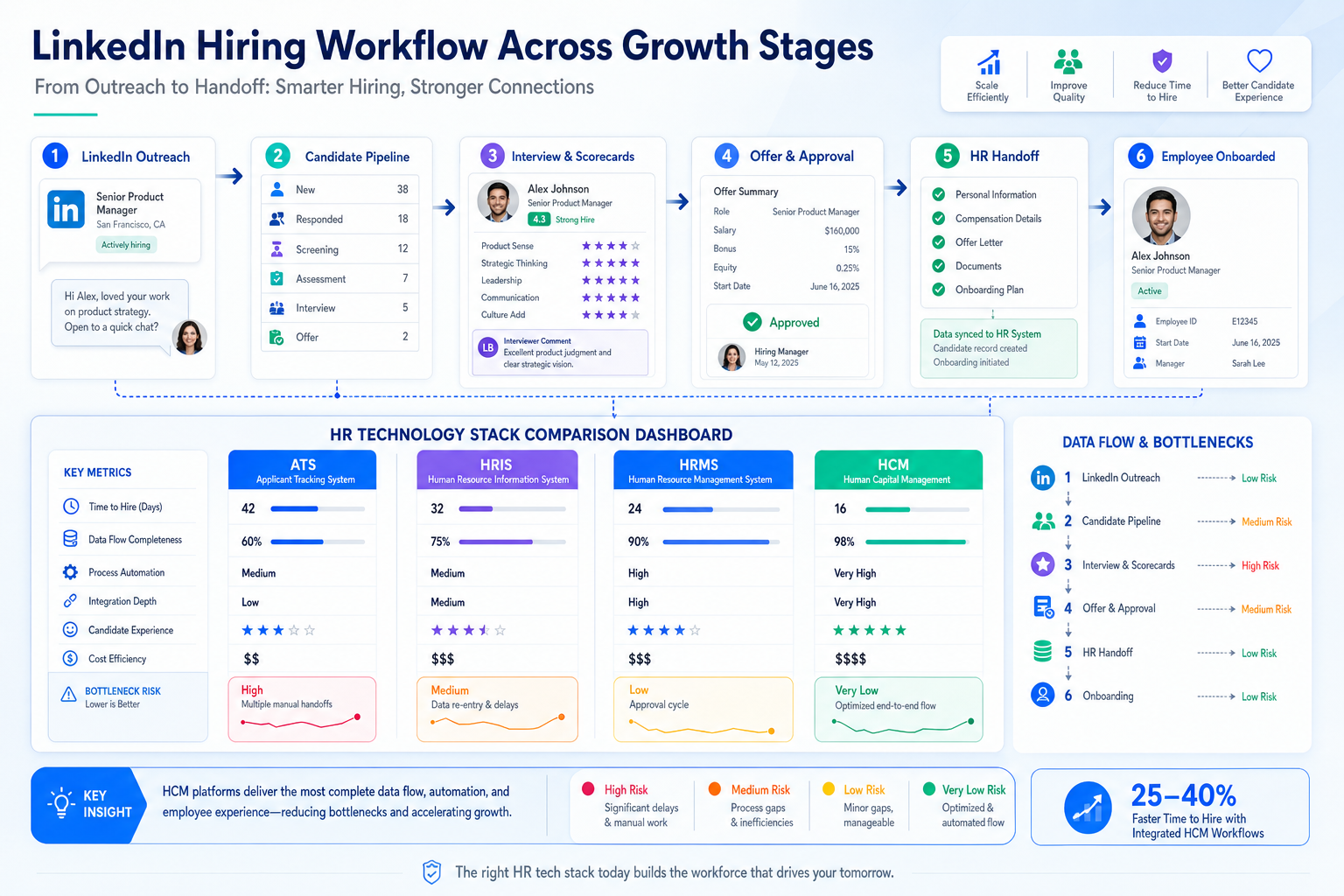
Growth-stage recruiters can use this article to judge human resource recruitment software before workflow gaps slow hiring and break handoffs.
That matters most when hiring starts to accelerate. A recruiter can manage a lean desk for a while with inboxes, spreadsheets, LinkedIn messages, and manager follow-ups, but once requisitions multiply, the cost shows up fast: slower response times, lost candidate context, uneven screening, delayed offers, and strained relationships with hiring managers who expect clear answers.
In my own workflow, one useful support layer has been StrategyBrain AI Recruiter for the repetitive front end of LinkedIn outreach. It can keep candidate conversations moving, respond after hours, and collect resumes or contact details from interested people, while I still make the final call on fit, resume quality, and whether someone should move into the real shortlist.
You see why that matters the moment a company shifts from a small, all-hands setup into a faster growth phase. The business is still trying to run lean, but suddenly there are more roles to open, more stakeholders asking for updates, and more pressure to hire specialists who can bring structure to functions that used to be handled informally. In the reference case behind this article, that function was finance: payroll, forecasting, investor reporting, cash planning, and process building all became too important to leave half-covered.
At that point, the recruiting problem is no longer just finding candidates. Someone has to open the right requisitions, keep messages moving, capture resumes, compare profiles against a bigger business need, and hand clean information to HR once a hire is made. That is exactly where the best recruiting software, strong hr in software decisions, and the boundary between standalone tools and a broader human resources management system start to matter.
- How growth-stage hiring exposes weak recruiting workflows
- What the best recruiting software actually needs to support
- How ATS, HRIS, HRMS, and HCM differ in day-to-day use
- When standalone human resource recruitment software makes more sense
- How LinkedIn outreach automation can support, not replace, recruiter judgment
- What to test before buying a recruiting platform
Table of Contents
- When Growth Reveals the Need for Better Recruiting Software
- What the Best Recruiting Software Really Means
- ATS vs HRIS vs HRMS vs HCM
- Core Workflows That Matter Most
- Standalone ATS vs Recruiting Inside a Human Resources Management System
- Where LinkedIn Outreach Automation Fits
- Why Integration and Data Flow Matter More Than Feature Volume
- How to Match Software to Team Size and Hiring Maturity
- Practical Evaluation Checklist
- Common Buying Mistakes
- FAQ
When Growth Reveals the Need for Better Recruiting Software
One of the most useful lessons from growth-stage hiring is that the recruiting system often gets tested before leaders realize it. A company may operate for months with a founder, a generalist HR lead, or a small recruiting function covering everything manually. That can hold for a while. Then the business starts expanding, and suddenly the open roles are no longer interchangeable.
Instead of filling one or two broad positions, the team now needs targeted hires with specific responsibilities. In the finance-focused reference scenario, the business had moved past the point where basic coverage was enough. Payroll had to be reliable. Forecasting had to become more rigorous. Investor and budget questions needed proper reporting. Process and structure were no longer optional. The same pattern shows up in recruiting operations: once growth creates specialist hiring needs, informal talent workflows begin to fail.
That failure is usually operational before it becomes strategic. Recruiters spend more time locating the last conversation, asking who owns the next step, and rebuilding candidate context than actually moving the search forward. Hiring managers feel the delay. Candidates feel the silence. HR inherits incomplete data at the point of offer or onboarding.
Key insight: The best recruiting software is often purchased because growth exposed workflow gaps, not because a team suddenly wanted more features.
What the Best Recruiting Software Really Means
The phrase best recruiting software sounds simple, but in practice it means different things to different hiring teams. A retained search consultant, an internal talent acquisition lead, and a lean HR team may all want very different outcomes from the same category of software.
For most employers, the right answer is the system that supports the actual hiring cycle without creating extra administrative drag. That means more than storing resumes. Good human resource recruitment software should help recruiters and HR teams run a repeatable process from requisition to handoff.
At minimum, experienced teams usually look for three outcomes:
- Process visibility: every role and candidate sits in a clear stage with a visible next step
- Team coordination: recruiters, hiring managers, and HR can collaborate without relying on scattered email threads
- Data continuity: candidate information can move cleanly into employee records after acceptance
The reference finance-team scenario is useful here because it reflects how hiring needs change as a business matures. Early on, a company may only need lightweight coordination. Later, it needs better decision support, stronger reporting, more structure, and people who understand the bigger business picture. Your recruiting software should evolve in the same direction.
ATS vs HRIS vs HRMS vs HCM
Many buyers confuse these categories because vendors use the terms loosely. The most practical way to compare them is to look at what each system is built to manage first.
| Term | Primary focus | How recruiting is handled | Best fit |
|---|---|---|---|
| ATS | Hiring workflow and candidate tracking | Recruiting is the core purpose | Teams needing deeper recruiting control |
| HRIS | Employee records and core HR admin | May include limited recruiting | Organizations prioritizing employee data |
| HRMS | Broader HR process management | Often includes recruiting and onboarding modules | Teams wanting connected HR operations |
| HCM | Enterprise-wide workforce management | Recruiting is one module in a larger suite | Larger, process-mature organizations |
An ATS is generally strongest when recruiters need to manage pipelines, interview stages, scorecards, and search coordination. A human resources management system tends to be stronger when the business wants continuity across recruiting, onboarding, payroll, and employee administration.
This is also where hr in software becomes a practical buying question. Is the software primarily designed for recruiting specialists, or is recruiting one workflow inside a broader HR operating system? That distinction affects configuration, reporting, handoff, and adoption.
Core Workflows That Matter Most
Long feature lists can be misleading. In real recruiting operations, the best software supports the work that gets repeated every week and starts breaking when headcount plans expand.
1. Requisition setup and approvals
As companies grow, role definitions become more important. The finance-team reference case highlighted a business moving from general coverage to specialized responsibility. Recruiting software should support that shift through clear requisitions, approval tracking, and role-specific workflows.
2. Candidate sourcing and intake
Resume capture, profile organization, and searchable records matter because they reduce manual sorting. This is one of the most basic but valuable outcomes of human resource recruitment software.
3. Pipeline management
This is the center of most recruiting operations. Recruiters need clear stages, ownership, reminders, and visibility. Hiring managers need to know what is waiting on them and what is blocked.
Look for:
- Custom stages by role type or department
- Easy movement between stages
- Reason codes for progress and rejection
- Shared access for recruiters, coordinators, and managers
4. Interview coordination and structured feedback
Once roles become more specialized, decision quality depends on better input. Structured scorecards and timely feedback help teams evaluate candidates consistently instead of relying on scattered impressions.
5. Offer workflow and approvals
Offers often fail because the software handles the front of the funnel well but leaves the final mile messy. Approval routing, templates, and status visibility matter more than many teams expect.
6. Candidate-to-employee handoff
One of the clearest signs of strong software is whether recruiting data becomes usable HR data. If accepted candidates still have to be rebuilt inside another system, the workflow is not really solved.
Standalone ATS vs Recruiting Inside a Human Resources Management System
This is one of the most common decisions buyers face. The right answer depends less on company size alone and more on hiring complexity, recruiter specialization, and downstream HR needs.
When a standalone ATS often makes more sense
- You hire for multiple functions with different workflows
- You need recruiter-grade reporting and pipeline management
- You rely on structured interviews and scorecards
- You have dedicated recruiters or agency partners
- You need more flexibility than an HR suite usually offers
When recruiting inside a human resources management system may be enough
- Your hiring volume is moderate or predictable
- Your process is relatively consistent across roles
- Your main goal is system consolidation
- You need smoother connection to onboarding and payroll
- Your HR team prefers simpler administration over deeper recruiting controls
The finance-team reference logic helps here too. Startups are often advised to begin small, sometimes even with part-time or contract expertise, then add permanent structure as the business grows. Software selection follows the same pattern. Some organizations need lightweight coordination first. Others have already reached the point where a recruiter-focused system is necessary.
Where LinkedIn Outreach Automation Fits
Recruiting software decisions do not stop at the ATS or HRMS layer. Many teams also need a practical answer for outbound sourcing, especially on LinkedIn, where a lot of recruiter time disappears into repetitive messaging and follow-up.
I have found that AI Recruiter is most useful when treated as an outreach and response layer rather than a replacement for recruiting judgment. In one stretch of hiring, I used it to keep initial LinkedIn conversations active across time zones, answer candidate questions about a role, and gather resumes from people who were genuinely open to talking. That helped reduce the dead time between first outreach and recruiter review.
Two parts stood out in practice. First, it kept replies moving outside normal work hours, which matters because good passive candidates often respond late. Second, it captured resume and contact details cleanly enough that I could review interested profiles without digging through fragmented messages. When the role required a final fit decision, I still handled the resume review, qualification check, and next-step choice myself. That division of labor felt right.
For teams comparing workflow options, this LinkedIn recruiting experience overview is relevant because it shows where automation helps most: repetitive outreach, multilingual communication, and after-hours follow-up. It does not remove the need for recruiter accountability, but it can reduce the manual load at the top of funnel.
Why Integration and Data Flow Matter More Than Feature Volume
A platform can look polished in a demo and still fail under real operating pressure if information does not move well between systems. This becomes obvious when the company is hiring for roles that affect payroll, budgeting, reporting, compliance, or other business-critical functions.
That is another reason the finance-team reference scenario works as a lead for this topic. Once a business needs people who bring structure, forecasting, reporting, and process discipline, poor handoffs become expensive. The same is true for recruiting systems. If recruiter activity, candidate records, offer data, and onboarding details live in separate silos, the software stack creates admin work instead of removing it.
Key integration areas include:
- ATS to HRIS or HRMS sync: moving candidate data into employee records
- Onboarding workflow: carrying accepted-offer details into the next stage
- Payroll readiness: reducing re-entry of compensation and start-date information
- Background checks and document collection: keeping downstream status visible
- Reporting: linking hiring data to broader workforce planning
The best recruiting software should not only help you identify talent. It should help the business absorb that hire cleanly.
How to Match Software to Team Size and Hiring Maturity
Different hiring environments need different levels of control. The mistake is choosing software designed for a more mature or less mature operation than your own.
Lean firms and smaller agencies
Smaller teams usually need speed, clarity, and ease of administration. In these environments, human resource recruitment software should reduce chaos without requiring a full-time system owner.
- Prioritize ease of use
- Check whether built-in recruiting in your HR stack is enough
- Confirm LinkedIn and communication workflows are manageable
Mid-sized organizations
This is often where software fit starts to matter much more. Different departments want different stages, managers need better visibility, and reporting requests become more serious.
- Test role-based pipelines
- Review interview scorecards and approvals
- Assess how much admin work ongoing maintenance requires
Larger or process-mature employers
Bigger organizations usually need governance, integrations, auditability, and stronger reporting. They also feel the cost of poor handoff more quickly.
- Evaluate structured process controls
- Map the full candidate-to-employee path
- Check how recruiting data supports broader workforce planning
Practical Evaluation Checklist
If you are actively comparing platforms, use a process that reflects actual hiring work rather than generic demos.
| Evaluation area | What to test | Why it matters |
|---|---|---|
| Workflow coverage | Requisition, outreach, intake, interviews, offers, onboarding handoff | Shows whether the system supports real end-to-end hiring |
| Flexibility | Stages, templates, scorecards, role-based paths | Prevents weak process fit |
| Integration quality | ATS-HRMS sync, onboarding, payroll, reporting | Reduces duplicate work |
| Recruiter usability | Daily navigation, follow-up flow, sourcing support | Improves adoption among recruiters and hiring managers |
| Admin burden | Setup, maintenance, permissioning, change requests | Reveals long-term operational cost |
- Walk one real requisition through the system from approval to hire.
- Test one specialist role, not only a generic opening.
- Review what happens after offer acceptance.
- Ask recruiters where they still rely on inboxes or spreadsheets.
- Evaluate whether LinkedIn outreach needs a separate automation layer.
If your team does heavy outbound search, it is worth testing how tools like StrategyBrain AI Recruiter work alongside the core ATS. In my experience, that combination is most useful when the ATS manages structure and reporting, while the outreach layer keeps candidate conversations active until the recruiter takes over.
Common Buying Mistakes
Buying for feature count instead of process fit
A long list of functions does not guarantee cleaner recruiting. The software has to match how your team actually hires.
Ignoring the growth trigger
Many teams wait until the process is already strained. By then, recruiters are carrying manual work that should have been systematized earlier.
Overlooking specialist hiring needs
As the finance-team reference scenario shows, growth changes the kind of talent a business needs. The recruiting system should support role complexity, not just volume.
Assuming every HR suite handles recruiting equally well
Some do a fine job for straightforward hiring. Others become limiting as soon as recruiter workflow needs deepen.
Separating sourcing from system design
If LinkedIn outreach is central to your process, do not evaluate ATS software in isolation. The handoff from conversation to candidate record matters.
FAQ
What is the difference between ATS and HRIS?
An ATS is built around recruiting workflow such as applications, stages, interviews, and offers. An HRIS usually centers on employee records and core HR administration. Some HRIS platforms include recruiting, but often with less depth than a dedicated ATS.
When is standalone human resource recruitment software better than a human resources management system?
It is usually better when your team needs deeper pipeline control, structured interviews, recruiter-specific reporting, or more flexible workflows by role and department.
How does hr in software affect recruiting decisions?
It helps clarify whether the platform is built mainly for recruiters or mainly for broader HR operations. That influences usability, data flow, and long-term fit.
Can LinkedIn automation replace recruiter screening?
No. It can support outreach, candidate communication, and resume collection, but recruiters should still review qualifications, assess fit, and decide next steps.
What should growing companies prioritize first?
Most should prioritize workflow clarity, candidate visibility, and clean handoff into HR operations. Once those are stable, more advanced automation and reporting become much easier to use well.
Conclusion
The best recruiting software is not the system with the most checkboxes. It is the one that helps a hiring team stay organized when growth makes roles more specialized, decisions more visible, and handoffs more important.
If your process still works only because recruiters are compensating manually, that is usually the signal to act. Start by deciding whether you need recruiter-depth control, broader HR continuity, or both. Then evaluate human resource recruitment software, any supporting LinkedIn workflow, and your human resources management system as one operating model rather than separate purchases. That is what gives recruiting teams cleaner execution and the business a better hiring foundation.














