


When workflow drift slows hiring, this article helps HR leaders judge recruiting tools by context control, avoid feature-led mistakes, and choose software that keeps hiring plans, candidate follow-up, and manager visibility aligned.
That matters more than many teams expect. In-house recruiters, agency consultants, and small search firms rarely lose momentum because one sourcing tactic fails in isolation. The bigger problem is operational drift: candidate questions sit unanswered after hours, communication history gets scattered across inboxes, hiring managers cannot see what changed, and recruiters are left patching together decisions without a clean record. The result is slower response time, weaker candidate trust, and more avoidable admin when hiring conditions suddenly shift.
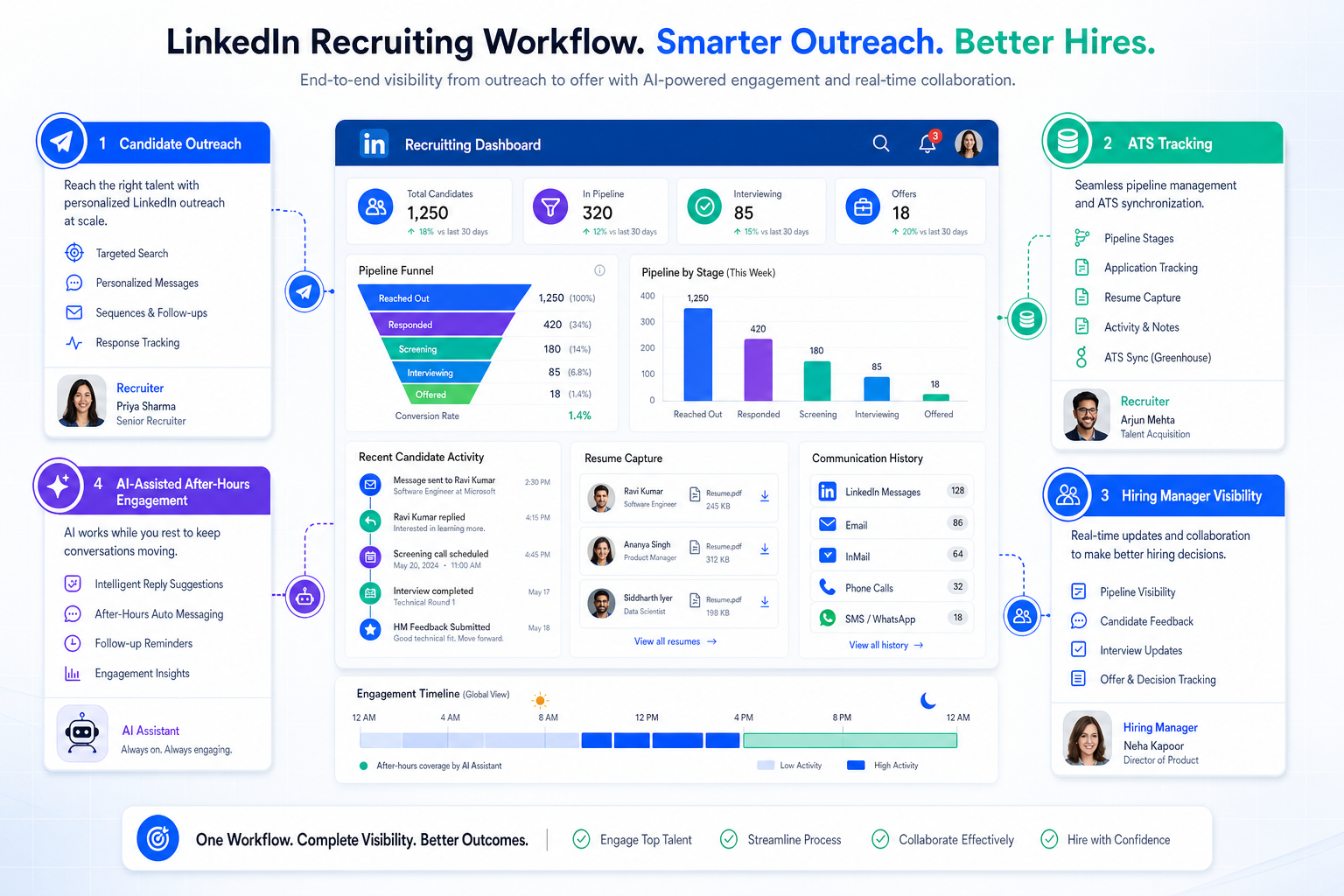
In my own workflow, I have found that an AI-supported outreach layer can ease that pressure when used carefully. StrategyBrain AI Recruiter is most useful here not as a replacement for recruiter judgment, but as a way to keep LinkedIn outreach moving, respond to candidates around the clock, and collect resumes and contact details from interested prospects before momentum disappears. Recruiters still need to review resumes, decide who actually fits the role, and make the final call on next steps.
A good example of why this matters comes from an employment-policy shift rather than a software review. When Canada extended parental leave options, the change looked simple on paper but created a more complicated reality for employers and HR teams. A recruiter or HR lead could no longer assume that leave timing, benefit duration, or employer top-up expectations would follow the old twelve-month rhythm. In practice, someone had to review requisition plans, check contract language, answer candidate questions about flexibility, and flag where a longer leave window might affect replacement hiring or internal mobility.
The friction became visible in ordinary recruiting actions. Teams had to reopen workforce plans, update job priority lists, log new conversations about leave coverage, and remind hiring managers that a role might stay in transition longer than expected. If those details lived in email threads or recruiter memory, the process became fragile fast. That is exactly why the best recruiting software is not just about posting jobs. It is about giving employers a structured way to track context, coordinate stakeholders, and connect applicant tracking with outreach, analytics, and social recruiting tools.
If you are evaluating the best recruiting software, it helps to stop thinking about one feature in isolation. Most employers do not need a single magic platform. They need recruiting tools that can absorb real-world complexity, whether that comes from hiring spikes, leave coverage, compliance questions, hard-to-fill roles, or a sourcing process that depends on fast candidate communication.
Why Recruiting Software Must Handle Business Context
One lesson from employment-rule changes is that recruiting workflows do not break only at the candidate stage. They also break when business context changes and the hiring team has no reliable way to document, share, and act on that change. A policy update, a benefit extension, or a longer internal transition period can all trigger new recruiting work long before a candidate enters the funnel.
That is why experienced teams evaluate recruiting tools by workflow resilience, not just by sourcing volume or dashboard polish. The software should help recruiters preserve context across moving parts such as workforce planning, requisition changes, candidate communication, stakeholder visibility, and timeline shifts.
For employers, that often means asking practical questions:
- Can the system capture why a role opened, not just that it opened?
- Can recruiters and hiring managers see how timing changed?
- Can candidate communication continue when recruiters are offline?
- Can sourcing, outreach, and applicant tracking stay connected when priorities shift?
Those questions matter in ordinary hiring and even more in moments when a change outside the recruiting team creates new pressure inside it.
What Recruiting Software Actually Includes
Recruiting software is a broad category of technology used to support some or all of the hiring process. Depending on the employer, that can include job posting, sourcing, applicant tracking, interview scheduling, recruitment marketing, candidate relationship management, analytics, and onboarding handoff.
In real buying conversations, the term gets used loosely. Some teams mean an applicant tracking system. Others mean a broader hiring stack. The distinction matters because employers often compare tools that solve very different problems.
A more useful way to evaluate recruiting tools is by workflow coverage:
- Applicant tracking for requisitions, stages, and documentation
- Sourcing for finding and engaging talent
- Recruiting CRM for building long-term candidate relationships
- Interview coordination for scheduling and feedback collection
- Recruitment marketing for employer brand visibility and distribution
- Analytics for funnel visibility and process improvement
- Onboarding handoff for moving from accepted offer to start date
That broader lens also explains many of the applicant tracking system benefits employers care about most: consistency, visibility, better documentation, and less dependence on scattered manual follow-up.
Key insight: The best recruiting software is the system that helps your team preserve context, not just process candidates.
Best Recruiting Software for Employers by Use Case
When employers search for the best recruiting software, they are usually trying to answer one of three questions: what kind of platform fits our team, which features actually matter, and where should outreach, tracking, and manager collaboration live. The answer depends on hiring model, scale, and operating discipline.
1. Small and midsize employers
SMBs usually need fast setup, clear ownership, and just enough automation to reduce admin without creating a system nobody uses. In this environment, recruiting tools for employers should make job posting, stage tracking, candidate communication, and interview coordination easy for both recruiters and hiring managers.
The biggest applicant tracking system benefits for smaller teams include:
- One place to manage candidates instead of spreadsheets and inboxes
- Cleaner visibility into who owns each next step
- Faster interview coordination
- Less dependence on recruiter memory
Practical advice: choose software that your hiring managers will actually log into. Simplicity usually beats feature breadth at this stage.
2. Enterprise employers
Larger organizations need stronger governance. Permissions, reporting, integration logic, and multi-team workflow consistency become more important than raw ease of setup. This is especially true when external policy changes, internal mobility, or leave coverage create hiring ripple effects across departments.
For enterprise teams, the best recruiting software often stands out through:
- Role-based permissions and process control
- Reliable analytics across business units
- Integration with HR and onboarding systems
- Clear hiring manager dashboards
Practical advice: test whether the system supports both local flexibility and centralized visibility. Enterprises often need both.
3. Staffing firms and search teams
Agency and search workflows are more relationship-driven. Recruiters need searchability, outreach history, candidate rediscovery, and pipeline reuse. In these environments, a basic ATS is usually not enough on its own.
This is also where I have seen a LinkedIn automation layer help the most. In active sourcing markets, AI Recruiter can keep first-touch communication moving after hours, answer routine role questions, and gather candidate details while the recruiter focuses on fit and client-side judgment. That is useful for headhunters who repeatedly work the same talent segments and cannot afford to lose interested replies overnight.
4. High-volume hiring teams
High-volume environments need speed, standardization, and operational control. The software should reduce friction in screening, scheduling, communication, and stage progression. If a team is hiring against changing labor conditions or fluctuating availability, workflow visibility matters as much as sourcing reach.
Practical advice: identify the bottleneck before you buy. If the real problem is candidate follow-up or manager delay, another sourcing tool alone will not solve it.
| Employer Type | What Usually Matters Most | Recommended Priority |
|---|---|---|
| SMB | Ease of use, scheduling, pipeline visibility, basic reporting | Simple ATS with core automation |
| Enterprise | Governance, analytics, permissions, integrations | Scalable platform with process controls |
| Staffing or search team | Candidate rediscovery, outreach history, search workflows | ATS plus CRM and sourcing depth |
| High-volume employer | Screening speed, communication, funnel management | Automation-first recruiting workflow |
Key Features to Compare
Experienced buyers do not compare software by feature count alone. They compare it by whether it removes repeated friction from real hiring work.
Applicant tracking system for recruiters
The ATS is the operational backbone. It should support requisition setup, stage movement, collaboration, documentation, and hiring decisions in one place.
Key questions to ask:
- Can recruiters and hiring managers quickly see candidate status?
- Can the team document why timelines or priorities changed?
- Does the system reduce email dependency?
- Is it easy to maintain a clear record for every decision?
Sourcing and pipeline building
For many employers, especially in harder talent markets, waiting for inbound applications is not enough. Strong recruiting tools should support active sourcing, list building, segmentation, and usable candidate records.
In my experience, this is where StrategyBrain AI Recruiter can fit neatly beside an ATS. It automates repetitive LinkedIn outreach steps, continues candidate messaging outside office hours, and captures contact details from interested prospects. The recruiter still evaluates resumes and decides who enters the formal process, but the top-of-funnel work becomes easier to sustain.
Interview scheduling and feedback management
Scheduling is often the least strategic but most disruptive part of recruiting. Good software reduces back-and-forth, keeps reminders visible, and makes interviewer feedback easier to collect. That matters even more when hiring plans shift and recruiters must coordinate multiple stakeholders quickly.
Recruitment marketing and job distribution
Employers increasingly need broader visibility across multiple channels, which is where recruiting software overlaps with social recruiting tools. The goal is not just wider posting. It is keeping employer messaging consistent and making sure inbound interest flows into a trackable recruiting workflow.
Analytics and workflow visibility
Dashboards should help answer practical questions: where candidates drop off, where hiring managers delay, which channels produce qualified applicants, and how business changes affect hiring timelines. If reporting cannot support operational decisions, it is mostly decoration.
Integrations and onboarding handoff
Recruiting software works best when data moves cleanly from sourcing to interview to offer to onboarding. Employers should review calendar integrations, HR system handoffs, communication tools, and any workflow that depends on shared records.
ATS vs Recruiting CRM
One reason buyers get stuck is that they use nearby terms interchangeably. They should not.
What an ATS does
An applicant tracking system for recruiters manages active hiring workflows. It tracks applicants against open jobs, organizes stages, stores records, and supports structured decisions.
This is where many classic applicant tracking system benefits come from: process control, visibility, and documentation.
What a recruiting CRM does
A recruiting CRM is built more for relationship management. It helps teams organize passive talent, track outreach history, segment talent pools, and nurture future candidates before they apply.
This matters when hiring depends on recurring outreach rather than one-time inbound flow.
Where recruitment marketing fits
Recruitment marketing sits further upstream. It focuses on employer branding, message distribution, audience engagement, and interest generation. Many social recruiting tools now operate in this space, especially when they connect social posting with lead capture and CRM functions.
Practical selection advice
- If your main problem is managing applicants, ATS strength comes first.
- If your main problem is relationship continuity, CRM depth matters more.
- If awareness and engagement are weak, recruitment marketing deserves attention.
- If your recruiters live heavily in LinkedIn sourcing, add an outreach layer that supports conversation continuity without replacing human screening.
Where Social Recruiting Tools Fit
Social recruiting tools are no longer just posting utilities. They now sit closer to sourcing, employer branding, candidate engagement, and lead capture.
What they should help employers do:
- Distribute jobs across relevant social channels
- Keep employer messaging consistent
- Capture interest before formal application
- Send that interest into a usable workflow
- Measure engagement quality, not just clicks
For many employers, the most useful social recruiting setup is not standalone. It connects social reach with ATS records and CRM follow-up.
That is also why some teams pair a structured ATS with a LinkedIn-specific communication layer. If the channel generating candidate interest moves faster than your recruiters can respond, social recruiting becomes noisy instead of productive. A tool such as StrategyBrain AI Recruiter can help maintain first-response speed and resume collection in LinkedIn-heavy workflows, while the ATS remains the system of record.
How to Choose Recruiting Software
The best recruiting software for one employer can be the wrong choice for another. A better evaluation process starts with workflow diagnosis rather than a vendor feature sheet.
- Map your current process. Identify where work slows down: sourcing, screening, scheduling, approvals, reporting, or candidate follow-up.
- Look for context failures. Ask where business changes, policy updates, or staffing shifts get lost between recruiters and hiring managers.
- Separate must-haves from nice-to-haves. Core process repair should outweigh edge-case features.
- Define your hiring model. Inbound hiring, high-volume hiring, and search-led recruiting need different tool combinations.
- Test hiring manager usability. If managers cannot use the system easily, adoption will suffer.
- Review integration needs early. Calendars, HR systems, assessments, and onboarding tools all affect workflow quality.
- Assess AI features carefully. Use them for communication support, drafting, and routine admin, but keep recruiter review for fit, compliance, and decision-making.
Practical takeaway: During evaluation, ask each stakeholder which manual step wastes the most time and which missed update creates the most risk. Those answers usually reveal the real buying criteria.
Common Buying Mistakes
Choosing feature volume over workflow fit
A longer checklist does not mean better hiring outcomes. If the tool does not fit how your team actually works, adoption will stay shallow.
Ignoring hiring manager behavior
Even a strong recruiter-facing system fails when managers cannot review candidates quickly, see status clearly, or submit feedback on time.
Confusing ATS, CRM, and recruitment marketing
These categories overlap, but they are not interchangeable. Mixing them together creates weak evaluations and harder implementations.
Treating AI as a substitute for recruiter judgment
Automation can reduce repetitive work, especially in outreach and communication, but it should not replace resume review, candidate evaluation, or decision accountability.
Underestimating change triggers outside recruiting
Policy changes, leave rules, internal mobility, and workforce planning shifts can all create hiring complexity. Good recruiting tools should help your team handle those changes without losing process clarity.
FAQ
What is the difference between recruiting software and an ATS?
Recruiting software is a broad category that can include applicant tracking, sourcing, CRM, recruitment marketing, analytics, and onboarding support. An ATS is one part of that category, focused on managing applicants through active hiring stages.
What are the main applicant tracking system benefits for employers?
The main benefits include better process visibility, cleaner stage management, stronger documentation, easier collaboration, and less manual coordination.
How do social recruiting tools help employers?
They help employers expand reach, support employer branding, engage candidates earlier, and move interest from social channels into a structured workflow.
When should employers add a LinkedIn outreach automation layer?
It makes the most sense when recruiters rely heavily on active sourcing, struggle to keep up with replies outside work hours, or need help collecting resumes and contact details before interest fades. Human review should still control qualification and next-step decisions.
How should employers evaluate AI in recruiting software?
Start with practical use cases such as communication support, message drafting, outreach continuity, and admin reduction. Then confirm that human review stays in place for fit, compliance, and final hiring decisions.
What should employers compare first when selecting recruiting tools?
Start with bottlenecks and context loss. Compare how each system supports applicant tracking, communication, visibility, reporting, and workflow continuity when priorities change.
Conclusion
The search for the best recruiting software gets clearer when employers stop chasing features and start diagnosing workflow risk. The real goal is not to buy the most software. It is to choose recruiting tools that help your team maintain structure when hiring conditions, candidate behavior, or business context change.
If you are comparing recruiting tools for employers, begin with the operational problem: applicant tracking, relationship management, manager coordination, recruitment marketing, or stronger social recruiting tools. Once that is clear, the right category becomes much easier to identify.
The strongest hiring teams use technology to reinforce judgment, preserve context, and reduce avoidable manual work. That is the practical value behind modern recruiting software, and it is why thoughtful selection pays off long after implementation.














