


This article helps headhunters evaluate hire platform choices to reduce no-shows, expose ownership gaps, and speed workflows.
That standard matters because hiring breaks down long before a role is officially marked delayed. Recruiters lose time chasing missed replies, hiring managers stop trusting the pipeline, candidates drift when communication feels impersonal, and agencies absorb the cost of admin work that never shows up on a dashboard. For smaller search firms and lean in-house teams, the real damage is not just slower hiring. It is lower response quality, more interview no-shows, weaker process discipline, and a brand experience that starts to feel transactional instead of professional.
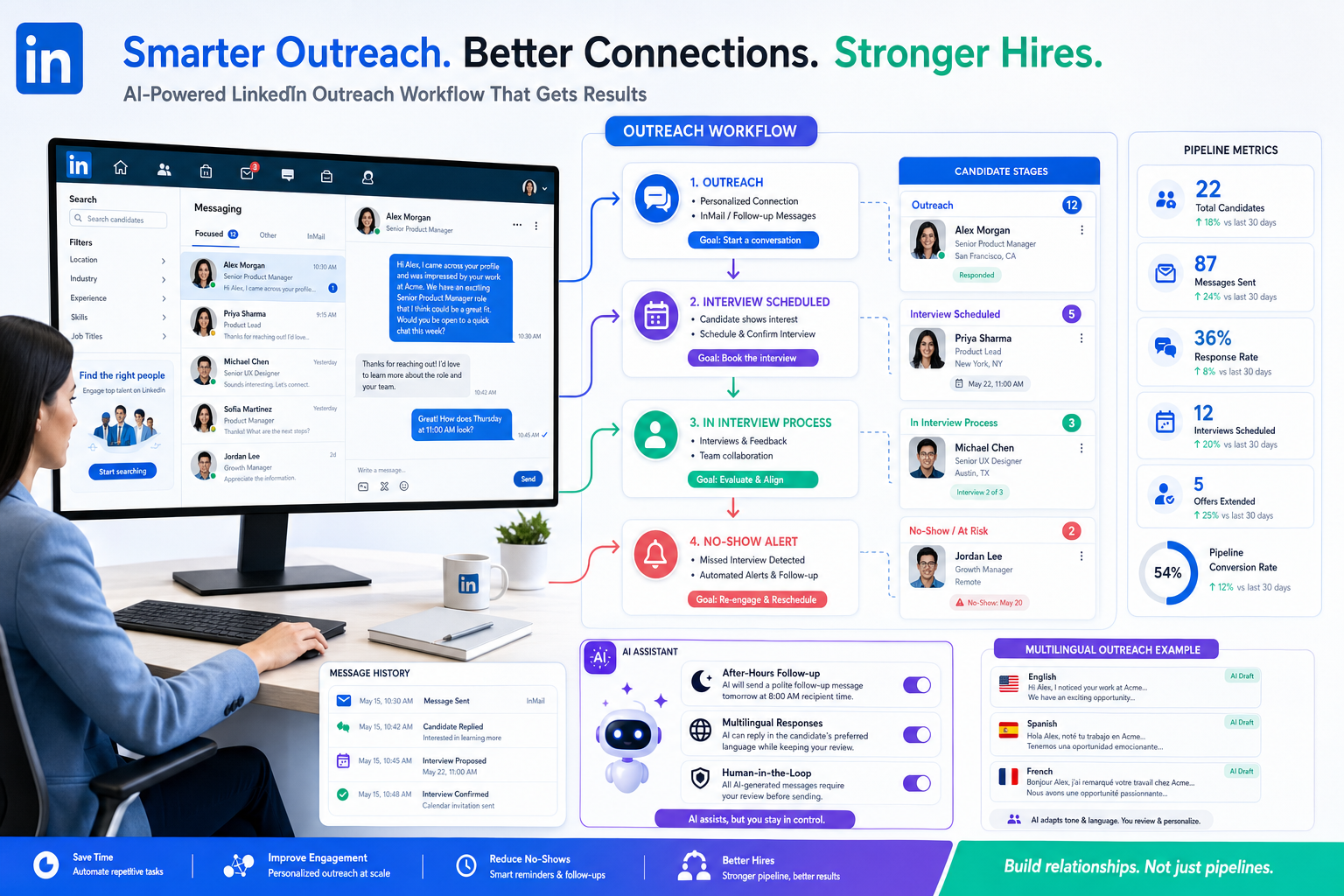
In my own workflow, I have found that an AI-supported layer can help when the problem is message volume and follow-up discipline, not final judgment. Used carefully, StrategyBrain AI Recruiter can keep candidate conversations moving after hours, respond across languages, and collect resumes or contact details from interested people without forcing recruiters to sit in LinkedIn all night. What it does not replace is recruiter accountability. I still review the resume, decide whether the person actually fits the brief, and control whether the next step should be an interview, a hold, or a rejection.
A useful way to understand the problem is to start from the candidate side, because that is where communication failure becomes visible first. Recruiters have reported hearing questions that would have sounded absurd a few years ago, including whether a job interview could be handled over email instead of in person or live conversation. Around the same time, missed interviews became less rare and more routine. A candidate confirms, the recruiter blocks the slot, the hiring team prepares, and then nobody joins the call or sends a cancellation note. In some teams, the employer still tries to reschedule because the market leaves little room to reset expectations.
That sequence matters because it exposes two concrete workflow gaps. First, communication convenience does not create accountability on its own. Second, when the hiring team cannot see message history, reminders, candidate intent, and next actions in one place, every no-show creates duplicate work: checking inboxes, re-reading chats, updating spreadsheets, notifying stakeholders, and deciding whether the candidate is still salvageable. That is exactly why the best recruiting software now has to function as a true hire platform, not just a passive database. If you are comparing an app to hire people or a broader online employment platform, the right question is whether it helps your team preserve human communication while running a faster, more trackable process.
Table of Contents
- Why human communication still matters in recruiting software
- What the best recruiting software should actually do
- ATS core vs full hire platform
- Features to prioritize when communication is breaking down
- Where AI-supported outreach helps and where recruiters still decide
- Best fit by team type and hiring model
- How to evaluate software before you buy
- Common buying mistakes to avoid
- FAQ
Why human communication still matters in recruiting software
When teams search for the best recruiting software, they often start with automation, integrations, and reporting. Those matter, but they are not the whole story. The opening problem above shows something more basic: hiring quality drops when communication becomes easy to send but hard to own.
In recruiting operations, that shows up in familiar ways. Candidates ghost interviews. Hiring managers delay feedback because they are not prompted clearly. Recruiters end up copying information from email to notes to spreadsheets. A role may look active in one tool and effectively stalled in real life. The software may still check every box in a demo, yet the process feels less human and less accountable once people start using it.
The strongest hire platform choices solve that by making communication visible and actionable. They centralize conversations, next steps, interview scheduling, ownership, and status changes so that convenience does not turn into ambiguity. In practice, this is one of the most valuable applicant tracking system benefits: the system gives digital communication structure instead of letting it float around disconnected channels.
Key takeaway: The best recruiting software is not the one that sends the most messages. It is the one that helps recruiters keep every message tied to a decision, a stage, and an accountable next step.
What the best recruiting software should actually do
A modern hire platform should support the full path from job opening to accepted offer while reducing the communication failures that create no-shows, confusion, and duplicated effort. That means more than resume storage. It means an operating layer for recruiting.
| Category | What to Look For | Why It Matters |
|---|---|---|
| Job posting | Multi-board posting, careers page tools, branded listings | Creates consistent top-of-funnel visibility across an online employment platform workflow |
| Candidate records | Centralized profiles, notes, message history, attachments | Prevents context loss when communication moves across channels |
| Pipeline tracking | Custom stages, status controls, aging visibility | Keeps missed follow-ups and stalled interviews visible |
| Scheduling | Calendar sync, reminders, self-scheduling options | Reduces interview friction and avoidable no-shows |
| Automation | Triggers, nudges, reminders, stage updates | Helps teams maintain accountability at scale |
| Communication support | Email templates, messaging logs, candidate follow-up tools | Improves consistency without removing recruiter judgment |
| Integrations | Email, calendar, HRIS, boards, assessments | Prevents duplicate admin work |
| Reporting | Source tracking, funnel metrics, response rates, no-show trends | Shows where communication is failing in the process |
| Mobile access | Recruiter and candidate mobile usability | Critical if you need an app to hire people efficiently |
| Security and permissions | Role-based access, audit logs, privacy controls | Protects sensitive candidate data |
If a system is polished in presentation but weak in candidate communication history, scheduling discipline, or ownership tracking, it usually will not hold up under real hiring pressure.
ATS core vs full hire platform
Buyers often use several terms interchangeably: recruiting software, ATS, recruitment platform, and hire platform. In practice, the distinction is useful.
An applicant tracking system is the core engine for moving candidates through stages. It helps recruiters see who applied, where each person stands, and what action should happen next. A broader hire platform adds surrounding workflow: sourcing support, careers page management, automation, analytics, stakeholder collaboration, and integrations.
This matters because the communication problems described earlier rarely live in only one place. A missed interview may begin with candidate behavior, but the cleanup touches the ATS, the recruiter inbox, calendar scheduling, internal updates, and reporting. Teams with low hiring volume may manage with a simpler ATS-first setup. Teams with distributed hiring, agency workflows, multilingual candidate pools, or higher outreach activity often need something closer to a full online employment platform.
- Choose ATS-first thinking if your main pain point is pipeline visibility.
- Choose broader recruiting software thinking if your pain point includes sourcing, communication, and cross-team coordination.
- Choose hire platform thinking if you need one environment that can support the whole hiring operation.
Features to prioritize when communication is breaking down
1. End-to-end workflow visibility
The best recruiting software should make it obvious who owns each step, what happened last, and what happens next. If a candidate stops responding, the team should be able to see the timeline without opening five tools. If a hiring manager owes feedback, that delay should not disappear in someone else's inbox.
This is where applicant tracking system benefits become operational rather than theoretical. Recruiters spend less time reconstructing events. Managers get clearer handoffs. Leadership sees whether delays come from sourcing, scheduling, feedback, or candidate drop-off.
2. Candidate communication tied to stage movement
Communication tools should not sit outside the workflow. The system should connect outreach, replies, reminders, and scheduling to candidate stages. That is how you reduce the gap between "message sent" and "decision made." It also protects candidate experience, because people are less likely to receive inconsistent updates from different team members.
3. Scheduling support that reduces no-shows
One of the clearest lessons from the reference scenario is that convenience alone does not create professionalism. Scheduling tools should include confirmations, reminders, rescheduling controls, and enough visibility for recruiters to know whether a candidate is drifting before the interview slot is lost.
4. Automation that removes repetitive admin
Automation is useful when it handles the repetitive work that weakens responsiveness: reminders, stage changes, follow-up prompts, routing, and status updates. It becomes less useful when it turns candidate communication into something obviously generic. The goal is disciplined process, not robotic tone.
5. Mobile usability for recruiters and candidates
Many teams searching for an app to hire people really mean they need a process that can keep moving outside the desktop. Recruiters need to review profiles, message candidates, and update stages quickly. Candidates need forms and communication flows that are easy to handle on a phone, especially in hourly or field-based hiring.
6. Reporting that shows communication failure points
Most teams look at time-to-fill and source quality. I would add response lag, interview no-show patterns, and stage aging by owner. If your software cannot reveal where communication is slipping, it is harder to improve the process that candidates and hiring managers actually experience.
7. Governance and privacy controls
As communication volume grows, so does data sensitivity. The right system should offer clear permissions, audit trails, and data handling controls. This is especially important when candidate conversations include resumes, direct contact details, and multilingual communication across regions.
Where AI-supported outreach helps and where recruiters still decide
I do not think AI should replace recruiter judgment, and I do think it can remove a lot of low-value friction. That distinction matters when you are evaluating the best recruiting software today.
In my own testing and process design, the most practical use case has been outreach and follow-up support around channels that create message bottlenecks. With AI Recruiter, the value is not mystical screening accuracy. It is that the system can continue candidate conversations, answer common role questions, and collect resumes or contact details from interested candidates while I keep control of shortlist quality. That is especially useful in LinkedIn-heavy sourcing workflows, after-hours reply windows, and multilingual outreach where delays usually accumulate.
I also like that this model keeps the recruiter in the final decision seat. The tool can identify who is willing to engage, help maintain response speed, and reduce repetitive back-and-forth. I still review the actual resume, assess whether the profile matches the brief, and decide who moves to interview. For teams that struggle with candidate responsiveness but do not want to dehumanize recruiting, that is a sensible boundary.
If you want to understand the workflow more concretely, the three-step setup overview is a useful starting point, and the broader LinkedIn recruiting tutorial shows where this kind of support can fit into an active sourcing process. I would still treat it as part of the recruiting workflow, not as the workflow itself.
Best fit by team type and hiring model
Small businesses
Small teams usually need simple structure more than heavy customization. A good hire platform for them includes job posting, candidate tracking, scheduling, and basic communication discipline. The biggest win is often consistency. Without it, interview follow-up and stakeholder feedback quickly become ad hoc.
High-growth companies
When hiring ramps quickly, communication debt grows just as fast. Fast-growth teams need automation, integrations, reporting, and a process that scales without turning every recruiter into a project manager. Here, the advantages of applicant tracking system adoption are highly visible because the alternative is chaos hidden behind busy inboxes.
Agency and search recruiters
Agency teams care deeply about speed, searchability, and re-engagement. They also feel the cost of missed communication more directly because every delay affects placements and client trust. If you work this way, test the software as a desk tool: search, notes, movement, follow-up, messaging history, and candidate ownership matter as much as dashboard polish.
For LinkedIn-led outbound work, an AI support layer can be helpful here, particularly when recruiters need to keep conversations moving across time zones. That is where tools like StrategyBrain AI Recruiter can complement the core system rather than replace it.
Enterprise hiring teams
Larger organizations usually need stronger permissions, more complex workflows, and tighter reporting. A real online employment platform at this level should support multiple stakeholder groups without losing accountability. If the software cannot show who delayed a step or how communication moved across a process, enterprise complexity will expose that weakness quickly.
Seasonal, hourly, or high-volume hiring
These environments need short applications, mobile usability, rapid screening support, and reliable reminders. If you are choosing an app to hire people in this context, test the candidate journey from click to interview invite. A long or confusing process increases drop-off even when sourcing volume looks strong at the top.
How to evaluate software before you buy
The cleanest evaluation process is still workflow-based. Do not ask what the platform can theoretically do. Ask it to handle the steps your team actually runs every week, especially the communication moments where real hiring starts to break.
- Define your hiring environment. Clarify role volume, sourcing model, hiring manager involvement, and candidate response patterns.
- Map the communication chain. Document where outreach begins, how interviews are confirmed, how feedback is collected, and where candidates disappear.
- Find the true friction points. Separate sourcing problems from follow-up problems, and pipeline visibility problems from manager accountability problems.
- Test the ATS core. Review candidate records, stage movement, notes, reminders, and collaboration.
- Test scheduling and follow-up workflows. Ask how the system handles confirmations, reminders, reschedules, and no-show visibility.
- Review communication support. Check message history, templates, candidate logging, and whether outreach stays attached to the record.
- Review automation carefully. Focus on the repetitive tasks you truly want removed.
- Assess integration depth. Email, calendar, HRIS, and job board connections matter because disconnected systems hide accountability.
- Review candidate experience. Test the process on mobile, not just desktop.
- Score for adoption. If hiring managers will avoid the tool, the purchase decision is already weakened.
A practical scorecard for selection
| Evaluation Area | Question to Ask | Why It Matters |
|---|---|---|
| Workflow fit | Does this match our real hiring stages and handoffs? | Reduces workarounds and hidden admin |
| Communication visibility | Can we see what was sent, received, and promised? | Protects accountability |
| Recruiter usability | Can recruiters move quickly without losing context? | Daily adoption depends on speed |
| Manager collaboration | Will hiring managers complete actions in the system? | Improves feedback discipline |
| Candidate experience | Is the process simple online and on mobile? | Supports online employment platform performance |
| Automation quality | Does it remove real admin without making communication feel fake? | Improves speed without harming trust |
| Scalability | Will it hold up if hiring volume doubles? | Protects the long-term decision |
Common buying mistakes to avoid
- Buying for feature count instead of process control. A crowded roadmap does not fix missed handoffs.
- Ignoring communication design. If replies, reminders, and status changes are disconnected, recruiters will create manual patches.
- Overestimating AI claims. AI is most useful where it supports responsiveness and routine workflow, not where it pretends to replace hiring judgment.
- Under-testing mobile experience. An app to hire people should work in real candidate and recruiter conditions, not just in a sales demo.
- Leaving hiring managers out of evaluation. Their behavior often determines whether candidate communication stays timely.
- Skipping governance review. Candidate data protection should be clear from the start.
- Failing to define the real win. Decide whether success means fewer no-shows, cleaner handoffs, faster follow-up, or better reporting before you buy.
The common thread is simple: teams often buy software to add speed, then discover they have purchased more channels without more accountability.
FAQ
What is the best recruiting software for most teams?
The best recruiting software is the one that fits your actual hiring workflow, keeps candidate communication visible, and helps recruiters and hiring managers move candidates through clear stages. For many teams, that means an ATS-led hire platform with strong scheduling, automation, and reporting.
What is a hire platform?
A hire platform is a broader recruiting environment that usually includes ATS functionality plus job posting, communication support, scheduling, reporting, integrations, and workflow automation.
How is an ATS different from broader recruiting software?
An ATS focuses on tracking applicants through stages. Broader recruiting software may include sourcing, outreach, analytics, careers page tools, and integrations that support the full hiring process.
Why do interview no-shows matter when choosing software?
No-shows reveal deeper process weaknesses: weak reminders, poor visibility, disconnected communication, and unclear ownership. Good recruiting software helps reduce that friction by tying communication and scheduling to the candidate record and workflow.
What should I look for in an app to hire people?
Look for mobile usability, fast candidate tracking, clear communication history, scheduling support, and simple stage updates. The right app to hire people should help recruiters act quickly without losing context.
What makes a good online employment platform?
A strong online employment platform supports cloud-based recruiting, online applications, centralized candidate records, careers page management, communication tools, and integrations with your existing systems.
Are AI recruiting tools worth using?
They can be, especially for repetitive outreach, follow-up, multilingual communication, and candidate response management. They are most effective when recruiters still control fit assessment, resume review, and final next-step decisions.
Where can AI support fit in a LinkedIn-heavy workflow?
AI support can help continue candidate conversations, answer common questions, and collect resumes or contact information after interest is confirmed. That is useful when recruiters want better response speed without spending every hour inside outbound messaging.
Final thoughts
The opening case about email-only interviews and growing no-show behavior is not really about etiquette alone. It is a signal that convenience has outpaced structure in many hiring workflows. That is why choosing the best recruiting software now requires more than reviewing feature lists. You need a hire platform that keeps communication human, visible, and tied to accountable action.
If you are evaluating options, start with the moments where your process becomes vague: candidate replies, interview confirmations, stakeholder feedback, and follow-up ownership. Then choose software that closes those gaps with workflow discipline, not just more activity. That is the practical difference between a system that stores hiring data and one that actually helps teams hire well.














