


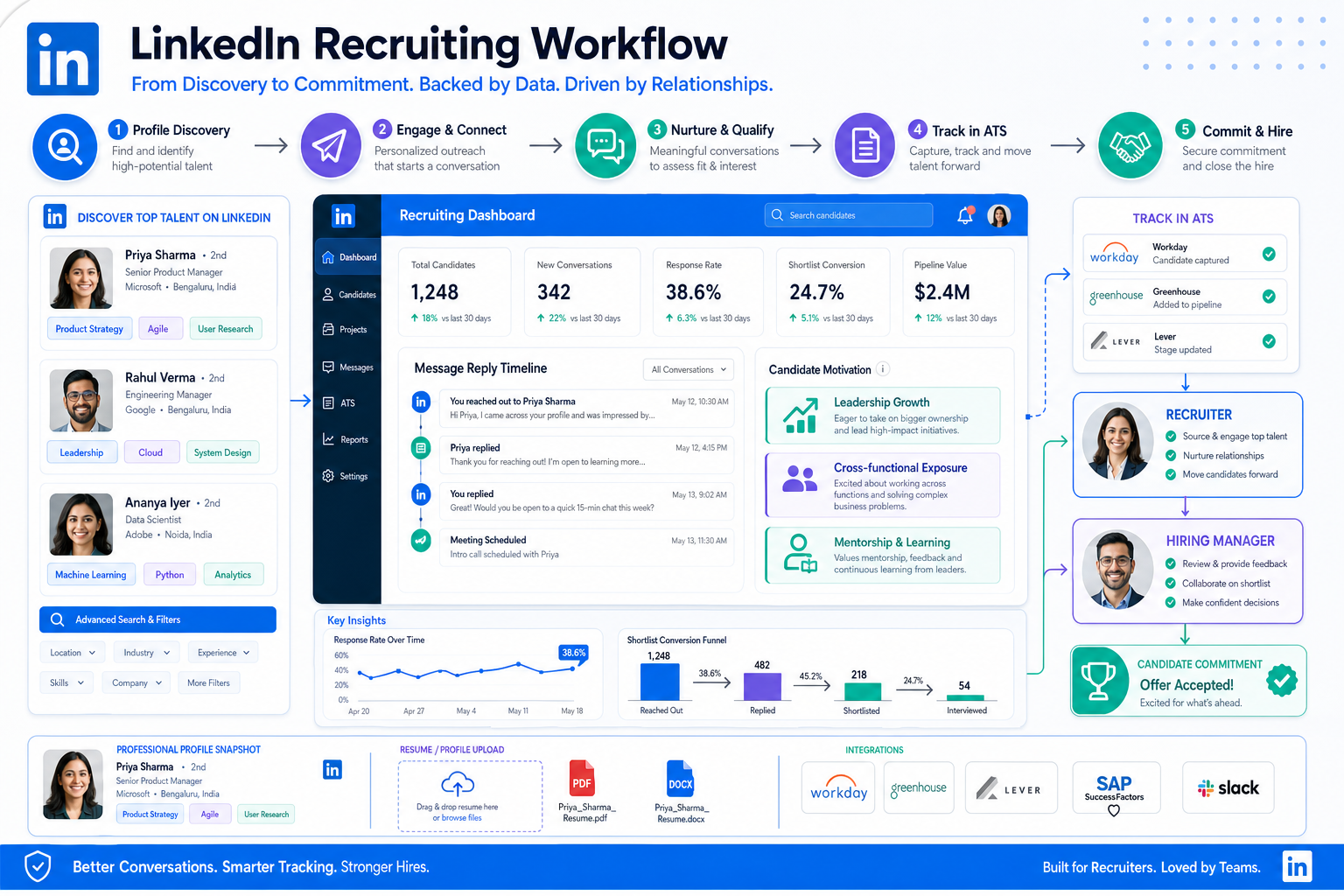
When LinkedIn replies stall and shortlists collapse, this article helps recruiters judge how do you use LinkedIn for recruitment as a repeatable process.
That matters because the sourcing problem is rarely just finding profiles. The real loss shows up later: a strong prospect goes quiet, a hiring manager forgets why someone looked promising, outreach timing slips, and the recruiter ends up rebuilding the shortlist from scratch. For agency owners, that means wasted desk time and weaker fill rates. For solo recruiters, it means missed replies after hours and too much manual chasing. For in-house teams, it often means top candidates choosing employers that showed clearer growth, better communication, and more consistent process.
In that gap between first message and real candidate commitment, I have found that StrategyBrain AI Recruiter can reduce a lot of the repetitive LinkedIn work that usually drains recruiter attention. The most relevant strengths here are always-on candidate messaging, multilingual communication for global searches, and automated collection of resumes and contact details from interested prospects. It does not replace recruiter judgment; I still review the CV, assess fit, and decide whether the person should move forward.
The retention lesson is familiar to anyone who recruits finance talent. A top performer leaves, says the new opportunity just appeared, and the hiring team wonders whether the move could have been prevented. Usually the answer sits in three areas that matter long before resignation: leadership development, cross-functional exposure, and access to a respected mentor. In recruiting terms, those are not soft side notes. They are candidate decision criteria, especially for high performers who are not actively applying anywhere.
When I source that kind of profile on LinkedIn, the sequence is practical. I review the requisition, check whether the hiring manager can truly offer growth beyond compensation, message the candidate, log the reply, and then compare what attracted them with what made similar people leave prior employers. That is where recruiting software starts to matter. If your system cannot capture candidate motivations, track outreach cleanly, and keep future-fit prospects warm, then even a good answer to how do you use LinkedIn for recruitment turns into disconnected activity instead of a repeatable hiring process.
- The best recruiting software helps recruiters manage not only applicants, but also candidate motivation, follow-up, and hiring team coordination.
- If you want a serious answer to how do you use LinkedIn for recruitment, treat LinkedIn as a sourcing channel inside a broader ATS and CRM workflow.
- High performers often evaluate roles through growth signals such as leadership training, cross-functional scope, and mentorship, so your system should help capture and reuse that intelligence.
- Recruiters still own final qualification, resume review, shortlist decisions, and hiring manager alignment even when automation supports outreach.
- If you want to become a recruiter or improve how to recruit people, software fluency and process discipline matter as much as messaging skill.
- What the Best Recruiting Software Actually Solves
- Why Candidate Motivation Belongs in Your ATS
- How to Choose the Best Recruiting Software
- How Do You Use LinkedIn for Recruitment
- Three Recruiting Software Options Recruiters Compare
- How to Recruit People With a Repeatable Process
- What to Learn First if You Want to Become a Recruiter
- FAQ
What the Best Recruiting Software Actually Solves
If you are comparing the best recruiting software, the most useful question is not which platform advertises the most features. It is whether the software helps your team move from sourcing to hire without losing candidate context, stakeholder alignment, or follow-up discipline.
That is especially important for LinkedIn-driven recruiting. LinkedIn is good at surfacing people. It is not designed to be your full system of record for intake notes, scorecards, talent pooling, reporting, hiring manager accountability, and long-cycle relationship management. Once you start recruiting passive candidates, the workflow gets more complex because their decision is tied to career growth, timing, and trust, not just job availability.
The reference lesson from finance talent retention maps directly here. Strong performers do not move only because a recruiter reached out. They move when a new role appears to offer something their current employer did not: leadership development, broader business exposure, or guidance from someone they respect. The best recruiting software gives you one place to record those motives and reuse them across future searches.
In practice, that usually means a combination of applicant tracking, recruiting CRM functions, communication history, scheduling support, and reporting. A tool that only stores resumes is too narrow. A tool that automates messages but cannot support final recruiter review is incomplete. The right system should help recruiters source, track, qualify, collaborate, and learn from every search.
Why Candidate Motivation Belongs in Your ATS
Many recruiters think of an ATS as a stage tracker. Experienced recruiters use it more broadly. It should also capture why a candidate engaged, what concerns they raised, what growth themes mattered, and what conditions would make a future approach stronger.
That is one of the most underused applicant tracking system benefits. Candidate motivation is often treated as a memory task sitting in a recruiter's inbox or private notes. Then months later, a similar role opens and no one remembers whether the person cared most about promotion scope, strategic exposure, or mentorship.
The retention framework from top finance talent is useful here because it highlights three recurring decision drivers:
- Leadership training: high performers want evidence that a role expands responsibility and leadership potential.
- Cross-functional exposure: strong candidates often care about understanding the business more broadly, not staying in a narrow silo.
- Mentorship: many top people value access to a credible leader who can support career growth before frustrations become exit reasons.
If your recruiting software lets you record and search those themes, sourcing becomes more intelligent. Recruiters can revisit warm talent pools based on actual career drivers rather than job title alone. That improves how to recruit people for harder-to-fill roles because your outreach is tied to what matters to the candidate, not only what matters to the vacancy.
Practical takeaway: When a candidate replies on LinkedIn, do not log only skills and salary expectations. Log the growth reason behind their interest or hesitation.
How to Choose the Best Recruiting Software
Buying software without mapping your recruiting process first is where most evaluation projects go wrong. The best recruiting software for a contingency desk, an in-house finance hiring team, and a high-volume talent acquisition function will not be identical.
Start with recent hiring history. Review your last few successful hires and your last few searches that stalled. Look for breakdowns in sourcing, candidate response speed, handoff quality, decision logging, or manager feedback. If your recruiting is LinkedIn-heavy, also examine whether valuable outreach data stays trapped in messages rather than flowing into a shared process.
What experienced recruiters assess first
| Evaluation Area | What to Look For | Why It Matters |
|---|---|---|
| LinkedIn workflow support | Clean sourcing handoff, outreach tracking, response logging | Prevents valuable candidate data from disappearing in inboxes |
| ATS structure | Pipeline stages, scorecards, ownership rules, offer flow | Supports consistency after sourcing begins |
| CRM capability | Tags, talent pools, nurture notes, search history | Helps recruiters return to passive candidates later |
| Candidate context | Motivation notes, growth preferences, relocation or timing signals | Improves outreach quality and future matching |
| Automation | Follow-up support, after-hours messaging, reminders, admin reduction | Saves recruiter time without removing human judgment |
| Reporting | Source performance, response rates, stage conversion, time-to-hire | Shows whether LinkedIn effort produces real hiring outcomes |
| Compliance and security | Data handling controls, permission structure, privacy support | Essential for candidate trust and operational risk management |
Questions worth asking in demos
- Can sourced prospects and inbound applicants live in one workflow?
- Can recruiters capture why a candidate might leave their current role, not just their resume?
- Does the software support talent pooling for later follow-up?
- Will hiring managers actually use the feedback process?
- Can we see which LinkedIn searches and messages convert into interviews and hires?
- What still requires recruiter judgment, and what can be automated safely?
Those last two questions matter because software should reduce repetitive work, not dilute recruiting quality. In my own process, that is where I found value in using AI Recruiter for the front end of LinkedIn engagement while keeping shortlist review and qualification in recruiter hands. It helped me keep communication moving outside business hours and across time zones, but I still made the hiring call based on the resume, the search brief, and the conversation quality.
How Do You Use LinkedIn for Recruitment
The practical answer to how do you use LinkedIn for recruitment is to use LinkedIn for discovery and early engagement, then move every real interaction into a structured recruiting workflow. Recruiters who leave sourcing activity inside isolated messages usually lose response history, candidate motivation, and follow-up discipline.
A repeatable LinkedIn recruiting workflow
- Define the real search. Agree on must-haves, likely title variants, industry context, and what career upside the role can honestly offer.
- Search with context, not title alone. Use geography, function, company background, seniority, and adjacent-path filters to surface stronger prospects.
- Look for career signals. On passive candidates, note whether they appear ready for leadership, broader business exposure, or a mentoring environment.
- Segment before outreach. Tag prospects by fit, timing, and likely motivation so the search does not become one long unstructured list.
- Write concise outreach. Good LinkedIn messaging respects the candidate's time and speaks to a real career move, not a generic vacancy blast.
- Track every reply centrally. Move response details, contact information, and next-step notes into your ATS or CRM.
- Review actual outcomes. Measure which search slices, message themes, and candidate profiles produce interviews and hires.
When I tested this process on harder LinkedIn searches, the biggest bottleneck was never writing the first message. It was sustaining consistent follow-up across many prospects, especially when replies arrived at odd hours or from different regions. That is where StrategyBrain AI Recruiter was useful in practice. It could keep the initial conversation moving, answer role questions, and collect resumes or contact details from interested people, while I focused on evaluating fit and preparing the next recruiting step.
Common LinkedIn recruiting mistakes
- Using broad title searches without a clear intake discussion
- Sending the same message to every passive candidate
- Ignoring why high performers would consider a move
- Failing to record motivation and timing signals
- Leaving resumes or contact details trapped in personal inboxes
- Not measuring whether LinkedIn outreach actually converts
If you remember one rule, make it this: LinkedIn finds people, but recruiting software helps you manage the reasons they may actually move.
Three Recruiting Software Options Recruiters Compare
Because this topic is about software use, recruiters usually compare three categories of tools: a general ATS, a sourcing automation platform, and a LinkedIn-focused communication workflow. Below is a practical comparison of three well-known options often discussed in the market.
| Software | Where It Fits Best | Strengths | Limitations | How It Can Work With StrategyBrain AI Recruiter |
|---|---|---|---|---|
| LinkedIn Recruiter | Teams that need strong native search and profile discovery | Powerful search workflow, familiar recruiter environment, strong prospect discovery | Needs separate process discipline for follow-up, record-keeping, and downstream ATS consistency; can become expensive for smaller teams | Use LinkedIn Recruiter for search breadth, then use AI Recruiter to handle repetitive outreach, after-hours replies, and resume capture before recruiter review |
| Greenhouse | Structured in-house hiring teams with mature interview workflows | Strong ATS structure, scorecards, interview process discipline, hiring manager collaboration | Less centered on LinkedIn-first outreach workflows; may feel heavier for smaller agencies or solo recruiters | Use AI-supported LinkedIn outreach upstream, then push qualified prospects into Greenhouse for evaluation, interviews, and offer management |
| Lever | Teams wanting a blend of ATS and CRM capability | Good balance between candidate tracking and relationship management, easier talent pooling than many ATS tools | Still depends on recruiter consistency for outreach execution and message handling; cost-fit varies by team size | Use AI Recruiter to keep first-contact conversations moving at scale, while Lever stores long-term candidate context and pipeline activity |
A few cautions are worth stating clearly. Pricing, efficiency, and outcomes vary by contract, workflow maturity, recruiter skill, and geography, so I would not trust blanket claims on cost-per-hire or response uplift without testing your own process. From a usability perspective, the distinction is simpler:
- LinkedIn Recruiter is strongest for search and discovery.
- Greenhouse is strongest for structured hiring operations.
- Lever is often attractive when you want ATS and CRM balance.
- StrategyBrain AI Recruiter is most relevant when the pain sits in repetitive LinkedIn outreach, global reply handling, and collecting candidate materials before recruiter review.
That makes the comparison less about naming one universal winner and more about knowing your workflow. If your biggest issue is sourcing volume and response handling, AI-supported LinkedIn communication may produce more value than another internal workflow feature. If your problem is panel feedback and offer approvals, your ATS core matters more.
How to Recruit People With a Repeatable Process
The phrase how to recruit people sounds basic, but it usually breaks down at the same points: unclear intake, inconsistent sourcing, poor follow-up, weak feedback discipline, and no shared record of what candidates actually cared about.
The finance-talent opening case illustrates that well. High performers do not only compare salary or title. They often ask, directly or indirectly, whether the next move will build leadership capacity, widen business understanding, and provide credible support. If your process misses those themes, you will source people but fail to convert them.
A repeatable recruiting process
- Clarify the role and growth story. Define not just requirements, but why a strong person would join.
- Write a realistic brief. Make sure the opportunity reflects actual responsibilities and development potential.
- Source across channels. Use LinkedIn, referrals, talent pools, and prior silver-medalist candidates.
- Capture motivation during first contact. Log the push and pull factors behind candidate interest.
- Screen with structure. Review resume evidence against must-haves and future-fit criteria.
- Run consistent interviews. Keep evaluation anchored to the role, not personality bias.
- Align stakeholders quickly. Late feedback is one of the easiest ways to lose good candidates.
- Close and hand off well. Good recruiting continues through offer acceptance and onboarding transition.
That process is easier to sustain when software handles repetitive admin and the recruiter handles judgment. In my own workflow, using AI Recruiter conversation support for early LinkedIn exchanges helped reduce the stop-start effect that usually harms passive-candidate engagement. What mattered most was not the automation by itself, but the fact that I could review a clearer trail of interest, questions, and submitted materials before deciding the next move.
What to Learn First if You Want to Become a Recruiter
People who want to become a recruiter often assume the job is mainly about persuasion. In reality, the craft is a mix of market reading, stakeholder management, candidate judgment, and process control.
If you want to become a recruiter, learn these basics early:
- Role intake: translate hiring-manager needs into search criteria and candidate value proposition.
- Sourcing: understand how LinkedIn, referrals, and existing talent pools work differently.
- Candidate motivation: listen for why someone would move, not just whether they can do the job.
- Pipeline hygiene: keep notes, statuses, resumes, and follow-ups organized.
- Software fluency: know how an ATS, CRM, and LinkedIn-support workflow fit together.
- Decision discipline: separate early interest from real qualification.
One reason I recommend that new recruiters learn software early is that it teaches operational thinking. A recruiter who can source well but cannot track candidate context will struggle at scale. A recruiter who understands how do you use LinkedIn for recruitment inside a proper system becomes far more reliable.
FAQ
What is the best recruiting software for LinkedIn hiring?
The best recruiting software for LinkedIn hiring is the one that connects sourcing, outreach tracking, candidate context, team collaboration, and final recruiter review. For some teams that means a strong ATS plus CRM workflow; for others it also means adding AI-supported LinkedIn communication to reduce manual follow-up.
How do you use LinkedIn for recruitment without creating more admin work?
Use LinkedIn for search and early engagement, then move all meaningful candidate activity into your ATS or CRM. Tag prospects, log motivation, track replies, and measure conversions. Do not rely on memory or inbox folders.
Why do passive candidates often ignore recruiter outreach?
Because the message is too generic, the role lacks a clear career advantage, or the recruiter does not speak to what matters most to strong performers. Leadership growth, cross-functional scope, and mentorship are common decision themes.
Can AI handle LinkedIn recruiting by itself?
It can support repetitive front-end tasks such as connection flow, candidate messaging, answering common role questions, and collecting resumes or contact details. Recruiters should still handle resume evaluation, shortlist decisions, and hiring-manager alignment.
How does StrategyBrain AI Recruiter fit into a recruiting workflow?
It is most useful when LinkedIn outreach volume is high and recruiters need help sustaining communication, especially across regions or after hours. It can support messaging and resume capture, while the recruiter keeps control of qualification and next-step decisions.
What should someone learn first to become a recruiter?
If you want to become a recruiter, start with intake, sourcing, candidate assessment, communication discipline, and ATS hygiene. Learning how to recruit people well means understanding both human motivation and process structure.
Conclusion
The best recruiting software does more than move candidates through stages. It helps recruiters understand why good people consider moving, preserve that insight, and act on it consistently.
That is why the answer to how do you use LinkedIn for recruitment should never stop at search filters or message templates. The real advantage comes when LinkedIn activity feeds a disciplined workflow that tracks motivation, supports follow-up, and keeps recruiter judgment at the center.
If you are refining how to recruit people or trying to become a recruiter, start there: know what strong candidates value, use software to reduce repetitive work, and keep the final hiring decision grounded in evidence rather than noise.














