


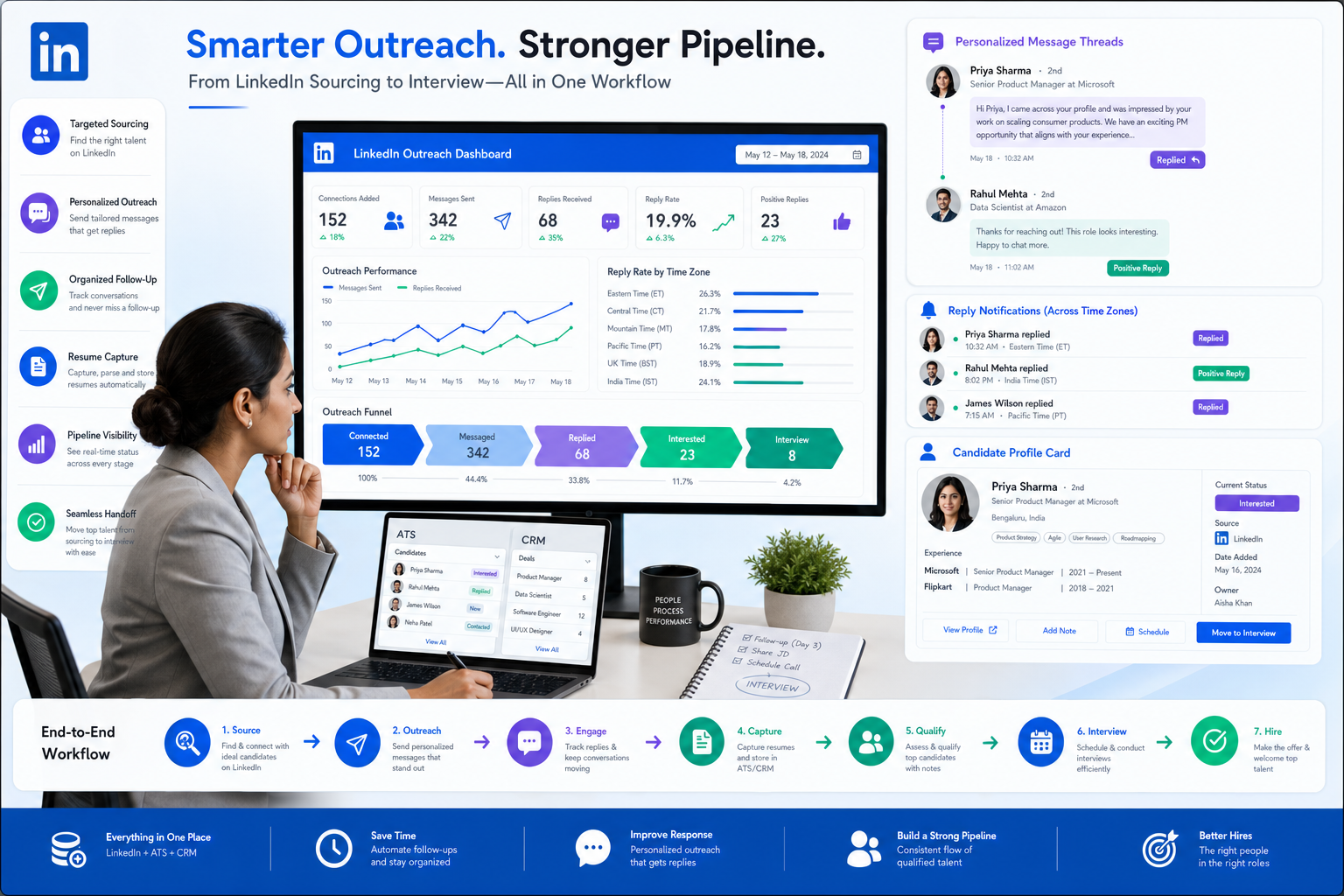
When LinkedIn outreach turns scattered, recruiters can use this article to judge how do you use LinkedIn for recruitment without losing replies.
Without that support, LinkedIn sourcing turns into scattered searches, weak outreach, missed replies after hours, and poor handoffs once a prospect finally shows interest. For a solo headhunter, that means wasted sourcing time and fewer submittals. For a small agency owner, it means consultants working hard but not building a reusable talent pipeline. For an in-house recruiter, it often shows up as slower hiring, frustrated managers, and candidates who disappear because nobody kept the process moving.
That is where StrategyBrain AI Recruiter can help as part of a broader recruiting workflow. In my experience, it is most useful when LinkedIn outreach volume is high, candidate replies arrive across time zones, and recruiters need help collecting resumes and contact details without losing context. Its strongest fit here is automating first-touch LinkedIn conversations, handling always-on follow-up, and supporting multilingual communication, while the recruiter still owns final qualification, resume review, and the decision on who moves to interview.
A useful way to think about this comes from a very different professional setting: finance talent weighing whether to give back through volunteer work, socially responsible employers, or a move into the charitable sector. The choice sounds personal, but from a recruiter’s side it creates a familiar sourcing challenge. These candidates are not always applying to job ads. They are comparing mission, realistic time commitment, resource constraints, and whether the role will actually match their values.
In practice, a recruiter trying to reach that kind of candidate often has to review past LinkedIn replies, revisit notes from an informational conversation, update the candidate stage, and clarify whether the opportunity is a volunteer board seat, a paid role, or a values-driven career move with tradeoffs such as lower compensation and broader responsibilities. That sequence exposes the real software question behind the topic: the best recruiting software is not just an applicant database, but a system that helps you source, nurture, document, and act on nuanced candidate decisions.
That is also why this article treats LinkedIn sourcing, ATS structure, CRM-style nurturing, and recruiter judgment as one operating model. If you are comparing the best recruiting software, trying to improve how to recruit people, or even thinking about how to get a job recruiter interested in your background, the same principle applies: good hiring outcomes depend on organized outreach, clean follow-up, and enough context to understand why someone may say yes, not just whether they clicked apply.
- How to compare ATS and recruiting CRM capabilities
- What the best recruiting software should do before and after application
- How do you use LinkedIn for recruitment in a practical workflow
- How to recruit people when motivation and fit are more nuanced
- What job seekers should know about how to get a job recruiter
Table of Contents
- What best recruiting software really means
- Why candidate motivation matters in software choice
- ATS vs recruiting CRM
- How do you use LinkedIn for recruitment
- How software supports each hiring stage
- How to recruit people with a repeatable process
- How to get a job recruiter
- How to evaluate recruiting software
- Common mistakes to avoid
- FAQ
What Best Recruiting Software Really Means
The best recruiting software does much more than store resumes. In a modern hiring team, it should support sourcing, nurturing, screening, interviewing, approvals, reporting, and communication across the full hiring funnel.
That broader view matters most when the candidate decision is not simple. If someone is considering a move for values, flexibility, mission, or long-term fit, recruiters need more than a requisition and a message template. They need a system that preserves context: why the person was sourced, what concerns they raised, whether they are open to volunteer work or paid employment, and what next step was actually agreed to.
In real hiring operations, the best recruiting software usually helps teams do five things well:
- Keep hiring organized with clear stages, ownership, and status tracking
- Automate repetitive work like screening prompts, follow-ups, reminders, and approvals
- Improve consistency through scorecards, notes, and structured evaluation
- Protect candidate experience with timely communication and cleaner handoffs
- Support better decisions with source visibility, reporting, and integrations
Key insight: The best recruiting software is the one that helps recruiters carry context from first contact to final decision, especially when LinkedIn outreach starts the relationship.
Why Candidate Motivation Matters in Software Choice
One strength of the reference scenario is that it reminds us candidates are often evaluating opportunity types, not just job titles. Some people respond because they want to contribute to a cause. Others are open to socially responsible employers. Others may explore charitable-sector work but worry about reduced resources, broader responsibilities, or pay tradeoffs.
Recruiting software should help teams capture that level of nuance. If a recruiter has to keep those details in memory or in a private spreadsheet, the process breaks as soon as volume rises or ownership changes. A hiring manager then sees only a name in a pipeline, not the actual reason that candidate was worth pursuing.
This is especially relevant to how do you use LinkedIn for recruitment. LinkedIn is effective because it reaches passive or semi-passive talent, including professionals who may never submit a standard application. But once you start those conversations, you need software that can record intent, objections, timing, and next steps in a structured way.
In my own workflow, that is where I have found StrategyBrain AI Recruiter useful. It can keep initial LinkedIn conversations moving when I am offline and help capture resumes or contact details from interested candidates, but I still review whether the person’s background and motivation actually fit the assignment. That division of labor matters. Automation can keep momentum; the recruiter still has to interpret the opportunity decision.
What’s the Difference Between an ATS and a Recruiting CRM?
This is one of the most important distinctions in recruiting technology. An ATS primarily manages candidates after they enter a formal application process. A recruiting CRM supports sourcing and relationship-building before a candidate applies.
If your team is focused on how to recruit people proactively, you need more than applicant storage. You need the ability to search for prospects, segment talent pools, personalize outreach, and re-engage people whose timing was not right the first time.
| Category | ATS | Recruiting CRM |
|---|---|---|
| Primary purpose | Manage active applicants | Manage prospects before application |
| Main workflow | Screening, interviews, feedback, offers | Sourcing, outreach, talent pooling, nurturing |
| Best for | Structured post-application hiring | Proactive candidate sourcing |
| Typical users | Recruiters, coordinators, hiring managers, HR | Sourcers, recruiters, talent acquisition teams |
| Value signal | Process control and visibility | Pipeline creation and relationship management |
The difference becomes obvious in values-driven or hard-to-convert searches. A candidate who wants an informational conversation before making a move does not belong in the same workflow as an applicant already booked for interviews. If your software treats both the same way, recruiters either create workarounds or lose track of the relationship.
How Do You Use LinkedIn for Recruitment?
If you want a practical answer to how do you use LinkedIn for recruitment, think of it as a four-part workflow: define the right target, personalize outreach, manage ongoing conversation, and connect LinkedIn activity to your core recruiting system.
1. Start with a real success profile
Do not begin with a title-only search. Start with the actual profile of success: skills, likely employers, years of experience, adjacent backgrounds, location constraints, and the kind of motivation that may matter for this role.
That last point is often missed. A candidate considering a mission-driven move may care less about title inflation and more about mandate, flexibility, or community impact. Your search logic should reflect that.
2. Send outreach that shows selection, not volume
Good LinkedIn outreach explains why that person was selected. It does not read like a mass blast. A strong message usually includes:
- Why you reached out to them specifically
- What the role or opportunity actually solves
- Why the timing may make sense
- A low-friction question they can answer quickly
This is where a tool like AI Recruiter can reduce manual load on repetitive first-touch and follow-up messaging. In practice, I have used it most effectively when candidate responses arrive late at night or from different regions, because it keeps the conversation alive until I step in to review fit and decide whether to advance the person.
3. Treat replies as workflow events, not inbox clutter
When a candidate replies, recruiters need to tag intent, capture key concerns, and set the next action. Otherwise, LinkedIn becomes a place where good leads go to stall. This is particularly true when the person needs more context before applying, such as understanding the employer’s mission, the level of resources available, or whether the role is paid or volunteer-based.
4. Bring hiring managers into calibration early
LinkedIn recruiting works better when recruiters and hiring managers align on the target profile before outreach volume increases. Share examples, compare profiles, and clarify what matters most. That saves everyone from arguing later about whether the wrong people were sourced, when the real problem was that the search logic was never aligned.
How the Best Recruiting Software Supports the Full Hiring Funnel
Strong recruiting technology should map to real workflow stages. This is where many software evaluations go off course: teams compare features without asking whether those features support day-to-day recruiting work.
Sourcing and talent discovery
At the top of the funnel, software should help recruiters search across job boards, internal databases, referrals, and passive candidates. It should also make targeted outreach manageable rather than manual. If your team regularly asks how do you use LinkedIn for recruitment, this stage matters most.
Nurturing before application
This is where CRM-style features matter. A prospect may not be ready to apply today, but they may be relevant in three months. Good recruiting software lets you tag, segment, revisit, and re-engage those people without starting over.
The reference scenario around volunteering, socially responsible employers, and charitable-sector work is a good example. Those are not one-message decisions. Recruiters need somewhere to record what the person cares about, what tradeoffs they mentioned, and when to circle back.
Applying and screening
Once a person applies, the hiring team needs clean intake, qualification review, and clear next steps. This is where ATS value becomes visible. Recruiters can see who is in process, who is stalled, and which sources are producing qualified candidates.
Interviewing and evaluation
Recent recruiting-software expectations increasingly center on structured hiring. Standardized interviews, scorecards, and documented feedback are not cosmetic features. They help teams compare candidates fairly and reduce process drift.
Offers, approvals, and onboarding handoff
Late-stage breakdowns are expensive. Software should support approvals, offer coordination, communication history, and a smooth transition into onboarding or stakeholder handoff. Even if onboarding happens elsewhere, the recruiting team still needs a reliable final-stage workflow.
Reporting and integration
Recruiting leaders need visibility into funnel health, source quality, time in stage, and team responsiveness. They also need integrations with calendars, communication tools, HR systems, and reporting workflows. Without integrations, automation stays partial and fragile.
How to Recruit People Without Creating Chaos
If someone asks how to recruit people, the experienced answer is that recruiting is not one action. It is a sequence of decisions across sourcing, qualification, communication, evaluation, and closure.
The best recruiting software helps because it turns that sequence into a repeatable operating system.
Start with a realistic intake
Before opening a requisition, define the business need, must-have capabilities, likely motivations, and approval path. Software cannot fix a role that was never scoped clearly.
Use more than one source
Do not rely on a single channel. Strong pipelines usually combine job boards, referrals, internal talent pools, and sourced prospects from targeted outreach.
Keep a communication rhythm
Candidates judge the process as much as the role. Status updates, interview scheduling, and timely decisions all affect candidate experience. This is one reason always-on communication support can help in LinkedIn-heavy recruiting workflows.
Standardize evaluations
If every interviewer uses different criteria, your data is weak and your decisions are hard to defend. Structured interviews and scorecards are part of responsible hiring.
Review what the funnel is telling you
If sourced candidates reply but do not convert, your outreach may be too broad or the opportunity may be poorly framed. If good candidates stall after interest, the issue may be your handoff between sourcing and formal process.
How to Get a Job Recruiter on Your Side
The keyword how to get a job recruiter points to a related reader need. Job seekers often want to know how to connect with recruiters effectively, especially in competitive or mission-driven fields.
- Find recruiters in your field rather than messaging everyone with a recruiter title
- Use your network or relevant communities when possible
- Send a targeted message that explains your background and interest clearly
- Be realistic about your ask if you are exploring volunteer, nonprofit, or purpose-led work
- Keep your profile and resume aligned so the recruiter can assess fit quickly
That same logic helps recruiters too. The easier it is to understand the candidate’s goals, the easier it is to route them into the right workflow and avoid mismatched follow-up.
How to Evaluate the Best Recruiting Software for Your Team
Once you move from general interest to actual buying, use a workflow-based checklist. This keeps the selection grounded in recruiting operations rather than marketing claims.
| Evaluation area | What to look for | Why it matters |
|---|---|---|
| ATS workflow | Stage management, statuses, approvals, feedback collection | Supports process control after application |
| CRM capability | Talent pools, sourcing pipelines, outreach tracking | Supports proactive recruiting before application |
| Automation | Follow-ups, reminders, scheduling, resume capture support | Reduces admin time and missed steps |
| Structured hiring | Interview kits, scorecards, shared criteria | Improves consistency and governance |
| Candidate experience | Status communication, clean scheduling, less duplication | Protects employer reputation |
| Compliance and governance | Permissions, records, process controls | Important for defensible hiring |
| Analytics | Source quality, time in stage, conversion patterns | Supports better resource allocation |
| Integrations | Calendar, communication, HR, reporting connections | Makes workflows usable at scale |
When you compare options, ask recruiters to walk through real scenarios:
- Sourcing a passive candidate on LinkedIn
- Revisiting an earlier conversation where timing was not right
- Collecting a resume and contact details after interest is confirmed
- Moving an applicant through screening
- Reporting on source performance
If the system performs poorly in those situations, it will not matter how polished the demo looks.
Common Mistakes Teams Make When Choosing Recruiting Software
Choosing for posting, not for process
Some teams still evaluate recruiting software mainly on posting convenience or resume storage. That is too narrow.
Ignoring candidate intent
If your software cannot capture why a candidate is considering the move, recruiters lose context and hiring managers get weaker pipelines.
Confusing ATS and CRM needs
If a team confuses applicant management with candidate nurturing, they often buy a system that solves only half the problem.
Underestimating communication discipline
Poor status updates and delayed responses damage candidate experience quickly. Software should help maintain communication rhythm, especially in LinkedIn-led searches.
Assuming automation replaces judgment
Automation can improve speed, but recruiters still need to assess fit, review resumes, and decide next steps. That is true whether you use an ATS, a CRM, or a LinkedIn support tool such as StrategyBrain AI Recruiter.
FAQ
What’s the difference between an ATS and a recruiting CRM?
An ATS manages candidates after they apply, including screening, interviews, and feedback. A recruiting CRM supports sourcing and relationship management before application.
How do you use LinkedIn for recruitment effectively?
Use LinkedIn to search for candidates with clear filters, send personalized outreach, manage replies as workflow events, and connect all activity to your recruiting system.
What should recruiting automation include?
Recruiting automation should cover repeatable tasks such as follow-ups, reminders, scheduling support, and capture of candidate information after interest is confirmed.
How to recruit people more consistently?
Use a structured process that starts with clear intake, mixes sourcing channels, maintains communication discipline, and standardizes evaluation criteria.
How to get a job recruiter to respond?
Contact recruiters relevant to your function, keep your message specific, explain your target role clearly, and make it easy for them to assess fit quickly.
Conclusion
The best recruiting software supports the full hiring funnel, not just resume intake. If your team relies on LinkedIn sourcing, the real test is whether the system can preserve context from first outreach through final decision.
That is why the question how do you use LinkedIn for recruitment is really a software and workflow question. The better your tools are at handling nuanced candidate motivation, timely communication, and clean handoffs, the easier it becomes to recruit well at scale.
And if you are trying to improve how to recruit people more consistently, or helping candidates understand how to get a job recruiter to engage, the same lesson applies: organized sourcing beats isolated outreach, and structured follow-up beats memory every time.














