


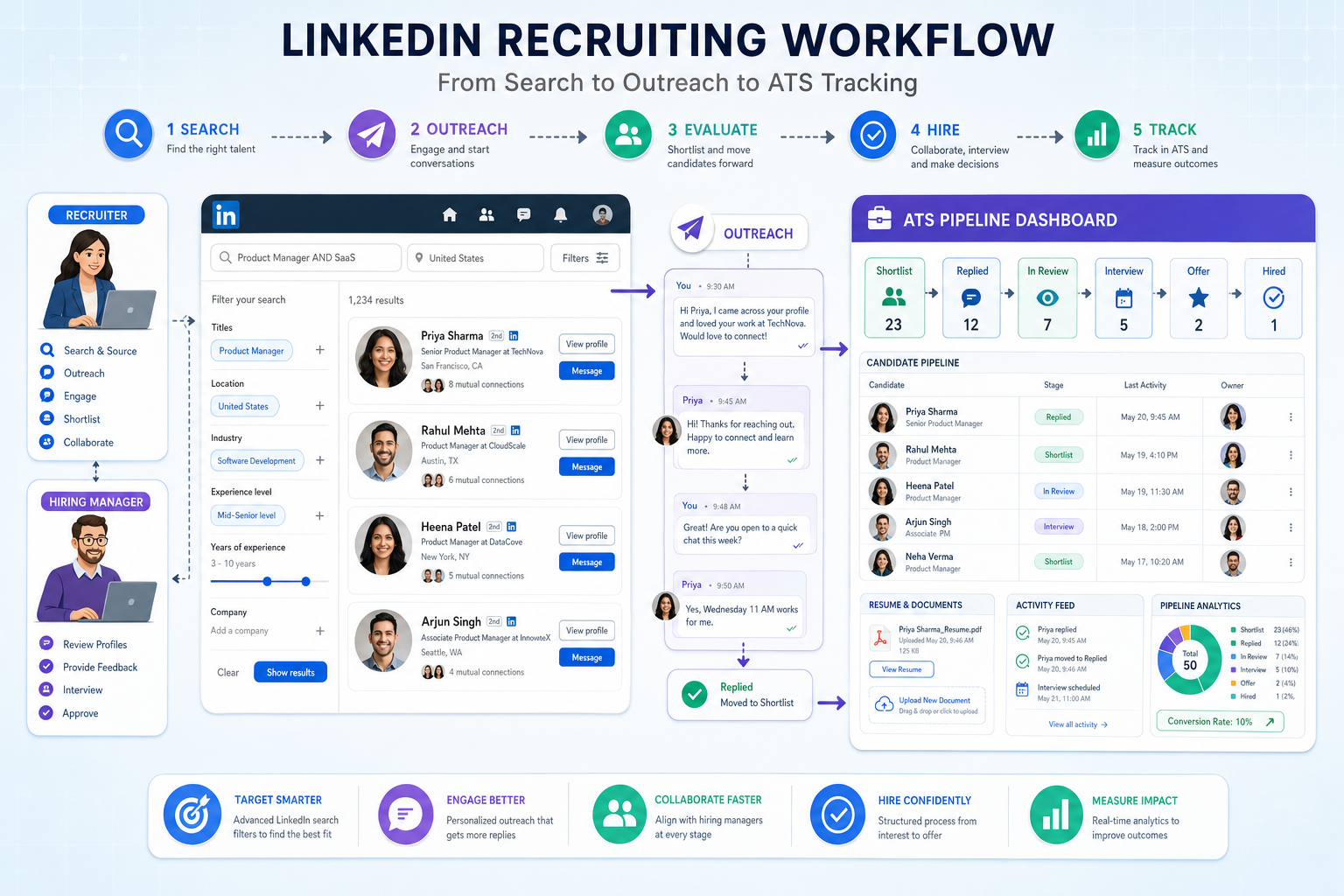
Recruiters can use this guide to judge how do you use LinkedIn for recruitment without losing replies, context, or shortlist control.
That matters because LinkedIn activity breaks down quickly once searches, outreach, applicant review, and hiring manager updates start happening in different places. For boutique search firms, solo recruiters, and in-house teams hiring staff, the cost is not just admin time. It shows up in missed replies from passive candidates, duplicated outreach, delayed shortlists, and weaker trust with hiring managers who want clearer movement from first contact to interview-ready slate.
In my own workflow, I have found that StrategyBrain AI Recruiter is most useful when LinkedIn volume rises beyond what one recruiter can comfortably track by hand. Its strongest help is practical rather than magical: it can automate first-touch LinkedIn outreach, keep conversations moving after hours, and collect resumes or contact details from interested prospects in multiple languages, while the recruiter still owns final resume review, fit assessment, and next-step decisions. If you want a closer look at the setup logic, the workflow overview and these conversation examples show the kind of repetitive sourcing work it can absorb.
You can see why this matters in modern marketing hiring. Over the last decade, marketing teams have shifted away from a world dominated by large agencies and broad brand roles toward smaller digital-first firms and lean in-house departments. A recruiter opening a new search is often not filling one familiar job title but sorting through a mix of SEO specialists, content creators, product marketers, paid search operators, and hybrid marketers who are expected to plan campaigns, publish content, manage platforms, and read performance data with limited oversight.
Once that search begins, the work becomes intensely operational. The recruiter reviews the requisition, checks whether the team needs a strategist or a hands-on executor, searches LinkedIn for people with the right mix of creative and analytical signals, sends outreach, logs responses, and then has to explain to the hiring manager why a candidate with strong content instincts may still lack the data fluency the role needs. That scene exposes the real software question behind the topic: the best recruiting software is the system that helps you use LinkedIn with discipline, especially when hiring staff for roles that no longer fit neat job-title boxes and when candidates also want to know how to get a job recruiter to notice them.
- What the best recruiting software actually needs to support
- How do you use LinkedIn for recruitment in a modern, structured workflow
- Why specialist hiring, especially in marketing and digital roles, exposes software gaps fast
- How to evaluate LinkedIn recruiting tools, ATS platforms, and automation support
- What candidates can do if they want to know how to get a job recruiter to notice them
Table of Contents
- What the Best Recruiting Software Really Does
- How Do You Use LinkedIn for Recruitment Without Losing Control?
- Why Specialist Hiring Exposes Weak Recruiting Systems
- The Core Software Categories in a Modern Recruiting Stack
- How to Compare LinkedIn Recruiting Software Options
- How to Implement a LinkedIn-Centered Hiring Workflow
- Common Mistakes Teams Make When Hiring Staff
- How to Get a Job Recruiter to Notice You
- FAQ
What the Best Recruiting Software Really Does
If you are comparing the best recruiting software, do not start with feature lists in isolation. Start with the actual chain of work: role intake, sourcing, candidate contact, screening, hiring manager calibration, interviews, follow-up, and decision-making. Good software reduces friction across that chain. Bad software improves one stage while making the rest harder.
That distinction matters more now because many employers are hiring for blended roles. The reference case from modern marketing recruitment is a good example. Employers often want one person who can think strategically, execute quickly, manage channels, and interpret data. In recruiting terms, that means the search brief is more nuanced, the outreach needs to be more targeted, and the handoff between sourcing and evaluation has to be better documented.
So the best recruiting software is rarely a single standalone tool. It is usually a combination of:
- A sourcing layer for finding and engaging talent
- An ATS or CRM layer for tracking candidates and team activity
- A collaboration layer for recruiter and hiring manager alignment
- An automation layer for reducing repetitive messaging and follow-up work
Practical takeaway: A tool is not the best recruiting software if it helps you find people on LinkedIn but leaves the rest of the process in inboxes, spreadsheets, and memory.
From an SEO, paid media, or digital marketing search to a general operations hire, the core test stays the same: can the software preserve context as candidates move from discovery to decision?
How Do You Use LinkedIn for Recruitment Without Losing Control?
The strongest answer to how do you use LinkedIn for recruitment is that you use LinkedIn as the market-facing layer of your recruiting process, not as the entire process itself. It is where recruiters search, attract, test interest, and begin conversations. But if that activity never moves into a controlled workflow, scale creates confusion fast.
1. Start with a role brief that reflects the real job
Specialist hiring has made this step more important. In marketing, for example, a company may think it needs a senior leader but actually needs a full-stack operator who can build campaigns and report on results. The same problem appears in many functions. If the brief is vague, LinkedIn search becomes broad, outreach underperforms, and hiring managers reject candidates for reasons that should have been clarified earlier.
2. Search for capability clusters, not just titles
LinkedIn works best when recruiters search beyond obvious title matching. Job titles are messy, especially in newer functions. One strong marketer may call herself a growth lead, another a content strategist, and another a product marketing manager, yet all may overlap with the actual need. Recruiters should combine title, skill, platform, industry, and outcome signals.
This is also where automation can help. In periods of heavy outreach, I have used AI Recruiter to handle the repetitive front end of LinkedIn contact while I focused on whether the candidate's background actually matched the role's business context. That split is important. Automation can keep conversations moving, but a recruiter still has to judge if a content-heavy profile can operate in a data-led role or whether an e-commerce marketer can shift into a more brand-driven environment.
3. Personalize outreach around relevance
Passive candidates respond when the message shows role understanding. That means referencing the candidate's likely fit, the business challenge, and why the opportunity may be worth a conversation. Generic volume messaging usually lowers response quality, even if it raises raw activity numbers.
4. Capture every serious interaction in your system
Once a candidate responds, the record should not stay trapped in LinkedIn. The profile, conversation notes, resume status, and next step need to move into your ATS or recruiting CRM. That is the point where software either protects the process or weakens it.
| LinkedIn Recruiting Action | Why It Matters | What Good Software Should Do |
|---|---|---|
| Search and shortlist | Find relevant active and passive talent | Support tags, projects, and role-based organization |
| Initial outreach | Open conversations with targeted candidates | Track message history and response status |
| Candidate replies | Surface real interest and availability | Capture contact details, resumes, and notes |
| Hiring manager review | Align on fit before interviews | Show clear candidate context and recruiter reasoning |
| Stage progression | Prevent stalls and duplicate effort | Keep one visible source of truth |
Why Specialist Hiring Exposes Weak Recruiting Systems
The reference material on marketing recruitment highlights a useful lesson for any recruiter evaluating software: modern specialist hiring is less about filling neat role categories and more about interpreting hybrid capability. That is why weak systems fail faster in these searches.
Consider the pressures involved:
- Digital transformation means almost every company now needs online visibility
- Content saturation makes quality and differentiation harder
- E-commerce growth creates demand for platform-specific experience
- Data expectations mean creative talent is often expected to understand analytics too
Recruiters are not only finding candidates; they are translating business needs into talent decisions. A hiring manager may ask for a marketing director, but the budget may only support a strong mid-level marketer with broad execution ability. The recruiter then has to source accordingly, explain trade-offs, and keep the process moving without overselling the role or wasting candidate goodwill.
This is exactly where the best recruiting software earns its place. It should help you retain the context behind the search: what the team actually needs, which skills matter most, where the must-haves are flexible, and how each sourced candidate compares against that reality.
The Core Software Categories in a Modern Recruiting Stack
Most teams evaluating recruiting software are really deciding how to combine several categories of tools. LinkedIn is usually one layer, not the whole stack.
1. Applicant tracking systems
An ATS gives structure to the process after sourcing begins. It centralizes candidate records, stage movement, feedback, and reporting. For teams hiring staff regularly, this remains non-negotiable.
Main strengths: visibility, consistency, collaboration, reporting.
Main weakness: many ATS platforms are weak at outbound sourcing on their own.
2. Recruiting CRM and sourcing tools
These tools are stronger at pipeline building and passive candidate management. They are useful for agency recruiters and in-house teams with hard-to-fill roles.
Main strengths: talent pooling, rediscovery, outbound organization.
Main weakness: some create duplicate systems if they are poorly connected to the ATS.
3. LinkedIn automation and communication support
This category matters most when recruiters are spending too much time on repetitive outreach, follow-up, and after-hours response management. Used carefully, it can increase throughput without removing recruiter judgment.
That is where StrategyBrain AI Recruiter fits well in practice. My experience is that it is most helpful for agency recruiters, in-house sourcing teams, and international hiring environments where responsiveness matters but recruiter time is finite. The system can connect with targeted candidates, introduce opportunities, answer basic role questions, and continue multilingual communication while the recruiter handles qualification and hiring decisions. I would not use it to replace recruiter evaluation. I would use it to stop losing momentum between search, first response, and resume collection. The product documentation on active sourcing workflows is worth reviewing if LinkedIn volume is already outpacing your manual follow-up capacity.
How to Compare LinkedIn Recruiting Software Options
If your workflow depends heavily on LinkedIn, compare software by the work it removes, the control it preserves, and the business type it suits. Below is a practical framework that includes three widely known software brands plus StrategyBrain AI Recruiter because recruiters often evaluate them in adjacent workflows.
| Tool | Best Use | Pros | Limitations | Best Fit | How It Can Work with StrategyBrain AI Recruiter |
|---|---|---|---|---|---|
| LinkedIn Recruiter | Direct sourcing on LinkedIn | Strong search, broad talent visibility, familiar recruiter workflow | Can become message-heavy and time-intensive; pricing is often a concern for smaller firms | In-house teams and agencies sourcing high-value roles | Useful as the search environment while StrategyBrain AI Recruiter helps automate repetitive first-touch communication and follow-up |
| Greenhouse | Structured hiring process management | Strong interview workflow, scorecards, collaboration, process discipline | Less naturally sourcing-led; teams still need a front-end candidate generation process | Growth-stage and enterprise employers | Works well when LinkedIn outreach and candidate interest generation happen upstream, then qualified prospects move into ATS stages |
| Lever | ATS plus CRM-style recruiting | Good balance between applicant tracking and relationship management | Still requires recruiter effort to keep outreach active and personalized | Mid-sized recruiting teams balancing inbound and outbound | Can serve as the system of record while StrategyBrain AI Recruiter supports LinkedIn engagement volume |
| StrategyBrain AI Recruiter | LinkedIn outreach automation and candidate conversation handling | Automates repetitive LinkedIn contact, supports multilingual messaging, collects resumes and contact details, helps continue after-hours conversations | Recruiter still must assess resumes and determine real fit; not a replacement for ATS governance | Agency recruiters, lean in-house sourcing teams, international hiring operations | Acts as the outreach and engagement support layer feeding qualified interest into your main recruiting system |
A few buying notes are important here. First, avoid claiming one platform can do everything equally well. Second, cost varies widely by contract structure, seats, and usage, so it is better to evaluate total workflow value than chase isolated price comparisons. Third, customer feedback across the market consistently points to the same truth: recruiters adopt tools that save real time without making candidate communication feel impersonal or creating another place to update records.
How to score software in real recruiting conditions
When I assess tools for LinkedIn-heavy recruiting, I use five decision lenses:
- Daily experience: does the recruiter actually move faster in the live workflow?
- Output quality: do we get more meaningful candidate conversations, not just more activity?
- Cost logic: is the spend justified by reduced manual effort or better process control?
- Business fit: does the tool suit agency, SMB, enterprise, or international hiring?
- Stack compatibility: does it complement ATS and sourcing tools instead of fragmenting the process?
How to Implement a LinkedIn-Centered Hiring Workflow
The reference case from marketing recruitment points to an important implementation principle: before you automate anything, decide how role definition, sourcing, and evaluation will connect. Hybrid roles create noise if those steps are disconnected.
- Clarify the role before search starts. Decide whether you need strategy, execution, or a balance of both.
- Define LinkedIn's exact role. Is it primarily for job posting, passive sourcing, outreach, or all three?
- Set rules for candidate transfer. Decide when a LinkedIn profile becomes an ATS record and who owns that step.
- Use automation on repetitive contact, not final judgment. Let tools support outreach and response handling while recruiters retain fit assessment.
- Review source quality monthly. Compare inbound applicants, sourced prospects, and referral candidates based on movement and quality, not vanity volume.
In practice, this is where I have seen StrategyBrain AI Recruiter help most cleanly. When recruiters are covering multiple roles, especially across time zones, the system keeps first-round LinkedIn communication active so candidates do not cool off while the recruiter is in interviews or asleep. It is especially useful for global recruiting, after-hours replies, and high-volume outbound sourcing. But the healthy operating model stays the same: AI handles repetition, the recruiter handles interpretation.
Common Mistakes Teams Make When Hiring Staff
Many recruiting problems blamed on software are really workflow design problems. These are the most common ones I see.
Treating LinkedIn like a standalone recruiting system
Search and outreach happen there, but hiring decisions need a wider system. Without that, candidate context disappears between sourcing and interview planning.
Over-specifying titles and under-defining outcomes
The marketing example shows why this fails. Employers often search for polished titles when the actual need is a hybrid operator. Software cannot fix a confused brief.
Automating messages without protecting recruiter judgment
Automation should reduce repetitive work, not create fake certainty. Resume review, role fit, and stakeholder calibration still need human ownership.
Ignoring passive candidate timing
Strong candidates often reply outside working hours or after several touchpoints. If no one captures that momentum, the shortlist weakens.
Choosing platforms that the hiring team will not actually use
A simpler, well-adopted setup usually beats a complex stack with low discipline. The best recruiting software is the one that preserves activity, notes, and decisions in the real world of hiring pressure.
How to Get a Job Recruiter to Notice You
There is a useful mirror image to this discussion. If you want to understand how to get a job recruiter to notice you, look at how recruiters actually search and sort people on LinkedIn.
- Use searchable role language: clear titles and skill terms beat vague personal slogans
- Show relevant capability combinations: especially in hybrid roles, demonstrate both execution and business understanding
- Keep experience current: recruiters scan for fit quickly, so stale profiles reduce visibility
- Highlight outcomes, not only responsibilities: growth, performance, campaign, or delivery results help
- Signal openness carefully: make it easier for recruiters to understand your timing and interest
In specialist hiring, candidates who explain their range clearly are easier to place. The same marketing search problem appears from the other side: if your profile does not show whether you are a strategist, an operator, or both, recruiters may skip you even if you are qualified.
FAQ
What is the best recruiting software for LinkedIn hiring?
There is no universal winner. The best recruiting software for LinkedIn hiring is usually a combination of tools: LinkedIn for search and visibility, an ATS for process control, and optionally an automation layer to handle repetitive outreach and candidate follow-up.
How do you use LinkedIn for recruitment effectively?
Use LinkedIn to define target talent pools, search by skill clusters, send relevant outreach, and move real candidate interactions into your ATS or CRM quickly. The goal is not just finding profiles but turning interest into a trackable hiring process.
Why does specialist hiring make software choice more important?
Because modern roles, especially in digital and marketing functions, often mix strategic and execution expectations. Recruiters need systems that preserve context, not just candidate names.
Can LinkedIn automation replace recruiters?
No. It can reduce repetitive manual effort and improve responsiveness, but recruiters still need to assess resumes, interpret fit, manage stakeholders, and decide who moves forward.
What should small teams prioritize when hiring staff?
Prioritize ease of use, clear stage tracking, visible communication history, and a sourcing process that does not rely on one person remembering everything in LinkedIn messages.
Conclusion
The best recruiting software is the one that makes LinkedIn recruiting usable at real hiring speed without stripping away recruiter judgment. The lesson from modern specialist hiring, including marketing roles shaped by digital change, is simple: searches are more nuanced, candidate pools are more mixed, and the process breaks when sourcing, outreach, and tracking are disconnected.
If you are asking how do you use LinkedIn for recruitment, the practical answer is to pair strong search habits with software that protects follow-up, context, and decision quality. For firms hiring staff regularly, and for candidates wondering how to get a job recruiter to notice them, the winning system is the one that keeps relevance, responsiveness, and process discipline working together.














