


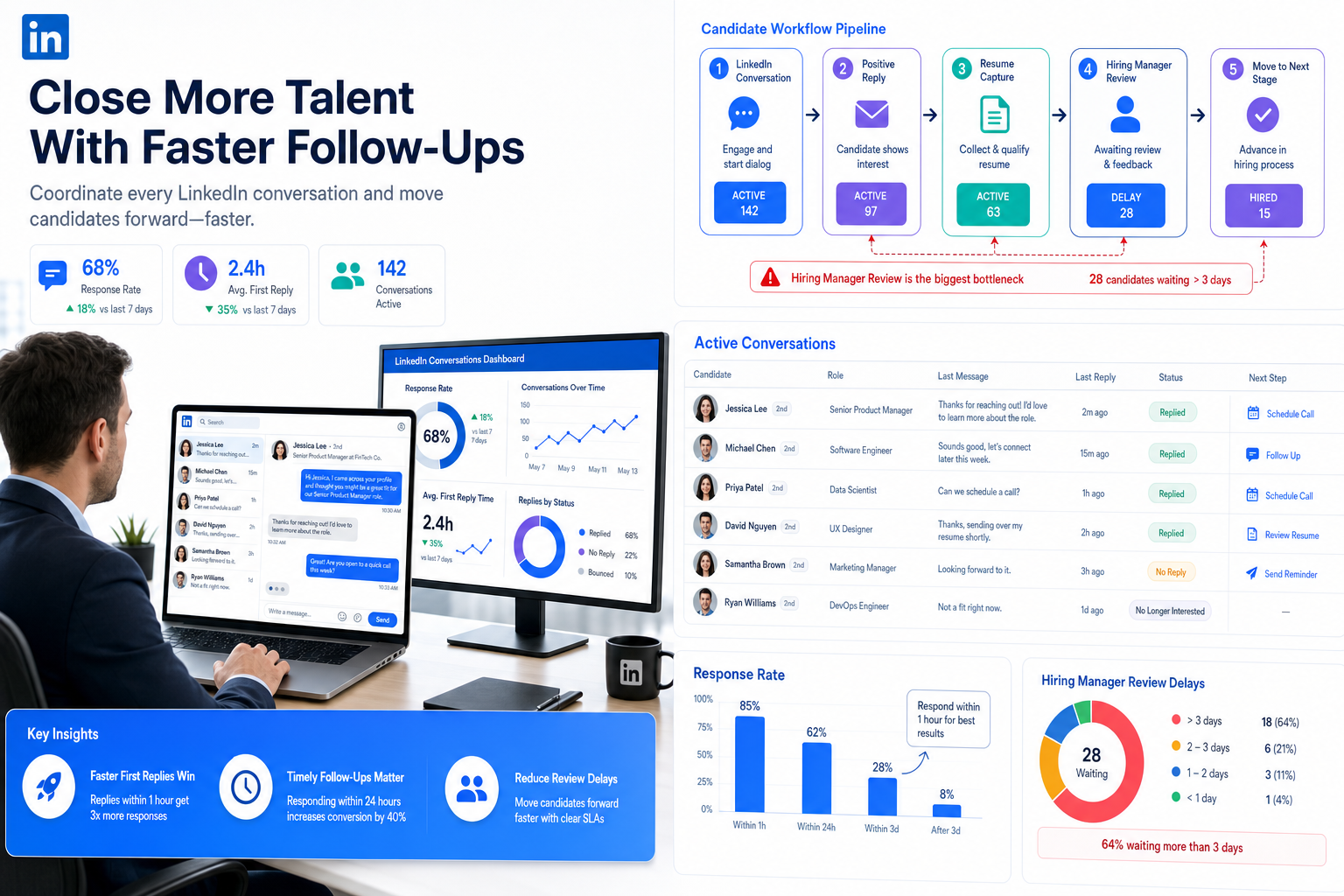
When LinkedIn replies go cold, this article helps recruiters diagnose workflow gaps, judge software fit, and prevent candidate loss.
What usually breaks the process is not search volume but coordination. A recruiter sends strong outreach, candidates reply after hours, hiring managers review too slowly, and sourcing notes stay trapped in inboxes or browser tabs. For small search firms, solo headhunters, and internal talent teams, that means missed replies, duplicate contact, weaker candidate experience, and unnecessary cost when hiring staff across several roles at once.
That is where a LinkedIn-focused workflow can help. In my own sourcing work, AI Recruiter is most useful not as a replacement for recruiter judgment, but as a way to keep first-touch outreach, candidate replies, and resume collection moving when I cannot be online. Its always-on messaging, multilingual communication, and automatic capture of candidate interest reduce the manual gaps that often appear between outreach and shortlist creation. The recruiter still makes the final call on resume quality, fit, and whether a candidate should move forward.
A useful way to think about this comes from another relationship-driven field: donor management. Modern donors no longer accept vague updates and passive communication. They expect transparency, measurable outcomes, personalized engagement, and clear alignment with their values. The organizations that adapt best do not just change their messaging; they hire people who can report clearly, build relationships, and translate activity into visible impact.
The same pressure now applies to recruiting. Candidates on LinkedIn behave less like passive names in a search result and more like informed participants who expect relevance, responsiveness, and proof that the opportunity is real. If your team is asking how do you use LinkedIn for recruitment, the answer now sits inside a broader software question: which recruiting tools help you source, track, communicate, and evaluate consistently enough to hire people without losing trust along the way?
Table of Contents
- Why candidate expectations now shape software choice
- What the best recruiting software actually needs to do
- How do you use LinkedIn for recruitment in a real workflow
- Three recruiting software options worth comparing
- What hiring staff need beyond software
- Common mistakes when buying recruiting software
- FAQ
Why candidate expectations now shape software choice
One of the strongest lessons from relationship-heavy sectors is that expectations evolve before most teams update their process. In recruiting, candidates now expect timely follow-up, clarity about role scope, visible process steps, and communication that feels relevant rather than automated for automation's sake. The teams that still run LinkedIn sourcing through spreadsheets and scattered messages often assume the problem is candidate scarcity when the real issue is process reliability.
That is why the best recruiting software is not just a database. It is an operating layer for transparency, speed, and accountability inside hiring. If a recruiter cannot show where a candidate came from, what was discussed, whether a resume was received, who owes feedback, or why a profile stalled, the process becomes harder to defend and harder to improve.
For employers hiring staff in competitive markets, this matters because trust compounds. A candidate who receives a clear message, quick reply, and organized next step is more likely to stay engaged. A candidate who gets silence, repetition, or confusion starts to doubt both the role and the employer.
What the best recruiting software actually needs to do
The best recruiting software helps teams combine sourcing, communication, evaluation, and reporting without forcing recruiters to work in fragments. That is especially important when LinkedIn is a major channel, because outbound recruiting creates more moving parts than inbound application review.
In practice, I look for five capabilities.
1. Support transparent pipeline management
Borrowing from the logic behind donor transparency, recruiting software should make candidate status easy to understand for everyone involved. Recruiters need a clear history of outreach and replies. Hiring managers need visibility into who is waiting for review. Leadership needs a simple way to see where bottlenecks form.
2. Turn activity into measurable outcomes
Good teams do not just send messages and hope. They track response rates, source quality, stage conversion, and time lost between milestones. This mirrors the broader demand for measurable impact: activity alone is not enough. You need evidence that the process is producing qualified interviews and hires.
3. Enable personalized engagement at scale
Mass messaging creates noise. Strong software should help recruiters maintain relevant outreach, segment talent pools, and continue conversations without losing context. That is a practical answer to how to recruit people more effectively in crowded markets.
4. Keep alignment with role and employer value
Just as donors want alignment with mission, candidates want alignment with role value, team reality, and career direction. Your software should support consistent messaging across job posts, outreach, screening notes, and handoff to hiring managers.
5. Preserve recruiter control over final judgment
Software should reduce repetitive work, not outsource judgment. Resume review, fit assessment, shortlist quality, and final next-step decisions still belong with the recruiter and hiring team.
Practical takeaway: The strongest recruiting systems do not merely help you find people on LinkedIn; they help you maintain trust from first message to final decision.
How do you use LinkedIn for recruitment in a real workflow
The short operational answer is this: you use LinkedIn for recruitment by pairing targeted search and outreach with software that captures responses, resumes, and stage movement in one place.
Here is the workflow I recommend for recruiters, agency consultants, and internal talent teams.
Start with a sharper brief
Before opening LinkedIn, define the real must-haves, adjacent backgrounds, and evidence of likely success. This sounds basic, but it is where many teams fail. If the brief is vague, software will only help you run a vague search more efficiently.
Search for transferable fit, not title clones
Use LinkedIn filters to find relevant skills, functions, sectors, and location patterns, but do not over-rely on exact titles. Some of the best candidates sit one title away from your assumption.
Outreach with relevance
Good outreach should explain why the person is being contacted, why the role may matter, and what makes the opportunity credible. Generic scripts are easy to spot and easy to ignore.
Capture replies while the interest is fresh
This is one of the hardest operational gaps. Candidates often answer outside your working hours, and strong interest can go cold when nobody responds. In my own process, using StrategyBrain AI Recruiter helped most at this exact point. It could continue the early exchange, answer basic role questions, confirm whether the candidate was open to discussing the job, and collect resume or contact details. What it did not do, and should not be expected to do, is decide whether the resume was actually strong enough. That review still sat with me.
Move candidate data into the hiring workflow
Whether you use an ATS, CRM, or broader talent acquisition platform, candidate records should not remain trapped inside personal LinkedIn notes. Once a reply arrives, the next action needs to be trackable by the team.
Get fast feedback from hiring staff
When hiring staff take too long to review sourced profiles, recruiters either oversource to compensate or lose momentum with good candidates. Structured scorecards and clear review ownership matter more than another dashboard.
Review source quality, not just message volume
If your team is learning how to recruit people more efficiently, do not measure success by outreach count alone. Look at conversation quality, resume relevance, interview conversion, and stage speed.
Three recruiting software options worth comparing
Because this topic is software selection, buyers usually need to compare more than one category. The three options below represent common approaches in the market: a LinkedIn automation specialist, an ATS-first platform, and a CRM-first sourcing platform.
| Software Type | Best For | Strengths | Tradeoffs | Works Well With AI Recruiter |
|---|---|---|---|---|
| LinkedIn recruitment automation | Outbound sourcing teams, agencies, headhunters | Fast outreach continuity, after-hours response handling, resume capture, multilingual communication | Needs recruiter review for true qualification and shortlist decisions | Core tool itself |
| ATS-first platform | In-house teams, SMBs, structured hiring workflows | Requisition control, stage tracking, interview feedback, reporting, approvals | Often weaker for first-touch sourcing and passive candidate engagement | Yes, for moving sourced candidates into a managed process |
| Recruiting CRM-first platform | Search firms, talent pooling teams, proactive sourcing functions | Relationship management, segmented talent pools, nurture campaigns, sourcing visibility | May require separate workflow tools for later hiring stages | Yes, especially for maintaining outreach history and long-term pipelines |
1. LinkedIn recruitment automation software
This category is most relevant to the seed keyword. It is useful when the main pain point is repetitive first-touch sourcing work: connection requests, role introduction, candidate Q&A, after-hours follow-up, and collecting resumes from interested prospects.
From a usage standpoint, the upside is clear speed and continuity. From an effect standpoint, it helps keep more candidate conversations alive. On cost, buyers usually prefer it when recruiter time is the constraint rather than ATS budget. It suits agencies, independent headhunters, and internal teams that source heavily on LinkedIn. Used well, it complements rather than replaces an ATS.
For that reason, AI Recruiter stands out most when LinkedIn is the top-of-funnel bottleneck. I found it especially practical when candidates replied late at night or in another language and I needed the process to continue without waiting until the next day.
2. ATS-first recruiting software
An ATS-first platform is usually the best fit if your main issue is control after the candidate enters your process. It helps with screening consistency, interviewer feedback, offer workflows, compliance, and reporting. User experience is often stronger for hiring managers than for top-of-funnel sourcing.
The downside is that many ATS tools still feel reactive. They handle applicants well but do less to help recruiters generate new conversations. For companies hiring staff across multiple departments, that means the ATS should be paired with stronger sourcing support when outbound recruiting matters.
3. CRM-first recruiting software
A recruiting CRM is often the right middle ground for agency teams and sourcing-led talent functions. It helps maintain talent pools, outreach cadence, and relationship history over time. If your biggest challenge is re-engagement or market mapping, a CRM-first approach can be stronger than an ATS alone.
The tradeoff is that later-stage workflow may need additional structure. Many teams still require an ATS or other process layer to manage evaluation and offers cleanly.
How to choose among the three
- If LinkedIn sourcing volume is high and response timing is your main pain point, start with LinkedIn recruitment automation.
- If process control, approvals, and interview alignment are the bigger issue, lead with an ATS.
- If long-term relationship building and passive talent pipelines matter most, prioritize a recruiting CRM.
In many real teams, the best recruiting software stack is not one tool but a combination that reflects where the workflow actually breaks.
What hiring staff need beyond software
The reference article's strongest point was not technology alone but capability. Teams need the right skills to meet rising expectations. Recruiting works the same way. Even the best recruiting software will underperform if hiring staff lack the habits needed to use it well.
Communication and storytelling
Recruiters need to explain the role in a way that is concrete and credible, especially on LinkedIn where attention is scarce. That includes translating compensation, team context, and business need into a message worth answering.
Data analysis and reporting
If you cannot tell which source produces conversations, resumes, interviews, and hires, optimization becomes guesswork. This is where applicant tracking and CRM reporting become genuinely useful rather than just administrative.
Relationship management
LinkedIn recruiting is not just search. It is relationship work. Follow-up quality, timing, and tone all affect whether strong people stay engaged.
Digital engagement
Recruiters now operate in digital-first environments. The ability to manage outreach tools, content signals, and candidate communication flow is part of the role.
Adaptability and judgment
Tools can automate touchpoints, but recruiters still need to sense when to push, when to clarify, when to disqualify, and when to escalate a profile to the hiring manager quickly.
Common mistakes when buying recruiting software
Choosing a system that reflects vendor categories instead of your real workflow
Teams often buy based on labels like ATS or CRM without asking where the process actually fails. If your biggest issue is delayed LinkedIn follow-up, adding more interview forms will not fix it.
Confusing activity automation with hiring quality
Automation can create more conversations, but it does not guarantee stronger shortlists. Recruiters still need disciplined review standards.
Ignoring candidate expectations
Just as donor-facing organizations must adapt to demands for transparency and engagement, recruiting teams have to assume that candidates expect relevant outreach, visible process steps, and timely replies.
Leaving sourcing separate from process management
This is one of the most expensive mistakes. If LinkedIn outreach runs in one environment and hiring decisions live somewhere else, handoff failure becomes normal.
Buying for edge cases instead of daily use
The best recruiting software is the one recruiters and hiring managers will actually use every day. A smaller set of well-used features is usually more valuable than a broad system that nobody maintains.
FAQ
How do you use LinkedIn for recruitment effectively?
Use LinkedIn to define a targeted talent pool, send relevant outreach, continue candidate conversations quickly, collect resumes or contact details, and move interested prospects into your ATS or CRM for structured follow-up.
What is the best recruiting software for LinkedIn hiring?
It depends on where your process breaks. If first-touch sourcing is the bottleneck, LinkedIn-focused automation may help most. If screening and team coordination are the problem, an ATS may matter more. Many teams need both.
Can software replace recruiter judgment?
No. Good software removes repetitive tasks and improves visibility, but recruiters still need to assess resume quality, role fit, motivation, and next-step readiness.
What should hiring staff look for in recruiting software?
Look for clear pipeline visibility, sourcing support, recruiter-hiring manager collaboration, reporting, and a workflow that matches how your team actually hires.
How can small teams improve how to recruit people without hiring more recruiters?
Start by tightening role briefs, improving outreach quality, using software that keeps candidate replies from going cold, and reducing handoff delays between recruiters and hiring managers.
Is an ATS enough for outbound recruiting?
Usually not. An ATS is strong for later-stage control, but outbound recruiting often needs additional sourcing or CRM support to manage early candidate engagement well.
Conclusion
The best recruiting software is the system, or combination of systems, that helps your team meet modern candidate expectations with less friction and better visibility. That means transparency in status, measurable outcomes in sourcing, personalized engagement at the first touch, and recruiter control where judgment matters most.
If you are still asking how do you use LinkedIn for recruitment, start with the real operational question behind it: what happens after a candidate replies? Once that answer includes fast response handling, organized resume capture, shared visibility, and disciplined review, your software choice becomes much clearer.














