


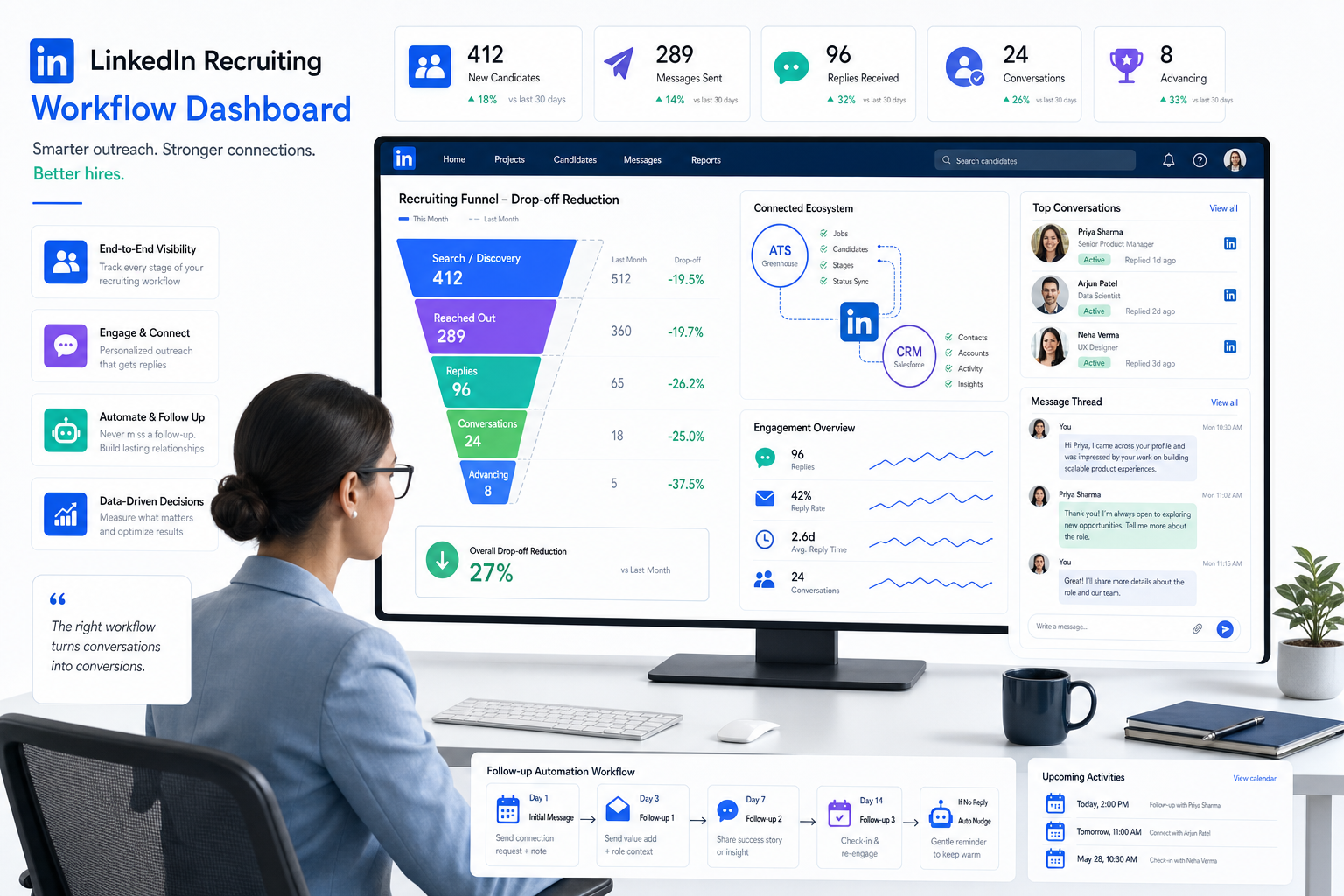
This article shows recruiters how to evaluate recruitment online for recruiters software, cut drop-off, and choose a stronger workflow.
That conclusion matters because most recruiting friction does not begin with sourcing volume alone. It shows up after first contact, when good candidates go quiet, hiring managers stop responding, recruiters lose track of prior conversations, and motivated people start to feel like record numbers instead of individuals. For a solo headhunter, that means wasted outreach and missed placements. For a small agency owner, it can mean slower desk productivity and weaker repeat business. For an in-house talent lead, it often turns into damaged employer perception, longer time-to-fill, and preventable drop-off from candidates who needed timely acknowledgment and a clearer process.
One practical way I have reduced that strain is by pairing core recruiting systems with StrategyBrain AI Recruiter for the repetitive parts of outbound communication. In my own testing, its value is not that it replaces recruiter judgment; it does not. Recruiters still review résumés, decide fit, and own next steps. What it does well is keep candidate conversations moving through automated LinkedIn outreach, after-hours reply coverage, and multilingual follow-up when response timing would otherwise break momentum. In desks where internet recruiting depends on fast acknowledgment, that support can prevent the communication gap that causes candidates to disengage.
The logic is close to a point many employer-branding discussions miss: winning talent is only the beginning. Once strong people enter your process, recognition and responsiveness shape whether they stay engaged. That is true inside employment, where recognition supports commitment, and it is just as true in hiring workflows, where acknowledgment affects whether candidates reply, complete steps, and remain interested. In practice, a recruiter may secure a strong prospect, log the profile, send the first note, and then lose traction because no one follows up clearly enough to make the person feel seen. The issue is not only outreach volume. It is the absence of a system that keeps attention, context, and ownership intact.
That is why the best recruiting software is not just a database decision. It is an engagement design decision for recruitment online for recruiters. The same lesson also helps separate broader software research from local-service intent like recruitment office near me, and it clarifies where internet recruiting tools, ATS workflows, CRM functions, and communication automation should fit together. The rest of this article focuses on that evaluation from a working recruiter’s perspective.
- What the best recruiting software really needs to do
- Why recognition and responsiveness matter in recruiting systems
- How recruitment online for recruiters connects to internet recruiting
- ATS vs recruiting CRM: where teams still get it wrong
- Three software paths recruiters usually compare
- Must-have features in the best recruiting software
- Where StrategyBrain AI Recruiter fits in a real workflow
- How to evaluate by team type and hiring model
- Why recruitment office near me is a different search intent
- Common mistakes buyers make
- A practical software selection checklist
- FAQ
What the best recruiting software really needs to do
In day-to-day recruiting, the best recruiting software does more than collect applications. It helps recruiters maintain candidate attention, preserve context across conversations, and keep hiring stakeholders aligned. That is a more useful standard than simply asking which platform is most popular.
From experience, software starts to earn its keep when it handles three layers at once: operational control, relationship continuity, and communication speed. Operational control is the ability to move applicants cleanly through a process. Relationship continuity is the ability to find, understand, and re-engage people later. Communication speed is the ability to acknowledge, answer, and follow up without turning every recruiter into a full-time inbox manager.
If one of those layers is missing, the process usually degrades in familiar ways. Recruiters duplicate outreach. Hiring managers lose visibility. Candidates feel ignored. Strong past applicants disappear into an archive. Teams doing recruitment online for recruiters then end up adding spreadsheets, calendar hacks, and side inbox routines to compensate for software that should have handled the workflow in the first place.
Why recognition and responsiveness matter in recruiting systems
The reference point behind this article is simple but useful: attracting talent and keeping talent engaged are connected problems. Employer branding may bring people to the door, but recognition is what helps sustain commitment. In recruiting, that same principle shows up earlier in the funnel. Candidates respond better when the process acknowledges their time, interest, and questions rather than treating them like a queue item.
That is why I treat recognition as a software issue as much as a people issue. A recruiter cannot consistently create a responsive candidate experience if messages are scattered across tools, if follow-up depends on memory, or if replies arrive after hours with no system support. The cost of disengagement is real even before hire: missed interviews, slower pipeline velocity, lower response rates, and unnecessary re-sourcing for roles that already had viable interest.
So when buyers ask about the best recruiting software, I do not start with a feature sheet. I start with a practical question: does this system help us make candidates feel seen and keep them moving without losing recruiter control? If the answer is no, the workflow will become brittle under volume.
How recruitment online for recruiters connects to internet recruiting
The terms internet recruiting, online recruiting, digital recruitment, and web-based hiring are often used interchangeably. In practice, they all describe the use of digital channels to attract, contact, evaluate, and move candidates through a hiring process.
The important distinction is that internet recruiting is the activity, while recruiting software is the infrastructure that supports it. A team may source through LinkedIn, post jobs on boards, receive applications from a careers page, and schedule interviews through integrated calendars. Without a system tying those motions together, recruiters spend too much of the day updating records and too little time building judgment.
For teams relying on recruitment online for recruiters, the software stack usually needs to support:
- Candidate discovery through sourcing and search
- Application and pipeline control through an ATS
- Relationship management through CRM-style records and nurture workflows
- Ongoing communication through email, messaging, and automation
- Reporting so leaders can see source quality and process bottlenecks
That is also where responsiveness becomes measurable. Good internet recruiting is not just about reaching people online. It is about keeping the hiring conversation coherent after contact begins.
ATS vs recruiting CRM: where teams still get it wrong
The most common buying mistake I see is assuming every ATS can function as a recruiting CRM. Some systems offer both well. Many do not. If your team is doing recruitment online for recruiters at any meaningful scale, that gap becomes expensive.
What an ATS does best
An applicant tracking system is built to manage active candidates attached to open requisitions. It handles stages, interview feedback, status visibility, compliance support, and structured handoffs. If your pain point is that live applicants are getting lost, delayed, or inconsistently reviewed, the ATS is your first operational priority.
What a recruiting CRM does best
A recruiting CRM helps recruiters maintain long-term candidate relationships before application, between roles, and after a process ends. It matters when you want to revisit silver medalists, segment outreach lists, search old talent pools, and maintain context around prior interactions. This is often where the recognition issue becomes practical: if a candidate returns to your process months later, a true CRM lets you acknowledge prior contact rather than starting from zero.
Why the distinction matters
Without CRM depth, many teams become overly reactive. They source from scratch for every opening, forget who already expressed interest, and lose the continuity that makes internet recruiting more efficient over time. Without ATS strength, they may have relationships but no reliable control over open hiring workflows. The best recruiting software for many teams is either a strong blended system or a stack where ATS and CRM functions clearly complement one another.
Three software paths recruiters usually compare
Because this topic is about software, buyers usually compare categories that solve different parts of the workflow. Rather than listing branded vendors, it is more useful to think in three practical software paths.
| Software path | Strengths | Limitations | Best fit | How it works with AI-assisted outreach |
|---|---|---|---|---|
| ATS-first platform | Strong requisition control, structured stages, interview management, reporting discipline | Often weaker for nurture, proactive sourcing history, and long-term engagement | In-house TA teams, compliance-heavy hiring, growing organizations | Useful when paired with outreach support that keeps candidates warm before and between ATS stages |
| CRM-first recruiting platform | Deep searchability, talent pooling, relationship notes, outbound support | Can be lighter on approvals, applicant workflow governance, and hiring-manager process structure | Agencies, executive search, market mapping, repeat-search desks | Pairs well with automated messaging and follow-up to maintain recruiter productivity |
| End-to-end suite | Fewer handoffs, one record across sourcing, applicant flow, and communication | May trade depth in one module for convenience across many modules; implementation can be heavier | Mid-size teams wanting fewer systems and clearer data continuity | Can work well if automation tools are integrated carefully and recruiter review remains central |
In my experience, none of these paths is universally best. The right choice depends on whether your biggest risk is losing applicants, losing candidate relationships, or losing communication speed.
Must-have features in the best recruiting software
Once you frame software around engagement and control, the evaluation becomes more realistic. The best recruiting software should support the actual work recruiters do every day, not just the dashboard a vendor wants to show.
| Feature | Why it matters in real recruiting | Who usually needs it most |
|---|---|---|
| Resume and profile parsing | Reduces admin entry and keeps records consistent | All teams |
| Searchable talent pools | Lets recruiters recover prior conversations and avoid starting from zero | Agencies, executive search, repeat-hiring teams |
| Pipeline stage management | Creates visibility and cleaner ownership across live roles | Recruiters, coordinators, hiring managers |
| Automated follow-up | Supports timely acknowledgment and prevents candidate disengagement | High-volume teams, outbound recruiters, sourcers |
| Duplicate detection | Prevents fragmented records and repeated outreach | Multi-recruiter desks, agencies |
| Interview scheduling support | Shortens delays between interest and assessment | In-house TA, coordinators, scaling teams |
| Analytics and funnel reporting | Shows where engagement drops and where process friction appears | Recruiting leaders, operations, HR |
| Integrations | Links email, calendar, sourcing channels, and HR systems | All teams |
When you test these features, focus on usability, not presence. A system can claim automation but still require constant manual correction. It can claim search but make archived candidates effectively undiscoverable. It can claim messaging support but fail to preserve a readable communication history that helps the next recruiter pick up the thread.
Where StrategyBrain AI Recruiter fits in a real workflow
Although this article is not about choosing one branded platform over another, it is worth addressing where communication automation can help because it speaks directly to the opening problem. In my own workflow, I have used AI Recruiter from StrategyBrain as a communication layer around sourcing-heavy LinkedIn work, especially where prompt acknowledgment matters.
The most useful scenarios were straightforward. First, it handled initial LinkedIn outreach and follow-up when I already knew the target profile and needed response continuity. Second, it helped maintain after-hours communication without forcing me to monitor every reply in real time. Third, in cross-border searches, multilingual messaging reduced delays caused by language friction. That kind of support matters because candidate interest often fades in the gap between first reply and next recruiter action.
I want to be clear about the division of labor. The tool can connect, introduce the role, answer routine questions, and collect résumé or contact details from interested people, but I still treat final fit judgment as recruiter work. I review résumés, assess whether the background meets the brief, and decide whether a candidate should move into interview. For teams that depend on LinkedIn-led internet recruiting, that balance is sensible: automation protects speed, while recruiter judgment protects quality.
If your process is outreach-heavy, the relevant resources are worth reviewing directly, including the main AI Recruiter page, the official StrategyBrain site, and some of the workflow-oriented material such as its LinkedIn sourcing tutorial notes. I would still place it inside a wider recruiting stack, not as a substitute for ATS discipline or recruiter decision-making.
How to evaluate by team type and hiring model
The best recruiting software changes depending on how your team works. The opening engagement problem appears differently in each environment.
Agency recruiters and headhunters
Agency desks usually need speed, strong search, duplicate prevention, and simple movement between sourced prospects and active candidates. If the system does not preserve context from one search to the next, the desk becomes less profitable over time. For these teams, outreach support and CRM depth are often as important as classic applicant tracking.
In-house talent acquisition teams
Internal teams usually care more about approvals, interview coordination, reporting consistency, and hiring-manager visibility. Here, engagement risk often comes from process lag rather than lack of sourcing. Candidates become disengaged when interviewers delay feedback or when status updates vanish into email threads. Strong ATS workflows matter more, but communication tools still help maintain candidate momentum.
Executive search and specialist recruiting
Search-focused teams often need long memory: deep notes, relationship history, market mapping, and discreet re-engagement over months or years. They benefit most from systems that preserve context and make prior interactions retrievable. Recognition here means showing the candidate you remember their history, not sending another generic cold message.
High-volume hiring teams
At scale, engagement problems multiply fast. Late follow-up, poor scheduling, and weak stage discipline create candidate drop-off across hundreds of applicants. These teams need workflow consistency, messaging speed, and analytics that highlight where response quality is breaking down.
Practical takeaway: map your software choice to the point where candidate interest is most often lost. For some teams it is sourcing; for others it is stage control, manager response, or re-engagement.
Why recruitment office near me is a different search intent
Not every recruiting-related search belongs on a software page. The query recruitment office near me usually signals local-commercial intent rather than software evaluation intent. Someone searching that phrase often wants a nearby staffing agency, office location, contact details, or service-area information.
That matters for content planning and for buyer clarity. A person researching recruitment online for recruiters is usually exploring tools, workflows, and software categories. A person searching recruitment office near me is often trying to find human assistance in a local market. Combining those needs on one page usually weakens both outcomes.
If your business offers both recruiting services and recruiting technology content, build separate intent-matched pages. Your software guide should stay focused on evaluation criteria, while your local page should include address information, service geography, and contact access.
Common mistakes buyers make
- Buying an ATS when the real problem is relationship loss
If recruiters keep forgetting past candidates or re-sourcing from zero, the issue may be CRM weakness rather than applicant workflow weakness.
- Overestimating feature breadth and underestimating daily usability
Recruiters live inside search, notes, status changes, and follow-up. If those actions feel clumsy, the platform will create drag regardless of how broad the marketing claims are.
- Ignoring the engagement layer
Teams often evaluate stages and reporting but forget to ask how the system supports acknowledgment, responsiveness, and candidate continuity.
- Failing to test communication handoffs
If one recruiter sources, another reviews, and a manager interviews, the system should preserve enough context that candidates do not feel like they are starting over each time.
- Treating local search intent like software intent
Content built for recruitment office near me is not the same as content built for software buyers researching internet recruiting infrastructure.
A practical software selection checklist
When I help teams evaluate recruiting systems, I use a workflow-first checklist rather than a feature-count approach.
- Clarify the main failure point: are you losing candidates at sourcing, follow-up, screening, scheduling, or rediscovery?
- Separate ATS needs from CRM needs: do not assume one automatically covers the other well
- Test communication continuity: can the next recruiter or hiring manager understand the candidate history quickly?
- Review search quality: can you reliably find prior candidates and prior conversations later?
- Check duplicate logic: how does the system handle repeated applications, sourced profiles, and merged histories?
- Assess automation carefully: does it save time while keeping recruiter control over qualification and next steps?
- Inspect integrations: email, calendar, sourcing channels, HR systems, and reporting all matter
- Ask for a live scenario demo: source someone, contact them, collect details, move them into a role, schedule an interview, and report on the funnel
A strong final test is simple: can your team identify a candidate, acknowledge them quickly, keep them engaged, move them through a live process, and find that person again six months later with all prior context intact? If the answer is no, the software may be adding complexity rather than reducing it.
FAQ
What does recruitment online for recruiters mean?
It refers to the digital workflows recruiters use to source, attract, engage, track, and hire candidates. That includes sourcing channels, applicant tracking, talent pooling, outreach, scheduling, and reporting.
Is internet recruiting different from online recruitment?
In normal recruiting usage, the terms are very similar. Both refer to digital methods of finding and managing candidates. The more important distinction is between the recruiting activity itself and the software stack that supports it.
What is the difference between an ATS and a recruiting CRM?
An ATS manages active applicants tied to current roles. A recruiting CRM manages longer-term candidate relationships before, during, and between hiring cycles. Most growing teams need both functions, whether in one system or in a connected stack.
Why does candidate recognition matter when choosing recruiting software?
Because disengagement often begins when candidates feel ignored, delayed, or forgotten. Software that supports timely acknowledgment, context retention, and follow-up can reduce drop-off and improve the quality of recruiter-candidate interactions.
Can StrategyBrain AI Recruiter replace a recruiter?
No. It can automate parts of outreach, communication, and information collection, especially on LinkedIn, but recruiters still need to review résumés, assess fit, and decide next steps.
Who benefits most from AI-supported recruiting communication?
Outbound recruiters, agency teams, headhunters, and cross-border hiring teams often benefit most because they rely on response speed, after-hours continuity, and repetitive outreach at scale.
How should companies handle recruitment office near me searches?
Those searches usually belong on local-intent pages with address, contact, and service-area details. They should not be treated as the same need as software comparison content.
What should I ask for in a recruiting software demo?
Ask to see a complete recruiter workflow: sourcing a candidate, recording the interaction, preventing duplicates, moving the person into an active pipeline, sending follow-up, collecting feedback, and retrieving the record later.
Conclusion
The best recruiting software helps recruiters do more than organize applicants. It helps them maintain engagement, preserve context, and create a process where good candidates do not disappear because the workflow failed to recognize them at the right moment.
That is the most practical way to think about recruitment online for recruiters. If your team relies on internet recruiting, evaluate systems not only for tracking and reporting, but also for searchability, relationship continuity, and communication speed. And if a search is really about recruitment office near me, treat that as local service intent rather than software research. Recruiters make better buying decisions when the workflow problem is defined clearly first.














