


Repeated sourcing gets expensive fast; this article helps recruiters judge which candidate database for recruiters preserves context and speeds rediscovery.
When that does not happen, the cost is not just recruiter time. Agency owners lose billable hours to repeat sourcing, solo recruiters miss follow-up windows, and in-house talent teams frustrate hiring managers by restarting searches they should have been able to reopen from prior applicants, sourced contacts, and silver-medalist files. In a selective market, slow rediscovery also weakens employer credibility because strong candidates often move on while internal records stay fragmented.
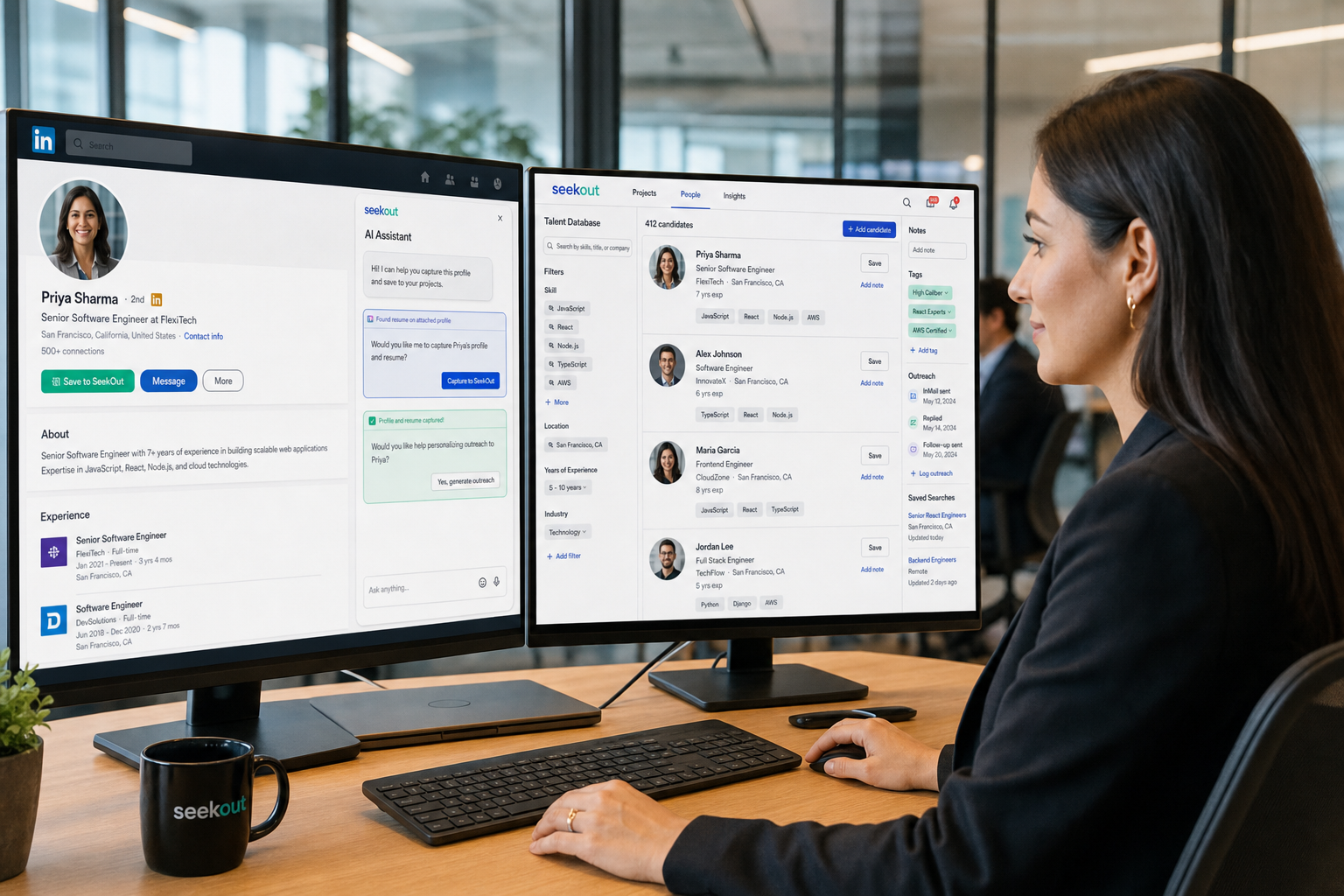
That is why I now pay close attention to workflow support, not just storage. In my own sourcing process, StrategyBrain AI Recruiter has been most useful when a team needs faster candidate outreach, after-hours follow-up, and a cleaner handoff from early interest to recruiter review. Its multilingual messaging and always-on response coverage help keep conversations moving, while automated résumé and contact capture reduces the usual copy-paste mess. The recruiter still has to judge fit, review the résumé, and decide next steps, but the front end of the process becomes much easier to manage.
You can see why this matters in specialized hiring markets like engineering in British Columbia. Employers there are hiring carefully, candidates are weighing long-term fit and stability, and recruiters cannot afford loose process. A strong engineering candidate may need to show specific project accomplishments, bring drawings or work examples to interview, and explain how they fit the employer’s future pipeline of work. At the same time, the employer has to move quickly, present the opportunity well, and keep communication clear before another offer appears.
That creates a very practical recruiting problem. The recruiter is not only finding resumes; they are tracking prior conversations, surfacing candidates with the right technical background, remembering who cared about growth and who cared about stability, and moving fast enough to keep momentum. In that kind of market, resume search for employers and the quality of a candidate database for recruiters become central buying criteria, which is exactly why the best recruiting software deserves a deeper look than a simple feature checklist.
Table of Contents
- Why search quality matters more in selective hiring markets
- ATS vs CRM: the difference that affects recruiter speed
- What a usable candidate database for recruiters must include
- What engineering-style hiring pressure teaches software buyers
- Free resume search vs paid recruiting software
- How recruiters and employers search resumes better
- What setup fits agencies, SMBs, and in-house teams
- Three recruiting software approaches worth comparing
- Common buying mistakes to avoid
- FAQ
Why search quality matters more in selective hiring markets
When employers become more selective, recruiting software gets exposed quickly. In easier markets, teams can sometimes compensate for weak systems by pushing more job ads or buying more traffic. In tighter markets, that breaks down. Recruiters need to know who already interviewed well, who has the right technical depth, who asked for a longer-term path, and who disappeared only because the process moved too slowly.
That is why the best recruiting software is not just a place to log applicants. It needs to support the actual judgment calls recruiters make under pressure: who can do the work, who fits the team, who needs fast follow-up, and who may be worth revisiting when a similar requisition opens again. In practical terms, that means your candidate database for recruiters has to search cleanly across resumes, notes, tags, stages, and communication history.
The lesson from engineering hiring is especially useful here. Employers are not only checking technical capability first; they are also selling stability, growth, and future opportunity while candidates assess whether the move makes sense over the long term. Software has to preserve that context. If your records only show a PDF and a stage name, your recruiter loses the story that explains whether a candidate is still viable.
| Evaluation Area | What Good Looks Like | Why It Matters |
|---|---|---|
| Candidate search | Boolean, filter, and semantic search across parsed fields and notes | Finds relevant people faster in repeat searches |
| Resume parsing | Accurate extraction of titles, skills, employers, dates, and location | Makes resumes usable inside the database |
| Candidate history | Searchable outreach, feedback, and prior stage records | Preserves context beyond the file itself |
| ATS + CRM workflow | Applicants and sourced talent managed in one flow | Supports both active roles and long-term pipelines |
| Re-engagement tools | Saved searches, tags, campaigns, reminders | Helps reopen relationships without starting over |
Practical advice: ask every vendor to run a real rediscovery test. For example, can your team find prior engineering candidates in Vancouver who had project leadership exposure, wanted stability, and were strong on communication even if their exact title varied? If not, the software may look fine in demo mode but fail in recruiter reality.
ATS vs CRM: the difference that affects recruiter speed
A common buying mistake is treating an ATS and a CRM as the same thing. An ATS is usually strongest when handling active applicants for current openings. A CRM is better at tracking prospects, past finalists, referrals, and passive candidates over time. The best recruiting software increasingly blends both because modern recruiting depends on both.
This matters directly if you are building a candidate database for recruiters. If your system only gets organized after a candidate applies, you are relying too heavily on inbound traffic. But if it also works like a CRM, you can store sourced talent, tag long-term interest, segment by niche skill, and revisit people when market timing changes.
In specialist hiring, this distinction becomes obvious. A recruiter may have one engineer who was excellent technically but declined due to uncertainty, another who wanted stronger long-term project visibility, and a third who interviewed well but lost out to a faster offer. Those are not dead records. They are future pipeline assets, but only if the system keeps them searchable.
- ATS-first workflow: best for interview stages, approvals, and compliance-heavy hiring.
- CRM-first workflow: best for proactive sourcing, silver medalists, and recurring niche roles.
- ATS + CRM setup: best for agencies and talent teams that want one searchable operating system.
Practical advice: if your team regularly works on repeated role families, choose software that treats candidate rediscovery as a core workflow rather than a secondary archive function.
What a usable candidate database for recruiters must include
Recruiters usually say they want a database, but what they actually need is retrievability with context. The right person has to be findable again for the right reason. That requires structure, discipline, and software that respects how recruiters really work.
1. Search across resumes, notes, and stage history
The foundation of any candidate database for recruiters is search depth. Recruiters should be able to search titles, skills, certifications, industries, tags, feedback notes, and geography with control. This is where resume search for employers either works or breaks.
Practical advice: test whether search reaches parsed fields, notes, and communication history, not just attached resume text.
2. Resume parsing that reduces cleanup work
Parsing turns a resume file into usable data. Without it, your database becomes a document folder. With it, recruiters can filter by location, years of experience, technical stack, project exposure, and leadership history.
Practical advice: upload a mix of resume formats before buying. Parsing quality should be checked on real recruiter inputs, not perfect sample files.
3. Tags that reflect real recruiting decisions
In selective hiring, you often need more than “qualified” or “not qualified.” A strong system lets recruiters tag candidates by technical depth, salary flexibility, relocation status, communication strength, long-term interest, or specific project experience. That is what makes a candidate database for recruiters usable six months later.
Practical advice: create a controlled vocabulary for tags before rollout. Loose tagging destroys search quality over time.
4. Saved searches for recurring roles
If you recruit similar profiles repeatedly, saved search logic is one of the clearest signs of the best recruiting software. It reduces repetitive sourcing and helps teams reopen known pipelines fast.
Practical advice: build saved searches around role families and title variants, not just one exact title.
5. Re-engagement support
Past applicants, sourced contacts, and silver medalists should not disappear into storage. Recruiters need reminders, ownership, and a clear way to restart contact with context intact.
Practical advice: require each recruiter to log why a strong candidate was not hired. That note becomes valuable later.
6. AI support for outreach and handoff
AI is most helpful when it removes repetitive communication work without pretending to replace recruiter judgment. My own experience with AI Recruiter is that it works best as a front-end workflow layer: it can connect with candidates, explain opportunities, answer routine questions, and collect resumes or contact details so the recruiter can focus on qualification and persuasion. That is especially useful when candidates reply after hours or across time zones.
Practical advice: use AI to keep conversations alive and data captured, but keep final fit assessment with the recruiter and hiring team.
What engineering-style hiring pressure teaches software buyers
The BC engineering market offers a useful lens because it combines technical screening, candidate selectivity, and time pressure. Employers want technical strength first, but they also care about fit, communication, and whether someone will stay for the longer-term direction of the business. Candidates are making their own judgment at the same time: is this employer stable, are the projects meaningful, and will the move support long-term career growth?
That dual evaluation changes how recruiting software should be judged. The system has to record more than resume keywords. It should preserve whether a candidate wanted future project visibility, whether they responded well to a workplace tour, whether they cared about flexibility or growth, and whether the process stalled because the employer moved too slowly.
In that environment, speed matters. One of the strongest practical lessons from engineering recruiting is simple: if you like a candidate, move quickly. Search quality, reference tracking, communication history, and timeline visibility all support that speed. Software that cannot support quick progression from search to contact to shortlist quietly costs teams strong candidates.
Practical takeaway: The more selective the market, the more your software must preserve candidate context, not just candidate files.
Free resume search vs paid recruiting software
Many recruiters still try to search job resumes free before investing in stronger systems. That can work for discovery, especially with public web search and Boolean logic, but it usually fails on organization and reuse.
When free search is still useful
Free methods make sense for low-volume hiring, market mapping, or early testing of a niche. Recruiters can use X-ray search, public profile review, and internal spreadsheets to identify possible candidates.
Example concept: combine a title family, a core skill, a location, and a site operator to narrow public profile results without paying for a full database workflow.
Where free methods fail
Free search does not create a durable candidate database for recruiters. It does not parse resumes, preserve stage history well, maintain communication records, or support consistent rediscovery. So while it helps find people, it rarely helps teams build repeatable hiring operations.
This is also where AI support can fit. I have used AI Recruiter in LinkedIn-heavy sourcing to keep outreach moving while I continue the real evaluation myself. That kind of workflow works well in a hybrid model: free or low-cost discovery where appropriate, structured software for tracking, and AI-supported messaging to reduce manual delay.
How to compare free and paid options honestly
- Free methods: lower direct cost, higher manual effort, weaker retention of context.
- Paid software: stronger search, collaboration, and long-term reuse.
- Hybrid model: external discovery plus structured storage and AI-assisted communication.
Practical advice: do not ask whether you can find resumes for free. Ask whether your team can recover, rank, and reuse those resumes later without redoing the work.
How recruiters and employers search resumes better
Resume search for employers improves when search is treated as a method, not just a button inside software.
Start with the real target profile
List must-have skills, equivalent titles, industries, location limits, and disqualifiers before opening any platform. This improves both Boolean search and AI-assisted matching.
Practical advice: write a short search brief for every role with title variants and exclusions.
Search your own database first
Before spending money on new traffic, check prior applicants, past finalists, and sourced contacts. One of the most overlooked benefits of a strong ATS or CRM is how often it can reduce duplicated sourcing.
Practical advice: build a habit of reviewing candidates by recency, interview notes, and related role fit before launching fresh outreach.
Use Boolean where precision matters
Boolean remains useful when exact skill combinations matter. This is especially true for technical and specialist recruiting, where title variation can hide strong people.
Practical advice: do not search one exact job title only. Expand into title families and neighboring functions.
Keep outreach and search connected
The strongest workflows connect discovery to action. A recruiter might search job resumes free on the open web, then use a structured system and AI Recruiter to continue the conversation, collect details, and move candidates into a formal pipeline. That prevents strong sourcing from getting lost in tabs and inboxes.
What setup fits agencies, SMBs, and in-house teams
Agencies and search firms
Agencies usually need the deepest search and CRM behavior. They revisit similar talent pools across clients and cannot afford isolated recruiter knowledge. The best recruiting software for agencies should emphasize parsing, tags, candidate ownership, and fast cross-role retrieval.
AI-supported outreach can add value here too. For firms working across time zones or candidate markets, multilingual follow-up and after-hours messaging support can keep response cycles shorter without requiring recruiters to be online constantly.
Small and mid-sized businesses
SMBs usually benefit from balance. They need an easy workflow, shared visibility, and enough search quality to make old applicants reusable. For them, strong basics matter more than a huge feature list.
Enterprise in-house teams
Large internal teams need governance, segmentation, and durable process. Search quality still matters, but so do access controls, consistency, and internal mobility workflows. In these environments, saved searches and structured notes become critical because multiple recruiters may revisit the same talent over time.
Three recruiting software approaches worth comparing
Because this topic is about software selection, it helps to compare categories of tools recruiters actually evaluate. I would look at three broad approaches rather than chasing a perfect one-size-fits-all answer.
| Software Approach | Strengths | Limitations | Best Fit | How AI Recruiter can assist |
|---|---|---|---|---|
| Traditional ATS platforms | Strong job workflow, approvals, and applicant tracking | Often weaker for proactive sourcing and rediscovery | SMBs and process-driven in-house teams | Can support outreach and candidate capture before recruiter review |
| Recruitment CRM platforms | Better talent pooling, tags, and long-term relationship tracking | Sometimes less structured for formal hiring stages | Agencies and recurring specialist search | Useful for keeping sourced conversations active at scale |
| Sourcing automation and communication tools | Fast outreach, after-hours response, multilingual reach | Do not replace recruiter qualification or full ATS structure | LinkedIn-heavy teams and outbound-focused recruiters | StrategyBrain AI Recruiter fits here as a practical layer between sourcing and recruiter decision-making |
I would not evaluate these categories only on feature count. Look at five dimensions instead: day-to-day usability, search quality, operating cost, best-fit business type, and how well the tool works beside your core workflow. In my experience, AI communication tools add the most value when they reduce manual outreach while leaving screening judgment where it belongs: with the recruiter.
Common buying mistakes to avoid
- Buying for job posting instead of candidate retrieval: this ignores the long-term value of your database.
- Assuming storage equals searchability: many systems hold files but do not support good rediscovery.
- Ignoring context fields: candidate motivation, timing, and prior objections often matter as much as skills.
- Confusing ATS functionality with CRM depth: this limits future pipeline value.
- Overrelying on free sourcing: you may find people but fail to operationalize them.
- Treating AI as final qualification: automation should support communication and capture, not replace recruiter judgment.
Practical advice: test real workflows, not polished demos. Search old applicants, reopen a silver-medalist shortlist, log new outreach, and see whether the system actually helps the recruiter move faster with better memory.
FAQ
What makes the best recruiting software different from a basic ATS?
The best recruiting software does more than track applicants. It helps recruiters search prior resumes, preserve context, nurture prospects, and move candidates back into active consideration quickly.
How can recruiters search resumes for free?
Recruiters can search job resumes free by using public web search, X-ray methods, and internal records. It works for discovery, but it is not a substitute for a strong candidate database.
What is the best candidate database for recruiters?
The best candidate database for recruiters is one with strong parsing, flexible search, usable tags, preserved communication history, and a clear ATS + CRM workflow.
Why does resume search for employers fail so often?
Resume search for employers often fails because resumes are stored as files instead of structured data, and because recruiters cannot search notes, prior feedback, or candidate motivation effectively.
Can AI replace recruiter screening?
No. AI can help with outreach, response handling, and collecting resumes or contact details, but the recruiter should still review fit, assess the résumé, and make the next-step decision.
Conclusion
The strongest lesson from selective markets like engineering hiring is that recruiting speed depends on memory as much as sourcing. The best recruiting software is the one that helps teams retrieve the right candidate with the right context at the right moment. For most organizations, that means investing in a true candidate database for recruiters, not just a place to store applications.
If you are evaluating options, focus on recruiter reality: can your team search old records well, preserve candidate intent, and move quickly when a good match appears? That is where software earns its value. And if your workflow includes heavy outbound outreach, AI-supported communication layers such as AI Recruiter can reduce repetitive front-end work while keeping final judgment with the recruiter, where it belongs.














