


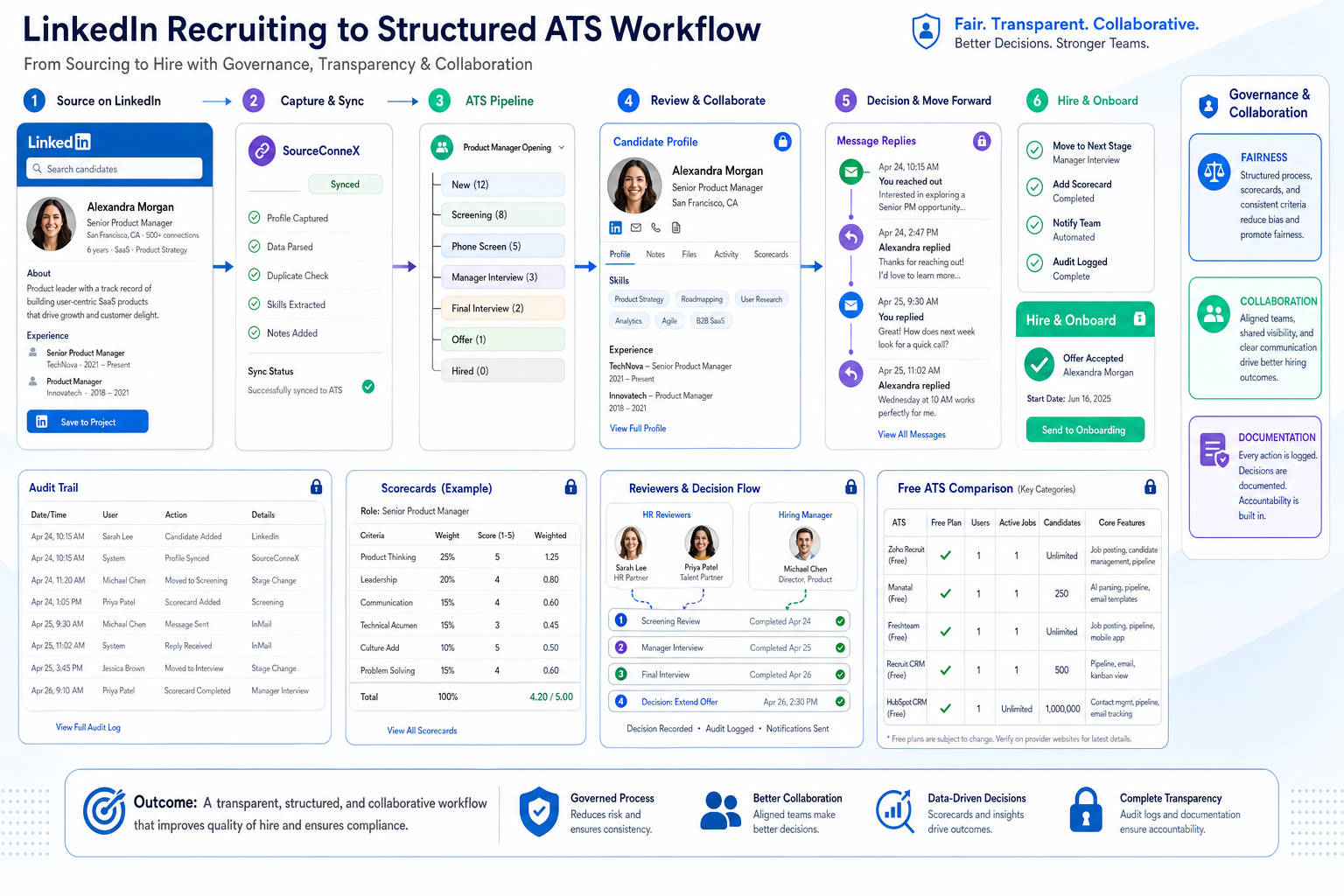
Headhunters comparing freeware recruitment software can use this guide to prevent undocumented hiring calls and protect client trust.
That matters because a surprising number of recruiting mistakes start before anyone reaches interview scheduling or offer approval. A candidate may look strong on paper, references may be lined up, and the recruiter may feel ready to move fast, yet scattered social checks, missing notes, tagged photos, overshared public posts, and inconsistent manager reactions can derail momentum. For an agency recruiter, that means wasted sourcing hours and credibility risk with clients. For a small search firm owner, it can mean consultants duplicating effort, losing track of who reviewed what, and making avoidable judgment calls without a clean audit trail. For an internal talent team, it creates fairness concerns, delays, and employer-brand damage when social media impressions influence decisions more than a structured process does.
In my own workflow, one practical way to reduce that mess has been pairing an ATS with AI Recruiter for the part of recruiting that usually gets fragmented first: candidate outreach, after-hours replies, and early interest checks on LinkedIn. Used well, it helps keep communication moving, captures resumes and contact details from interested candidates, and supports multilingual follow-up without forcing recruiters to sit in their inbox all night. The recruiter still owns final judgment, resume review, and whether a prospect should move forward, but the administrative gaps that often trigger sloppy decisions become easier to control. I have found that especially useful when candidate conversations are active across time zones and the team needs cleaner handoff records before anyone starts making subjective calls.
The risk is easy to recognize from everyday job-search behavior. A candidate spends time polishing a resume, lining up references, and getting ready to impress employers, yet a single public post, an old tagged picture, or repeated oversharing about a job search can suddenly shift how they are perceived. Employers and recruiters do look, and what once felt personal can become part of the selection process whether the candidate intended it or not.
Now place that reality inside a live hiring workflow. A recruiter opens a shortlist, checks the last LinkedIn reply, reviews a resume, then clicks into a public profile because a hiring manager asks for "more context." Another stakeholder notices a questionable photo, someone else flags complaints about a former boss, and nobody records clearly whether the concern relates to actual job risk, bias, or simple discomfort. That is the transition point where recruiting stops being just candidate evaluation and becomes a software problem. The best recruiting software is not only about posting jobs and moving stages. It also needs to help teams evaluate signals consistently, document decisions, and avoid letting ad hoc social checks turn a free online applicant tracking system or ats software free setup into a liability. That is why this article looks at how to choose freeware recruitment software with governance, collaboration, and real recruiter workflows in mind.
Table of Contents
- Why Candidate Context Needs Structure
- What Counts as Free in Recruiting Software
- Quick Comparison of Free ATS Categories
- Best Overall Type of Free Recruiting Software
- Best for Small Teams
- Best Open Source Route
- Best Forever-Free ATS Use Case
- How to Evaluate Applicant Tracking System Benefits
- How Recruiting Software Helps Manage Social-Signal Risk
- Limitations of Free ATS Software
- AI Features, Governance, and Fairness
- When to Upgrade From a Free Plan
- FAQ
Why Candidate Context Needs Structure
Experienced recruiters know that hiring decisions are rarely shaped by resumes alone. Public professional presence, communication style, and online behavior can influence how candidates are discussed, especially when hiring managers want extra reassurance. The problem is not that recruiters seek context. The problem is that many teams gather it inconsistently.
When social information enters the process without a shared method, the risk shows up quickly. One recruiter may ignore a tagged party photo as irrelevant. Another may treat complaints about a former employer as a warning sign. A hiring manager may react to political commentary even when it has nothing to do with job performance. Without structured notes, permissions, and clear decision rules, the team can drift from evidence-based recruiting into subjective elimination.
That is why the best recruiting software should support more than pipeline visibility. It should make it easier to track who reviewed a candidate, what concern was raised, whether it was job-related, and what next step was taken. Even a lightweight ATS can improve this if it centralizes feedback instead of leaving judgments inside inboxes, chat threads, or memory.
What Counts as Free in Recruiting Software
Before comparing the best recruiting software, define what “free” means. This matters because a recruiter evaluating freeware recruitment software may assume two tools offer the same value when they do not.
- Free trial: Full or partial access for a limited time. Useful for testing workflows, not for long-term live hiring.
- Free plan: Ongoing access with feature or usage restrictions. Common for small hiring teams and early-stage firms.
- Freemium: Basic recruiting tools included, with automation, advanced reporting, or integrations reserved for paid tiers.
- Open source: Software with configurable code access, usually requiring technical ownership for hosting, maintenance, and security.
- Free forever: An ongoing no-cost plan, often with meaningful caps on jobs, users, support, or reporting depth.
This distinction matters even more when your hiring process includes judgment-heavy steps such as manager collaboration, candidate communication history, and documentation of concerns. A startup hiring occasionally may function well with a free online applicant tracking system. A team that needs consistent records, review permissions, and better governance often outgrows ats software free options faster than expected.
Quick Comparison of Free ATS Categories
| Category | Best For | Typical Strengths | Common Limits |
|---|---|---|---|
| Free trial ATS | Shortlisting vendors quickly | Broad feature exposure, realistic testing | Time-limited access, not suitable for long-term live use |
| Free plan ATS | Early-stage internal hiring | Basic pipelines, job posting, candidate tracking | Job caps, seat caps, limited reporting |
| Freemium recruiting software | Teams learning ATS workflows | Low entry risk, easy onboarding | Automations and integrations often restricted |
| Open source recruitment software | Teams with technical resources | Customization, control, flexibility | Maintenance burden, setup complexity |
| Forever-free ATS | Very lean recruiting operations | Predictable cost, simple start | Feature depth usually shallow |
The takeaway is simple: the best recruiting software is not the one with the broadest free claim. It is the one whose restrictions do not break your process when recruiters, hiring managers, and candidate communications all need to stay aligned.
Best Overall Type of Free Recruiting Software
Best overall: a structured free plan ATS with core workflow coverage and usable collaboration controls.
If you want a balanced starting point, the strongest freeware recruitment software option is usually a free plan that covers the essentials of an applicant tracking system: job posting, resume collection, pipeline stages, interview coordination, hiring-team feedback, and basic reporting. For most recruiting teams, that is the point where the software starts supporting real operational discipline rather than just offering a place to store resumes.
This type of recruiting software tends to deliver the most practical applicant tracking system benefits because it supports day-to-day execution. A recruiter can open a role, collect applicants, move candidates through stages, track concerns in one record, and keep hiring managers from making isolated decisions based on partial information.
What to look for
- Customizable stages for different role types
- Career page hosting or job publishing tools
- Resume parsing to reduce manual entry
- Interview scheduling support
- Scorecards or structured feedback forms
- Basic analytics for source visibility and stage movement
- Permission settings that limit unstructured candidate review
Practical advice: Ask whether your recruiters and hiring managers can run an entire requisition in the system without shifting important judgments back to spreadsheets, inboxes, or side conversations. If not, it may not be the best recruiting software for your team, even if the entry cost is zero.
Best for Small Teams
Best for small teams: a simple free online applicant tracking system with strong usability and enough visibility to prevent informal decision-making.
Small businesses and lean HR teams usually do not fail because they lack advanced features. They struggle when the system is too awkward to use consistently, so recruiters and hiring managers improvise. In that environment, a lightweight free online applicant tracking system can outperform a more complex platform if it keeps everyone looking at the same candidate record instead of reacting independently.
The value shows up quickly. Even a basic system can centralize resumes, standardize status updates, and reduce the confusion that happens when founders, recruiters, and managers all keep separate notes. That matters not only for efficiency but also for fairness when off-platform impressions start influencing hiring choices.
Best-fit use cases
- A company hiring for fewer than 10 active openings at once
- A founder-led business moving from email to process
- An HR generalist managing hiring alongside other responsibilities
- A department head coordinating interviews without dedicated recruiting operations support
What matters most
- Fast setup
- Clear pipeline visibility
- Easy hiring-manager collaboration
- Minimal training requirements
- Enough permissions to avoid accidental edits or undocumented comments
Practical advice: Test one real workflow with a recruiter and a hiring manager together. If both can understand the pipeline, review notes, and next-step ownership in under 15 minutes, adoption odds improve significantly.
Best Open Source Route
Best open source option: an open source applicant tracking system only when your team can support it operationally.
Open source recruiting software appeals to teams that want more control over hosting, configuration, and data handling. In theory, it can be one of the best recruiting software paths for organizations with strict governance requirements. In practice, it only works when technical support and recruiting operations stay aligned.
From a recruiter’s perspective, the benefits are only real when the tool remains stable, usable, and secure. A highly customizable ATS that lacks ownership becomes a hiring risk. This is especially true when you need dependable access controls, audit trails, or consistent handling of candidate-related concerns across multiple reviewers.
When open source makes sense
- You have internal technical support
- You need deeper workflow customization
- You care strongly about hosting control or data governance
- You can document permissions and process rules clearly
When it does not
- You need a plug-and-play free online applicant tracking system
- You lack technical ownership
- You want vendor-backed implementation help
- You expect integrations to work with little setup effort
Practical advice: Evaluate open source ATS options as an operations decision, not just a software preference. Recruiters should be involved early so technical flexibility does not undermine workflow clarity.
Best Forever-Free ATS Use Case
Best forever-free ATS use case: low-volume hiring with standardized roles and simple collaboration needs.
There is a valid place for ats software free plans that stay free over time. They can work for volunteer-led organizations, small agencies testing a niche desk, or startups with occasional hiring needs. Their value is not unlimited capability. It is process discipline at minimal cost.
For this use case, freeware recruitment software should cover the basics reliably: candidate intake, stage management, interview notes, communication history, and basic collaboration. If your hiring demand is predictable and light, that may be enough.
Good fit signs
- You hire in bursts rather than continuously
- You rarely need advanced approval workflows
- You can live with limited integrations
- You do not need complex compliance reporting
Bad fit signs
- You run many concurrent roles
- You need role-based permissions across departments
- You rely on sourcing, CRM, and analytics working together
- You need stronger controls around who can review and comment on candidates
Practical advice: Map your next 12 months of hiring before committing. The best recruiting software for today can become the wrong system quickly once role count, reviewer count, or decision complexity increases.
How to Evaluate Applicant Tracking System Benefits in Real Recruiting Work
When teams compare recruitment software, they often overfocus on front-end features and underweight operating reality. A better evaluation framework looks at how the system supports recruiters, agency consultants, HR teams, and hiring managers throughout the hiring funnel.
1. Job posting and career page workflow
A good ATS should simplify opening a requisition, publishing jobs, and routing applicants into the correct pipeline. This is one of the clearest applicant tracking system benefits because it reduces repetitive admin work and keeps applicant data centralized.
2. Resume parsing and candidate intake
With freeware recruitment software, check whether parsing is accurate enough to save time without creating extra cleanup work. If imported resumes are messy, recruiters lose speed and confidence.
3. Pipeline management
The best recruiting software makes candidate stages visible and actionable. Look for drag-and-drop stages, clear ownership, status consistency, and room for role-specific workflows. This is where many free online applicant tracking system tools either feel efficient or become too rigid.
4. Interview scheduling and feedback
Structured scheduling and scorecards improve hiring quality. They also reduce the risk of vague reactions replacing useful evaluation. If a team is already prone to making side judgments based on off-platform information, strong feedback tools matter even more.
5. Collaboration and permissions
Hiring software should support recruiter and manager collaboration without turning every stakeholder into an unrestricted reviewer. Permissions matter more than teams expect once multiple departments hire at once.
6. Reporting and visibility
Even with ats software free options, basic reporting should show pipeline health, source performance, and stage bottlenecks. If you cannot explain where candidates drop off or why decisions changed, your system is not helping enough.
7. Integrations and operational fit
The best recruiting software fits your wider stack. Email, calendar, sourcing tools, and HR systems all affect recruiter productivity. Free plans often limit integrations, so verify what is native, what remains manual, and what is unavailable.
8. Communication continuity
One overlooked criterion is whether the software ecosystem helps your team maintain timely candidate contact. I have used AI Recruiter alongside ATS workflows specifically to keep LinkedIn outreach and follow-up from falling into personal inbox chaos. Its always-on messaging, multilingual communication support, and resume collection features are helpful when the ATS tracks the hiring process but does not solve the problem of missed candidate replies. The recruiter still decides who advances, but the handoff into the ATS becomes cleaner.
Key insight: The best applicant tracking system for recruiters is usually the one that reduces follow-up work outside the ATS and makes subjective candidate judgments easier to document consistently.
How Recruiting Software Helps Manage Social-Signal Risk
The reference point from social media is useful here because it highlights a common recruiting blind spot: information that feels informal can still affect formal decisions. Candidates may be judged because of a tagged photo, repeated job-search updates, complaints about past employers, or posts that make stakeholders uncomfortable even when the relevance to job performance is unclear.
Recruiting software cannot eliminate human bias on its own, but it can reduce the conditions that let bias spread unnoticed. A better system helps teams do three things well.
Capture where concerns came from
If someone on the hiring team raises a concern, the ATS should make it possible to log that concern in a structured way rather than leaving it in chat messages or hallway conversations.
Separate job-related risk from general discomfort
The system should support scorecards, required feedback fields, or shared review templates so teams are encouraged to explain why something matters. A complaint about a former employer may be relevant in one role and irrelevant in another. The issue is not the existence of context, but whether it is evaluated consistently.
Limit uncontrolled candidate review
Permissions matter. Not every stakeholder needs the same level of access, and not every hiring manager should conduct untracked independent reviews. Good software helps contain sprawl before it becomes process drift.
Practical takeaway: If your hiring team frequently checks public profiles, then governance is not a niche concern. It is a core software selection criterion.
Limitations of Free ATS Software
Search intent around freeware recruitment software often includes a hidden question: what is the catch? In most cases, the tradeoff is not quality alone. It is scope.
- Active job limits: You may only be able to keep a small number of live requisitions open.
- User or seat limits: Collaboration breaks down if key stakeholders cannot access the system.
- Restricted automations: Email workflows, triggers, or stage rules may be unavailable.
- Shallow integrations: A free online applicant tracking system may not sync well with calendars, sourcing tools, or HR systems.
- Basic reporting only: Useful for visibility, but often not enough for recruiting operations analysis.
- Limited support: Troubleshooting may be self-service only.
- Weak governance options: Permissions, audit trails, or structured review controls may be too limited for teams with more complex decision-making.
These limitations do not automatically disqualify ats software free options. They simply need to be judged against your real workflow. A lean internal team may accept them. A multi-stakeholder hiring process often cannot.
Practical advice: Build your shortlist using actual constraints, not a generic feature checklist. Specifically test your expected number of active jobs, users, approval steps, reports, and reviewer access levels.
AI Features, Governance, and Fairness in Recruiting Software
AI now appears in many recruiting platform discussions, especially around screening, ranking, automation, and candidate matching. That can be useful, but only when the system is transparent enough to trust.
When reviewing the best recruiting software, do not just ask whether AI is included. Ask how it is used and how much control your team keeps. This matters for fairness, explainability, and process consistency.
Questions recruiters should ask
- Does the system explain how candidates are ranked or recommended?
- Can recruiters review and override automated scoring?
- Are AI-driven actions visible to hiring managers?
- Can your team document consistent usage policies?
- Does the platform support governance around bias, transparency, and auditability?
That same standard applies to outreach automation. My own experience with StrategyBrain AI Recruiter is that it works best when used for repetitive front-end communication rather than final qualification. It can connect with candidates, introduce opportunities, answer basic role questions, and collect resumes or contact details from interested prospects, but the recruiter should still decide whether the profile is genuinely aligned to the search. Used that way, it supports speed without hiding judgment.
When Should You Upgrade From a Free Plan?
The right time to move beyond freeware recruitment software is usually operational, not emotional. Teams often upgrade too late, after recruiter frustration, hiring-manager confusion, and reporting gaps have already slowed hiring.
Upgrade when you see these signs
- You are consistently at or near job or user limits
- You need better reporting for planning and accountability
- You want automated workflows to reduce manual follow-up
- You need deeper integrations with the rest of your hiring stack
- You are adding recruiters, coordinators, or cross-functional interviewers
- You require stronger permissions, governance, or compliance support
- You need candidate communication to stay active outside business hours without losing recruiter control
This is where the best recruiting software changes category. A simple free online applicant tracking system may be perfect for getting organized, but not for scaling a disciplined talent acquisition process. Upgrading is worthwhile when the operational cost of staying free exceeds the financial cost of moving up.
FAQ
What is an ATS?
An ATS, or applicant tracking system, is recruiting software that helps teams collect applications, organize candidates, manage pipeline stages, coordinate interviews, and track hiring decisions in one system.
Is there a truly free applicant tracking system?
Yes, but “truly free” can mean different things. Some tools offer a free forever plan, while others only provide a free trial or freemium version. Always check limits on jobs, users, integrations, and reporting.
What is the difference between ATS and recruiting CRM?
An ATS is mainly built to manage active applicants through a hiring process. A recruiting CRM is more focused on nurturing prospects before they apply. Many teams need both eventually, but a free ATS can still be enough if the immediate need is applicant tracking.
What features do free ATS tools usually include?
Many ats software free options include job posting, candidate pipelines, resume intake, interview coordination, and basic collaboration. Advanced automations, analytics, integrations, and governance controls are usually where free plans become limited.
Why does social media matter when choosing recruiting software?
Because public candidate information often enters hiring decisions informally. The right software helps teams capture concerns, document reasoning, and prevent off-platform impressions from driving inconsistent decisions.
Can LinkedIn automation replace recruiter judgment?
No. Tools such as AI Recruiter can help with outreach, candidate replies, and resume collection, but recruiters still need to review profiles, assess fit, and decide next steps.
When should a recruiting team stop relying on freeware recruitment software?
A team should move on when hiring volume, process complexity, communication demands, or governance requirements exceed the free plan’s limits. If recruiters are adding manual workarounds or undocumented decision paths, it is usually time to upgrade.
Conclusion
The best recruiting software is not defined by a free label alone. The right choice depends on whether the system supports your real hiring workflow, from job posting and pipeline management to collaboration, documentation, and fair decision-making.
For many teams, freeware recruitment software is a smart starting point. But if your process includes multiple reviewers, public-profile checks, or high candidate communication volume, software needs to do more than store applicants. It needs to keep judgments structured. If you are comparing a free online applicant tracking system or reviewing ats software free options, choose the one your team can use consistently, explain clearly, and outgrow for the right reasons rather than the wrong ones.














