


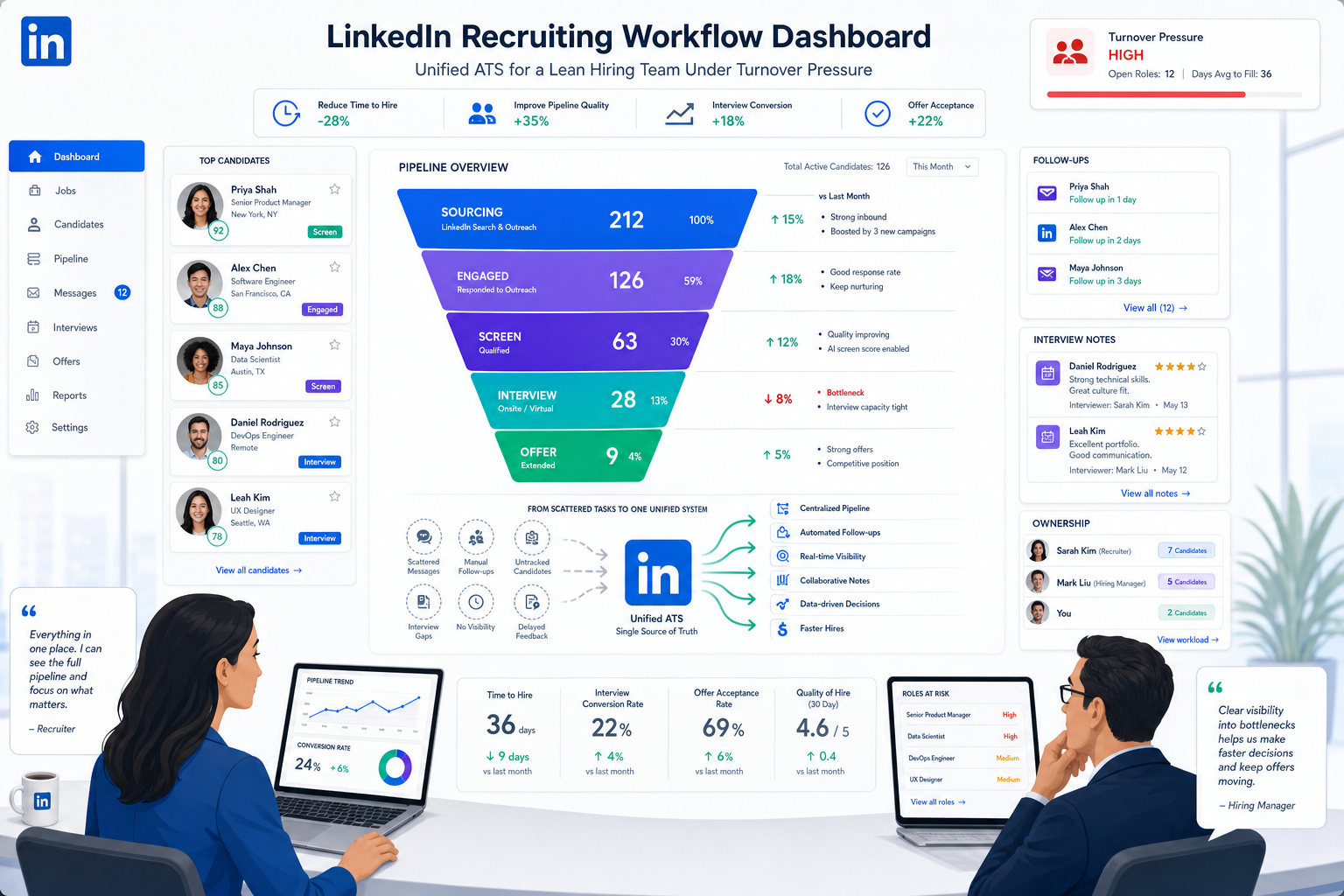
When turnover strains a lean recruiting team, this article helps headhunters judge a candidate tracking tool by speed, visibility, and process recovery.
That standard matters because recruiting problems rarely end at a slow inbox or a messy pipeline. When follow-up slips, interview notes live in separate places, or candidate ownership is unclear, the damage spreads outward: recruiters lose time, hiring managers lose confidence, short-staffed teams absorb extra work, and replacement hiring gets more expensive than most founders expect. In smaller firms, those failures are even more visible because one resignation can force the same recruiter to reopen sourcing, restart coordination, and repair employer perception at the same time.
In that kind of environment, I have found that StrategyBrain AI Recruiter is most useful when it is treated as workflow support rather than a substitute for recruiter judgment. Its always-on candidate messaging, LinkedIn outreach automation, and multilingual follow-up help prevent slow response gaps that often appear when teams are stretched. The recruiter still reviews the résumé, decides whether the profile fits the brief, and owns the next step, but the repetitive front-end communication no longer has to depend on who is awake, available, or manually checking every reply.
The reason this matters becomes obvious when turnover starts rising inside a real team. A departure does not just create one empty seat; it removes know-how, interrupts handoffs, and leaves the remaining group covering both their own workload and the missing employee’s tasks. Researchers have linked higher turnover rates to weaker organizational performance, with customer outcomes, quality, employee attitude, and productivity taking some of the hardest hits. Smaller companies feel this faster because they have less slack, fewer layers of backup, and less room for recruiting mistakes.
In practice, the recruiting team then moves into a familiar chain of actions: reopen the requisition, review old prospects, chase candidate replies, schedule interviews, log communication, remind hiring managers, and rebuild a process that should have been visible from the start. That is where the search for the best recruiting software begins to overlap with terms like candidate tracking tool, applicant tracking system for small companies, and even applicant tracking system logo when stakeholders are trying to compare vendors quickly. The real question is not which platform looks familiar; it is which one helps your team handle replacement hiring, preserve process quality, and keep candidates moving before turnover creates another vacancy.
Table of Contents
- Why Recruiting Software Matters More When Turnover Is High
- What “Best Recruiting Software” Really Means
- Candidate Tracking Tool vs. ATS
- What Small Companies Should Prioritize
- Workflow Lessons From Replacement Hiring
- A Practical Evaluation Framework
- Features That Matter in Daily Recruiting
- Why People Search for “Applicant Tracking System Logo”
- Common Buying Mistakes
- FAQ
Why Recruiting Software Matters More When Turnover Is High
Many software evaluations start too late, after the hiring team is already feeling the operational cost of churn. When employees leave in clusters or even one by one from a lean team, recruiting becomes a business continuity function, not just an HR task. The cost of replacement includes sourcing, outreach, screening, coordination, onboarding effort, and the loss of knowledge that walked out with the employee. That is why a good recruiting system should be judged partly by how well it helps your team respond when replacement hiring becomes urgent.
The most useful lesson from turnover research is not just that attrition is expensive. It is that the effects compound. Performance drops, remaining employees carry more load, and the quality of execution often declines while the team tries to refill roles. In recruiting terms, that means candidate response times slip, hiring managers delay feedback, and promising applicants disappear because no one is clearly managing the process. A reliable candidate tracking tool helps contain that damage by making movement, ownership, and communication easier to see.
Practical takeaway: The best recruiting software is often the one that holds process quality together when your team is replacing people under pressure, not the one with the flashiest demo.
What “Best Recruiting Software” Really Means
The best recruiting software is not simply the platform with the longest checklist. It is the system that helps recruiters, hiring managers, and HR leads move from application to offer with fewer handoff failures and less hidden work. In teams that have experienced turnover, this matters even more because the process has to stay understandable even when responsibilities shift.
In my experience, “best” usually comes down to five practical outcomes: clear pipeline control, dependable candidate communication, usable collaboration for hiring managers, reporting that highlights bottlenecks, and administration that does not become a weekly cleanup project. Those are the conditions that keep hiring from becoming more chaotic when a vacancy reopens unexpectedly.
That is also why market language often overlaps. Buyers may search for recruiting software, hiring software, an ATS, or a candidate tracking tool, but they are usually trying to solve the same operational problem: how to keep applicant information, recruiter activity, and team decisions in one usable workflow.
Candidate Tracking Tool vs. ATS
Many teams talk about a candidate tracking tool as though it is separate from an applicant tracking system. In real buying conversations, candidate tracking is usually the core layer inside the broader ATS. It is the part of the system that records where each applicant is, what has happened, who is responsible, and what comes next.
The ATS, however, should do more than display stages. It normally acts as the system of record for job posting, application intake, résumé parsing, interview scheduling, notes, dispositions, communication history, and reporting. Separate sourcing or assessment tools may connect to it, but they do not replace the need for one reliable applicant record.
This distinction becomes important when replacement hiring accelerates. If turnover increases and your team has to reopen roles quickly, fragmented tools create delays. Recruiters end up switching between inboxes, spreadsheets, messaging platforms, and scheduling apps just to reconstruct the status of one search. That is why the strongest candidate tracking tool is usually part of a broader workflow rather than a narrow point solution.
What a modern ATS usually includes
- Job posting: publish openings across a careers page and job boards
- Application capture: turn inbound applications into searchable records
- Pipeline management: move candidates through each hiring stage
- Communication history: keep messages and updates attached to the candidate record
- Collaboration tools: collect interviewer and manager feedback in one place
- Reporting: surface bottlenecks, stage aging, and hiring activity
What Small Companies Should Prioritize
The search for an applicant tracking system for small companies is usually driven by restraint, not ambition for complexity. Small businesses need software that is easy to launch, affordable to maintain, and structured enough to prevent hiring from living in someone’s inbox.
This is where turnover pressure is especially revealing. Research on attrition consistently shows that smaller companies struggle more when employees leave because each departure affects a larger share of the team’s output. In recruiting, that means an SMB cannot afford a bloated system that needs constant upkeep, but it also cannot afford a weak process with no visibility.
A practical applicant tracking system for small companies should therefore balance simplicity and control. It should support one recruiter today, a few hiring managers tomorrow, and a more repeatable process as the business grows.
Best-fit criteria for smaller teams
- Simple setup: jobs, stages, and templates should be easy to launch
- Low admin burden: routine maintenance should not require a dedicated owner
- Core features included: essential posting, tracking, and communication should not be overly fragmented
- Strong pipeline visibility: everyone should be able to see candidate status quickly
- Usable collaboration: hiring managers should leave feedback without friction
- Room to grow: the workflow should support more structured hiring later
If you are buying for a lean team, the wrong system is often not too small. It is too heavy, too dependent on add-ons, or too awkward for occasional hiring managers to use.
Workflow Lessons From Replacement Hiring
One reason I like evaluating software through the lens of turnover is that it shows where recruiting workflows actually fail. When a valued employee leaves, the issue is not abstract talent acquisition strategy. It is a sequence of real tasks that either holds together or falls apart.
The team first has to confirm whether the role will be backfilled immediately, then reopen the requisition, refresh the brief, check previous applicants, resume sourcing, and coordinate hiring manager availability. If those actions happen across disconnected tools, the recruiter spends more time rebuilding context than advancing candidates.
I have used StrategyBrain AI Recruiter in situations where the biggest risk was losing momentum between sourcing and human review. The most helpful part was not magical qualification. It was that candidate outreach and follow-up kept moving after business hours, replies were captured consistently, and multilingual communication reduced delay with international profiles. I still had to review résumés myself and decide who should move forward, but the tool took repetitive LinkedIn communication off the critical path. For replacement hiring, that kind of support can protect speed without lowering standards.
The broader lesson is straightforward: the best recruiting software should reduce the amount of recovery work a recruiter has to do after disruption. If the system cannot preserve context, surface history, and keep communication attached to the record, it will struggle when hiring urgency rises.
A Practical Evaluation Framework
When comparing the best recruiting software, I recommend reviewing platforms in the same order that real hiring work happens. That approach keeps the conversation grounded in recruiter execution rather than vendor slideware.
- Start with job setup. Can the team create a role, assign stages, and launch the process without technical overhead?
- Review candidate capture. Does the system turn inbound applications and sourced prospects into useful, searchable records?
- Inspect stage movement. Is it easy to move candidates, tag them, prioritize them, and identify stalled records?
- Test communication. Are messages, replies, and scheduling actions connected to the candidate history?
- Check collaboration. Will hiring managers actually use the feedback tools, or will the recruiter still end up chasing notes manually?
- Examine reporting. Can the team see where time is being lost, especially when a role has to be refilled quickly?
- Review maintenance. How much admin work is required to keep users, workflows, and templates current?
This framework is particularly useful for an applicant tracking system for small companies because it shows whether the platform supports practical execution rather than just promising scale.
Questions worth asking in demos
- What core workflow features are bundled versus sold separately?
- How easily can our team adjust stages as hiring needs change?
- Can a recruiter see communication history without checking another tool?
- Will occasional hiring managers understand the interface quickly?
- How well does the system handle replacement hiring when speed matters?
Features That Matter in Daily Recruiting
Feature lists become more useful when they are tied back to actual recruiter work. The best systems tend to win on a small set of operational basics.
1. Pipeline visibility
If the system does not make candidate status obvious, the recruiter will end up recreating that visibility elsewhere. This becomes especially harmful when multiple vacancies are open because of turnover or growth.
2. Job posting and career page support
Open roles should be easy to publish and maintain. If posting a backfill role requires repeated manual work, urgency gets lost early in the process.
3. Clean candidate records
Résumé parsing only helps if the resulting record is easy to read and search. A cluttered profile slows down both recruiters and hiring managers.
4. Communication and scheduling
Candidate outreach, interview coordination, and status updates should sit close to the record. Once communication starts living elsewhere, the process becomes harder to recover after staffing changes.
5. Hiring manager collaboration
Most delays in recruiting are not caused by sourcing alone. They happen because decision-makers do not respond quickly or cannot see where they need to act.
6. Reporting that reveals bottlenecks
You do not need flashy dashboards to improve hiring. You need reporting that shows where candidates stall, how long stages take, and where the team is overloading itself.
Why People Search for “Applicant Tracking System Logo”
The term applicant tracking system logo looks cosmetic, but the intent is often practical. Buyers use logos to recognize vendors in comparison sheets, internal presentations, screenshots, or shortlist documents. In other words, they are trying to orient themselves quickly during a software review.
There is nothing wrong with using an applicant tracking system logo as a visual label, but it should stay secondary to operating criteria. A familiar logo does not tell you whether the platform supports replacement hiring, manager collaboration, or the level of administration your team can realistically handle.
How to use ATS logos in a useful way
- Keep the logo as a visual identifier only
- Add a short label for company size and hiring environment fit
- Note whether tracking, communication, and reporting are core features
- Document expected setup and maintenance effort
- Pair visuals with recruiter workflow notes, not branding language
Common Buying Mistakes
Even experienced recruiting teams can miss the mark when software selection gets driven by demos alone.
- Buying for imagined future complexity: choose for your next real stage, not a distant enterprise scenario
- Ignoring turnover realities: if the process breaks when a role must be backfilled fast, the system is less useful than it appears
- Overlooking manager adoption: recruiter efficiency falls apart when hiring managers avoid the platform
- Underestimating admin burden: maintenance matters as much as launch
- Confusing vendor recognition with fit: an applicant tracking system logo may be memorable, but recognition is not evaluation
- Separating tracking from workflow: a candidate tracking tool should be assessed as part of the full recruiting process
The strongest selections usually come from teams that define success in operational terms: faster movement, clearer ownership, lower coordination drag, and better resilience when staffing changes create new pressure.
FAQ
What is a candidate tracking tool?
A candidate tracking tool is the workflow layer used to monitor applicants as they move through hiring stages. In most modern systems, it sits inside a broader applicant tracking system that also manages posting, communication, scheduling, and reporting.
What should an applicant tracking system for small companies include?
An applicant tracking system for small companies should include easy job setup, clear stage management, usable communication tools, simple collaboration, and low maintenance requirements. Small teams usually benefit more from bundled essentials than from highly complex add-ons.
Why does turnover matter when choosing recruiting software?
Turnover puts pressure on every part of the hiring workflow. When employees leave, recruiters need software that helps them reopen roles, preserve candidate history, move quickly, and keep managers aligned without rebuilding context manually.
Why do people search for applicant tracking system logo?
The phrase applicant tracking system logo is usually part of comparison behavior. Searchers often want a quick way to recognize vendors in documents, screenshots, or internal shortlists, not just design assets.
Can LinkedIn automation replace recruiter judgment?
No. Tools such as StrategyBrain AI Recruiter can help with outreach, follow-up, and candidate communication, but recruiters still need to evaluate résumés, confirm fit, and decide who advances in the process.
Conclusion
The best recruiting software earns its value when hiring gets messy, urgent, or repetitive. If turnover rises, a vacancy reopens, or a lean team has to protect candidate experience while moving faster, your process needs more than a polished interface. It needs a candidate tracking tool and ATS workflow that preserve context, reduce manual chasing, and keep ownership visible.
For most teams, especially those evaluating an applicant tracking system for small companies, the right choice is the platform that fits real recruiter work: posting, tracking, communication, collaboration, and reporting in one manageable system. And if LinkedIn outreach speed is part of the bottleneck, support tools like AI Recruiter can help keep early-stage conversations moving while the recruiter remains responsible for the actual hiring decision.














