


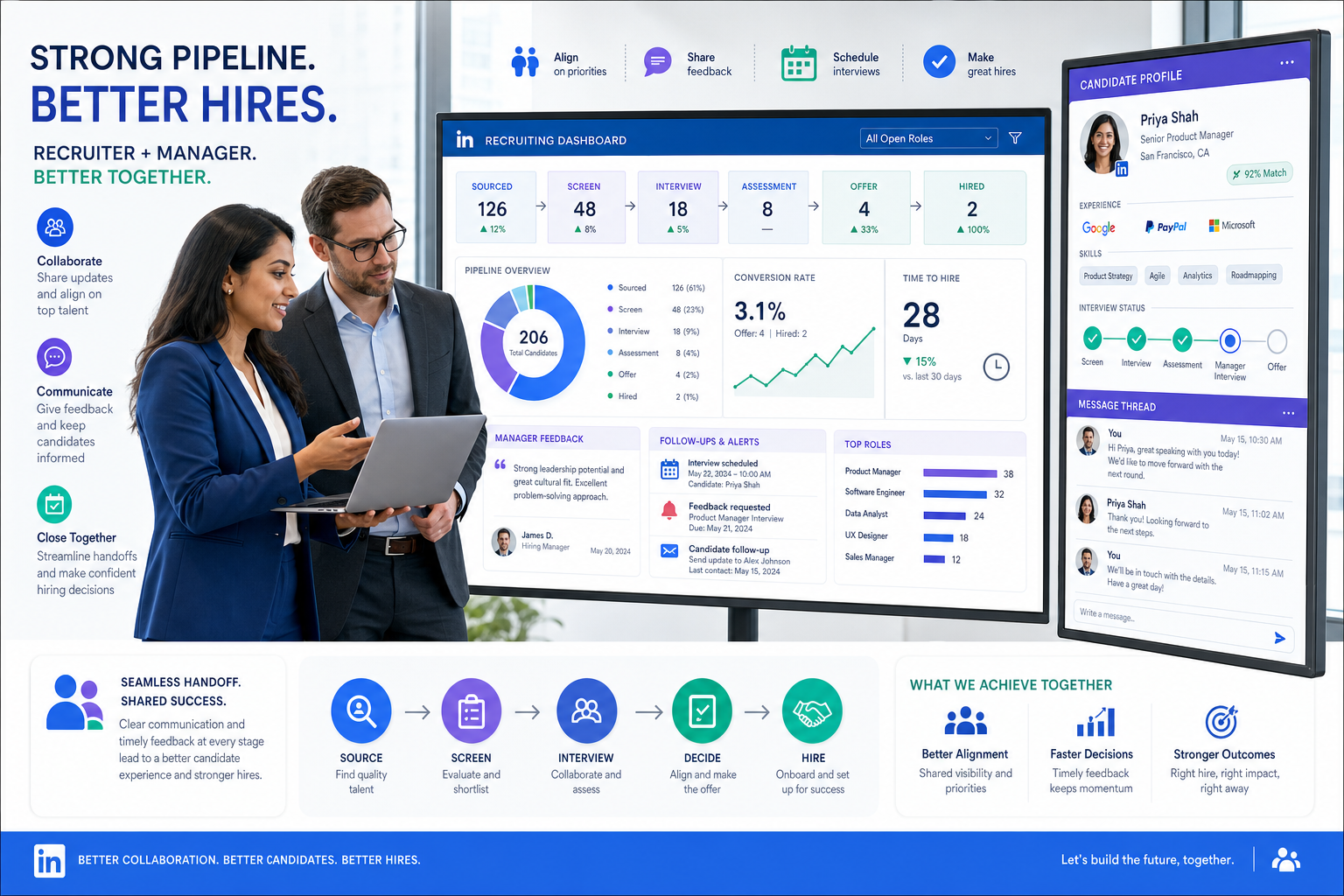
When recruiter-manager handoffs keep breaking, this article helps hiring leaders judge recruiting and applicant tracking software by the team habits that prevent delays and wasted sourcing time.
That sounds simple, but it is where many hiring teams break down. A recruiter can build a solid shortlist, yet a difficult team dynamic, inconsistent feedback, or missing follow-up notes can stall the process fast. For a small search firm, that means wasted sourcing hours and slower placements. For an in-house talent team, it can damage candidate experience, create friction with hiring managers, and make the recruiter look disorganized even when the root issue is shared process failure.
In my own workflow, tools that reduce repetitive outreach and keep conversations moving have helped most when a team is already under strain. I have found AI Recruiter useful for two specific pressure points: keeping candidate communication active outside recruiter working hours and collecting resumes or contact details once interest is confirmed. It also helps when multilingual outreach is part of the search. The recruiter still makes the final call on fit, resume quality, and whether a candidate should move forward, but the admin drag is lighter and the handoff is cleaner.
A useful way to think about this comes from a familiar team-management problem: every organization eventually has to work with a difficult team member, and the issue is not always attitude alone. Sometimes it is stress outside work, a role change, financial pressure, or a team that has stopped noticing what is going well. In recruiting, that same pattern shows up when coordinators, recruiters, and hiring managers interact only around problems. The workflow becomes reactive, and every delay feels personal.
That is why the best recruiting software is not just a place to move applicants from stage to stage. It should support the kind of team habits that keep hiring on track: visible feedback, small acknowledgments, documented next steps, and coaching conversations that do not begin only when something has gone wrong. When you evaluate recruiting and applicant tracking software through that lens, features, applicant tracking system pricing, and even applicant tracking system certification become easier to judge in real operational terms.
Table of Contents
- Why Team Dynamics Matter in Recruiting Software
- When an ATS Is Enough and When It Is Not
- What Good Systems Fix in Daily Recruiting
- The Best Software Supports Better Feedback Loops
- Features That Matter Most in 2026
- Best Recruiting Software by Use Case
- Applicant Tracking System Pricing Explained
- Applicant Tracking System Certification: What Buyers Should Check
- How to Choose the Right System
- Common Buying Mistakes
- FAQ
Why Team Dynamics Matter in Recruiting Software
Most comparisons of the best recruiting software focus on features. In practice, experienced recruiters know that hiring success depends just as much on team behavior. If hiring managers leave vague feedback, if coordinators are chasing updates in email, or if recruiters only hear from stakeholders when a candidate is rejected, the software will not fix everything on its own. But the right system can create structure around those weak points.
The reference point I keep coming back to is simple: people usually improve when the organization gives them clearer support, stronger connection, and visible recognition for small wins. That idea applies to hiring teams too. A recruiter who can see timely manager feedback, a coordinator who knows the next step without asking, and a manager who gets credit for responsive participation are all easier to work with. The best recruiting software supports those conditions.
For most buyers, that evaluation starts with recruiting and applicant tracking software. The ATS layer is still the operational center of the process. It controls requisitions, applications, interview stages, interview feedback, and candidate status changes. But what separates average systems from the best recruiting software is whether they also help the people around the process collaborate better.
When an ATS Is Enough and When It Is Not
An applicant tracking system organizes the hiring process. A broader recruiting platform expands that into sourcing, outreach, automation, talent rediscovery, and reporting. The distinction matters because many teams buy based on immediate pain and then discover they also needed stronger communication support or manager visibility.
- ATS-first systems are usually best when your main problem is process order: job posting, application handling, interview progression, and recordkeeping.
- Broader recruiting platforms make more sense when your team also needs sourcing support, candidate engagement, workflow automation, and better cross-functional coordination.
If your biggest issue is that applicants are getting lost, a clean ATS may be enough. If your bigger issue is that recruiters are spending too much time chasing responses, repeating updates, and manually moving candidate conversations forward, then broader recruiting software is often the better fit.
Practical takeaway: the right system should improve both candidate flow and stakeholder behavior, not just add more fields to complete.
What Good Systems Fix in Daily Recruiting
The best systems remove friction that experienced recruiters notice immediately. They reduce status confusion, make feedback visible, shorten scheduling loops, and preserve context from first contact through final disposition.
In real teams, the strongest applicant tracking system benefits usually include:
- Centralized candidate history so outreach, feedback, and stage movement stay in one place
- Clear ownership for who is waiting on whom at each step
- Repeatable feedback collection that helps managers comment with structure instead of one-line reactions
- Faster communication with candidates and internal stakeholders
- Reporting that shows bottlenecks by stage, team, or requisition
- Compliance support for documentation, privacy, and disposition records
From my own recruiting experience, one of the most underrated benefits is emotional temperature control. When people can see progress, recognize small wins, and respond inside a shared workflow, there is less room for blame-driven communication. That is not a soft benefit. It directly affects speed, candidate experience, and recruiter credibility.
The Best Software Supports Better Feedback Loops
The team-management lesson from the reference material is worth translating directly into software evaluation. Two simple practices stand out: make recognition visible, and start difficult coaching conversations with something concrete that is working. In recruiting operations, strong software can support both.
1. Visible recognition and progress signals
A hiring process works better when contributions are seen. In one team setting, that might look like a simple station for peer kudos collected over two weeks or a month. In recruiting software, the equivalent is visible activity history, fast acknowledgment of submitted feedback, and dashboards that show which stakeholders are keeping the process moving. Small positive signals matter because they reinforce good behavior before delays become conflict.
2. Coaching with specifics instead of frustration
Good recruiting leaders do not wait until a process is failing to speak with a hiring manager or coordinator. They start with evidence. Maybe the manager has been punctual in interviews, or consistently reviews resumes on time, even if written feedback is still weak. The best recruiting software makes those patterns visible, which makes coaching more productive.
3. Resolutions that ask what support is needed
One of the most practical leadership questions is, “What can I do to help you improve this?” Software cannot replace that conversation, but it can make it easier by showing where the blocker actually sits. If candidate replies are arriving overnight, if outreach stalls because recruiters cannot keep up, or if resumes are collected but not reviewed promptly, the right platform exposes the issue instead of forcing everyone to guess.
That is also where I have seen StrategyBrain AI Recruiter fit well beside a broader recruiting stack. I have used it as a front-end support layer for LinkedIn-heavy searches when the team needed constant candidate replies, multilingual communication, and cleaner resume collection from interested prospects. It did not replace recruiter judgment. What it changed was responsiveness: conversations stayed active after hours, candidate intent was clarified sooner, and I could return to a tighter queue of people who had already shared resumes or contact details.
Features That Matter Most in 2026
By 2026, buyers should expect recruiting and applicant tracking software to do more than track applicants. The best systems support speed, transparency, and cleaner human collaboration.
Core workflow features
- Job posting across relevant channels
- Customizable pipelines by role or department
- Interview scheduling with calendar coordination
- Career site support for branded applications
- Feedback capture from interviewers and hiring managers
- Analytics and reporting for funnel health
- Integrations with calendars, HR systems, and communication tools
Modern workflow signals
- Automation for reminders, status changes, and follow-ups
- Candidate matching to speed up initial review
- Talent pooling for rediscovery and future roles
- AI-assisted outreach or screening support where manual communication is too heavy
- Visibility controls so hiring managers can participate without creating chaos
Be careful with AI claims. The useful question is not whether software uses AI, but whether it reduces repetitive work without reducing recruiter control. In my testing, that matters most in sourcing-heavy roles and in LinkedIn-led pipelines where a recruiter can lose hours to repetitive messages and off-hours replies.
Best Recruiting Software by Use Case
The best recruiting software depends on the way your team hires, communicates, and makes decisions.
Small and midsize businesses
SMBs usually need fast deployment, easy training, and pricing they can predict. The ideal system handles core recruiting without forcing a long implementation. If the team also relies on direct outreach, adding a focused support layer like AI Recruiter can help recruiters keep candidate communication active without hiring extra coordinators.
Enterprise hiring teams
Large organizations need permissions, auditability, compliance controls, and deeper integrations. They also need systems that survive complex stakeholder behavior. Enterprise buyers should test whether the platform makes feedback discipline easier, not just more formal.
High-volume hiring
High-volume environments depend on bulk actions, automation, scheduling efficiency, and candidate communication at scale. Delays here are rarely caused by one feature gap alone. They come from cumulative friction across handoffs.
Agency recruiters and headhunters
Agency teams need search flexibility, talent pool visibility, submission tracking, and stronger outreach workflows. An applicant tracking system for recruiters in this segment should not be overly rigid. It should support fast movement between sourcing, outreach, response handling, and shortlist presentation.
For LinkedIn-heavy desk work, this is also where I have personally felt the value of StrategyBrain AI Recruiter most clearly. It handled repetitive initial messaging, stayed responsive across time zones, and surfaced interested candidates with resumes attached, while I kept ownership of qualification and client-facing decisions.
Applicant Tracking System Pricing Explained
Applicant tracking system pricing is one of the most misunderstood parts of software buying because the visible subscription is only part of the actual cost.
| Pricing Model | How It Works | Best Fit | What to Watch |
|---|---|---|---|
| Per-user monthly | Cost rises with recruiter or admin seats | Growing teams that want flexibility | Costs can climb quickly as managers need access |
| Flat-rate subscription | One recurring fee for a defined package | SMBs that want predictability | May include user caps or limited workflows |
| Custom enterprise quote | Pricing based on scale and complexity | Large organizations | Implementation fees and add-ons may be substantial |
When you review applicant tracking system pricing, ask about:
- Implementation and onboarding fees
- Integration charges
- Support tiers
- Limits on hiring manager access
- Volume thresholds tied to jobs or applicants
- Customization costs for workflows and reporting
- Renewal terms and contract length
I would also add one practical check: estimate the cost of poor follow-up. A lower-priced ATS can become expensive if recruiters still need spreadsheets, manual reminders, or extra messaging tools to keep the process moving.
Applicant Tracking System Certification: What Buyers Should Check
Applicant tracking system certification usually refers to two different things, and buyers should separate them.
Software compliance and security credentials
These cover how a vendor manages security, privacy, and controls. Depending on the market, buyers may ask about standards or frameworks such as SOC 2, ISO 27001, GDPR readiness, CCPA support, or related audit practices.
User training and admin certification
Some vendors also provide formal training or administrator programs. That is not the same as an independent compliance credential, but it can matter a lot for adoption. If your recruiting process depends on many hiring managers and coordinators, training support may be more valuable than one extra feature module.
For AI-supported tools, I would also verify how candidate data is handled, whether customer data is used for model training, and what access controls exist around recruiter accounts and conversation records. Those questions matter just as much as headline features.
How to Choose the Right System
If you want a practical selection process, use the same mindset you would use to stabilize a difficult team relationship: understand the real problem, identify what is working, and choose support that improves the whole interaction.
- Map your workflow. Show where sourcing, review, scheduling, feedback, and offers actually slow down.
- Identify collaboration failure points. Separate software gaps from team habit problems.
- Define must-have functionality. Keep the list anchored to current recruiting work, not idealized future demos.
- Compare pricing in context. Review applicant tracking system pricing against user growth, support needs, and admin savings.
- Test with a live use case. Run a current role through the platform, including feedback collection and candidate communication.
- Review compliance and training. Clarify what applicant tracking system certification means in each vendor discussion.
- Check recruiter and manager adoption. If either group resists the system, your process quality will drop.
Common Buying Mistakes
- Choosing for feature volume instead of team fit.
- Ignoring the hiring manager experience.
- Underestimating communication workload.
- Assuming low pricing means low total cost.
- Confusing security credentials with training certifications.
- Buying AI without a clear human-review boundary.
The most common mistake I see is treating recruiting software like a passive database purchase. It is really an operating-system decision for how your team communicates, documents progress, and resolves friction.
FAQ
What is the difference between recruiting software and an ATS?
An ATS manages applicants through the hiring process. Recruiting software may include that ATS core but also add sourcing, automation, talent pooling, communication support, and broader analytics.
How does applicant tracking system pricing usually work?
Most vendors use per-user pricing, flat subscriptions, or enterprise quotes. The full cost should include implementation, support, integrations, and likely growth in user access.
What does applicant tracking system certification mean?
It usually refers either to software security and compliance credentials or to vendor training and administrator programs. Buyers should confirm which meaning applies.
What features matter most in recruiting and applicant tracking software?
Core features include job posting, pipeline management, scheduling, feedback collection, reporting, and integrations. For some teams, automation and AI-supported communication also matter.
Can AI tools help recruiters without replacing recruiter judgment?
Yes. In many workflows, AI is most useful for repetitive outreach, off-hours communication, and collecting resumes or contact details from interested candidates. Final qualification and hiring decisions should remain with the recruiter and hiring team.
How should headhunters evaluate the best recruiting software?
Headhunters should prioritize search flexibility, outreach efficiency, candidate relationship management, and tools that reduce admin drag while keeping control over qualification and client presentation.
Conclusion
The best recruiting software does more than organize applicants. It helps recruiting teams work through friction with more visibility, cleaner communication, and more consistent follow-through. That is why the smartest way to evaluate recruiting and applicant tracking software is not by feature count alone, but by how well it supports the real human system around hiring.
If your team is comparing options now, keep four questions in view: Will the system improve recruiter-manager collaboration? Is the applicant tracking system pricing sustainable as usage grows? Does applicant tracking system certification cover the trust issues you actually care about? And if outreach volume is a major burden, would a focused support layer like AI Recruiter help your recruiters spend more time judging talent and less time chasing routine replies?














