


Use this article to judge which ai recruiting tool lifts response, speed, and hire quality without hiding weak process.
That sounds obvious until you look at how many agency teams still buy software around feature demos instead of recruiting evidence. Owners feel it in lost desk productivity, solo recruiters feel it in inconsistent follow-up, and internal talent leaders feel it when hiring managers question why volume is up but accepted offers, qualified conversations, or retention are not. In practice, the damage is rarely one big failure. It is the daily drag of scattered candidate notes, untracked outreach, weak source visibility, and no reliable way to tell whether the team is hiring faster, hiring better, or simply working harder.
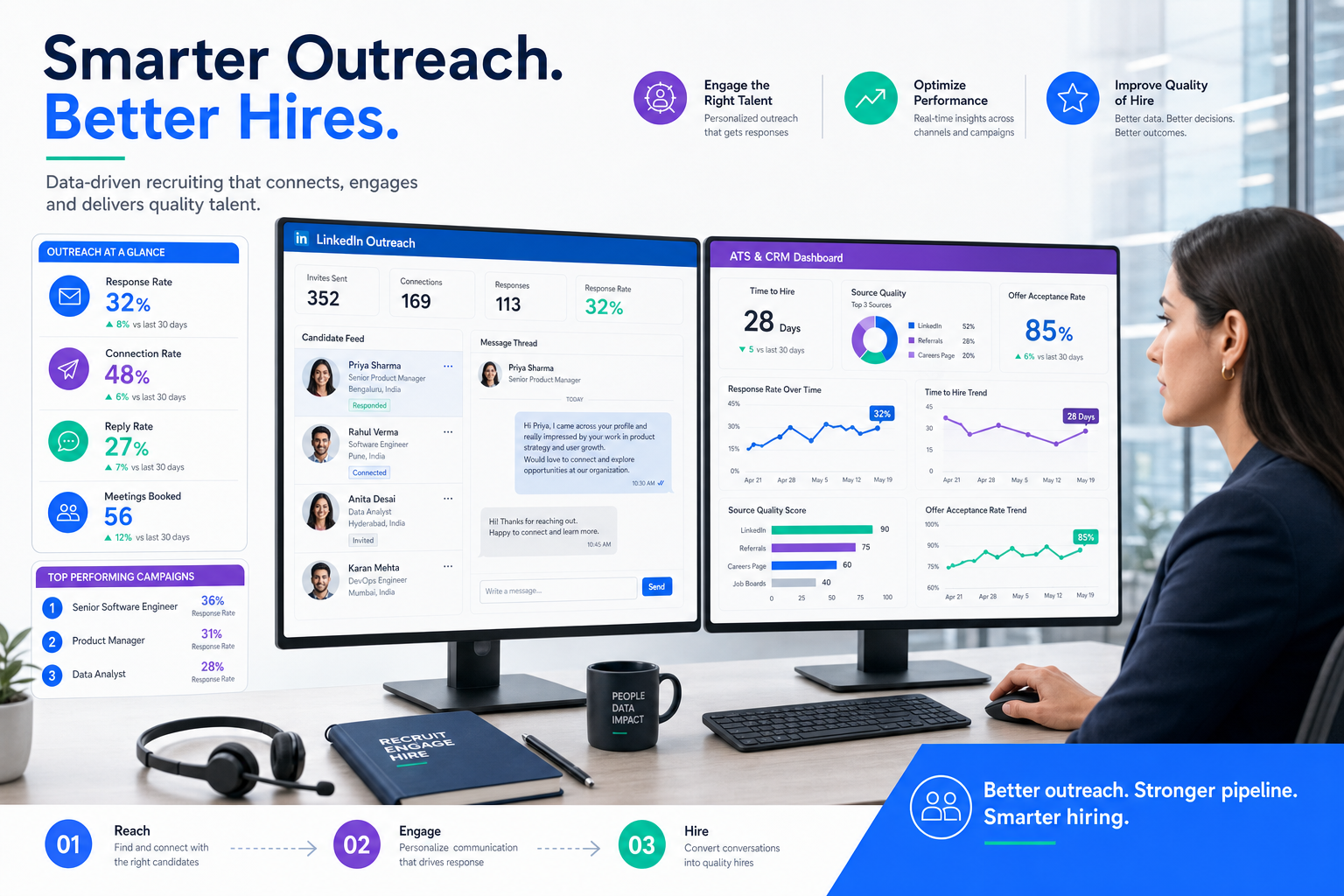
That is where an AI-supported workflow can help, especially when it removes repetitive outreach and admin without removing recruiter judgment. In my own testing, StrategyBrain AI Recruiter was most useful when I needed three things tied together: automated LinkedIn outreach, around-the-clock candidate replies, and structured capture of resumes and contact details for interested prospects. It can keep conversations moving when recruiters are busy or offline, but the recruiter still owns resume review, fit assessment, and the decision on who advances.
The pressure becomes clearer when you look at the metrics recruiting teams actually use. A desk can show plenty of job ad traffic or application volume and still miss the mark if time to hire stretches, offer acceptance slips, or outbound response rates stay weak. Executive and specialist work makes this even more visible. A recruiter may spend days adjusting outreach, checking where shortlisted people came from, and updating stakeholders, only to realize that the team has no clean view of which sourcing channels produce qualified conversations or whether the process is losing strong candidates halfway through.
Once you see recruiting through that lens, software selection changes. The real question is not just which platform claims to be the best recruiting software, but which system gives you usable recruiting analytics, strong ATS execution, true recruiting crm software depth, and AI support that helps improve the metrics that matter. That is also how most agencies should think about the best crm for staffing agencies: not as a contact database, but as operational infrastructure for candidate quality, client visibility, and recruiter follow-through.
Table of Contents
- Why software evaluation should start with metrics
- What the best recruiting software now combines
- The recruiting metrics that actually matter
- What an ai recruiting tool should really improve
- What to look for in recruiting crm software
- How to choose the best crm for staffing agencies
- A practical buying framework for agency leaders
- Comparison table: what strong agency software should include
- Common software selection mistakes
- FAQ
- Conclusion
Why software evaluation should start with metrics
Most articles about the best recruiting software begin with features. In real agency buying, that is backward. Recruiters do not win because their system has the longest list of automations. They win because the platform helps them move the numbers that signal healthy recruiting: response rates, qualified submissions, speed through stages, accepted offers, and longer-term hire quality.
That metrics-first view matters because recruiting is both relational and operational. Experienced recruiters absolutely use judgment, but the market is too competitive to rely on intuition alone. If your software cannot show where candidates drop off, which sources produce actual hires, or whether outreach quality is improving, then your team is managing by feel. For a boutique search firm or staffing desk, that usually leads to wasted sourcing effort, inconsistent client updates, and weak coaching visibility.
I have seen this most clearly on LinkedIn-heavy workflows. When outbound volume rises, message quality, timing, candidate replies, and resume follow-up all become hard to control manually. That is one reason I found AI Recruiter useful as a support layer rather than a replacement for recruiting craft. It can keep first-touch communication moving, collect interested candidate details, and prevent after-hours replies from going cold. But if the surrounding ATS and CRM are weak, those gains still get buried in poor stage tracking and thin reporting.
What the best recruiting software now combines
If you are comparing the best recruiting software today, you are rarely choosing a simple ATS. Agency teams usually need one system that covers candidate pipeline management, client relationship tracking, job order workflow, submissions, reporting, and an ai recruiting tool layer that reduces repetitive work. That shift matters because placements depend on two linked pipelines: candidates and clients.
An internal TA team may be able to operate with a lighter applicant tracking setup if the goal is only internal hiring workflow. A staffing or search firm cannot. Recruiters need to see client contacts, account history, active job orders, outreach records, candidate ownership, interview movement, and placements in the same operational picture. That is why serious buyers now focus on ATS plus CRM depth, not ATS alone.
The practical implication is straightforward. If your team handles permanent search, contract staffing, or a mix of both, shortlist systems that support candidate and client workflows natively. A disconnected ATS and sales CRM often creates duplicate records, weak reporting, and poor adoption. Unified systems make applicant tracking system benefits visible in everyday desk work instead of hiding them behind admin effort.
The recruiting metrics that actually matter
The best software decisions become easier when you know which recruiting metrics matter enough to shape process. Not every number is equally useful. Some metrics give real guidance. Others are vanity counts that look encouraging but do not improve hiring decisions.
1. Time to hire
This measures how long it takes from a candidate entering process to accepting an offer. For agency teams, it highlights friction in screening, client feedback, scheduling, and offer movement. If your software cannot show where time is being lost, it will be hard to improve.
2. Cost per hire
Even in agencies, this matters more than many buyers admit. You need to understand the total effort behind each placement, including tools, job advertising, recruiter time, and sourcing spend. During software evaluation, the useful question is whether the platform lowers admin load and channel waste over time, not whether the subscription looks cheap in isolation.
3. Quality of hire
This is harder to measure, but it is the metric that keeps executive search and specialist recruiting honest. Good proxies include retention, performance signals, and hiring-manager confidence after the person lands. A fast placement that does not stick is not a software success story.
4. Source of hire
Every agency should know which channels produce hires, not just candidates. If direct outreach, referrals, job boards, and network sourcing all feed the same system, your reporting should make those differences obvious. This matters for future budget allocation and recruiter focus.
5. Candidate response rate
For outbound recruiting, this is one of the clearest signals of recruiter effectiveness and role-market fit. If your team sends high volumes of messages but sees weak engagement, you may have a messaging problem, a targeting problem, or a credibility problem. Software should help expose that quickly.
6. Offer acceptance rate
Accepted offers tell you whether the role, compensation story, and process experience are aligned. A low acceptance rate often points to issues that start much earlier than the offer stage.
Practical takeaway: If a platform helps your team improve response rate, source quality, stage speed, and accepted offers, it is doing real recruiting work. If it mainly inflates activity counts, it is probably adding noise.
Avoid vanity metrics
Not every dashboard tile deserves attention. Job ad page views, social impressions, or raw resume volume can be useful supporting data, but they are weak primary indicators. More applications do not automatically mean better recruiting. Agencies especially need software that distinguishes qualified engagement from passive volume.
Why this matters more in executive and specialist recruiting
In executive search, senior technical hiring, or niche market work, process quality matters more than volume. Engagement quality, time to productivity, and retention carry more weight than application counts. The best recruiting software should support that reality with detailed notes, transparent communication history, and reporting that connects activity to business outcomes.
What an ai recruiting tool should really improve
AI is now a standard buying criterion, but most experienced recruiters have learned to separate useful AI from label-only AI. A credible ai recruiting tool should improve specific parts of recruiter workflow while keeping final judgment with the recruiter. It should not claim to replace assessment, relationship management, or hiring decisions.
In practical recruiting work, the most useful AI support usually appears in a few repeatable areas:
- Outreach automation: keeping initial contact and follow-up moving without recruiters manually chasing every message.
- Response handling: replying to candidate questions quickly, including after hours, so warm interest does not cool off.
- Resume and contact capture: collecting interested candidate details cleanly for recruiter review.
- Parsing and record creation: reducing manual data entry once information is received.
- Matching and prioritization: helping recruiters decide who deserves immediate attention first.
- Workflow reminders: surfacing next actions so outreach and submissions do not stall.
That is also where my own use of StrategyBrain AI Recruiter felt strongest. For LinkedIn outreach-heavy desks, it handled repetitive candidate introductions, ongoing message replies, and collection of resumes or contact details from interested people. What I liked most was not the promise of replacing a recruiter. It was the practical reduction in dead time between outreach and response. What still required recruiter ownership was the part that should remain human: reading the resume carefully, deciding whether the profile truly matched the brief, and choosing whether to move the candidate to interview.
When you evaluate AI, ask for a live workflow demonstration rather than a feature list. You want to see whether the tool actually changes daily work. Can recruiters review outputs easily? Can they edit messaging? Does the system create cleaner records or just more records? Does it improve response quality, not just output volume? Those are better buying questions than asking whether a vendor has AI somewhere in the product.
What to look for in recruiting crm software
Whether you are buying your first agency stack or replacing an older one, strong recruiting crm software should support both delivery and growth. The best systems are not simply recruiter databases. They connect candidate execution, client development, and performance visibility in one place.
1. Candidate pipeline management
Your ATS should make it easy to search, parse, stage, shortlist, and track candidates across multiple jobs and clients. Recruiters need to act fast without losing historical context.
2. Client CRM and job order management
The best crm for staffing agencies does more than store contact details. It should support account ownership, prospecting activity, job order intake, client communication history, and visibility across active business.
3. Submission and placement tracking
Agency teams need a clear record of where every candidate stands by role, by client, and by recruiter. Without this, reporting becomes unreliable and client communication suffers.
4. Source tracking and analytics
Because source of hire and response rate are meaningful metrics, software should let you see where good candidates originated and which outreach channels produce actual conversion.
5. Automation with recruiter control
The right automation should save time without taking ownership away from the desk. Recruiters should be able to review, override, and refine workflows.
6. Integrations and migration support
Email, calendar, sourcing environments, and operational systems all matter. Migration matters just as much. Even the best recruiting software can fail if historical records, notes, and ownership rules move poorly.
7. Reporting that managers can actually coach from
Good dashboards should answer practical operating questions: Which jobs are aging? Which clients are active? Which recruiters generate high-quality responses? Where are candidates dropping out? These are management tools, not just executive snapshots.
How to choose the best crm for staffing agencies
The best crm for staffing agencies depends heavily on business model. A broad top-software list can help with awareness, but fit comes from workflow reality.
Boutique search firms
These teams often need strong relationship history, nuanced candidate notes, and better visibility into long-cycle client work. Quality of engagement matters more than high-volume automation alone.
Contract and perm staffing firms
Mixed-model agencies need stronger operational discipline. Job volume, active redeployment, and account coordination create complexity quickly, so ATS and CRM depth need to be balanced.
Technical recruiting teams
Search precision, messaging quality, and candidate matching matter more here than broad database volume. AI can help, but recruiter review remains essential because role fit is rarely obvious from keywords alone.
Healthcare and compliance-heavy desks
These teams benefit from structured records, repeatable workflows, and cleaner follow-up discipline. Software should reduce admin while preserving review quality.
Small versus larger agencies
Small firms usually need ease of use, fast setup, and minimal overhead. Larger firms may need permissions, reporting layers, and more formal implementation. Buy for your actual operating model first, not an imagined future org chart.
A practical buying framework for agency leaders
If you are actively comparing the best recruiting software, start with your live desk workflow and the metrics you want to improve.
- Map candidate and client flow together. Document how prospects are sourced, where resumes are captured, how job orders open, and where handoffs stall.
- Choose three to five primary metrics. For most agencies, that means response rate, time to hire, source quality, accepted offers, and recruiter adoption.
- Test both ATS and CRM depth. A polished candidate demo can hide weak client workflow.
- Review AI inside daily work. Ask what the ai recruiting tool actually changes in outreach, follow-up, and record quality.
- Stress-test reporting. Can a manager diagnose a weak desk from the dashboard, or only admire activity totals?
- Check migration and onboarding. Clean implementation is a major adoption driver.
- Estimate total operating cost. Include workarounds, training time, admin effort, and lost productivity if the system is only partially used.
One lesson I would underline from using AI support on outbound recruiting is that speed only matters when it feeds a coherent system. I have had LinkedIn conversations move faster with AI Recruiter, especially when candidates replied outside office hours, but the value showed up only when those conversations tied back to clean candidate records, follow-up tasks, and accountable recruiter review. That is the standard I would use for any software comparison.
Comparison table: what strong agency software should include
| Category | What strong software should do | Why it matters for agencies |
|---|---|---|
| ATS workflow | Track applicants, stages, submissions, interviews, offers, and placements | Supports clearer candidate movement and fewer dropped handoffs |
| CRM depth | Manage prospects, clients, contacts, job orders, ownership, and account history | Essential for business development and account growth |
| Metrics visibility | Show response rate, source quality, stage speed, and offer outcomes | Lets leaders improve process instead of guessing |
| AI support | Enable outreach automation, candidate replies, parsing, capture, and workflow reminders | Improves speed if outputs remain reviewable and editable |
| Integrations | Connect with email, calendars, sourcing environments, and ops systems | Reduces admin and keeps records current |
| Implementation | Support migration, onboarding, permissions, and process setup | Directly affects time to value and adoption |
Use this table as a sanity check. If a platform is strong in outreach but weak in CRM, or strong in ATS but weak in analytics, it may still create the same process blind spots that made you look for new software in the first place.
Common software selection mistakes
- Buying for features instead of metrics. If you do not know what process outcome you want to improve, demos can be misleading.
- Choosing an ATS with shallow CRM capability. This usually creates account-side blind spots for agencies.
- Overvaluing AI labels. Not every ai recruiting tool feature saves meaningful recruiter time.
- Ignoring source and response tracking. Outreach-heavy desks need this to improve performance.
- Skipping migration planning. Historical notes, ownership logic, and communication records matter.
- Leaving end users out of evaluation. Recruiters and managers should test real workflows before a decision is made.
A useful rule is simple: if the software makes candidate follow-up, client visibility, and recruiting metrics easier to trust in the first month, you are likely looking at a serious platform. If it mostly adds manual cleanup, adoption will struggle no matter how modern the product sounds.
FAQ
What is recruiting CRM software?
Recruiting crm software combines candidate management and client relationship workflow in one system. It typically includes records for candidates, job stages, submissions, placements, client contacts, job orders, and business development activity.
How is an ATS different from a CRM in recruiting?
An ATS manages candidates, resumes, pipeline stages, and hiring workflow. A CRM manages prospects, clients, contacts, and account activity. Agency teams usually need both because placements depend on candidate and client pipelines together.
Why should software evaluation start with metrics?
Because software only matters if it improves outcomes. Metrics like time to hire, source of hire, candidate response rate, quality of hire, and offer acceptance rate give a practical way to judge whether a platform actually supports better recruiting.
What AI features save recruiters the most time?
The most useful features are usually outreach automation, candidate reply handling, resume and contact capture, parsing, matching support, and workflow reminders. The real value comes when recruiters can still review and control the next step.
What should small agencies prioritize first?
Small agencies should prioritize ease of use, client CRM depth, candidate search, source tracking, reporting clarity, and implementation support. The best system is usually the one recruiters adopt quickly and use consistently.
Conclusion
The search for the best recruiting software is really a search for software that improves the numbers behind good recruiting. For agencies, that means a platform that combines ATS discipline, CRM depth, useful reporting, and practical AI support. A good ai recruiting tool can help accelerate outreach and follow-up, but it only creates lasting value when it supports better decisions, cleaner records, and stronger recruiter execution.
If you are evaluating options now, anchor the decision in live workflow and meaningful recruiting metrics. Focus on time to hire, response quality, source effectiveness, accepted offers, and user adoption. That is how you separate a fashionable platform from software that actually helps recruiters place better talent and serve clients with more consistency.














