


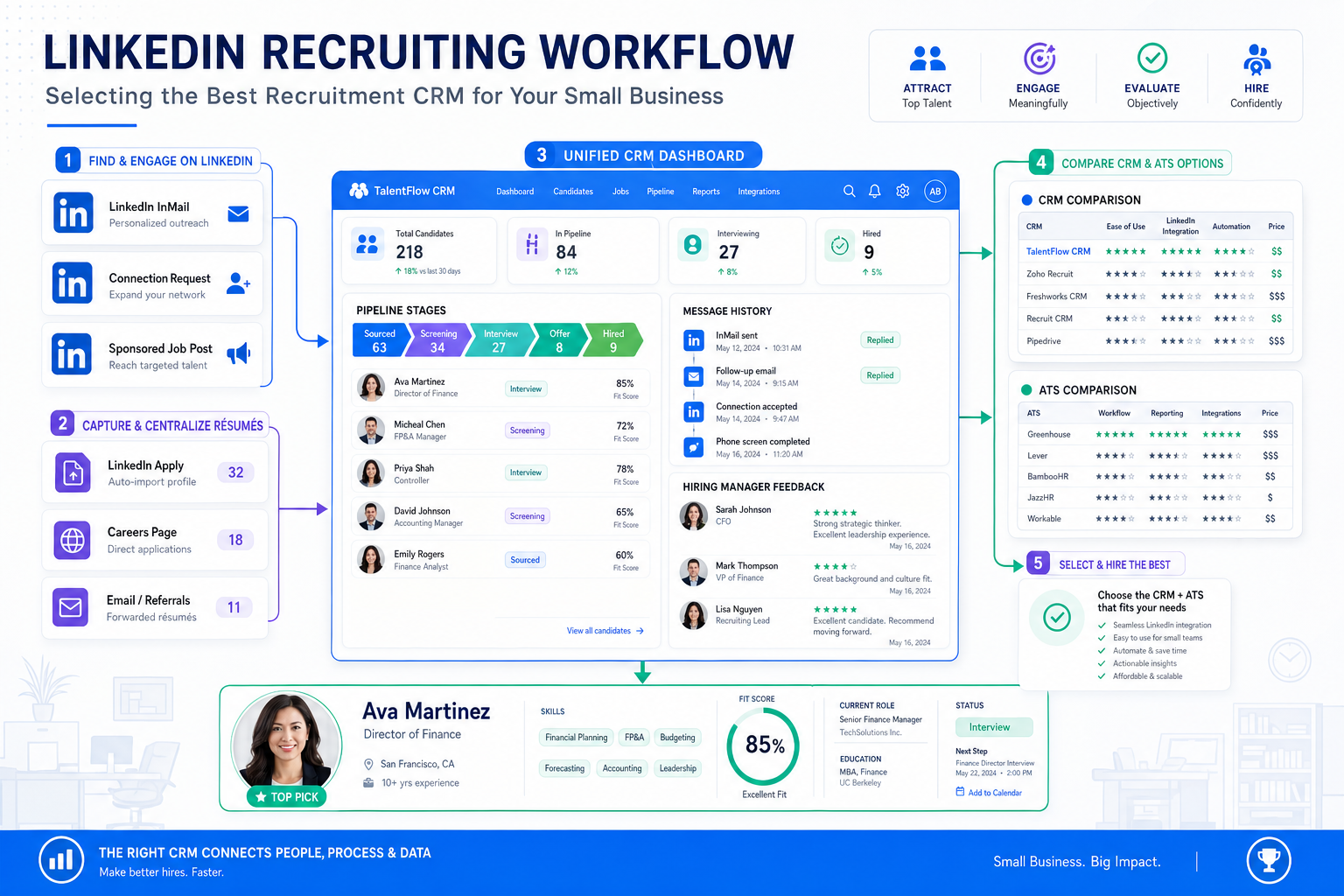
See how recruiters can judge the best recruitment CRM for small business to avoid split records, slow follow-up, and lost hires.
That matters more than most small firms expect. When a team is opening a new office, replacing a key leader, or trying to hire into a changing market, the real damage rarely comes from low effort. It comes from split records, slow follow-up, unclear ownership, and hiring managers making high-stakes decisions without a clean view of candidate conversations. For agency recruiters, in-house talent teams, and owner-led firms, those gaps create lost candidates, longer vacancies, weaker stakeholder trust, and expensive rework.
In that kind of workflow, I have found that StrategyBrain AI Recruiter is most useful when it handles the repetitive top-of-funnel work that usually clogs a recruiter's day. Its LinkedIn outreach automation, always-on candidate messaging, and résumé capture can keep early conversations moving while the recruiter still owns final judgment, résumé review, shortlist decisions, and the next step with hiring managers. If you want to see how those conversations are structured in practice, the conversation examples are worth reviewing before you redesign your process.
A useful way to think about software selection comes from a hiring scenario many recruiters know well: a company is expanding and relocating at the same time, and one of the hardest roles on the org chart suddenly becomes urgent. In the reference case, the pressure centered on a Director of Finance hire. The employer did not just need technical credentials. It needed someone who could lead a team, deliver results, and fit the culture while the business itself was changing.
That kind of search exposes the exact reason small teams start looking for the best recruiting software. The recruiter has to map the brief, open outreach, track who replied, compare leadership signals, record stakeholder feedback, and keep momentum while business conditions shift underneath the search. Once you see that sequence clearly, the choice between the best recruitment CRM for small business, the best ats for small business, and the best ats for small companies stops being theoretical. It becomes a workflow decision about how to manage complexity without losing judgment.
Table of Contents
- Quick answer
- Why complex hires change software needs
- ATS vs recruitment CRM
- How to compare the best recruiting software
- A recruiter workflow for expansion and relocation hiring
- Features that matter most
- Best recruiting software by use case
- Pricing and cost expectations
- Implementation and adoption
- Common buying mistakes
- FAQ
Quick answer
The best recruitment CRM for small business is usually the platform that helps a lean recruiting team manage both active applicants and relationship-based follow-up without creating extra admin. If your hiring includes confidential leadership searches, recurring niche roles, office expansion, or relocation-related recruiting, a hybrid ATS plus CRM setup is often the strongest fit.
For many teams, the best ats for small business is not the one with the largest feature list. It is the one that makes a demanding search manageable: clear pipelines, organized notes, stakeholder visibility, candidate messaging, and enough automation to stop recruiters from living in email and spreadsheets. The same principle applies when evaluating the best ats for small companies.
Why complex hires change software needs
Small businesses often assume recruiting software is mainly for volume hiring. In practice, software becomes even more valuable when the role count is low but the complexity is high. A Director of Finance search during expansion is a good example. The role affects leadership, reporting, business continuity, and team credibility. If the company is also relocating, candidate motivation and fit become harder to assess because the opportunity itself carries more trade-offs.
That is why the strongest applicant tracking system benefits are not limited to speed. They also include control and continuity. When a search involves multiple stakeholders and a narrow candidate pool, your system needs to preserve context: why someone was sourced, what they said, where concerns emerged, and what follow-up is due next.
- Searches with strategic impact: finance leadership, operational heads, and niche managers require more documentation and better alignment.
- Hiring during change: expansion, restructuring, or relocation increases the need for consistent outreach and fast internal communication.
- Relationship-driven recruiting: passive candidates, silver medalists, and repeat talent pools make CRM features more valuable than ATS-only workflows.
- Lean execution teams: when one recruiter supports several stakeholders, software must reduce admin rather than multiply it.
The practical takeaway is simple: the harder the role is to fill, the more the software must protect context, timing, and recruiter judgment.
ATS vs recruitment CRM
An applicant tracking system is built to move active candidates through open jobs. A recruitment CRM is built to maintain and reactivate talent relationships over time. Small teams often need both, especially when searches involve outreach before application.
| Category | Main purpose | Best fit | What to prioritize |
|---|---|---|---|
| ATS | Track open-role applicants | Teams filling current vacancies | Pipeline stages, interview coordination, feedback capture |
| Recruitment CRM | Build candidate relationships before application | Agency recruiters and sourcing-heavy teams | Talent pools, reminders, segmented outreach, re-engagement |
| Hybrid ATS + CRM | Combine active hiring and pipeline nurture | Small businesses with recurring or hard-to-fill roles | Single record of communication, sourcing notes, and process movement |
If your work is mostly inbound, the best ats for small business may be enough. If your recruiters regularly source passive talent, revisit prior finalists, or manage searches with relocation concerns, the best recruitment CRM for small business usually needs stronger CRM behavior, not just applicant tracking.
How to compare the best recruiting software
When I compare recruiting systems for small firms, I do not start with feature volume. I start with one realistic search. In this case, imagine you need to fill a finance leader role during growth. You must brief stakeholders, source selectively, respond quickly, preserve candidate context, and keep the process moving even when decision makers are busy.
That scenario creates a better scorecard than any vendor demo.
| Evaluation factor | Why it matters | Questions to ask |
|---|---|---|
| Pipeline visibility | Complex searches break when status is unclear | Can every stakeholder see current stage, owner, and blockers? |
| Candidate relationship tracking | Leadership searches involve nuanced follow-up | Can you log outreach, notes, objections, and recontact timing in one place? |
| Hiring manager collaboration | Key hires need aligned decision makers | Is feedback easy to submit and compare without long email chains? |
| Automation quality | Admin reduction matters in lean teams | Does automation support messaging, reminders, and intake without removing recruiter control? |
| Search flexibility | Expanding firms often adjust the brief mid-search | Can you edit stages, tags, and workflows quickly? |
| Reporting | Small teams need practical visibility | Can you see stage conversion, source quality, and aging at a glance? |
| Implementation effort | Most small firms cannot support long rollouts | How quickly can one recruiter and one manager become productive? |
If you are screening for the best ats for small companies, test the same live tasks in each tool: add a role, source a candidate, store outreach notes, move the profile through stages, request feedback, and pull a short pipeline report. That reveals real usability fast.
A recruiter workflow for expansion and relocation hiring
The opening finance search is useful because it reflects a common pattern: a company in transition needs a leader who can perform, influence, and fit. In those searches, software selection should follow the workflow, not the other way around.
1. Clarify the business brief before opening the funnel
The reference case makes an important point indirectly: when a company is relocating and expanding, the job description alone is not enough. Recruiters need the larger business context. Why is the role open now? What must the new leader stabilize? Which parts of the opportunity will attract or concern candidates?
Software helps here when intake forms, role notes, and stakeholder comments stay attached to the requisition. That context becomes critical later when the shortlist is small and every candidate conversation matters.
2. Run outreach without losing continuity
For confidential or specialized searches, sourcing often happens before candidates enter a formal application flow. That is where CRM capability starts to matter. I have used AI Recruiter as a support layer in this stage because it keeps LinkedIn outreach moving after hours, answers common role questions, and collects résumés or contact details from interested candidates. The recruiter still reviews fit manually, but the handoff becomes much cleaner.
In practical terms, that helped reduce the usual lag between initial outreach and usable candidate records. Instead of chasing missed replies across inboxes, I could review who had engaged, what was already discussed, and which profiles were ready for a human screening call. For teams doing active sourcing, that kind of continuity is one of the less talked-about applicant tracking system benefits.
3. Protect stakeholder alignment through the shortlist stage
A finance leadership search rarely fails because nobody sourced enough names. It fails when comments are scattered, criteria drift, or the hiring team reacts too slowly. The best recruiting software for this stage keeps every evaluation tied to the candidate record and shows who needs to act next.
This is also where the best recruitment CRM for small business differs from a basic tracker. Small companies often revisit strong candidates when the brief changes slightly. A CRM-oriented system makes that possible without rebuilding the search from scratch.
Practical takeaway: if your firm handles executive, finance, or relocation-sensitive searches, choose software that preserves business context and candidate history as carefully as it tracks stage movement.
Features that matter most
Most feature lists in this category are too broad to be useful. For small teams, the best features are the ones that change daily execution.
Candidate history and relationship notes
If a candidate is hesitating because of office location, leadership scope, or team structure, those details must stay visible. This is especially important for repeat outreach months later.
Structured pipeline management
The best ats for small business should make stage movement obvious. Recruiters need to know who is sourced, contacted, interested, screened, shortlisted, and stalled.
Built-in communication support
Messaging templates, reminders, and interview scheduling reduce admin. They also make it easier to maintain a professional candidate experience during busy searches.
Résumé capture and profile organization
When outreach happens through LinkedIn or email, records can fragment fast. Systems that centralize documents and contact details save real recruiter time.
Manager-side usability
Hiring managers should be able to review, comment, and decide without training fatigue. If they avoid the platform, the process falls back into inbox chaos.
Reporting that answers operational questions
Useful reports do not need to be advanced. Small teams mostly need to know where searches are slowing, which sources convert, and which roles are at risk.
Best recruiting software by use case
There is no universal winner. The right choice depends on the type of recruiting work you do most often.
Best for owner-led small businesses
Choose a lightweight ATS with clear stages, easy collaboration, and transparent pricing. Simplicity beats customization in most founder-led hiring environments.
Best for agencies and headhunters
Agency teams usually need stronger CRM behavior because passive sourcing, re-engagement, and pipeline reuse are core to the business. In that setup, the best recruitment CRM for small business should support long-term talent pooling rather than only open requisitions.
Best for startups and scaling teams
Startups often need a fast-launch system with simple workflows and enough flexibility to change hiring plans quickly. The best ats for small companies here is usually one that the founder, recruiter, and hiring manager can all use without heavy setup.
Best for sourcing-heavy LinkedIn workflows
If your bottleneck is outbound LinkedIn work rather than applicant processing, a supporting tool like StrategyBrain AI Recruiter can work alongside your ATS or CRM. It is most relevant for recruiters who need continuous first-touch outreach, multilingual reply handling, and résumé collection at scale, while keeping final qualification in human hands.
Pricing and cost expectations
Pricing matters, but small firms should evaluate cost against workload removed and process risk reduced.
- Per user pricing: workable for small recruiter teams, but watch manager seat costs.
- Per recruiter pricing: often easier for agency structures.
- Flat company pricing: useful when several stakeholders need platform access.
- Free plan or trial: good for testing adoption, but only if core workflows are intact.
Ask practical questions during evaluation:
- What does the base plan include?
- Are hiring manager seats charged separately?
- Do sourcing, CRM, automation, or reporting features sit behind higher tiers?
- Are implementation or support fees extra?
- How much manual work remains even after setup?
The cheapest system is not always the best recruiting software. In small teams, hidden cost usually shows up as recruiter time, delayed searches, and poor internal visibility.
Implementation and adoption
The systems that succeed in small businesses tend to be the ones that feel usable in the first week. That means quick setup, sensible defaults, and clear recruiter-manager handoffs.
To test implementation, run one realistic scenario:
- Create a role with business context notes.
- Set hiring stages.
- Invite one hiring manager.
- Add several sourced candidates.
- Record outreach activity.
- Schedule an interview.
- Collect feedback.
- Export or view a pipeline summary.
If those steps feel clumsy, adoption will be poor. The best ats for small business should make ordinary actions feel intuitive, not technical.
Common buying mistakes
Buying for feature volume instead of search reality
Small firms often buy tools for hypothetical future needs. Start with the kinds of searches you actually run now, especially if they involve leadership, relocation, or relationship-driven hiring.
Ignoring context preservation
For hard-to-fill roles, the most important data is often not the résumé itself. It is the reason the candidate engaged, hesitated, or stayed in the pipeline.
Overlooking sourcing workflow support
If your team lives on LinkedIn, a standard ATS may not solve the biggest bottleneck. In that case, pairing your core system with AI Recruiter can help cover repetitive outreach and response handling while preserving recruiter control.
Letting hiring managers stay outside the system
No software works if decision makers continue to rely on private email threads and memory.
Choosing ATS-only when CRM need is obvious
Teams that fill recurring roles or depend on proactive search often discover too late that applicant tracking alone is not enough. That is when the best recruitment CRM for small business proves its value.
FAQ
What is the best recruitment CRM for small business?
It is usually a platform that combines applicant tracking with enough CRM capability to support sourcing, follow-up, and talent-pool reuse. The best option depends on whether your hiring is mainly inbound or relationship-driven.
What is the best ATS for small business?
The best ATS for small business is typically the one that offers clear pipelines, fast setup, easy collaboration, and practical reporting without unnecessary complexity.
What is the best ATS for small companies doing executive or finance hiring?
Look for systems that preserve candidate history, support stakeholder alignment, and make nuanced searches easier to manage. For leadership hiring, context retention is as important as stage tracking.
Do small companies need both an ATS and a CRM?
Not always. If hiring is occasional and mostly inbound, an ATS may be enough. If your team relies on sourcing, passive candidates, or repeated outreach, CRM functionality becomes much more important.
Can LinkedIn automation replace recruiter judgment?
No. Tools can support outreach, handle replies, and collect résumés, but final fit assessment, shortlist building, and hiring decisions still need recruiter and stakeholder judgment.
What are the main applicant tracking system benefits for small teams?
The biggest benefits are cleaner pipelines, less admin, better hiring manager coordination, more visible bottlenecks, and a more repeatable process across searches.
Conclusion
The strongest lesson from complex searches like a Director of Finance hire during expansion or relocation is that software matters most when the process cannot afford confusion. The best recruitment CRM for small business is the one that helps recruiters hold together context, communication, and stakeholder alignment while the search is still moving.
If you are comparing the best ats for small business or the best ats for small companies, use a real search scenario as your benchmark. Judge each tool by how well it supports sourcing, candidate continuity, manager collaboration, and next-step clarity. That is how small teams choose the best recruiting software with fewer regrets and better hiring discipline.














