


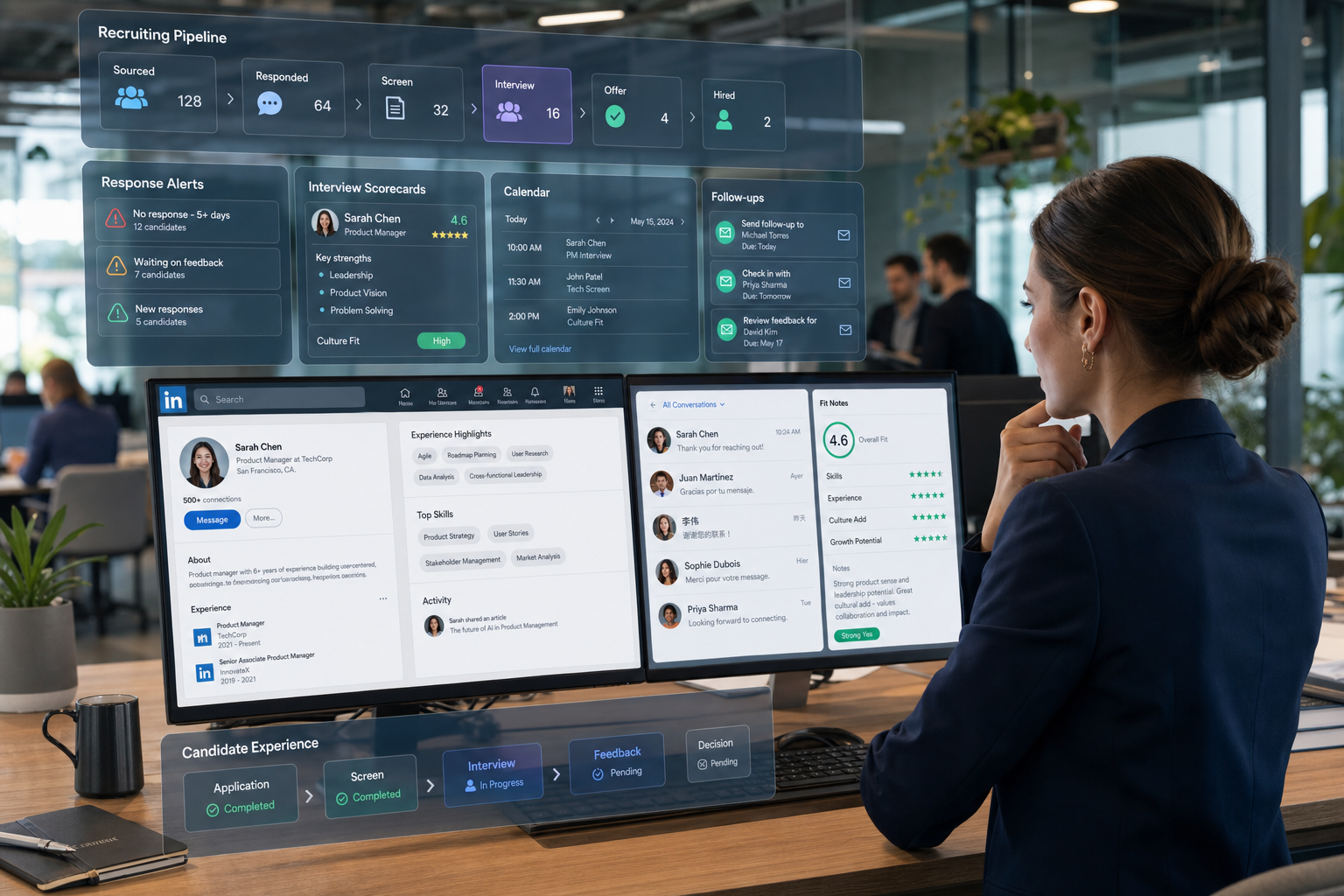
Missed replies and lost fit signals show recruiters how to assess a candidate tracking tool before drop-off and process drift grow.
When those three things are managed in separate inboxes, spreadsheets, calendars, and chat threads, the damage shows up quickly. Small search firms lose hours to admin and miss warm replies after work hours. Individual recruiters struggle to remember who needs a nudge, which hiring manager still owes feedback, and which shortlist is drifting. In-house talent teams feel the same pressure from a different angle: slower hiring, uneven candidate communication, weaker employer perception, and less confidence in reporting when leaders ask why a role is still open.
In my own workflow, tools like StrategyBrain AI Recruiter have been most useful not as a replacement for recruiter judgment, but as a way to reduce the repetitive messaging and follow-up that make good process discipline hard to maintain. Its always-on candidate communication, multilingual outreach support, and automated collection of resumes or contact details can keep conversations moving after hours or across time zones, while the recruiter still handles final resume review, fit assessment, and the next hiring decision. That distinction matters if your goal is to strengthen process without surrendering judgment.
The reason this matters becomes obvious when a candidate is trying to decide whether a company will actually suit them, not just whether the title or compensation looks acceptable. In a real interview setting, candidates are quietly reading the room long before the formal questions begin. They notice whether the office feels rigid or collaborative, whether senior leaders sit apart from the team, whether employees seem energized or guarded, and whether the workplace looks cared for or merely occupied. They are also listening for clues about how people are recognized, how teams work together, and what kind of personalities succeed there.
Now put that scene back into the recruiter's world. A recruiter has to capture not only resumes and stage movement, but also the softer evidence that shapes a hiring decision: what the candidate noticed, how the hiring team presented itself, where enthusiasm dropped, and whether the process reinforced or weakened culture fit. That is why recruitment automation tools should not be evaluated as admin software alone. If you are choosing an applicant tracking system, the real question is whether the system helps your team track process signals, preserve context, and act fast enough for both operational efficiency and candidate confidence.
Table of Contents
- Why hiring fit and process belong together
- What a candidate tracking tool should actually do
- What culture-fit signals reveal about software needs
- ATS features that matter in real recruiting
- How automation works in practice
- Using AI Recruiter alongside your ATS
- Why candidate experience should shape your decision
- A practical framework for choosing an applicant tracking system
- Feature and workflow comparison checklist
- Common mistakes buyers make
- FAQ
Why hiring fit and process belong together
Experienced recruiters know that hiring success is rarely just about finding available talent. It is also about reading whether the opportunity, the team, and the candidate actually belong together. Candidates do their own evaluation throughout the process, often using small signals that are easy for recruiters to underestimate. The interview environment, the speed of communication, the way stakeholders interact, and how organized the process feels all shape the candidate's view of the employer.
That means recruiting operations and candidate perception are connected. A delayed response from a hiring manager does not feel like an internal process issue to a candidate; it feels like indifference. A confusing interview schedule does not feel like a calendar problem; it feels like the company may be chaotic. One of the less discussed advantages of applicant tracking system adoption is that it helps preserve the consistency candidates use to judge whether they want to join.
Key insight: The best candidate tracking tool does not just organize applicants; it helps recruiters protect trust, context, and momentum while both sides assess fit.
What a candidate tracking tool should actually do
A candidate tracking tool should give recruiting teams one reliable record of how each candidate moves from application to offer, while also making it easier to collect feedback, coordinate interviews, trigger follow-up, and report on bottlenecks. In practice, it replaces scattered process management with one shared workflow.
But that definition is still too narrow if you hire for roles where stakeholder judgment matters. Recruiters are not just moving names through stages. They are tracking interest shifts, interview outcomes, scheduling friction, hiring manager responsiveness, and signals about whether the candidate sees the company as a place where they could actually work comfortably every day.
That is why many teams use applicant tracking system and candidate tracking tool interchangeably, yet experience them differently in real life. A weak system stores applicants. A strong system helps recruiters answer harder questions: Who is progressing? Where is momentum breaking? Which interviews are producing unclear feedback? Are candidates dropping because the process is too slow, too opaque, or too impersonal?
What culture-fit signals reveal about software needs
The reference point from the interview setting is useful here. When candidates walk into an office, they read visual and behavioral cues: office layout, level of formality, energy in the room, how people speak to one another, and even how long employees seem to have stayed. In other words, culture is often judged through observable details rather than formal employer statements.
Recruiters need software that can support that reality. If a candidate shares concerns after meeting the team, can that be captured in context? If an interviewer hints that the candidate may thrive in one department but not another, can the note be stored in a way the rest of the hiring team can use? If there are signs of a slow or inconsistent internal process, can the system show the pattern before the candidate opts out?
This is where the buying conversation gets more practical. When teams start choosing an applicant tracking system, they often focus first on broad automation promises. A better approach is to ask whether the system can preserve the subtle context that helps recruiters evaluate fit, not just completion. Culture is hard to quantify, but process clues around culture are easier to track when the workflow is structured well.
ATS features that matter in real recruiting
When buyers review ATS features, feature lists can get bloated quickly. The more useful lens is to ask which capabilities improve recruiter execution, candidate confidence, and stakeholder accountability at the same time.
1. Customizable pipeline stages
This is the foundation of any candidate tracking tool. Recruiters need stage structures that match real hiring paths, not generic defaults. Culture-heavy leadership searches, agency-style contingent recruiting, and high-volume hiring all require different movements and checkpoints.
What to test: Can you customize stages by role type, business unit, or geography without making reporting unusable?
2. Searchable candidate records and resume parsing
Resume parsing is useful because it reduces manual entry and makes prior applicants reusable. Searchability matters even more for recruiters filling similar roles repeatedly, where old applicants may become relevant again under a different team or manager.
What to test: Is parsed data accurate enough for search, outreach, and reporting, or does it create cleanup work later?
3. Interview scheduling and rescheduling support
Scheduling is where candidate goodwill often gets lost. Good systems coordinate calendars, reminders, and panel logistics while making changes manageable. This is especially important when candidates are already evaluating how organized the company feels.
What to test: How does the workflow handle panel changes, cancellations, time zones, and candidate self-scheduling?
4. Automated communication that still feels human
Email templates, interview reminders, and acknowledgement messages are standard now, but quality matters. Fast communication improves conversion, yet poor messaging can make the process feel transactional.
What to test: Can recruiters personalize templates easily, and can automation be adjusted by stage, role, or candidate segment?
5. Structured feedback and scorecards
Interviewers need a simple way to provide timely, comparable feedback. Structured scorecards reduce vague post-interview opinions and shorten debrief cycles.
What to test: Is the feedback workflow light enough that hiring managers will actually use it without repeated chasing?
6. Reporting and pipeline analytics
Strong reporting should show stage conversion, aging, source performance, drop-off patterns, and reviewer delays. A candidate tracking tool becomes strategically useful when it helps diagnose why a process is underperforming.
What to test: Ask to see standard reports and custom views built from real recruiting scenarios, not sample dashboards alone.
7. Integrations
Recruiting rarely happens in one system. Teams often need links to HRIS platforms, calendars, communication tools, approvals, and sourcing channels. One of the clearest applicant tracking system benefits is reducing duplicate data entry across that stack.
What to test: Which integrations are native, which require middleware, and which still depend on export-import workarounds?
8. Permissions, privacy, and governance
Candidate information is sensitive, and access should reflect role-based need. Governance matters just as much as usability when multiple recruiters, coordinators, hiring managers, and HR partners work in the same environment.
What to test: Who can edit decisions, export records, and view sensitive notes?
How automation works in practice
In day-to-day recruiting, automation is usually valuable when it removes repetitive coordination, not when it tries to make the hiring decision for you.
| Automation use case | What it does | Why it matters |
|---|---|---|
| Trigger-based stage updates | Moves candidates after a defined action | Keeps pipeline data current |
| Knockout screening | Filters against basic requirements | Reduces time spent on clearly unqualified applicants |
| Interview reminders | Sends prompts to candidates and interviewers | Reduces no-shows and admin chasing |
| Approval routing | Requests sign-off for offers or requisitions | Prevents stalls between stakeholders |
| Task assignment | Routes next actions to the right owner | Improves accountability |
| Email sequences | Sends stage-based communications | Improves consistency and speed |
The main lesson is that automation should reinforce good process. If interview expectations are unclear, feedback discipline is poor, or candidates are getting mixed signals about the employer, software will only scale that inconsistency. That is why workflow design should come before vendor enthusiasm.
Using AI Recruiter alongside your ATS
For teams doing significant outbound sourcing or LinkedIn-heavy recruiting, I have found that an ATS and a sourcing automation layer solve different problems. The ATS remains the system of record. A tool like StrategyBrain AI Recruiter helps earlier in the process by handling repetitive outreach, replying to candidates outside recruiter working hours, and collecting resumes or contact information from interested prospects. In multilingual or cross-border hiring, that support can be especially useful because conversations do not stall when the recruiter is offline.
What I like in that setup is the division of labor. The AI can manage first-touch communication, answer routine role questions based on the recruiter's inputs, and keep outreach moving. The recruiter still reviews the resume, decides whether the background matches the brief, and chooses whether to screen, advance, or close the file. That keeps the human judgment where it belongs.
It is also worth using the workflow selectively. If your bottleneck is after-hours response management, sourcing follow-up, or large volumes of early interest checking, an AI Recruiter workflow can help. If your bottleneck is hiring manager indecision or broken interview loops, the ATS configuration matters more than outreach automation.
Why candidate experience should shape your decision
The earlier interview scene shows why candidate experience is not a cosmetic issue. Candidates are evaluating the employer at every step, using practical signals: how quickly messages arrive, whether scheduling is easy, whether they have to repeat information, whether interviewers seem aligned, and whether the process feels respectful.
A candidate tracking tool that serves only internal users can still harm outcomes if it creates long forms, poor mobile experiences, duplicate requests, or silence between stages. In contrast, one of the strongest advantages of applicant tracking system selection done well is that it improves the external experience while also giving recruiters more control internally.
- Keep application flows as short as the role allows.
- Automate acknowledgement messages quickly.
- Make interview scheduling easy on mobile.
- Avoid asking candidates to re-enter information already provided.
- Use templates that sound clear and human, not mechanical.
A practical framework for choosing an applicant tracking system
The best method for choosing an applicant tracking system is to evaluate workflow fit, stakeholder behavior, and scalability together. The following framework works well because it starts with how hiring actually happens.
Step 1: Map the real hiring journey
Document the actual path from sourcing or application to offer. Include handoffs, approvals, interview loops, and common exceptions. Also note where candidates start forming judgments about the employer, because those moments often reveal the biggest workflow risks.
Step 2: Define the outcomes you need
List the operational changes you want first: stronger pipeline visibility, faster follow-up, fewer dropped conversations, better hiring manager accountability, or more complete reporting. Then connect those needs to relevant ATS features.
Step 3: Test context capture, not just movement
Can the system store notes about candidate concerns, team impressions, culture-fit observations, and interview nuances in a usable way? A good candidate tracking tool should preserve more than statuses.
Step 4: Review your integration priorities
Identify which connections must work from the start, including calendars, HRIS, sourcing tools, and job distribution channels. Weak integration often recreates spreadsheet behavior inside modern software.
Step 5: Run role-based demos
Ask to see workflows from recruiter, coordinator, hiring manager, and leadership perspectives. A polished overview means very little if common tasks feel awkward during a live scenario.
Step 6: Pilot before full rollout
A small pilot surfaces issues in permissions, stage logic, reminders, and reporting. It also shows whether recruiters and managers will actually use the process discipline the system requires.
Step 7: Evaluate total operational cost
Price is only one part of cost. Include implementation effort, admin ownership, training load, integration setup, and the risk of low adoption.
Feature and workflow comparison checklist
Use this checklist to compare a candidate tracking tool shortlist against real recruiting work.
| Evaluation area | What to check | Why it matters |
|---|---|---|
| Pipeline design | Custom stages by role, region, or team | Supports real workflows instead of forcing workarounds |
| Context capture | Notes, scorecards, concerns, interview observations | Preserves fit-related signals, not just status updates |
| Automation | Triggers, reminders, approvals, task routing | Reduces manual admin and delays |
| Candidate experience | Mobile apply flow and communication speed | Reduces drop-off and protects employer perception |
| Collaboration | Hiring manager reviews and scorecard ease | Improves feedback quality and timeliness |
| Reporting | Aging, conversion, bottlenecks, source data | Supports better planning and diagnosis |
| Integrations | HRIS, calendars, sourcing and email tools | Prevents duplicate work |
| Governance | Permissions, privacy, audit controls | Protects candidate data and decision integrity |
Common mistakes buyers make
Even experienced teams make predictable mistakes when choosing an applicant tracking system.
- Focusing on feature volume instead of workflow fit. Recruiters do not adopt software because it has more menus.
- Ignoring candidate-side signals. Delays and unclear communication shape employer perception fast.
- Testing only recruiter workflows. Hiring manager friction usually becomes the bigger problem later.
- Underestimating integration needs. Disconnected tools recreate manual work.
- Automating a weak process. Broken expectations just move faster.
- Treating culture fit as untrackable. You may not quantify it perfectly, but you can capture the signals around it.
That last point is where the opening case matters most. Candidates often decide how they feel about a company through observed details and process quality. Your software should help recruiters capture, act on, and learn from those details rather than letting them disappear into scattered notes.
FAQ
What is the difference between a candidate tracking tool and an applicant tracking system?
In most recruiting conversations, the terms overlap. A candidate tracking tool usually emphasizes the workflow side of moving people through stages, while an applicant tracking system may also imply broader reporting, integrations, governance, and automation.
Who needs a candidate tracking tool?
Any team managing multiple roles, stakeholders, or hiring stages can benefit. That includes agency recruiters, in-house talent teams, hiring managers, and HR operations teams that have outgrown email-and-spreadsheet coordination.
Which ATS features matter most?
The most important ATS features are customizable pipelines, searchable candidate records, interview scheduling, automated communication, structured feedback, reporting, integrations, and privacy controls. The right mix depends on your hiring volume and workflow complexity.
Why does candidate experience matter when buying recruiting software?
Candidates judge employers through the process itself. If the workflow is slow, confusing, or impersonal, good applicants can disengage before the team reaches a decision.
How should I approach choosing an applicant tracking system?
Start with workflow mapping, candidate journey review, stakeholder needs, and integration requirements. Then test systems using realistic hiring scenarios rather than generic demos.
Can sourcing automation work alongside an ATS?
Yes. Many teams use an ATS as the system of record and a separate sourcing automation tool for outbound communication and early interest checking. For example, AI Recruiter usage can support LinkedIn-heavy outreach while recruiters keep final screening and decision-making inside their broader hiring workflow.
Conclusion
A strong candidate tracking tool does more than hold applicant data. It helps recruiters run a process that candidates can trust, hiring managers can actually follow, and leaders can measure. That is why the best recruitment automation tools connect operational discipline with the human signals that decide whether a hire will happen.
If you are comparing systems now, keep the opening interview scene in mind. Candidates are evaluating the company through every visible detail, every delay, and every interaction. The right software supports that reality with practical ATS features, better process visibility, and a more disciplined approach to choosing an applicant tracking system that fits both your workflow and your hiring goals.














