


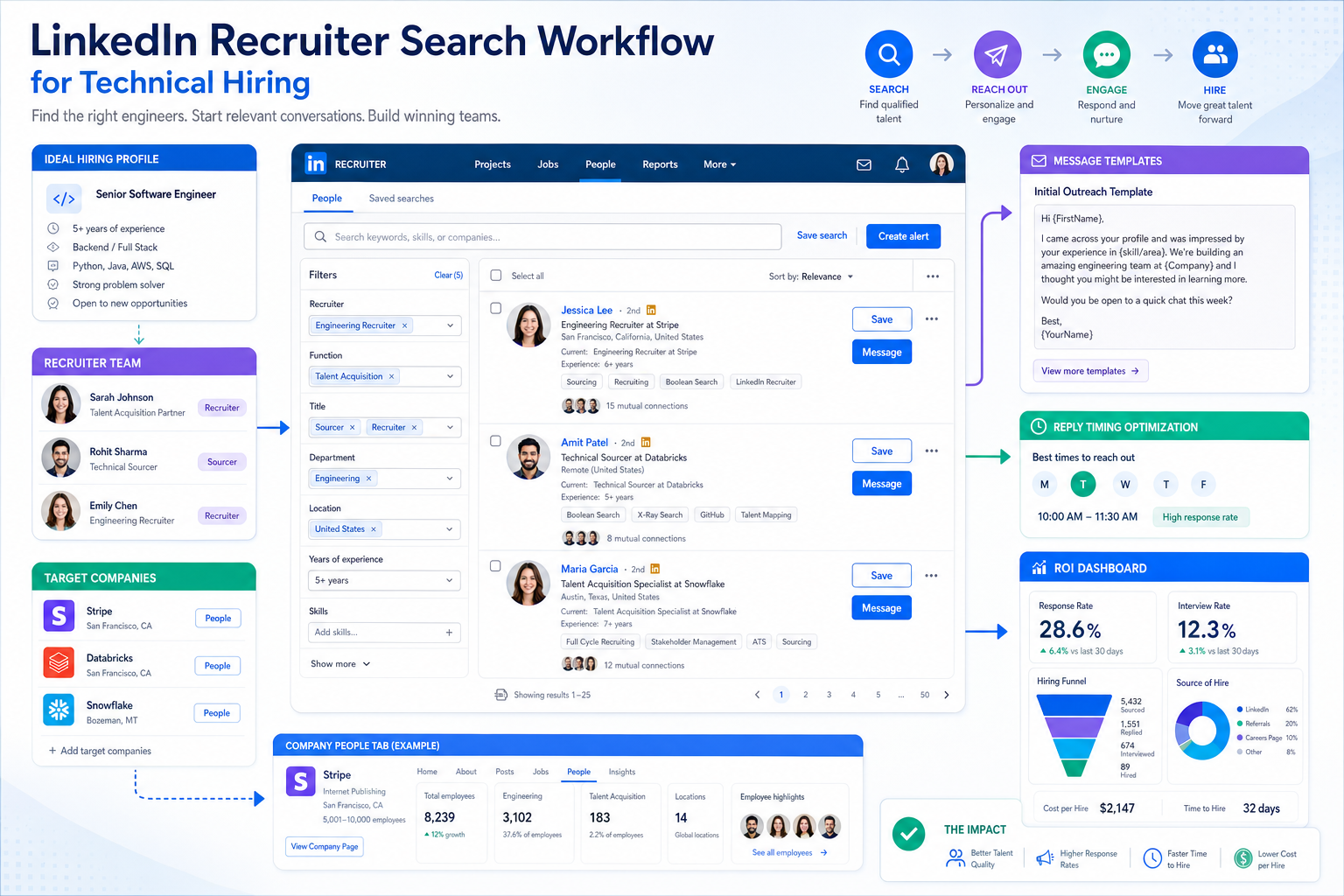
Delayed replies and vague titles kill searches, so this article helps recruiters judge how to find recruiters on LinkedIn faster and avoid wasted outreach.
That matters most when the market is tight and the cost of delay is real. In hard-to-fill functions such as engineering, infrastructure, energy, manufacturing, and other technical hiring areas, the problem is rarely just finding profiles. The real problem is identifying the right contact fast enough, reaching them with context, and keeping the process moving before counteroffers, slow feedback, or internal confusion kill momentum. For solo recruiters, small agencies, and in-house teams, the loss shows up in wasted hours, duplicate outreach, damaged candidate experience, and missed placements or stalled headcount plans.
In my own LinkedIn workflow, tools such as StrategyBrain AI Recruiter have been most useful when response timing and follow-up discipline start to break down. I do not use it to replace recruiter judgment, résumé review, or final shortlisting. I use it to handle repetitive first-touch communication, keep candidate conversations moving after hours, and collect interest signals and contact details so I can focus on fit, hiring-manager calibration, and next-step decisions. In practice, that helps most when a search requires speed, discretion, and steady candidate engagement across time zones.
You can see why in specialized engineering hiring. When a smaller firm needs an intermediate or senior engineer, the task often starts with a very specific brief: discipline, project type, location, compliance exposure, and team context all matter. The recruiter opens the requisition, checks past LinkedIn replies, searches for talent acquisition contacts and relevant hiring stakeholders at target companies, and tries to map where passive candidates may move. Meanwhile, the strongest engineers are usually already employed, some have moved into leadership roles, and the best-fit people may disappear after one delayed response or a counteroffer from their current employer.
That scene explains the larger topic better than a generic LinkedIn tutorial. Learning how to search for recruiters on LinkedIn is not only about finding a name in search results. It is about reducing time lost between search, outreach, qualification, handoff, and decision-making. That is why recruiter discovery, message quality, workflow discipline, and ROI belong in the same conversation for job seekers, agency recruiters, internal talent teams, hiring managers, and HR leaders.
- Why LinkedIn Recruiter Search Matters More in Tight Markets
- How to Find Recruiters on LinkedIn Step by Step
- Title Variations and Search Patterns That Work
- When the Right Contact Is Not Actually the Recruiter
- How to Message Recruiters Without Wasting Their Time
- What LinkedIn Recruiter Value and ROI Really Mean
- Where Workflow Tools Fit After LinkedIn Discovery
- Common Mistakes That Cut Response Rate and ROI
- FAQ
Why LinkedIn Recruiter Search Matters More in Tight Markets
Some recruiting markets are forgiving. Specialized technical hiring usually is not. In engineering and other experience-heavy fields, employers are often competing for a limited group of mid-level and senior talent. Experienced professionals may already be committed to larger firms, tied to long projects, or difficult to move without a strong value proposition. At the same time, junior talent may be available but not yet ready for the scope many employers actually need.
That creates a useful frame for this article. A search for how to find recruiters on LinkedIn is often triggered by a practical need: a candidate wants the fastest route to a real decision-maker, or a recruiter wants a cleaner path to the right internal contact and a more efficient sourcing workflow. In both cases, precision matters more than volume.
From an ROI perspective, this is where many teams get the math wrong. They treat LinkedIn activity as a simple top-of-funnel channel and ignore the hidden costs of delay: slower project staffing, overextended teams, poor stakeholder confidence, lost candidates, and repeated outreach. The value of recruiter search on LinkedIn is not just reach. It is the ability to improve timing, relevance, and conversion quality.
Key takeaway: In tight hiring markets, LinkedIn search creates value only when it helps recruiters reach the right people quickly and move candidates forward before the market moves on.
How to Find Recruiters on LinkedIn Step by Step
The most dependable answer to how to search for recruiters on LinkedIn is to use multiple search paths together instead of relying on one keyword or one contact type.
1. Start with People Search, not assumptions
Use role-based search terms in LinkedIn's search bar and then filter to People. Do not assume every relevant contact uses the title “Recruiter.” In technical or specialized hiring, titles often vary by function, seniority, or company structure.
- Recruiter
- Technical Recruiter
- Talent Acquisition Specialist
- Talent Acquisition Partner
- Senior Recruiter
- Sourcer
- Executive Recruiter
- Hiring Manager
Then narrow by current company, geography, and industry relevance. If the role is location-sensitive, match the recruiter’s region to the role whenever possible.
2. Use the company page People tab
If you already know the employer, go to the company’s LinkedIn page and use the People tab. Search within that employee list using terms like “recruiter,” “talent acquisition,” “engineering recruiter,” or the function itself.
This often produces better results than broad platform searches because it keeps the search inside the company’s own employee directory. For candidates, it is one of the fastest ways to identify internal recruiting contacts. For recruiting leaders, it also highlights an operational truth: if recruiter titles are unclear, inbound interest gets routed poorly and LinkedIn visibility produces weaker returns.
3. Combine role, function, and location
Search quality improves when you combine three variables:
- Role: recruiter, talent acquisition partner, sourcer
- Function: engineering, healthcare, finance, sales, product
- Location: city, region, country, remote
Examples:
- Technical recruiter Houston
- Talent acquisition partner civil engineering Toronto
- Engineering sourcer remote
- Recruiter manufacturing Midwest
This is the shift from broad searching to practical searching. It is also why experienced recruiters usually get better results than occasional users of LinkedIn search.
4. Check whether the contact is internal or external
Before you send any message, verify whether the recruiter works for the employer directly or for a staffing firm. Internal recruiters typically show the employer as their current company. External recruiters may cover multiple clients and multiple functions.
That distinction changes the outreach strategy. Candidates usually want internal recruiters when targeting a specific employer. Hiring teams may rely on external recruiters for scarce technical talent, confidential searches, or leadership hiring.
5. Watch for timing signals
When a market is tight, timing matters as much as contact accuracy. If you are recruiting in sectors where hiring delays are costly, do not treat LinkedIn outreach as a batch task to revisit days later. A good search process includes quick review of replies, clear next steps, and consistent follow-up.
I learned this the hard way on searches where candidates replied outside business hours and momentum was lost by the next afternoon. Using AI Recruiter for first-response continuity helped me keep those conversations warm without pretending that automation should make the final call. It handled the repetitive back-and-forth, while I stayed responsible for evaluating relevance and deciding who should move forward.
Title Variations and Search Patterns That Work
A big reason people struggle with how to find recruiters on LinkedIn is that they search too narrowly. Public titles vary across companies, functions, and regions.
Useful search terms include:
- Recruiter
- Technical Recruiter
- Talent Acquisition
- Talent Acquisition Partner
- Talent Acquisition Manager
- Sourcer
- Staffing Specialist
- Executive Recruiter
- Hiring Manager
Then layer in function language:
- recruiter AND software
- talent acquisition AND civil engineering
- sourcer AND renewables
- hiring manager AND manufacturing
The reference point from engineering hiring is useful here. Specialized searches work best when the role context is explicit. Employers are not only evaluating credentials; they are often looking for experience in a particular project environment, technical system, or operating context. Your LinkedIn search should mirror that reality.
Practical tip: If “recruiter” produces weak results, switch to adjacent language. Many companies use “talent acquisition partner” or “sourcer” for the same practical ownership.
When the Right Contact Is Not Actually the Recruiter
Another common problem is assuming the best first contact will always have “recruiter” in the title. In some situations, the better entry point is a sourcer or hiring manager.
| Role | What They Usually Handle | Best Time to Contact |
|---|---|---|
| Recruiter | Screening, scheduling, candidate process, offer coordination | When you want process clarity or role fit validation |
| Sourcer | Talent identification and early engagement | When the role is niche or talent is mostly passive |
| Hiring Manager | Team need, technical scope, final requirements | When recruiter visibility is low or context matters more than process |
In specialized hiring, this distinction becomes especially important. For example, a hiring manager in civil infrastructure or energy may understand project constraints, compliance issues, and required field exposure far better than a generic search phrase reveals. If you cannot find the recruiter, look for the person who owns the problem.
For recruiting teams, the lesson is operational: make ownership visible. If candidates and external partners cannot tell who handles what, your LinkedIn presence creates friction instead of efficiency.
How to Message Recruiters Without Wasting Their Time
Once you identify the right contact, keep the message short and specific. In busy markets, recruiters scan quickly and decide quickly.
A message structure that usually works
- Say why you are reaching out
- Name the role, team, or function
- Show one or two relevant fit points
- Ask a specific next-step question
Example:
Hello [Name], I found your profile while researching [company/function]. I work in [specific area] and have experience with [relevant skill or project type]. If your team is hiring in this space, I would appreciate your advice on the best next step.
This approach works because it respects the recruiter’s workflow. It is also consistent with how strong recruiters assess inbound messages: not by enthusiasm alone, but by clarity, fit, and ease of routing.
What weakens response rates
- Sending the same generic note to many people
- Not naming the function or team
- Writing too much before establishing relevance
- Ignoring title variations after one failed search
- Failing to follow up when the market is moving quickly
When I have used StrategyBrain AI Recruiter in active sourcing, the biggest advantage was not magical qualification. It was consistency. Candidate replies were acknowledged quickly, role questions were answered in a structured way, and interested people were nudged toward résumé and contact sharing. That gave me a cleaner handoff point for human review.
What LinkedIn Recruiter Value and ROI Really Mean
The phrase “LinkedIn recruiter ROI” is often used too loosely. In practice, ROI comes from measurable improvements in targeting, speed, and conversion quality, not from activity volume alone.
1. Access to harder-to-reach talent
LinkedIn is especially valuable when a role depends on passive talent rather than active applicants. That is common in engineering, operations, technical leadership, and other experience-constrained hiring areas.
2. Better fit at the top of funnel
When search terms reflect function, context, and geography, the first conversation is more likely to be relevant. Better targeting usually means fewer wasted screens and better use of hiring-manager time.
3. Less process drag
A good LinkedIn search process reduces time lost between discovery, outreach, follow-up, and routing. In delayed searches, that friction is expensive. Projects slow down, teams become overloaded, and preferred candidates take other options or accept counteroffers.
4. Stronger source attribution
ROI becomes easier to defend when teams can show which search patterns, messages, and recruiter touchpoints produced interviews, shortlist movement, and hires.
This is where the engineering recruitment lens adds something useful. The hidden cost of delayed hiring is not theoretical. In technical roles, an empty seat can slow delivery, increase workload on existing staff, and create budget or schedule risk. LinkedIn sourcing has value when it reduces those downstream costs, not just when it fills a dashboard with outreach numbers.
How to think about ROI more realistically
- Do not measure only messages sent. Track replies, qualified interest, interviews, and hiring-stage progression.
- Do not separate speed from quality. Fast outreach that creates irrelevant conversations is not efficient.
- Do not ignore decision latency. Slow internal feedback can erase the value of strong sourcing.
- Do not treat recruiter search as independent from workflow. Search quality and process quality are linked.
Where Workflow Tools Fit After LinkedIn Discovery
Even when the article focus is how to find recruiters on LinkedIn, serious recruiting teams should think about what happens after the search result. Search creates opportunity. Workflow determines whether that opportunity becomes a conversation, a shortlist, or a hire.
That is why many recruiters eventually pair LinkedIn outreach with process support tools. In my experience, the most useful capabilities are:
- Automated first-touch outreach within defined search criteria
- Fast follow-up when candidates reply after hours
- Structured collection of résumés and contact information
- Clear separation between automated communication and human decision-making
StrategyBrain AI Recruiter fits that layer well for teams that rely heavily on LinkedIn. It can connect with targeted candidates, introduce roles, answer common role and company questions, and capture résumé or contact details from interested people. But the recruiter still owns final review, fit assessment, and next-step decisions. That division of labor matters. It keeps the process efficient without pretending that early automation replaces recruiting judgment.
For teams hiring across regions or outside normal business hours, the multilingual and always-on response capability can also help preserve momentum. That is especially relevant when passive candidates reply at unpredictable times and fast engagement affects whether a conversation continues.
Common Mistakes That Cut Response Rate and ROI
Whether you are a candidate, an agency recruiter, or an in-house talent leader, the same mistakes appear again and again.
Using only one keyword
If you search only “recruiter,” you will miss many relevant contacts. Use title and function variations.
Ignoring market context
In specialized roles, you are not just trying to find a recruiter. You are trying to reach someone who understands the hiring context quickly enough to act.
Sending generic outreach
Unclear messages create extra work for the recruiter and lower your response rate.
Letting replies sit too long
In competitive markets, delayed response can mean lost candidates, weaker engagement, or increased counteroffer risk.
Failing to connect search activity to outcomes
If your team cannot tie LinkedIn search patterns to conversations, interviews, and hires, ROI discussions become guesswork.
Confusing activity with effectiveness
A larger number of searches, messages, or connections does not automatically create value. Quality of contact, timing, and process discipline matter more.
FAQ
How do I search recruiters by company on LinkedIn?
Go to the company’s LinkedIn page, open the People tab, and search terms such as recruiter, talent acquisition, sourcer, or the specific function. This is one of the best methods when you already know the employer.
What keywords should I use to find recruiters on LinkedIn?
Use recruiter, technical recruiter, talent acquisition partner, talent acquisition manager, sourcer, and hiring manager. Add function and location terms for better relevance.
How do I know whether to contact a recruiter or hiring manager?
Start with the recruiter when possible. If recruiter visibility is low or the role is highly specialized, a hiring manager or sourcer may be the better first contact.
How should I message a recruiter on LinkedIn?
Keep the note brief, relevant, and easy to route. Mention the role or function, one or two fit points, and ask a clear next-step question.
What does LinkedIn recruiter ROI actually mean?
It usually refers to whether LinkedIn-based search and outreach improve access to relevant talent, reduce process friction, support faster movement, and create better hiring outcomes relative to the time and effort invested.
Why does ROI matter more in engineering or technical hiring?
Because the cost of delay is often higher. Open technical roles can slow delivery, strain existing teams, and increase the chance of losing strong candidates to faster-moving employers or counteroffers.
Can automation help with LinkedIn recruiter workflows?
Yes, especially with repetitive outreach, reply handling, and résumé collection. But automation should support the recruiter, not replace human assessment, candidate judgment, or final hiring decisions.
If you came here to learn how to find recruiters on LinkedIn, the practical answer is to use people search, company People tabs, title variations, and focused outreach. If you came here for the value question, the bigger answer is that LinkedIn becomes worth the effort when it helps you move the right conversations faster in a competitive market. That is the real link between recruiter discovery and ROI.














