


When recruiter ROI is under pressure, this article helps headhunters judge how to find recruiters on LinkedIn without wasting search time.
That matters because LinkedIn recruiting rarely breaks down at the search bar alone. The real losses show up when a recruiter spends hours building lists for the wrong hiring pocket, misses candidates who were open after work hours, or keeps pushing compensation structures the market no longer likes. For a solo recruiter, that means lower output and weaker relationships. For a small agency owner, it means wasted seat cost, missed placements, and recruiters burning time on outreach that never turns into interviews. For an in-house team, it usually looks like slower shortlists, confused hiring managers, and a growing gap between labor-market reality and the req on paper.
In my own workflow, tools such as StrategyBrain AI Recruiter have been most useful when they support, rather than replace, recruiter judgment. The practical value is straightforward: it can keep candidate conversations moving outside normal hours, handle first-touch LinkedIn messaging at scale, and collect resumes or contact details from interested people so the recruiter can spend more time on fit, compensation alignment, and shortlist decisions. That division of labor matters, because the recruiter still owns the final assessment, the resume review, and whether the candidate actually belongs in the process.
A useful way to see this is through a market scene that recruiters in construction and adjacent sectors know well. In August 2018, Canadian new housing price data ticked up by 0.1% after a flat stretch, while housing starts came in at 206,000 against a 220,000 forecast. At the desk level, that kind of split signal does not stay abstract for long. A recruiter covering Western Canada opens the active requisition list, checks which building-materials roles are still urgent, then scans overnight LinkedIn replies from technical sales candidates who want stability more than a risky commission-heavy plan. Before long, the search itself is no longer the only issue; market movement has changed what counts as an attractive role.
The same recruiter then updates candidate notes, flags salary resistance for the hiring manager, and tries to keep luxury-build and energy-efficiency searches separate because the talent pools behave differently. Those are two very specific recruiting actions, but they expose a broader operating problem: if your LinkedIn search strategy, messaging workflow, and candidate tracking are not built for changing market context, you do not really know how to get recruiters LinkedIn results that justify the effort. That is why this article starts with how to find recruiters on LinkedIn, then moves into the ROI logic behind recruiter discovery, recruiter outreach, and workflow control.
Table of Contents
- Why recruiter discovery quickly becomes an ROI question
- How job seekers can find recruiters on LinkedIn step by step
- How Open to Work affects recruiter matching
- Profile checklist for recruiter search visibility
- What market context changes in recruiter outreach
- Where AI-supported LinkedIn workflow helps
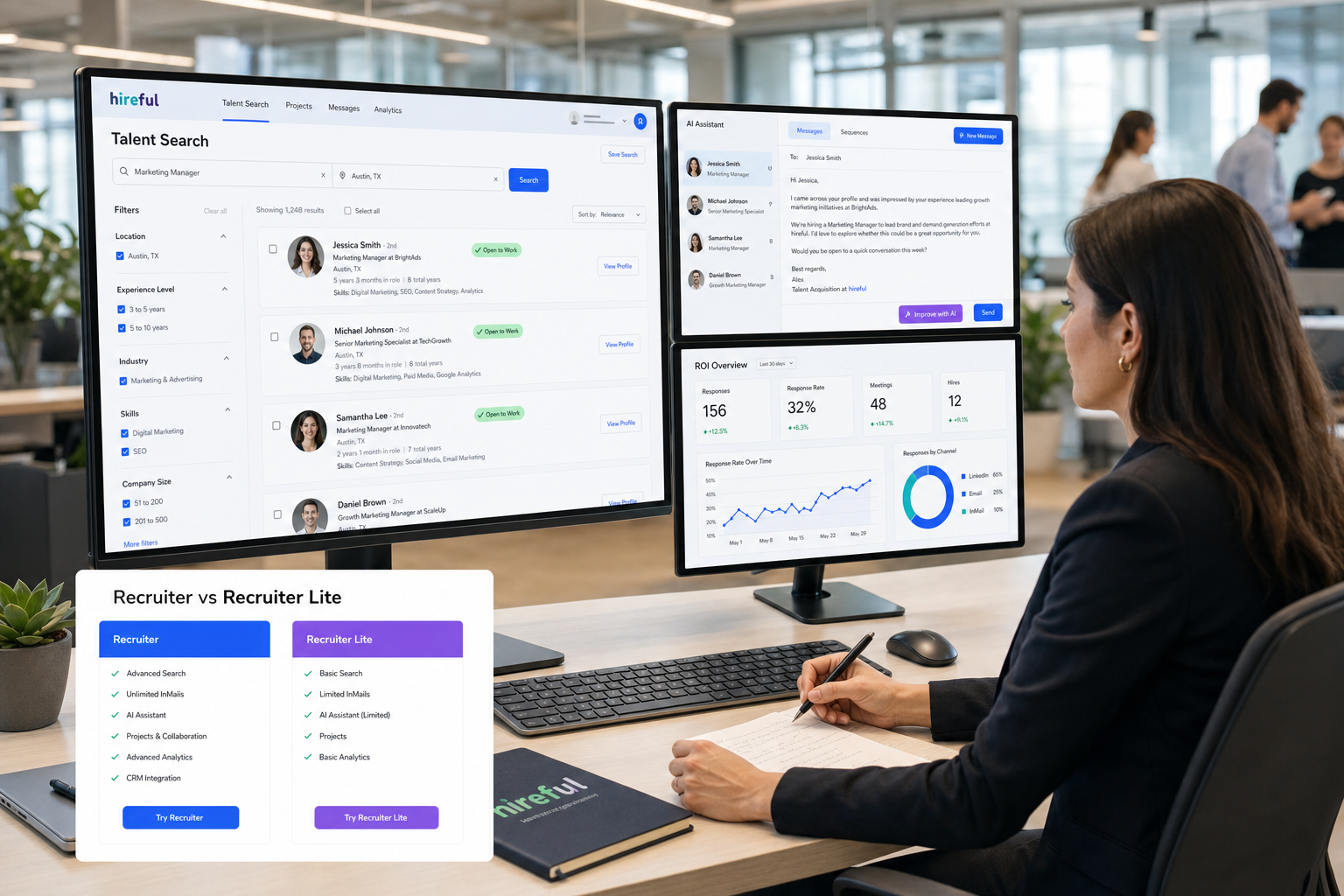
- LinkedIn Recruiter vs Recruiter Lite
- How hiring teams should think about LinkedIn recruiter ROI
- Privacy considerations
- FAQ
Why recruiter discovery quickly becomes an ROI question
When someone searches how to find recruiters on LinkedIn, they usually mean one of two things. Either they are a candidate asking how to get in front of the right recruiter, or they are part of a hiring team trying to understand whether LinkedIn sourcing produces enough qualified conversations to justify the investment.
In practice, those two intents meet in the same place: recruiter workflow. Candidates want visibility. Recruiters want relevance. Hiring leaders want speed and evidence that outreach is leading to real pipeline progress rather than activity for its own sake.
The construction-market example above is useful because it shows why this is not just a search problem. When a labor pocket shifts, when one sector is active and another cools, or when candidates start rejecting variable-pay roles in favor of stability, recruiter ROI depends on whether the team can adjust search criteria, messaging, and expectations fast enough.
Practical takeaway: LinkedIn recruiter value comes from using search in context. The subscription matters, but the bigger variable is whether recruiters can interpret the market and act on it quickly.
How job seekers can find recruiters on LinkedIn step by step
If your goal is how to get recruiters LinkedIn attention, stop looking for a hidden recruiter directory. The better approach is to create several relevant paths into your profile while also identifying recruiters attached to the kinds of jobs you want.
1. Search by function, company, and hiring pattern
Use combinations of your target role with terms such as recruiter, talent acquisition, hiring, or staffing. Then narrow by company, geography, and industry.
- Search for recruiter titles tied to your function
- Pair company names with talent-acquisition terms
- Check whether the recruiter covers your region or specialty
- Prioritize recruiters connected to active hiring, not just large networks
This is more effective than mass-adding random recruiters because specialization matters. A technical recruiter in building products will not review your profile the same way a generalist recruiter will.
2. Start from job posts, not only people search
One of the most reliable answers to how to find recruiters on LinkedIn is to begin with current openings. Relevant jobs often reveal the hiring company, the role language being used, and in some cases the recruiter or hiring contact attached to the process.
This is especially useful in sectors where market conditions shift quickly. When role demand is moving, the current job post tells you more than an old recruiter connection does.
3. Write a message that reduces recruiter effort
Recruiters respond better when your note helps them place you quickly. Mention your current title, location, target role, and one or two high-signal skills. If compensation structure or relocation flexibility matters, say so early when relevant.
That last point is often ignored, but it matters in real recruiting. In some markets, candidate hesitation is not about title prestige at all. It is about pay mix, commute, stability, or family risk. The closer your outreach is to the actual decision factors, the easier it is for a recruiter to move you forward.
4. Make your profile searchable
Recruiters do not search like candidates write resumes. They search with structured filters: titles, locations, skills, industries, seniority, and likely availability signals. If your profile hides role clarity behind vague branding language, you will be harder to find and harder to shortlist.
How Open to Work affects recruiter matching
For job seekers, one of the strongest visibility signals is still the Open to Work setting. Used well, it helps recruiters match you to the right searches rather than the wrong ones.
- Turn on Open to Work.
- Choose titles that reflect your real target roles.
- Add accurate locations and remote preferences.
- Review employment type choices.
- Update the settings when your search changes.
Recruiters move fast, so stale settings create noise. If you selected roles six months ago that no longer fit your target, you may appear in searches that waste everyone’s time.
From the employer side, cleaner candidate-intent signals also improve sourcing efficiency. Better visibility does not guarantee a hire, but it can reduce the amount of low-fit profile review required before outreach begins.
Profile checklist for recruiter search visibility
If you want a practical answer to how to get recruiters LinkedIn attention, optimize the fields recruiters actually use.
Headline
Use the role language you want to be found for. A clear functional headline outperforms clever wording.
Skills
Prioritize core competencies tied to real hiring filters. A focused list is usually more useful than a long generic one.
Location
Keep location and work-mode preferences accurate. Recruiters often filter geographically before reading deeper.
Recent experience
Make your latest roles easy to interpret. Scope, progression, and domain matter.
Consistency
Your headline, summary, experience, and Open to Work settings should point in the same direction.
| Profile Element | What Recruiters Look For | Practical Advice |
|---|---|---|
| Headline | Role clarity | Use searchable job-function language |
| Skills | Filter alignment | Favor core terms over filler |
| Location | Geographic fit | Keep it current |
| Experience | Recent relevance | Show scope and direction clearly |
| Open to Work | Intent signal | Match titles and locations to your real search |
What market context changes in recruiter outreach
The Western Canada construction snapshot offers a lesson that applies far beyond construction. A modest rise in new-home pricing alongside softer housing starts tells recruiters that demand is not uniform. Some hiring pockets stay active, especially where specialized capability is growing, while other pockets become harder to fill because compensation, timing, or business confidence changes.
In the 2018 discussion around those numbers, two details stood out from a recruiter’s perspective. First, activity in building materials and energy-efficiency related work was creating demand for technical and sales specialists. Second, in the Vancouver area, rising living costs were changing candidate behavior, making lower-base, higher-commission roles less attractive. That is not just economic commentary. It changes how recruiters search, what they say in outreach, and which candidates will actually engage.
That is why recruiter discovery on LinkedIn cannot be separated from market reading. The question is not only how to find recruiters on LinkedIn, but also whether the recruiter you find is working inside the right hiring context for your function and expectations.
Where AI-supported LinkedIn workflow helps
Once candidate behavior becomes more sensitive to timing, compensation, and market segment, the workflow burden grows quickly. Recruiters need to keep conversations moving, separate promising leads from casual interest, and avoid losing evening replies or weekend follow-up moments.
That is where I have found AI Recruiter useful in a narrow but important way. It can automate repetitive first-touch LinkedIn activity, continue candidate communication around the clock, and gather resumes or contact details from people who want to proceed. In live use, the benefit is not that it makes final hiring decisions. It does not. The benefit is that it removes a lot of the repetitive front-end drag that keeps recruiters from spending time on judgment-heavy work.
For example, when I have needed to keep multiple niche searches active at once, the workflow support mattered most after normal business hours. Candidates often reply when they are off work. Instead of losing momentum, an AI-supported process can acknowledge interest, answer basic role questions, and capture the next-step information so the recruiter returns to a warmer pipeline rather than a cold inbox. Anyone curious about that operating model can review the broader LinkedIn sourcing notes here.
The caution is important: recruiters still need to review resumes, test compensation realism, and decide whether a candidate belongs in the shortlist, future pool, or decline pile. Used that way, AI support is a workflow amplifier, not a substitute for recruiting craft.
LinkedIn Recruiter vs Recruiter Lite
Hiring teams often ask whether full LinkedIn Recruiter is worth more than Recruiter Lite. The answer depends on search depth, hiring volume, and how often you need out-of-network sourcing.
| Area | LinkedIn Recruiter | Recruiter Lite |
|---|---|---|
| Candidate reach | Broader access and stronger search coverage | More limited |
| Search depth | More advanced filtering and sourcing support | Lighter capability |
| Insights | Richer candidate context | More basic visibility |
| Workflow fit | Better for team sourcing and heavier pipelines | Better for lighter individual use |
| Outreach scale | Stronger for sustained proactive search | More constrained |
In practical terms, full Recruiter tends to matter more when the market is fragmented and recruiters must separate multiple talent pools quickly, as in the construction example above. Lite may be enough for occasional hiring or narrower, lower-volume searches.
How hiring teams should think about LinkedIn recruiter ROI
Too many ROI discussions stop at subscription cost. In real recruiting teams, a better framework is to measure value across four dimensions.
1. Search speed
How quickly can a recruiter move from open role to a credible outreach list?
2. Relevance
How much wasted review time is removed by better filters, clearer signals, and better market targeting?
3. Response probability
Are recruiters contacting people who are likely to reply, or simply sending more messages?
4. Workflow continuity
Can the team capture, track, and act on replies consistently, including after-hours candidate engagement?
Key insight: LinkedIn recruiter ROI is usually the compound effect of faster search, better-fit outreach, and less candidate leakage between first reply and real screening.
This is also where an AI-supported layer can complement core LinkedIn use. If a recruiter can keep first-touch communication moving and collect next-step information without losing time to repetitive admin, more of the paid search value turns into usable pipeline.
Privacy considerations
Any serious discussion of how to get recruiters LinkedIn visibility should include privacy. Open to Work can help with discoverability, but candidates should review audience settings carefully, especially if they are employed and being selective.
- Use accurate target-role settings
- Review location and audience choices regularly
- Be deliberate about public profile changes
- Remember that visibility controls reduce risk but do not remove it completely
Recruiters have a responsibility here as well. Professional outreach respects context and candidate discretion.
FAQ
How do I find recruiters on LinkedIn without a recruiter directory?
Search by role, company, and location, then use job posts and company hiring activity to identify relevant recruiters. At the same time, improve your own profile so recruiters can also find you.
How do I get recruiters LinkedIn attention without mass messaging?
Focus on relevance. A clear headline, accurate location, targeted skills, and a concise message tied to the recruiter’s specialty usually outperform generic networking notes.
Does Open to Work help me appear in recruiter searches?
Yes, especially when your target roles and locations are current. It works best when the rest of your profile supports the same direction.
What affects LinkedIn recruiter ROI the most?
Usually a combination of search speed, candidate relevance, response rate, and whether the team can keep candidate communication moving without losing interested people.
Where does AI-supported LinkedIn outreach fit?
It is most helpful in repetitive front-end work such as initial messaging, follow-up continuity, and collecting resume or contact information from interested candidates. Recruiters still need to make the final fit and process decisions.
Conclusion
If you started with how to find recruiters on LinkedIn, the best answer is that recruiter discovery works best when search behavior, market context, and workflow discipline all line up. Candidates need clearer visibility signals. Recruiters need sharper segmentation and better message timing. Hiring teams need a realistic way to judge ROI beyond seat cost.
The construction-market example makes that concrete: when the market shifts, role attractiveness changes, talent pools split, and compensation sensitivity rises, LinkedIn recruiting becomes less about raw access and more about how well you interpret and act. That is where recruiter craft still matters most, and where the right workflow support can make LinkedIn search pay off.














