


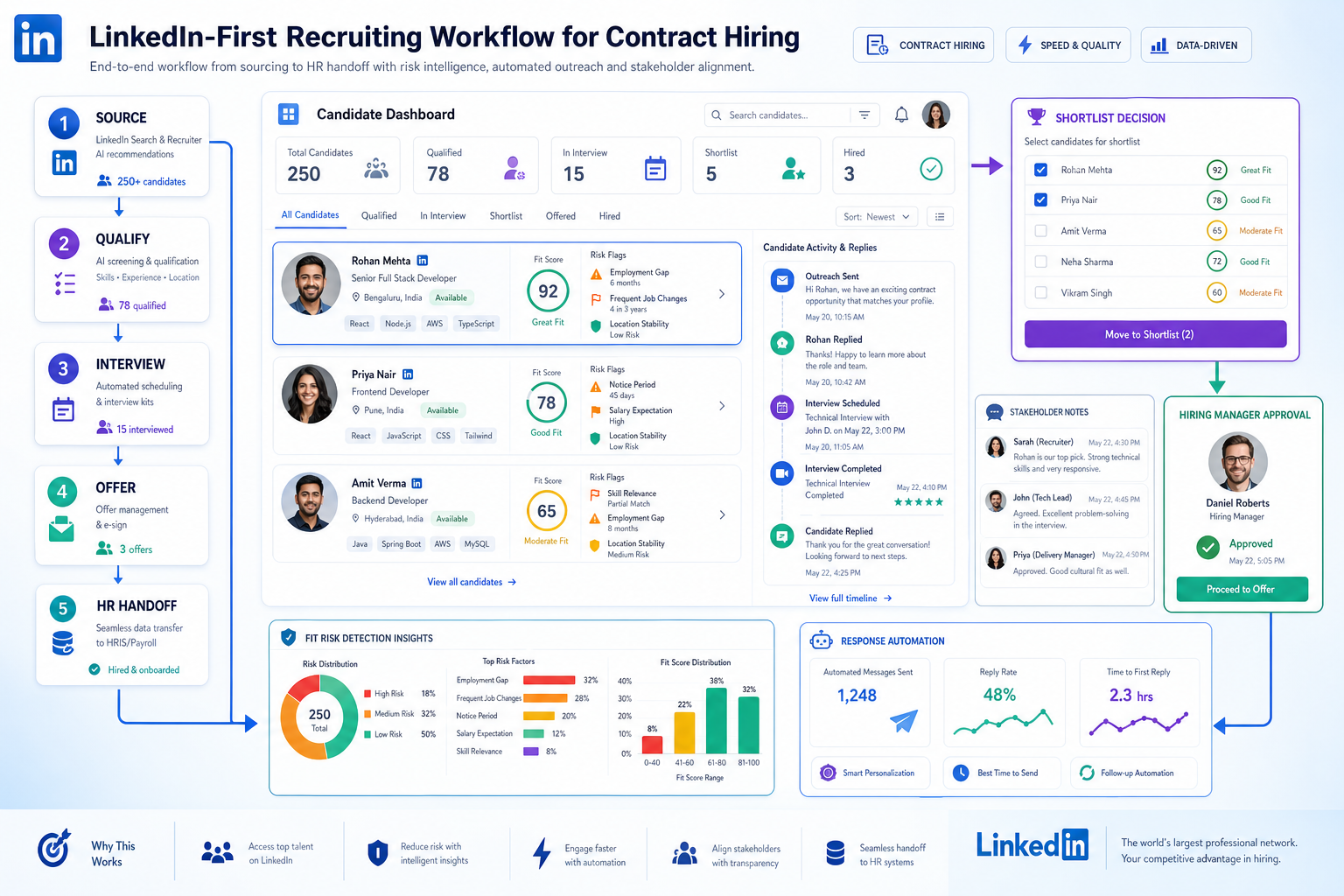
Contract hiring reveals which human resource recruitment software helps recruiters spot fit risks early, defend shortlist decisions, and avoid weak hires.
That matters because contract hiring rarely fails at the obvious point. It fails when a recruiter cannot quickly tell whether someone is truly committed, when project expectations sit in email instead of the workflow, and when hiring managers discover too late that a promising profile does not translate into delivery. For small search firms, that means wasted sourcing hours and damaged client trust. For independent recruiters, it means more chasing, more backtracking, and more pressure to defend shortlists. For in-house teams, it often means slower project starts, avoidable turnover, and a hiring process that feels reactive instead of controlled.
In that gap between initial interest and dependable qualification, tools like StrategyBrain AI Recruiter can reduce the manual load without taking judgment away from the recruiter. I have found the most practical value comes from automating first-contact outreach, handling after-hours candidate replies, and collecting resumes or contact details from people who actually want to continue the conversation. The recruiter still reviews the resume, tests fit, and decides who moves forward, but the early-stage workflow stops depending on whoever happens to be online at the right moment.
The contractor scenario is a good example. Hiring a finance contractor can be as difficult as, and sometimes harder than, hiring a permanent employee because the team is not just filling a seat. They are asking someone to enter a live project, move work forward quickly, and contribute to a team that already has deadlines and dependencies. The first screening action may look simple: review the shortlist, check whether the person has handled similar project work, and send the opening message. The second action is where the risk shows up: follow the replies, confirm availability and commitment, and compare who sounds interested with who is actually qualified to deliver.
That is also where weak systems create bad hires. If recruiter notes, resume collection, role questions, and stakeholder feedback live in different places, warning signs are easy to miss. A candidate may look responsive but lack the qualifications to deliver, or may have the skills but little commitment to the assignment. The practical lesson from that contractor hiring logic is clear: recruitment automation tools are not just about speed. The right human resource recruitment software must help recruiters detect fit risks early, preserve decision context, and pass clean information into an all in one hr platform or employee data management software after the hire.
- Automation is most useful when it removes repetitive outreach, scheduling, and record-keeping while recruiters keep final judgment.
- Contract and project hiring expose software weaknesses faster than routine full-time hiring.
- The strongest human resource recruitment software keeps qualification evidence, communication history, and hiring decisions in one workflow.
- Clean handoff into employee data management software reduces downstream HR errors after acceptance.
Table of Contents
- Why contractor hiring is the best stress test for recruiting software
- What recruitment automation tools should handle
- ATS vs HR platform vs recruiting layer
- Features that matter in human resource recruitment software
- Where AI-supported outreach fits in the workflow
- When an all in one HR platform makes sense
- Why employee data management software matters after the offer
- How to choose without overbuying
- Common mistakes teams make
- FAQ
Why contractor hiring is the best stress test for recruiting software
One useful lesson from contractor recruiting is that speed alone is not the goal. When a business brings in a contractor, consultant, or interim specialist, it needs someone who can contribute quickly, align with the current team, and deliver against a defined piece of work. That creates a sharper evaluation problem than many standard hires.
In practice, recruiters are usually trying to do two things at once:
- Identify qualified, dependable talent that can move a project forward
- Spot the warning signs that the person may not be the right fit or may not be able to deliver
Those two goals should shape how you evaluate human resource recruitment software. If the system only helps you collect applications, it is too shallow. If it can document communication history, structure qualification steps, route stakeholder feedback, and keep decision evidence attached to the candidate record, it is far more useful in real hiring.
This is why I often tell recruiting teams to test software against a contractor workflow first. If the platform can handle urgency, availability checks, project-fit questions, hiring manager visibility, and post-offer handoff in that environment, it is usually strong enough for broader talent acquisition work as well.
What recruitment automation tools should handle
Recruitment automation tools work best when they take over repetitive activity, not accountable decision-making. The right balance is straightforward: let software manage volume, reminders, routing, and documentation while recruiters and hiring managers control qualification, interviews, and selection.
In day-to-day recruiting, the most useful automation usually covers:
- Posting jobs across multiple channels
- Triggering first-touch outreach and follow-ups
- Capturing candidate replies and contact details
- Running structured pre-screen questions
- Scheduling interviews and reminders
- Collecting scorecards and feedback
- Managing offer and onboarding handoff steps
That distinction matters because many buyers expect automation to replace recruiter thinking. It does not. What it can do is protect process quality. When every outreach, reply, note, and next step is visible inside the workflow, it becomes easier to compare candidates consistently and to explain why someone moved forward.
Key insight: The best automation does not make hiring decisions for you; it makes your real decisions easier to defend.
ATS vs HR platform vs recruiting layer
Software evaluations often go off track because teams mix together ATS tools, HR platforms, and automation layers as if they solve the same problem. They overlap, but they are not interchangeable.
| System type | Main role | Best fit | Main limitation to test |
|---|---|---|---|
| Applicant Tracking System | Controls requisitions, stages, interviews, decisions, and hiring records | Teams that need a clear operational hiring backbone | May still require integration into core HR systems |
| HR platform or HRIS | Maintains employee records, onboarding, payroll, and core people operations | Organizations seeking broader HR standardization | Recruiting depth may be lighter than a dedicated ATS |
| Recruiting automation layer | Adds sourcing, outreach, communication, matching, and workflow support | Teams improving an existing stack without replacing it | Success depends on integration quality and process clarity |
For most employers and search teams, the ATS is still the system that governs hiring stages and records. But an automation layer can make a major difference in the early funnel, especially where recruiter response time, message consistency, and candidate follow-up create bottlenecks.
That is also where I see practical use for AI Recruiter. In LinkedIn-heavy sourcing workflows, I have used this kind of support to keep candidate conversations moving after outreach is sent, especially when replies come in late, across time zones, or in bursts that would normally sit untouched until the next work block. It helps maintain continuity, but I still treat resume review and fit assessment as recruiter work.
Features that matter in human resource recruitment software
When buyers compare platforms, feature lists can start to blur. In actual recruiting operations, a smaller set of capabilities tends to matter most because they affect speed, quality control, and the ability to avoid preventable mis-hires.
1. Structured outreach and response capture
For many teams, candidate engagement breaks down before formal screening even begins. Software should make it easy to initiate outreach, track replies, collect resumes, and keep conversation history attached to the candidate record. If those actions are fragmented, recruiters lose context and duplicate work.
2. Qualification support without black-box selection
Modern systems increasingly include AI-assisted ranking, semantic search, and matching support. These can help surface likely fits faster, but they should support recruiter review rather than replace it. In contractor and project hiring, this is especially important because technical fit, availability, and commitment are rarely captured by one automated score.
3. Interview scheduling and stakeholder coordination
Scheduling remains one of the biggest silent drains on recruiter time. Good software should reduce back-and-forth, issue reminders, and make it obvious who owes feedback. This matters even more when hiring managers are balancing live project work and cannot afford process confusion.
4. Visible warning signs and decision records
One of the most overlooked strengths of good human resource recruitment software is its ability to preserve evidence. Recruiters need one place to see qualifications, communication history, concerns, scorecards, and stage movement. That visibility makes it easier to detect candidates who appear interested but do not align with the assignment.
5. Clean post-hire data flow
Hiring software should not stop being useful after acceptance. Once an offer is signed, the right data should move forward without manual reconstruction. This is where systems either support the broader organization or create more admin work for HR.
Where AI-supported outreach fits in the workflow
There is a specific part of the funnel where AI-supported recruiting workflow can be especially helpful: early outreach, response handling, and candidate intent capture. For teams that source heavily through LinkedIn, this stage is repetitive, time-sensitive, and easy to neglect when recruiters are carrying full req loads.
My own view is practical rather than ideological. When I tested StrategyBrain AI Recruiter in sourcing-heavy work, the useful part was not replacing the recruiter. It was keeping first conversations active, answering basic role questions, and gathering resumes or contact details from candidates who wanted to continue. That kind of automation can help in several situations:
- After-hours replies that would otherwise sit unattended
- Cross-border outreach where language creates friction
- High-volume top-of-funnel work that drains recruiter time
For recruiters, headhunters, and HR managers, that means less manual follow-up and fewer dropped conversations. But the control point should stay human: the recruiter still evaluates the resume, determines whether the background matches the role, and decides whether the candidate should be interviewed.
If your hiring motion depends heavily on LinkedIn sourcing, an automation layer like AI Recruiter can sit beside your ATS or broader HR stack rather than replace it. That is often the better buying frame.
When an all in one HR platform makes sense
An all in one hr platform can be the right answer when the company wants one system across recruiting, onboarding, payroll, and people operations. The main appeal is continuity: one interface, fewer logins, fewer sync problems, and a clearer path from applicant to employee record.
This usually makes sense when:
- The organization has moderate hiring complexity
- HR operations want fewer systems to maintain
- Candidate-to-employee handoff is a frequent pain point
- Leadership wants unified reporting across hiring and HR
It may be less ideal when:
- The team runs complex interview loops with many reviewers
- Sourcing depends on specialized outreach workflows
- You already have a capable HRIS and only need stronger recruiting automation
- Recruiters need deeper CRM-style pipeline management
In other words, an all in one HR platform is strongest when administrative simplicity is as important as recruiting depth. If the hiring process is more demanding than the HR module can support, the software may look tidy in a demo but frustrating in real use.
Why employee data management software matters after the offer
Recruiters often focus on funnel speed and forget that the real cost of poor software shows up after the offer letter. That is where employee data management software becomes part of the recruiting conversation.
Once a candidate is hired, their information should move cleanly into the employee record. If HR has to rebuild the file manually, the organization introduces unnecessary risk in onboarding, payroll setup, document control, and reporting.
When evaluating human resource recruitment software, ask exactly what transfers and when. At minimum, most teams should verify handoff of:
- Candidate identity and contact details
- Position, team, and location data
- Offer information and start date
- Signed documents and supporting files
- Relevant hiring history where appropriate
This is especially important in the contractor and project-based hiring logic discussed earlier. If the organization needs someone to contribute quickly, post-offer delays caused by poor data transfer can undermine the very speed the recruiter worked to create.
How to choose without overbuying
The best recruiting software is not the one with the longest feature sheet. It is the one that matches your hiring model, keeps decision evidence visible, and reduces avoidable handoffs.
Start with the hiring risk you actually need to control
If your biggest problem is weak early-stage follow-up, focus on outreach and response workflows. If your biggest problem is messy process governance, start with ATS discipline. If handoff into HR is failing, prioritize integration and record continuity.
Test the software against a live-use scenario
Use a contractor, interim, or project hire as your test case. Ask the vendor to walk through opening the role, sourcing candidates, tracking replies, collecting resumes, documenting concerns, moving someone to offer, and handing data into downstream systems.
Define where automation stops
Before buying, decide which steps the team is comfortable automating and which require recruiter or manager review. This prevents false expectations and helps maintain fairness and accountability.
Check system relationships early
Be explicit about whether the product is your ATS, an enhancement to your ATS, or a module inside a broader HR suite. A lot of implementation pain starts with unclear ownership.
| Evaluation area | Question to ask | Why it matters |
|---|---|---|
| Qualification control | Can we document both strengths and warning signs in one place? | Helps prevent avoidable bad hires |
| Outreach workflow | How are first contact, replies, and resume capture managed? | Reduces recruiter admin time |
| Decision visibility | Can managers see notes, scorecards, and status without chasing updates? | Improves collaboration and accountability |
| Integration | What syncs into HRIS and employee data management software? | Protects downstream HR operations |
| Automation boundaries | Which actions are automated, and where does human review stay mandatory? | Keeps expectations realistic and defensible |
Common mistakes teams make
After enough software reviews and hiring process cleanups, the same mistakes appear again and again.
- Buying broad HR branding instead of recruiting depth. A platform can look complete but still be weak where recruiters do their real work.
- Assuming fast response equals good qualification. Responsiveness matters, but it does not replace evidence of fit or commitment.
- Letting communication live outside the workflow. When replies, notes, and documents are scattered, warning signs get missed.
- Overestimating autonomous AI screening. Automation can support triage, but recruiters still need to validate resumes and make decisions.
- Ignoring post-hire data quality. Weak handoff into employee data management software creates problems that HR has to clean up later.
The fix is simple but disciplined: evaluate software as a hiring operating system, not a feature catalog. The right product should help the recruiter identify stronger talent, detect risk earlier, and leave the organization with cleaner records after the hire.
FAQ
What do recruitment automation tools actually automate?
They usually automate repetitive steps such as outreach, follow-up, interview scheduling, reminders, scorecard collection, and onboarding handoff tasks. Recruiters and hiring managers should still control qualification and final decisions.
Why is contractor hiring a useful way to evaluate software?
Because it exposes whether the system can handle urgency, fit-risk detection, stakeholder visibility, and fast handoff into onboarding. If it works there, it is usually stronger elsewhere too.
Is human resource recruitment software the same as an ATS?
Not always. The phrase can include ATS platforms, recruiting modules inside HR suites, or automation layers that support sourcing and communication around an existing ATS.
When should a company use an all in one HR platform?
It is often a good fit when the business wants simpler administration and unified employee lifecycle data, and when recruiting needs are important but not unusually complex.
Why does employee data management software matter in recruiting?
Because hiring does not end at acceptance. Candidate data needs to transfer into employee records cleanly so HR can onboard people without duplicate entry, missing fields, or disconnected documents.
Where does AI-supported outreach fit best?
It is most useful at the top of the funnel, especially for repetitive sourcing, candidate replies, resume capture, and communication that would otherwise stall outside working hours. Final fit assessment should still stay with the recruiter.
Conclusion
The strongest human resource recruitment software does more than move applicants through stages. It helps recruiters avoid weak hires, document what they learned, and keep project-critical hiring from becoming guesswork. That is why contractor and interim hiring are such useful test cases: they make software weaknesses visible fast.
If you are comparing recruitment automation tools now, start with your real workflow. Decide what must be automated, where human judgment stays in control, whether an all in one hr platform gives you enough recruiting depth, and how candidate data flows into employee data management software. That is the practical route to choosing a system that supports hiring instead of just organizing it.














