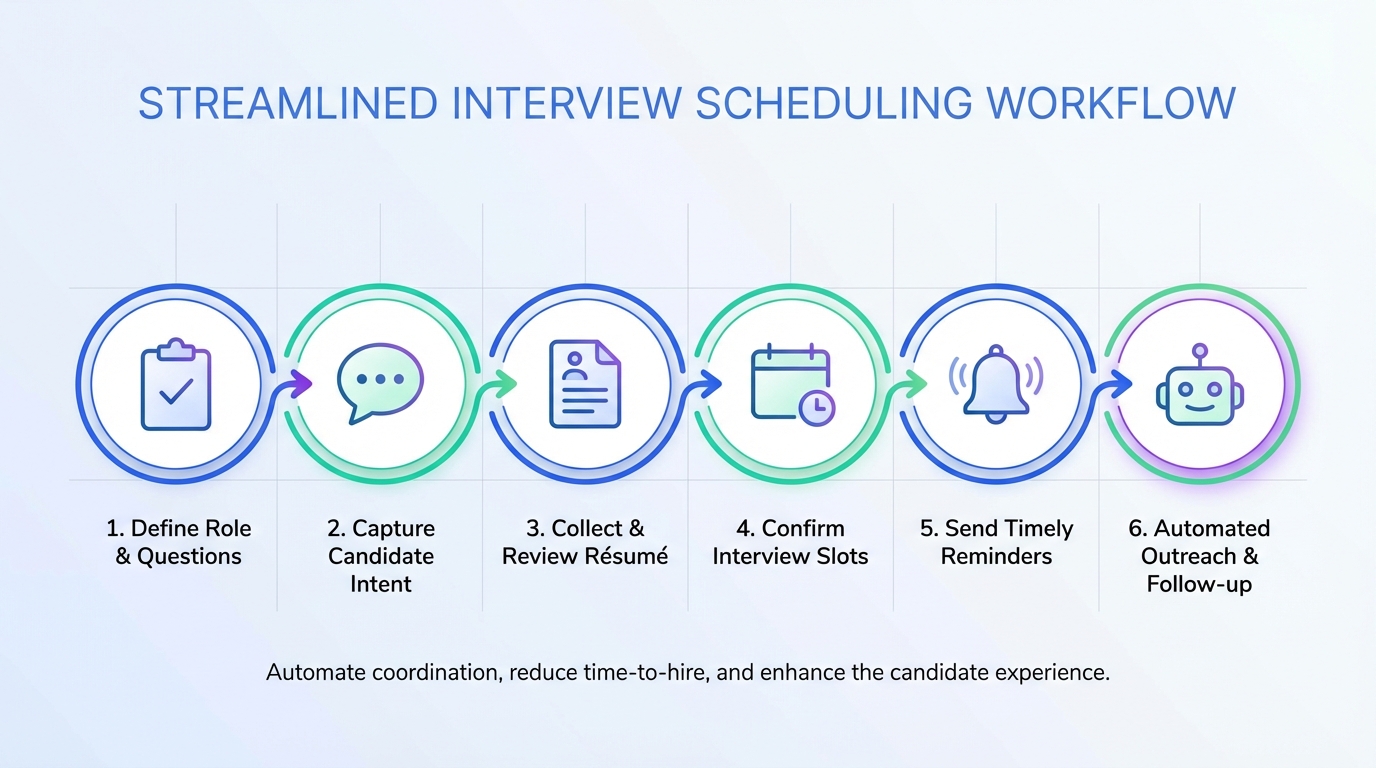
An interview scheduling app works best when it does more than pick a time. It should reduce back and forth, clarify expectations, and keep both sides aligned on what success looks like. The workflow we use is simple. First, standardize the questions that uncover role scope, challenges, and 30 60 90 day deliverables. Second, capture candidate intent and readiness to interview before you offer times. Third, automate outreach and follow up so interviews get booked faster and fewer candidates drop off. In this guide, we turn proven interview questions into a scheduling playbook, include a copyable checklist, and show how StrategyBrain AI Recruiter can automate LinkedIn outreach, multilingual messaging, and résumé collection before scheduling.
Table of Contents
- What to look for in an interview scheduling app
- A practical scheduling workflow that starts with better questions
- The 5 questions that make scheduling easier and interviews stronger
- Where StrategyBrain AI Recruiter fits before scheduling
- Quick comparison: manual scheduling vs automated pre scheduling
- Copyable checklist for recruiters and hiring managers
- FAQ
- Conclusion and next steps
Key Takeaways
- Scheduling improves when qualification happens first: confirm interest, collect résumé, then offer times.
- Use 5 core questions: role opening reason, challenges, success definition, 30 60 90 deliverables, career roadmap.
- Reduce drop off with fast follow up: consistent messaging and reminders matter as much as the calendar link.
- StrategyBrain AI Recruiter can handle pre scheduling work: LinkedIn connecting, role intro, Q and A, interest confirmation, résumé and contact capture.
- Multilingual coverage supports global hiring: candidates can reply in their native language at any time.
- Scale with account management: AI Recruiter supports managing more than 100 LinkedIn accounts for team level outreach.
What to look for in an interview scheduling app
When teams search for top scheduling apps or a schedule maker app free, they often focus on calendar features. In recruiting, the bigger win is process control. The app should support a workflow that keeps candidates informed and keeps hiring teams aligned.
Core capabilities that matter in recruiting
- Time zone handling: candidates should see times in their local time automatically.
- Availability rules: buffer time, minimum notice, and interview length should be enforced consistently.
- Structured intake: a short form that captures role specific details and candidate constraints before booking.
- Reminders and rescheduling: automated confirmations and easy reschedule reduce no shows.
- Auditability: you should be able to see what was sent, when it was sent, and what the candidate confirmed.
Scope boundary
This article focuses on the recruiting workflow around scheduling, not a feature by feature review of specific calendar vendors. If you need a vendor shortlist, use this guide to define requirements first, then evaluate tools against those requirements.
A practical scheduling workflow that starts with better questions
We have seen scheduling break down for one predictable reason. Teams try to book interviews before they have shared enough context or confirmed real interest. The fix is to treat scheduling as the final step of a short qualification sequence.
Step by step workflow
- Align internally on the role story: why the role exists, what success looks like, and what the first 90 days require.
- Send a structured pre interview message: include role summary, compensation range if available, and what the interview will cover.
- Confirm interest explicitly: ask if the candidate wants to proceed to an interview before offering times.
- Collect essentials: résumé and best contact details, plus any constraints such as time zone or notice period.
- Offer times through your interview scheduling app: provide a single clear path to book, reschedule, or decline.
- Close the loop: send confirmation, agenda, and reminders to reduce no shows.
The 5 questions that make scheduling easier and interviews stronger
The questions below come from a classic candidate focused interview preparation framework. We rewrote them into a recruiter and hiring manager workflow so they improve scheduling outcomes, not just interview performance. Each question reduces ambiguity, which reduces scheduling friction.
1) Why is the position open
This question clarifies the business driver. Is it growth, backfill, or a change initiative. When you can explain the reason clearly, candidates decide faster, and you waste fewer scheduling cycles on misaligned expectations.
2) What are the major challenges in this role
Challenges can be team dynamics, competing priorities, or a systems implementation. When you name the challenges up front, you attract candidates who have handled similar situations and you reduce late stage drop off after the first call.
3) What does success look like and what has worked in the past
Define success in observable terms. Candidates respond better when they understand how they will be evaluated. This also helps you build a consistent interview scorecard, which makes scheduling panels easier because everyone knows what they are assessing.
4) What are the major deliverables for the first 30 60 90 days
This is the fastest way to surface unrealistic expectations. If deliverables are unclear or timelines are not reasonable, you can fix the role definition before you schedule multiple rounds that lead nowhere.
5) What does the career roadmap look like internally
Career growth, mentoring, and development opportunities are often the deciding factors for strong candidates. If you can describe a credible roadmap, candidates are more likely to commit to interview times and show up prepared.
Where StrategyBrain AI Recruiter fits before scheduling
An interview scheduling app solves the calendar step. Many teams still lose time earlier in the funnel, especially on LinkedIn. That is where StrategyBrain AI Recruiter can reduce manual work before scheduling by automating outreach and early qualification.
What we used AI Recruiter for in a real workflow
- Automated LinkedIn connecting: it connects with candidates who match your search criteria.
- Role introduction and Q and A: it introduces the opportunity and answers questions about the role, company, compensation, and benefits based on the information you provide.
- Interest confirmation: it confirms whether the candidate wants to move forward to an interview.
- Résumé and contact capture: it requests and records résumés and contact details from interested candidates.
- 24 7 multilingual messaging: it responds at any time and can communicate in the candidate’s native language.
How this improves scheduling outcomes
When candidates reach your scheduling step, they already know what the role is, they have had their basic questions answered, and they have explicitly said they want to interview. That reduces ghosting and reduces the number of calendar links sent to people who were never going to book.
Limitations and an honest boundary
AI Recruiter can confirm willingness to interview, but it does not decide whether a résumé fully matches the job requirements. A recruiter or hiring manager still reviews the résumé and makes the final qualification decision before scheduling later stage interviews.
Security and compliance notes to include in your process
For teams operating in regulated environments, document how candidate data is handled. AI Recruiter states that customer provided data is not used to train AI models, and that credentials and candidate data are encrypted and isolated per customer. You should still align this with your internal policies and legal guidance.
Quick comparison: manual scheduling vs automated pre scheduling
| Workflow area | Manual approach | With AI Recruiter before the scheduling app |
|---|---|---|
| Candidate outreach | Recruiter sends connection requests and messages one by one | Automated connecting and messaging based on your criteria |
| Candidate questions | Recruiter answers repeatedly across time zones | 24 7 responses with multilingual communication |
| Interest confirmation | Often implied, not explicit | Explicit confirmation before scheduling |
| Résumé and contact collection | Chased manually in messages and email | Requested and captured as part of the conversation |
| Scheduling step | Calendar link sent to many unqualified or uncommitted candidates | Calendar link sent after intent and basics are captured |
Copyable checklist for recruiters and hiring managers
Use this checklist to make any interview scheduling app perform better, including a schedule maker app free. The goal is to reduce ambiguity before you ask candidates to pick a time.
Role clarity checklist
- Define why the position is open in one sentence.
- List the top 3 challenges the hire will face.
- Write a success definition that can be evaluated in 90 days.
- Document 30 60 90 day deliverables.
- Outline the internal career roadmap and development support.
Pre scheduling checklist
- Confirm the candidate is interested in interviewing.
- Collect résumé and best contact details.
- Confirm time zone and availability constraints.
- Send a short agenda and what to prepare.
- Send one clear scheduling path and one clear rescheduling path.
LinkedIn automation checklist with StrategyBrain AI Recruiter
- Provide job opening details including company context, compensation, and benefits.
- Set candidate search criteria for outreach.
- Decide what counts as interview ready interest.
- Define what résumé and contact fields you need captured.
- Set expectations for recruiter review before scheduling next rounds.
FAQ
What is an interview scheduling app in recruiting terms
An interview scheduling app is a tool that lets candidates choose interview times based on interviewer availability, then sends confirmations and reminders. In recruiting, it is most effective when it is the final step after interest is confirmed and essentials like résumé and contact details are collected.
Can a schedule maker app free work for interviews
Yes, a schedule maker app free can work if it supports time zones, buffers, and automated reminders. The bigger factor is your workflow. If you send scheduling links before confirming interest, even the best tool will feel ineffective.
How do top scheduling apps reduce candidate drop off
Top scheduling apps reduce drop off by making the booking path simple and by sending confirmations and reminders automatically. Pair that with clear role context and explicit interest confirmation to reduce ghosting.
Does StrategyBrain AI Recruiter replace an interview scheduling app
No. StrategyBrain AI Recruiter focuses on LinkedIn outreach, early conversation, interest confirmation, and collecting résumés and contact details. You still use an interview scheduling app for the calendar booking step.
How does AI Recruiter handle multilingual candidates
AI Recruiter supports 24 7 messaging and can communicate in any global language, using the candidate’s native language. This helps when you recruit across time zones and want faster responses before scheduling.
Can AI Recruiter qualify candidates automatically
AI Recruiter can confirm willingness to communicate or interview, but it does not determine whether a résumé fully matches job requirements. Recruiters still review résumés and decide who advances.
How does AI Recruiter capture résumés and contact details
AI Recruiter requests résumés and contact information from candidates who express interest. It supports email submissions and LinkedIn file uploads, and it captures contact details shared in messages so recruiters can proceed to screening and scheduling.
What should I document for privacy and compliance
Document what data you collect, why you collect it, where it is stored, and who can access it. AI Recruiter states it complies with privacy regulations in the EU, United States, and Canada, and that customer provided data is not used to train AI models. Confirm fit with your internal policies.
Conclusion and next steps
The fastest way to get value from an interview scheduling app is to treat scheduling as the final step, not the first. Standardize the five questions that clarify role scope and success, confirm candidate interest, collect résumé and contact details, then send one clean booking path. If LinkedIn outreach is where your team loses time, StrategyBrain AI Recruiter can automate connecting, role introduction, Q and A, interest confirmation, and résumé capture so only committed candidates reach your scheduling link. Next step: copy the checklist above, run it on one open role this week, and measure how many scheduling links convert into booked interviews.