


Bad LinkedIn outreach wastes recruiter time; this article shows candidates how to judge fit and target recruiters to avoid being ignored.
That matters because poor targeting on LinkedIn is not a harmless annoyance. For an independent headhunter, it means hours lost chasing the wrong people. For a small agency owner, it means wasted InMail, weaker response rates, and damaged client confidence. For an in-house recruiting lead, it can mean a shortlist filled with candidates who look polished but miss the real requirements of the role, which is exactly how expensive hiring mistakes start.
In my own workflow, tools that reduce repetitive LinkedIn work are most useful when they protect recruiter judgment instead of replacing it. StrategyBrain AI Recruiter helped in that specific way: it can automate first-touch LinkedIn outreach, keep candidate conversations moving after hours, and collect resumes or contact details from interested people, while the recruiter still decides who actually fits the role, who moves forward, and how the shortlist is built.
The underlying problem is familiar to anyone who has recruited revenue-facing talent. When a B2B sales search opens, the danger is rarely just a missed reply on LinkedIn. The bigger risk is selecting a person who sounds impressive but does not match the selling motion, buyer level, sales cycle, technical demands, or persistence the role actually needs. The hard cost shows up in compensation, onboarding time, training, missed pipeline, wasted leads, and sometimes lost customers. In practice, one wrong hire can cost far more than the role's annual salary.
That is why experienced recruiters do not begin with a message template. They start by testing whether the candidate's background aligns with the job's true demands: comparable sales experience, quick thinking, insight into customer needs, emotional intelligence, persistence, comfort with technology, and the urgency to close. Once you look at LinkedIn through that lens, the topic of recruiter subscriptions becomes more practical. It shapes who recruiters can find, how precisely they can filter, and how candidates should present themselves if they want better odds of being noticed or answered.
If you want better results on LinkedIn, you need to separate two goals that many candidates blur together: how to get in touch with recruiters on LinkedIn and how to make recruiters find you first. Those goals overlap, but they rely on different platform behaviors and different recruiter workflows.
- Why LinkedIn recruiter access matters
- What recruiters actually screen for before replying
- How to find recruiters on LinkedIn
- How to approach a recruiter on LinkedIn
- How to get recruiters to contact you on LinkedIn
- Recruiter Lite vs broader recruiter access
- LinkedIn workflow tools recruiters compare
- Common mistakes that reduce recruiter response
- FAQ
Why LinkedIn recruiter access matters
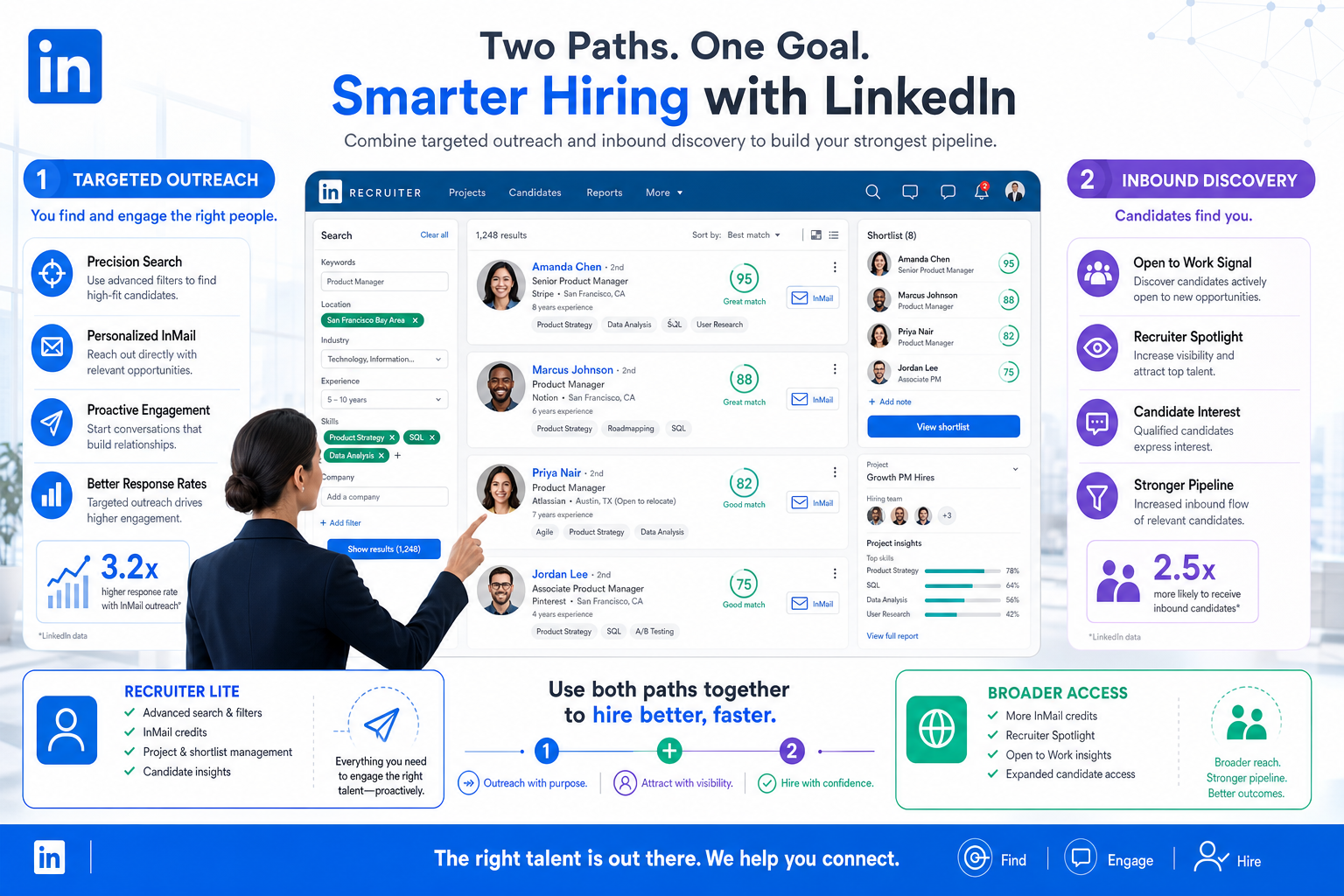
The topic of linkedin recruiter subscription details matters because recruiters do not all work from the same search environment. Some use lower-volume access such as Recruiter Lite. Others work inside broader recruiter subscriptions with deeper search filters, more candidate discovery options, more InMail capacity, and stronger prioritization cues.
For job seekers, that changes the experience in ways that are easy to miss. A recruiter with lighter access may run tighter, narrower searches and contact only the clearest matches. A recruiter with broader access can search by more variables, review more profiles, and use visibility signals to prioritize who seems relevant and reachable.
For recruiters, the lesson is similar to the sales-hiring example above: more access helps, but it does not remove the cost of weak judgment. Better tools widen the top of the funnel. They do not fix unclear role intake, lazy targeting, or shallow candidate review.
Key insight: Subscription depth affects how recruiters search, but candidate relevance still determines who gets contacted and who gets ignored.
What recruiters actually screen for before replying
One reason many candidates struggle with how to get in touch with recruiters on LinkedIn is that they focus on the note before they understand the screen. Recruiters usually decide in seconds whether a profile deserves more attention, and those decisions are tied to practical hiring risk.
In sales recruiting especially, I do not just look for a strong title. I look for evidence that the person has sold into a similar market, dealt with similar buying stakeholders, handled a comparable sales cycle, and worked in a process close to the role I need to fill. The same principle applies in other functions. Similarity of environment often predicts success better than a charismatic profile summary.
Signals recruiters tend to value most
- Relevant experience: similar industry, customer type, function, or complexity
- Clear role fit: background that matches the actual responsibilities
- Decision-level alignment: evidence of working with the same level of stakeholders
- Adaptability: signs of quick thinking and situational judgment
- Social and emotional intelligence: listening, empathy, and professionalism
- Persistence: especially in roles where rejection and follow-up matter
- Technology fluency: comfort with modern tools, data, and digital workflow
This is also why I advise candidates not to overinvest in sounding impressive. On LinkedIn, precision beats charisma. A recruiter can work with a concise profile that shows true fit. They cannot do much with a polished message attached to a vague background.
How to find recruiters on LinkedIn
If your goal is how to get in touch with recruiters on LinkedIn, start with search discipline, not cold-message volume. Candidates often contact the wrong recruiter because they do not verify function, geography, or level.
The best process is to search toward actual recruiting ownership. The platform may also show cues such as active hiring behavior, which can help you identify people closer to live openings.
Step-by-step recruiter search process
- Search by role and company: use combinations such as recruiter + company name, talent acquisition + company name, or technical recruiter + your function.
- Check specialty: a campus recruiter, executive recruiter, and commercial recruiter do not handle the same talent pool.
- Review hiring context: look for evidence the recruiter supports the type of role you want.
- Use shared context where available: mutual connections, shared industry, and common groups can improve response odds.
- Read open roles first: message after you understand where your background actually fits.
In agency recruiting, this targeting step is where a lot of avoidable waste occurs. I have seen recruiters send broad outreach to candidates who looked marketable, only to realize later that the candidate had never sold into the right buyer group or lacked the technical environment the client required. Good LinkedIn outreach starts before the first message.
How to approach a recruiter on LinkedIn
If you are wondering how to approach a recruiter on LinkedIn, think in terms of risk reduction. A recruiter is trying to decide whether you are relevant enough to justify time. Help them make that decision quickly.
The biggest mistake candidates make is opening with, “I am open to any opportunity.” That creates work for the recruiter and says nothing about fit. A better note names the role family, shows one or two relevant qualifications, and gives the recruiter a reason to click through.
What a strong recruiter message includes
- A specific target: role title, team, or hiring area
- Fast relevance: one or two lines tied to actual requirements
- A fit signal: industry, skill, location, or customer type
- A light ask: request consideration or guidance, not a demand for a call
Example structure
Opening: Interest in [role title or hiring area]
Message: Hello [Name], I noticed you recruit for [function/company]. My background includes [relevant experience], including work with [industry, buyer type, or key skill]. I am especially interested in [role/team] because my recent work in [specific area] appears closely aligned. If that hiring area is still active, I would appreciate any guidance on whether my profile is a fit. Thank you.
That approach works because it mirrors how recruiters evaluate hiring risk. If the role requires persistence, complex stakeholder management, or a long sales cycle, your note should hint at those specifics rather than rely on generic enthusiasm.
How to get recruiters to contact you on LinkedIn
The other half of the search intent is how to get recruiters to contact you on LinkedIn. That is less about outbound messaging and more about being discoverable inside recruiter searches.
In practical terms, recruiters usually search for combinations of title, skills, location, industry relevance, and responsiveness signals. Public platform guidance also points to Open to Work as a major visibility input. If you want more inbound contact, your profile needs to read like a search result worth opening.
Profile updates that improve recruiter visibility
- Turn on Open to Work and define target roles clearly
- Add realistic locations that match your actual search range
- Use specific skills instead of broad filler terms
- Write a precise headline tied to your real function and level
- Keep experience current so recruiters can assess fit quickly
- Reply promptly when contacted, because responsiveness matters
Some recruiter workflows also use prioritization cues such as Spotlights, which may surface candidates based on profile settings and likelihood of reply. In plain terms, complete data helps. So does being reachable.
| Action | Helps Direct Outreach | Helps Inbound Recruiter Contact |
|---|---|---|
| Messaging a recruiter about a specific role | High | Low |
| Using Open to Work with target roles | Low | High |
| Updating skills and location | Medium | High |
| Replying quickly to messages | Medium | High |
| Sending generic introductions | Low | Low |
When I tested AI Recruiter in a LinkedIn-heavy workflow, the most useful part was not just sending outreach faster. It was keeping candidate conversations active across time zones, collecting resume handoff cleanly, and reducing delays between first interest and recruiter review. That matters when strong candidates reply after hours and a slow handoff costs momentum. Even then, the final call still stayed with the recruiter because message activity is not the same as qualification.
Recruiter Lite vs broader recruiter access
One of the most practical parts of linkedin recruiter subscription details is understanding how recruiter-side access changes sourcing behavior. You do not need a price list to understand the candidate impact. You need to understand capability depth.
Quick comparison
| Area | Recruiter Lite | Broader Recruiter Plans |
|---|---|---|
| Typical use case | Lower-volume hiring | Larger or more complex hiring needs |
| Search breadth | More limited | Broader search capability |
| Filters | Fewer | More search filters |
| Spotlights | More limited visibility cues | More robust prioritization signals |
| InMail capacity | Smaller volume | Larger volume |
From a job-seeker perspective, this means not every recruiter can search the same way. If your profile is vague, you may disappear in a narrow search and fail to stand out in a broader one. If your profile is structured well, you have a better chance in both environments.
From a recruiter perspective, lighter access raises the importance of accurate intake and smarter sequencing. Broader access creates the opposite risk: over-filtering, over-messaging, and trusting activity metrics more than judgment.
LinkedIn workflow tools recruiters compare
Because this topic also touches workflow, recruiters often compare their LinkedIn process against a few common tool categories. Below is a practical view of three widely known names in outbound and recruiting-adjacent workflows: LinkedIn Recruiter, Gem, and SeekOut. Each can be useful, but they serve different parts of the process.
| Tool | Use Experience | Effectiveness | Cost Posture | Best Fit | How it can work with AI Recruiter |
|---|---|---|---|---|---|
| LinkedIn Recruiter | Native for search and outreach, familiar to most recruiters | Strong for direct sourcing inside LinkedIn | Often heavier investment for teams that need scale | In-house teams and agencies doing frequent LinkedIn sourcing | AI Recruiter can support first-touch conversation flow while recruiters use LinkedIn Recruiter for search and final review |
| Gem | Good for workflow visibility and outreach coordination | Useful for pipeline discipline and analytics | Typically better justified for structured recruiting teams | Mid-size to larger teams with established process | AI Recruiter can complement it by handling LinkedIn conversation continuity and collecting candidate replies faster |
| SeekOut | Strong search experience across broader talent discovery use cases | Helpful when teams need wider talent mapping beyond one channel | Often best suited to teams with sustained sourcing volume | Larger sourcing functions and specialist talent teams | AI Recruiter can assist once candidate engagement shifts into LinkedIn messaging and response handling |
The practical difference is this: search tools help you find people, workflow platforms help you organize activity, and conversational automation helps you keep momentum. In my experience, the safest setup is the one that removes repetitive message handling without handing over qualification. That is where StrategyBrain AI Recruiter fits most naturally for LinkedIn-heavy recruiting.
Common mistakes that reduce recruiter response
Whether your goal is how to get in touch with recruiters on LinkedIn or how to get recruiters to contact you on LinkedIn, the same mistakes usually get in the way.
1. Using a vague headline
“Open to opportunities” is weaker than a headline that names your function, seniority, and specialty.
2. Sending untargeted messages
If you do not reference a role, function, or business area, the recruiter has to guess what to do with your note.
3. Ignoring environment match
If the job requires a specific buyer type, industry setting, or level of complexity, generic experience may not carry much weight.
4. Leaving your profile hard to scan
Dense summaries, outdated experience, and missing skills slow down recruiter review.
5. Confusing polish with fit
This is the LinkedIn version of overvaluing charisma in hiring. A polished profile can attract attention, but sustained recruiter interest comes from evidence, not style.
6. Turning on Open to Work without refining details
The setting works best when paired with target roles, locations, and clear profile data.
For recruiters, there is a mirror lesson here. Generic outreach creates the same trust problem that generic candidate messaging does. Better response rates usually follow better alignment, not more volume.
FAQ
Can you message a recruiter on LinkedIn without Premium?
Yes, in many cases you can still connect with or message recruiters depending on your relationship path and available messaging options. What matters more is whether your message is targeted and relevant.
What is Recruiter Lite?
Recruiter Lite is generally used for lower-volume hiring. Compared with broader recruiter subscriptions, it usually offers a lighter sourcing setup with fewer search and outreach capabilities.
How do recruiters find candidates on LinkedIn?
Recruiters typically use search, filters, profile relevance, and visibility signals such as Open to Work. Skills, target roles, location, and responsiveness all help.
Does Open to Work show your profile to all recruiters?
It can help recruiter visibility, and recruiter-only options are intended to limit visibility to recruiters at your current employer and related companies where possible. Candidates should still consider their privacy preferences carefully.
What makes a recruiter more likely to contact you?
A clear target role, strong skill match, updated location preferences, complete experience, and signs that you are likely to respond can all improve your chances.
How should recruiters think about LinkedIn automation?
The safest approach is to automate repetitive outreach and follow-up while keeping final qualification, resume review, and shortlist decisions with the recruiter. That preserves speed without weakening judgment.
Conclusion
If you want to improve how to get in touch with recruiters on LinkedIn, focus on targeting first and messaging second. If you want to improve how to get recruiters to contact you on LinkedIn, invest in profile clarity, searchability, and responsiveness.
The bigger lesson behind linkedin recruiter subscription details is the same lesson experienced recruiters already know from difficult hires: access and activity help, but fit decides outcomes. Whether a recruiter is working with Lite or broader recruiter access, candidates who are specific, relevant, and easy to assess will always stand out faster.
Before your next search, review your profile like a recruiter managing risk. Can someone tell what you do, what environments you fit, and why you are worth contacting in under 30 seconds? If yes, your LinkedIn setup is doing its job.














