


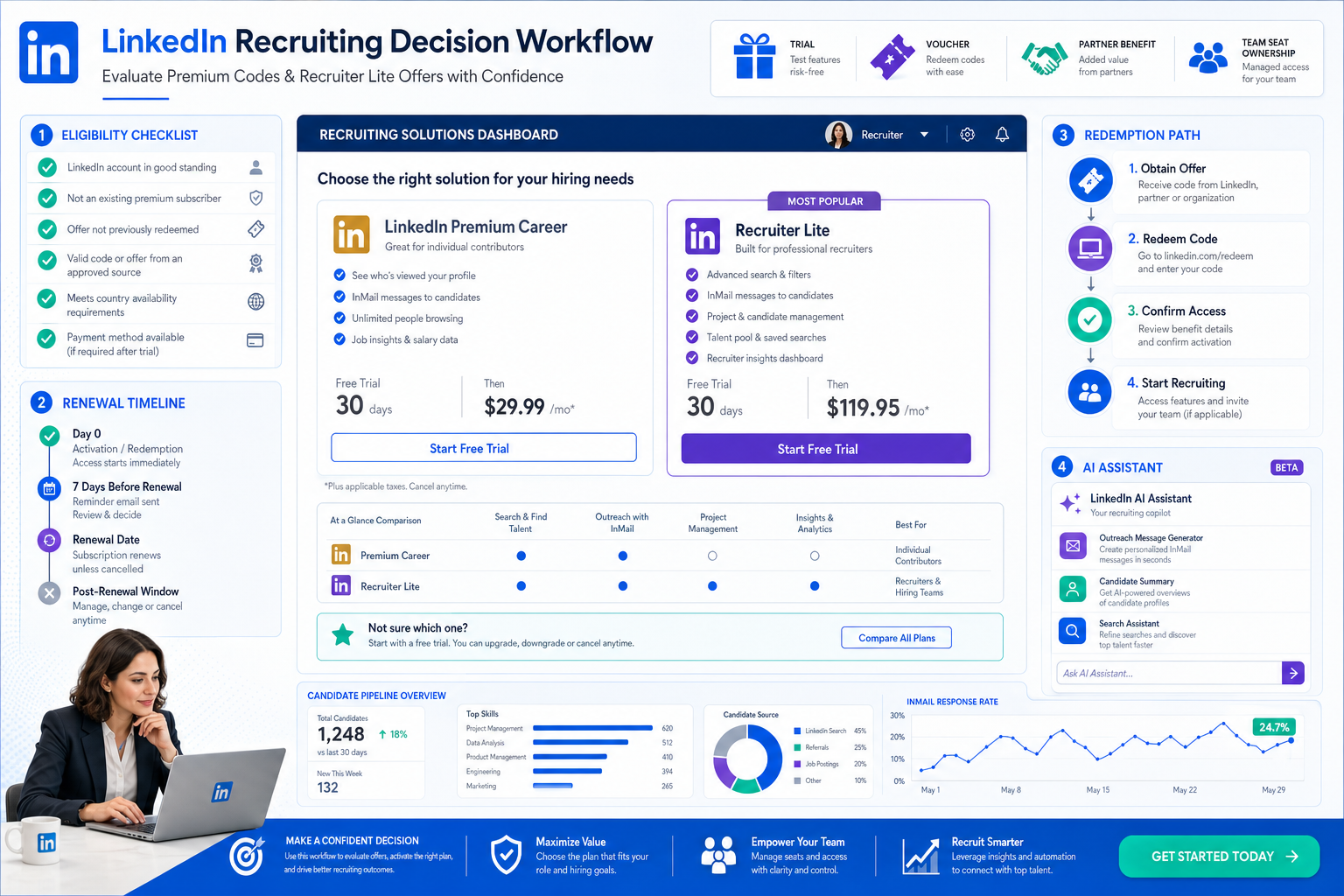
A linkedin premium code search only pays off when recruiters use this article to judge product fit, eligibility, and renewal risks before costly activation mistakes.
That discipline matters more than most teams expect. In-house recruiters, agency desks, and small search firms often lose time chasing public coupon claims that do not match their actual workflow. The result is familiar: a sourcer activates the wrong plan, finance approves a subscription with unclear renewal terms, or a team assumes one promotion applies across multiple seats when it only works for a specific account.
In my own LinkedIn-heavy sourcing work, I have found that an AI-supported workflow reduces that confusion when it is used for the right part of the process. StrategyBrain AI Recruiter is useful here because it can automate first-contact outreach, keep candidate conversations moving after hours, and collect resumes or contact details once interest is confirmed. The recruiter still makes the final call on fit, reviews the resume, and decides who moves to interview, but the admin load around LinkedIn usage becomes much easier to control.
A legal update for employers in March 2025 made the broader point clearly in another hiring context: when pressure rises, weak preparation gets exposed fast. In that discussion, an employment lawyer explained that many employers learned during the pandemic they were not set up for sudden workforce changes. Temporary layoffs, employee agreements, policy language, and early communication all became high-stakes decisions because if the structure was missing, employers had to rely on goodwill and ad hoc judgment.
The same pattern shows up when recruiters hunt for LinkedIn savings. A team starts with a simple question about a linkedin premium code, then discovers the real issue is preparation: which product they actually need, whether the account is eligible, whether the offer is a code or a special link, and who owns the renewal decision if a trial converts. That is why this article focuses on decision criteria first, then on redemption steps, recruiter use cases, and what to do when you see claims about a linkedin voucher code or a linkedin premium discount for students.
- Why preparation matters before you chase LinkedIn deals
- What people usually mean by linkedin premium code
- Official offers vs third-party discount claims
- How to redeem a code or special offer link
- Recruiter Lite vs full Recruiter for deal seekers
- What to know about linkedin premium discount for students
- Tools and workflow support for LinkedIn recruiting
- Practical buying advice for recruiting teams
- Common mistakes to avoid
- FAQ
Why preparation matters before you chase LinkedIn deals
The strongest lesson from the layoff preparedness discussion is simple: when a process becomes urgent, the missing rules surface immediately. In the employment-law context, that meant unclear layoff clauses, weak policy language, and overreliance on informal trust. In LinkedIn recruiting, the equivalent problem is shopping for subscriptions without defining the business need, the seat owner, or the likely path to redemption.
That is why experienced recruiters do not treat LinkedIn like a generic ecommerce checkout. They separate the workflow first. Are you trying to source occasionally, run a disciplined outbound desk, or equip a larger talent acquisition team? Are you evaluating Recruiter Lite, a Premium subscription, or a sales-led enterprise product? If you skip those questions, any discount search becomes noise.
Another useful parallel from that legal update is the value of early communication and clear terms. Employers were advised that if they lacked contractual protection, they had to depend on workforce goodwill and transparent communication. Recruiters face a softer version of the same issue internally. If a manager, coordinator, and budget owner all assume something different about an offer, activation errors and renewal surprises follow.
Practical takeaway: before looking for a deal, decide who will use the plan, which LinkedIn product is required, and what happens when the promotion ends.
What people usually mean by linkedin premium code
The phrase linkedin premium code bundles several different intents into one search. Some users mean Premium Career, some mean Premium Business, and some really want Recruiter Lite or full LinkedIn Recruiter pricing. For recruiters, that distinction is not cosmetic. It changes the buying path, the likely discount format, and the approval process.
In practical recruiting terms, a solo headhunter may only need self-serve sourcing access, while a multi-seat hiring function may need a sales conversation, procurement review, and seat planning. Those are different purchasing motions, and the offer types are usually different too.
| Buyer intent | Common search phrase | What usually follows |
|---|---|---|
| Job seeker | linkedin premium code | Often looking for a Premium trial or short-term promotional access |
| General business user | linkedin voucher code | May be seeking an account-specific or partner-linked offer |
| Solo recruiter | LinkedIn recruiter discount | Usually should evaluate Recruiter Lite first |
| TA leader or hiring team | LinkedIn Recruiter deals | Often enters a sales-led process rather than a coupon flow |
| Student | linkedin premium discount for students | Should verify current eligibility rather than assume a standing public deal |
When I help teams sort this out, I ask one operational question first: what job is this subscription supposed to do every day? That single question usually clears up whether the team is searching for the right product or just the most visible coupon phrase.
Official offers vs third-party discount claims
The safest approach is to split the landscape into official offer paths and third-party coupon claims. Official paths commonly take the form of a free trial, a promotional period, a partner benefit, an offer code, or a special link tied to an eligible account. Third-party pages, by contrast, often flatten all of that into a generic discount promise.
That matters because the details determine whether an offer is usable. In the legal update, one of the recurring themes was that legal rights and operational flexibility depended on exact wording, not assumptions. LinkedIn offers work the same way. If the terms say the promotion is limited to new subscribers, selected members, or a particular region, the discount is not universal no matter how attractive the headline looks.
What official-style offers usually look like
- Free trial: commonly restricted to first-time or otherwise eligible members
- Promotional offer: often time-bound and tied to account status
- Offer code: may need to be entered through a specific redemption flow
- Special link: may apply the deal after sign-in instead of at checkout
- Partner benefit: may come through a school, employer, program, or campaign
How to evaluate a linkedin voucher code claim
If someone on your team shares a linkedin voucher code, validate it the same way you would validate a policy exception or contract term: carefully and in context.
- Check the product: Is it for Recruiter Lite, Premium Career, Premium Business, or something else?
- Check eligibility: Does it mention first-time users, selected members, or region-specific access?
- Check redemption: Is it a real code, or is the valid path actually a unique link?
- Check billing geography: Does the offer vary by country or billing region?
- Check post-promo terms: What renews, when, and at what standard rate?
For recruiting operations, this prevents a common failure point: one recruiter tests something successfully, then the whole team assumes the same result will replicate across every seat.
How to redeem a code or special offer link
If you want to use a linkedin premium code properly, think less like a shopper and more like an operator documenting a subscription change. Redemption often works through either a manual code entry or a link-based sign-up path. Missing that distinction is one of the easiest ways to think an offer is broken when it is actually account-specific.
Step-by-step redemption workflow
- Confirm the exact plan: make sure the offer matches the subscription you intend to activate.
- Verify eligibility: confirm whether the account qualifies for the trial or promotion.
- Sign in to the right account: avoid redeeming under an inactive or personal login by mistake.
- Use the proper path: enter the code if prompted, or follow the special offer link through sign-up.
- Review billing details: check renewal timing, country-specific pricing, and the next charge date.
- Record the activation: note who redeemed it, what plan was activated, and when it renews.
I strongly recommend keeping a simple subscription tracker, especially in agency settings where different recruiters test different tools. It sounds basic, but it solves the same kind of preventable confusion that employers run into when they depend on memory instead of clear written terms.
Recruiter Lite vs full Recruiter for deal seekers
For recruiter-focused readers, this is usually the main commercial distinction. Recruiter Lite is generally the self-serve path most likely to intersect with visible trials or promotions. Full LinkedIn Recruiter usually involves a more consultative, sales-led buying motion.
That is why a search for linkedin premium code can be helpful in some contexts but misleading in others. If you are an individual sourcer or a boutique recruiter, there may be a realistic self-serve offer path. If you are buying for a larger function, expecting a retail-style coupon often creates unnecessary friction with finance and procurement.
| Scenario | Likely fit | What to expect |
|---|---|---|
| Independent recruiter | Recruiter Lite | Look for trial eligibility or active self-serve promotions |
| Small team | Recruiter Lite or mixed workflow | Check seat ownership, regional pricing, and renewal rules |
| Larger TA organization | Full Recruiter | Expect a sales discussion more than a public coupon path |
A practical lesson here is similar to the temporary-layoff discussion in the legal article: not every mechanism that exists on paper is automatically available in the exact way you hope to use it. The route matters.
What to know about linkedin premium discount for students
The search phrase linkedin premium discount for students is common, but recruiters should handle it cautiously when advising interns, campus hires, or junior researchers. There is no reliable basis for presenting a permanent universal student discount as a standard public program.
What does happen is more nuanced. Students may encounter partner benefits, limited campaigns, trial offers, or eligibility-based access tied to their account or institution. That is very different from a blanket student coupon that always works.
- Look for official language such as free trial, promotional offer, partner benefit, or eligible members
- Check whether the offer is connected to a school relationship or campaign window
- Confirm what subscription area the benefit applies to
- Review renewal terms before activation
For university recruiting teams, the best advice is not to overstate availability. Ask students to verify the current path that applies to their own account and region.
Tools and workflow support for LinkedIn recruiting
Discount hunting is only one side of the cost equation. The bigger operational question is whether your LinkedIn workflow is efficient enough once a plan is active. That is where I have seen recruiters get more value from process support than from coupon chasing alone.
In my own testing, StrategyBrain AI Recruiter helped most in three situations: when candidate replies arrived after hours, when I needed steady first-touch outreach without dropping follow-ups, and when interested prospects needed a clean handoff with resume or contact capture. It does not replace recruiter judgment, and it does not decide final fit from a resume. What it does well is handle the repetitive LinkedIn messaging layer so the recruiter can focus on shortlist decisions, stakeholder alignment, and interview progression.
If you want to see the workflow logic behind it, the three-step setup overview and the broader usage notes for headhunters are useful starting points. For me, the practical benefit was consistency. The tool kept conversations moving, surfaced interested candidates, and reduced the chance that a paid LinkedIn seat sat underused because the team could not keep pace with message volume.
That also connects back to the opening case logic. In the same way employers were urged to prepare contract language before layoffs become urgent, recruiters should build a usable LinkedIn operating rhythm before a busy hiring cycle starts. A discount is helpful, but only if the team can execute once it has access.
Three software routes recruiters commonly compare
| Tool type | Usage experience | Effectiveness focus | Cost model | Best fit | How it can work with StrategyBrain AI Recruiter |
|---|---|---|---|---|---|
| LinkedIn Recruiter / Recruiter Lite | Native sourcing environment familiar to most recruiters | Strong for search, outreach, and candidate discovery inside LinkedIn | Subscription-led; discount visibility varies by product and account | In-house teams, agencies, solo recruiters | StrategyBrain AI Recruiter can support the repetitive outreach and response layer around LinkedIn activity |
| Greenhouse | Structured ATS workflow with broad hiring-team collaboration | Strong for process control after candidate entry | Typically organization-level software spend rather than seat-level sourcing spend | Growing and mid-market teams needing process discipline | Works downstream once candidates sourced through LinkedIn are ready for formal pipeline management |
| Lever | Recruiting CRM and ATS blend with collaboration features | Useful for relationship management and centralized recruiting operations | Usually not a coupon-style purchase; sold as a recruiting platform | Teams balancing sourcing with long-term pipeline nurture | Can receive candidates after LinkedIn outreach identifies engaged prospects |
The key difference is that LinkedIn seat discounts address access cost, while workflow tools address execution cost. The strongest recruiting setups usually think about both.
Practical buying advice for recruiting teams
When recruiter discounts become an urgent discussion, follow the same discipline that good employers use when facing any risky people process: define the rules before acting quickly.
Use this evaluation framework
- Clarify the workflow: occasional sourcing, high-volume outreach, or multi-seat collaboration
- Match the product: Recruiter Lite, Premium subscription, or enterprise Recruiter
- Validate the offer path: code, partner benefit, trial, or link-based promotion
- Assign ownership: decide who redeems, who tracks renewal, and who cancels if needed
- Plan the post-activation workflow: make sure the seat will actually be used consistently
Questions worth asking before approval
- Who is the real day-to-day user of this subscription?
- Does the offer attach to an individual account or broader team access?
- Is the team seeking lower seat cost, more sourcing output, or both?
- What happens when the trial or promotion expires?
- What support process exists so the recruiter actually uses the seat effectively?
This is the difference between finding a deal and making a good buying decision. Experienced recruiting leaders care about both, but they never confuse them.
Common mistakes to avoid
Assuming every LinkedIn subscription follows the same discount logic
A linkedin premium code search can point toward very different products. Do not assume the same redemption method applies across Premium plans, Recruiter Lite, and enterprise recruiting products.
Sharing a code across a team without checking account eligibility
An offer that works for one selected account may fail for everyone else. Always verify who qualifies before promising savings internally.
Ignoring the operational side of paid LinkedIn access
A discounted seat still wastes money if the recruiter cannot keep outreach, response handling, and follow-up organized. Pair access decisions with workflow support.
Forgetting renewal ownership
Trials and promotional periods become expensive when nobody owns the cancellation or renewal review date.
Overpromising student discounts
Do not treat linkedin premium discount for students as a standing universal program unless the active terms clearly show it.
FAQ
How do I redeem a LinkedIn Premium code?
Confirm the exact product, verify your account is eligible, then redeem through the correct path. Some promotions require a code entry, while others only work through a sign-in link.
Is a linkedin voucher code the same as a public coupon?
No. A linkedin voucher code may refer to a partner benefit, promotional code, or account-specific redemption path rather than a standard public coupon box.
Is there a linkedin premium discount for students?
You should not assume there is a permanent public program. Some students may see trials, limited campaigns, or partner-linked benefits, but availability can depend on timing and eligibility.
Does Recruiter Lite usually have more visible deals than full Recruiter?
In practice, self-serve products like Recruiter Lite are more likely to intersect with visible trial or promotional flows, while full Recruiter often follows a sales-led buying process.
Why do recruiters struggle to find consistent LinkedIn discounts?
Because LinkedIn products do not all follow the same commercial model. Product type, account history, region, and timing all affect what offer paths are available.
Can StrategyBrain AI Recruiter replace recruiter judgment?
No. It can automate parts of outreach, follow-up, and candidate information collection on LinkedIn, but recruiters still decide fit, review resumes, and determine next steps.
What is the smartest way to control LinkedIn recruiting spend?
Choose the right product first, verify offer eligibility second, and then make sure the team has a workflow that uses the subscription consistently.
Conclusion
When recruiters search for LinkedIn discounts, the real win is not just finding a lower price. It is avoiding the preventable mistakes that happen when product fit, eligibility, redemption method, and workflow ownership are unclear.
If you remember one thing from this article, let it be this: treat a linkedin premium code as a decision checkpoint, not a magic coupon. Define the use case, validate the offer path, document renewal terms, and make sure the seat supports an actual recruiting workflow. That is the approach that saves the most money over time and creates fewer operational surprises.














