


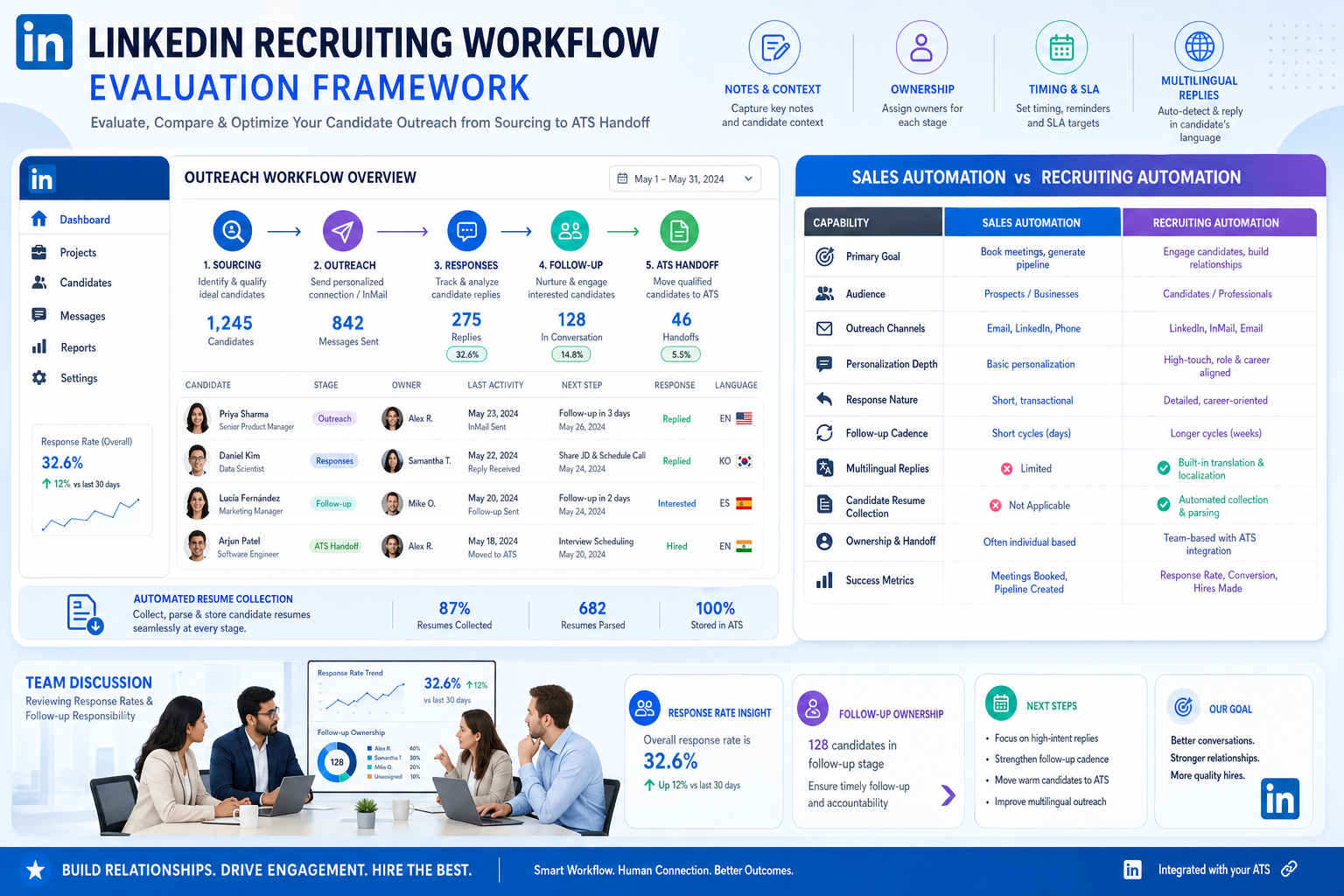
When sourcing stalls and follow-ups blur, recruiters can use this framework to judge linkedin sales automation tools and avoid messy handoffs.
That distinction matters more than many teams expect. In recruiting, wasted outreach is not just a productivity issue. It can create messy handoffs, missed replies, poor notes, confused ownership, candidate irritation, and real account or policy concerns. For a solo recruiter, that means late nights chasing follow-ups that should have been logged earlier. For a small agency owner, it means consultants working in circles while live searches stall. For an in-house talent lead, it means hiring managers see activity, but not clean progress.
That is exactly where StrategyBrain AI Recruiter can help as a workflow support layer rather than a substitute for recruiter judgment. In my own review of LinkedIn-heavy sourcing processes, the most useful capabilities were its always-on candidate communication, multilingual follow-up, and automated collection of résumés or contact details from interested prospects. That can reduce the lag between first reply and next action, while the recruiter still handles final résumé review, fit assessment, and interview decisions. For teams exploring linkedin automation tools, that distinction is critical.
You can see the underlying problem most clearly in a familiar management scene: a recurring team meeting is called because everyone feels sourcing activity needs attention, yet half the room arrives without a shared agenda, updates drift into side issues, and the real blockers stay buried. One recruiter is talking about response rates, another is asking who owns follow-up on last week’s passive candidates, and someone else is trying to reconstruct which hiring manager wanted which profile. Time passes, inboxes keep growing, and very little is actually resolved.
The lesson from that kind of meeting is not just “run better meetings.” It is that poorly structured recruiting work creates poorly structured discussions. If outreach steps, follow-up expectations, note-taking, and ownership are unclear before the meeting starts, no meeting can fix them in real time. That is why evaluating linkedin sales automation tools, comparing linkedin automation tools, or searching for the best linkedin automation software should begin with the same five practical rules that make operational meetings work: do not automate what should not happen, set a clear agenda, respect time, establish rules, and capture decisions in a system of record.
This article uses that five-rule framework to evaluate LinkedIn recruiting automation from a recruiter’s point of view. The goal is not maximum activity. The goal is a sourcing workflow that saves time, supports follow-through, preserves candidate experience, and gives recruiters and hiring managers a cleaner path from first touch to shortlist.
Table of Contents
- Why a meeting-management framework fits LinkedIn recruiting automation
- Rule 1: Do not automate work that should not happen
- Rule 2: Set an outreach agenda before you touch a tool
- Rule 3: Respect timing, pacing, and follow-up windows
- Rule 4: Establish ground rules for recruiters and systems
- Rule 5: Capture notes, ownership, and next steps
- Quick comparison table
- Native LinkedIn workflows vs third-party automation
- How to assess the best linkedin automation software
- Common buying mistakes
- Best practices for safer recruiting automation
- FAQ
Why a meeting-management framework fits LinkedIn recruiting automation
Recruiting teams often look for software at the exact moment their process starts feeling like a bad staff meeting: too many moving parts, too little structure, and no clear record of what happened. That is why the meeting rules from the reference material transfer so well here. Both situations fail for the same reasons. People start activity that did not need to happen, show up without preparation, let discussion or outreach drift, lose track of time, and leave without documented action items.
In practical recruiting terms, LinkedIn recruiting automation covers the tools and workflows that reduce repetitive work around sourcing, first-touch outreach, reminders, candidate replies, résumé collection, notes, and handoff into downstream systems. Many buyers discover these options through searches for linkedin sales automation tools because the market language overlaps, even though recruiting success is measured very differently.
That overlap is where good decisions and bad decisions split apart. A sales team may optimize for top-of-funnel activity. A recruiting team needs relevance, cleaner collaboration, and accountable progression from outreach to hiring decision. So instead of asking which tool sends more, experienced recruiters ask which workflow creates fewer dead-end conversations and fewer unproductive internal check-ins.
Recruiter’s takeaway: If a tool would make your sourcing review meeting shorter, clearer, and easier to document, it is probably solving a real problem. If it mainly increases activity without improving ownership, it probably is not.
Rule 1: Do not automate work that should not happen
The first rule from the meeting article was simple: do not schedule a meeting unless it is necessary. The recruiting equivalent is just as important: do not automate outreach that should not happen in the first place.
That means the first filter is not features. It is relevance. Before a recruiter launches any sequence, they should be able to answer a few basic questions:
- Is this talent pool actually aligned to the role?
- Is the message specific enough to justify contact?
- Would I be comfortable owning this outreach if the candidate replies critically?
- Does this belong in our hiring process, or are we creating activity to look busy?
This is also where policy risk comes in. LinkedIn’s published guidance has long taken a restrictive stance toward unauthorized third-party tools or extensions that automate activity, scrape data, or alter normal account behavior. For recruiters, that is not a background legal footnote. It is a practical buying constraint.
I have seen teams lose sight of this because the category language around linkedin automation tools often emphasizes scale, warm-up routines, daily limits, or human-like behavior patterns. Those claims may sound operationally reassuring, but they do not answer the core recruiting question: should this action happen at all, and can we defend the workflow behind it?
When I tested structured support approaches, the most credible use of AI Recruiter was not “hands-free mass outreach.” It was using automation to keep candidate conversations moving across time zones, respond after hours, and collect résumé or contact details when interest had already been expressed. That is very different from treating automation as a replacement for role targeting or final qualification.
Rule 2: Set an outreach agenda before you touch a tool
Great meetings do not happen without an agenda, and neither do effective recruiting campaigns. If you are evaluating linkedin sales automation tools for hiring, your team should define the outreach agenda before opening a demo or requesting a trial.
In recruiting, an outreach agenda means:
- what role or role family you are hiring for
- which candidate segments matter most
- what message sequence is appropriate
- what outcome counts as progress
- when a conversation should move into email, phone screen, or ATS review
Without that structure, teams do exactly what badly managed meetings do: they improvise. Sourcers build lists that are too broad, recruiters send messages that are too generic, hiring managers ask for updates in inconsistent formats, and nobody agrees on whether response rate or qualified interest is the real success metric.
This is one reason many recruiting teams end up with tools that feel productive but create extra administration. The workflow was never defined tightly enough to begin with. The better path is to outline the practical outcomes you want from automation, in the same way a meeting agenda should define intended decisions rather than vague topics.
For example, “reach more engineers” is not a workable agenda. “Identify backend engineers in two target locations, test two message angles, log all interested replies into the hiring workflow, and assign next-step review within one business day” is much closer to a recruiter-grade operating plan.
Questions to ask before vendor review
- Can the workflow support low-volume, high-relevance recruiting rather than just campaign volume?
- How are candidate replies captured and routed?
- Will recruiters be able to review context before taking over a conversation?
- Does the system help standardize notes and next steps?
- Can the workflow support multilingual hiring without losing recruiter control?
Rule 3: Respect timing, pacing, and follow-up windows
The meeting article stressed starting and ending on time because people resent uncertainty and drift. Recruiters should think the same way about candidate communication. Poor timing damages both efficiency and trust.
Most candidates do not reply on your schedule. Some respond late at night, some during lunch, and some only after a second or third message. The question is whether your workflow respects those windows without making the process feel robotic or unmanaged.
This is where timing support can be genuinely useful. A recruiter does not need software to replace judgment, but they do need help preventing delays between candidate interest and recruiter action. Slow follow-up often kills momentum more reliably than a weak first message.
In my own workflow review, one of the more practical uses of StrategyBrain AI Recruiter was as a buffer between recruiter availability and candidate timing. It can keep communication moving, answer common role questions, and gather materials from interested prospects, which is especially helpful when agency recruiters are juggling multiple searches or when internal teams recruit across regions. The recruiter still needs to step in for screening judgment, compensation nuance, and final progression decisions, but fewer good replies go stale.
When comparing the best linkedin automation software, ask whether timing controls are there to improve recruiter responsiveness or merely to increase account activity. Those are not the same thing.
Rule 4: Establish ground rules for recruiters and systems
Effective meetings need ground rules so discussion does not get hijacked. Recruiting automation needs the same thing. If your team does not define who owns targeting, message edits, reply handling, escalation, and data capture, the software will expose that weakness quickly.
Ground rules should cover at least five areas:
- Targeting ownership: who approves audience criteria before outreach begins.
- Message standards: what level of personalization is required for each role type.
- Reply handling: which responses can be handled through automation-supported workflows and which require recruiter intervention.
- Escalation thresholds: when a recruiter must take over because a candidate asks nuanced questions or shows serious interest.
- Documentation: where conversations, files, and next steps are recorded.
This matters because many linkedin automation tools are designed with sales assumptions. In sales, broader experimentation may be acceptable. In recruiting, relevance, employer perception, and process governance matter more. A recruiter can recover from a low-reply campaign. Recovering from repeated poor-fit outreach to a narrow talent market is harder.
If you manage a small agency or a growing in-house team, this rule becomes even more important as more users touch the same search. The fastest way to create internal chaos is to let outreach happen outside a shared structure and then try to reconcile it later in a status meeting.
Rule 5: Capture notes, ownership, and next steps
The last rule from the meeting article may be the most transferable: take notes. In recruiting, that means every promising conversation needs a usable record. Otherwise, the same candidate gets rediscovered, the same questions get re-asked, and the same hiring manager requests produce repeated manual cleanup.
This is why the software conversation cannot stop at message sending. A sourcing workflow only becomes recruiting infrastructure when it supports note quality, ownership clarity, and handoff into a broader system of record.
At minimum, recruiters should be able to document:
- where the prospect came from
- which role or talent pool they were tied to
- what message angle was used
- whether they showed interest
- what résumé or contact details were received
- who owns the next step
In practice, that is where an applicant tracking system or equivalent recruiting system matters more than raw outreach volume. The operational benefits are familiar to any recruiter who has had to clean up after a loose sourcing process:
- Consistency: everyone uses the same candidate stages and definitions.
- Visibility: hiring managers can see progress without asking for ad hoc updates.
- Compliance support: communication history is easier to review.
- Collaboration: sourcers, recruiters, and coordinators work from shared context.
- Follow-through: next steps do not disappear into inboxes or side spreadsheets.
That note-taking logic is exactly why the meeting analogy works. If a meeting ends with no minutes, nobody really knows what was decided. If a LinkedIn sourcing thread ends with no structured handoff, nobody really owns the candidate.
Quick comparison table
| Evaluation area | What sales-focused buyers may prioritize | What recruiting teams should prioritize |
|---|---|---|
| Prospect lists | Volume and expansion | Role-specific segmentation |
| Messaging | Sequence scale | Relevance and candidate fit |
| Timing | More automated touches | Faster, cleaner follow-up |
| Workflow rules | Campaign freedom | Ownership and escalation clarity |
| Data capture | CRM activity logging | Résumé, notes, and ATS handoff |
| Success metric | Replies or meetings booked | Qualified candidates progressed |
Native LinkedIn workflows vs third-party automation
For recruiting intent, a major decision is whether your bottleneck is actually a need for external automation or simply a need for better use of native LinkedIn recruiting workflows plus cleaner internal process.
Smaller teams, solo recruiters, and newer agency desks often benefit first from sharpening search discipline, clarifying outreach ownership, and improving note capture. In those cases, a native recruiting setup plus a dependable system of record may solve more than an aggressive automation layer would.
That does not mean external support has no place. It means the decision should be sequenced correctly. If your real problem is that candidate replies sit overnight, multilingual communication slows down, or résumé collection falls through the cracks, then an AI-supported layer may help. If your real problem is that the role itself is unclear or your team cannot agree on a target profile, no tool will fix that upstream confusion.
How to assess the best linkedin automation software
If you are actively comparing the best linkedin automation software for recruiting, use the following criteria:
1. Workflow fit
Does the product support recruiting work as it actually happens, or does it assume a sales pipeline model? Look for role-based segmentation, practical follow-up support, and recruiter takeover points.
2. Policy awareness
Does the workflow raise obvious concerns around scraping, unauthorized automation, or account behavior? Recruiting leaders should review this early, not after rollout.
3. Candidate experience
Can the workflow keep replies timely and relevant without making candidates feel pushed through a generic campaign?
4. Handoff quality
How are notes, résumés, and contact details moved into the broader hiring process? If that answer is weak, the tool will create downstream work.
5. Team usability
Can a busy recruiter or sourcer use it consistently without building side spreadsheets or separate reminder systems?
6. International recruiting support
If you hire across markets, can the workflow support multiple languages and after-hours response windows while preserving recruiter control?
That last criterion is where I found StrategyBrain AI Recruiter especially interesting. For internationally distributed searches or high-response windows outside office hours, its multilingual communication and continuous follow-up model directly address a common recruiting bottleneck. Again, the recruiter still has to judge fit. But fewer promising conversations die waiting for a human handoff.
Common buying mistakes
Buying for activity instead of outcomes. Recruiters sometimes get impressed by sequence depth or campaign controls, then realize later that qualified progression barely changed.
Assuming sales automation maps neatly to recruiting. The mechanics overlap, but the risk profile and candidate expectations do not.
Ignoring system handoff. If replies, files, and decisions do not move cleanly into the hiring workflow, the software creates hidden admin.
Trusting safety language without operational review. Terms like gradual ramp-up or activity limits are not substitutes for policy assessment.
Using automation to avoid process discipline. This is the recruiting version of calling a meeting because the work is unclear. More activity is not the same as better execution.
Best practices for safer recruiting automation
- Map the workflow first. Define sourcing, message ownership, reply handling, résumé capture, and next-step routing before vendor selection.
- Keep recruiters in the decision loop. Automation can support communication, but final qualification should stay human.
- Use structure to reduce meetings. Better documented outreach should make status meetings shorter and more specific.
- Prioritize follow-through over volume. Timely response and clean handoff beat high send counts.
- Document every meaningful interaction. Notes are not admin overhead; they are the memory of the search.
- Review candidate experience regularly. A workflow that feels efficient internally can still feel impersonal externally.
- Measure progression, not just replies. Watch screening conversion, interview movement, and shortlist quality.
FAQ
Is LinkedIn automation allowed for recruiting?
Recruiters should approach the category carefully. LinkedIn has published restrictions around third-party tools or extensions that scrape, automate, or alter account activity. Any evaluation should include a policy review, not just a feature review.
Why do recruiters end up researching linkedin sales automation tools?
Because the market categories overlap. Search filters, list building, sequencing, reminders, and sync features look similar across sales and recruiting. The difference is that recruiters need relevance, candidate experience, and cleaner hiring-process handoff.
What makes the best linkedin automation software for recruiters?
The best option is the one that fits recruiting workflow: clear targeting, sensible follow-up support, clean documentation, and strong recruiter control over qualification and next steps.
Can automation replace recruiter screening?
No serious hiring team should assume that. Automation may help with outreach support, multilingual communication, or collecting résumés and contact details, but final fit assessment and hiring decisions still belong to the recruiter and hiring team.
Are linkedin automation tools useful for agency recruiters?
They can be, especially when recruiters are managing multiple live searches and cannot always respond in real time. But agencies should be especially careful about relevance, account risk, and documentation because poor-fit outreach can hurt both delivery and reputation.
Where does StrategyBrain AI Recruiter fit best?
It fits best where the problem is communication continuity rather than recruiter judgment: after-hours replies, multilingual conversations, and structured collection of candidate materials from interested prospects. It is most useful when paired with disciplined human review.
Conclusion
If you are evaluating linkedin sales automation tools for recruiting, the best buying discipline may come from an unexpected place: the same rules that make meetings shorter and more productive. Do not start unnecessary activity. Set a clear agenda. Respect timing. Establish rules. Capture decisions.
That framework keeps the category grounded in recruiting reality. Instead of chasing the loudest promise in the linkedin automation tools market, you can judge what actually improves sourcing operations. And if your team needs support with timely candidate replies, multilingual communication, or collecting materials from interested prospects, an option like StrategyBrain AI Recruiter may be useful as part of that workflow, so long as recruiters remain responsible for fit, judgment, and the final hiring path.














