


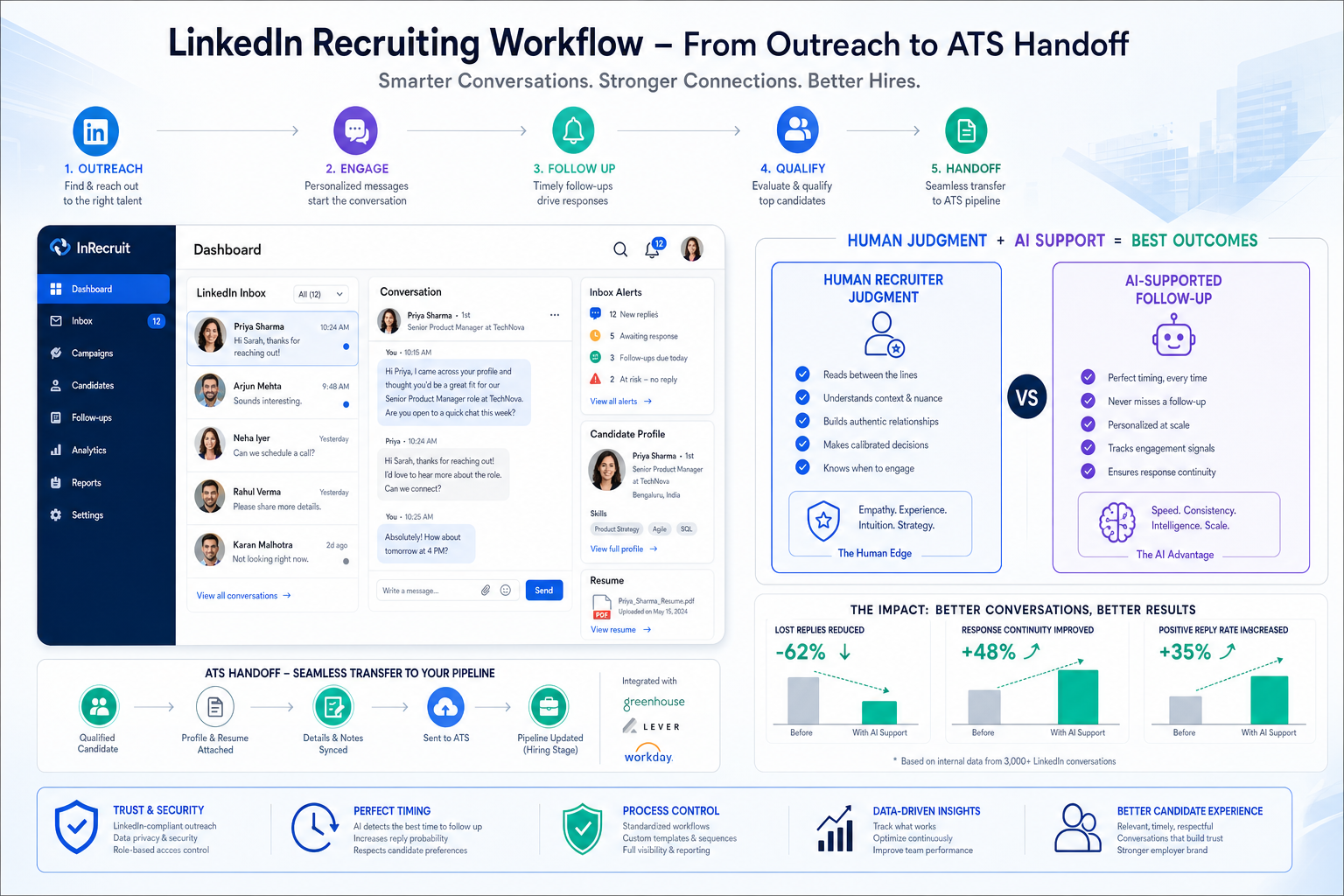
When headhunters assess linkedin sales automation tools through this framework, they can avoid lost replies, ATS gaps, and trust-damaging outreach.
That sounds obvious until a real desk gets busy. A solo recruiter can lose promising replies in a crowded inbox, an agency owner can watch duplicate outreach erode credibility, and an in-house TA lead can end up with sourcing activity that never reaches the ATS. The damage is not only about wasted time. It shows up in slower shortlists, weaker response quality, inconsistent follow-up, and a brand impression that feels more automated than attentive.
That is where an AI-supported workflow can help if it stays inside a recruiter-led process. In my own testing, StrategyBrain AI Recruiter was most useful not as a replacement for recruiter judgment, but as a way to keep LinkedIn conversations moving, handle after-hours replies, and gather resume or contact details from interested prospects before momentum faded. The recruiter still owns final screening, resume review, and whether a candidate should move into interview steps.
A useful way to understand the problem is to borrow a management lesson from multigenerational sales teams. When younger and older teammates work side by side, the challenge is not deciding which group is better. It is recognizing that each group contributes differently: digitally fluent team members stay close to fast-moving market signals, while more experienced colleagues bring timing, judgment, and relationship depth. In recruiting, the same divide appears every day on LinkedIn.
One recruiter is watching profile activity, job-change signals, and message cadence across digital channels; another is refining outreach based on years of reading motivation, seniority, and timing. Both are needed. But when the workflow is loose, one person is buried in repetitive follow-up while the other is manually reconstructing context from scattered notes. That is the point where recruiting teams start searching for linkedin automation tools or linkedin prospecting automation, often beginning with the broader market for linkedin sales automation tools and only later realizing recruiting needs a different standard.
The lesson from that team dynamic is simple: automation should amplify complementary strengths, not flatten them into generic volume. The rest of this article looks at how to evaluate LinkedIn recruiting automation through that lens, where it helps, where it creates risk, and how to build a workflow that keeps sourcing fast without losing candidate trust or process control.
Table of Contents
- Why Recruiting Automation Needs a Different Fit
- Using Different Recruiter Strengths the Right Way
- Best Use Cases for Recruiting Teams
- What I Learned Using an AI-Supported Workflow
- Policy, Data, and Account Safety Risks
- What to Look for in LinkedIn Automation Tools
- Three Well-Known Tool Types Compared
- Why ATS Handoff Still Decides the Outcome
- How to Choose the Right Setup for Your Team
- Best Practices for Human-Led Automation
- FAQ
Why Recruiting Automation Needs a Different Fit
LinkedIn recruiting automation is often evaluated with the wrong frame. Buyers begin in the market for linkedin sales automation tools, see familiar language around sequences, multichannel outreach, and personalization, and assume the same model will carry over into hiring. In practice, recruiting has a different operating goal.
Sales teams can tolerate more experimentation around volume and funnel conversion. Recruiters cannot. Talent outreach affects employer brand, candidate trust, hiring-manager confidence, and compliance discipline. One irrelevant sequence can damage far more than a reply rate. That is why the best recruiting workflows automate repetitive coordination while keeping message quality and progression decisions in human hands.
The strongest question is not whether a workflow can send more messages. It is whether it helps a recruiter combine digital responsiveness with experienced judgment. That is the same managerial logic behind mixed-generation sales teams: different strengths matter, but they only create leverage if the system around them is well organized.
Using Different Recruiter Strengths the Right Way
The reference point from sales team management is surprisingly useful here. In a mixed-age team, younger workers often stay close to digital behavior, platform habits, and quick market shifts. More experienced workers often carry the relationship sense, strategic patience, and context that prevent short-term activity from becoming random noise. Recruiting teams usually have the same split, even if it is not strictly generational.
Some recruiters are excellent at spotting signals: profile edits, location moves, job changes, visible engagement, and timing clues that make an outreach message feel relevant. Others are better at calibrating tone, understanding career risk, and deciding when a candidate should be approached at all. Good automation should support both groups.
That means using systems to handle alerts, reminders, inbox triage, candidate capture, and handoff mechanics, while reserving fit evaluation, personalization, and next-step judgment for the recruiter. In other words, the workflow should be a bridge between complementary strengths rather than an attempt to turn every recruiter into the same high-volume sender.
| Recruiting Capability | Digital-First Strength | Experience-Led Strength | Best Automation Role |
|---|---|---|---|
| Targeting | Signal spotting and list building | Role-fit calibration | Saved searches and prioritization |
| Messaging | Fast response handling | Tone and motivation judgment | Draft support and reminder sequences |
| Follow-up | Task speed and consistency | Knowing when to pause or escalate | Inbox triage and cadence tracking |
| Handoff | Capturing details quickly | Stage decision and stakeholder context | CRM or ATS sync |
Best Use Cases for Recruiting Teams
Once you look at recruiting through that strengths model, the right use cases become clearer. The best applications are not the ones that mimic mass outbound sales. They are the ones that reduce admin drag and preserve context.
1. Candidate sourcing and search management
Recruiters benefit from saved searches, search alerts, segmented talent pools, and job-change signals. This is the most defensible form of linkedin prospecting automation because it improves timing and prioritization rather than pushing volume for its own sake.
2. Follow-up discipline after initial interest
Many recruiting breakdowns happen after a candidate replies. Good workflows help recruiters remember who needs a second message, who asked for details, who shared a resume, and who should be moved into a formal process. That is where linkedin automation tools can create real value.
3. Candidate detail capture
If a prospect is interested, the next risk is losing the moment. Resume collection, contact capture, and clean record creation matter more than another generic touchpoint. Mature teams know that top-of-funnel messaging is only useful if candidate data makes it into the right system.
4. Team coordination across desks
Agency recruiters and embedded teams need shared visibility. Duplicate outreach, unclear ownership, and fragmented notes are common when recruiters work the same market without process support. A workflow layer that records contact history and next actions can prevent those collisions.
5. After-hours message continuity
Strong candidates often reply outside business hours. If no one responds until the next day, interest can cool. If a recruiter tries to monitor everything manually, burnout follows. The right setup can keep conversations moving without pretending the recruiter no longer needs to make the actual hiring decision.
Practical takeaway: In recruiting, better timing, cleaner handoff, and stronger follow-up usually outperform higher send volume.
What I Learned Using an AI-Supported Workflow
I have found that the most practical role for StrategyBrain AI Recruiter is in the gap between first outreach and formal screening. That gap is where many recruiters lose momentum: replies arrive late, candidates ask basic questions when the recruiter is offline, and a promising conversation sits too long before a resume or email is captured.
Used carefully, the workflow can continue the early exchange, explain role basics, ask whether the person is open to a conversation, and collect resume or contact details if interest is real. I would not treat that as final qualification, and neither should any serious recruiter. The real decision still starts when a human reviews the resume, checks alignment against the brief, and decides whether the candidate belongs in the next stage.
Where this helped most was not magical sourcing scale. It was continuity. It reduced the number of half-started LinkedIn threads that would otherwise die between outreach and recruiter follow-up. For desk recruiters, that kind of continuity matters more than inflated automation claims because it protects timing without removing responsibility.
For teams curious about implementation examples, the conversation workflow examples and the overview at AI Recruiter are useful mainly as a reminder of where automation belongs: repetitive communication support, multilingual continuity, and candidate detail capture, not final judgment.
Policy, Data, and Account Safety Risks
Any discussion of linkedin sales automation tools in a recruiting context has to address risk plainly. LinkedIn has restrictions around scraping and prohibited automation behavior, and recruiters carry added exposure because candidate trust and employer reputation are part of the equation.
The main risk areas include:
- Account safety: aggressive automated activity can trigger restrictions or reviews.
- Data governance: candidate information needs clear handling and approved storage.
- Message quality: generic outreach damages response rates and brand credibility.
- Process leakage: conversations that never reach the ATS create compliance and reporting gaps.
- Team inconsistency: one recruiter's shortcuts can affect the reputation of the whole function.
This risk picture connects back to the opening case. When teams rely too heavily on speed without preserving judgment, they lose the balance between digital fluency and experience. Automation should support those strengths, not erase the differences that make a recruiting team effective.
What to Look for in LinkedIn Automation Tools
When reviewing linkedin automation tools, ignore feature bloat and look at workflow fit. The following areas matter most in recruiting.
Signal-based prospecting
You want sourcing support that helps recruiters spot timing cues rather than blast broad lists. Better timing almost always beats more volume in candidate outreach.
Human-reviewed personalization
Templates are fine as a starting point, but recruiting messages should still reflect role, level, location, and likely motivations. Look for workflows that support recruiter edits rather than suppress them.
Inbox triage and reminders
This is where real productivity gains show up. A cleaner way to tag replies, assign next steps, and revisit open conversations prevents candidates from slipping away after expressing interest.
Candidate capture and handoff
Resume collection, contact detail capture, and movement into a recruiter CRM or ATS are essential. If that handoff is weak, your sourcing workflow becomes a side channel rather than part of the hiring process.
Governance and visibility
Recruiting leaders need to know who contacted whom, what was said, and what happens next. Workflow transparency matters as much as throughput.
| Feature Area | Why It Matters | Warning Sign |
|---|---|---|
| Signal-based sourcing | Improves timing and relevance | Noisy triggers with little context |
| Personalization support | Protects candidate experience | One-message-fits-all templates |
| Inbox management | Prevents reply loss | No clear ownership or reminders |
| Resume/contact capture | Keeps momentum after interest | Manual copy-paste dependency |
| ATS/CRM sync | Preserves process discipline | Disconnected sourcing records |
| Controls and visibility | Supports safe scaling | Opaque execution model |
Three Well-Known Tool Types Compared
Because this topic is software-focused, it helps to compare categories recruiters actually encounter. I am avoiding vendor endorsement language and sticking to practical tradeoffs a recruiting team will recognize.
1. Broad outbound engagement platforms
These tools are usually built for sales first, then adapted by recruiters. Their strengths tend to be sequence design, multichannel cadence, and campaign management. The upside is structure. The downside is that recruiting teams can inherit a sales rhythm that is too aggressive for talent conversations.
Best for: teams that already run disciplined outreach and need workflow consistency.
Weak point: message quality can decline if recruiters lean on volume habits.
Cost reality: often justified only when the team uses enough seats and enough outbound process to warrant it.
Collaboration with StrategyBrain AI Recruiter: useful when broad sequencing handles the outer workflow and AI Recruiter supports reply continuity and candidate detail capture inside LinkedIn conversations.
2. Browser-based LinkedIn activity tools
These are often the first stop for buyers searching linkedin sales automation tools. They may feel lightweight and easy to test, but recruiters should scrutinize risk, data handling, and whether the workflow actually improves hiring outcomes rather than just activity counts.
Best for: individuals experimenting with repetitive tasks.
Weak point: policy risk and thin process control can make them a poor fit for branded recruiting teams.
Cost reality: attractive at entry level, but hidden risk can outweigh convenience.
Collaboration with StrategyBrain AI Recruiter: limited unless the team is very clear about separating low-risk workflow support from actual candidate qualification.
3. Recruiting-centered AI conversation support
This category is more relevant when the goal is to maintain candidate momentum rather than maximize sends. The value comes from handling repetitive early communication, multilingual continuity, and gathering resumes or contact details while the recruiter remains the decision-maker.
Best for: agency desks, in-house sourcing teams, and recruiters dealing with after-hours replies or multilingual candidate pools.
Weak point: still requires a strong ATS process and clear human review standards.
Cost reality: only makes sense if it reduces real coordination friction in the team's existing workflow.
Collaboration with StrategyBrain AI Recruiter: this is the native use case, especially when paired with an ATS and a recruiter-led review step.
The practical point is that not every tool buyers place under linkedin automation tools is solving the same problem. Some increase touch volume. Others improve continuity. Recruiting leaders should know which outcome they actually need.
Why ATS Handoff Still Decides the Outcome
No matter how strong a LinkedIn workflow looks, the process is incomplete until the candidate is moved into a formal system. That handoff is what turns outreach into actual hiring progress.
An ATS provides stage control, interviewer coordination, notes, compliance structure, and reporting. It also creates the shared context that mixed-experience recruiting teams need. The digitally fast recruiter can capture momentum; the experienced recruiter can assess fit and align stakeholders. Without the ATS, those strengths remain disconnected.
A simple chain works best:
- LinkedIn workflow: identify signals, start outreach, continue early conversation.
- Recruiter review: assess relevance, edit personalization, decide whether interest is genuine.
- Resume or detail capture: collect the information needed to move forward.
- ATS handoff: create the formal record, assign ownership, and progress the candidate within the approved hiring process.
If teams skip that chain, automation creates activity without memory.
How to Choose the Right Setup for Your Team
The right choice depends less on feature count than on operating model.
- Solo headhunter: prioritize simplicity, reply continuity, and a clean way to capture resumes or contact details.
- Small agency: prioritize ownership visibility, duplicate-contact prevention, and shared workflow discipline.
- In-house recruiting team: prioritize employer brand protection, ATS handoff, and governance controls.
- Global or multilingual hiring: prioritize always-on communication support and language flexibility, with human review on qualification.
- Mature recruiting ops function: prioritize transparency, reporting discipline, and policy-safe execution.
If you are starting from a search for linkedin sales automation tools, pause and ask whether you need more outbound volume or a safer, better-structured recruiting process. Those are not the same purchase decision.
Best Practices for Human-Led Automation
- Automate repetitive communication support, not hiring judgment.
- Let signals improve timing rather than justify mass outreach.
- Keep a recruiter responsible for final fit evaluation and next-step decisions.
- Move interested candidates into the ATS quickly.
- Audit inboxes, ownership, and contact history regularly.
- Use automation to complement different recruiter strengths, not standardize everyone into the same behavior.
That last point is the throughline of this article. The same logic that helps a manager get value from different generations on a sales team applies to recruiting operations: digital agility and seasoned judgment both matter, and the workflow should make them work together.
FAQ
Is LinkedIn recruiting automation the same as LinkedIn sales automation?
No. Recruiting and sales share some workflow language, but recruiting has lower tolerance for generic outreach and higher dependence on trust, timing, and ATS handoff. That is why buyers exploring linkedin sales automation tools need recruiting-specific evaluation criteria.
What is the safest use of linkedin prospecting automation in recruiting?
The safest and most useful application is signal-based prioritization, task reminders, and follow-up organization. In recruiting, linkedin prospecting automation works best when it improves process discipline instead of chasing volume.
Can AI handle candidate conversations without replacing the recruiter?
Yes, if the workflow is designed to support early communication, collect details, and maintain continuity while leaving final screening and advancement decisions to the recruiter. That is the line mature teams should protect.
Where does StrategyBrain AI Recruiter fit best?
It fits best in the early-conversation gap: continuing LinkedIn exchanges, responding across time zones or after hours, and capturing resume or contact details from interested candidates before a recruiter completes the real qualification step. You can review its workflow overview at this page.
What should recruiters look for first in linkedin automation tools?
Start with signal quality, personalization support, inbox management, candidate capture, ATS handoff, and governance visibility. The best option is usually the one that improves control and continuity, not the one that promises the most automation.
Conclusion
LinkedIn recruiting automation works when it respects how recruiting teams actually succeed. Fast digital response, strong relationship judgment, and disciplined process handoff are complementary strengths, not competing ones. That is why the right evaluation lens for linkedin sales automation tools in hiring is not scale alone.
If you are comparing linkedin automation tools or thinking about linkedin prospecting automation, focus on timing, trust, and workflow accountability. The best setup helps recruiters move faster without becoming less human.














