


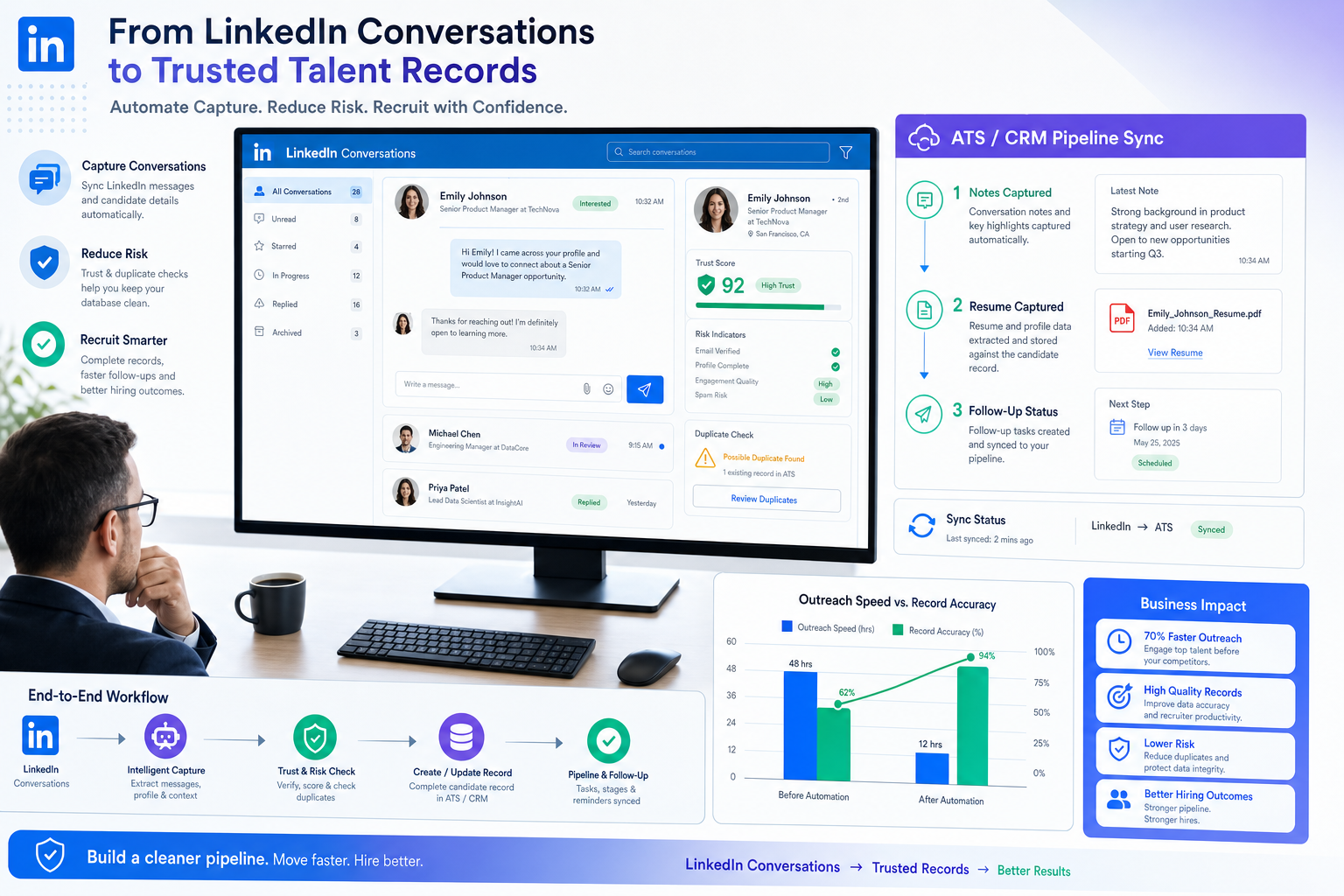
Headhunters evaluating linkedin sales automation tools can use this article to spot trust, sync, and follow-up risks before they cost replies and placements.
That matters more than most buying pages admit. In recruiting, a weak LinkedIn workflow does not just waste clicks. It damages response quality, creates duplicate outreach, weakens recruiter credibility, and leaves candidate interest sitting in inboxes instead of moving into a system the team can act on. Small agencies feel that pain in owner time and missed placements. Solo recruiters feel it in after-hours chasing. In-house teams feel it when hiring managers ask for status and the notes live across messages, spreadsheets, and memory.
In my own workflow, the most useful support has come from automation that handles repetitive LinkedIn communication without taking away final human judgment. One example is StrategyBrain AI Recruiter, which can keep candidate conversations moving, respond across time zones, and collect resumes or contact details from interested people while the recruiter still decides who to advance, how to assess the profile, and what happens next. I have found that this kind of support is most helpful when a recruiter is juggling several live searches and cannot afford to let a good reply go cold overnight.
The dynamic is not so different from the relationship candidates build with a specialist recruiter in accounting or finance. People often ignore that relationship until they urgently need a new role, and then availability, responsiveness, and trust suddenly become critical. A recruiter who already understands a candidate's niche, gives candid feedback, and stays in touch over time is far more likely to surface the right opportunity than someone making a rushed cold approach at the exact moment pressure peaks.
The same lesson carries into linkedin recruiting automation. If your process treats LinkedIn as a volume machine instead of a relationship channel, the technology will magnify the wrong habits. That is why buyers searching for linkedin sales automation tools, broader linkedin automation tools, or even lead generation automation tools need to evaluate not just outreach speed, but also specialization fit, feedback loops, record sync, and the ability to play the long game with candidates and prospects.
Table of Contents
- Why Trust Comes First in LinkedIn Recruiting Automation
- What Recruiter-Candidate Rapport Teaches About Automation
- LinkedIn Automation Tools Categories That Actually Matter
- Quick Comparison Table
- Recruiting Workflows vs Lead Generation Workflows
- How to Evaluate the Right Setup
- A Practical Stack for Agencies and In-House Teams
- How to Implement Safely
- Common Mistakes to Avoid
- FAQ
Why Trust Comes First in LinkedIn Recruiting Automation
Most conversations about LinkedIn recruiting automation start too late in the process. Teams compare features when the real issue is trust: trust in recruiter follow-up, trust in record accuracy, trust that specialization is understood, and trust that a candidate will not be treated like one more sequence step.
That is why the best buying lens is not simply "what can be automated?" but "what part of the relationship can be supported without lowering quality?" In practice, that usually separates safe workflow automation from risky activity automation.
Workflow automation around LinkedIn includes tasks like reminders, ATS or CRM sync, conversation tracking, resume capture, multilingual replies, scheduling support, and analytics. Activity automation on LinkedIn often refers to automated on-platform actions, scraping, or aggressive message behavior that can create account, policy, and brand risk.
From an operator's point of view, the safer and more durable path is obvious: use LinkedIn for discovery and relationship entry, then let your systems and approved workflows handle the repetitive admin around it.
Key insight: The real value of linkedin sales automation tools in recruiting is not more activity. It is better continuity between first contact, candidate interest, recruiter feedback, and the system of record.
What Recruiter-Candidate Rapport Teaches About Automation
The reference point many recruiting teams miss is that strong recruiting outcomes often begin before an urgent opening appears. Candidates who know a recruiter, trust their niche judgment, and have already had honest conversations are easier to re-engage than people contacted cold under deadline pressure.
That relationship logic offers four useful standards for evaluating automation.
1. Specialization Still Matters
A recruiter who covers finance, accounting, engineering, or commercial roles in depth will speak differently from a generalist blasting the same pitch to everyone. Automation should preserve that specialization. If a tool helps you segment by function, seniority, geography, or target company set, it supports recruiter credibility. If it pushes generic scale, it usually weakens it.
2. Referral and Network Work Are Part of the Job
Recruiters often reach back into existing networks first, especially when a role needs to move quickly. Good automation supports that reality by helping you track who referred whom, where prior conversations happened, and which contacts are worth revisiting. In both recruiting and lead generation, this is where many lead generation automation tools overlap with recruiting use cases.
3. Coachability and Feedback Loops Need Structure
Strong recruiters give feedback candidates do not always want to hear. Strong teams also need feedback on outreach quality, response quality, and handoff discipline. If your stack cannot capture notes, objections, candidate readiness, or recruiter observations cleanly, it will be difficult to improve the process over time.
4. The Long Game Beats Panic Outreach
One of the most practical lessons from recruiter rapport is that relationships compound. Staying visible, staying relevant, and keeping records current matters when someone becomes open to a move six months from now. The best linkedin automation tools for recruiting are usually the ones that help you maintain continuity, not just trigger one campaign.
LinkedIn Automation Tools Categories That Actually Matter
When buyers search for linkedin sales automation tools, they often compare products that belong to completely different categories. A better way to evaluate the market is by job to be done.
1. Search and Prospecting Tools
These support talent discovery, account mapping, and list building. For recruiters, the question is whether they make it easier to identify the right niche talent, share targets internally, and avoid duplicate sourcing across the desk or team.
2. Outreach and Conversation Support
This category covers cadence support, message drafting, reminders, and reply handling. In recruiting, the strongest use case is not blasting volume. It is helping a recruiter maintain timely, relevant communication with people who are actually worth speaking with.
That is where I found AI Recruiter useful in principle for high-response periods. Rather than replacing recruiter judgment, it can continue candidate conversations after hours, answer common role questions based on recruiter-provided job details, and collect resumes or contact information from interested candidates so momentum is not lost before the next work block. The recruiter still reviews the resume and makes the qualification call.
3. ATS and CRM Sync Tools
This is the least glamorous category and often the most valuable. If your LinkedIn activity does not land in the ATS or CRM correctly, you do not have an automation win. You have a temporary front-end shortcut that creates downstream confusion.
4. Enrichment and Data Quality Tools
These help standardize records, add context, and improve segmentation. Their value depends on whether the added data actually improves sourcing decisions, outreach relevance, and reporting accuracy.
5. Reporting and Analytics Tools
Managers need to know whether recruiters are getting replies, whether those replies turn into screens, and whether certain message patterns damage candidate experience. Analytics should help answer those questions.
6. AI Assistance Layers
This includes profile summarization, draft generation, prioritization, and multilingual communication. Used with discipline, these features reduce manual load. Used carelessly, they create generic outreach that candidates notice immediately.
Quick Comparison Table
| Category | Best For | Recruiting Fit | Lead Generation Fit | Risk Level | What to Check |
|---|---|---|---|---|---|
| Search / Prospecting | Building target talent lists | High | High | Low to Medium | Filters, niche targeting, collaboration |
| Outreach / Conversation Support | Timely follow-up and reply handling | High | High | Medium | Human review, personalization, reply logic |
| ATS / CRM Sync | Clean system records | Very High | High | Low | Field mapping, duplicate control, audit trail |
| Enrichment | Segmentation and context | Medium | High | Medium | Accuracy, refresh process, consent standards |
| Analytics | Performance visibility | High | High | Low | Reply quality, stage conversion, source tracking |
| AI Assistance | Drafting, prioritization, multilingual messaging | Medium to High | High | Medium | Factual control, tone, recruiter oversight |
Recruiting Workflows vs Lead Generation Workflows
There is real overlap between recruiting and outbound pipeline work, which is why searches for linkedin sales automation tools and lead generation automation tools often surface similar categories. But the operating logic is not identical.
Where They Overlap
Both depend on search, segmentation, and follow-up discipline.
Both need clean records and handoffs between front-end activity and back-end systems.
Both can benefit from multilingual communication, reminders, and conversation continuity.
Where Recruiting Is Different
Candidate trust and employer brand matter more than raw outreach volume.
Role fit and timing are often more nuanced than simple meeting booking.
Notes, feedback, and ownership matter because hiring is collaborative.
The recruiter remains accountable for shortlist quality, not just response count.
Where Lead Generation Is Different
Sales teams usually optimize for account coverage and meeting creation.
They can tolerate more rigid sequencing than most recruiting workflows should.
CRM orchestration often plays the central operational role.
This is why a recruiting team should be careful about borrowing the loudest outbound playbook. The fact that a process works for sales does not mean it will preserve recruiter credibility in a candidate-led conversation.
How to Evaluate the Right Setup
If you are comparing linkedin automation tools, use these criteria before you compare feature screenshots.
Start with relationship stage, not software category
Ask whether the problem sits at discovery, first outreach, active conversation, resume capture, handoff, or reporting. Different stages need different support.
Check whether the tool respects specialization
Can you keep separate workflows for different functions or markets? A finance recruiter and an engineering recruiter should not sound the same.
Test how feedback is captured
Recruiting is full of nuance: not interested now, open after bonus season, interested in remote only, willing to refer a former colleague, wants comp range first. If the stack cannot retain those signals, you lose one of the biggest long-term benefits of LinkedIn activity.
Inspect the handoff to the recruiter
Any AI-supported workflow should make it easy for the human recruiter to see the conversation, review the resume, and decide the next move. That handoff is non-negotiable.
Review compliance and data handling
Candidate data, contact details, and resumes need proper controls. If a vendor discusses encryption, data isolation, and limited data use clearly, that is a healthier sign than hype about fully hands-off hiring.
Look for long-game support
The best setups help you return to warm contacts, maintain organized networks, and build familiarity over time. That is more valuable than one burst of activity.
A Practical Stack for Agencies and In-House Teams
For most recruiting teams, the strongest stack is simple:
LinkedIn for discovery and initial relationship entry
An ATS or CRM as the system of record
Light automation for reminders, conversation continuity, and data capture
Human recruiter review for qualification, coaching, and shortlist decisions
In my experience, that setup works because it mirrors how good recruiters already operate. You build a niche network, stay in touch before urgency arrives, respond quickly when interest appears, and keep enough structured history to act intelligently later.
Where StrategyBrain AI Recruiter can fit is in the middle layer: the repetitive communication that otherwise slips when the desk gets busy. The useful part is not pretending the recruiter is removed from the process. The useful part is that candidate replies can still be handled, role questions can still be answered based on approved job information, and resumes can still be collected while the recruiter keeps ownership of evaluation and interview decisions.
That makes it more relevant for agency recruiters, in-house talent teams with global response windows, and independent recruiters handling multiple live openings at once. It is less about replacing recruiting craft and more about protecting it from admin overload.
How to Implement Safely
Map your current LinkedIn workflow. Document sourcing, outreach, reply handling, resume collection, and ATS updates.
Find the point where relationships stall. Usually this is slow follow-up, lost replies, or poor handoff into the ATS.
Automate around the relationship, not over it. Use technology to support speed and consistency without removing recruiter judgment.
Keep specialization visible. Separate workflows by desk, function, or market.
Review every handoff. Make sure a recruiter can easily inspect the conversation and the candidate materials gathered.
Measure quality. Track reply rates, conversation quality, resume yield, and progression to screen, not just activity counts.
A controlled pilot is usually enough to learn what matters. Test one function, a limited set of roles, and a clear review cycle before expanding.
Common Mistakes to Avoid
Buying for volume instead of continuity. Recruiting wins from trust and relevance more than sheer message count.
Ignoring recruiter specialization. Generic campaigns weaken niche credibility.
Letting conversations live outside the system of record. If replies are not captured properly, future relationship value is lost.
Confusing candidate interest with qualification. Interest is a signal, not a shortlist decision.
Skipping human review. Recruiters still need to assess resumes, nuance, timing, and fit.
Thinking only short term. The strongest LinkedIn workflows support the next search as much as the current one.
FAQ
What is linkedin recruiting automation?
It is the use of structured tools, approved integrations, and process support to reduce manual work around sourcing, outreach, reply handling, resume capture, and record updates tied to LinkedIn recruiting activity.
Are linkedin sales automation tools useful for recruiters?
Some are, especially where the underlying need is list building, follow-up structure, or conversation continuity. But recruiting teams should adapt those workflows carefully because candidate relationships are more sensitive than standard outbound sales motion.
How are linkedin automation tools different from lead generation automation tools?
The categories overlap, but recruiting usually requires stronger personalization, more nuanced qualification, and clearer handoffs into ATS-driven workflows. Lead generation automation tools often emphasize account coverage and meetings more heavily.
Can AI handle candidate conversations?
It can help with repetitive messaging, common role information, multilingual replies, and collecting candidate materials. Final qualification, resume review, and next-step decisions should remain with the recruiter.
What should recruiters prioritize first?
Prioritize the weak point that damages trust most: delayed replies, poor niche targeting, inconsistent notes, or broken ATS handoff. The best tool is the one that fixes that point without lowering judgment quality.
Who benefits most from this kind of setup?
Agency recruiters, headhunters, in-house talent teams with lean capacity, and global hiring teams often benefit most because they deal with time pressure, multiple live searches, and after-hours candidate replies.
Conclusion
The best linkedin sales automation tools are not necessarily the ones promising the most aggressive outreach. In recruiting, the better standard is whether they help you preserve trust, specialization, responsiveness, and record quality over time.
If you evaluate linkedin automation tools through that lens, the market becomes much clearer. Look for systems that support the relationship before urgency hits, help recruiters stay responsive when desks are overloaded, and keep final candidate decisions where they belong: with the recruiter.














