


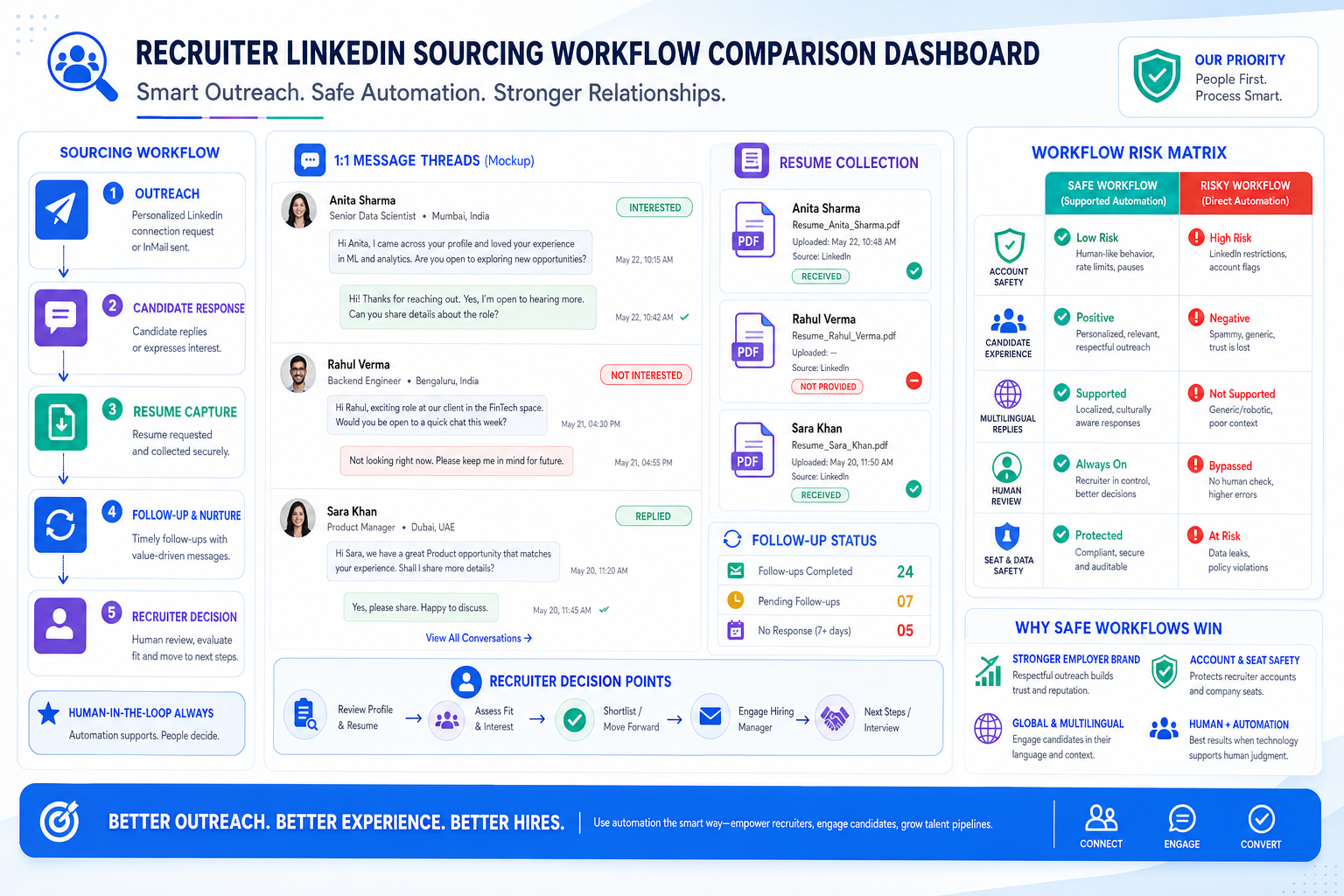
This article helps recruiters judge linkedin sales automation tools to avoid seat risk, protect employer brand, and fix follow-up gaps.
That distinction matters because hiring pressure has not eased. Recruiters still have to write stronger outreach, review heavy applicant flow, chase passive talent, coordinate hiring managers, and keep roles from sitting open long enough to hurt team output and morale. For a solo recruiter, that means lost hours and missed replies. For a small agency owner, it means slower delivery and strained client trust. For in-house talent teams, it often means employer brand damage when promising candidates receive late, generic, or inconsistent communication.
In my own LinkedIn sourcing workflow, I found that StrategyBrain AI Recruiter was most useful not as a replacement for recruiter judgment, but as a way to handle repetitive first-touch communication, after-hours replies, and resume collection from interested candidates. It can keep conversations moving across time zones and languages while I still make the final call on fit, shortlist quality, and next-step decisions. That matters when the real bottleneck is not finding software that sends more messages, but building a process that keeps candidate momentum without making recruiter seats vulnerable.
The practical problem looks very familiar. A business leader knows the right people matter most, but the path to hiring them is crowded with drafting job descriptions, sorting through applications, screening, interviewing, and negotiating offers in a market where skilled candidates are often passive rather than actively applying. In that situation, the recruiter is not just posting a role and waiting. They are searching, messaging, fielding questions about compensation and team fit, tracking who is open to move, and deciding which conversations deserve immediate follow-up before interest cools.
That is exactly where LinkedIn recruiting automation becomes a real evaluation issue. The same market that promotes best linkedin automation tools and lead generation automation tools often mixes together safe workflow support and unsafe on-platform automation. For recruiters, the better question is not which tool promises the most activity. It is which setup helps you reach passive talent, protect account access, preserve employer brand, and move qualified people into a structured hiring process with less manual friction.
Table of Contents
- Why hiring pressure changes the automation decision
- What LinkedIn recruiting automation should actually mean
- What recruiters can borrow from agency hiring logic
- Native workflow support vs third-party automation risk
- The main tool categories recruiters should compare
- Quick comparison table
- How to choose the right setup
- My experience using StrategyBrain AI Recruiter
- Mistakes that cause automation problems
- FAQ
Why Hiring Pressure Changes the Automation Decision
Hiring has always been hard, but the current market makes the work more layered than many software roundups admit. The recruiter is expected to source hard-to-reach candidates, maintain a credible employer story, move quickly, and still avoid rushed screening decisions. When good people are scarce in a location or specialty, the highest-value talent is often passive. That means recruiting success depends less on raw applicant volume and more on disciplined outreach, timely replies, and strong handoff into the rest of the hiring process.
This is why many recruiting teams begin with research into linkedin sales automation tools. They want speed, consistency, and less manual copy-paste. The problem is that sales-style automation content often overvalues output volume and undervalues candidate experience, account safety, and decision quality. A recruiter does not win by touching the most profiles. A recruiter wins by opening the right conversations, maintaining trust, and turning interest into an organized evaluation process.
That same logic is why recruitment agencies remain valuable to employers. A good recruiter does more than fill seats. They save time, reduce hiring stress, represent the employer in the market, and improve the odds of finding candidates who are both capable and likely to stay. Automation should support those outcomes. If it undermines them, it is the wrong kind of automation.
What LinkedIn Recruiting Automation Should Actually Mean
LinkedIn recruiting automation should mean reducing repetitive work around sourcing and candidate communication without outsourcing core hiring judgment to a bot and without automating risky visible account behavior.
That definition is important because the term is often blurred with broad categories like best linkedin automation tools or lead generation automation tools. In recruiting, the safest and most useful automations are usually around:
- Drafting outreach faster
- Following up consistently
- Responding when candidates reply after hours
- Capturing resumes and contact details from interested candidates
- Routing candidate information into a structured internal workflow
- Giving recruiters reminders and conversation history
By contrast, recruiters should be much more cautious about automation that directly imitates human behavior on LinkedIn, relies on browser manipulation, or treats candidate outreach like high-volume lead extraction.
Key insight: The best recruiting setup is usually not the one that automates the most LinkedIn activity. It is the one that protects recruiter seats while making candidate communication faster, cleaner, and easier to review.
What Recruiters Can Borrow From Agency Hiring Logic
The reference point that matters here is not generic SaaS automation. It is how experienced recruitment agencies think about value. Agencies justify their place by doing five things well: finding stronger candidates than job boards alone can produce, saving employers time, reducing hiring stress, representing the employer credibly, and helping improve long-term fit to lower turnover risk.
Those same five ideas create a better lens for evaluating linkedin sales automation tools in recruiting:
- Can it help reach passive candidates? If not, it may add admin without improving sourcing quality.
- Does it save meaningful recruiter time? Resume review and candidate follow-up are expensive in hours, not just effort.
- Does it improve candidate-facing communication? Employer brand is shaped one message at a time.
- Can it help surface fit, not just interest? Recruiting still needs human qualification.
- Does it support a consultative workflow? Recruiters need context, notes, and handoff, not just message counts.
That agency-style lens is more useful than many software comparison grids because it starts with the hiring mission rather than the automation label.
Native Workflow Support vs Third-Party Automation Risk
Recruiters should separate three very different things when reviewing the market.
1. Native or platform-aligned workflow support
This includes structured messaging workflows, legitimate settings, and approved process support that help recruiters work more consistently without imitating user actions. It is the safest place to start.
2. External workflow support outside visible account automation
Some tools help recruiters prepare drafts, track replies, capture resumes, manage multilingual communication, or move candidate data into a workflow that the recruiter controls. This category can be genuinely useful because it reduces admin without fully surrendering the conversation or final qualification decision.
3. Risk-heavy automation patterns
Be cautious with tools that promise to scrape data, alter page behavior, automate repetitive actions directly on LinkedIn, or scale activity in a way that looks machine-driven. Those products may still appear in lists of the best linkedin automation tools, but that does not make them recruiting-safe.
For talent teams, the real test is simple: does the system help a recruiter do better work, or does it push account behavior into territory that is difficult to supervise and defend?
The Main Tool Categories Recruiters Should Compare
Instead of comparing everything under one automation label, evaluate tools by recruiting job to be done.
Outreach and follow-up tools
These help with sequencing, reminders, and conversation continuity. In recruiting, they are most valuable when they prevent dropped follow-up and allow thoughtful review before next steps.
Look for:
- Manual review points
- Reply detection and pause logic
- Role-specific personalization support
- Ownership by recruiter, researcher, or account lead
- Conversation history that can be checked quickly
Resume and contact capture tools
This is one of the most practical areas for recruiting. If an interested candidate can send a resume or contact details without the recruiter manually chasing every step, the workflow becomes easier to manage. It also reduces the risk that warm candidates disappear between interest and screening.
Multilingual communication support
For cross-border hiring, after-hours outreach, or agency teams with international searches, this can be extremely helpful. Speed matters, but clarity matters more. Language support is useful when it reduces friction and misunderstanding, not when it creates generic messaging at scale.
Lead extraction and scraping-oriented tools
This is where many lead generation automation tools become less attractive for serious recruiting teams. Exporting more names is not the same thing as building a better hiring process. If a workflow creates a long list but weak follow-up, poor documentation, and unclear ownership, the recruiter is left with more noise rather than more talent.
Workflow and handoff systems
Any setup that helps candidate conversations become organized records is valuable. Recruiters need to know who replied, who sent a resume, who asked about compensation, and who should move to a live screening conversation. The best systems reduce memory-based recruiting.
Quick Comparison: What Matters Most for Recruiting Teams
| Category | What it automates | Main recruiting value | Main risk | Best fit |
|---|---|---|---|---|
| Workflow support tools | Reminders, draft prep, tracking | Less admin, better consistency | Limited if team process is weak | Most recruiting teams |
| Resume capture tools | Collection of CVs and contact details | Faster candidate handoff | Still needs human review | Agency and in-house sourcing teams |
| Multilingual communication tools | Cross-language candidate messaging | Supports global hiring and off-hours replies | Tone must still be reviewed | International recruiting teams |
| Sequencing tools | Follow-up timing and cadence | Fewer missed conversations | Can become impersonal | High-volume sourcing functions |
| Lead scraping tools | Bulk profile extraction | More raw names | High compliance and quality concerns | Usually a weak fit for recruiting-first teams |
| Direct account automation tools | Visible LinkedIn actions | Promised scale | Highest seat and policy risk | Generally not recommended |
How to Choose the Right Setup
If you are evaluating linkedin sales automation tools for recruiting, use this framework.
1. Start with the hiring bottleneck, not the feature list
Is your team losing time in first-touch outreach, after-hours replies, candidate re-engagement, or resume collection? Define the bottleneck before you compare software.
2. Check whether passive candidate outreach is actually improved
The strongest recruiters do not depend only on job boards. If the tool does not help with sourcing and maintaining passive-candidate conversations, it may not solve the real problem.
3. Protect employer brand in every message
One underappreciated lesson from agency recruiting is that recruiters represent the employer in the market. Any automation layer that creates robotic, mistimed, or irrelevant communication weakens brand perception.
4. Keep final qualification human
Interest is not fit. A candidate can be open to hearing more and still be wrong for the role. Your system should support screening, not skip it.
5. Review seat safety before rollout
Ask exactly what activity is being automated, where it happens, and how visible it is. Account protection is a strategic concern for recruiters, not a technical footnote.
6. Make sure the workflow supports consultation, not just activity
Recruiters advise hiring managers on market conditions, candidate sentiment, compensation questions, and response quality. If the system gives you more activity but less clarity, it is not helping enough.
My Experience Using StrategyBrain AI Recruiter
In practice, the most useful test for me was whether a tool could help with the exact moments where manual recruiting work tends to stall: an interested passive candidate replies late in the evening, asks a few basic questions about the role, wants to know whether compensation is realistic, and then disappears because the recruiter cannot continue the thread quickly enough. That is the gap where I used AI Recruiter as workflow support.
What stood out was not some fantasy of fully automated hiring. It was the operational relief of having candidate conversations continue, often across time zones, while the system handled repetitive first-stage messaging and prompted resume sharing from people who were genuinely interested. I still reviewed the resume, checked whether the background matched the role, and decided whether to move the person into screening. That division of labor felt right. The software handled repetitive conversation continuity; I handled judgment.
I also found its multilingual support useful when searches reached candidates who were more comfortable replying in their native language. In those cases, the system reduced friction at the top of the funnel without forcing me to compromise on later-stage evaluation. Recruiters who work agency desks, support overseas hiring, or deal with after-hours response windows will recognize the value quickly. For readers who want to understand the operating model in more detail, the public product walkthrough and conversation examples are worth reviewing at this overview and these conversation cases.
The right expectation, though, is important. This type of system can help replace repetitive LinkedIn recruiting steps such as opening conversations, answering routine role questions, and collecting resumes from interested candidates. It does not remove the recruiter's responsibility to assess quality, shortlist carefully, and protect the client or employer from weak fits. Used that way, it can be a serious aid. Used as a substitute for recruiting judgment, it becomes a process risk.
Mistakes That Cause Automation Problems
Confusing candidate volume with hiring progress
More names and more messages do not automatically create better searches. Recruiting progress comes from qualified movement, not dashboard activity.
Buying sales software without a recruiting lens
Many of the best linkedin automation tools are designed around prospecting logic. Recruiters need to judge them by candidate experience, fit assessment support, and account safety.
Ignoring the consultative side of recruiting
The best recruiters act as advisors, not just senders of outreach. If the tool makes it harder to understand compensation objections, candidate timing, or market feedback, it reduces strategic value.
Automating visible LinkedIn behavior too aggressively
This is the most obvious risk area. Recruiters should be skeptical of anything that depends on scraping, browser manipulation, or heavy direct account automation.
Removing the recruiter from qualification too early
Candidate interest is only one signal. Resume quality, trajectory, motivation, and role fit still require human review.
FAQ
What is LinkedIn recruiting automation?
It is the use of software and workflow systems to reduce repetitive sourcing and outreach work tied to LinkedIn recruiting. The best version supports communication and handoff without automating risky visible account actions.
Are linkedin sales automation tools safe for recruiters?
Some can be useful if they focus on workflow support, reminders, draft help, or candidate handoff. Recruiters should be careful with tools that automate direct LinkedIn activity, scrape data, or rely on aggressive browser behavior.
How are best linkedin automation tools different for recruiting?
Recruiting teams need different criteria than sales teams. They should evaluate candidate experience, employer brand impact, fit assessment support, and account protection instead of just message volume and throughput.
Do lead generation automation tools work for recruiting?
Some features overlap, especially for organizing outreach and follow-up. But many lead generation automation tools are built for contact extraction and scale rather than nuanced candidate engagement, which limits their value for recruiters.
Can AI help with passive candidate outreach?
Yes, especially for first-touch communication, after-hours replies, multilingual messaging, and resume capture from interested candidates. Recruiters should still own final screening and qualification.
Who benefits most from this kind of workflow?
Agency recruiters, headhunters, in-house sourcing teams, and HR leaders dealing with cross-border hiring or high message volume can benefit most when they use automation to support, not replace, recruiter judgment.
Conclusion
If you started this search looking for linkedin sales automation tools, the strongest recruiting answer is usually more selective than the market suggests. Hiring is difficult because the work is not just about sending outreach. It is about finding passive talent, saving time, representing the employer well, and improving fit. That is the same logic that makes experienced recruiters and agencies valuable in the first place.
So when you compare the best linkedin automation tools or broader lead generation automation tools, use a recruiting-first standard. Favor systems that help maintain candidate conversations, collect resumes, support multilingual communication when needed, and keep final evaluation in recruiter hands. That is how LinkedIn recruiting automation becomes genuinely useful instead of merely busy.














