


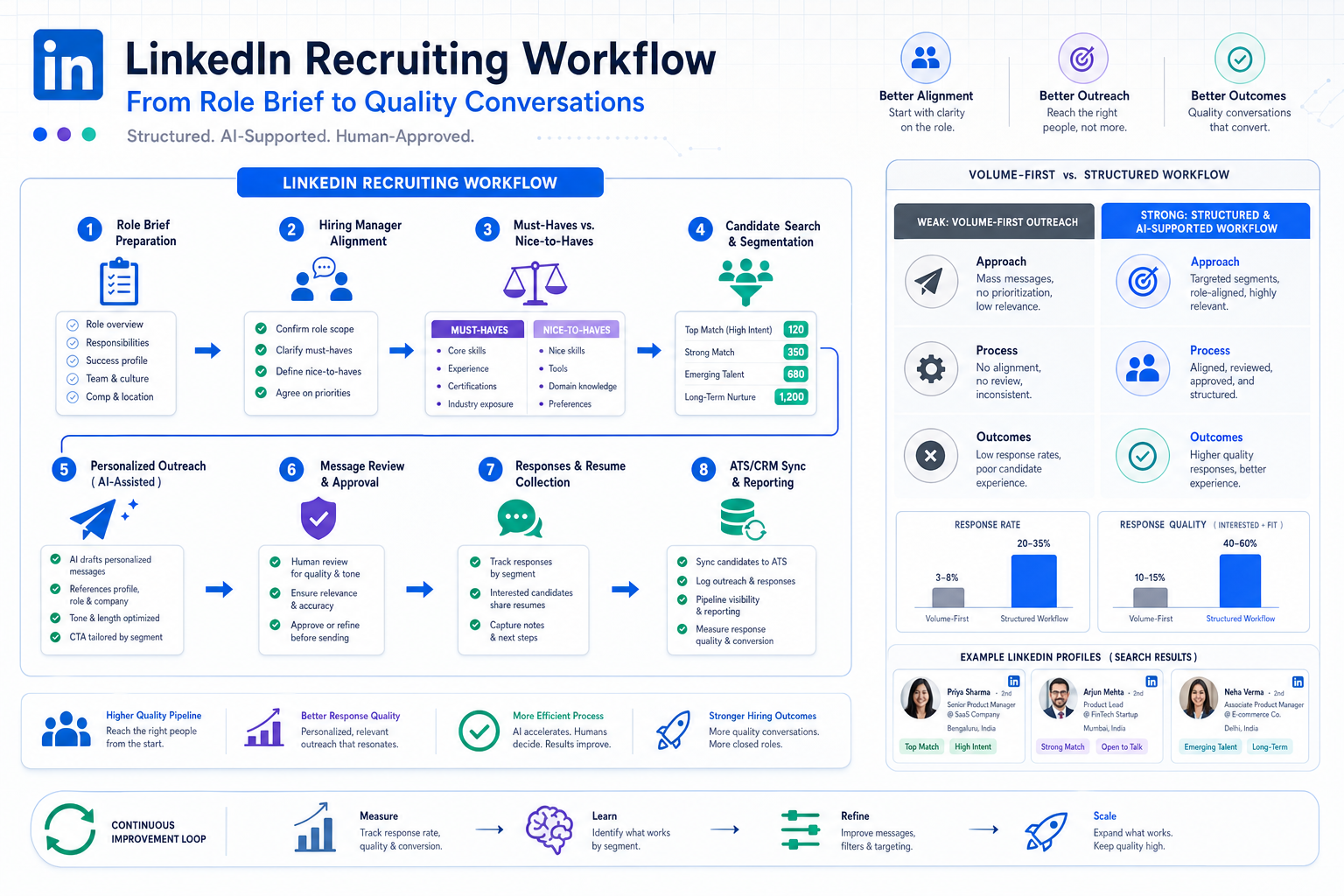
This article helps headhunters judge whether a linkedin connection automation tool will improve reply quality or amplify a weak brief.
That sounds obvious, but in practice many teams still start in the wrong place. They chase send volume before clarifying the role, skip alignment with hiring managers, and treat LinkedIn outreach like a generic outbound motion. The result is familiar to agency owners, independent recruiters, and in-house talent teams alike: weak reply quality, duplicated effort, confused follow-up, longer time-to-submit, and unnecessary risk to account health and employer reputation.
That is also where StrategyBrain AI Recruiter can help when it is used as workflow support rather than as a substitute for recruiting judgment. In my own evaluation of AI-assisted LinkedIn workflows, the most useful capabilities were continuous candidate messaging across time zones, automated collection of resumes and contact details from interested prospects, and structured handling of repetitive first-touch conversations. The recruiter still has to review resumes, assess fit, and decide who moves forward, but that support can remove a lot of avoidable manual drag.
A more grounded way to think about LinkedIn recruiting automation starts earlier, with the employer-recruiter relationship itself. Before a recruiter can run a good search, the hiring side has to do real preparation: clarify who owns the process, define the timeline, explain which details are confidential versus shareable, and make sure the people closest to the work have shaped the job description. In strong searches, recruiters are not guessing from a title alone; they are given context about team culture, reporting lines, required skills, and what success in the role actually looks like.
That opening scene matters because it exposes the real failure point behind many automation discussions. If the brief is vague, if the hiring manager is absent, or if the team has not ranked essentials versus nice-to-haves, then no linkedin connection automation tool will rescue the campaign. It will only accelerate poorly framed outreach. That is why this article connects LinkedIn recruiting automation to recruiter preparation, stakeholder alignment, message review, and the narrower question of where lessons from linkedin automated lead generation do and do not belong in hiring.
- Why preparation matters before automation
- What LinkedIn recruiting automation should actually do
- What a linkedin connection automation tool can safely support
- How to build a role brief recruiters can actually use
- Recruiting automation vs. linkedin automated lead generation
- What good linkedin automation consultation should include
- A practical implementation checklist
- How AI-supported workflows fit real recruiting work
- Common mistakes teams still make
- FAQ
Why preparation matters before automation
Experienced recruiters learn this early: search quality is usually decided before the first message is ever sent. When employers do the work up front, the entire sourcing process becomes more usable. That means a current job description, agreement on must-haves versus preferences, visibility into interview stages, and honest discussion about compensation, flexibility, travel, approvals, and timeline. Without that foundation, automation creates activity but not clarity.
The reference point here is practical and old-school in the best way. Good recruiters have always needed context from the client side: not just the job title, but the department environment, team expectations, reporting structure, and culture. A site visit or direct intake discussion often reveals details that never make it into a requisition, yet those details strongly affect sourcing and outreach. LinkedIn recruiting automation works better when it is built on that same discipline.
For recruiting leaders, that means the first evaluation question is not, “Which tool sends faster?” It is, “Can our recruiters get enough context to target correctly, personalize credibly, and keep the process moving?” If the answer is no, the problem is operational before it is technical.
What LinkedIn recruiting automation should actually do
In recruiting, automation should support the workflow around LinkedIn rather than trying to replace every interaction on LinkedIn itself. The strongest use cases are usually search planning, candidate segmentation, reminder systems, draft assistance, response handling, and clean handoff into an ATS or CRM after human review.
That distinction matters because recruiter work is not just message sending. It includes intake calibration, list prioritization, candidate relevance checks, hiring manager coordination, and tracking who said what and when. A usable automation layer should reduce repetitive admin while protecting the parts of the process where recruiter judgment creates value.
In practical terms, LinkedIn recruiting automation is usually most helpful when it improves:
- Target definition before sourcing begins
- Candidate list organization by role, geography, or seniority
- Drafting and sequencing of outreach with recruiter approval
- Collection of candidate replies, resumes, and contact details
- Follow-up discipline across time zones and after-hours windows
- Movement of qualified conversations into ATS or CRM records
That is very different from a fantasy of unlimited hands-off outreach. Recruiters still need to decide whether a candidate is right for the brief and whether the brief itself needs to change based on market feedback.
What a linkedin connection automation tool can safely support
When buyers search for a linkedin connection automation tool, they are often trying to solve one of four problems: not enough recruiter hours, poor follow-up consistency, scattered candidate data, or weak initial targeting. Those are real problems. But the solution should be designed carefully.
Lower-risk support areas usually include:
- Role-based search criteria planning
- Segmenting candidate pools before outreach
- Drafting message variants for recruiter review
- Handling reminders and task sequencing outside LinkedIn
- Collecting inbound information from interested candidates
- Syncing outcomes into ATS or CRM systems after review
Judgment-heavy steps should stay with recruiters:
- Final candidate fit assessment
- Approval of connection wording and follow-up tone
- Interpretation of nuanced candidate replies
- Escalation of sensitive compensation or process questions
- Decision on shortlist, submission, and interview movement
Warning signs of a poor setup include:
- No role intake discipline before outreach begins
- No agreement on what information can be shared with candidates
- No ranking of essential versus optional requirements
- No system of record for conversation outcomes
- Blind volume tactics borrowed from generic prospecting playbooks
From a recruiter’s point of view, the safest and most useful interpretation of automation is workflow assistance that helps humans respond faster and more consistently without removing their control over fit, messaging, and next steps.
How to build a role brief recruiters can actually use
One of the most valuable lessons from traditional recruiter-client collaboration is that the quality of the brief shapes everything that follows. If you want better results from LinkedIn automation, improve the intake first.
1. Bring in the people closest to the role
HR should not be left carrying the brief alone if line managers understand the real day-to-day demands. Recruiters need the practical detail that only front-line stakeholders can provide: what the person will own, what kinds of trade-offs matter, what skills are truly essential, and what kind of work style tends to succeed on that team.
2. Separate essentials from preferences
This is one of the clearest ways to improve sourcing quality. If every requirement is treated as mandatory, outreach becomes narrow, slow, and unrealistic. Good recruiters need to know which points are non-negotiable, which ones are flexible, and where market feedback may require compromise.
3. Define the process before candidates enter it
Strong hiring teams tell recruiters what the timeline looks like, how many interviews are likely, whether assessments or background checks are involved, and who will make decisions at each stage. That protects candidate experience and makes follow-up more believable.
4. Give recruiters the bigger business context
Titles alone do not explain why the hire matters. Recruiters write better messages and make better prioritization decisions when they understand the team, the function, the business pressure behind the search, and what success in the role should look like after the person joins.
These steps are not old-fashioned admin. They are the operating conditions that make LinkedIn recruiting automation worth using at all.
Recruiting automation vs. linkedin automated lead generation
This is where many teams drift off course. Linkedin automated lead generation and recruiting automation share some workflow ideas, but they are not the same practice.
| Area | Recruiting Automation | LinkedIn Automated Lead Generation |
|---|---|---|
| Main goal | Find and engage suitable candidates | Create sales conversations and pipeline |
| Primary quality test | Role fit and candidate response quality | Lead volume and meeting creation |
| Critical preparation | Role brief, hiring context, interview process | ICP definition, offer positioning, objection flow |
| Message standard | Relevance, credibility, employer context | Segmentation, hooks, follow-up cadence |
| Main risk of poor execution | Weak candidate experience and lost trust | Low reply rates and poor lead quality |
Some lessons from linkedin automated lead generation do carry over. Segmentation helps. Clean list management helps. Follow-up orchestration helps. But recruiting has a different trust model. Candidates are not just prospects in a commercial funnel; they are evaluating a job, a manager, a team, and often a life change. That means the bar for relevance and context is higher.
If your team borrows only one idea from sales-style automation, make it process discipline, not volume obsession.
What good linkedin automation consultation should include
A serious linkedin automation consultation should feel like a recruiting operations review, not a shortcut demo. The right conversation starts with how your recruiters currently work, where searches slow down, where communication breaks, and which handoffs create duplicate effort.
A useful consultation normally covers:
- Intake quality: how roles are defined and whether must-haves are ranked clearly
- Stakeholder alignment: which managers contribute to the brief and how feedback is returned
- LinkedIn workflow mapping: sourcing, list building, outreach, response handling, and follow-up
- System continuity: what gets written into ATS or CRM records and when
- Candidate communication design: what can be automated, what needs review, and what should stay manual
- Compliance boundaries: where supportive workflow ends and platform risk begins
That is why a strong linkedin automation consultation often improves results even before any new software is adopted. It forces the team to document assumptions that were previously informal.
A practical implementation checklist
If you want LinkedIn recruiting automation that actually helps recruiters, roll it out in phases.
- Audit the current search process. Identify whether delays come from targeting, messaging, follow-up, data entry, or manager feedback.
- Rebuild the intake template. Add fields for success profile, team context, essentials vs. preferences, process steps, and compensation boundaries.
- Segment the candidate market. Separate outreach for passive talent, niche specialists, referrals, and prior contacts.
- Create reviewable messaging paths. Draft connection requests, follow-ups, and information responses that recruiters can approve and edit.
- Define what gets captured. Decide how resumes, contact details, and conversation outcomes move into your ATS or CRM.
- Set clear human checkpoints. Recruiters should own fit decisions, shortlist movement, and final communication judgment.
- Monitor quality over activity. Review reply quality, role-fit quality, and progression to interview rather than raw send counts.
This approach keeps the technology in the right place: as a support layer for a process that is already becoming clearer and more consistent.
How AI-supported workflows fit real recruiting work
I have found that AI support becomes most useful at the exact points where recruiter discipline already exists but repetition keeps stealing time. For example, once the brief is solid and the target audience is segmented, an AI-supported workflow can keep candidate conversations moving outside recruiter working hours, handle early information exchange, and collect resumes from people who are genuinely interested.
That is the practical value I saw in AI Recruiter. It can maintain always-on LinkedIn communication, work across languages for international searches, and capture candidate resumes and contact information so the recruiter is not manually chasing the same basics every evening. What it does not remove—and should not remove—is the recruiter’s responsibility to evaluate the resume, test the fit against the brief, and decide whether to move the person into interview.
For agency recruiters and headhunters working across regions, the multilingual side is especially useful. Candidates often reply after local working hours, and response lag can quietly kill momentum. In those situations, StrategyBrain AI Recruiter is best understood as continuity support: it helps keep the conversation alive until the recruiter steps in with a proper assessment and next-step judgment.
That same model also makes sense for in-house teams with high req volume. The more repetitive the early-stage coordination becomes, the more value there is in giving recruiters structured assistance while preserving human control over selection.
Common mistakes teams still make
Starting with the tool instead of the brief
If the role is poorly defined, automation only spreads the confusion faster. Intake quality still drives sourcing quality.
Leaving hiring managers out of the preparation stage
When the people closest to the role do not contribute, recruiters miss the real operating context and outreach becomes generic.
Treating candidate communication like sales prospecting
Borrow from linkedin automated lead generation for segmentation and process flow if you want, but not for low-context, volume-first messaging.
Failing to set process expectations early
Candidates should not learn halfway through that there are extra interviews, assessments, or checks. Recruiters need that information before outreach begins.
Automating steps that require judgment
Resume review, relevance decisions, and nuanced candidate handling should stay with trained recruiters, even if AI helps with repetitive front-end work.
Ignoring continuity with internal systems
If candidate data and conversation outcomes do not land in the ATS or CRM, recruiters end up repeating work and losing history.
FAQ
What is the safest way to use a linkedin connection automation tool in recruiting?
The safest approach is to use automation around the workflow: targeting support, list organization, reminders, candidate information capture, and ATS or CRM updates after human review. Recruiters should keep control over fit assessment, final messaging decisions, and shortlist movement.
Why does preparation matter so much before LinkedIn automation?
Because recruiters need a real brief, not just a title. Clear essentials, process timing, manager input, and team context all improve targeting and outreach quality. Without that, automation just increases activity around a weak search foundation.
How is recruiting different from linkedin automated lead generation?
Recruiting has a higher requirement for relevance, context, and candidate trust. Some process logic overlaps, but the success measures are different: hiring teams care about fit, response quality, and progression, not just volume.
What should be covered in linkedin automation consultation?
A good linkedin automation consultation should review intake quality, stakeholder alignment, LinkedIn workflow design, ATS or CRM handoffs, communication rules, and compliance boundaries.
Can AI handle the whole LinkedIn recruiting process?
No responsible recruiter should want that. AI can assist with repetitive messaging, after-hours continuity, multilingual communication, and collecting resumes or contact details, but recruiters still need to evaluate candidates and make the final decisions.
Who benefits most from this kind of setup?
Agency recruiters, headhunters, in-house talent teams, and hiring leaders who already have meaningful search volume and want cleaner follow-up, better continuity, and less manual repetition without giving up quality control.
Conclusion
The best LinkedIn recruiting automation is not the one that promises the most activity. It is the one that keeps recruiter work usable: strong intake, clear role priorities, aligned stakeholders, disciplined follow-up, and human judgment at the moments that matter most.
If you are evaluating a linkedin connection automation tool, start with the same questions a good recruiter asks at the beginning of any search: who helped define the role, what success looks like, which requirements matter most, how the hiring process will run, and where candidate communication is likely to break down. From there, a practical linkedin automation consultation and carefully used AI support can strengthen the workflow without turning recruiting into a volume game borrowed from linkedin automated lead generation.














