


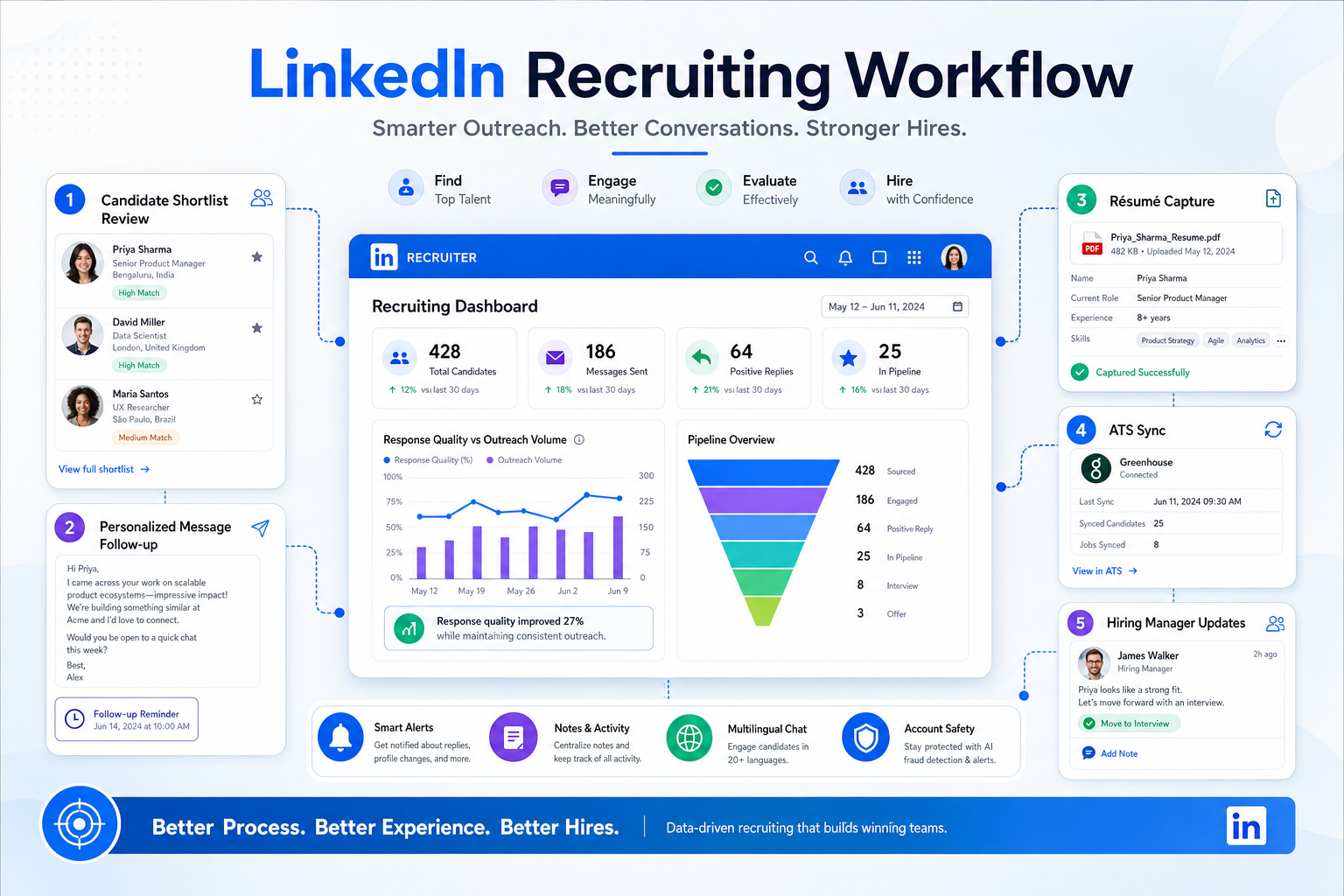
Before adopting a linkedin connection automation tool, headhunters can use this guide to avoid clutter, weak replies, and account risk.
That conclusion matters more in a candidates' market, where recruiters are often juggling multiple live searches, repeat follow-up, and hiring teams that want speed without sacrificing judgment. When outreach gets pushed into volume mode, the damage is usually visible fast: ignored invitations, weaker response quality, duplicated records, messy handoffs, and a recruiter account that becomes harder to trust as a serious professional asset.
In my own sourcing workflow, I have found that StrategyBrain AI Recruiter is most useful when it supports the repetitive parts around LinkedIn recruiting rather than pretending the recruiter no longer needs to think. Its always-on candidate messaging, multilingual follow-up, and résumé/contact capture can reduce the administrative drag that builds up after initial outreach, while the recruiter still makes the final call on fit, résumé review, and who actually moves to interview.
A useful way to frame this came from a market moment many recruiters recognize. When the Bank of Canada held its target rate at 1.75% in late 2018, the broader message was not just about monetary policy. Trade uncertainty was hurting business investment, oil was under pressure, yet hiring activity in many sectors still stayed competitive. In executive search terms, that meant something very practical: candidates could attract multiple offers, and some employers were adding new positions instead of simply backfilling departures.
That kind of market creates a specific recruiting scene. A recruiter is reviewing active requisitions, checking which accounting and finance roles are net-new headcount, replying to candidates who now have options, and updating notes before a hiring manager asks for pipeline status. If those actions live across scattered LinkedIn messages, spreadsheets, and memory, the process starts to break exactly when market competitiveness is highest. That is why linkedin recruiting automation should be evaluated as a workflow discipline first, not just as a linkedin connection automation tool or a version of linkedin automated lead generation borrowed from sales.
- Why market pressure changes the automation question
- What LinkedIn recruiting automation really means
- Why recruiters should be cautious with connection automation
- Safer ways to automate LinkedIn recruiting workflows
- My experience using AI support in LinkedIn recruiting
- How common recruiting software approaches compare
- Recruiting automation vs. sales lead generation
- How to choose a practical setup
- Common mistakes that create risk
- FAQ
Why market pressure changes the automation question
Recruiters rarely look for automation in a vacuum. They start looking when the market gets harder to manage manually. The reference point above is useful because it shows a pattern that still appears today: even when the economy sends mixed signals, good candidates can remain scarce, selective, and fast-moving. In that environment, the real strain is not just sending more messages. It is keeping sourcing, candidate context, and stakeholder timing aligned.
When markets stay competitive, three pressures usually rise at once:
- More candidates are considering multiple opportunities at the same time.
- Hiring teams open growth roles in addition to replacement roles.
- Recruiters have less room for slow follow-up or poor record keeping.
That is the backdrop for most searches around linkedin automation. The search intent is often practical: recruiters want to move faster on sourcing and candidate engagement. But the safer answer is usually not blind scale. It is better workflow control under pressure.
What LinkedIn recruiting automation really means
LinkedIn recruiting automation is best understood as structured support for sourcing, outreach, record capture, follow-up, and team coordination. It can include saving candidate details, syncing activity into an ATS, organizing notes, triggering reminders, and creating a more reliable sequence after a recruiter has already decided someone is worth contacting.
That is very different from treating a linkedin connection automation tool as the center of the process. Recruiters often search this phrase because connection requests are time-consuming. But recruiting value rarely comes from invitations alone. It comes from whether the right people are selected, whether the outreach feels relevant, and whether the recruiter can manage the next steps cleanly once interest appears.
This is also where confusion with linkedin automated lead generation starts. In sales, lead generation systems often optimize for touch volume and conversion stages. In recruiting, the decision threshold is higher. You are not just asking someone to take a meeting. You are asking them to consider changing employers, compensation structure, reporting lines, or long-term career direction.
From a recruiter's point of view, the practical order should be:
- Get role criteria and candidate targeting right.
- Reduce admin work around sourcing and response handling.
- Keep candidate records and internal notes connected.
- Use automation to support human judgment, not replace it.
Practical takeaway: In a competitive market, the biggest recruiting gains usually come from faster follow-up and cleaner workflow, not higher invitation volume.
Why recruiters should be cautious with connection automation
A linkedin connection automation tool can look attractive because it promises immediate activity. But recruiters carry a different kind of risk than most prospecting teams. A recruiter account is tied to professional credibility, long-term network quality, and ongoing access to candidates in the exact market where reputation matters.
LinkedIn has long signaled caution around excessive invitations, low-relevance outreach, and behavior that appears automated. Whether restrictions show up as invitation limits, account review, or broader access problems, the underlying lesson is the same: if automation weakens relevance and trust, it becomes expensive even before any policy issue appears.
The common warning signs are familiar:
- Connection requests sent at a scale that outpaces real candidate review.
- Near-identical notes delivered across very different profiles.
- Outreach patterns copied from sales-style linkedin automated lead generation.
- Little connection between sourcing decisions and ATS documentation.
- Recruiters spending more time cleaning records than building relationships.
For agency owners, internal TA leaders, and solo headhunters, the cost is not theoretical. A weak process can lower response rates, clutter future searches, and damage confidence from hiring managers who want to know where strong candidates stand right now.
Safer ways to automate LinkedIn recruiting workflows
The most useful linkedin automation usually happens around the connection request, not inside it. In practice, that means reducing friction before outreach and after response rather than forcing the initial step into a high-volume machine.
A safer workflow often looks like this:
- Build a targeted shortlist using clear role filters, geography, function, and seniority.
- Review relevance manually before outreach so the candidate list stays defensible.
- Capture approved profiles into a central workflow or ATS.
- Use reminders or sequences for follow-up after a real interaction begins.
- Track outcomes consistently so the hiring team can see progress without chasing the recruiter.
This approach reflects the same lesson from the market example earlier. When candidates have options and employers are opening new roles, recruiters do not win by producing more activity logs. They win by preventing dropped threads. That includes remembering who has another offer, which searches are growth hires, and where hiring manager feedback is still missing.
Useful automation points include:
- Candidate note capture after sourcing review.
- Record creation for approved prospects.
- Follow-up reminders after LinkedIn replies.
- Interview scheduling coordination.
- Hiring manager nudges for delayed feedback.
- Pipeline visibility across recruiters and coordinators.
My experience using AI support in LinkedIn recruiting
I do not think recruiters should hand over all first-touch judgment to software, but I have found that AI-supported workflow can be valuable when the bottleneck is message handling and after-hours continuity. In my own testing with StrategyBrain AI Recruiter, the useful part was not some fantasy of fully replacing the recruiter. It was the ability to keep candidate communication moving, collect contact details or résumés from interested people, and avoid losing momentum while I was still covering live searches and client updates.
That mattered most on searches where candidates replied outside working hours or in different languages. The platform's multilingual communication and round-the-clock response handling helped keep those conversations warm until I could step in. On interested candidates, it could also gather résumé and contact information so the next review step was easier to organize. I still handled the final résumé assessment, the fit decision, and whether to advance someone, which is exactly how it should work in executive search or serious in-house hiring.
If you want to see how that workflow is positioned, the product overview and the broader usage notes for headhunters are the most relevant starting points. The reason I mention it here is simple: in the kind of market described earlier, the administrative gap between initial sourcing and recruiter review is where many teams actually lose candidates.
How common recruiting software approaches compare
Most teams ask the wrong question first. Instead of asking which linkedin connection automation tool to use, ask which operating model fits your search pressure, recruiter bandwidth, and account-risk tolerance.
| Approach | Main Use | Strengths | Trade-offs | Best Fit |
|---|---|---|---|---|
| Connection-request automation tools | Increase invitation activity | Fast top-of-funnel output | Higher account risk, weaker personalization, often poor fit for sensitive hiring | Limited recruiting use; more common in prospecting-heavy environments |
| ATS-centered recruiting stacks | Track candidates and stages | Documentation, visibility, team coordination, reporting | Can feel slow if outreach handling is still manual | In-house teams, staffing firms, multi-role hiring operations |
| AI-supported LinkedIn recruiting workflow | Handle repetitive messaging and candidate capture | Improves follow-up continuity, supports multilingual communication, reduces admin work | Still requires recruiter review and clear process rules | Headhunters, agencies, and hiring teams managing active LinkedIn sourcing |
The operational difference is important. A pure connection tool measures motion. An ATS stack measures process control. AI-supported recruiting workflow can help bridge the space between those two if it is used to support communication and record capture rather than to flood the network with generic outreach.
Recruiting automation vs. sales lead generation
Search intent around linkedin automation often mixes recruiting and sales language, but the workflows are not interchangeable. Sales teams may be comfortable with larger prospect pools, heavier cadence testing, and broad funnel math. Recruiters usually cannot afford that style on specialized searches.
Where sales logic overlaps
- Both functions care about response rates and follow-up consistency.
- Both can benefit from reminders, sequencing, and cleaner records.
- Both often search for software using similar words.
Where recruiting differs
- Candidate trust matters more than touch volume.
- Role fit has to be reviewed before outreach, not after.
- The cost of a weak message is higher because the ask is larger.
- Internal stakeholders need a documented path from sourcing to interview.
That is why linkedin automated lead generation should not be imported directly into talent acquisition. The market scenario from the opening makes this clear. When candidates have multiple offers and companies are creating new roles, the recruiter who wins is usually the one who knows exactly who was contacted, why they were relevant, what they said, and what must happen next.
How to choose a practical setup
If you are evaluating LinkedIn recruiting automation, use a workflow-first checklist.
1. Start with the point of failure
If you are losing candidates because replies arrive after hours and no one follows up quickly, that is a communication continuity problem. If notes are scattered and hiring managers keep asking for updates, that is a record and visibility problem. If sourcers are reaching out to the wrong profiles, that is a targeting problem.
2. Protect the parts that need human judgment
Candidate relevance, compensation nuance, executive sensitivity, and final fit assessment should stay recruiter-led. A strong system reduces repetitive handling but does not erase accountability.
3. Check whether the workflow survives a competitive market
Ask whether the system would still hold up if candidates had multiple offers or if your team opened several new positions at once. That is a more realistic test than asking whether it can send more invitations.
4. Separate speed from spam
You can move faster with automation while still keeping outreach selective. Better note capture, multilingual response support, and résumé collection can improve throughput without pushing the risky parts of the process too hard.
5. Choose tools by coordination value
The best setup gives recruiters, coordinators, and hiring managers a cleaner shared view of the search. If software mainly adds noise, duplicate records, or extra cleanup, it is solving the wrong problem.
Common mistakes that create risk
Experienced recruiters usually run into trouble when they automate activity before they automate discipline.
- Treating recruiting like generic lead generation. That invites poor-fit outreach.
- Using a linkedin connection automation tool as the core strategy. It should never replace candidate judgment.
- Ignoring market context. In a competitive hiring market, slow follow-up can hurt more than low outreach volume.
- Letting candidate records live in too many places. Fragmented notes create avoidable loss.
- Overpromising AI's role. Recruiters still need to review résumés, judge fit, and decide next steps.
- Measuring output instead of process quality. More sends do not equal better recruiting.
FAQ
Is LinkedIn recruiting automation the same as using a linkedin connection automation tool?
No. LinkedIn recruiting automation is broader and safer when it includes sourcing organization, follow-up handling, candidate capture, and internal coordination. A linkedin connection automation tool usually refers to automation at the invitation layer only.
Is linkedin automation safe for recruiters?
It can be, if it supports workflow rather than imitating large-scale manual activity. The safest use cases are usually reminders, note capture, ATS updates, and controlled communication support.
How is linkedin automated lead generation different from recruiting?
Linkedin automated lead generation is usually built for sales pipelines. Recruiting requires stronger relevance, more trust, and a better documented path from first contact to interview.
When does AI support help most in LinkedIn recruiting?
It helps most when recruiters are losing time to repetitive messaging, after-hours replies, multilingual communication, or résumé and contact capture from interested candidates.
Should recruiters let AI decide who is qualified?
No. AI can support communication and administration, but the recruiter should still review the résumé, assess role fit, and decide who moves forward.
What is the safest alternative to mass connection automation?
A workflow-centered setup that combines careful sourcing, candidate tracking, structured follow-up, and selective outreach is usually the safer alternative.
Conclusion
If you started by searching for a linkedin connection automation tool, the better answer may be to rethink the problem first. In recruiting, especially in markets where candidates have options and companies are adding roles, speed matters most after judgment, not before it.
That is why the strongest form of linkedin automation is usually workflow-centered: better sourcing discipline, cleaner candidate records, faster follow-up, and AI support where repetitive communication creates drag. Used that way, LinkedIn recruiting automation becomes less about mass activity and more about preserving relevance, protecting account safety, and helping recruiters stay competitive when the market is moving quickly.














