


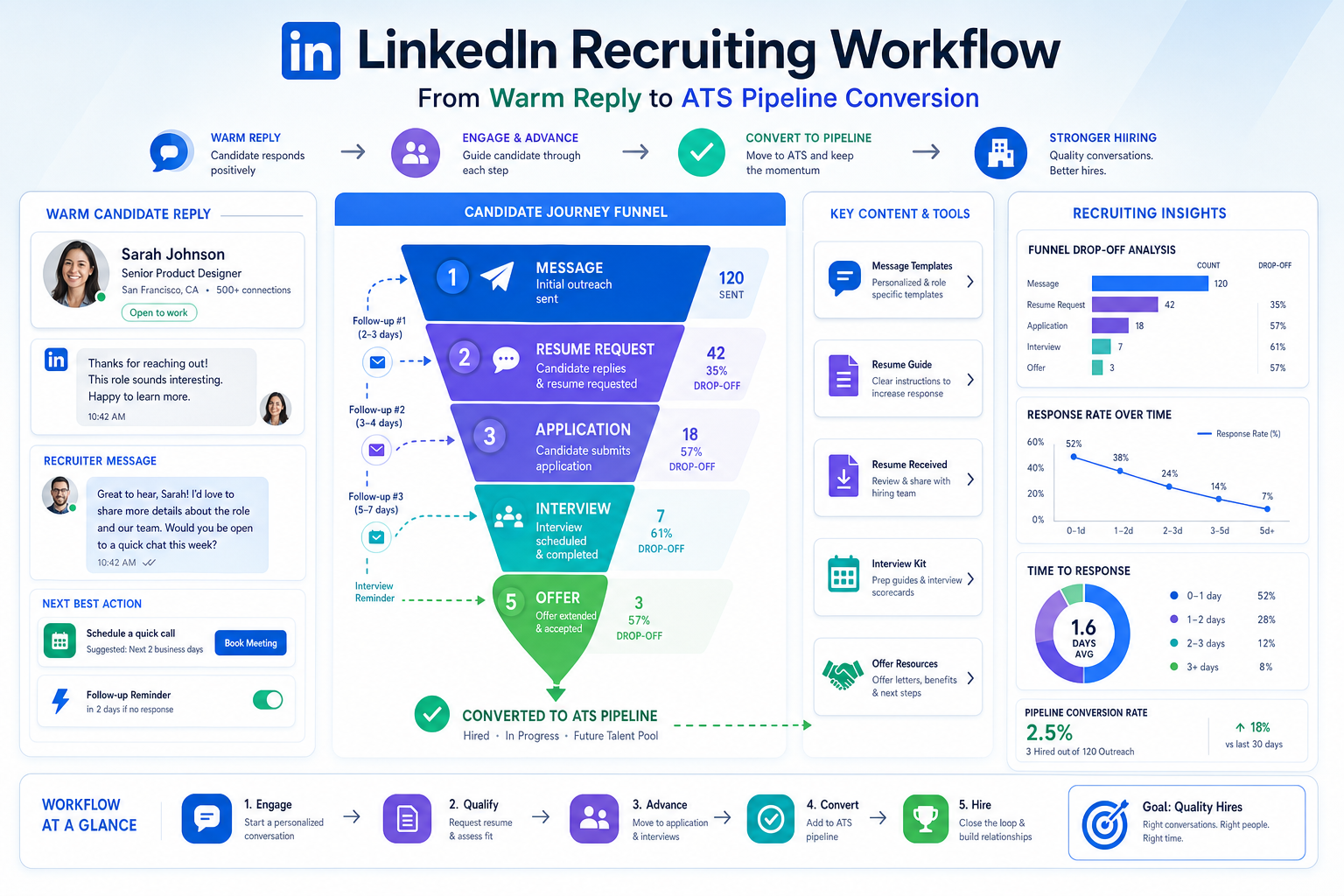
When follow-up breaks after a warm reply, this article helps recruiting leaders judge recruiting and applicant tracking software by whether it captures candidate readiness before strong talent goes cold.
That matters because the work often breaks down long before interviews start. A promising referral arrives, a recruiter asks for a resume, a candidate says they will send it later, and the thread goes cold. At the same time, hiring managers still expect fast shortlists, agency owners still need consultants to stay productive, and in-house teams still have to protect candidate experience while handling more roles than inboxes and spreadsheets can realistically support.
In my own workflow, tools like StrategyBrain AI Recruiter helped most when the problem was not final selection but early-stage consistency. Used carefully, it can keep outreach moving on LinkedIn, respond after hours, and collect resumes or contact details from interested people without forcing recruiters to babysit every conversation. The important boundary is that the recruiter still owns judgment: reviewing the resume, deciding who is actually qualified, and choosing the next step.
That gap between opportunity and follow-through is familiar to anyone who has watched a strong candidate market unfold in real time. People improve their odds by telling their network they are open, joining groups, refreshing their LinkedIn presence, keeping a current resume ready, and practicing how they explain their value. In other words, candidates often do the right prep work before a recruiter ever reaches them. But if the hiring side cannot capture that readiness quickly, the advantage disappears.
A candidate who is prepared to say “I can send it now,” willing to follow up by phone, and able to explain measurable value is exactly the kind of person recruiters do not want to lose between message, application, and interview stage. That is why understanding how does an applicant tracking system work matters in a more practical way than most software pages admit. The real issue is not just storage or keyword search. It is whether recruiting and applicant tracking software gives your team a reliable way to turn candidate readiness into visible pipeline progress, which is also the clearest way to understand how ats works in day-to-day recruiting.
Table of Contents
- Why Candidate Readiness Changes ATS Requirements
- What Is an Applicant Tracking System?
- How an ATS Works in 8 Practical Steps
- Where Recruitment Automation Tools Help Most
- Field Lessons From Networking, Follow-Up, and Value Messaging
- Why Recruiting Teams Adopt These Systems
- ATS vs Automation vs CRM vs HRIS
- What to Look for in Recruiting Software
- Common Buying and Workflow Mistakes
- Practical Selection Advice
- FAQ
Why Candidate Readiness Changes ATS Requirements
One of the easiest mistakes in recruiting operations is assuming that speed starts when an application lands in the system. In reality, speed often starts earlier, at the moment a candidate becomes reachable, interested, and prepared. A person who has already updated a resume, refined an elevator pitch, and started networking is much closer to a real hiring conversation than someone who clicks apply casually and disappears.
That changes what recruiters should expect from software. The best systems do not simply hold applicants after they arrive. They make it easier to capture intent, preserve communication history, collect documents quickly, and move interested people into a structured process before momentum fades.
From an operator's perspective, this is where recruitment automation tools and an ATS need to work together. If your team regularly loses warm talent between outreach and formal application, the problem is not only sourcing volume. It is workflow design.
What Is an Applicant Tracking System?
An applicant tracking system, or ATS, is the central system of record for recruiting. It stores candidate profiles, manages requisitions, tracks applicants through each hiring stage, and keeps the hiring team aligned on status, feedback, and next steps.
In practice, recruiting and applicant tracking software helps teams replace scattered spreadsheets, email chains, and disconnected notes with a structured hiring workflow. That matters whether you are an internal talent acquisition team, a boutique search firm, or an individual recruiter juggling active searches across clients.
The most useful way to define an ATS is not as a resume scanner. It is better understood as a hiring operating system: one place where application flow, candidate records, communications, interview progression, and reporting come together. That is why experienced recruiters ask not just what the software stores, but what behaviors it reinforces.
How an ATS Works in 8 Practical Steps
When people ask how does an applicant tracking system work, the clearest answer is to follow the hiring lifecycle from opening a role to reporting on outcomes.
- Create the requisition
A recruiter or hiring manager opens a requisition with the title, department, location, approval path, and baseline hiring criteria. Strong systems make intake more consistent, which matters because weak intake usually leads to weak screening later.
- Publish the job
Once approved, the role can be posted to the careers page and selected channels. This is one area where automation reduces repetitive posting work and keeps source tracking cleaner.
- Collect applications and candidate details
Candidates apply through forms that feed directly into the ATS. Their resumes, responses, source information, and contact details are stored in a profile recruiters can revisit and search.
- Parse resumes into searchable fields
Resume parsing converts unstructured documents into usable fields such as skills, titles, employers, education, and location. This is not perfect, but it saves time compared with opening every file manually.
- Screen and organize the pipeline
Recruiters review applicants using filters, tags, knockout questions, and searches. This is where many misunderstand how ats works. The software helps teams prioritize and route candidates, but quality still depends on sensible criteria and recruiter judgment.
- Coordinate interviews
Qualified applicants move forward to interviews. The ATS may support interviewer assignments, scorecards, scheduling workflows, and status updates so the team can work from one process instead of fragmented messages.
- Manage offers and handoffs
When a finalist is selected, the system can support offer approvals, document flow, and transition visibility between recruiting, HR, and hiring managers.
- Report on hiring funnel performance
Reporting helps teams understand source quality, stage conversion, delays, and drop-off points. This is often where hidden process issues become visible.
For most teams, that eight-step flow is the most practical explanation of how does an applicant tracking system work. It is not a single feature. It is a connected process from requisition through hire.
Where Recruitment Automation Tools Help Most
Recruitment automation tools are most useful when they reduce repetitive work without removing recruiter accountability. In everyday operations, the highest-value automations tend to sit around communication, document capture, and movement between stages.
Common areas include:
- Job posting across selected channels
- Routine candidate messaging for confirmations and next steps
- Interview coordination and reminders
- Status updates inside the pipeline
- Document collection such as resumes and contact details
- Offer routing and approval workflows
I have found this especially useful on the outreach side of recruiting, where candidate momentum is fragile. In one LinkedIn-heavy search process, using AI Recruiter reduced the amount of manual checking needed after hours because replies could still be handled, interest could still be confirmed, and resumes could still be requested while I focused on shortlist review and hiring manager calibration. What it did not do, and should not pretend to do, was make the final call on fit. I still reviewed each profile myself before deciding who moved forward.
That distinction matters. Good automation supports the recruiter's workflow; it should not be confused with complete qualification. If a platform helps you gather interest and documents quickly but still leaves final matching to the recruiter, that can be a healthy design choice rather than a weakness.
Field Lessons From Networking, Follow-Up, and Value Messaging
The candidate-side behaviors that improve job search outcomes also reveal what recruiting systems need to support. In practice, three patterns show up again and again.
1. Visibility matters before formal application
Candidates who actively network, join groups, update their professional profiles, and let people know they are open create more surface area for opportunity. For recruiters, this means software should preserve source context and communication history, not just record who clicked apply.
2. Prepared candidates move faster
A current resume and a ready response change timing. If someone can send credentials immediately, the recruiter needs a workflow that captures that material without delay. This is exactly where automation can support document collection and follow-up while the ATS keeps the record organized.
3. Follow-up changes outcomes
Many good candidates do not disappear because they are unqualified. They disappear because no one closes the loop quickly enough. A system that logs touchpoints, prompts next actions, and keeps ownership visible gives recruiters a better chance of converting interest into interviews.
4. Clear value beats generic enthusiasm
Candidates who can explain what makes them valuable, including measurable achievements, are easier to assess and easier to present. That is why structured profiles, scorecards, and notes matter. They help the hiring team capture substance instead of relying on memory.
Together, these patterns show why recruiting and applicant tracking software should be evaluated as a workflow tool, not just a database. If your process cannot absorb candidate readiness and recruiter follow-up efficiently, you lose the very people most likely to move.
Why Recruiting Teams Adopt These Systems
The main benefits show up in consistency, visibility, and coordination. Recruiters usually feel the impact in daily execution, while hiring managers notice it in cleaner process and more predictable follow-up.
Better organization of candidate data
Resumes, notes, communication history, and stage movement live in one place instead of being spread across inboxes and documents.
More structured hiring pipelines
A defined pipeline creates shared expectations and reduces ad hoc handling of candidates, especially when multiple stakeholders are involved.
Faster handling of repetitive tasks
Recruitment automation tools reduce time spent on posting jobs, sending routine updates, collecting information, and moving candidates through standard steps.
Stronger collaboration
Shared scorecards, profiles, and status visibility make it easier for recruiters, coordinators, and hiring managers to work from the same information.
Better funnel insight
Source tracking and stage reporting show where delays or drop-off happen, which helps teams fix real bottlenecks instead of guessing.
More consistent candidate experience
Candidates are less likely to be ignored when the workflow makes ownership, stage status, and communications easier to manage.
The strongest case for recruiting and applicant tracking software is usually operational clarity. Good systems help recruiters act on candidate readiness instead of letting it fade in untracked conversations.
ATS vs Automation vs CRM vs HRIS
These categories overlap, which is why buyers often compare the wrong things.
| System Type | Primary Purpose | Best Use | Practical Advice |
|---|---|---|---|
| Applicant Tracking System | Manage requisitions, applications, pipeline stages, offers, and recruiting records | Core hiring workflow | Start here when you need process control and one source of truth |
| Recruitment Automation Tools | Automate repetitive recruiting tasks and communication steps | Efficiency and scale | Best when layered onto a clear process rather than used as a process substitute |
| Recruiting CRM | Build and nurture talent pools before formal application | Proactive sourcing and relationship management | Useful if your team hires continuously or relies heavily on outreach |
| HRIS | Manage employee records after hire | Core HR administration | Important after acceptance, but not a replacement for dedicated recruiting workflow |
| HCM Platform | Support broader workforce management across HR functions | Enterprise people operations | Check whether the recruiting module is deep enough for your actual hiring needs |
If your main question is still how ats works, think of the ATS as the operating core for active hiring. Automation tools reduce repetitive actions around that core. A CRM supports relationship building before application, and an HRIS takes over after hire.
What to Look for in Recruiting Software
The best recruiting software is not the one with the longest feature list. It is the one that supports your actual hiring workflow, your stakeholder habits, and the points where you most often lose momentum.
Requisition management
Look for a clean process to open, approve, and track roles. Poor intake usually creates downstream confusion.
Careers page and job distribution
Teams using multiple sourcing channels need efficient posting and clear source reporting.
Resume parsing and candidate profiles
Applications should become searchable profiles, not just stored attachments.
Screening workflows
Knockout questions, filters, and tags can improve consistency if they are used with restraint.
Interview coordination and scorecards
These features matter because hiring quality often breaks down in collaboration, not sourcing.
Offer management
Approvals and handoffs should be visible so the process does not stall late in the funnel.
Reporting
Useful reporting answers specific recruiting questions about source quality, conversion, and bottlenecks.
Communication support and integrations
If your process depends on LinkedIn outreach, calendars, email, or HR handoffs, evaluate how easily the system fits those realities. For teams that rely heavily on LinkedIn conversations, it can also be worth reviewing supporting tools such as AI Recruiter workflows for LinkedIn recruiting alongside the ATS itself.
Common Buying and Workflow Mistakes
- Expecting software to repair a weak hiring process
If role intake, follow-up ownership, or hiring manager discipline is weak, software will expose those gaps more quickly than it solves them.
- Reducing ATS value to resume keyword scanning
That misses the bigger value of workflow visibility, collaboration, and funnel reporting.
- Over-automating meaningful candidate touchpoints
Routine communication can be automated, but important moments still need recruiter judgment and human timing.
- Using rigid filters too early
Aggressive knockout logic can remove viable talent before a recruiter evaluates context.
- Ignoring recruiter follow-up behavior
Even a strong system fails if consultants or hiring managers do not log notes, update stages, or complete scorecards.
- Confusing outreach support with qualification
Tools that collect resumes and confirm interest can be highly useful, but they do not replace the recruiter's final review of fit.
These are exactly the problems that sit beneath the question how does an applicant tracking system work. The software works well only when the team knows what decisions belong to automation and what decisions still belong to recruiters.
Practical Selection Advice
If you are evaluating options, start by documenting your workflow from requisition approval to offer acceptance. Then add one more layer: identify where candidate readiness is currently being lost. That might be after a LinkedIn reply, after a referral intro, after a request for a resume, or after a first recruiter screen.
- Define your hiring volume and sourcing mix
A team handling inbound applications needs something different from a search-heavy firm living in outreach channels.
- Map stakeholder responsibilities
Recruiters, coordinators, hiring managers, and HR each interact with the workflow differently.
- List your real non-negotiables
Examples include requisition approvals, source tracking, candidate messaging, scorecards, document collection, or offer routing.
- Test live scenarios, not polished demos
Ask how the system handles a candidate who replies after hours, sends a resume directly, or needs fast movement from outreach to interview.
- Review reporting for decisions, not decoration
Dashboards should help you improve process, not just display data.
- Plan adoption before purchase
Implementation discipline matters as much as features. A modest tool used well often beats a broad platform used badly.
For me, that evaluation became clearer after using StrategyBrain AI Recruiter in a LinkedIn outreach workflow. The most useful lesson was not that automation could replace recruiting. It was that it could protect momentum in the exact window where candidates are most likely to drift: after interest is expressed but before the recruiter has time to respond personally. Once resumes and contact details were captured, the ATS remained the place where real evaluation, pipeline movement, and hiring decisions happened.
FAQ
What is an ATS?
An ATS is an applicant tracking system used to manage recruiting workflows. It stores candidate information, organizes requisitions, tracks applicants through stages, and supports collaboration and reporting.
How does an applicant tracking system work?
It typically follows a sequence: create the requisition, publish the job, collect applications, parse resumes, screen candidates, coordinate interviews, manage offers, and report on funnel performance.
How ATS works beyond keyword scanning?
How ats works today is much broader than simple keyword matching. Modern systems support workflow control, candidate profiles, communication tracking, scorecards, scheduling, analytics, and team collaboration.
Does an ATS automatically reject resumes?
An ATS can filter or sort based on configured criteria, but outcomes depend on how the team sets those rules. It is more accurate to say the system supports screening decisions rather than replacing recruiter judgment.
What is resume parsing?
Resume parsing converts information from a resume into structured fields such as work history, education, skills, and contact details so recruiters can search and compare candidates more efficiently.
What should recruiters look for in recruiting and applicant tracking software?
Focus on requisition management, candidate profiles, resume parsing, communication support, interview coordination, scorecards, offer workflows, reporting, and integrations that match your sourcing process.
What are the main benefits of recruitment automation tools?
The biggest benefits are time savings on repetitive tasks, cleaner follow-up, more consistent communication, and better process visibility. They are most useful when paired with a clear recruiting workflow and an ATS that remains the system of record.
Conclusion
If you came here asking how does an applicant tracking system work, the practical answer is that it turns hiring into a visible, structured workflow from requisition to reporting. But in real recruiting, that is only half the story. The better question is whether your system captures candidate readiness, recruiter follow-up, and hiring team action before momentum is lost.
That is why recruiting and applicant tracking software should be judged on workflow discipline, not just features. Candidates network, prepare, follow up, and learn to explain their value long before they are hired. The teams that win are the ones whose software can meet that readiness with fast capture, clear ownership, and a process strong enough to carry interest all the way to hire.















