


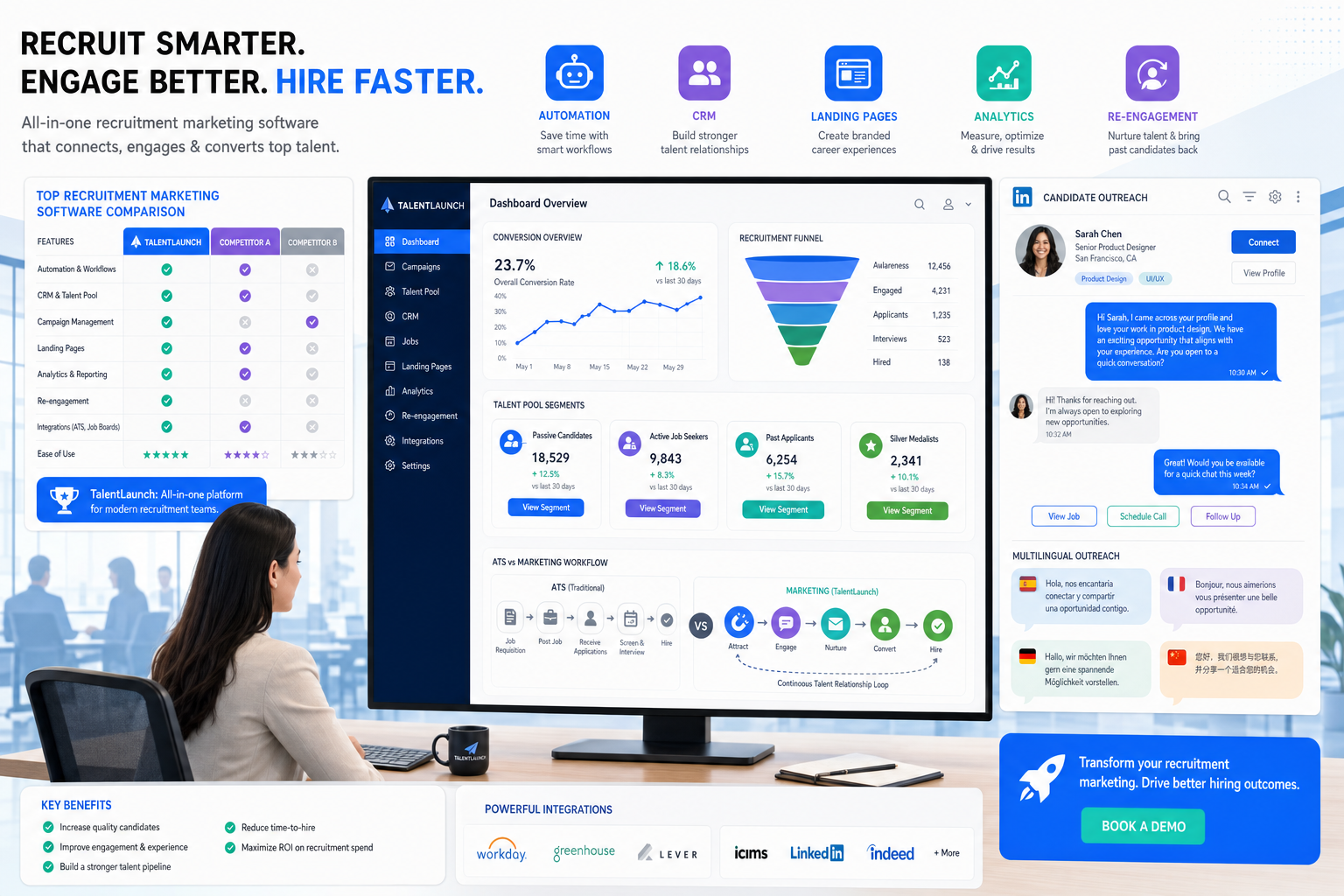
When drop-off starts before apply, headhunters can use this guide to compare recruitment marketing software and avoid generic messaging.
That early-stage gap is where many searches lose momentum. A recruiter may have decent traffic coming into a careers page, a healthy list of old applicants in the ATS, and active outreach underway, yet still struggle to build a shortlist with the right timing. For smaller search firms, that means more manual follow-up and slower placements. For solo recruiters, it means evenings spent chasing replies and rechecking old conversations. For internal talent teams, it often shows up as low apply conversion, weak re-engagement, and hiring managers who feel the market is cold when the real issue is that candidate interest was never organized well enough to mature.
That is also why I have found tools like StrategyBrain AI Recruiter useful in a narrow but important part of the workflow. When a search depends on quick outreach, multilingual follow-up, and consistent after-hours candidate responses, it can keep conversations moving without forcing the recruiter to monitor every reply in real time. In my experience, the best use case is not replacing recruiter judgment but reducing the repetitive front-end work of contact, response handling, and interest confirmation so the recruiter can focus on résumé review, fit assessment, and the next decision.
A useful way to understand this comes from how candidates and employees judge a workplace in the first place. In one discussion on company culture, the key point was that culture is not the office perks people list on a careers page; it is how work actually gets done, how values show up in behavior, and how people on different teams may describe the same employer very differently. That matters in recruiting because candidates do not engage with a brand based only on slogans. They respond to whether the message, timing, and follow-up feel consistent with the work environment being promised.
The same discussion also highlighted a familiar problem in talent acquisition: leaders often believe culture is clearly communicated, while employees do not experience it that way. In recruiting terms, that mismatch appears when a recruiter builds a landing page, sends follow-up messages, reviews past replies, and reminds a hiring manager about role positioning, only to realize the employer story is still too generic to convert interest. That is exactly where recruitment automation tools, recruitment marketing tools, and recruitment marketing platforms deserve a closer look: not as bulk messaging systems, but as the layer that helps teams define what they are really offering, segment who should hear it, and measure whether the message is landing before candidates ever apply.
- Why recruiting context matters before automation
- What recruitment marketing software is
- How it differs from an ATS
- Features that actually improve conversion
- How recruitment automation tools work in practice
- Buyer checklist for recruitment marketing platforms
- How to choose without overbuying
- Common mistakes to avoid
- FAQ
Why Recruiting Context Matters Before Automation
Experienced recruiters know that hiring breaks down long before the interview stage. The problem usually starts when the employer story is unclear, the target audience is too broad, or the team has no shared language for what kind of environment, mission, and expectations they are actually recruiting into.
That is why I do not evaluate recruitment marketing software only by send volume, job distribution reach, or dashboard polish. I want to know whether it helps a team communicate the reality of the opportunity. Can it segment by role family, geography, work style, or seniority? Can it support different messages for different talent groups? Can it surface what candidates are responding to, rather than forcing recruiters to guess?
The culture framework from the reference discussion is useful here. It broke organizational reality into elements such as mission, values, artifacts, implicit beliefs, motivations, and behaviors. That structure translates surprisingly well into recruitment marketing. Good systems help recruiting teams turn vague employer branding into practical campaign logic:
- Mission becomes the reason the role matters now
- Values become observable ways of working, not wall statements
- Artifacts become proof points on the career site, landing page, or event page
- Implicit beliefs become the tone and expectations built into recruiter messaging
- Motivations become the candidate triggers that shape nurture content
- Behaviors become conversion and engagement signals that can be measured
Without that level of structure, automation simply speeds up inconsistent messaging. With it, automation becomes useful because it delivers a more credible story to the right audience at the right time.
What Is Recruitment Marketing Software?
Recruitment marketing software is technology designed to attract, engage, segment, and nurture candidates before they formally enter the hiring workflow. In practical terms, it supports the part of recruiting that happens before application: employer branding, campaign landing pages, career site conversion, talent community capture, candidate relationship management, automated communication, and source tracking.
That distinction matters because many recruiting teams are still set up mainly to process applicants, not to build demand and trust ahead of application. Strong recruitment marketing tools help solve issues such as:
- Career site traffic that does not convert
- High reliance on paid job advertising for every opening
- No system for revisiting silver medalists or inactive talent pools
- Manual nurture that is too slow to keep interest warm
- Weak visibility into which campaigns actually produce qualified applicants
This is also why the category often overlaps with candidate CRM or talent CRM. In market terms, those labels are close cousins. Both focus on preserving recruiting memory: who engaged, what they cared about, what they responded to, and when it makes sense to re-open the conversation.
For recruiters who already have sourcing tools and an ATS, recruitment marketing software fills the missing middle. It does not replace search skill or hiring judgment. It gives structure to the period between first awareness and formal application.
Recruitment Marketing Software vs ATS
The simplest way to separate the categories is this: recruitment marketing platforms help you create and convert interest, while an ATS helps you process active applicants.
| Category | Primary Job | Typical Activities | Best Stage |
|---|---|---|---|
| Recruitment marketing software | Attract and nurture talent | Career pages, landing pages, campaigns, talent pools, automated follow-up | Before application |
| ATS | Manage applicants and workflow | Requisitions, interview stages, feedback, compliance, offer process | After application |
In day-to-day recruiting, that means a candidate may first encounter an employer through a campaign, role page, referral prompt, hiring event, or outreach sequence. They may join a talent community, open a nurture email later, reply to a message after work, or return when a better-fit role appears. Once they apply, the ATS becomes the operating system for the formal process.
If your ATS is stable but your pipelines still feel thin or inconsistent, the issue may not be applicant handling at all. It may be that your team lacks the recruitment marketing layer needed to make your message coherent and measurable before application.
Practical takeaway: A good ATS keeps the process orderly. Good recruitment marketing software makes the process worth entering.
Features That Actually Improve Conversion
When I compare recruitment marketing tools, I care less about feature count and more about whether the product helps candidates understand the opportunity, helps recruiters segment audiences sensibly, and helps leadership see what is actually working.
1. Career Sites That Explain How Work Really Happens
The reference discussion on culture emphasized that work experience is shaped by behaviors, incentives, and day-to-day realities, not surface perks. Career sites should reflect that. Strong platforms let teams build pages that show the environment candidates are entering, not just list generic benefits.
Useful capabilities include:
- Role-specific landing pages
- Location and team pages
- Employee story modules or proof-oriented content blocks
- Fast mobile forms and low-friction apply paths
- Talent community sign-up options for visitors not ready to apply
2. Segmentation and Talent CRM
If you cannot separate different talent audiences, your nurture will feel generic. Good systems let recruiters tag prospects by skill set, business unit, geography, experience level, past engagement, and likely timing. That is how you avoid sending the same message to everyone.
This matters especially for firms handling repeat hiring patterns. Whether you recruit finance, operations, support, commercial, or technical talent, the ability to revisit organized pools is often more valuable than constantly refilling the top of funnel from scratch.
3. Automated Follow-Up That Still Feels Human
Email and SMS automation are useful when they are tied to candidate intent. Welcome flows, job alerts, event reminders, and re-engagement sequences can all be effective, but only when they match what the candidate actually signed up for.
I have also seen value in pairing broader recruitment marketing platforms with targeted outreach automation. For LinkedIn-heavy search work, AI Recruiter can be useful when the challenge is not brand awareness at scale but response consistency. The practical benefit is straightforward: it can initiate outreach, keep candidate replies from stalling overnight, and collect résumé or contact details from interested prospects. The recruiter still decides whether the profile fits the brief and whether the candidate should move forward.
4. Job Distribution With Attribution
Posting jobs widely is easy. Understanding which channels produce qualified outcomes is harder. Good recruitment marketing platforms connect distribution with attribution so teams can see not just where traffic comes from, but where applications, interviews, and hires are actually generated.
5. Event and Referral Workflows
Referrals and events often bring in warmer interest than cold traffic. If those channels matter to your business, look for registration pages, reminder automation, referral capture, and follow-up sequences that keep momentum after the initial interaction.
6. Analytics That Move Beyond Vanity Metrics
Traffic and opens are not enough. Useful analytics include:
- Visitor-to-lead conversion
- Lead-to-application conversion
- Source-of-hire
- Campaign engagement by segment
- Time-to-apply
- Pipeline contribution by source and audience
The point is to learn what message is resonating with which audience, not just to prove that a campaign was active.
How Recruitment Automation Tools Work in Practice
The phrase “automation” covers very different workflows, so it helps to anchor it in real recruiting activity. In most teams, the best use of recruitment automation tools is not total replacement of human interaction. It is structured acceleration of repetitive actions that would otherwise be forgotten or delayed.
Workflow 1: Re-Engaging Talent With Better Context
Suppose a company has candidates in the CRM who previously engaged with finance leadership roles. A recruiter reopens the search, reviews the old segment, updates the campaign page with clearer expectations about pace, autonomy, and stakeholder exposure, then triggers a re-engagement flow. Candidates who were unsure the first time may respond differently when the role story is sharper and more specific.
That is where the culture reference is especially relevant. Different teams create different working realities. If marketing copy does not match those realities, even interested talent may pull back. Automation helps only after the message becomes credible.
Workflow 2: LinkedIn Outreach That Does Not Die After Hours
For direct search work, candidates often reply outside recruiter working hours. I have used StrategyBrain AI Recruiter in situations where a long response delay would otherwise cool interest. It kept communication moving, answered basic role questions, and captured contact details when a candidate wanted to continue. What I liked most was not the idea of automation itself, but the ability to preserve momentum while keeping the final fit call with the recruiter.
That is an important distinction for headhunters: automation can manage the opening exchange, but it should not pretend to replace your judgment about résumé quality, motivation, compensation nuance, or shortlist credibility.
Workflow 3: Multilingual or Cross-Border Hiring
When teams hire across time zones or language groups, reply management becomes a bottleneck fast. AI-supported messaging can reduce that friction, especially at the early-contact stage. Once interest is confirmed, a recruiter can step in with a more tailored conversation and formal qualification.
Buyer Checklist for Recruitment Marketing Platforms
If you are building a shortlist of recruitment marketing platforms, use a scorecard tied to workflow outcomes rather than vendor claims.
| Evaluation Area | What to Verify | Why It Matters |
|---|---|---|
| Career site quality | Mobile performance, branded pages, role-specific content, conversion paths | Improves visitor trust and apply rates |
| Audience segmentation | Tags, filters, talent pools, nurture logic, re-engagement controls | Prevents generic messaging |
| ATS integration | Status sync, source tracking, bidirectional data flow | Reduces manual handoffs |
| Automation depth | Email, SMS, alerts, workflows, reminders, triggered campaigns | Supports timely engagement |
| Analytics | Conversion, source-of-hire, segment performance, pipeline contribution | Shows what is actually working |
| Referral and event support | Registration pages, referral capture, event follow-up | Strengthens warm channels |
| Recruiter usability | Ease of building pages, segments, and workflows | Drives adoption |
| Cross-channel support | Career site, CRM, messaging, outreach compatibility | Creates a connected funnel |
If LinkedIn outreach is central to your model, add another line item: how well the platform coexists with tools that support first-touch conversation management. In that scenario, a recruitment marketing platform may handle landing pages, nurture, and analytics, while a targeted workflow tool such as StrategyBrain AI Recruiter handles repetitive outreach and candidate response capture.
How to Choose Without Overbuying
The best buying process starts with hiring pattern and message clarity, not feature ambition.
Start With the Actual Funnel Problem
Ask where your process breaks first:
- Do people visit but not apply?
- Do they apply but low-fit audiences dominate?
- Do passive candidates engage once and disappear?
- Do recruiters lose track of who should be revisited?
- Do hiring managers struggle to describe the environment accurately?
Those questions are more useful than broad requests for an all-in-one platform.
Audit Whether Your Employer Story Is Specific Enough
The culture reference made a strong point: leaders often think values are clear, but employees do not necessarily experience them that way. The same gap appears in recruiting. If the employer story is too polished and too vague, software cannot rescue it.
Before you buy, review whether your content explains:
- How teams actually work
- What success looks like in the role
- What kind of autonomy, pace, or collaboration the work involves
- Why someone would choose this opportunity over a similar one
Test Recruiter Workflows, Not Just Admin Controls
During evaluation, ask recruiters to perform real tasks:
- Create a role landing page
- Segment a past-candidate audience
- Launch a nurture flow
- Trace source and conversion performance
- Move interested talent into the ATS
If those tasks are clumsy, adoption will lag no matter how strong the sales demo looks.
Plan for Human Judgment to Stay in the Loop
Especially with AI-assisted workflows, decide in advance what remains human-owned. In my view, that includes final résumé assessment, motivation testing, compensation nuance, shortlist quality, and hiring-manager calibration. Automation should support those decisions, not hide them.
Common Mistakes Teams Make
Treating Messaging Like Generic Employer Branding
If campaigns describe every role in the same polished language, candidates cannot tell where they would actually thrive. Specificity beats broad slogans.
Automating Before Defining the Offer Clearly
Automation amplifies whatever is already in the system. If the role story is confused, your software will simply distribute confusion faster.
Using the ATS as a Front-End Engagement Tool
An ATS is necessary, but it is rarely enough to support segmentation, nurture, and campaign learning before application.
Ignoring Candidate Timing
Many good prospects reply after hours, revisit later, or need multiple touches before converting. If nobody owns that timing, warm intent cools off quickly.
Measuring Attention Instead of Hiring Value
Clicks, impressions, and opens can mislead. Recruiters should care more about qualified pipeline contribution and eventual hiring outcomes.
FAQ
What does recruitment marketing software do?
It helps employers attract and nurture candidates before they apply. Typical capabilities include career site management, landing pages, talent CRM, automated messaging, campaign tracking, and source analytics.
How is recruitment marketing software different from recruitment marketing tools?
The terms are often used interchangeably. In practice, “software” may describe the full category, while “recruitment marketing tools” can refer to either complete platforms or narrower point solutions within that category.
Are recruitment marketing platforms the same as an ATS?
No. Recruitment marketing platforms focus on pre-application attraction and engagement. ATS platforms focus on applicants once they enter the formal hiring process.
What should headhunters look for first?
Look for segmentation, nurture, conversion tracking, and recruiter usability. If your work depends heavily on direct outreach, also assess how the platform complements outreach automation and candidate response management.
Can AI help without replacing recruiters?
Yes. AI is often most useful for repetitive front-end tasks such as first-touch outreach, response handling, and follow-up. Recruiters should still own fit assessment, résumé review, and next-step decisions.
When does StrategyBrain AI Recruiter fit into this workflow?
It fits best when LinkedIn outreach, after-hours candidate replies, multilingual communication, or repetitive first-contact tasks are slowing recruiters down. It can support early engagement while the recruiter retains control over qualification and hiring decisions.
Conclusion
The real purpose of recruitment marketing software is not to send more messages. It is to help recruiting teams communicate the opportunity more credibly, measure what candidates are responding to, and keep promising interest from fading before application.
That is why the culture discussion matters here. Candidates evaluate employers based on how work feels, how values show up in practice, and whether different signals from the company line up. The best recruitment marketing tools and recruitment marketing platforms support that reality by helping teams define the message, segment the audience, and automate follow-up without flattening everything into generic employer branding.
If your ATS is functioning but your pipeline still feels colder than it should, the issue may be less about workflow control and more about pre-application conversion. Fix that layer well, and every stage after it gets easier.














