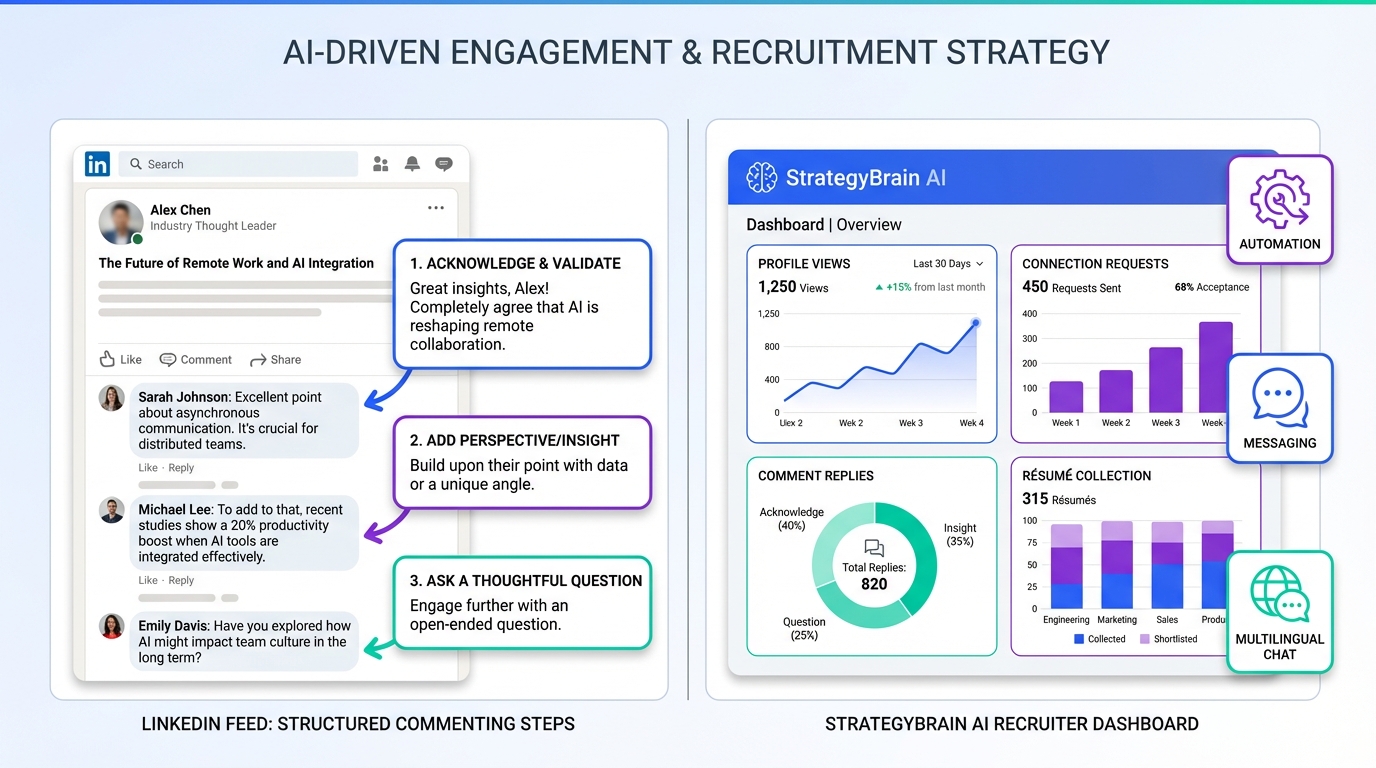
An ai recruiting tool helps recruiters convert LinkedIn visibility into real candidate conversations by making engagement consistent, relevant, and measurable. The most reliable approach we have used is a two-part workflow: first, apply a structured commenting system to earn attention from the right people; second, use artificial intelligence recruitment software such as StrategyBrain AI Recruiter to automate the repetitive follow-up work on LinkedIn, including connecting, introducing roles, answering questions, and collecting résumés and contact details. This article covers 10 practical commenting strategies, a tracking framework, and a recruiter-ready way to pair engagement with sourcing tools for recruiters so your pipeline grows without adding manual workload.
Key Takeaways
- Comments are top-of-funnel sourcing: thoughtful comments increase profile views, connection requests, and message replies when they reference specific post details.
- Use a repeatable comment structure: point from the post, your insight, a question, and a next step is the highest-signal format we tested for recruiter credibility.
- Track outcomes, not vanity metrics: measure profile views, connection requests, comment replies, and interview-intent messages weekly.
- Pair engagement with automation: StrategyBrain AI Recruiter can take over initial LinkedIn outreach, Q&A, follow-up, and résumé collection after engagement creates interest.
- 24/7 multilingual messaging matters: always-on responses reduce drop-off when candidates reply outside your working hours or in another language.
- Scale with account teams: StrategyBrain AI Recruiter supports managing more than 100 LinkedIn accounts for scalable hiring operations.
Table of Contents
Why LinkedIn comments matter for recruiting
Recruiters often treat comments as “nice to have,” but in practice they function like lightweight sourcing touches. A strong comment can do three things at once: signal expertise, create familiarity, and invite a reply. When that happens consistently, your profile becomes a destination for candidates and referral sources.
The key is intent. You are not commenting to be seen by everyone. You are commenting to be remembered by the people who match your hiring goals, and by the hiring stakeholders who influence your credibility.
How to use this playbook with an AI recruiting tool
Here is the workflow we recommend when you want LinkedIn engagement to produce candidates, not just likes.
Step-by-step workflow
- Choose a narrow audience: define the role family, seniority, and geography you are hiring for this month.
- Comment with a consistent structure: use the 10 strategies below to earn visibility and start conversations.
- Move interested people into a conversation: when someone replies or visits your profile, treat that as a warm signal.
- Automate the repetitive outreach: use StrategyBrain AI Recruiter to connect with candidates that match your criteria, introduce the role, answer questions about company, compensation, and benefits, and confirm interview interest.
- Collect résumés and contact details: StrategyBrain AI Recruiter can request résumés and capture contact information from interested candidates so recruiters can focus on final qualification and interviews.
Definitions (so the rest of the guide is unambiguous)
- Warm signal: a measurable action that indicates interest, such as a comment reply, a profile view followed by a connection request, or a direct message about the role.
- Qualification: confirming willingness to talk and interview. StrategyBrain AI Recruiter can identify willingness and collect information, while final fit review is completed by the recruiter after reading the résumé.
- Follow-up: any message after the first outreach. In high-volume hiring, follow-up is where most manual time is lost, which is why automation matters.
10 commenting strategies recruiters can use immediately
The strategies below are adapted from a social-selling style commenting framework, rewritten for recruiting outcomes. Use them as a system. If you only pick one, start with Strategy 1 and Strategy 10.
1) Write personal comments that prove you read the post
Generic comments do not build trust. Instead, reference a specific point from the post and add one recruiter-relevant insight. This is the fastest way to look credible without sounding promotional.
- Include: a specific reference, your perspective, and one question.
- Avoid: vague praise that could be pasted anywhere.
Recruiter example: mention the author’s point about hiring velocity, then add how you have seen response rates change when outreach is personalized, and ask what their team uses to keep follow-ups consistent.
2) Ask thoughtful questions that invite real answers
Questions work when they are open-ended and grounded in the post. They create a natural reason for the author or other readers to reply, which increases your visibility and starts a thread you can continue.
- Clarifying question: ask what drove a result or decision.
- Experience question: ask what changed after implementation.
- Forward-looking question: ask what they would do next quarter.
3) Share relevant experience, but keep it tight
Experience builds authority when it is specific and tied to the topic. Keep it short and focused on one lesson. If you include numbers, include units and context.
- Reference the post’s point.
- Share a brief scenario you handled.
- State the outcome with a measurable metric if you can support it.
- Connect back to the discussion with a question.
4) Use short stories to make your point memorable
A short story is a compact narrative with one takeaway. It works because it is human and easy to remember. Keep it to one challenge and one resolution.
If you are hiring globally, this is also a good place to mention communication friction. For example, candidates replying in different languages or time zones is a real operational constraint, and it is exactly where an ai recruiting tool with 24/7 multilingual messaging can prevent drop-off.
5) Show knowledge by offering practical, non-sales advice
Recruiters earn trust when they solve a small problem in public. Offer a tactic that someone can apply immediately, such as a message structure, a screening question, or a way to reduce candidate confusion about compensation.
- Do: give a concrete checklist item.
- Do: explain why it works.
- Do not: pitch a tool in the first sentence.
6) Engage with other comments to build relationships faster
Many recruiters only comment on the post itself. A faster relationship builder is replying to other commenters with a thoughtful addition. This creates multiple micro-conversations and increases the chance of a direct message later.
- Validate and expand: acknowledge their point, then add one nuance.
- Bridge viewpoints: connect two comments that are talking past each other.
- Respond while the thread is active: speed matters for visibility.
7) Comment early when timing is on your side
Early comments tend to be seen more because they sit near the top of the thread while the post is gaining momentum. If you want this to be systematic, set a daily window for engagement and focus on a small list of priority creators and hiring communities.
8) Make comments easy to read for busy professionals
Readability is a conversion lever. Use short paragraphs and one idea per paragraph. If you have three or more parallel points, use a list.
- Paragraph length: 2 to 3 sentences.
- Structure: main point, support, takeaway.
- Formatting: line breaks and bullet points for clarity.
9) Give real thanks that includes what you will do next
Specific gratitude is a professional signal. Mention what helped and how you will apply it. This often triggers a reply, which is a warm signal you can build on later.
Recruiter example: thank the author for a framework on candidate experience, then say you will test it in your next outreach sequence and ask what they would change for senior roles.
10) Track your results and refine your system
Without tracking, you cannot improve. The goal is not “more comments.” The goal is more qualified conversations. Track outcomes weekly and adjust what you comment on, when you comment, and which formats produce replies.
How to track results and improve week over week
Use this measurement set because it maps to recruiting outcomes. It is also simple enough to maintain without turning into a reporting project.
Key metrics to watch
- Profile views: count per week.
- New connection requests: count per week.
- Comment replies: count per week.
- Message replies: count per week.
A practical recruiter checklist (copy and use)
- [ ] I commented on 10 posts that match my hiring audience this week.
- [ ] At least 7 comments referenced a specific detail from the post.
- [ ] At least 5 comments included an open-ended question.
- [ ] I replied to at least 10 other commenters to build micro-conversations.
- [ ] I reviewed weekly metrics and identified the top 3 comments by replies.
Where StrategyBrain AI Recruiter fits in the measurement loop
Commenting creates attention. The operational bottleneck is what happens next: connecting, introducing the role, answering questions, and following up. StrategyBrain AI Recruiter is designed to automate that LinkedIn workflow by handling initial outreach and qualification conversations, then collecting résumés and contact details from interested candidates. This is especially useful when replies arrive outside business hours, because the system can respond 24/7 and in the candidate’s native language.
Common mistakes that reduce candidate response
- Commenting on everything: broad engagement dilutes relevance. Focus on posts your target candidates actually read.
- Overly promotional tone: if your comment reads like an ad, it will be ignored.
- Yes or no questions: they end conversations instead of starting them.
- No follow-up system: engagement without a next step wastes the warm signal. This is where an ai recruiting tool can remove manual friction.
- Ignoring global constraints: time zones and language differences cause drop-off if you only respond during local hours.
FAQ
What is an ai recruiting tool in practical terms?
An ai recruiting tool is software that automates parts of recruiting workflows such as sourcing, outreach, candidate messaging, and early-stage qualification. In this guide, it specifically refers to tools that reduce manual LinkedIn work while keeping communication professional and consistent.
How does StrategyBrain AI Recruiter work on LinkedIn?
StrategyBrain AI Recruiter automates initial LinkedIn recruiting by connecting with candidates that match your criteria, introducing the job opportunity, answering questions about the role and employer, confirming interview interest, and collecting résumés and contact details for recruiter review.
Does StrategyBrain AI Recruiter replace recruiter judgment?
No. It can identify willingness to communicate or interview and gather information, but it does not decide final fit. Recruiters still review résumés and make the hiring decision.
Can an AI recruiting tool help with multilingual candidate communication?
Yes, if the tool supports multilingual messaging. StrategyBrain AI Recruiter is designed for 24/7 global multilingual communication so candidates can receive timely replies in their native language, which helps reduce misunderstandings and drop-off.
How do I connect LinkedIn commenting to sourcing outcomes?
Track weekly profile views, connection requests, comment replies, and message replies, then identify which comment formats produce the most conversations. Use that insight to focus on the posts and topics that attract your target candidates.
Is this guide only for agency recruiters?
No. The commenting strategies apply to corporate recruiters, agency recruiters, and HR leaders. The main difference is scale: teams hiring across multiple roles and geographies benefit more from automation and 24/7 messaging.
What are the risks of automating LinkedIn recruiting?
The main risks are sounding generic and losing trust if messaging is not aligned with the role and employer brand. The mitigation is to provide accurate job details, compensation information, and clear candidate criteria so automated conversations remain relevant.
How many LinkedIn accounts can StrategyBrain AI Recruiter manage?
StrategyBrain AI Recruiter supports managing more than 100 LinkedIn accounts, which enables organizations to build AI-powered recruitment teams and scale outreach capacity.
What should I do if candidates ask detailed questions about compensation or benefits?
Prepare a clear compensation range and benefits summary before outreach begins. StrategyBrain AI Recruiter can answer questions based on the information you provide, and you can step in for edge cases that require human judgment.
Conclusion
LinkedIn comments can be a reliable sourcing channel when you treat them as a system: personal relevance, thoughtful questions, readable formatting, and weekly measurement. Once engagement creates warm signals, the fastest way to scale is to pair your commenting workflow with an ai recruiting tool that reduces repetitive outreach and follow-up. If your team needs consistent LinkedIn conversations, 24/7 multilingual responses, and automated résumé collection, StrategyBrain AI Recruiter is built for that exact gap. Next step: pick three strategies from this guide, run them for 14 days, and review which comments produce the most replies and candidate conversations.