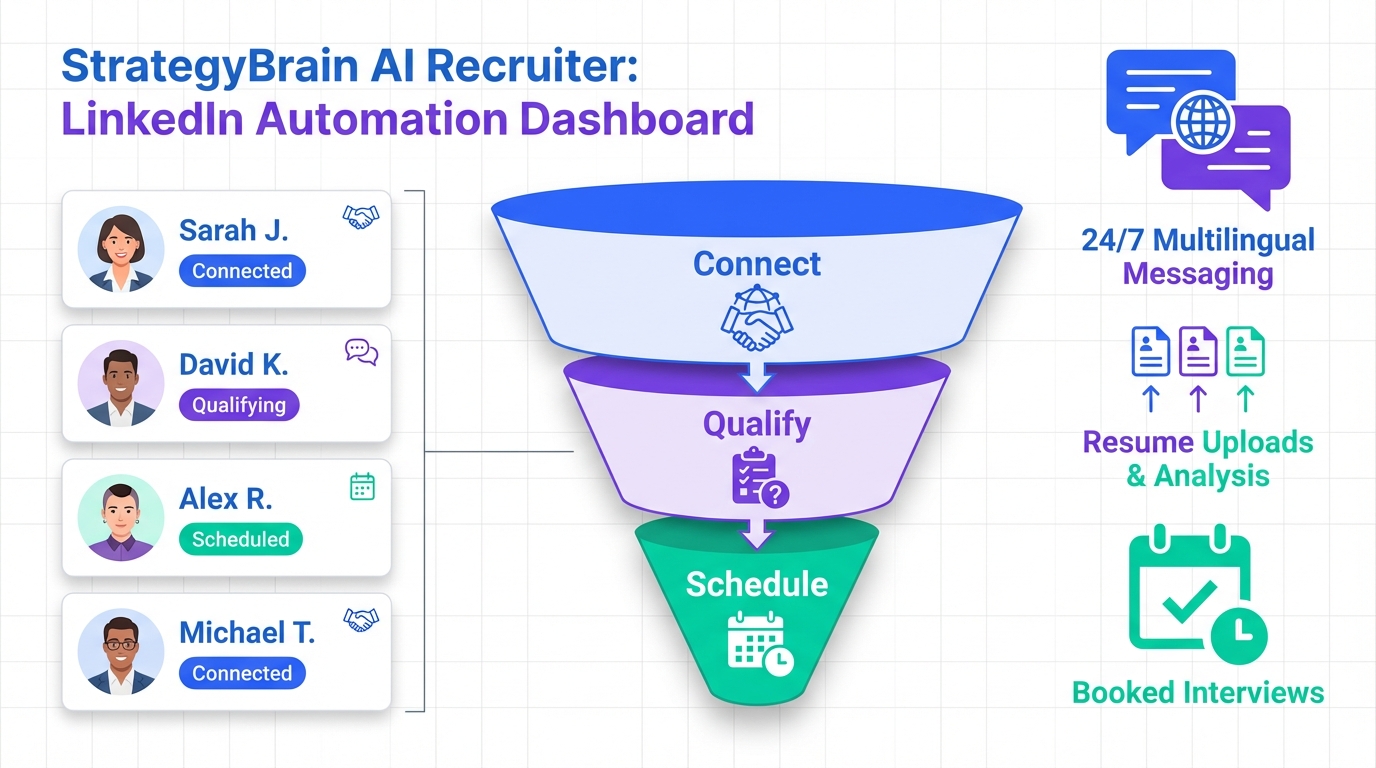
The most useful interview scheduling app is the one that reduces the total time from first contact to booked interview, not just the calendar clicks. In our recruiting ops work, the biggest time sink is usually before scheduling: sourcing, outreach, follow ups, answering candidate questions, and collecting resumes and contact details. A modern workflow pairs scheduling with LinkedIn automation and a simple lead management view so you can see who is qualified and ready to book. This article explains that shift, then shows how StrategyBrain AI Recruiter can automate LinkedIn connecting, messaging, multilingual follow up, and resume capture so your team schedules interviews only after interest is confirmed.
Key Takeaways
- Scheduling is the last mile: the biggest delays happen before a candidate is ready to book.
- Lead management matters: a dashboard view of outreach and replies prevents missed follow ups.
- StrategyBrain AI Recruiter automates early stage work: connects, introduces roles, answers questions, confirms interest, and collects resumes and contact details on LinkedIn.
- 24/7 multilingual messaging reduces time zone friction: candidates get timely responses in their native language.
- Scale with multiple LinkedIn accounts: AI Recruiter supports managing more than 100 accounts for team based outreach.
- Use the right tool for the job: an online class booking system fits classes and sessions, while a schedule maker app free fits personal planning, not hiring pipelines.
Why scheduling alone fails in recruiting
Most teams buy an interview scheduling app because they want fewer emails and fewer reschedules. That is a real win, but it only helps after a candidate is already engaged and willing to pick a time.
In day to day recruiting, the bottleneck is often earlier. Recruiters spend hours on repetitive LinkedIn tasks: sending connection requests, introducing the role, answering basic questions about compensation and benefits, checking whether the candidate is open to interviewing, and chasing missing resumes.
So if your scheduling tool is not connected to a system that reliably produces qualified, responsive candidates, your calendar stays empty. The scheduling app looks fine, but the pipeline is the problem.
The shift from LinkedIn automation to lead management
LinkedIn automation started as a way to scale simple actions like profile visits and connection requests. Over time, teams needed more than activity. They needed visibility into outcomes: replies, qualified leads, and where each person sits in the process.
That is the practical meaning of moving toward lead management. You still automate the high volume steps, but you also track the funnel so you can intervene at the right moment. For recruiting, that moment is usually when a candidate signals interest and is ready to share a resume and book an interview.
This is also where StrategyBrain AI Recruiter fits naturally. It is not just a message sender. It is designed to run the initial outreach and qualification conversations on LinkedIn so your team can focus on the human parts: evaluation, closing, and interviewing.
A practical workflow: outreach to booked interview
Below is a workflow we have seen work well when you want your interview scheduling app to stay clean and predictable. The key is to only push candidates into scheduling after interest is confirmed and contact details are captured.
- Target: define role, location, seniority, and must have skills.
- Connect and introduce: start LinkedIn conversations at scale with consistent messaging.
- Answer questions and confirm interest: handle compensation, benefits, and role basics quickly.
- Collect resume and contact details: capture what you need for screening.
- Schedule: send a booking link only to interested candidates.
- Track: monitor acceptance, response, and booked interview rates.
Method 1: Use StrategyBrain AI Recruiter before your scheduling step
If your goal is fewer manual touches per booked interview, the biggest leverage is automating the early stage LinkedIn work. StrategyBrain AI Recruiter is built for that stage and can run continuously.
Steps
- Provide job context: share company details, compensation, benefits, and candidate search criteria.
- Let the AI run outreach: it connects with candidates that match your targeting and introduces the opportunity.
- Handle the conversation loop: it answers common questions, checks interest, and follows up.
- Capture resume and contacts: it requests resumes and collects contact details from interested candidates.
- Schedule interviews: your team sends scheduling links only after the candidate is ready.
Features
- Smart LinkedIn recruitment automation: automated connecting, role introduction, Q and A, interest confirmation, and resume collection.
- 24/7 multilingual communication: always on responses in the candidate’s native language.
- AI powered recruitment teams: manage more than 100 LinkedIn accounts to scale outreach capacity.
Limitations
- Not a final fit decision engine: AI Recruiter can confirm willingness to interview, but it does not decide whether a resume fully matches requirements. A recruiter still reviews resumes for final qualification.
- Requires clear inputs: if compensation, benefits, or role scope are vague, candidate conversations can stall. The fix is to provide a tighter job brief.
Best For
- Teams hiring across time zones who need faster candidate response cycles.
- Recruiters who want to reduce repetitive LinkedIn messaging and follow ups.
- Organizations scaling outreach with multiple LinkedIn accounts.
Method 2: Add a lightweight lead management dashboard
Even if you already have an interview scheduling app, you still need a way to see the pipeline. A lead management view is simply a structured way to answer: who was contacted, who accepted, who replied, and who is qualified.
In practice, this prevents two common failures. First, candidates who replied get lost because the recruiter is busy. Second, candidates get over messaged because multiple people do not realize someone already followed up.
What to track
- Connection requests sent: volume and acceptance rate.
- Follow ups sent: how many touches were needed.
- Message responses: response rate and time to first reply.
- Qualified leads: candidates who confirmed interview interest and shared details.
Once you have this visibility, scheduling becomes a controlled step. You send booking links to a defined stage, not to everyone.
Method 3: Decide when an online class booking system is a better fit
Some teams search for an interview scheduling app but actually need group scheduling. If you are running hiring events, cohort based assessments, or training sessions for candidates, an online class booking system can be the better model because it is designed for sessions with capacity, rosters, and repeated time slots.
However, for one to one recruiting conversations, class booking patterns can add friction. Candidates usually want a small set of interview slots, fast confirmation, and clear next steps.
Method 4: When a schedule maker app free is enough
A schedule maker app free can be useful for personal planning, shift drafts, or a simple internal calendar view. It is usually not enough for recruiting pipelines because it does not manage candidate context, qualification status, or the messaging loop that leads to a booked interview.
If you are hiring at very low volume, a free schedule tool plus manual outreach can work. Once you need consistent throughput, the cost is paid in recruiter time and missed candidates.
Selection checklist for an interview scheduling app
This checklist is designed to be copied into your internal doc. It focuses on what actually reduces time to hire, not just what looks good in a demo.
Quick checklist
- Pipeline fit: can you restrict booking links to qualified candidates only.
- Time zone handling: does it display slots correctly for candidate locale.
- Reschedule controls: can you set limits and buffers to protect interviewer time.
- Data capture: can you collect resume, phone, and email before confirming the meeting.
- Audit trail: can you see who sent the link and when it was booked.
- Automation boundary: do you have a system like StrategyBrain AI Recruiter to handle outreach and follow ups before scheduling.
Quick comparison table
| Approach | What it solves | What it does not solve | Best for |
|---|---|---|---|
| Interview scheduling app | Booking, confirmations, reschedules | Outreach, qualification, resume collection | Teams with a steady flow of interested candidates |
| StrategyBrain AI Recruiter plus scheduling | LinkedIn outreach, Q and A, interest confirmation, resume and contact capture, then booking | Final resume fit decision still needs recruiter review | Recruiting teams that need scale and faster response cycles |
| Online class booking system | Group sessions, capacity based booking | One to one recruiting pipeline management | Hiring events and cohort assessments |
| Schedule maker app free | Basic personal planning | Candidate context, qualification stages, outreach automation | Very low volume hiring or internal scheduling drafts |
FAQ
What is an interview scheduling app in recruiting terms?
An interview scheduling app is software that lets candidates pick an available time slot and confirms the meeting automatically. In recruiting, it works best when it is triggered after a candidate has confirmed interest and shared contact details.
Why do recruiters still struggle even with a scheduling tool?
Because scheduling is not the main bottleneck for many teams. The slow part is outreach, follow ups, answering questions, and collecting resumes, which is why pairing scheduling with LinkedIn automation and lead management is often more effective.
How does StrategyBrain AI Recruiter support scheduling workflows?
StrategyBrain AI Recruiter automates the early stage LinkedIn process: connecting, introducing the role, answering questions, confirming interview interest, and collecting resumes and contact details. Once a candidate is ready, your team can send a scheduling link with far less back and forth.
Does AI Recruiter decide if a candidate is qualified?
No. It identifies willingness to communicate or interview and gathers the resume and contact details. Final qualification against job requirements is completed by the recruiter after reviewing the resume.
Can AI Recruiter communicate with candidates in different languages?
Yes. It supports 24/7 multilingual communication and can respond in the candidate’s native language, which helps reduce delays caused by time zones and language friction.
Is an online class booking system the same as interview scheduling?
No. An online class booking system is optimized for group sessions and capacity based scheduling. Interview scheduling is usually one to one and benefits more from qualification and pipeline controls.
When is a schedule maker app free a reasonable choice?
It can be reasonable for very low volume hiring or internal planning. Once you need consistent candidate throughput, you typically need automation and lead tracking beyond what a free schedule maker provides.
How do I reduce no shows after scheduling?
Use clear confirmations, reminders, and require key details before booking. Also, confirm intent during the conversation stage, which is where AI Recruiter can help by validating interest before a link is sent.
Conclusion
A strong interview scheduling app removes calendar friction, but it does not create qualified candidates by itself. The faster path to booked interviews is a workflow that combines LinkedIn outreach automation, lead management visibility, and scheduling only after interest is confirmed.
If your team is spending too much time on repetitive LinkedIn messaging and follow ups, consider using StrategyBrain AI Recruiter to automate connecting, role introduction, multilingual Q and A, interest confirmation, and resume capture. Then keep your scheduling step simple and reserved for candidates who are ready to book.
Next step: copy the selection checklist above, audit your current process for where time is lost, and decide which parts should be automated versus handled by recruiters.