


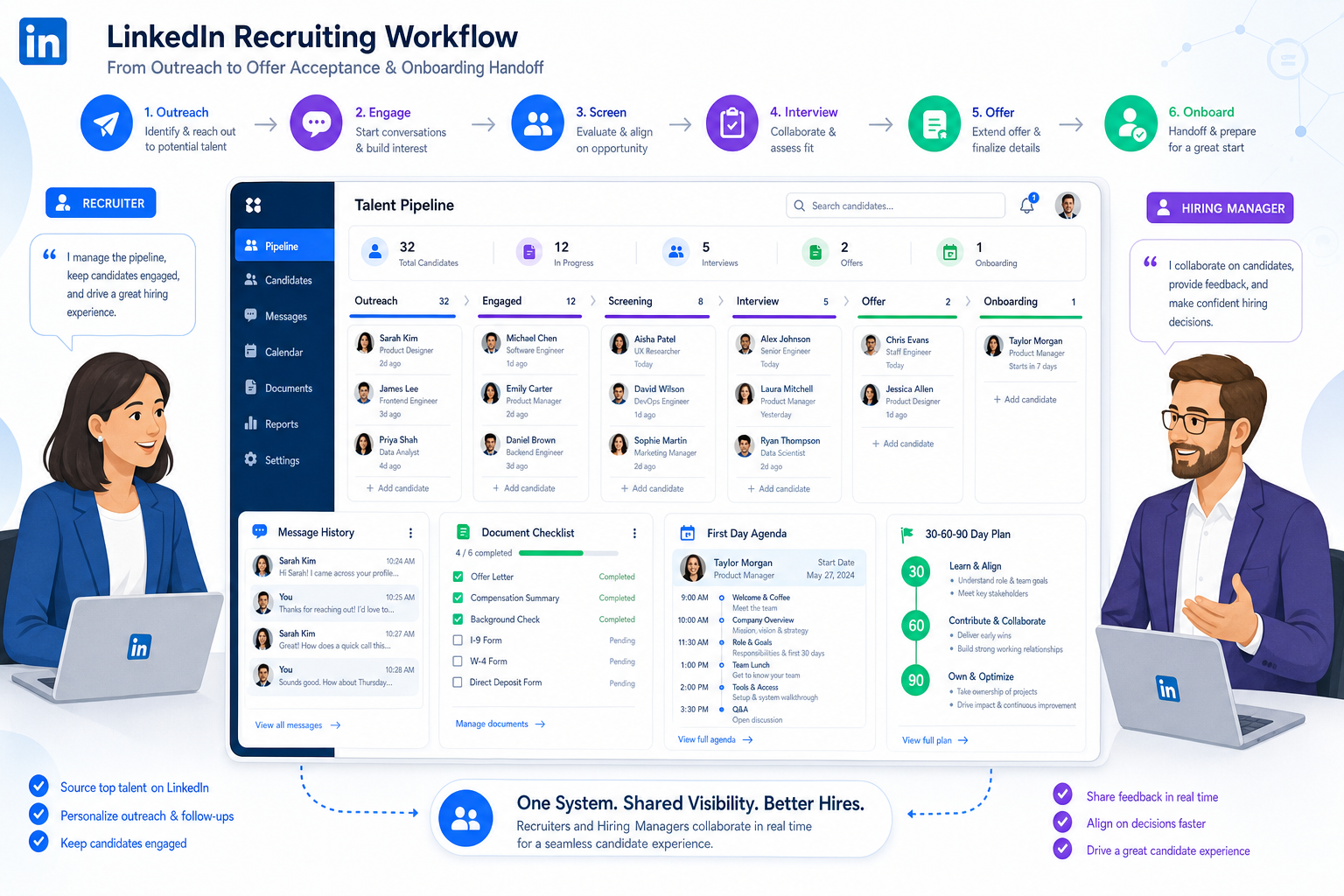
See how hiring teams can evaluate a candidate tracking tool to prevent post-offer handoff gaps, lost context, and early turnover risk.
That distinction matters more than many teams admit. A weak recruitment tracker does not just make sourcing messy; it also breaks continuity after the offer is signed. Recruiters lose visibility, hiring managers miss follow-ups, new hires start with unanswered questions, and early friction gets blamed on talent quality when the real problem is process design. For small agencies, solo recruiters, and in-house teams, those misses affect placement trust, stakeholder confidence, and repeat business.
In my own workflow, I have found that StrategyBrain AI Recruiter is most useful when the issue starts before day one: delayed replies, scattered outreach history, and missing candidate context. Its always-on candidate messaging, multilingual communication, and automated collection of resumes and contact details help keep momentum going while recruiters still make the final screening judgment, resume review, and next-step decision. When I have used AI Recruiter alongside a structured applicant workflow, it has reduced the risk of losing candidate intent between first contact and handoff.
The problem becomes visible right after a candidate accepts. In a strong onboarding process, the days before day one are not dead time. Someone needs to confirm documents, technology access, introductions, and what the first week will look like. Then the first day needs a clear agenda, a prepared workspace, and enough room for questions. By the first week, managers should already be checking in, clarifying responsibilities, and helping the new hire understand how success will be measured.
When those steps live across inboxes, spreadsheets, chat threads, and recruiter memory, the cracks show fast. A recruiter may know the candidate’s concerns, the hiring manager may know the 30-day priorities, and operations may know the setup tasks, but no one sees the full picture in one place. That is why the best recruiting software is not only a database. It must act as a dependable candidate tracking tool and recruitment tracker that preserves context across pre-boarding, day-one preparation, early check-ins, and longer-term hiring accountability.
If you are comparing the best recruiting software, start with one practical question: does it work as a reliable candidate tracking tool for your real hiring process, including the handoff into onboarding and the first 30 to 90 days? In most teams, that points back to an applicant tracking system, or ATS. A solid ATS gives recruiters one system to manage pipeline movement, store communication history, centralize applicant data, and keep stakeholder actions visible after the offer stage instead of stopping at offer acceptance.
- The best recruiting software usually has a strong applicant tracking foundation at its center.
- A good candidate tracking tool should support candidate tracking, pipeline visibility, scheduling, reporting, and collaboration before and after the offer.
- The most useful systems help teams manage pre-boarding, first-week coordination, and 30-60-90 follow-through without losing context.
- Advanced automation and AI can help, but only after the basics of stage ownership, data quality, and recruiter judgment are in place.
Table of Contents
- Why candidate tracking matters beyond the interview process
- Best recruiting software by hiring stage and team need
- Comparison table
- What features matter most in a candidate tracking tool
- How software should support pre-boarding and early onboarding
- Advantages of applicant tracking system adoption
- Pricing and fit guidance
- How to choose the right recruitment tracker
- Common buying mistakes
- FAQ
Why candidate tracking matters beyond the interview process
Most teams define candidate tracking too narrowly. They think about sourcing, screening, interviews, and offers. In practice, the real value of a candidate tracking tool shows up when the process continues cleanly after acceptance. That is where recruiting and onboarding connect.
A structured onboarding model usually follows a clear sequence: pre-boarding before day one, a manageable first day, a first week with guided learning and check-ins, then 30-day and 90-day milestones that build competence and connection. From a recruiting operations perspective, this matters because candidate expectations do not reset once the offer is signed. If information gets lost at the handoff, early confusion often follows.
That is why buyers searching for candidate tracking, ATS, or recruitment tracker are often solving a broader problem than they realize. They are not only looking for a place to move applicants through stages. They need a system that captures what the candidate was told, what the manager expects, which documents are pending, what the first-week goals are, and who owns each follow-up.
In other words, the best recruiting software supports continuity. It gives the team a record of what happened, what needs to happen next, and where risk is building if nobody acts.
Best recruiting software by hiring stage and team need
The best recruiting software is not one universal platform type. The right fit depends on hiring volume, the number of stakeholders involved, and whether your team needs help mostly before the interview, during the process, or in the handoff that follows.
Best for small teams that need simple control
Small businesses and lean agency teams usually need fast setup, visible pipelines, and enough structure to avoid losing track of candidate status changes. Here, a lightweight candidate tracking tool is often the best starting point.
- Best fit: a limited number of open roles and a small hiring team
- Priority features: candidate tracking, scheduling, notes, status visibility, simple reporting
- Watch out for: tools that require heavy setup before the process is stable
Best for high-volume hiring
High-volume teams need automation, stage consistency, filtering, and reporting that identifies bottlenecks early. This is where a mature recruitment tracker becomes essential, especially when the team also needs to coordinate pre-boarding at scale.
- Best fit: hourly hiring, seasonal recruitment, rapid-growth environments
- Priority features: bulk workflows, stage automation, scheduling, dashboards, integrations
- Watch out for: systems that collect applicants but do not help recruiters prioritize action
Best for collaborative hiring teams
Some teams have enough inbound interest but struggle with handoffs. Interviewers submit feedback late, managers do not see onboarding tasks, and recruiters keep carrying context manually. In those cases, the best recruiting software is the one that strengthens ownership across the full process.
- Best fit: organizations with multiple interviewers, coordinators, and approval steps
- Priority features: shared notes, scorecards, permissions, reminders, task ownership
- Watch out for: platforms where stakeholder activity still happens outside the system
Best for process-driven talent teams
If your team cares about consistency, auditability, and long-term reporting, choose a candidate tracking tool that supports repeatable workflows from intake to early employment milestones. This is especially useful when leadership wants a clearer view of where new-hire friction actually begins.
- Best fit: recruiting operations teams and employers formalizing process governance
- Priority features: custom stages, audit trails, reporting, integrations, structured handoffs
- Watch out for: tools that feel flexible but produce poor reporting discipline
Best for outreach-heavy recruiting teams
When the challenge starts with candidate communication, especially on LinkedIn or across time zones, software that supports consistent messaging can complement your main ATS. In that scenario, I have seen value in pairing a primary recruitment tracker with StrategyBrain AI Recruiter for repetitive outreach, after-hours replies, and multilingual communication. It helps maintain responsiveness while the recruiter keeps control of qualification and shortlist decisions.
- Best fit: agency recruiters, in-house sourcing teams, internationally distributed hiring
- Priority features: outreach continuity, message follow-up, contact capture, resume collection
- Watch out for: treating automation as a substitute for recruiter evaluation
Comparison table
| Use Case | What the Team Usually Needs | Core Requirement | Best Added Support |
|---|---|---|---|
| Small team | Simple workflow and easy adoption | Candidate tracking, notes, scheduling | Basic automation |
| High-volume hiring | Speed and consistency across many applicants | Pipeline management, bulk actions, reporting | Screening support and analytics |
| Collaborative hiring | Clearer ownership and faster handoffs | Shared feedback, permissions, reminders | Structured scorecards |
| Operations-focused team | Process control and auditability | Centralized applicant data, integrations, custom stages | Compliance-oriented workflows |
| Outreach-heavy recruiting | Fast and consistent candidate communication | Reliable workflow tracking in the ATS | AI-supported messaging and contact capture |
Use the table as a filter, not a verdict. A platform can look strong in a demo and still fail if it breaks down during recruiter-to-manager handoff or during the first 30 days after acceptance.
What features matter most in a candidate tracking tool
When I evaluate software with hiring teams, I separate core workflow features from optimization features. That keeps the decision grounded in actual recruiting work.
Core features every team should evaluate
- Candidate tracking: Can the team see where each person stands right now?
- Pipeline management: Can recruiters move applicants through stages without side systems?
- Centralized applicant data: Are resumes, communication history, notes, and next steps easy to find?
- Interview coordination: Does scheduling happen with less manual back-and-forth?
- Collaboration tools: Can hiring managers and interviewers act inside the system?
- Reporting: Can you identify stalled stages and response delays?
- Task ownership: Can the system show who owns follow-up before and after the offer?
- Integrations: Does it fit your real workflow instead of forcing duplicate work?
If those basics are weak, the software will not solve the bigger problem. It may even hide it for a few months before the process becomes harder to trust.
Advanced capabilities that may matter later
- AI-assisted screening: useful when volume is high and the review process is already disciplined
- Candidate recommendations: helpful when recruiters manage large pools
- Automation layers: valuable for reminders, stage triggers, and repetitive follow-up
- Anti-bias scorecards: useful when teams want more consistent interviewer input
- Deeper analytics: important when leadership expects forecasting and process accountability
These can be meaningful additions, but they should sit on top of clean candidate tracking, not replace it.
How software should support pre-boarding and early onboarding
The reference point many teams miss is that recruiting software should support the transition into employment, not simply stop at signed offer. The strongest processes usually follow a sequence that looks familiar: pre-boarding preparation, a manageable first day, a first week with guided learning, then structured 30-day and 90-day check-ins.
Pre-boarding
Before day one, the system should help teams confirm documents, introductions, access needs, and first-week expectations. A recruitment tracker that cannot store these handoff notes forces recruiters and managers back into email threads.
First day
The first day should feel organized, not improvised. Technology setup, contact names, role expectations, and schedule details should be easy to reference. If the candidate tracking record ends at offer acceptance, that clarity often disappears.
First week
Week one is where managers begin regular check-ins, small wins matter, and role expectations become concrete. That makes visibility critical. Recruiters do not need to own the whole onboarding process, but they do need confidence that the handoff was complete.
First 30 to 90 days
By 30 and 90 days, the organization should know whether the new hire is gaining competence, forming the right internal relationships, and receiving enough feedback. Software that supports this continuity gives recruiting teams better insight into whether early turnover reflects a hiring mistake or an onboarding gap.
Practical takeaway: when you test a candidate tracking tool, do not stop at the offer stage. Ask the vendor to show how the system handles pre-boarding tasks, first-week notes, and 30-60-90 accountability.
Advantages of applicant tracking system adoption
The main advantages of applicant tracking system adoption are operational. A good ATS becomes the system of record that keeps hiring stages, communication history, and ownership visible across the process.
From a practical recruiting standpoint, the most important applicant tracking system benefits usually include:
- Clearer pipeline visibility: recruiters can spot stalled applicants and overloaded stages sooner
- Better team coordination: recruiters, hiring managers, and coordinators work from one shared record
- Stronger handoffs: context from sourcing and interviewing does not disappear at offer stage
- More consistent follow-through: reminders, tasks, and check-ins are easier to standardize
- Better reporting: leaders can see whether issues begin in recruiting, handoff, or onboarding
- Improved candidate experience: fewer dropped details usually means fewer avoidable delays
One lesson I keep coming back to is that software supports discipline but does not replace it. If your stages are vague, manager ownership is inconsistent, or onboarding expectations are undocumented, even the best recruiting software will feel incomplete.
Pricing and fit guidance
Cost matters, but fit matters more. A cheap candidate tracking tool becomes expensive if your team outgrows it after a hiring surge. A more advanced system becomes wasteful if only one person uses half the features.
For small teams
Focus on ease of adoption, workflow clarity, and whether the system removes immediate administrative drag. Small teams benefit most from software they can actually use every day.
For growing teams
Prioritize reporting, collaboration, and stage flexibility. At this level, candidate tracking needs to support manager accountability and more structured handoffs.
For high-volume or distributed teams
Evaluate automation depth, scalability, permissions, and whether candidate communication remains consistent across time zones and channels. If your sourcing work relies heavily on LinkedIn, an outreach layer such as StrategyBrain AI Recruiter may complement your main ATS by handling repetitive first-touch communication while recruiters focus on qualification.
A better buying question is not just, “What does it cost?” It is, “Which broken process will this system replace, simplify, or finally make visible?”
How to choose the right recruitment tracker
If you want a practical evaluation sequence, use this:
- Define your hiring model. Occasional hiring, continuous recruiting, and high-volume talent acquisition need different levels of structure.
- Map your process beyond the offer. Include pre-boarding, first-week coordination, and early manager check-ins.
- List your non-negotiables. Usually candidate tracking, scheduling, reporting, shared notes, and clear ownership.
- Separate essentials from extras. Do not let AI features distract from workflow basics.
- Test one real role end to end. Walk through sourcing, screening, interviews, handoff, and first-week tracking.
- Review integration fit. Make sure the system supports the tools your team already depends on.
- Inspect reporting outputs. The tool should answer simple operational questions without manual patchwork.
That sequence usually produces better decisions than feature-led demos alone because it reflects how hiring work actually unfolds.
Common mistakes teams make when buying recruiting software
- Stopping the evaluation at the offer stage: if the system loses context during onboarding handoff, it is not solving the full workflow
- Buying for features instead of process: software cannot fix undefined ownership on its own
- Ignoring hiring manager adoption: recruiter-only success rarely holds up in collaborative hiring
- Overvaluing automation before data quality is solid: weak inputs make advanced outputs less useful
- Skipping reporting review: many teams find out too late that their recruitment tracker cannot answer simple funnel or handoff questions
Avoiding these mistakes is one of the fastest ways to capture the real benefits of structured candidate tracking without overcomplicating your stack.
FAQ
What is a candidate tracking tool?
A candidate tracking tool is software that helps recruiters organize applicants, move them through hiring stages, store notes and feedback, and maintain visibility across the recruiting pipeline. In most buying situations, it overlaps heavily with an applicant tracking system.
How is a recruitment tracker different from general recruiting software?
A recruitment tracker focuses on workflow visibility and status management. General recruiting software may also include sourcing, scheduling, automation, reporting, and integrations. In practice, the best recruiting software usually includes a strong tracking foundation.
Why should recruiting software support onboarding handoff?
Because candidate expectations and hiring accountability do not end at the signed offer. If pre-boarding tasks, first-day preparation, and early check-ins are not visible, important context gets lost and early turnover risk can rise.
What features are essential in a candidate tracking tool?
Essential features include candidate tracking, pipeline management, centralized applicant data, interview coordination, reporting, collaboration tools, and integrations that fit your actual hiring workflow.
Is an ATS worth it for a small team?
Usually yes. Even small teams benefit from structure, better visibility, and fewer manual follow-ups. The key is choosing a system that is simple enough to adopt quickly and solid enough to support growth.
Where can AI-supported outreach help?
It can help when recruiters need faster response handling, multilingual communication, or better continuity in first-touch outreach. Tools like AI Recruiter can support those repetitive tasks, while recruiters still handle final evaluation and shortlist decisions.
Final thoughts
The best recruiting software is the one that gives your team a dependable system for candidate tracking, communication, and accountability across the full hiring journey. For most organizations, that means choosing software that handles the basics exceptionally well and does not lose context once the offer is accepted.
If you are comparing platforms, use a simple standard: can this system help your team centralize applicant data, manage the recruiting pipeline, support pre-boarding handoff, and keep the first 30 to 90 days visible enough to learn from? If yes, you are likely looking at a candidate tracking tool that supports not only hiring efficiency, but also better long-term recruiting outcomes.














