


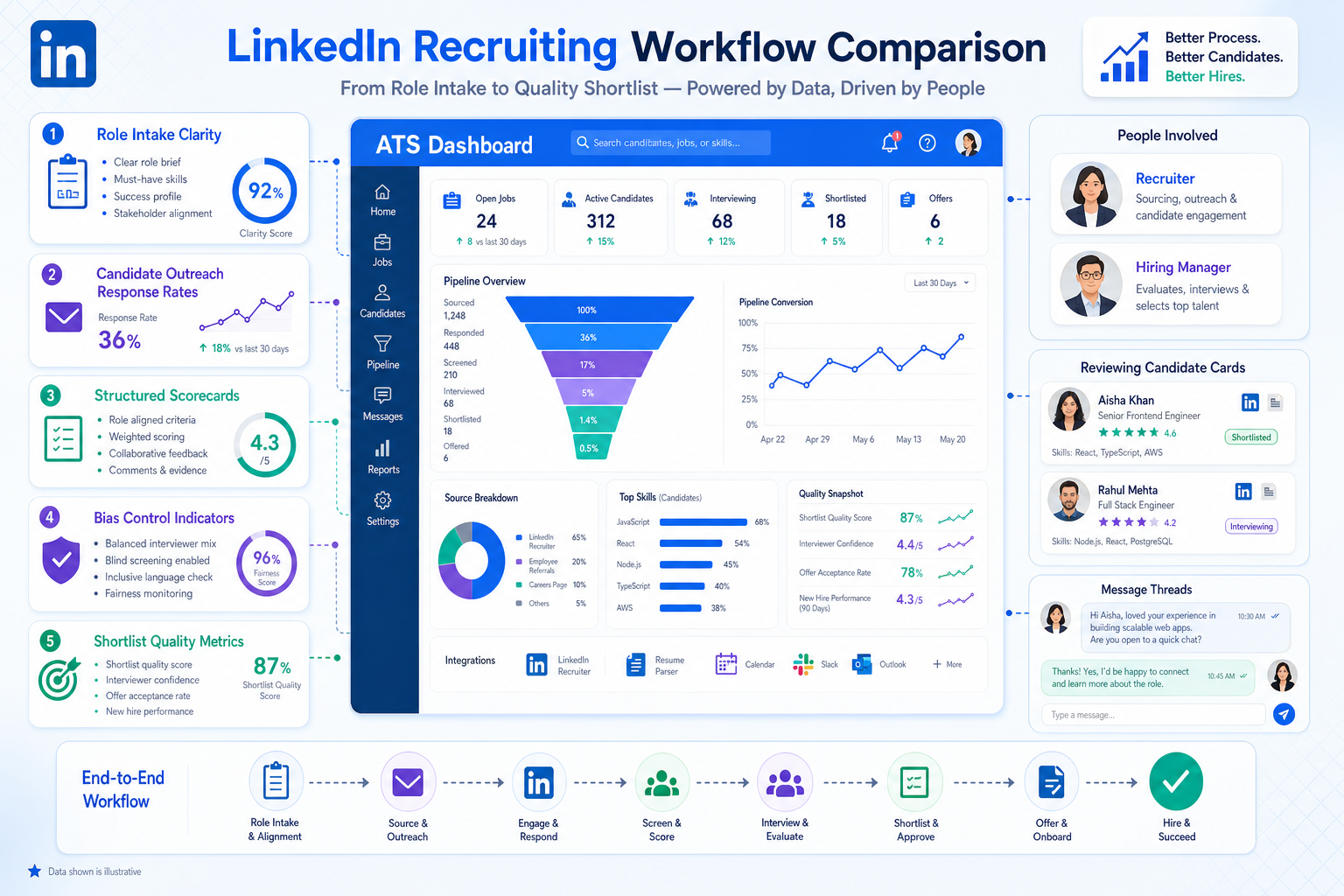
Avoiding weak shortlists and costly rework starts with this article’s framework for judging ats systems for recruiting by role clarity, response data, and bias control.
When those basics are missing, the damage shows up quickly. Small search firms lose hours chasing unclear briefs and late feedback, solo recruiters burn evenings replying to passive candidates across time zones, and in-house talent teams end up moving fast on the wrong profile. The result is not just slower hiring. It is weaker shortlists, frustrated hiring managers, candidate drop-off, and expensive rework after the search has already started.
That is where AI-supported workflow can help without replacing recruiter judgment. In my own sourcing-heavy work, StrategyBrain AI Recruiter has been most useful when a role needs steady LinkedIn outreach, after-hours follow-up, and multilingual candidate conversations that would otherwise sit unanswered. It can introduce the opportunity, keep conversations moving, and collect resumes or contact details, while the recruiter still owns final qualification, resume review, and the decision on who advances.
The pressure becomes obvious in executive and leadership hiring, where the search is never just about filling a seat. Before outreach even begins, someone has to define what success looks like at six and twelve months, clarify reporting lines, and make sure the authority of the role actually matches the expectations attached to it. Then the team starts another chain of work: checking source channels, watching response rates from outbound messages, and making sure interviewers do not default to the most familiar profile just because the shortlist is busy.
If those actions live in email threads, spreadsheets, and scattered notes, the recruiter is forced to manage strategy and admin at the same time. That is why the search for the best recruiting software usually starts with ats systems for recruiting. The right platform is not just a place to store applicants. It is where role design, sourcing evidence, structured evaluation, candidate communication, and hiring accountability stay connected—especially when comparing modern ats systems and today’s top rated applicant tracking systems.
- Why the best ATS choice starts before software demos
- What ATS systems for recruiting actually do
- Quick comparison of best recruiting software categories
- Five decision criteria that matter in real recruiting
- Best recruiting software by team type and use case
- Features that matter most in ATS systems
- How ATS systems affect candidate experience
- Integrations and recruiting stack compatibility
- How to choose the right ATS systems for recruiting
- Common buying mistakes
- FAQ
Why the best ATS choice starts before software demos
One lesson experienced recruiters learn the hard way is that software does not fix a fuzzy search strategy. The strongest hiring systems support good recruiting discipline; they do not create it from scratch. In leadership hiring especially, the process works better when five fundamentals are handled early: role clarity, practical metrics, bias control, job evaluation, and candidate reach.
That framing matters because buyers often compare tools by screenshots and feature counts, when the real question is whether the system supports smarter decisions. Can it hold the role context that recruiters and hiring managers need? Can it show source quality instead of vanity volume? Can it create more structured interview feedback? Can it support outreach to passive talent without losing control of candidate experience? Those are operational questions, not marketing questions.
Over the years, I have found that teams make better software decisions when they walk into demos with a workflow in mind: define the role, launch sourcing, track response quality, reduce subjective evaluation, and keep communication organized. If a platform cannot support that chain cleanly, it is rarely the best recruiting software for long.
Practical takeaway: The best ATS decision usually follows a strong hiring process design—not the other way around.
What ATS systems for recruiting actually do
An applicant tracking system is the operating layer of hiring. It helps teams publish jobs, collect applications, parse resumes, assign workflows, coordinate interviews, centralize feedback, and maintain a searchable candidate record. That is why most conversations about the best recruiting software begin with ats systems for recruiting rather than standalone point tools.
For recruiters, the practical value is visibility. Instead of asking who reviewed a candidate, what changed in the brief, or whether the latest outreach response was captured, the team works from one workflow. For hiring managers, that means better accountability. For recruiting leaders, it means cleaner data and less dependence on side spreadsheets.
The main benefits usually show up in four areas:
- Process control: standardized stages, permissions, approvals, and disposition tracking
- Speed: less manual admin, faster resume review, and cleaner interview coordination
- Collaboration: shared notes, scorecards, candidate history, and hiring manager visibility
- Reporting: source performance, stage movement, recruiter workload, and compliance records
When teams compare ats systems, they are choosing more than a database. They are choosing how recruiting work flows from intake to shortlist to offer.
Quick comparison of best recruiting software categories
The phrase best recruiting software means different things depending on hiring environment. A lean agency may value search speed and outreach support. A mid-sized internal team may care more about approvals and reporting. An enterprise may prioritize governance, integrations, and process control. Use the table below as a practical framework when comparing top rated applicant tracking systems.
| Best for | Typical use case | Standout features | Integration priorities | Buying strengths | Common limits |
|---|---|---|---|---|---|
| Startups and small teams | Low to moderate hiring volume with lean operations | Job posting, resume parsing, templates, interview scheduling, simple automation | Email, calendar, job boards, video interviews | Fast setup and easier adoption | May be outgrown on reporting and permissions |
| Mid-market internal recruiting teams | Growing multi-role hiring across departments | Approvals, analytics, talent pools, structured collaboration, automation | HRIS, onboarding, background checks, assessments | Balanced usability and process depth | Needs more rollout planning |
| Enterprise organizations | High-volume, regulated, or multi-location hiring | Advanced reporting, compliance controls, role permissions, workflow complexity | SSO, payroll, HR systems, identity tools, data platforms | Strong governance and scale support | Longer implementation and heavier administration |
| Staffing and search firms | Relationship-led recruiting with active sourcing | Pipeline flexibility, searchability, outreach tracking, submission workflow | CRM, email, sourcing extensions, communication tools | Supports recruiter-driven execution | May require adjacent systems for back-office work |
| All-in-one HR suite buyers | Teams wanting recruiting linked to HR operations | ATS plus onboarding, employee records, document workflows | Native HR and payroll connections | Cleaner handoff after hire | Recruiting depth may be lighter |
This matters because the value of software depends on what is currently failing in your process. If the problem is role ambiguity, the system needs stronger intake structure. If the issue is low outbound response, source and communication tracking matter more. If the issue is subjective evaluation, structured scorecards and interviewer discipline become central.
Five decision criteria that matter in real recruiting
The executive recruitment reference point is useful here because it highlights five areas that separate a smooth hiring process from a messy one. These same areas are often what expose whether an ATS is helping or hiding problems.
1. Role design and hiring context
A recruiting system should support more than a job title and requisition number. It should let teams document short-term goals, long-term expectations, reporting lines, and stakeholder ownership clearly. In executive search and specialist hiring, poor job design creates confusion long before candidate quality becomes the issue.
Ask whether the platform makes intake details easy to capture and revisit. If the brief changes every week and that history is buried in email, recruiters lose time and credibility.
2. Metrics that improve judgment
Not every recruiting metric is useful. Application volume can look impressive while producing little value. Better indicators include time in stage, source of hire, outreach response rates, interview completion rates, and quality signals tied to eventual success. In outbound-heavy recruiting, response data often tells you more than raw inbound volume.
Ask whether the system helps you understand what is working, not just what is happening.
3. Structured evaluation and bias control
Affinity bias appears when teams overvalue familiarity. In practice, this usually shows up when interviews are loosely run, scorecards are optional, or feedback arrives late and vague. The best recruiting software makes it easier to standardize evaluation with interview kits, rubrics, and visible decision trails.
Ask whether the tool supports culture-add thinking and disciplined interviewer input instead of gut-only decision making.
4. Job evaluation and expectation alignment
Fair hiring decisions depend on understanding the role’s real scope. If compensation expectations, authority, and success metrics are misaligned, the search becomes harder and the eventual hire is more likely to struggle. This is especially relevant in leadership recruiting, but the principle applies broadly.
Ask whether your ATS can store the business case behind a role and keep that context visible through the process.
5. Access to passive talent
Many strong candidates will never apply through the career page. They need to be sourced, contacted, and engaged over time. That makes outreach workflow and candidate communication part of the ATS conversation, even when those activities happen partly outside the system.
In practice, I have used AI Recruiter alongside ATS workflows when a search depends heavily on LinkedIn engagement. What I appreciate is not the promise of full automation, but the ability to keep candidate conversations active after hours, collect resumes from interested people, and maintain momentum across languages and time zones. The recruiter still has to read the profile, assess the resume, and decide whether the person really belongs on the shortlist.
Best recruiting software by team type and use case
For startups and small businesses
Small teams usually need software that removes admin without forcing a complicated operating model. The best option often includes easy job posting, resume intake, interview scheduling, and a clean pipeline view. If one recruiter and a handful of hiring managers are carrying the process, usability matters more than feature volume.
Choose ats systems for recruiting that managers will actually use. If feedback forms are buried or approvals are clumsy, the recruiter ends up carrying the process manually anyway.
For growing mid-sized teams
As hiring spreads across departments, lightweight tools start to strain. Mid-sized organizations often need stronger approval routing, reporting, recruiter capacity visibility, and onboarding or HR integration. This is where many teams move into more structured ats systems.
Look beyond surface ease-of-use and ask whether the system can support a larger hiring plan without redesigning everything in six months.
For enterprise organizations
Enterprise buyers usually assess recruiting software through the lens of scale, security, and consistency. They may need location-specific workflows, permission controls, compliance records, and multiple integration layers. In that environment, AI features are only valuable if they fit the governance model and can be explained to internal stakeholders.
Bring recruiting operations, IT, HR systems, and legal teams into the evaluation early. Enterprise ATS decisions often fail because the tool looked elegant in a demo but did not match security, reporting, or approval realities.
For staffing firms and search agencies
Agency recruiters usually care about pipeline flexibility, fast search, candidate relationship history, and submission management. Internal HR logic is not enough. Recruiters need to move quickly between sourcing, screening, presenting, and follow-up without losing the record of what happened.
This is also where LinkedIn workflow matters more. For sourcing-heavy desks, I have found that pairing a core ATS with AI Recruiter support on LinkedIn outreach can help keep top-of-funnel conversations moving while the human recruiter focuses on calibration calls, shortlist quality, and client judgment.
For teams wanting one HR ecosystem
Some buyers want recruiting tied directly to onboarding, employee records, and payroll. In that case, broad HR suites can be attractive because they reduce system sprawl and improve post-hire handoff.
Still, verify that the recruiting module is strong enough for your actual process. High-volume recruiting, structured interviewing, or sourcing-heavy work may still require deeper recruiting functionality.
Features that matter most in ATS systems
When buyers compare top rated applicant tracking systems, the real differences appear in day-to-day recruiter work. The points below are where software either saves time or quietly creates friction.
Application rules and workflow automation
Good automation moves work forward: candidate routing, reminders, stage updates, approval prompts, and follow-up notices. Bad automation simply adds another layer of clicks. Ask whether recruiters can adapt workflows without needing technical support for every change.
Resume parsing and candidate organization
Parsing quality affects searchability and speed to shortlist. If resumes enter the system inconsistently, recruiters waste time cleaning records and lose confidence in the database. Ask how easy it is to search skills, notes, prior touchpoints, and prior applications.
Interview coordination and hiring manager collaboration
Scheduling and feedback friction can derail an otherwise strong process. Shared scorecards, interview kits, and visible pending actions help teams move faster and reduce vague decision making. This is especially important when you are trying to limit similarity bias and keep evaluation disciplined.
AI-assisted recruiting features
AI is now part of most ATS conversations. What matters is whether it helps recruiters prioritize work, improve matching, support communication, or clean up workflow. The important line is between assistance and blind automation. Recruiters still need control over the final decision.
For outreach-heavy recruiting, I have had the best results using AI where candidate communication is repetitive but still time-sensitive. A tool like StrategyBrain AI Recruiter can handle first-touch introductions, candidate replies, and resume collection on LinkedIn, but it should not be treated as the final evaluator. The recruiter still needs to decide whether the candidate fits the role, the team, and the level of responsibility.
Compliance reporting and operational visibility
Reporting is where promising software often proves itself or disappoints. You need useful views of source quality, time in stage, recruiter activity, and auditability around decisions. If reporting requires constant exports and cleanup, the process is not really under control.
How ATS systems affect candidate experience
One common buying mistake is treating ATS selection as an internal workflow project only. In reality, ats systems for recruiting shape the candidate experience from the first click or the first outbound message. Application length, mobile usability, scheduling flow, updates, and communication quality all affect whether strong talent stays engaged.
This is particularly important when recruiting passive candidates. If outbound sourcing succeeds but the handoff into the application or interview flow is clumsy, the process loses credibility. Candidates at senior levels often judge the employer by how coherent the process feels, not by how polished the employer brand sounds.
When evaluating ats systems, test the process like a candidate:
- How long does the application take?
- Does mobile apply work cleanly?
- Are status updates timely and meaningful?
- Do interview instructions stay centralized?
- Does the process feel trustworthy and professional?
Integrations and recruiting stack compatibility
Most recruiting teams do not operate in a single tool. That is why integration planning is central to choosing the best recruiting software. Buyers increasingly expect ATS connections with HR systems, onboarding, assessments, background screening, calendars, and communication tools.
In real workflows, integration quality determines whether your team duplicates work. If recruiters have to re-enter data, manually track outreach replies, or switch across multiple tabs just to understand candidate status, efficiency gains disappear quickly.
Review integrations through three practical lenses:
- Workflow continuity: does data move cleanly from application to hire?
- User experience: do recruiters and managers stay in flow?
- Future stack fit: will the ATS still work if your sourcing or HR setup changes later?
For sourcing-heavy teams, also ask how the ATS will coexist with LinkedIn-based outreach. In my experience, that is where a complementary tool such as StrategyBrain AI Recruiter can be useful: it keeps first-touch and follow-up conversations moving externally while the ATS remains the system of record for structured evaluation and hiring progress.
How to choose the right ATS systems for recruiting
If you are comparing top rated applicant tracking systems, a structured buying process works far better than generic best-of lists.
1. Define your hiring environment
Start with hiring volume, role complexity, stakeholder count, and whether your process is mostly inbound, outbound, or mixed.
2. Clarify the role-design problem first
Before looking at demos, identify whether your biggest issue is intake quality, sourcing, interview discipline, candidate communication, or reporting. This keeps the evaluation tied to reality.
3. Separate useful metrics from vanity metrics
Know which numbers actually matter for your team: source quality, response rate, stage conversion, and time in stage usually matter more than raw application count.
4. Test structured decision making
Have vendors show how hiring managers submit scorecards, how bias controls work in practice, and how interview feedback stays visible and comparable.
5. Run realistic demos
Ask to see your actual workflow, not a polished tour. That means intake, sourcing handoff, candidate review, interview coordination, offer movement, and reporting.
6. Review total operating effort
Do not focus only on subscription cost. Consider implementation, training, admin ownership, process redesign, and integration overhead. Hidden cost often appears in recruiter time rather than invoices.
Buying tip: The best recruiting software is the one your team can adopt consistently while preserving recruiter judgment and improving hiring discipline.
Common buying mistakes
Even experienced teams make avoidable mistakes when reviewing ats systems for recruiting.
- Buying from a generic leaderboard: category popularity does not equal workflow fit.
- Ignoring role intake quality: software cannot rescue a poorly defined search.
- Tracking vanity metrics: more applicants do not automatically mean better hiring.
- Underestimating bias controls: unstructured feedback often rewards familiarity over fit.
- Overvaluing AI claims: useful AI should support recruiter work, not obscure it.
- Neglecting candidate communication: weak follow-up hurts both conversion and reputation.
- Skipping integration planning: disconnected tools create the manual work you hoped to remove.
The strongest ATS decisions come from matching the system to the way your team actually hires, not to the way software categories describe themselves.
FAQ
What is an ATS in recruiting?
An ATS, or applicant tracking system, is software that helps teams post jobs, collect applications, track candidates through hiring stages, coordinate interviews, and keep recruiting data in one place.
How do ATS systems work?
ATS systems organize candidate records, route applicants through defined stages, support team collaboration, and provide reporting across the hiring pipeline. Many now include automation, integrations, and AI-assisted features.
Which ATS is best for small businesses?
The best option for small businesses is usually one that is simple to adopt, easy for hiring managers to use, and strong in core tasks such as job posting, resume review, scheduling, and communication.
What features matter most in top rated applicant tracking systems?
Important features usually include job distribution, resume parsing, workflow automation, interview scheduling, collaboration tools, reporting, candidate communication, and integrations. For many teams, structured evaluation and outbound workflow support also matter.
Are ATS systems only for large companies?
No. Small teams, agencies, and enterprise employers all benefit from a structured recruiting system. The difference is how much complexity and control each team needs.
How does LinkedIn outreach fit with ATS software?
LinkedIn outreach often sits upstream of the ATS, especially for passive candidate sourcing. In those cases, recruiters may use a sourcing or messaging workflow to start conversations and then move qualified candidates into the ATS for structured evaluation and hiring-stage management.
Can AI replace recruiter judgment?
No. AI can help with repetitive communication, workflow support, and prioritization, but recruiters still need to make the final call on candidate quality, fit, and next steps.
Conclusion
The search for the best recruiting software gets easier when you stop treating it as a feature race and start treating it as a hiring process decision. The strongest ats systems for recruiting support clear role design, useful metrics, structured evaluation, better candidate communication, and cleaner collaboration across the whole search.
That is also why many teams evaluating ats systems end up looking beyond the core database and into sourcing workflow, outreach responsiveness, and recruiter control. If you use that lens while comparing top rated applicant tracking systems, you are much more likely to choose software that helps your team hire smarter, not just track faster.














